

Set data synchronization
Overview
BOS provides a data synchronization feature that lets you set up automatic synchronization between two buckets in different regions. Once you configure the source and target buckets, BOS will handle synchronization automatically. You can also define the specific range of data to be synchronized from the source bucket and decide whether to include historical data in the sync.
The data synchronization feature addresses requirements such as cross-region, cross-account, or other forms of bucket data replication. Objects in the target bucket are exact replicas of the objects from the source bucket, maintaining consistent properties such as object name, metadata, content, creation time, owner, user-defined metadata, object ACL, and content.
Application scenarios
You may configure data synchronization for a bucket for various reasons, including:
- Efficient Access & Latency Reduction: When accessing a bucket or object across regions, the access speed may decrease due to geographical differences. The data synchronization function allows pre-synchronization of required data to the target region, to improve access efficiency.
- Cross-region disaster recovery: To meet compliance requirements in finance and government, etc., multiple data replicas are maintained within the same region. However, to prevent data center-level disasters, such as floods and earthquakes, it is also required to maintain a replica of data across regions. The data synchronization function of BOS provides this capability.
- Cross-Account Replication: Suitable for multi-account scenarios in enterprises. For data security and backup considerations, enterprises may want to periodically sync data from Account A to Account B to replicate and share cross-account data.
- Cross-region data reuse: Due to business requirements, such as computing clusters built across regions needing to use the same set of data, the BOS data synchronization function can be used to replicate data copies.
Set data synchronization
- Sign in to the Baidu AI Cloud Object Storage (BOS) Management Console.
- From the bucket list on the left, select the bucket for which you want to set permissions, then click its name to enter the bucket management directory.
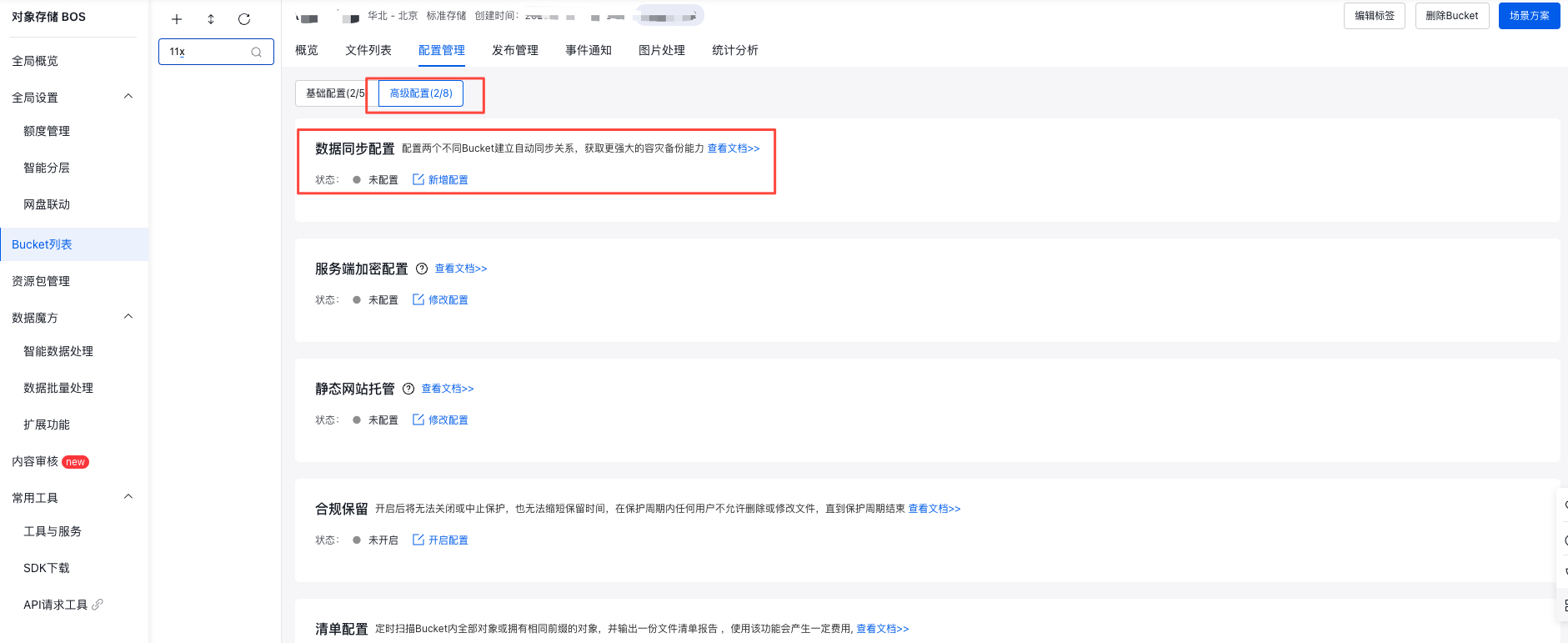
- Select the Configuration Management tab in the top navigation bar.
- On the Configuration Managementpage, select Advanced Configuration, then click Enable Configuration in the Data Synchronization Configuration region to configure data synchronization for this bucket.
- In the data synchronization configuration toolbar, set up the synchronization strategy, select the data to be synchronized, decide on historical data inclusion, and specify the target region, target bucket, and target storage class.
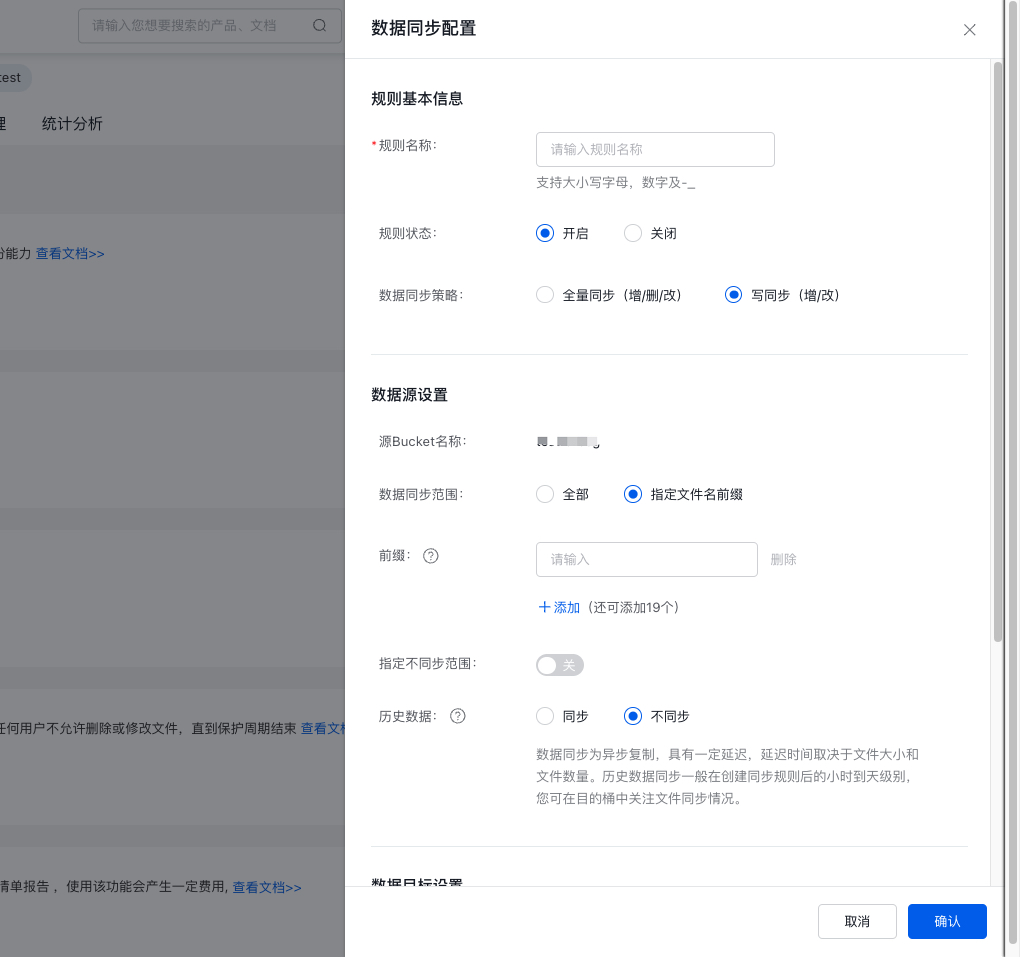
| Configuration module | Configuration description |
|---|---|
| Basic information of rules |
|
| Data source configuration |
|
| Data target configuration |
|
Description:
- The two buckets for data synchronization can be cross-region or same-region. Only data synchronization between cross-region buckets will trigger traffic fees; data synchronization between buckets in the same region will not incur traffic fees.
- The two buckets for data synchronization can be cross-account or same-account. Please carefully confirm that the entered target bucket name is accurate. If the target bucket in the destination account is located in another region, cross-region traffic fees will be generated. The source account shall bear the traffic fees, while the destination account shall bear the storage and request fees.
- It supports multi-rule synchronization between buckets, that is, one source bucket can have multiple destination buckets, and one destination bucket can have multiple source buckets. Suppose there are three buckets, named A, B and C respectively: (1) A is supported as the source bucket of B, while B is supported as the source bucket of C; (2) A is supported as the source bucket of B, while B is supported as the source bucket of A; (3) A is supported as the source bucket of B and C at the same time; (4) C is supported as the target bucket of A and B at the same time.
- Performing data replication involving non-standard storage objects will incur data restoration fees. Archived objects cannot currently be synchronized and will be skipped during synchronization.
- For buckets in a synchronization relationship, objects copied from the source bucket can overwrite objects with the same name in the target bucket. Please proceed cautiously.
- Since data synchronization uses asynchronous replication, there will be a delay in data appearing in the target bucket, typically from several minutes to several hours depending on the data size.
- For data security reasons, BOS will not obtain or return the activation status of cross-account synchronization. If cross-account synchronization is enabled, it is recommended that you actively check whether data synchronization has started in the target bucket. If the source data has not been synchronized to the destination account’s bucket within 5 minutes, please check again whether the Write Permission is enabled. If synchronization still fails after write permission is enabled, please submit a Ticket.
- Historical data synchronization cannot guarantee the synchronization speed. If you need to use it urgently, it is recommended to use the object copying function of the bcecmd Tool for synchronization.
- When using data synchronization to replicate or migrate data to another bucket or account with the rule set to full synchronization, remember to disable the synchronization rule before deleting data from the source location to avoid unintentional deletions in the target location.
- If historical data synchronization is enabled under a given synchronization rule, altering the rule will trigger re-synchronization of already synchronized historical data.
- Click Confirm to complete the configuration.
Viewing synchronization progress
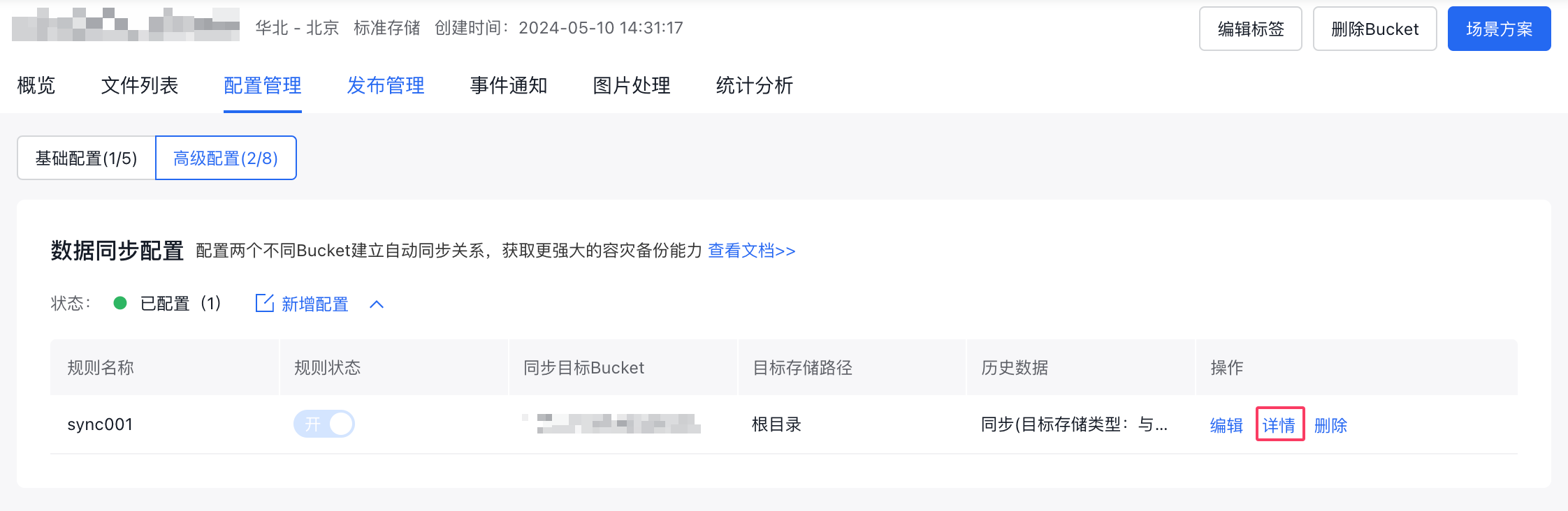
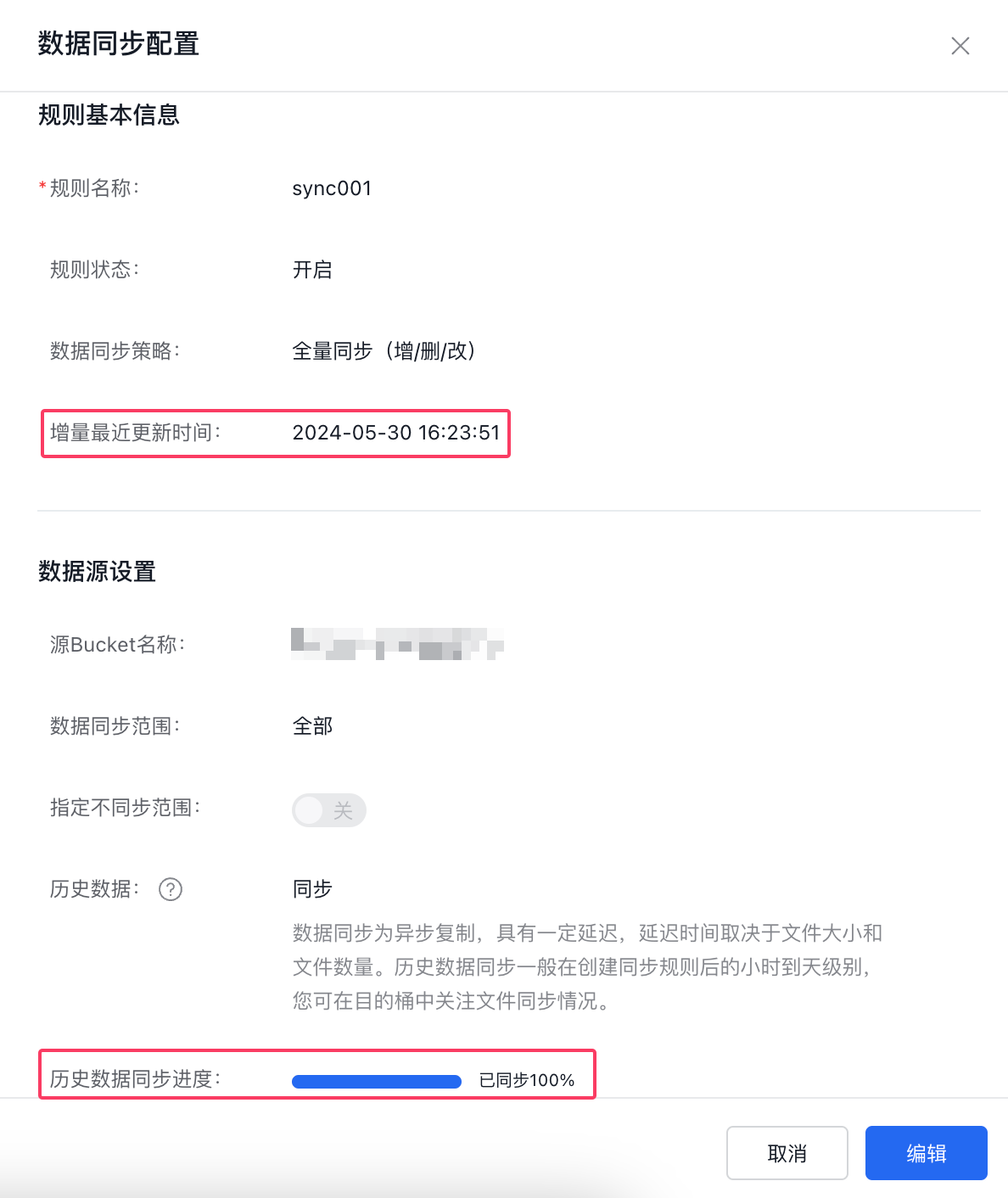
After completing the configuration of the data synchronization rule, you can click the Details button under the Operations section of the synchronization rule in the console to view progress on historical data synchronization, real-time sync timestamps, and comprehensive rule configuration details.
- Historical Data Synchronization: You can monitor the progress of historical file synchronization to check the status.
- Real-Time Data Synchronization: You can view timestamps for the latest incremental file syncs to stay updated on real-time synchronization.
Related APIs
- PutBucketReplication
- GetBucketReplication
- DeleteBucketReplication
- GetBucketReplicationProgress
- ListBucketReplication
Note
Cross-border data compliance commitment
When you use this service or feature, your business data on the cloud will be transmitted to the selected region or the region where the service is deployed. This may involve cross-border data transfer.
By using this feature, you confirm that you have full legal authority to manage the relevant business data and that you accept complete responsibility for its transmission and associated actions. You also confirm that your data transmission complies with relevant laws and regulations, including obtaining explicit consent from data subjects, completing cross-border data security assessments, and signing standard contracts for cross-border personal information transfers with recipients. You further guarantee that your data does not include any content restricted or prohibited by applicable laws. For specific compliance requirements, please consult the appropriate authorities.
In the event of non-compliance with the above commitments, you will bear all legal consequences and compensate Baidu AI Cloud and/or its affiliates for any resulting losses.
If Baidu AI Cloud is required to modify or discontinue this feature due to changes in law, policy, or regulations, you understand and accept that this will not constitute a breach of contract. Baidu AI Cloud will provide transitional assistance for any service adjustments or termination.