

Set referer allow list
Overview
The BOS referer allow list function restricts resource access in your bucket to domain names specified in the allow list. When your bucket is public-read or public-read-write, this feature helps prevent unauthorized hotlinking of BOS-stored data, protecting your rights.
BOS offers anti-leech protection through the HTTP header's referer field. Configure an allow list in the BOS console, enabling access only for users whose referer fields match the list. Requests outside the list are denied, but null referers are permitted by default and ignored in restrictions.
- The allow list can only be set under the bucket’s advanced permissions.
- The referer allow list applies universally to all API requests accessing BOS.
- The referer allow list disregards case sensitivity, uses line breaks for separation, supports wildcards (*), and permits only one wildcard per referer.
- The referer allow list follows the exact matching principle. For example:
http://www.baidu.com/abc/andhttp://www.baidu.com/abcare considered different in the allow list. - The referer allow list system verifies both HTTP and HTTPS protocols. For hosts without a trailing "/", one is automatically appended.
- When selecting Allow Null Referer, HTTP requests with referers in the allow list or null referers are permitted; When selecting Do Not Allow Null Referer, access is only granted to HTTP requests with referers from the allow list, while null referers are denied.
For details about bucket permission control, please refer to [Bucket Permission Control](BOS/API Reference/Access control.md#Bucket permission control).
Set referer allow list
- Sign in to the Baidu AI Cloud Object Storage (BOS) Management Console.
- Click Bucket List in the left navigation bar, then select the bucket name.
- In the left navigation bar, select Basic Configuration > Permission Configuration.
- On the Permission Configuration page, click Modify Configuration.
-
In the sidebar of Bucket Permission Configuration, click Custom to add custom permissions and set the referer allow list.
- Each Referer is separated by a line break, and each Referer supports a maximum of one wildcard
*; - You may also select whether to allow null referer;
- When selecting Allow Null Referer, access is granted to HTTP requests with referers in the allow list or null referers;
- When the Do Not Allow Null Referer option is selected, access is restricted to HTTP requests with referers in the allow list, while null referers are denied.
- Each Referer is separated by a line break, and each Referer supports a maximum of one wildcard
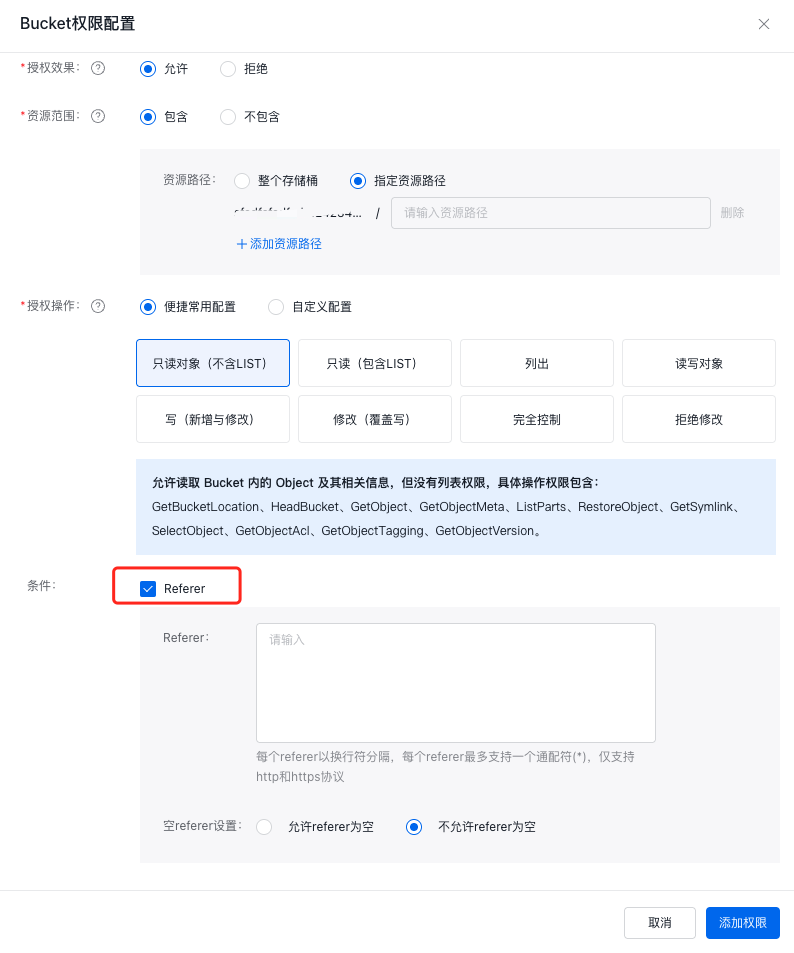
- Click Add Permission to complete the permission configuration.
- After the configuration is completed, you can see the generated permission records in Bucket Permission Configuration, and you can adjust the existing permissions through the Modify and Delete buttons.