

Get Object
Updated at:2025-11-03
Overview
After saving data objects in BOS, you can download them.
Prerequisites
The file has been uploaded to the bucket. For details, please refer to [Upload Object](BOS/Quick Start/Upload Object.md).
Use the management console to obtain objects
- Sign in to the Baidu AI Cloud Object Storage (BOS) Management Console.
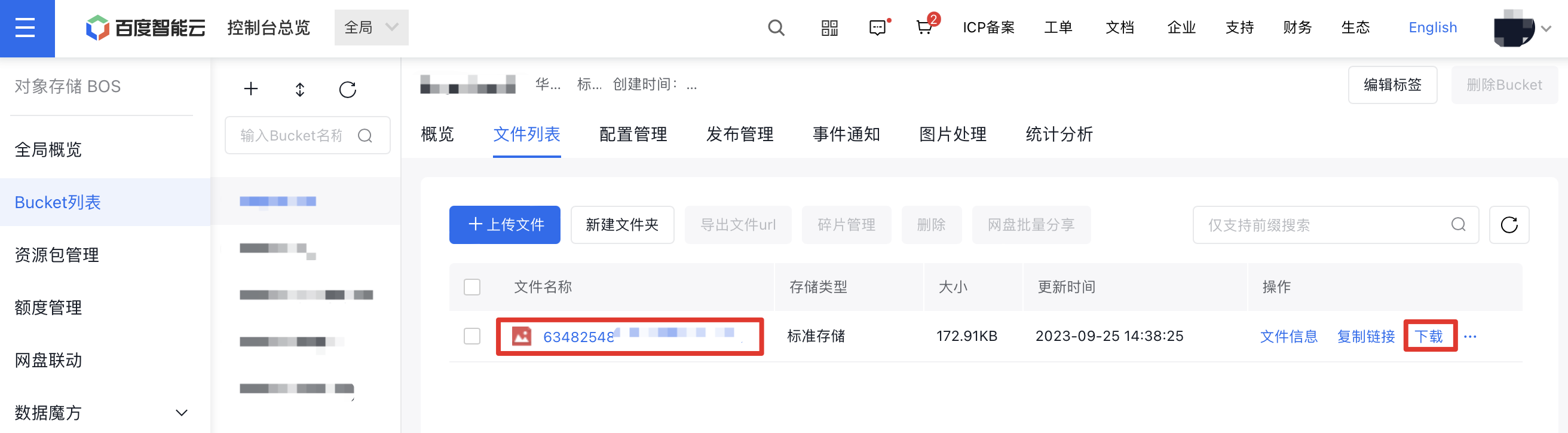
- Select the bucket to be operated and click the File List tab.
-
Depending on your needs, objects can be downloaded in two ways.
-
Click "Copy Link" next to the object file, then paste the copied download link into a new browser window to download.

-
Click the "Download" button located on the right side of the object file.
-
Obtain an object using the API
API: [GetObject](BOS/API Reference/Object-Related Interface/Basic Operations/GetObject.md).
Obtain an object using SDK
- JAVA SDK: [Download File](BOS/SDK/Java-SDK/File management/Download file.md)
- Python SDK: [Download File](BOS/SDK/Python-SDK/File management/Download file.md)
- PHP SDK: [Download File](BOS/SDK/PHP-SDK/File management.md#Download file)
- C# SDK: [Get Object](BOS/SDK/C-Dotnet-SDK/Object management.md#Get Object)
- JavaScript SDK: Get Object
- Android SDK: [Get Object](BOS/SDK/Android-SDK/File management/Get Object.md)
- iOS SDK: [Get Object](BOS/SDK/IOS-SDK/File management/Get Object.md)
- Ruby SDK: [Download File](BOS/SDK/Ruby-SDK/File management/Download file.md)
- Go SDK: [Download File](BOS/SDK/GO-SDK/File management.md#Download file)
- C++ SDK: [Download File](BOS/SDK/C++-SDK/File management/Download file.md)
Obtain objects by tools
You can use the official tool BOS Browser provided by BOS to get objects. For details, please refer to File Download.