Overview and Scenario Introduction
Overview
This tutorial guides users in quickly building a mobile app for direct file uploads and image processing using BOS. The implementation primarily involves three modules: STS temporary authorization, Android SDK, and the image processing API.
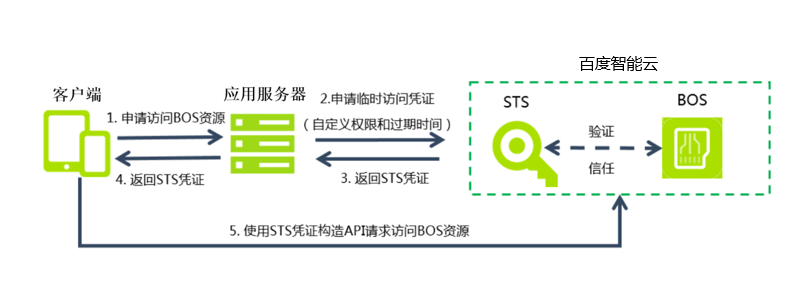
- As there is a risk of information leakage in users' mobile applications, storing AK/SK information directly is not feasible. Instead, the STS temporary authorization mode must be used to access BOS. In this mode, a temporary Token is generated with limited validity. During the Token's active period, the application can complete image upload or download services. After expiration, a new Token must be acquired.
- The Android SDK helps users create a BOS client to store files in BOS or download them from BOS.
- The image processing API enables functionalities such as creating thumbnails, cropping, format conversion, rotation, and adding text or image watermarks.
Requirement scenarios
In the mobile internet era, scenarios involving data uploads from mobile phones are ubiquitous. To allow developers to focus on product business logic, users can store files directly on BOS. BOS offers secure upload and download methods via STS authorization and supports image processing services. BOS features low costs, support for massive storage, and elastic scalability, aiding developers in easily building mobile app functionalities. The overall architecture for developing the Meitu app is as follows: