

Upload Object
Overview
BOS supports storage of any file type. After successfully creation of a bucket, you can upload, download, copy, and delete objects in the bucket via the console. BOS file storage supports four storage classes: standard storage, infrequent access storage, cold storage, and archive storage. Users can choose based on data access frequency. For selection guidance, refer to Hierarchical Storage.
Note
- A single uploaded file should not exceed 5GB. For transferring large files, it is recommended to use the SDK tool.
- If versioning is not enabled for a bucket, uploading a file with the same name will overwrite the previously uploaded data.
Upload an object using SDK
- JAVA SDK: [Upload File](BOS/SDK/Java-SDK/File management/Upload files.md)
- Python SDK: [Upload Files](BOS/SDK/Python-SDK/File management/Upload files.md)
- PHP SDK: [Upload File](BOS/SDK/PHP-SDK/File management.md#Upload files)
- C# SDK: [Upload Object](BOS/SDK/C-Dotnet-SDK/Object management.md#Upload Object)
- JavaScript SDK: Upload Object
- Android SDK: [Upload Object](BOS/SDK/Android-SDK/File management/Upload Object.md)
- iOS SDK: [Upload Object](BOS/SDK/IOS-SDK/File management/Upload Object.md)
- Ruby SDK: [Upload File](BOS/SDK/Ruby-SDK/File management/Upload files.md)
- Go SDK: [Upload File](BOS/SDK/GO-SDK/File management.md#Upload files)
- C++ SDK: [Upload File](BOS/SDK/C++-SDK/File management/Upload files.md)
Upload objects by tools
You can use the official tools provided by BOS to perform uploads.
- Use the command-line interface BOS cmd for quick upload. For details, please refer to BOS cmd-File Upload.
- Use BOS Browser to upload objects. For details, please refer to BOS Desktop Tool - File Upload.
Upload objects by the management console
- Sign in to the Baidu AI Cloud Object Storage (BOS) Management Console.
-
On the left, select the created bucket, click Upload File, and open the local file selection dialog box.

-
After selecting files, select the storage class: Standard Storage, Infrequent Access Storage, Cold Storage, or Archive Storage, then click the Start Upload button to upload. Multiple files can be selected for simultaneous upload.
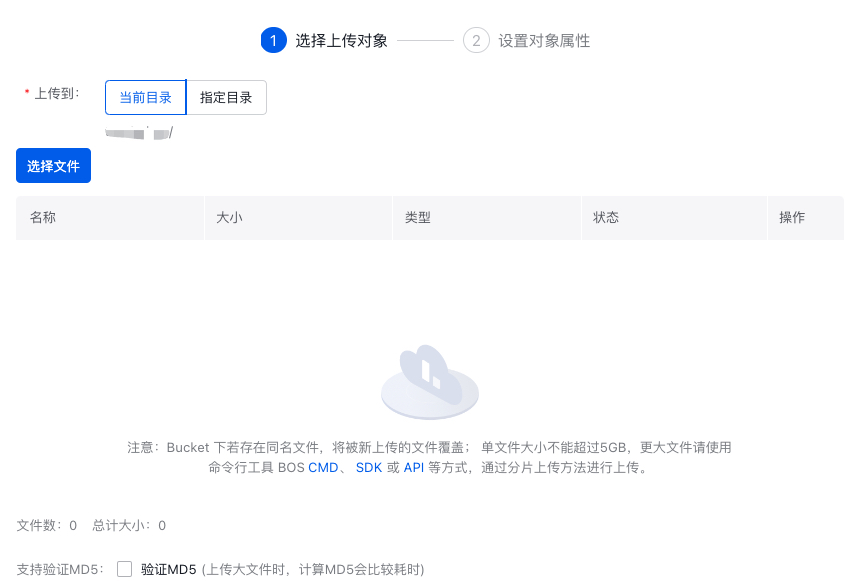
After upload completion, it will be displayed in the Storage Class column of the corresponding object.
Upload an object by API
API: [PutObject](BOS/API Reference/Object-Related Interface/Basic Operations/PutObject.md).