Add Image-Text Mixed Watermark
Updated at:2025-11-03
Overview
This document explains how to add both image and text watermarks to an image. Command name: watermark.
Image watermark parameters
Image watermark parameters
| Parameters | Value | Description |
|---|---|---|
| bucket | - | Specify the name of the BOS bucket where the watermark image is stored. This is optional; the default is the current bucket. If using a different bucket, ensure the watermark image in that bucket has public-read permissions. |
| image | - | Specify the name of the watermark image stored in BOS, which must be a URL-safe Base64 encoded value. |
| t | 1-100 | Set the opacity level of the watermark image. A value of 100 means it will match the original opacity. This parameter is optional, with the default value set to 100. |
Text watermark parameters
| Parameters | Value | Description |
|---|---|---|
| text | - | The text content for the watermark must be URL-safe Base64 encoded, and the encoded result should not exceed 200 characters. |
| size | 1-1024 | Set the font size of the watermark. This is optional, with a default value of 30. |
| color | 8-bit hexadecimal color code | Specify the font color. Optional; the default color is black 000000. |
| type | Supported fonts are listed in the table below | Specify the font type, which must also be URL-safe Base64 encoded. This is optional, and if the provided font is not within the supported list, the default font (Song) will be applied. |
| style | normal, italic, bold | Define the font style, which can be normal, italic, or bold. This is optional, with the default style being normal. Text effects are rendered only when the font supports these styles. |
| effect | hardshadow, softoutline | Text effects available include: "hardshadow" for a text shadow and "softoutline" for a text shadow with a Gaussian blur effect. |
| shx | 0-10 | Set the horizontal offset for the text effect. This is optional, with a default value of 0. |
| shy | 0-10 | Set the vertical offset for the text effect. This is optional, with a default value of 0. |
| shc | 8-bit hexadecimal color code | Define the color of the shadow effect. |
| blr | 1-50 | Set the Gaussian blur radius for the text outline. This is applicable only with the "softoutline" effect. This is optional, with a default value of 0. |
| bls | 1-50 | Set the Gaussian blur standard deviation for the text outline. This is applicable only with the "softoutline" effect. This is optional, with a default value of 0. |
Common parameters
| Parameters | Value | Description |
|---|---|---|
| g | 1-9 | Determine the anchor point position for the watermark. This is optional, and the default value is 9. For detailed descriptions, refer to the section below. |
| x | -4096-4096 | Define the horizontal offset of the watermark relative to the anchor point. This setting is optional, with a default value of 10. |
| y | -4096-4096 | Define the vertical distance of the watermark from its anchor point. This is optional, with a default value of 10. |
| a | -360-360 | Set the watermark's rotation angle. Positive values mean a clockwise rotation, while negative values indicate a counterclockwise rotation. This is optional, with a default value of 0. |
| order | 0,1 | Set the order of text and image watermarks. 0 (default): Image watermark is placed first; 1: Text watermark is placed first. |
| align | 0,1,2 | Set the alignment between the text watermark and image watermark. 0: Text watermark aligns with the top of the image watermark; 1: Text watermark is center-aligned with the image watermark; 2 (default): Text watermark aligns with the bottom of the image watermark. |
| interval | 0-1000 | Set the spacing between the text watermark and the image watermark. Optional; defaults to 0. |
Watermark encoding
For adding watermarks, parameters such as text content, text font, and the watermark image name must be encoded in URL-safe Base64 format. Encoding steps are as follows:
- Convert the content into Base64 format and then modify some characters in the result.
- Replace all plus signs (+) in the result with hyphens (-).
- Replace all forward slashes (/) in the result with underscores (_).
- Remove all trailing equal signs (=) from the result.
Anchor point position
Divide the original image into 9 regions as shown in the figure below, and number them according to the positions shown in the diagram. The anchor points of each region are shown in the figure:
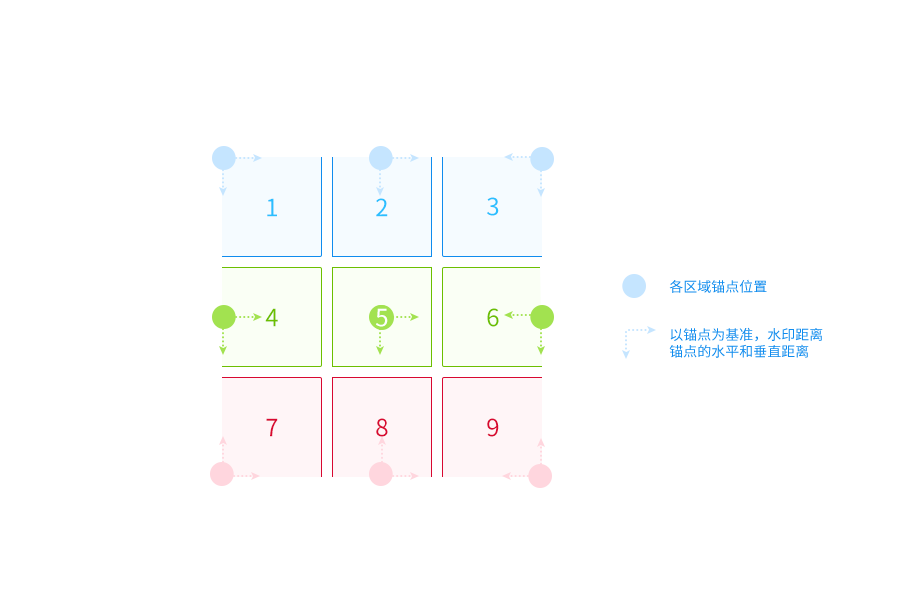
Supported font types
| Font | Name | base64 encoding |
|---|---|---|
| FZLanTingHei | Founder Lan Ting Hei Simplified Chinese | RlpMYW5UaW5nSGVp |
| FZLanTingHeiSBGB | Founder Lan Ting Hei Bold Simplified Chinese | RlpMYW5UaW5nSGVpU0JHQg== |
| FZLanTingHeiSDB1GB | Founder Lan Ting Hei Medium Bold Simplified Chinese | RlpMYW5UaW5nSGVpU0RCMUdC |
| FZLanTingHeiSDBGB | Founder Lanting Medium Hei Simplified Chinese | RlpMYW5UaW5nSGVpU0RCR0I= |
| FZLanTingHeiSEBGB | Founder Lan Ting Hei Heavy Simplified Chinese | RlpMYW5UaW5nSGVpU0VCR0I= |
| FZLanTingHeiSELGB | Founder Lan Ting Hei Light Simplified Chinese | RlpMYW5UaW5nSGVpU0VMR0I= |
| FZLanTingHeiSHGB | Founder Lan Ting Hei Extra Bold Simplified Chinese | RlpMYW5UaW5nSGVpU0hHQg== |
| FZLanTingHeiSLGB | Founder Lan Ting Hei Thin Simplified Chinese | RlpMYW5UaW5nSGVpU0xHQg== |
| FZLanTingHeiSMGB | Founder Lan Ting Hei Semi Bold Simplified Chinese | RlpMYW5UaW5nSGVpU01HQg== |
| FZLanTingHeiSRGB | Founder Lan Ting Hei Simplified Chinese | RlpMYW5UaW5nSGVpU1JHQg== |
| FZLanTingHeiSULGB | Founder Lan Ting Hei Ultra Light Simplified Chinese | RlpMYW5UaW5nSGVpU1VMR0I= |
| FZKaTongM19S | Founder Cartoon Simplified Chinese | RlpLYVRvbmdNMTlT |
| FZFangSong | Founder Imitation Song Simplified Chinese | RlpGYW5nU29uZw== |
| FZShuSong | Founder Book Song Simplified Chinese | RlpTaHVTb25n |
| FZKai | Founder Kai Script Simplified Chinese | RlpLYWk= |
| FZHei | Founder Black Simplified Chinese | RlpIZWk= |
| FZDuHeiS | Founder Du Hei Simplified Chinese | RlpEdUhlaVM= |
Example
- Mixed image-text watermark with center alignment:
https://doc.bce.baidu.com/bce-documentation/BOS/image.jpg?x-bce-process=image/watermark,image_YmNlLWRvY3VtZW50YXRpb24vQk9TL2JjZS5qcGc=,text_55m-5bqm5LqR,type_ZnpsYW50aW5naGVpc3JnYg==,align_1

- Mixed text-image watermark with text in front, center-aligned
https://doc.bce.baidu.com/bce-documentation/BOS/image.jpg?x-bce-process=image/watermark,image_YmNlLWRvY3VtZW50YXRpb24vQk9TL2JjZS5qcGc=,text_55m-5bqm5LqR,type_ZnpsYW50aW5naGVpc3JnYg==,order_1,align_1

- Mixed image-text watermark with text hard shadow effect:
https://doc.bce.baidu.com/bce-documentation/BOS/image.jpg?x-bce-process=image/watermark,image_YmNlLWRvY3VtZW50YXRpb24vQk9TL2JjZS5qcGc=,text_55m-5bqm5LqR,type_ZnpsYW50aW5naGVpc3JnYg==,size_32,color_FFFFFFFF,effect_hardshadow,shx_2,shy_2,shc_696969,align_1

- Mixed image-text watermark with text soft shadow effect:
https://doc.bce.baidu.com/bce-documentation/BOS/image.jpg?x-bce-process=image/watermark,image_YmNlLWRvY3VtZW50YXRpb24vQk9TL2JjZS5qcGc=,text_55m-5bqm5LqR,type_ZnpsYW50aW5naGVpc3JnYg==,size_32,color_FFFFFFFF,effect_softoutline,shx_2,shy_2,shc_696969,bls_2,align_1