

Configure intelligent tiering
Updated at:2025-11-03
Intelligent tiering
- When Intelligent Tiering is enabled for a bucket, the system periodically monitors data access. If there is no access for an extended time, the data is moved to a lower-cost storage tier. If the data is accessed later, it will be returned to a high-frequency access tier to ensure optimal read performance.
- Support file conversions from Standard Storage - Infrequent Access Storage - Cold Storage or Cold Storage - Infrequent Access Storage - Standard Storage.
- You can configure regular deletion of files and fragments (incomplete file fragments from multipart upload tasks). The files can be deleted after a specified number of days. The rule's start time is based on the object's creation time. Deletion takes precedence over conversion and will be executed once expired.
- After configuring the rules, you can view the amount of tiering up or down data of a single bucket through the Statistical Analysis - Intelligent Tiering of the bucket on the console.
Notes on intelligent tiering
- After configuring intelligent tiering, the system will continuously monitor and analyze the bucket, and it will take at least 30 days to transfer the data to the access tier with lower storage cost according to the access situation. If data is accessed multiple times again, it will be moved to the frequent access tier.
- Conversion to archive storage, standard storage - multi-AZ, or infrequent access storage - multi-AZ is not supported.
- Only one intelligent tiering rule can be created for each bucket.
- Currently, the service is available only in the Beijing, Suzhou, and Guangzhou regions.
Console operation instructions
Configure intelligent tiering
You can directly manage settings in the Intelligent Tiering section of the left navigation bar or configure intelligent tiering for the current bucket through the bucket management directory.
Method 1: Configure in the Intelligent Tiering page
- Sign in to the Baidu AI Cloud Object Storage (BOS) Management Console.
- In the left navigation bar, select Intelligent Tiering to access the Intelligent Tiering management page, which shows all configured intelligent tiering rules under the current account by default.
- Choose Intelligent Tiering Configuration to create a new intelligent tiering rule in the pop-up window.
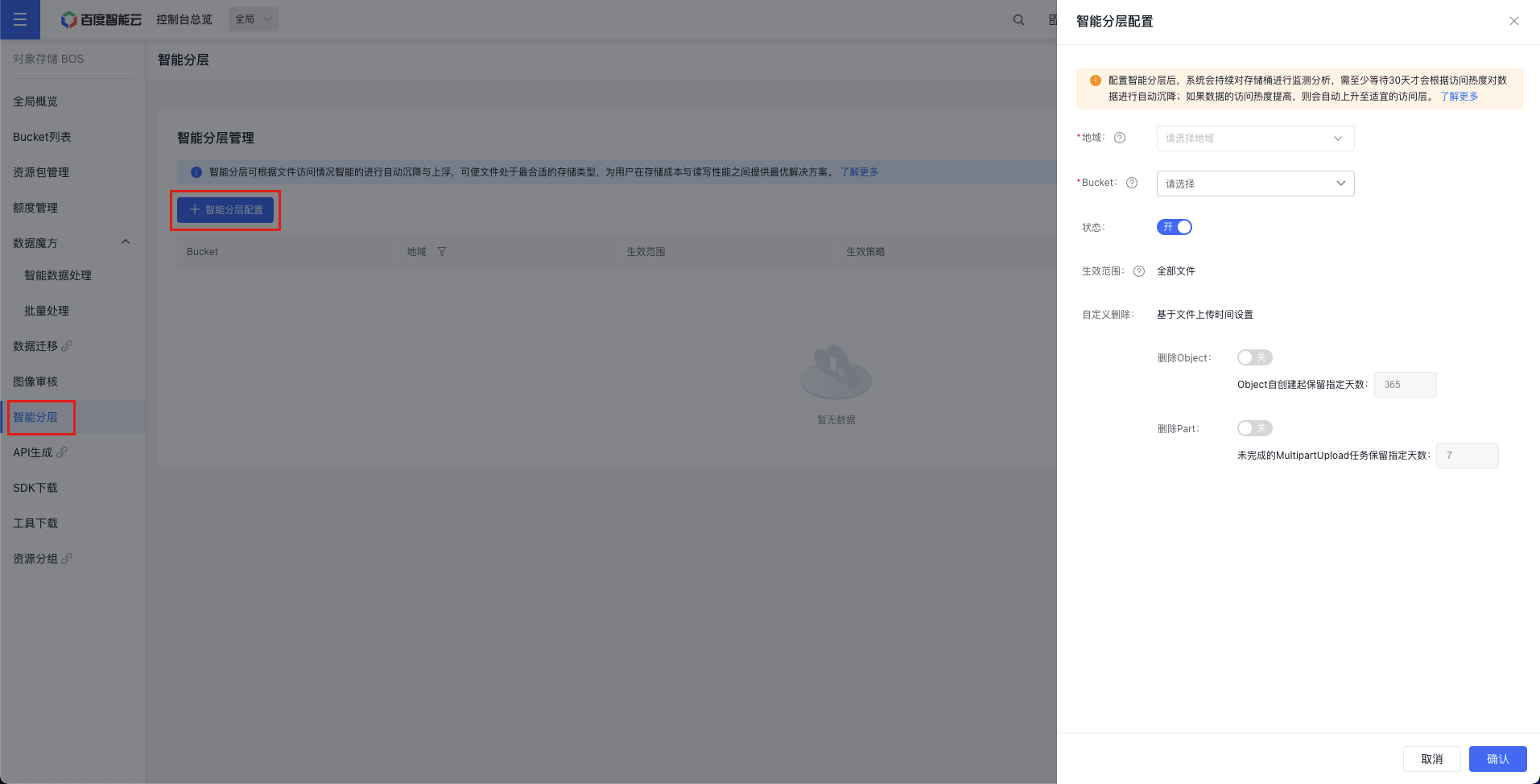
- On the Intelligent Tiering management page, you can click the Edit or Delete button in the operation bar to modify or delete configured intelligent tiering rules.
- You can also click the Statistics button in the operation bar to view the amount of tiering up or down data of the current intelligent tiering rules under different storage classes.
Method 2: Configure in Bucket Configuration Management
- Sign in to the Baidu AI Cloud Object Storage (BOS) Management Console.
- In the left bucket list, click on the bucket name.
- In the left navigation bar, select Basic Configuration - Lifecycle Configuration.
- On the Lifecycle Configuration page, click Add Configuration and select Intelligent Tiering Configuration to configure the lifecycle for this bucket. By default, the function is not enabled.
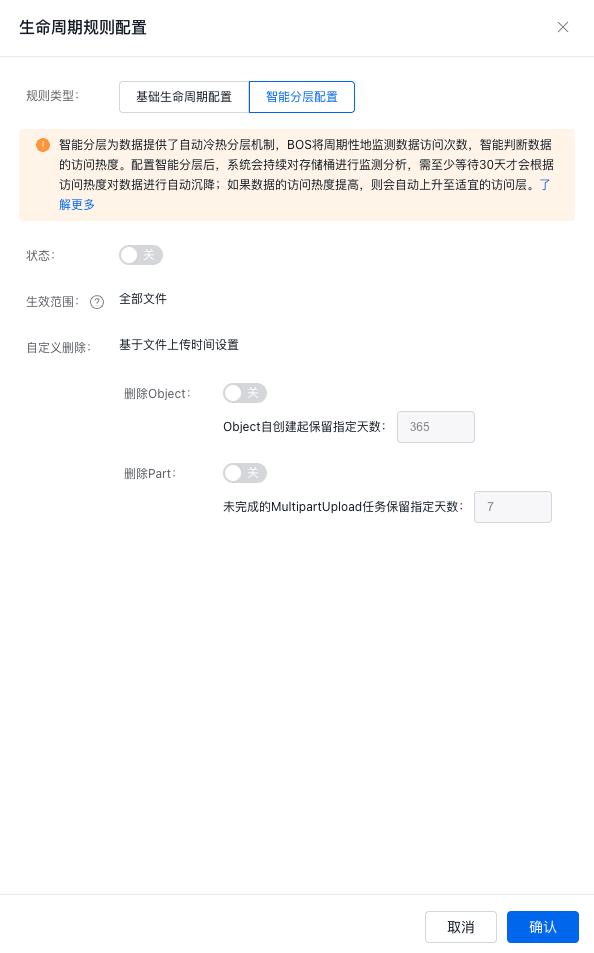
- Turn on the intelligent tiering switch; intelligent tiering rules apply to all files in the entire bucket. Additionally, you may optionally configure custom deletion rules based on your business requirements. Custom deletion supports deleting files and incomplete parts. You can configure how many days files are retained before automatic deletion.
- Click OK to save the rule.
- After successful rule addition, you can view the generated rule records in Lifecycle Configuration. You can re-edit or delete rules according to your needs.

View intelligent tiering execution
- After configuring the rules, you can view the amount of tiering up or down data of a bucket enabling intelligent tiering within a specified time range through the Statistical Analysis > Intelligent Tiering tab on the console.
