

Intelligent Business Analysis
Overview
The Intelligent Business Analysis feature of Baidu AI Cloud BOS conducts in-depth analysis based on users’ data usage. It scientifically identifies the optimal number of days for migrating data from Standard Storage to Infrequent Access Storage, helping you minimize the total cost (storage capacity fee + data restore fee) while maintaining the same level of business access.
Upgrade notification
1. The intelligent business analysis feature is upgraded to the Intelligent Tiering feature. Baidu AI Cloud Object Storage (BOS) will deprecate the intelligent business analysis feature on July 18, 2023;
2. The intelligent tiering feature can fully replace the intelligent business analysis feature. Previously, you needed to first configure intelligent business analysis rules, then set up lifecycle management rules for each bucket based on the analysis results. With the intelligent tiering feature, you only need to enable the bucket’s tiering function with one click. The system will intelligently convert the storage class to the most cost-effective option based on file access patterns - including both “cooling down” (migrating to lower-cost storage) and “warming up” (migrating to higher-performance storage). Moreover, it expands beyond the standard-to-infrequent access storage conversion supported by intelligent business analysis to include cold storage, covering a wider range of storage classes (standard, infrequent access, cold). For more details, see Intelligent Tiering Description;
3. To configure intelligent tiering, refer to Configure Intelligent Tiering in the BOS console, or follow the steps in the Upgrade to Intelligent Tiering section below.
Upgrade to intelligent tiering
- To help existing users smoothly transition from intelligent business analysis to intelligent tiering, users still using the intelligent business analysis feature can directly configure intelligent tiering rules for eligible buckets with one click in the console before July 18, 2023. The steps are as follows:
- Log in to the BOS management console and go to the Global Overview page.
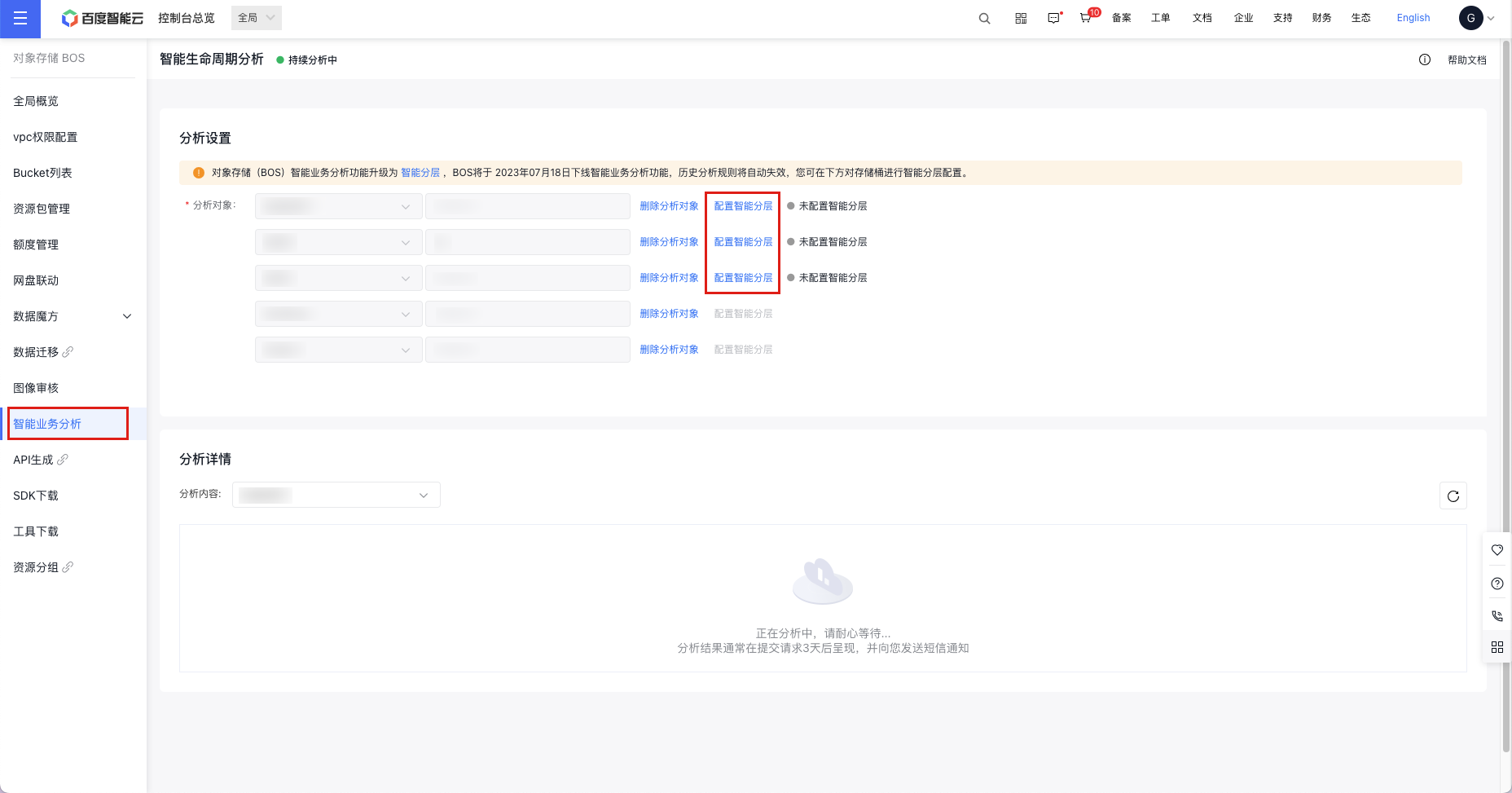
- Select "Intelligent Business Analysis" from the left navigation menu.
-
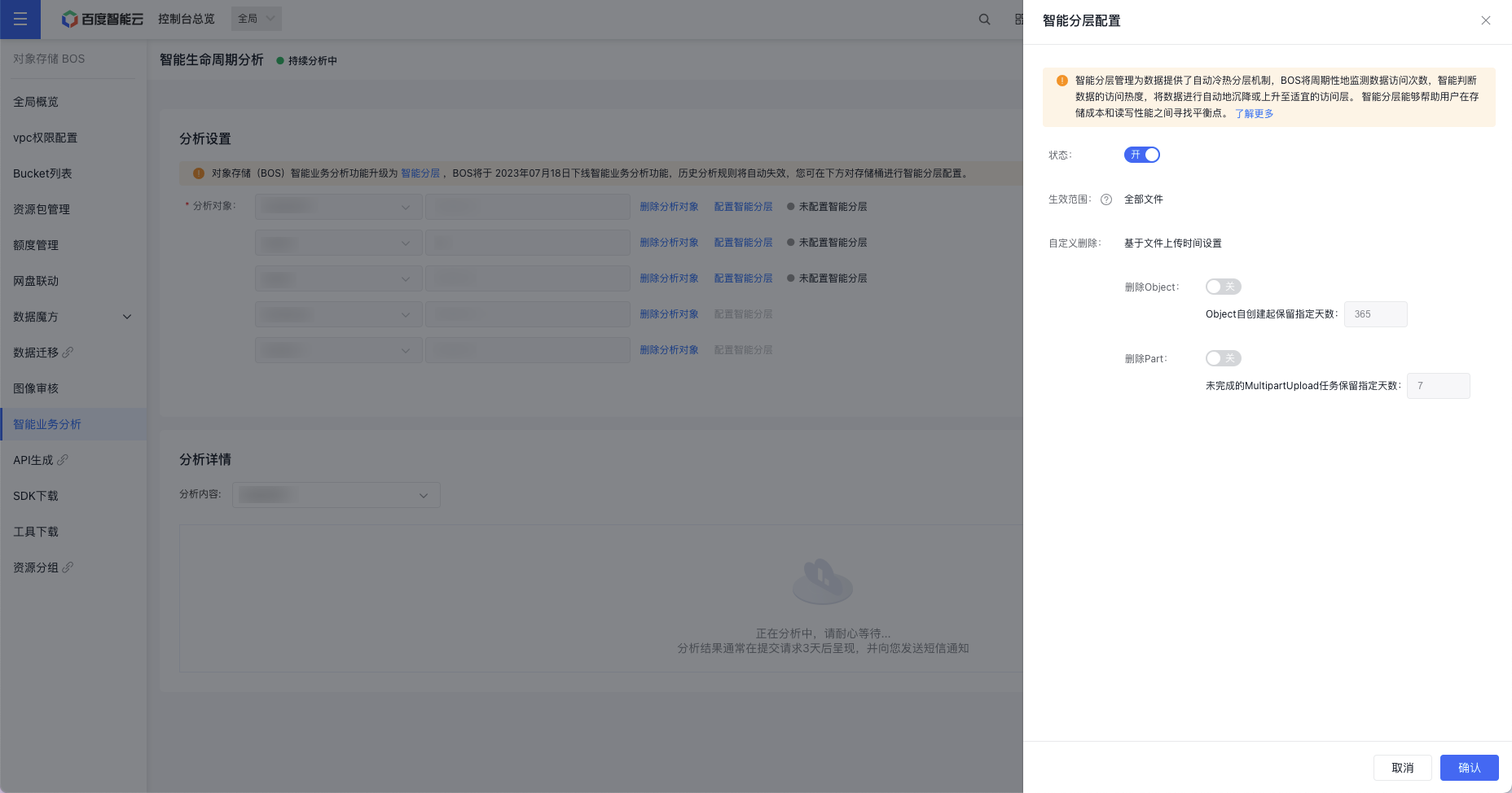
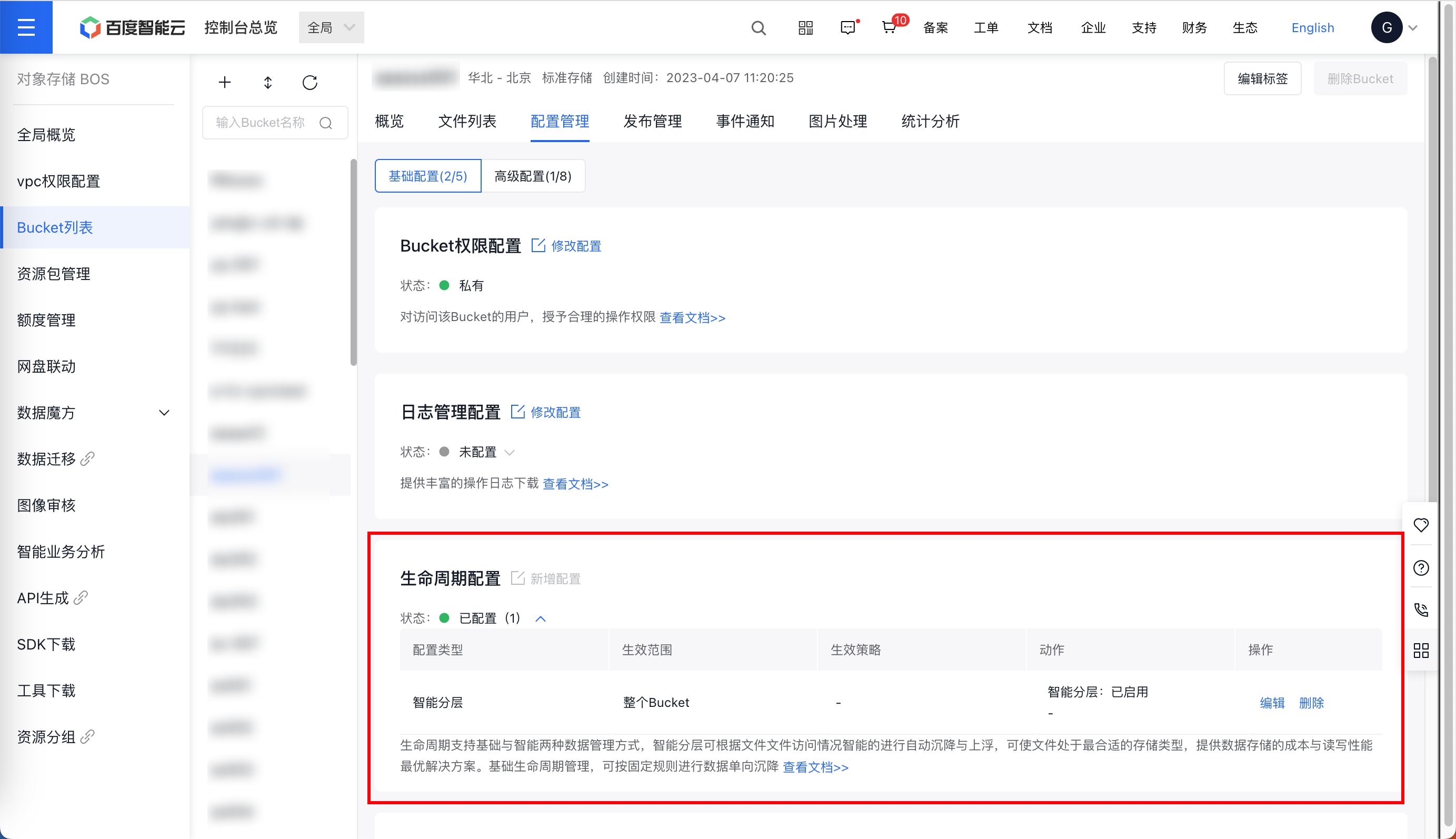
Click "Configure Intelligent Tiering" to set up intelligent tiering for the current bucket. If intelligent tiering is already configured, "Intelligent Tiering Configured" will be displayed on the right.
Notes:
- Currently, intelligent tiering configuration is only supported for buckets in the Beijing, Suzhou, and Guangzhou regions. For the Guangzhou region, you need to submit a ticket to apply.
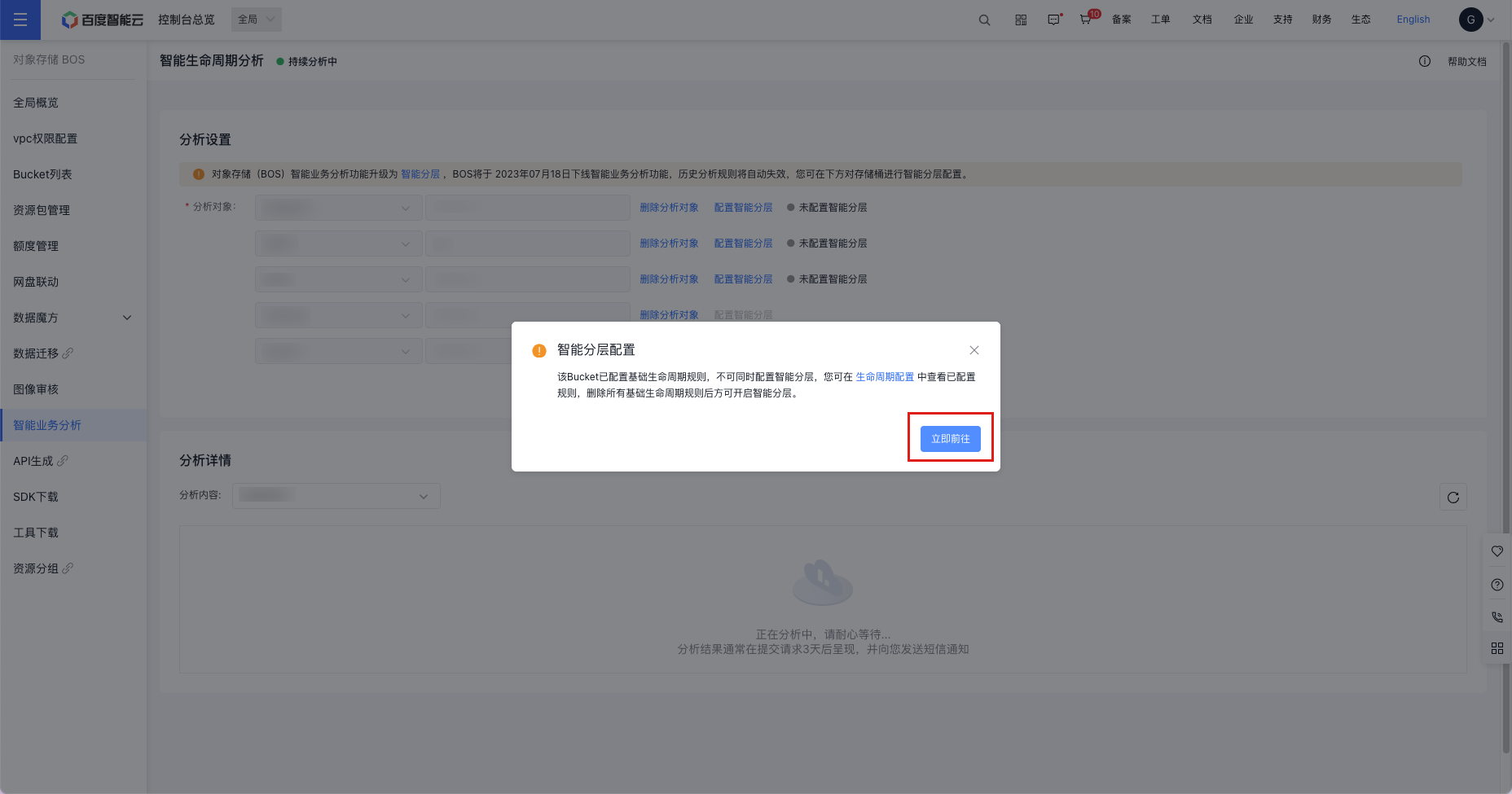
- Basic lifecycle rules and intelligent tiering cannot be configured simultaneously. If basic lifecycle rules are already applied to your current bucket, selecting "Configure Intelligent Tiering" will prompt a pop-up notification. You can click "Go Now" to review the set lifecycle rules and delete them before enabling intelligent tiering.
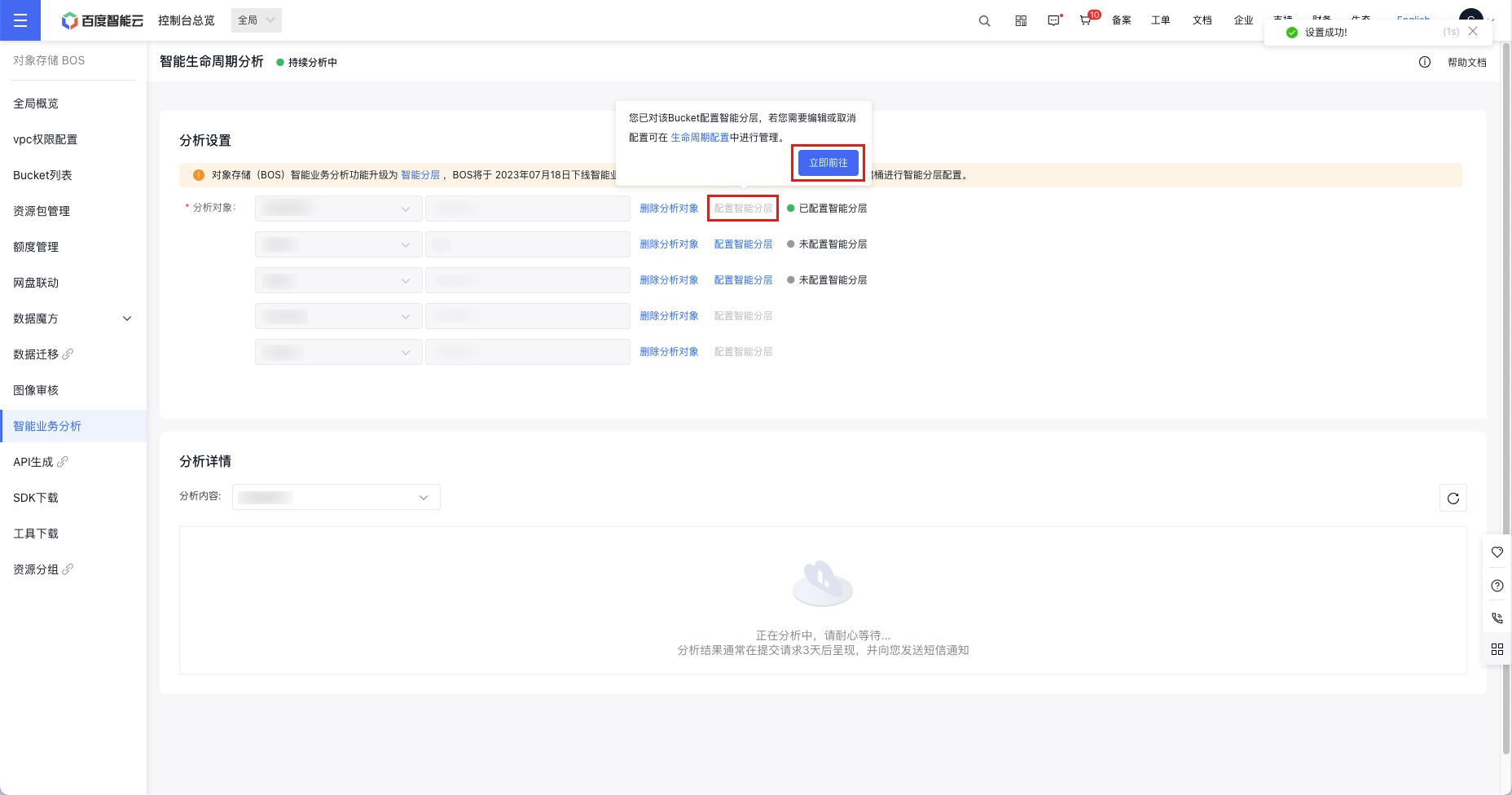
- If intelligent tiering has been configured for your current bucket, hover your cursor over "Configure Intelligent Tiering" and click "Go Now" to edit or disable the existing setup.
Note
At present, BOS intelligent service analysis does not recommend timeframes for transitioning data from standard storage or infrequent access storage to cold storage. This is because cold storage is specifically designed for backup scenarios, with much lower performance than the other classes. Moving hot data to cold storage without careful consideration may compromise business performance during access.
Interpretation of intelligent business analysis results
-
The system-generated report is shown in the figure below:
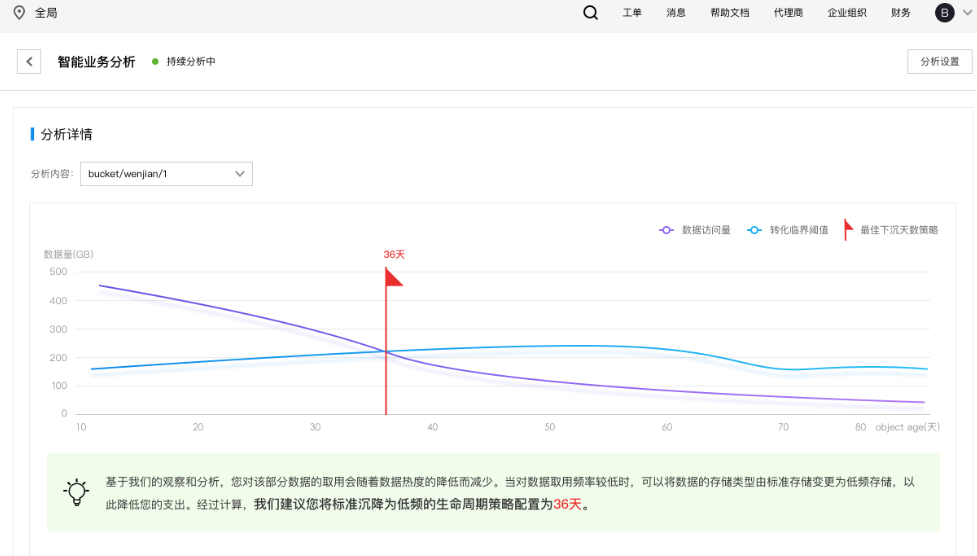
Key information in the figure:
- X-axis: Object age (file age) in days. It reflects the time elapsed since the file was uploaded.
- Y-axis: File restoration volume by users within each age range, measured in GB.
- Purple line: Indicates users' actual restoration volume. For instance, a point at (x=30, y=400) on the purple line means files aged 30 days are restored at an average rate of 400 GB per day.
- Blue line: A cost threshold baseline representing when the costs of standard storage equal those of infrequent access storage, based on on-cloud pricing and the current restoration pattern.
- Small red flag: Marks the intersection of the blue and purple lines, identifying the most cost-effective point to configure lifecycle-based storage migration.
-
Interpretation of strategy recommendations
Using the relationship trends of the blue and purple lines, BOS provides intelligent strategy recommendations (as shown in the green text below the chart) tailored to various scenarios.
Due to the diverse trend combinations of the blue and purple lines, BOS typically provides the following types of recommendations:
- If analysis reveals consistent high-frequency access to certain files, BOS advises keeping them in standard storage without configuring lifecycle migration.
- If the analysis reveals that the files are rarely accessed consistently, BOS suggests directly setting these files to be stored in infrequent access storage.
- If the analysis identifies predictable file access patterns (with higher access to hot data and lower access to cold data), BOS recommends setting up lifecycle migration at the threshold point.
- If the analysis indicates irregular file access patterns, BOS still provides suggestions on the number of days for migration based on the analysis data.
Using the figure above as an example, after analysis by the BOS system, it is recommended that the user set the lifecycle policy to migrate data from standard storage to infrequent access storage after 36 days.