

Data Processing FAQs
Updated at:2025-11-03
This document introduces common issues you may encounter while using BOS for data processing, along with their corresponding solutions.
Usage restrictions
What image formats does image processing support?
- BOS image processing supports mainstream input and output formats. Supported input original image formats include jpg, png, bmp, webp, heic and gif; supported output original image formats include jpg, png, bmp, webp, heic and gif. BOS provides format conversion, i.e., outputting images in formats different from the input original image format. Among these, heic and webp are advanced compressed formats and will incur charges based on invocation times. For advanced compression pricing, refer to BOS Charge Items Introduction and BOS Price.
Are there any restrictions on the input original image for image processing?
- BOS supports input images up to 20 MB in size, with dimensions not exceeding 4096x4096 px. Output images, including intermediate outputs between pipelines and sub-commands, must also adhere to the 4096x4096 px dimension limit.
Usage method
How can image processing be invoked?
- BOS supports invoking and reading the original images directly via API and can also carry processing commands during read/write operations. If a processing command is carried when reading a file, the image will be read in its processed state. If a processing command is included when writing a file, a new processed image file will be written, and the original image file will remain unchanged. At most 4 groups of processing operations can be designated in the same command, i.e. 4 actions, and the same parameter cannot be specified repeatedly under one action. For convenience, you can also encapsulate a set of actions as a style in advance for invocation. For detailed rules, please refer to Image Processing and Use Rules.
How to create an image processing style?
- You can add or delete styles via the BOS console. A single Bucket supports up to 400 image processing styles. For detailed steps, please refer to Add/Delete Image Styles.
What processing operations does image processing support?
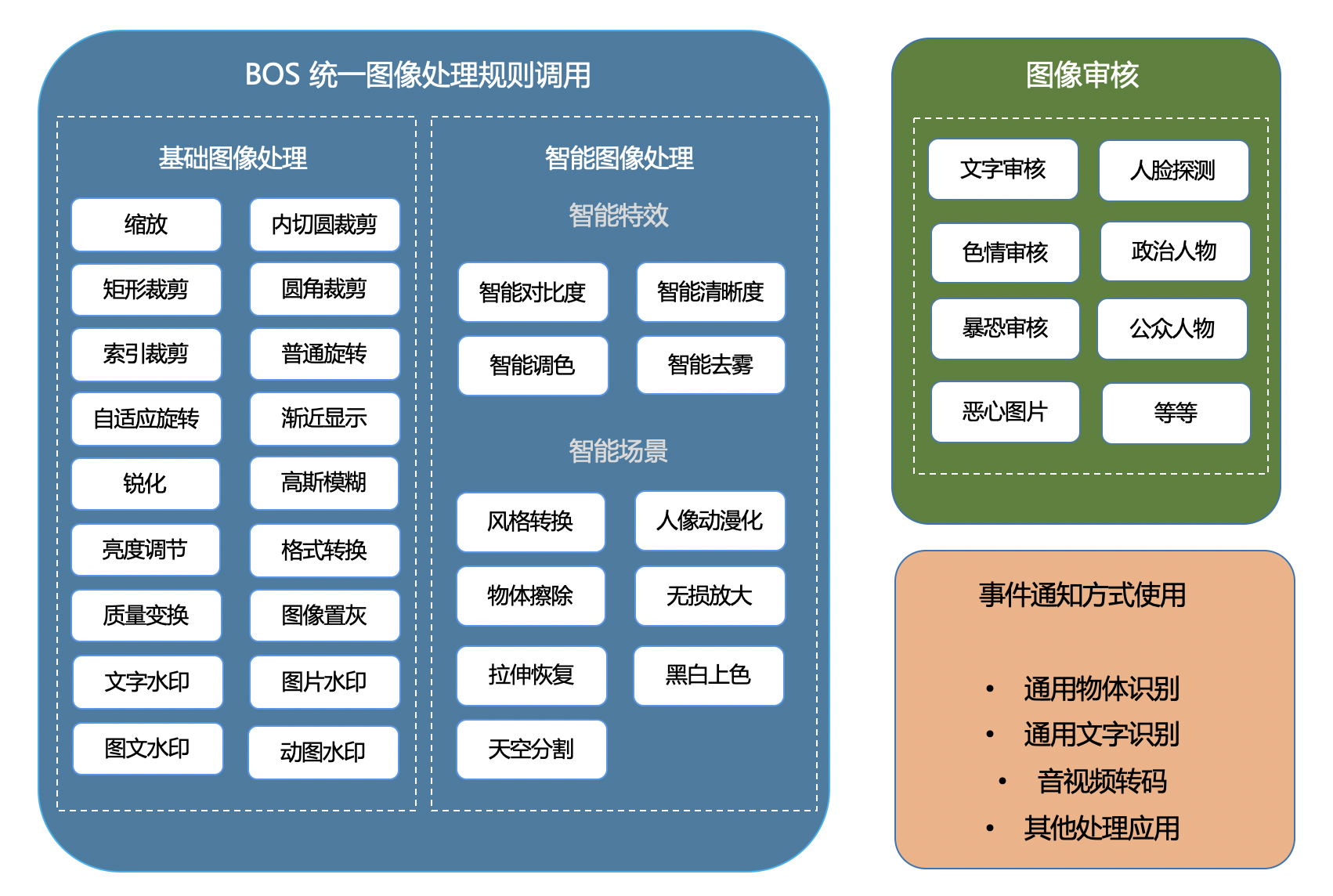
- BOS image processing offers a variety of processing methods, including basic image processing, intelligent image processing, image auditing, OCR, etc. However, the use of different capabilities varies. Basic image processing and intelligent image processing are used via BOS native Image Processing Rules; image review service is provided via separate interface and API, and does not support use via BOS native image processing rules. If you need OCR functions such as general text recognition or general object recognition, you can trigger other related products of Baidu AI Cloud via the event notification function.
Product price
Is there a charge for image processing?
- BOS basic image processing, intelligent image processing, and advanced compression are paid services, with fees charged based on the size (GB) of the image invoked or the frequency of invocation. For image review and other applications invoked via event notification, BOS only charges API read/write fees. For billing of image processing, please refer to BOS Charge Items Introduction and BOS Price.