Compatible Tools
Compatibility notes
Most tools developed for AWS S3 can be adapted to configure the access address. You can use these tools to access BOS by setting their access address to the AWS S3 Service Domain of BOS. Below are examples using common SDKs and tools to demonstrate how to connect to BOS.
Description:
String Meaning $ACCESS_KEY Baidu AI Cloud account Access key $SECRET_KEY Baidu AI Cloud Account Secret key
AWS SDK for Python
-
Install Boto library:
Plain Text1pip install boto3 -
Access BOS using AWS SDK for python
Plain Text1import boto3 2from botocore.client import Config 3s3 = boto3.client( 4 's3', 5 aws_access_key_id=$ACCESS_KEY, 6 aws_secret_access_key=$SECRET_KEY, 7 endpoint_url='http://s3.bj.bcebos.com', 8 region_name='bj', 9 config = Config( 10 signature_version='s3v4', 11 ) 12 ) 13# Use S3 client 14s3.create_bucket(...)
AWS SDK for Java
-
Add dependency package to pom.xml
Plain Text1// Add the following AWS Java SDK dependency package to pom.xml 2<dependency> 3 <groupId>com.amazonaws</groupId> 4 <artifactId>aws-java-sdk</artifactId> 5 <version>1.11.82</version> 6</dependency> -
Access BOS using AWS SDK for java
Plain Text1import java.io.IOException; 2import com.amazonaws.services.s3.AmazonS3; 3import com.amazonaws.services.s3.AmazonS3Client; 4import com.amazonaws.services.s3.model.*; 5import com.amazonaws.services.s3.S3ClientOptions; 6import com.amazonaws.auth.BasicAWSCredentials; 7import com.amazonaws.SDKGlobalConfiguration; 8 9public class S3Sample { 10 public static void main(String[] args) throws IOException { 11 System.setProperty(SDKGlobalConfiguration.ENABLE_S3_SIGV4_SYSTEM_PROPERTY, "true"); 12 AmazonS3 s3 = new AmazonS3Client(new BasicAWSCredentials($ACCESS_KEY,$SECRET_KEY)); 13 s3.setEndpoint("s3.bj.bcebos.com"); 14 S3ClientOptions options = new S3ClientOptions(); 15 options.withChunkedEncodingDisabled(true); 16 s3.setS3ClientOptions(options); 17 18 // Use S3 Client 19 s3.createBucket(...); 20 } 21 22} -
Compile code
Plain Text1mvn package
AWS PHP SDK
- Installation: Download aws.phar. For more installation methods, see AWS PHP SDK Installation Method.
-
Access BOS using AWS SDK for PHP
Plain Text1<?php 2require 'aws.phar'; 3use Aws\S3\S3Client; 4use Aws\Exception\AwsException; 5 6$s3Client = new S3Client([ 7 'version' => 'latest', 8 'region' => 'bj', 9 'credentials' => [ 10 'key' => $ACCESS_KEY, 11 'secret' => $SECRET_KEY, 12 ], 13 'endpoint' => 'https://s3.bj.bcebos.com', 14 'signature_version' => 'v4', 15]); 16 17$buckets = $s3Client->listBuckets(); 18foreach ($buckets['Buckets'] as $bucket){ 19 echo $bucket['Name']."\n"; 20}
AWS Golang SDK
-
Install
Plain Text1go get -u github.com/aws/aws-sdk-go -
Access Bos using AWS SDK for Golang
Plain Text1import ( 2 "github.com/aws/aws-sdk-go/aws" 3 "github.com/aws/aws-sdk-go/aws/session" 4 "github.com/aws/aws-sdk-go/service/s3" 5 "github.com/aws/aws-sdk-go/aws/credentials" 6) 7conf := &aws.Config{ 8 Region: aws.String("bj"), 9 Endpoint: aws.String("s3.bj.bcebos.com"), 10 Credentials: credentials.NewStaticCredentials($ACCESS_KEY, $SECRET_KEY,, ""), 11 } 12sess := session.Must(session.NewSessionWithOptions(session.Options{Config:*conf})) 13svc := s3.New(sess) 14getObjectParams := &s3.GetObjectInput{ 15 Bucket: aws.String("my-bucket"), 16 Key: aws.String("my-object"), 17} 18getObjectResp, err := svc.GetObject(getObjectParams) 19if err != nil { 20 fmt.Println(err.Error()) 21 return 22}
AWS JavaScript SDK
1. Installation and pre-dependency
Environmental requirements
- npm or yarn package manager
- Node.js environment: Node.js 14.x or higher versions
-
Browser environment
- Modern browser environments (supporting ES6+)
- Support ES Modules or use packaging tools (e.g., Webpack, Vite, etc.)
Install dependency packages
1# Install the core S3 client
2npm install @aws-sdk/client-s3
3# Install multipart upload tool
4npm install @aws-sdk/lib-storage
5# Install STS client (for temporary credentials)
6npm install @aws-sdk/client-sts
7# Install credential provider (browser environment)
8npm install @aws-sdk/credential-providers
Browser environment CDN
Online ES modules can be imported via CDN services like skypack, jsdelivr, etc.
1<script type="module">
2  import {S3Client, CreateBucketCommand, PutObjectCommand, GetObjectCommand, DeleteObjectCommand} from 'https://cdn.skypack.dev/@aws-sdk/client-s3@3.826.0';
3  import {Upload} from 'https://cdn.skypack.dev/@aws-sdk/lib-storage@3.826.0';
4</script>
Service domain
- For example, Beijing: https://s3.bj.bcebos.com
- For all compatible domain names, refer to: https://cloud.baidu.com/doc/BOS/s/xjwvyq9l4
2. Initialize configuration
2.1 Node.js server-side access mode (fixed AK/SK)
1import { S3Client } from '@aws-sdk/client-s3';
2const s3Client = new S3Client({
3    region: 'bj',
4    endpoint: 'https://s3.bj.bcebos.com',
5    credentials: {
6        accessKeyId: '<your-access-key>',
7        secretAccessKey: '<your-secret-access-key>'
8    }
9});
2.2 Browser STS access mode
1import {S3Client} from '@aws-sdk/client-s3';
2const s3Client = new S3Client({
3    region: 'bj',
4    endpoint: 'https://s3.bj.bcebos.com',
5    credentials: {
6        accessKeyId: '<your-access-key>',
7        secretAccessKey: '<your-secret-access-key>'
8 /** Temporary credentials, optional, obtained via Baidu AI Cloud STS service*/
9        sessionToken: '<your-session-token>'
10    }
11});
3. Common mode examples
3.1 Create a bucket
1import { CreateBucketCommand } from '@aws-sdk/client-s3';
2/**
3 * Create a bucket
4 *
5 * @param {string} bucketName Bucket name
6 */
7async function createBucket(bucketName) {
8  try {
9    const command = new CreateBucketCommand({
10 /** Bucket name */
11      Bucket: bucketName,
12 /** Bucket configuration */
13      CreateBucketConfiguration: {
14 /** Bucket region */
15        LocationConstraint: 'bj'
16      }
17    });
18    const response = await s3Client.send(command);
19 console.log ('Bucket created successfully:', response);
20    return response;
21  } catch (error) {
22 console.error ('Failed to create bucket:', error);
23    throw error;
24  }
25}
26 // Usage example
27await createBucket('my-test-bucket-beijing-2024');
3.2 Simple upload (PutObject)
Node.js environment
1import fs from 'fs';
2import {PutObjectCommand} from '@aws-sdk/client-s3';
3/**
4 * Upload files in Node.js environment
5 *
6 * @param {string} bucketName Bucket name
7 * @param {string} key Object name
8 * @param {string} filePath Local file path
9 * @returns
10 */
11async function uploadFile(bucketName, key, filePath) {
12  try {
13    const fileContent = fs.readFileSync(filePath);
14    const command = new PutObjectCommand({
15      Bucket: bucketName,
16      Key: key,
17      Body: fileContent,
18      ContentType: 'application/octet-stream',
19      Metadata: {
20        'uploaded-by': 'aws-sdk-v3',
21        'upload-time': new Date().toISOString()
22      }
23    });
24    const response = await s3Client.send(command);
25 console.log('File uploaded successfully:', response);
26    return response;
27  } catch (error) {
28 console.error('File upload failed:', error);
29    throw error;
30  }
31}
32 // Usage example
33await uploadFile('my-test-bucket', 'documents/test.pdf', './local-file.pdf');
Browser environment
1import {PutObjectCommand} from '@aws-sdk/client-s3';
2/**
3 * Upload files in browser environment
4 *
5 * @param {string} bucketName Bucket name
6 * @param {string} key Object name
7 * @param {File} file File object
8 * @returns
9 */
10async function uploadFileFromBrowser(bucketName, key, file) {
11  try {
12    const command = new PutObjectCommand({
13      Bucket: bucketName,
14      Key: key,
15      Body: file,
16      ContentType: file.type || 'application/octet-stream'
17    });
18
19    const response = await s3Client.send(command);
20 console.log('File uploaded successfully:', response);
21    return response;
22  } catch (error) {
23 console.error('File upload failed:', error);
24    throw error;
25  }
26}
27 // Usage example
28 // Assume the page contains an upload control: <input type="file" id="fileUpload">
29const fileInput = document.getElementById('fileUpload');
30const file = fileInput.files[0];
31await uploadFileFromBrowser('my-test-bucket', 'documents/test.pdf', file);
3.3 Multipart upload
Node.js environment
1import fs from 'fs';
2import {Upload} from '@aws-sdk/lib-storage';
3/**
4 * Upload files in Node.js environment shard
5 *
6 * @param {string} bucketName Bucket name
7 * @param {string} key Object name
8 * @param {string} filePath Local file path
9 */
10async function multipartUpload(bucketName, key, filePath) {
11  try {
12    const fileStream = fs.createReadStream(filePath);
13    const upload = new Upload({
14      client: s3Client,
15      params: {
16        Bucket: bucketName,
17        Key: key,
18        Body: fileStream,
19        ContentType: 'application/octet-stream'
20      },
21 /** Concurrent upload count, optional parameter*/
22      queueSize: 4,
23 /** Shard size, optional parameter, minimum 5MB*/
24      partSize: 5 * 1024 * 1024,
25 /** Whether to retain uploaded multipart upon failure, optional parameter*/
26      leavePartsOnError: false
27    });
28 /** Monitor upload progress*/
29    upload.on('httpUploadProgress', (progress) => {
30 console.log (`Upload progress: ${Math.round(progress.loaded / progress.total * 100)}%`);
31    });
32    const response = await upload.done();
33 console.log ('Multipart upload completed:', response);
34    return response;
35  } catch (error) {
36 console.error('Shard upload failed:', error);
37    throw error;
38  }
39}
40 // Usage example
41await multipartUpload('my-test-bucket', 'large-files/video.mp4', './large-video.mp4');
Browser environment
1import {Upload} from '@aws-sdk/lib-storage';
2/**
3 * Upload files in browser environment shard
4 *
5 * @param {string} bucketName Bucket name
6 * @param {string} key Object name
7 * @param {File} file File object
8 */
9async function multipartUploadBrowser(bucketName, key, file) {
10  try {
11    const upload = new Upload({
12      client: s3Client,
13      params: {
14        Bucket: bucketName,
15        Key: key,
16        Body: file,
17        ContentType: file.type || 'application/octet-stream'
18      },
19 /** Concurrent upload count, optional parameter*/
20      queueSize: 4,
21 /** Shard size, optional parameter, minimum 5MB*/
22      partSize: 5 * 1024 * 1024,
23 /** Whether to retain uploaded multipart upon failure, optional parameter*/
24      leavePartsOnError: false
25    });
26    upload.on('httpUploadProgress', (progress) => {
27      const percent = Math.round(progress.loaded / progress.total * 100);
28 console.log (`Upload progress: ${percent}%`);
29 // Update progress bar UI
30    });
31    const response = await upload.done();
32 console.log ('Multipart upload completed:', response);
33    return response;
34  } catch (error) {
35 console.error('Shard upload failed:', error);
36    throw error;
37  }
38}
39 // Usage example
40 // Assume the page contains an upload control: <input type="file" id="fileUpload">
41const fileInput = document.getElementById('fileUpload');
42const file = fileInput.files[0];
43await multipartUploadBrowser('my-test-bucket', 'large-files/video.mp4', file);
3.4 Download file
Node.js environment
1import fs from 'node:fs';
2import {pipeline} from 'node:stream/promises';
3import {GetObjectCommand} from '@aws-sdk/client-s3';
4/**
5 * Download files in Node.js environment
6 *
7 * @param {string} bucketName Bucket name
8 * @param {string} key Object name
9 * @param {string} downloadPath Local download path
10 */
11async function downloadFile(bucketName, key, downloadPath) {
12  try {
13    const command = new GetObjectCommand({
14      Bucket: bucketName,
15      Key: key
16    });
17    const response = await s3Client.send(command);
18    const writeStream = fs.createWriteStream(downloadPath);
19    await pipeline(response.Body, writeStream);
20 console.log ('File downloaded successfully:', downloadPath);
21    return downloadPath;
22  } catch (error) {
23 console.error('File download failed:', error);
24    throw error;
25  }
26}
27 // Usage example
28await downloadFile('my-test-bucket', 'documents/test.pdf', './downloaded-file.pdf');
Browser environment
1import {GetObjectCommand} from '@aws-sdk/client-s3';
2/**
3 * Download files in browser environment
4 *
5 * @param {string} bucketName Bucket name
6 * @param {string} key Object name
7 */
8async function downloadFileInBrowser(bucketName, key) {
9  try {
10    const command = new GetObjectCommand({
11      Bucket: bucketName,
12      Key: key
13    });
14
15    const response = await s3Client.send(command);
16
17    const blob = await response.Body.transformToByteArray();
18    const file = new Blob([blob], {
19      type: response.ContentType || 'application/octet-stream'
20    });
21
22    const url = URL.createObjectURL(file);
23    const downloadLink = document.createElement('a');
24    downloadLink.href = url;
25    downloadLink.download = key.split('/').pop();
26    downloadLink.click();
27    URL.revokeObjectURL(url);
28
29
30 console.log (`File downloaded successfully: ${key}`);
31    return blob;
32  } catch (error) {
33 console.error('File download failed:', error);
34    throw error;
35  }
36}
37 // Usage example
38await downloadFileInBrowser('my-test-bucket', 'documents/test.pdf');
3.5 Obtain file download link
1import {GetObjectCommand} from '@aws-sdk/client-s3';
2import {getSignedUrl} from '@aws-sdk/s3-request-presigner';
3/**
4 * Obtain object download link URL
5 *
6 * @param {string} bucketName Bucket name
7 * @param {string} key Object name
8 * @param {number} expiresIn Expiration time, in seconds
9 * @returns
10 */
11async function getDownloadUrl(bucketName, key, expiresIn = 3600) {
12  try {
13    const command = new GetObjectCommand({
14      Bucket: bucketName,
15      Key: key
16    });
17    const url = await getSignedUrl(s3Client, command, {expiresIn});
18 console.log ('Presigned download URL:', url);
19    return url;
20  } catch (error) {
21 console.error ('Failed to generate download:', error);
22    throw error;
23  }
24}
25 // Usage example
26const downloadUrl = await getDownloadUrl('my-test-bucket', 'documents/test.pdf', 7200);
3.6 Delete files
1import {DeleteObjectCommand, DeleteObjectsCommand } from '@aws-sdk/client-s3';
2/**
3 * Delete single file
4 *
5 * @param {string} bucketName Bucket name
6 * @param {string} key Object name
7 */
8async function deleteFile(bucketName, key) {
9  try {
10    const command = new DeleteObjectCommand({
11      Bucket: bucketName,
12      Key: key
13    });
14    const response = await s3Client.send(command);
15 console.log('File deletion successful:', response);
16    return response;
17  } catch (error) {
18 console.error('File deletion failed:', error);
19    throw error;
20  }
21}
22/**
23 * Delete files in batch
24 *
25 * @param {string} bucketName Bucket name
26 * @param {string[]} keys object name array
27 */
28async function deleteMultipleFiles(bucketName, keys) {
29  try {
30    const command = new DeleteObjectsCommand({
31      Bucket: bucketName,
32      Delete: {
33 /** Object name list*/
34        Objects: keys.map(key => ({Key: key})),
35 /** Whether to enable silent deletion*/
36        Quiet: false
37      }
38    });
39    const response = await s3Client.send(command);
40 console.log('File batch deletion successful:', response);
41    return response;
42  } catch (error) {
43 console.error('File batch deletion failed:', error);
44    throw error;
45  }
46}
47 // Usage example
48await deleteFile('my-test-bucket', 'documents/test.pdf');
49await deleteMultipleFiles('my-test-bucket', ['file1.txt', 'file2.txt', 'folder/file3.jpg']);
4. Common error descriptions
4.1 Server-side errors
For common errors and corresponding descriptions, refer to: https://cloud.baidu.com/doc/BOS/s/Ajwvysfpl
1// Error handling example
2async function handleS3Errors() {
3  try {
4 // Your S3 operation code
5  } catch (error) {
6 console.error ('S3 operation failed:', error);
7 /** Error codes */
8    console.log(error.Code);
9 /** Error message*/
10    console.log(error.message);
11 /** HTTP status code*/
12    console.log(error.$metadata.httpStatusCode);
13 /** Request ID */
14    console.log(error.RequestId);
15    console.log(error.$metadata.requestId);
16    /** x-bce-debug-id */
17    console.log(error.$metadata.extendedRequestId);
18  }
19}
4.2 Common issues and solutions
1Issue 1: Insufficient permissions
2 Error: AccessDenied: User is not authorized to perform: s3:PutObject
3 Solution: Verify if the IAM policy includes required permissions1Issue 2: CORS Configuration issue (browser environment)
2 Error: Access to XMLHttpRequest blocked by CORS policy
3 Solution: Configure CORS in the bucket4.3 Debugging suggestions
1. Enable detailed logs:
1import { S3Client } from '@aws-sdk/client-s3';
2const s3Client = new S3Client({
3    region: 'bj',
4    endpoint: 'https://s3.bj.bcebos.com',
5    credentials: {
6        accessKeyId: '<your-access-key>',
7        secretAccessKey: '<your-secret-access-key>'
8    }
9 /* Enable detailed logs:*/
10    logger: console,
11 /* Request settings*/
12    requestHandler: {
13        connectionTimeout: 5000,
14        socketTimeout: 10000
15    }
16});
2. Check network connection:
1# Test Endpoint connection
2curl -I https://s3.bj.bcebos.com
AWS CLI tools
-
Install AWS CLI tools
Plain Text1pip install awscli - Access BOS using AWS CLI
-
Edit configuration files
Plain Text1$ aws configure 2AWS Access Key ID [Nonel: <access_key_id> 3AWS Secret Access Key [Nonel: <access_key_secret> 4Default region name [None]: auto 5Default output format [Nonel: json -
Execute command example
Plain Text1aws s3api list-buckets --endpoint-url https://s3.bj.bcebos.com 2aws s3api list-objects --bucket bucketname --endpoint-url https://s3.bj.bcebos.com - Reference documentation
https://docs.aws.amazon.com/cli/latest/userguide/cli-chap-welcome.html
Hadoop S3A tool
S3A is the official Hadoop toolkit for using S3 in Hadoop systems. With S3A, you can operate S3 storage like hdfs. Currently, BOS supports most commonly used S3A.functions. For more detailed introductions to S3A, please refer to: S3 Support in Apache Hadoop and Hadoop-AWS module: Integration with Amazon Web Services.
-
Download dependency packages
-
Ensure the following dependency packages exist in the Hadoop system:
- Use the BOS-compatible JAR package: Since BOS currently has limited support for some S3 functions, it is recommended to use this customized toolkit for the best experience.
BOS-compatible Jar package MD5 code hadoop-aws-2.8.0.jar 6ffbdc9352b9399e169005aeeb09ee98 -
-
Modify the relevant S3A configurations
Plain Text1<property> 2 <name>fs.s3a.endpoint</name> 3 <value>http://s3.bj.bcebos.com</value> 4</property> 5<property> 6 <name>fs.s3a.signing-algorithm</name> 7 <value>AWSS3V4SignerType</value> 8</property> 9 <!-- Enable BOS backend API--> 10<property> 11 <name>fs.s3a.bos.compat.access</name> 12 <value>true</value> 13</property> 14<property> 15<name>fs.s3a.access.key</name> 16<value>$ACCESS_KEY</value> 17</property> 18<property> 19<name>fs.s3a.secret.key</name> 20<value>$SECRET_KEY</value> 21</property> -
Use S3A to experience BOS Service in a Hadoop environment, and execute the command
Plain Text1hadoop fs -ls s3a://$YOUR_BUCKET_NAME -
How to modify Hadoop-AWS independently
(1). Download Hadoop source code (2). Modify the hadoop-2.8.0-src/hadoop-tools/hadoop-aws/src/main/java/org/apache/hadoop/fs/s3a/S3ClientFactory.java file. Since BOS does not yet support Chunked Upload, and the Java SDK uses this method by default for write operations, this operation of SDK must be disabled in the code.
Plain Text1// Locate the AWS Client used by S3A, e.g.: 2 // Under the createAmazonS3Client function 3// AmazonS3 s3 = new AmazonS3Client(credentials, awsConf); 4 // Add disable-chunkedencoding to the AWS Client 5s3.setS3ClientOptions(new S3ClientOptions().withChunkedEncodingDisabled(true));(3). Compile to obtain the JAR package
Plain Text1cd hadoop-2.8.0-src/hadoop-tools/hadoop-aws 2mvn package
CloudBerry Explorer for Amazon S3
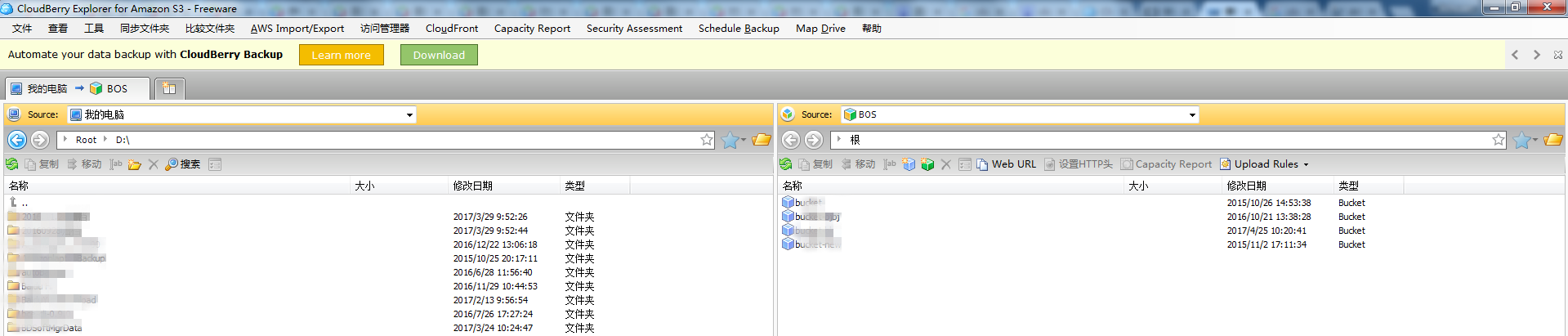
CloudBerry Explorer for Amazon S3 is an S3 graphical data management software provided by CloudBerry Lab. Its graphical interface is highly powerful, supporting management operations such as data upload, download, synchronization and deletion from the local to the cloud.
Baidu AI Cloud now also supports managing BOS resources via CloudBerry Explorer!
-
Download the software version matching your operating system, install it, and proceed with the setup.
Note: This software supports both free and paid versions. You can directly use the free version.
-
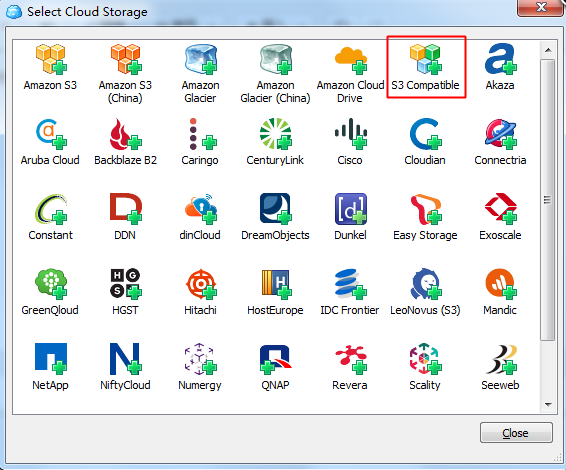
After installation, configure the cloud storage first and select "S3 Compatible":
-
Add a new S3 Compatible account. Enter BOS as the display name, the BOS service domain as the service point, and [Baidu AI Cloud AK/SK](Reference/Retrieve AK and SK/How to Obtain AKSK.md) as the access key and secret key. AWS S3-compatible service domain currently does not support HTTPS. Please uncheck "Use SSL" and select Signature Version 4.
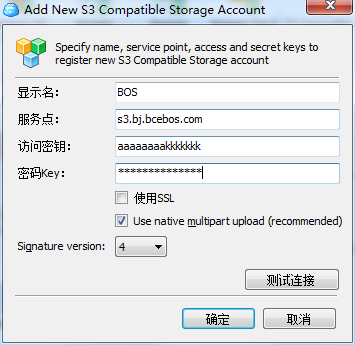
- Click "Test Connection" to confirm connectivity. A message saying "Connection success" will indicate a successful connection.
-
Now you can use CloudBerry Explorer for various data management tasks!