

Event Notification and Data Processing
Overview
The BOS event notification system is a smart trigger platform based on the BOS data processing framework V2.0. Developers can define data behaviors of interest within buckets using built-in platform functions. BOS monitors bucket operations like Put Object and Append Object and notifies downstream service systems of trigger events.
In addition, BOS integrates Baidu AI Cloud's powerful AI features, supporting direct triggering of advanced data processing capabilities based on monitored user behaviors and ensuring that processed results are delivered directly to businesses' downstream systems. This approach simplifies development logic, speeds up processes, and empowers users with superior data AI capabilities.
Application scenarios
The BOS event notification platform offers developers an automated system for monitoring and notifying about data behaviors, addressing multiple application scenarios such as:
- When new data is uploaded to a bucket, the application is immediately notified so it can retrieve and utilize the data right away.
- When images are uploaded to a bucket, they are processed immediately. The resulting new images are used for frontend display, and the original images are promptly deleted to free up storage space.
- When videos are uploaded to a bucket, content moderation (for pornography and illegal content) is carried out immediately. Any non-compliant content is promptly removed.
- When operations like PutObject or DeleteObject occur in a bucket and need to trigger subsequent custom processing workflows, this can be achieved via the BOS Trigger for CFC Function Computing.
In these scenarios, BOS users only need to configure trigger conditions on the event notification console, such as event name, encrypted authentication settings, monitored resources, covered resources, and triggered applications. Once configured, any changes to monitored resources in the specified bucket or under the specified prefix will automatically trigger the relevant application.
Prerequisites
- A Baidu AI Cloud account has been registered. For specific operations, please refer to [Register a Baidu AI Cloud Account](UserGuide/Register an account.md#Register a Baidu Account).
- The resources covered by an event notification rule refer to a single bucket or all files under a specific prefix in a bucket. Therefore, you first need to select the bucket for which to create the event notification rule. For details, see [Create Bucket](BOS/Console Operation Guide/Managing Bucket/Create bucket.md).
Supported regions
Currently, only Beijing, Suzhou, and Guangzhou are supported. For support in more regions, please Submit a Ticket.
Create rules
Note: Archived objects that have not been restored will not trigger event notifications. However, restored archived objects can trigger notifications as usual.
- Sign in to the BOS Management Console and navigate to the Global Overview page.
- In the left navigation bar of the BOS console, select the target Bucket, then click to open the bucket’s file list page.
- Click the Event Notification tab in the top navigation bar of the page to enter the Event Notification page.
- Click Create Rule to enter the creation page, and configure the following information:
| Parameters | Description |
|---|---|
| Status | Choose whether to enable event notifications for the rule. |
| Name |
|
| Rule ID |
|
| Product ID |
|
| Encrypted authentication | Choose whether to encrypt the event notification rule. If encryption is enabled:
|
| Event monitoring configuration | Choose whether to enable event monitoring. Configure if enabled:
|
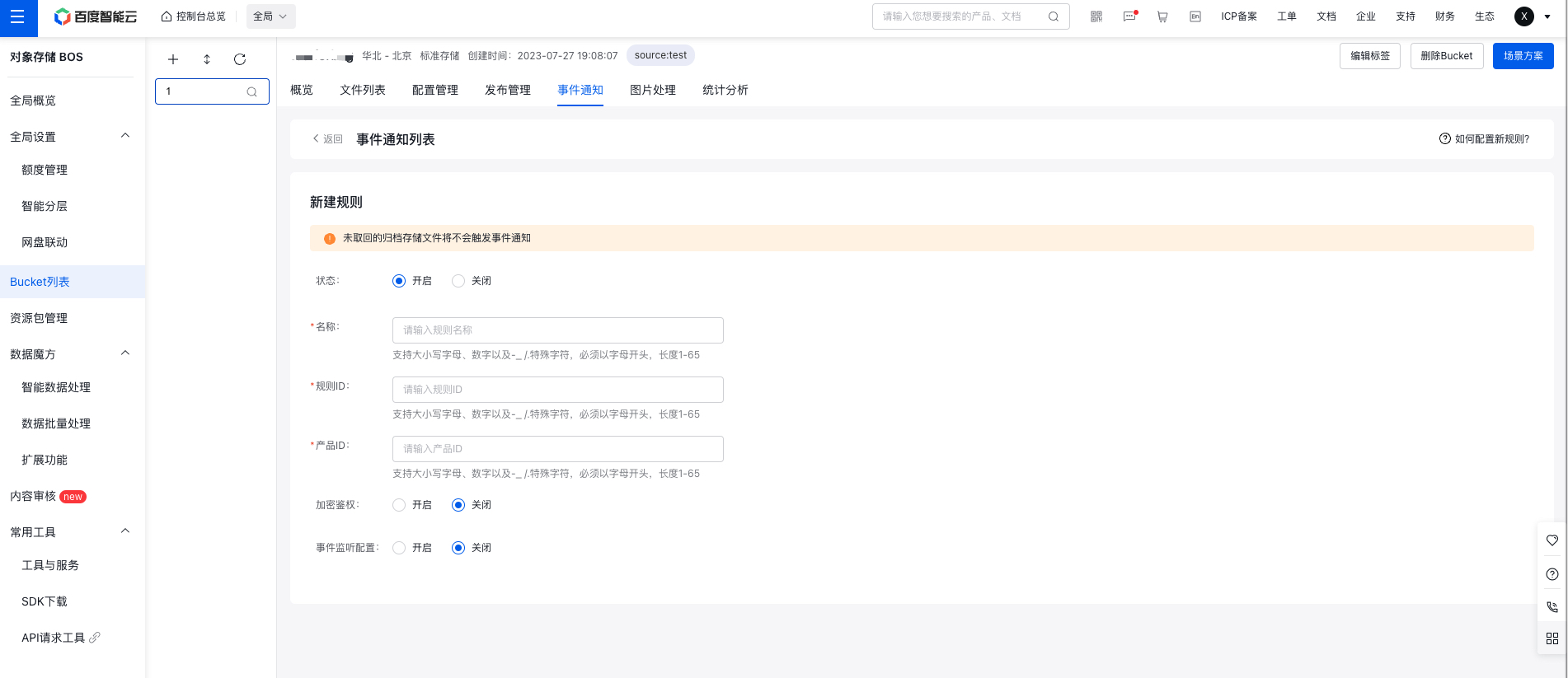
- Click Confirm to save the rule configuration. Successfully created rules can be viewed in the rule list on the Event Notification page. You can also perform management operations such as modifying or deleting existing rules.

Triggered application categories
Triggered applications fall into three categories: Baidu official applications, Cloud Function Compute (CFC), and custom applications. Baidu official applications: By leveraging Baidu AI Cloud’s robust data AI processing, BOS integrates various high-frequency, simple-to-use AI applications. Users just need to set a URL in the console to receive processed application results, enabling them to enhance their business efficiently with minimal development effort.
Currently, Baidu official applications include general text recognition, general object recognition, and multimedia cloud transcoding.
| Application category | Application name | Application description |
|---|---|---|
| Baidu official applications | General text recognition |
|
| General object recognition |
|
|
| Multimedia Cloud Transcoding |
|
|
| Abnormal image detection |
|
|
| Cloud Function Computing (CFC) | Cloud Function Compute (CFC) |
|
| Custom applications | Custom applications |
|
Related APIs
- [PutNotification API](BOS/API Reference/Bucket-Related Interface/Event notification/PutNotification.md): Use the PutNotification API to create event notification rules.
- [GetNotification API](BOS/API Reference/Bucket-Related Interface/Event notification/GetNotification.md): Use the GetNotification API to get created event notifications,.