

Bucket access and management
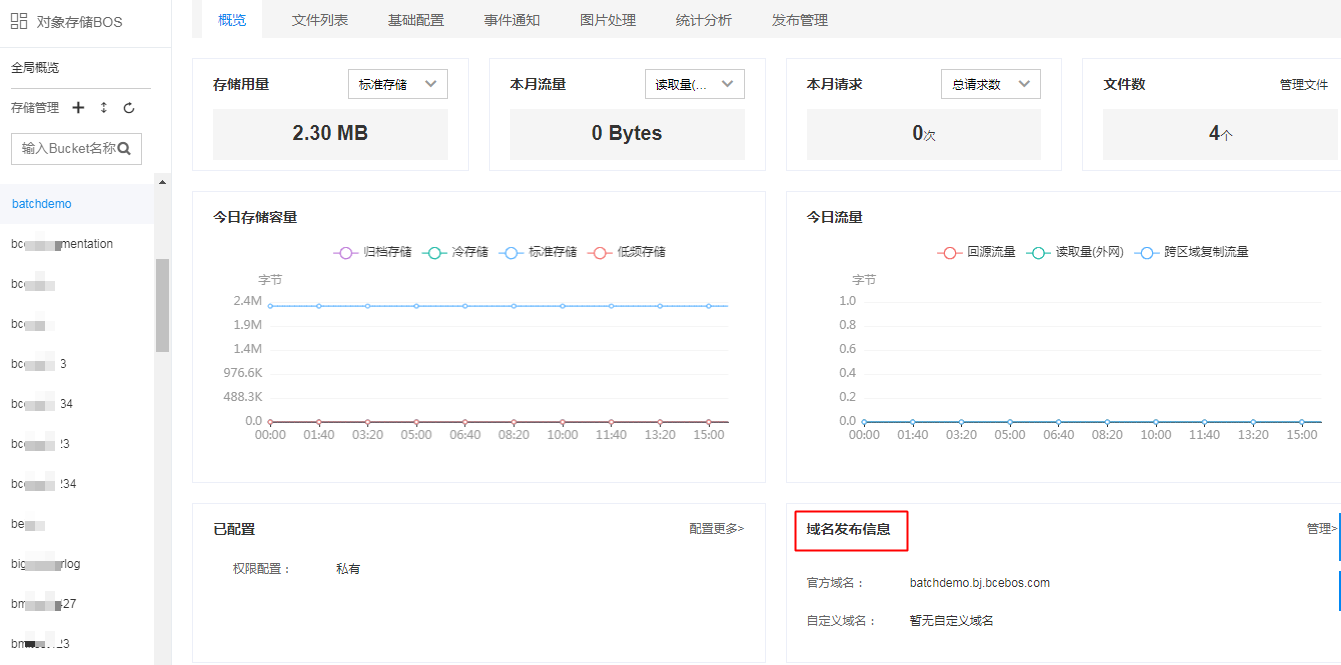
How can BOS view the domain name address of bucket?
Log in to the BOS console, navigate to the bucket's overview page to view the official and custom domain names as well as CDN acceleration settings. You can also click "Domain Name Release Information Management" to enter the domain name editing module, add custom domain names, enable CDN acceleration, and configure cache-related settings.
Does BCC use intranet to access BOS bucket in other regions?
If a BCC accesses a BOS bucket in the same region, it does so via the intranet. However, if it accesses a BOS bucket in a different region (e.g., a BCC in Beijing accessing a bucket in Guangzhou), the access occurs via a public network. This public access requires that the BCC is bound to a public IP.
Does BOS support to create folders under bucket?
BOS operates as a <key, value> system, where a bucket represents a storage space. The folders displayed on the management console are "simulated folders." These folders can be created in two ways:
- Create a file ended with "/", such as a file named "fakeFolder/";
- Add a prefix to the file name, such as naming a file "fakeFolder/img.jpg." Files with the same prefix will appear in the same simulated folder.
BOS supports folder creation function in the following two ways:
- By operations of console, please refer to [Manage Folders](BOS/Console Operation Guide/Manage object/Managing Folder.md).
- By operations of codes, please refer to SDK File [Java](BOS/SDK/Java-SDK/File management.md#Simulate folder function).
Does BOS support cross-origin access?
BOS supports setting Cross-Origin Resource Sharing (CORS), please refer to the [Cross-Origin Resource Sharing](BOS/API Reference/Bucket-Related Interface/Cross-Origin Access/PutBucketCors.md) for API. Please refer to [Set Cross-origin Access](BOS/Console Operation Guide/Managing Bucket/Set cross-origin access.md) as to how to set CORS on the console.
Does BOS support hotlinking prevention?
BOS supports hotlink prevention through customized permission settings. Bucket-specific permission settings include:
- Allow null referer,
- Do not allow null referer;
- Configuring matched referer strings.
- For specific setup methods, please refer to [Set Referer Allow List](BOS/Console Operation Guide/Managing Bucket/Set referer allow list.md).
How does BOS bind HTTPS certificate?
BOS supports enabling HTTPS by using custom domain name. (Hong Kong and Hong Kong Area II are not supported), with the setting method: Sign in to Console - Baidu AI Cloud Object Storage (BOS) - Bucket Name, click Release Management - Custom Domain Name Editing, and select enabling HTTPS configuration. If you want to enable the custom domain name HTTPS in Hong Kong and Hong Kong Area II, you should use CDN. The specified procedures are as follows: [first, configure BOS Custom Domain Name to Enable CDN Acceleration Service](BOS/Console Operation Guide/Data Publishing/Configuring CDN Upload Acceleration.md), and then [Configure HTTPS on CDN](CDN/Operation guide/Configure Domain Name/ HTTPS configuration/Configure HTTPS.md) and then access.
Bucket has been configured with cross-origin requests, why is it still unable to make cross-origin resource requests?
For configuring Bucket Cross-Origin Resource Sharing (CORS) on browsers, refer to [CORS Cross-Origin Best Practices](BOS/Typical Practices/How to Solve Browser Cross-Origin CORS Issues.md). If it still does not work after the configuration, it may be caused by cache problem of the browser, you are recommended to test again after clearing the browser cache.
How to delete a newly created bucket?
Once a BOS bucket is created, it cannot be deleted. However, if no files are uploaded or accessed in the bucket, there will be no associated charges.
How to enable CDN for BOS?
Currently, BOS supports using the bucket specified by CDN acceleration. After you select the bucket to be accelerated, you shall modify the DNS resolution of bucket domain name to CNAME domain name provided by CDN, thus accessing CDN node to initiate CDN acceleration. For detailed operations, refer to CDN Acceleration Release.
What is BOS intranet traffic? Is the traffic accessing BOS via BAE considered as intranet traffic?
For BCCs of the same account and region, BAE and BOS communicate via the intranet by default, meaning intranet traffic is used. However, BCH currently does not support intranet communication with BOS. Intranets across different regions do not communicate with each other, and the public network must be used for data transmission.
When data is transmitted via the intranet, no traffic charges apply; however, storage and request charges still apply. If you purchase a storage package, only storage fees will be deducted.
For Internet-based access, both request and traffic charges apply. If the CDN function is enabled simultaneously, additional CDN fees are charged.
What to do if the domain name of BOS is blocked by the applet of WeChat at the backend?
WeChat imposes access restrictions on external link addresses. It is inaccessible on WeChat by using the default assigned domains. It is recommended that after Bind Custom Domain Name, the custom domain name is used to access resources, and a domain name can only be bound to a bucket at present.
How to monitor egress traffic from BOS?
Egress traffic includes Internet read throughput, back-to-origin traffic, and cross-region replication traffic. BOS console supports viewing the write throughput, read throughput, reading times, writing times, CDN back-to-origin traffic and other monitor information. Please refer to Statistics and Monitoring for the specific introduction to metrics.
How to access the access log of BOS?
To access the access log of BOS, you need to enable the access logging function of bucket. Please refer to Set Access Log for detailed methods of operations. Please refer to Access Logs for log meaning and detailed description of format.
It typically takes 2-3 hours for access request logs to be stored in the target bucket after the request occurs. However, due to network conditions or other factors, some logs may take longer to reach the target bucket. Please be patient.
How to access the data in the bucket after the domain name is bound?
The binding of custom domain name by BOS can access your object directly with browser URL, and the custom domain name bound cannot be accessed normally until it is filed. The binding takes effect in 3 minutes in general. For detailed operations on binding a domain name, please refer to Bind a Bucket Domain Name.
How to view which websites refer to the link of BOS?
BOS does not support viewing the specific reference information of link temporarily. If you do not want others to refer to the BOS link, you can set the allow list of the referer field in the BOS console. After setting the allow list, only users whose referer field is in the allow list can access the data stored in the bucket, and requests not in the allow list will be rejected. However, if the referer is null, access is allowed by default and not restricted by the allow list. For detailed configuration, please refer to Hotlinking Prevention.
Can you view the traffic generated by which file from the Internet egress traffic?
Currently, two methods can be used for confirmation:
- Set and view logs to confirm.
- View "Statistical Analysis - Hotspot Analysis" and specify the appropriate bucket for confirmation.
For detailed operations, please refer to Statistics and Monitoring.
Can BOS decompress files online?
Currently, BOS supports online decompression. You should configure the decompression rules in the BOS Console - Event Notification, and the uploaded compressed package will automatically trigger decompression after matching with these rules. For details, please refer to Automatic File Decompression.
How can CDN access one of the private BUCKETS in BOS?
It can be done by setting the back-to-origin of private bucket. For detailed operations, please refer to Back-to-origin Configuration.
Does private BOS bucket has temporary permission to access file?
Private permission files generate temporary access URLs with expiration times,
- You can get it from the console file information
You can obtain a temporary URL using the SDK.
Reference documentation: Get Temporary URL (allows customization of access URL expiration time)
Can different buckets in BOS be bound to the same custom domain name?
A single custom domain name can only be bound to one bucket, but one bucket can bind up to 20 non-repeated domain names. For more references on the use of custom domain names, refer to: https://cloud.baidu.com/doc/BOS/s/ckaqihkra
Does BOS support mounting to Windows environment?
Baidu AI Cloud Object Storage (BOS) supports mounting to your server (only Linux system rather than Windows system). For detailed steps, refer to the tutorial of bosfs tool Install bosfs to Mount Linux Server.
Can WeChat directly access BOS file addresses?
BOS access URL may be blocked by WeChat. You can bind a custom domain name in the Baidu AI Cloud console and access resources via the custom domain link. Refer to the custom domain name: https://cloud.baidu.com/doc/BOS/s/ckaqihkra
Can BOS be mapped to our local server?
Currently, BOS does not support WebDAV or SMB and cannot be mounted in Windows environment. BOS provides bosfs for mount mapping only on Linux systems. You can use following tools to execute upload operations in Windows system: BOS Desktop, bcecmd and etc. For details, refer to: BOS Peripheral Tools.
After a video is uploaded in Baidu AI Cloud Object Storage (BOS) via front-end JS, can I get the video duration (e.g., 30 minutes)?
Baidu AI Cloud Object Storage (BOS) does not support retrieving the duration of audio or video files.
Does BOS Android SDK support resumable upload?
BOS Android SDK doesn't support resumable upload, while BOS SDK supports resumable upload, including Java SDK,Python SDK, PHP SDK, Ruby SDK and C++ SDK.
How to obtain BOS resource access URL?
In Baidu AI Cloud Object Storage (BOS), you can get the corresponding file access URL address through the following methods:
-
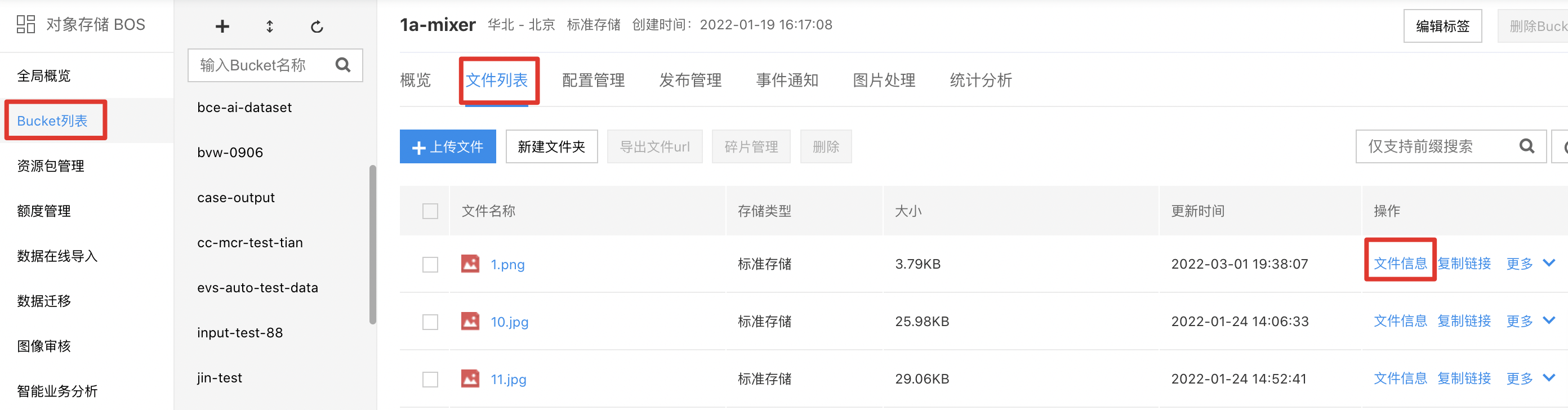
Method 1: Via BOS Management Console → Bucket List → File List → File Information → Copy Link
-
Method 2: Manually concatenate the URL
a) Bucket public read permission: http://. .bcebos.com/
b) Bucket private permission: http://. .bcebos.com/ ?authorization=
Note: Replace bucketname, region, objectname, authorization (requires combining with GetObject API to generate authentication)
- Method 3: Get the URL through the SDK, for example: Java SDK
Does the BOS API support downloading all files under a directory?
The current BOS API does not support batch downloading of all objects under a directory. You must use the ListObject API to retrieve the list of resource files within the directory and then download them individually using the GetObject API.
ListObject reference documentation: ListObjects
getobject reference documentation: GetObject
In Baidu AI Cloud Object Storage (BOS), if a bucket name is already taken by someone else, can it be recreated?
Bucket names in Baidu AI Cloud Object Storage (BOS) must be globally unique, meaning a name cannot be reused once it has been created by another user.
Can I get the [access URL] of BOS?
In Baidu AI Cloud Object Storage (BOS), you can get the corresponding file access URL address through the following methods:
Method 1: Via BOS Management Console → Bucket List → File List → File Information → Copy Link
Method 2: Manually concatenate the URL
a) Bucket public read permission: http://
b) Bucket private permission: http://
Note: Replace bucketname, region, objectname, authorization (requires combining with GetObject API to generate authentication)
Method 3: Get the URL through the SDK, for example: java sdkHow to download files in batches from BOS?
In Baidu AI Cloud Object Storage (BOS), batch download can be performed by using the following methods:
- Use BOS Peripheral Tools, such as BOS Desktop, Bcecmd, etc;
- Use API/SDK to perform ListObject, then iteratively call the GetObject API for download.
How to verify the integrity of files downloaded from BOS?
You can use the GetObject or GetObjectMate API, where the return value includes an etag parameter. By locally calculating MD5 value of your file and comparing it with etag value returned by BOS, you can verify the integrity of file. Reference documentation: BOS API Documentation
How to update file content while keeping the BOS file address unchanged?
In Baidu AI Cloud Object Storage (BOS), you can replace the original server file by uploading a file with the same name, and the access URL remains unchanged.
May I access an object permanently without calculating the signature authentication information?
In Baidu AI Cloud Object Storage (BOS), after setting bucket permissions to public read, the access URLs will not carry authorization information and you can access the object permanently.
Is there an SDK available to support batch upload/download of multiple objects?
Baidu AI Cloud Object Storage (BOS) does not support batch upload/download of object APIs. You can implement this at the service layer using upload or download APIs.
How to get the size of the file uploaded successfully?
Baidu AI Cloud Object Storage (BOS) provides GetObjectMeta API for users to get information such as file size.
Do buckets in Shanghai Region support HTTPS?
Baidu AI Cloud Object Storage (BOS) supports the binding of HTTPS certificates only in Beijing, Guangzhou and Suzhou, but not in other regions.
File download/How to generate access URLs?
Baidu AI Cloud Object Storage (BOS) provides the Download Object API.
How to automatically upload resources from BOS to CDN?
Baidu AI Cloud Object Storage (BOS) provides the "Cache Management" function, which can automatically preload uploaded resources into CDN cache or update CDN cache data.
How to get the access URL of private files?
For the Baidu AI Cloud Object Storage (BOS), when a bucket is set to private permission, you can get the access URL through the following methods:
- Via BOS Console → Bucket File List → File Information → Select Access URL to copy;
- Use BOS SDK to call APIs for obtaining access URLs, such as: Get File Download URL in Java SDK
If CDN acceleration is enabled for BOS, why it is not CDN address after I click the copied link?
All links in BOS default to official BOS links. To obtain CDN links, click on file information and select the CDN link option.
How to rename a file in the BOS management console?
You can handle in the following two ways:
- In the BOS Management console - Bucket File List - More - Rename. For details, refer to: Rename File
- Recall BOS API/SDK for renaming, such as: renaming files via the CopyObject API, then deleting the original file via DeleteObject API. Refer to: CopyObject API, DeleteObject API
How to access a BOS bucket via a custom domain name?
Currently, buckets support binding custom domain names for access. For details, refer to: Create Bucket Custom Domain Name.
How to delete all resources in a bucket recycle bin?
You can locate the recycle bin directory in the management console, and delete data under the corresponding directory using BOS peripheral tools like bcecmd. For details, refer to: Delete Object.
When BOS modifies a bucket's attribute from public read to private, does this setting take effect immediately?
Yes, changes to bucket permissions take effect immediately.
How long does it take for the bucket's lifecycle configuration to take effect?
Currently, bucket lifecycle configurations typically take effect within 24 hours. For details, refer to: Notes.
What is the maximum validity period of a STS token?
Currently, the maximum validity period for tokens generated by STS is 129,600 seconds (36 hours). For details, refer to: STS Service API.
How to configure: certain users can access only specified buckets while hiding others?
Identity and Access Management can be configured to manage operation and viewing permissions of different users. For details, refer to: Configure Identity and Access Management.
Does BOS support setting different bucket permissions for individual users?
BOS now supports Identity and Access Management, and grants different operation permissions for each user. For details, refer to: Configure Identity and Access Management.
How to resolve an IAM User's bucket creation failure due to insufficient permissions?
Currently, IAM users require to be granted permissions to operate on Baidu AI Cloud Object Storage (BOS). For permission settings, refer to: Configure Identity and Access Management.
How to configure a bucket for Intranet access only?
Baidu AI Cloud Object Storage (BOS) provides the IP Allow List function to allow access to permitted IP addresses.
How to restore a bucket that was mistakenly configured to prohibit access to everyone?
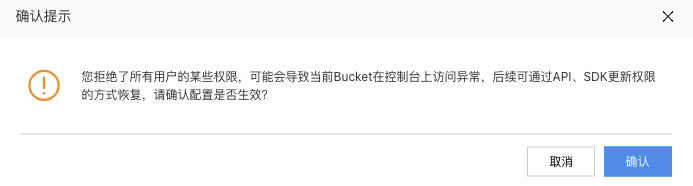
The bucket permission settings in the Baidu AI Cloud Object Storage (BOS) console can be configured to deny access to everyone (a prompt will appear during configuration). Once configured, the console will no longer be able to access the bucket as usual.
Repair method:
- Use API methods
Baidu AI Cloud's API Explorer provides page-based API call function, thus enabling quick online implementation of related API calls. Example of modifying all deny permissions to private permissions
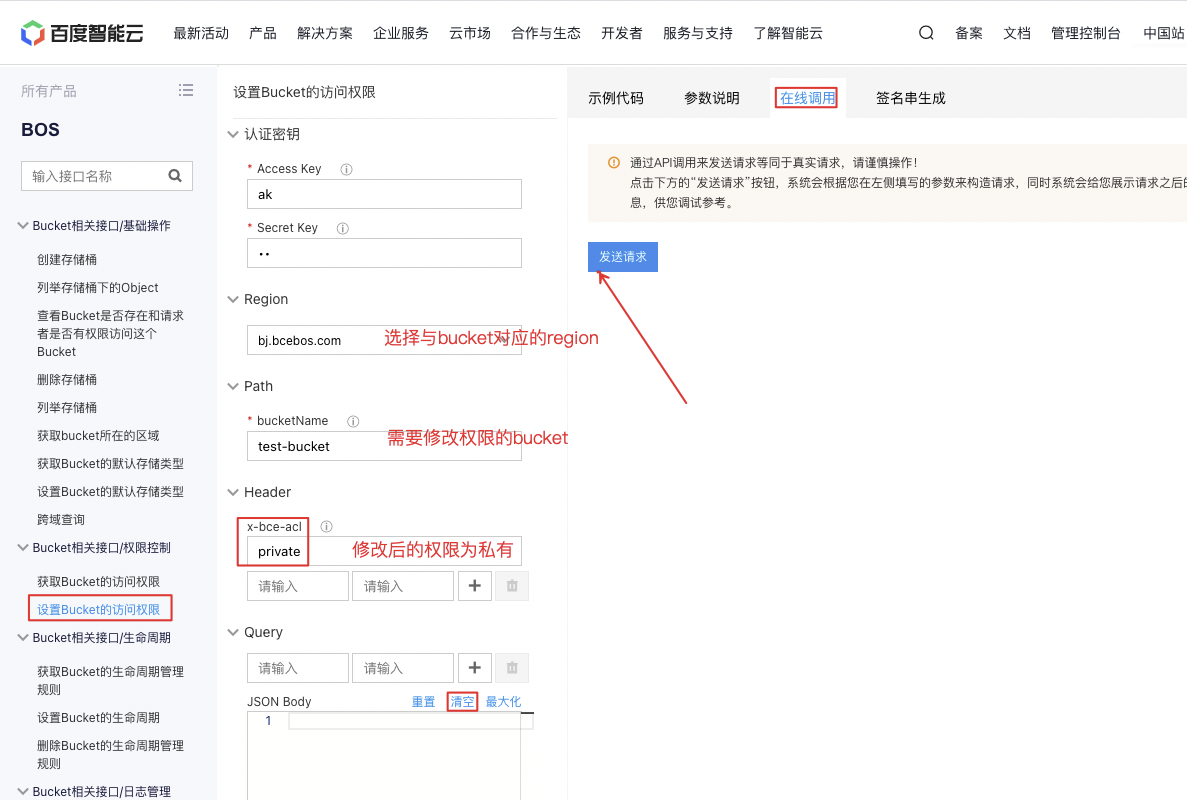
For more details on permission modification, refer to BOS API Permission Control. - Use SDK methods
Taking Python SDK as an example, modify all deny permissions to private permissions
bos_client.set_bucket_canned_acl(bucket_name, canned_acl.PRIVATE) - Use the Tool BOSCMD
First, use commandbcecmd -c yourConfPathto configure related parameters:ak, sk, region, domain, AutoSwitchDomain, etc. At this point, parametersregion and domainmust match theregion and domainof the bucket whose permission is being modified, and after the configuration of parameterAutoSwitchDomain=no, execute the following command to change all deny permissions to private permissions.
bcecmd --conf-path yourConfPath bosapi put-bucket-acl --bucket-name bucket1 --canned private
For more permission modifications, refer to Configure Bucket ACL.
Note: The AK-SK used for the above three recovery methods must belong to the root account.