

S3 Browser
Updated at:2025-11-03
Overview
S3 Browser is a graphical client designed for the Windows platform, supporting the management of S3 and S3 API-compatible cloud storage services. It enables users to manage object storage data through a graphical interface.
If you need to use and manage multiple cloud storage services simultaneously on the Windows platform, you can use S3 Browser, which has the following common functions:
- Account configuration management
- Create and delete buckets
- View bucket information
- Upload and download files in batch
- Copy/move/rename files and folders
- Upload and download bandwidth rate limit
- Preview files
- Client operation logs
- Synchronize data
Installation and configuration
Download and installation
Visit S3 Browser official website to download and install.
Configure S3 Browser to manage BOS

| ConfigMap | Required or not | Input/selected content | Description |
|---|---|---|---|
| Display name | Yes | BOS | Custom content. For ease of management, it is recommended to enter BOS. |
| Account type | Yes | S3 Compatible Storage | When managing BOS with S3 Browser, this option must be set to "S3 Compatible Storage" |
| API endpoint | Yes | https://s3.bj.bcebos.com | S3 compatible domain name using BOS |
| Access Key ID | Yes | Baidu AI Cloud Access Key ID. | Require permission to access BOS |
| Secret Access Key | Yes | Baidu AI Cloud Secret Access Key | Require permission to access BOS |
| Use secure transfer (SSL/TLS) | No | Check | Recommended to check |
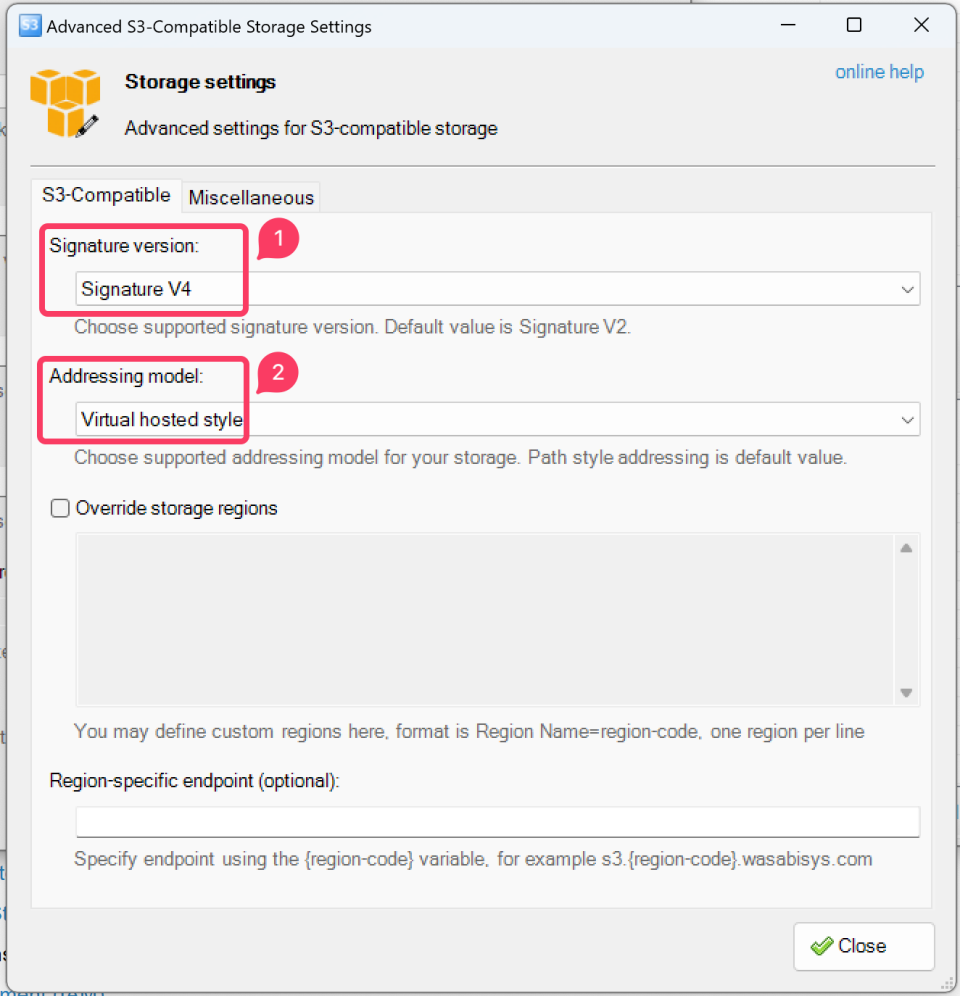
| ConfigMap | Required or not | Option | Description |
|---|---|---|---|
| Signature version | Yes | Signature V4 | BOS is compatible with AWS Signature Version 4 |
| Addressing model | Yes | Virtual hosted style | This method must be selected |
Once configured, you can use S3 Browser to manage Baidu AI Cloud Object Storage (BOS).