

Set storage inventory
Overview
Storage inventory is a feature that assists users in managing objects within their buckets. Based on the user's configured inventory tasks, BOS can conduct daily or weekly scans of specified objects in the bucket and generate an inventory report. This report is saved as a CSV file in a user-defined bucket, listing objects, their metadata, and the required attribute information configured by the user.
Description:
- The inventory function is charged from December 8, 2022 based on the number of listed objects (files). For pricing details, refer to BOS Price Description.
- This feature is currently fully supported in the North China (Beijing), East China (Suzhou), and South China (Guangzhou) regions.
- The efficiency of inventory exports is influenced by the number of objects in the bucket. For buckets with a large volume of files, a 1-2 day delay in generating the inventory is typical.
Application scenarios
The inventory feature helps users manage bucket objects systematically, serving as an alternative to object storage list API calls. Key uses of the inventory function include but are not limited to:
- Conducting regular audits and generating file lists along with their associated attributes.
- Streamlining and accelerating workflows through periodic, script-free scanning. Simple configurations enable routine output of file reports.
Prerequisites for use
Before configuring the inventory, you need to understand two concepts:
-
Source bucket: The bucket to enable the inventory function.
- Listing the objects included in the inventory.
- Providing inventory configuration details.
-
Target bucket: The bucket storing the inventory.
- Offering inventory list files.
- Including a Manifest file that describes the location of the inventory list files.
Set storage inventory
- Sign in to the Baidu AI Cloud Object Storage (BOS) Management Console.
- From the bucket list on the left, select the bucket for which you want to set permissions, then click its name to enter the bucket management directory.
- Select the Configuration Management tab in the top navigation bar.
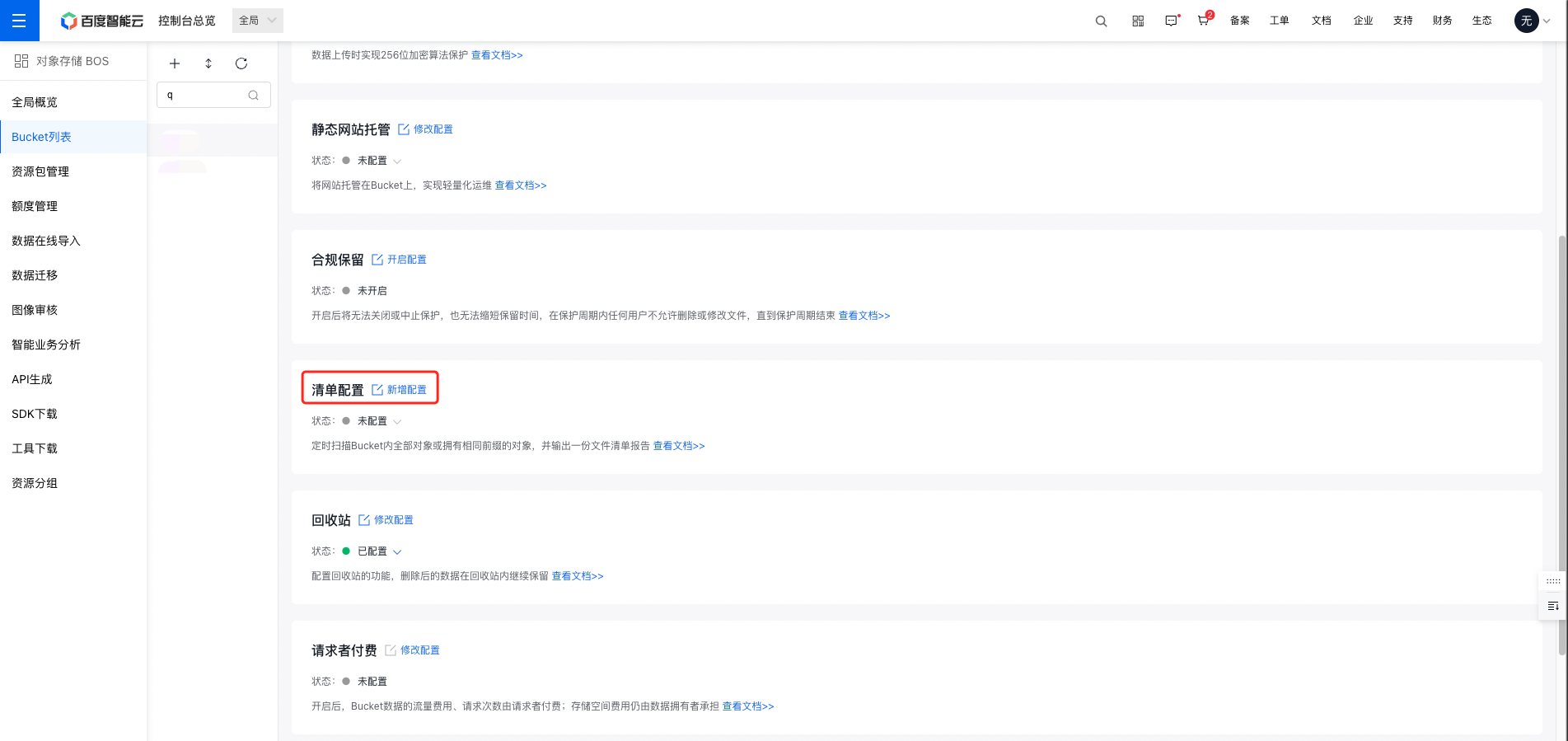
- On the Configuration Management page, select Advanced Configuration, and click Add Configuration in the Inventory Configuration area to create an inventory rule.
- Set inventory rules
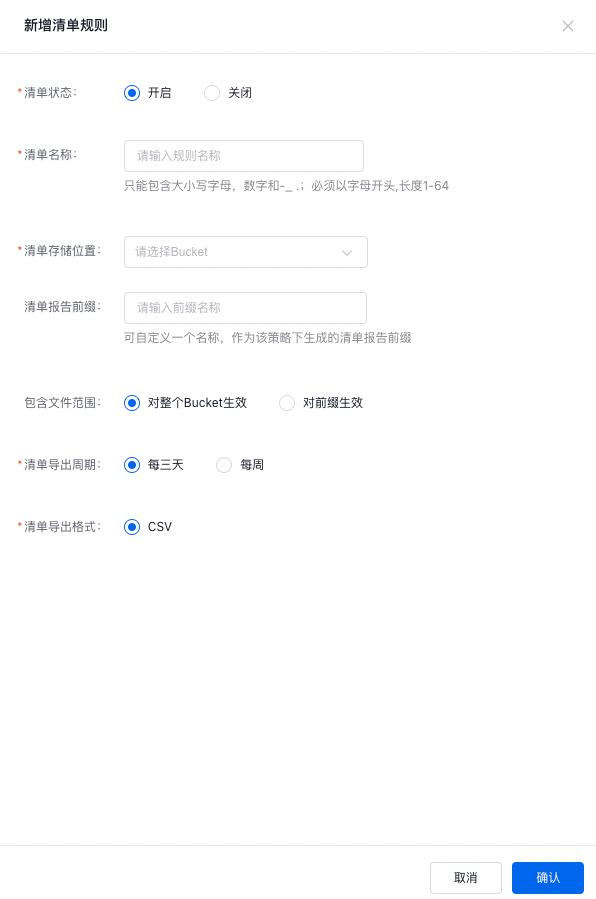
| Configuration name | Configuration description |
|---|---|
| Inventory status |
|
| Inventory name |
|
| Inventory storage position |
|
| Report inventory prefix |
|
| Include file scope |
|
| Inventory export cycle |
|
| Inventory export format |
|
Note:
- A single bucket can support up to 20 inventory rules simultaneously. If the rule limit is exceeded, existing rules must be deleted before creating new ones.
- Edit or delete inventory rules
You can modify existing inventory rules, such as reactivating a disabled rule. You can also delete inventory rules. Once a rule is deleted, BOS will stop generating inventory reports based on that rule.
Inventory report storage path
- Inventory report storage location: The inventory report will be published in the target bucket, and the inventory report will be published in the following path:
1destination-prefix/[source-bucket]/[config-ID]/[YYYY-MM-DDTHH-MMZ]/xxx.csv- Manifest-related files storage location: The relevant Manifest files will be published in the target bucket in the following path:
1destination-prefix/[source-bucket]/[config-ID]/[YYYY-MM-DDTHH-MMZ]/manifest.json
2destination-prefix/[source-bucket]/[config-ID]/[YYYY-MM-DDTHH-MMZ]/manifest.checksum
Meaning of the path field
- desitination-prefix: It is the “Report Inventory Prefix” set when you configure the inventory, which can be used to group all inventory reports in the public location of the target bucket.
- source-bucket: It is the name of the source bucket corresponding to the inventory report. This folder is added to avoid possible conflicts when multiple source buckets send their respective inventory reports to the same target bucket.
- config-ID: It is the “Inventory Name” set when you configure the inventory. When multiple inventory reports are set for the same source bucket and sent to the same target bucket, config-ID can be used to distinguish different inventory reports.
- YYYY-MM-DD-HH-MM: Timestamp, which includes the time and date when the bucket scanning starts when generating the inventory report.
- manifest.json: Refers to the Manifest file.
- manifest.checksum: Refers to the MD5 of the content of the manifest.json file.
Inventory content
The generated inventory includes a list of inventory CSV files and the corresponding Manifest files.
Contents of inventory CSV file list
The output inventory file list includes the following:
| Field description | Description |
|---|---|
| Bucket | Bucket name |
| Key | File name |
| Size | File data length |
| Etag | Object hash. It may be the base64-encoded MD5 digest of the object data, depending on object creation mode . |
| StorageClass | File storage class |
| CreateTime | File creation time. Time format: yyyy-mm-ddThh:mm:ssZ . Such as: 2016-09-07T00:00:00Z(UTC) |
Manifest file content
Manifest file content:
| Field description | Description |
|---|---|
| sourceBucket | Source bucket name corresponding to the inventory report |
| destinationBucket | Name of the target bucket for storing exported files |
| version | Exported version. The format is "year-month-day", e.g., "2021-11-03" |
| fileFormat | Report format |
| fileSchema | Report structure |
| files | Actual list of exported report files in the target bucket. Include key (inventory file name), size (inventory file size), and md5Checksum (md5 value) |
Example of a Manifest report:
1{
2   "sourceBucket": "src-bucket-name",
3   "destinationBucket":"destination-bucket-name",
4   "version":"2020-11-03",
5   "fileFormat":"CSV",
6   "fileSchema":"Bucket,Key,Size,etag,StorageClass,PutDate,CreateTime",
7   "files":[
8        {
9            "key":"destination-prefix/[source-bucket]-[config-ID]-[YYYY-MM-DDTHH-MMZ]-index.csv",
10            "size":1603959,
11            "md5Checksum":"2177e775870def72b8d84febe1ad3574"
12        }
13      ]
14}
API reference
- PutBucketInventory: It is designed to create an inventory task in the source bucket. You can name the task and then use this request to create an inventory task.
- GetBucketInventory: It is designed to retrieve a specific inventory configuration of a specified bucket through the GET operation.