

Access control
Signature certification access
Baidu AI Cloud features a unified API authentication mechanism. Refer to [Authentication Mechanism](Reference/Authentication mechanism/Introduction.md) for details.
Original AK/SK authentication
- The original AK/SK refers to the [AK (access key ID)/SK (secret access key) ](Reference/Retrieve AK and SK/How to Obtain AKSK.md)automatically assigned to you when you register BOS, which is mainly used to authenticate and certify the user’s calling behavior, equivalent to the user name and password dedicated to Baidu AI Cloud API. Every request you send to BOS shall pass authentication and certification before BOS processes your request.
- The interactive process of using the original AK/SK authentication in the mobile scenario is shown in the following figure:
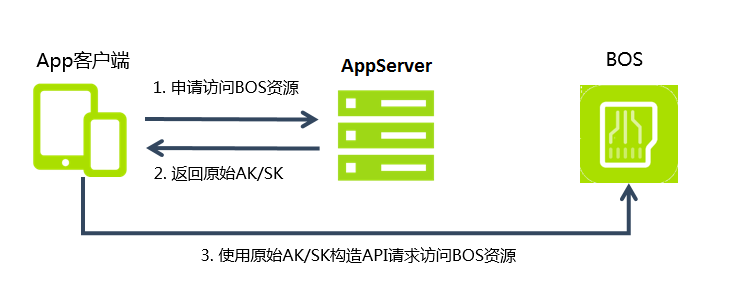
- Sending your original AK/SK to the mobile side is bound to cause certain security risks. Therefore, the original AK/SK authentication is only recommended for you to use in the test while the STS authentication is recommended for the formal provision of services.
Note: For authorization, it is recommended to strictly follow the principle of minimum permission, limit users to restricted operations (such as only authorizing read operations) and set access to resources with specified prefixes, so as to avoid granting excessive permission, resulting in unexpected unauthorized operations and data security risks.
Temporary authorized access
STS Introduction
BOS allows temporary third-party access authorization via the STS mechanism. STS (Security Token Service) is Baidu AI Cloud's temporary authorization service. By using STS, you can issue access credentials with custom validity periods and permissions to third-party users, enabling them to call Baidu AI Cloud APIs directly to access cloud resources.
Note: The third-party users here mainly refer to the end users of the Applications you have developed. For example, if you are a mobile App developer, your App end users are called third-party users.
Take the mobile client access to BOS service as an example:
If you are a mobile App developer, have enabled the BOS service and need to provide your App client with access to BOS service, you have the following two methods to authenticate the mobile client:
STS authentication
To ensure secure and convenient BOS services on mobile devices, Baidu AI Cloud has developed the STS service to meet security requirements in mobile scenarios. Through STS, temporary authorization can be granted without exposing your own AK/SK.
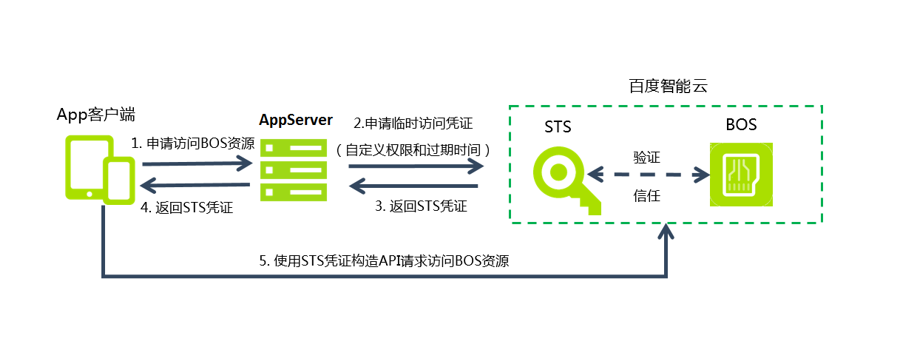
The process of using STS to temporarily authorize the APP client is shown in the following figure:
-
Request permissions to access BOS.
To gain access to BOS resources, app clients must request access permissions from the AppServer. The AppServer empowered with BOS service can assign permissions and restrict resource access for various app end users.
-
Request temporary access credentials.
AppServer shall apply for a temporary access credential from STS service. AppServer applies for the temporary access credential by calling STS's
GetSessionToken()API, and meanwhile specifies the resource access permission and its expiration time. For the calling method ofGetSessionToken(), please refer to [GetSessionToken API](#GetSessionToken API), and for STS service details, please refer to STS-related API document. -
The AppServer receives the STS credentials.
After reviewing the application, STS sends temporary access credentials back to the AppServer. The credentials include the temporary access key AK/SK, SessionToken, expiration time, and the AppServer’s user ID. The AppServer can store these credentials in a cache and directly provide them to multiple app clients needing the same permissions.
-
The AppServer forwards the STS credentials to the app client.
The AppServer sends the obtained STS credentials to app clients, which can cache the credentials. If the credentials expire, the app client must reapply for valid credentials from the AppServer.
-
App clients utilize STS credentials to access BOS resources.
App client devices can use the provided STS credentials to build API requests for direct access to BOS resources. BOS recognizes STS credentials and uses the STS service to validate them, ensuring proper responses to user requests.
Advantages of using STS:
- You only need to request temporary access credentials from STS and share them with third-party users without revealing your administrative account or AK/SK credentials. You can define the permissions and validity periods of these access credentials according to your requirements.
- Permission revocation is not a concern, as temporary access credentials automatically expire once their validity period ends.
GetSessionToken API
API description
The GetSessionToken API is used for temporary authorization to request and obtain a set of temporary access credentials.
Permission description
The request initiator must possess a valid AccessKeyID and SecretAccessKey to submit the request.
Request
-
Request syntax
Plain Text1POST /v1/sessionToken?durationSeconds=DurationSeconds HTTP/1.1 2Host: sts.bj.baidubce.com 3Date: <Date> 4Authorization: <AuthorizationString> 5{ 6 "id":"userid", 7 "accessControlList": [ 8 { 9 "eid":<eid>, 10 "service":"bce:bos", 11 "region":"bj", 12 "effect": "Allow", 13 "resource": ["Bucketname/*"], 14 "permission": ["READ"] 15 } 16 ] 17 } - Request parameters
| Name | Parameter location | Description | Default value | Required or not |
|---|---|---|---|---|
| durationSeconds | Query | The validity period for a temporary access credential during which you can repeatedly use it to access BOS resources after a single STS request is specified in seconds. The maximum duration allowed is 129,600 seconds (36 hours). Data type: int. | 43200 (12 hours) | No |
- Request headers
| Name | Data type | Description | Default value | Required or not |
|---|---|---|---|---|
| Authorization | string | For the computing method of certification string, please refer to [Generate certification string](Reference/Authentication mechanism/Generate Authentication String.md). | - | Yes |
-
Request elements
The request element of this API is central to permission management. It comprises one or more ACL configuration items, with each item being independent of the others.
Name Data type Description Default value Required or not Parent node accessControlList array Determine the start of the ACL body, which is made up of one or more groups of ACL configuration items. - Yes - effect string Specify whether the Request that matches this ACL configuration item can be executed, and its value is AlloworDeny.Allowmeans the execution is allowed;Denymeans the execution is denied.- Yes accessControlList eid string Identify the ACL configuration item's ID. - No accessControlList id string ACL identifier. - No - permission array Permissions affected by ACL configuration items may be READ,WRITE,LIST,MODIFY,FULL_CONTROL,GetObjector other fine-grained permissions.- Yes accessControlList region string Regions covered by ACL configuration items, with “*” representing all regions. - Yes accessControlList resource array Resources affected by ACL configuration items, supporting wildcards. For example, <BucketName>/<ObjectKey>or<BucketName>/xxx*- Yes accessControlList service string Service components impacted by ACL configuration items, with “*” representing all services. - Yes accessControlList
Description:
- Since GetSessionToken's response might include STS credentials, it is highly recommended to invoke it over the HTTPS protocol.
- Service: Using BOS service as an example, the value is "service":"bce:bos".
Resource: For "service":"bce:bos", the resource supports both buckets and objects.
- When resource is bucket, its value is
. For example, "resource": ["sts-bucket-1"]; - When resource is object, its value is <BucketName/ObjectName>. For example, "resource": ["sts-bucket-1/object1"];
- In addition, resource also supports the wildcard
*, indicating all objects under bucket For example, "resource": ["sts-bucket-1"].permission: BOS service supports the
READ/WRITE/LIST/MODIFY/GetObjectpermission. Each permission corresponds to a set of API requests as follows:
Operations corresponding to the
READpermission include:
- GetBucketLocation
- HeadBucket
- GetObject
- GetObjectMeta
- ListParts
Operations corresponding to the
WRITEpermission include:
- PutObject
- PostObjcet
- InitiateMultipartUpload
- UploadPart
- CompleteMultipartUpload
- AppendObject
- AbortMultipartUpload
- DeleteObject
- DeleteMultipleObjects
- FetchObject
Operations corresponding to the
LISTpermission include:
- ListObjects
- ListMultipartUploads
Operations corresponding to the
MODIFYpermission include:
- PutObject
- PostObjcet
- AppendObject
- RenameObject
- CopyObject
- FetchObject
- PutSymlink
Operations corresponding to the
GetObjectpermission include: **
- GetObject
- GetObjectMeta
Note:
- If no ACL is specified in the request element, the temporary permission credentials returned by default will match your current READ/WRITE permissions. Authorizing third-party users could pose risks to your account resources. It is advisable to specify the ACL explicitly when granting temporary permissions to mitigate these risks. If the request body is empty, the default STS credentials returned will align with your current permissions.
- To specify ACL, it is recommended to strictly follow the principle of [minimum permission](BOS/Developer Guide/Data Security/Principle of least privilege.md), limit users to restricted operations (permission field) and set access to resources with specified prefixes (resource field), so as to avoid data security risks.
Response
-
Response headers
This API uses only public response headers.
- Response element
| Name | Data type | Description |
|---|---|---|
| accessKeyId | string | Access Key (AK) for STS credential access. |
| expiration | date | Access expiration duration. |
| secretAccessKey | string | Secret Key (SK) for STS credential access. |
| sessionToken | string | When using STS credentials, the SessionToken must be included. |
| userId | string | Your user ID. |
Example
-
Request example
Plain Text1POST /v1/sessionToken?durationSeconds=DurationSeconds HTTP/1.1 2Host: sts.bj.baidubce.com 3Date: Wed, 06 Apr 2016 06:34:40 GMT 4Authorization: AuthorizationString 5Content-type:application/json 6Content-Length:178 7 8 { 9 "id":"10eb6f5ff6ff4605bf044313e8f3ffa5", 10 "accessControlList": [ 11 { 12 "eid":<eid>, 13 "service":"bce:bos", 14 "region":"bj", 15 "effect": "Allow", 16 "resource": ["sts-bucket-1-140683201300192-1447847972462384520478/*"], 17 "permission": ["READ"] 18 } 19 ] 20 } -
Response example
JSON1HTTP/1.1 200 OK 2Server: Apache-Coyote/1.1 3Content-Type: application/json;charset=UTF-8 4Date: Wed, 06 Apr 2016 06:34:40 GMT 5{ 6 "accessKeyId": "3bdecf4afebd41849628389a20629ecc", 7 "secretAccessKey": "3f901ef12d454b9c92ba2dde7c029140", 8 "sessionToken": "ZGZiM2M3MmU4Mjk4NGQ2MGEzYTNhYTAyMDE3NTZmZmV8AAAAAC8CAABf0XcbS9E/leusHxRyZ4DYNb+SH374S+mmkxaOpcwdLPC7JL/aTF5F7x83dQn354VKiTyNGuvQIsv7MidIPN7+0oOehdFlHua4RkwqIi8wOslX0qNitZa56WpxowLprrMksOHiQiEqYEzAyaVF3Oy3hBbMiX/RprtcnxERAi1/skNR1VzTZyYfS5D4p8Ul62X9Whwmj5Lkxy6yuZ1og94wytwTc8aWPFPGFIpQyCpCaxYvl/QkA1M0rxQ6SMaHbxTyEYuG2Eg8EOP0EKn2O2DMjGuLURRKuxHRCrFidRxDqOX9kM/L7gQXuaZl9DdB1DwZPrSo8xiPDRrfkpIqvkJEeB0blb8dXtMm0V0lmTznUrnPuoD4nfVyEPKCET+0JhQooxNLWDE6x4alnR8QtJkJ2yjrYaoMZdeuqKRcpgehVOIgI8ZDIumN1rdObs7a4Hw4Gmx7f0gQgLWdIF4ZOKsSpWP8aos+vzdOA+NNSHsTVg==", 9 "createTime": "2015-11-18T11:48:17Z", 10 "expiration": "2015-11-18T23:48:17Z", 11 "userId": "2d6f4473c99e4ca7be1ca19ec18beacf" 12} -
Example of sts configuring with modify permission (see bucket permission control below for the definition of modify permission)
Deny MODIFY + Allow WRITE: In this configuration, addition and deletion are allowed, but overwriting is prohibited
1 POST /v1/sessionToken?durationSeconds=DurationSeconds HTTP/1.1
2 Host: sts.bj.baidubce.com
3 Date: Wed, 06 Apr 2016 06:34:40 GMT
4 Authorization: AuthorizationString
5 Content-type:application/json
6 Content-Length:178
7 {
8 "id":"10eb6f5ff6ff4605bf044313e8f3ffa5",
9 "accessControlList": [
10 {
11 "eid":<eid>,
12 "service":"bce:bos",
13 "region":"bj",
14 "effect": "Allow",
15 "resource": ["sts-bucket-1-140683201300192-1447847972462384520478/*"],
16 "permission": ["WRITE"]
17 },
18 {
19 "eid":<eid>,
20 "service":"bce:bos",
21 "region":"bj",
22 "effect": "Deny",
23 "resource": ["sts-bucket-1-140683201300192-1447847972462384520478/*"],
24 "permission": ["MODIFY"]
25 }
26 ]
27 }
28 ```
29 - `Allow MODIFY`: In this configuration, overwriting is allowed, but addition and deletion are prohibited
30 ```json
31 POST /v1/sessionToken?durationSeconds=DurationSeconds HTTP/1.1
32 Host: sts.bj.baidubce.com
33 Date: Wed, 06 Apr 2016 06:34:40 GMT
34 Authorization: AuthorizationString
35 Content-type:application/json
36 Content-Length:178
37 {
38 "id":"10eb6f5ff6ff4605bf044313e8f3ffa5",
39 "accessControlList": [
40 {
41 "eid":<eid>,
42 "service":"bce:bos",
43 "region":"bj",
44 "effect": "Allow",
45 "resource": ["sts-bucket-1-140683201300192-1447847972462384520478/*"],
46 "permission": ["MODIFY"]
47 }
48 ]
49 }
50 ```
51
52### STS authentication process
53
54When a third-party user uses the returned temporary AK/SK and SessionToken to make a request to the Baidu AI Cloud server, how does the server complete the temporary authentication verification?
55
56- **First, the server will verify the validity of the request.**
57
58The server identifies the corresponding Secret Access Key using the Access Key ID provided in the request, then extracts the signature string and signature from the request. If the server's computed signature matches the provided signature, the request is deemed valid; otherwise, it is considered invalid and denied.
59
60- **Then, the server will verify whether the requester has permission to operate the resource.**
61
62The server will compare this request with the ACL list carried by GetSessionToken when applying for temporary token one by one, and the processing logic after comparison is as follows:
63
64 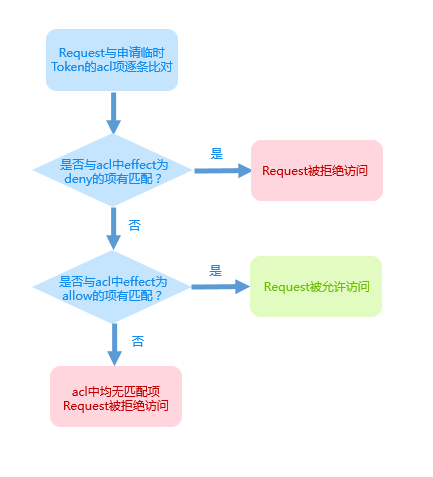
65
66- **Example:**
67
68Suppose the ACL is as follows when applying for temporary token:
69
70 [{
71 "effect": "Allow",
72 "resource": ["sts-bucket-1"],
73 "region": "bj",
74 "service": "bce:bos",
75 "permission": ["READ"]
76 }],
77
78The authorized third party wants to perform GetObject operation on img.jpg under sts-bucket-1.
79Because GetOject corresponds to the Read permission, this request can be written as:
80
81 [{
82 "resource": ["sts-bucket-1/img.jpg"],
83 "region": "bj",
84 "service": "bce:bos",
85 "permission": ["READ"]
86 }],
87
88Matching with the ACL above will fail because the resource doesn’t match. If the resource is written as `sts-bucket-1/img.jpg` or `sts-bucket-1/*`when applying for temporary token, the matching may succeed.
89
90### Access to BOS service with STS credentials
91
92After App clients get STS temporary credentials, signatures can be constructed through SessionToken and temporary access keys (AK/SK). The signature method is the same as the [signature certification access](#Signature certification access). Attention shall be paid to the following key points: signature keys used by users are temporary access keys (AK/SK) provided by STS.
93
94Compared with ordinary APIs, when calling APIs with STS credentials, you only need to add `x-BCE-security-token: <Session-token>` in the request, **with PutObject as an example:**
95
96 PUT /object HTTP/1.1
97 Host: <BucketName>.bos.bj.baidubce.com
98 Date: Wed, 06 Apr 2016 06:34:40 GMT
99 Authorization: <AuthorizationString>
100 x-bce-security-token: <SessionToken>
101 Content-Type: text/plain
102 Content-Length: 11434
103
104> **Description:**
105> - STS now supports fine-grained API requests such as READ, WRITE, LIST, MODIFY, FULL_CONTROL, and GetObject.
106> - With its caching mechanism, STS can allow repeated access to BOS resources using a single access credential within its validity period, eliminating the need to repeatedly send STS requests. The validity period for temporary access credentials can be adjusted by modifying the durationSeconds parameter in the request.
107
108
109## Bucket permission control
110
111### Permission control overview
112
113BOS utilizes ACL to manage bucket permissions. Bucket ACL serves as a set of permissions attached to a resource (i.e., a bucket), fundamentally granting specific permissions to grantees. To help users manage bucket resources more precisely, bucket ACL supports both resource and notResource fields. The resource field enables control over prefix and object granular permissions within a specified range, while the notResource field allows control outside that specified range. Additionally, the condition field in bucket ACL lets users set information such as the IP or referer of visitors.
114
115**To ensure the high security of your data stored in BOS, we provide you with rich multilevel permission management capabilities.
116BOS's permission system is divided into the following three levels:**
117
118- Bucket standard permissions (namely CannedACL)
119- Coarse-grained custom permissions
120- Fine-grained custom permissions
121
122Now, BOS can set ACL by **uploading ACL files** or **using CannedAcl**, and both the two method are realized through [PutBucketAcl API](BOS/API Reference/Bucket-Related Interface/Permission control/PutBucketAcl.md). Uploading ACL files aims to describe who (grantee) can execute what operations (permissions) on what resources (resource or notResource) under what conditions through a JSON file. The threshold for directly editing ACL files is high, so BOS also supports CannedAcl method. CannedAcl essentially encapsulates several common permission control scenarios, and directly sets resources in the `x-bce-acl` field in the PutBucketAcl header field.
123
124### Permission control by CannedAcl
125
126CannedAcl is a convenient way for users to use, which encapsulates several common permission situations. The resource is set through the `x-bce-ac` field in the PutBucketAcl header field. For example, `x-bce-acl:public-read`。 Fields are case-sensitive.
127
128**The currently supported CannedAcls include:**
129
130| ACL | Added permissions |
131| ----------------------------- | ------------------------------------------------------- |
132| private | Bucket owner gets FULL_CONTROL, and others have no permission |
133| public-read | Bucket owner gets FULL_CONTROL, and others get read permission |
134| Public-read-write | The bucket owner has FULL_CONTROL, while others are granted read and write permissions. Note: This permission poses a very high security risk. |
135
136> **Note:** The default permission for a new bucket created via PutBucket is private.
137
138### Permission control by uploading ACL files
139
140#### ACL file format
141
142PutBucketAcl allows access permissions to be set by uploading an ACL file. BOS ACL uses a policy description language in JSON format with camel case naming, starting with a lowercase letter. The fields are case-sensitive.
143
144For BOS ACL contents, [BOS ACL editing tool](https://console.bce.baidu.com/tools/#/editTools) can be used to obtain the permission configuration template and custom configuration.
145
146- **Field overview:**
147
148<table>
149<tr><th width=12%>Field</th><th width=8%>Data type</th><th width=60%>Description</th><th width=8%>Required or not</th><th width=12%>Parent node</th></tr>
150<tr><td>accessControlList</td><td>array</td><td>Identify the start of the ACL body, which includes one or more groups of ACL configuration items made up of grant+permission+resource+condition. </td><td>Yes</td><td>None</td></tr>
151<tr><td>+effect</td><td>string</td><td>Determine whether requests matching this ACL configuration item are permitted. The values can be "Allow" or "Deny". "Allow" means execution is permitted, while "Deny" means execution is denied. </td><td>No</td><td>accessControlList</td></tr>
152<tr><td>+grantee</td><td>array</td><td>Specify the grantee. </td><td>Yes</td><td>accessControlList</td></tr>
153<tr><td>++id</td><td>string</td><td>Provide the account ID of the grantee. You can find the user's account ID by logging into the console and navigating to User Information - Basic Information under the account name. </td><td>Yes</td><td>grantee</td></tr>
154<tr><td>+permission</td><td>array</td><td>Permissions affected by ACL configuration items may be <code>READ</code>, <code>LIST</code>, <code>WRITE</code>, and <code>GetObject</code>. For the detailed explanation of permissions, please refer to "permission supported by bucket ACL".</td><td>Yes</td><td>accessControlList</td></tr>
155<tr><td>+resource</td><td>array</td><td>Specify the resources affected by ACL configuration items. These indicate access permissions for resources defined in the resource field, supporting wildcards like <BucketName>/<ObjectKey> or <BucketName>/xxx*. If the resource field is blank or filled with the bucket name, it means access permissions are set for the bucket and all objects within ([<bucketName>, <bucketName>/*]). </td><td>No</td><td>accessControlList</td></tr>
156<tr><td>+notResource</td><td>array</td><td>Specify the resources excluded by ACL configuration items through the notResource field. This indicates access permissions for resources outside the range defined in notResource, supporting wildcards like <BucketName>/<ObjectKey> or <BucketName>/xxx*. Leaving the notResource field blank implies it is not configured, meaning access permissions are set for the bucket and all objects by default. </td><td>No</td><td>accessControlList</td></tr>
157<tr><td>+condition</td><td>array</td><td>Restrictions contained in ACL configuration items support the configuration of IP address and referer list</td><td>No</td><td>accessControlList</td></tr>
158<tr><td>++ipAddress</td><td>array</td><td>Identify the ip to which access permission is granted</td><td>No</td><td>condition</td></tr>
159<tr><td>++notIpAddress</td><td>array</td><td>Identify the non-ip to which access permission is granted, meaning that those ips are excluded</td><td>No</td><td>condition</td></tr>
160<tr><td>++referer</td><td>object</td><td>Identify the referer to which access permission is granted</td><td>No</td><td>condition</td></tr>
161<tr><td>+++stringLike</td><td>string[]</td><td>Identify the fuzzy matching addresses in the referer allow list</td><td>No</td><td>referer</td></tr>
162<tr><td>+++stringEquals</td><td>string[]</td><td>Identify the exact matching addresses in the referer allow list</td><td>No</td><td>referer</td></tr>
163<tr><td>++secureTransport</td><td>bool</td><td>Indicate whether only HTTPS access is allowed. Options are "true" or "false", with "false" as the default. When set to "true," only HTTPS access is allowed. </td><td>No</td><td>condition</td></tr>
164<tr><td>++currentTime</td><td>object</td><td>Configure time restrictions in the condition section, supporting "dateLessThan," "dateLessThanEquals," "dateGreaterThan," and "dateGreaterThanEquals." Any number of these can be set, but all specified conditions must be satisfied for a match. </td><td>No</td><td>condition</td></tr>
165<tr><td>+++dateLessThan</td><td>string</td><td>Specify that the granted access permission is valid for a duration shorter than the specified time. The format should conform to ISO 8601, e.g., "2018-07-01T12:00:00Z". </td><td>No</td><td>currentTime</td></tr>
166<tr><td>+++dateLessThanEquals</td><td>string</td><td>Specify that the granted access permission is valid for a duration shorter than or equal to the specified time. The format should conform to ISO 8601, e.g., "2018-07-01T12:00:00Z". </td><td>No</td><td>currentTime</td></tr>
167<tr><td>+++dateGreaterThan</td><td>string</td><td>Specify that the granted access permission is valid for a duration longer than the specified time. The format should conform to ISO 8601, e.g., "2018-07-01T12:00:00Z". </td><td>No</td><td>currentTime</td></tr>
168<tr><td>+++dateGreaterThanEquals</td><td>string</td><td>Specify that the granted access permission is valid for a duration longer than or equal to the specified time. The format should conform to ISO 8601, e.g., "2018-07-01T12:00:00Z". </td><td>No</td><td>currentTime</td></tr>
169</table>
170
171> **Description:**
172>
173> - The ACL format used is as described above; when uploading ACL files, the owner attribute (json field identifies the owner of bucket) is not required; if it has the owner attribute, its id value must be the owner id of bucket
174> - The size of the uploaded ACL file must not exceed 20KB.
175> - If the user specifies ACL settings both in the HTTP header (Canned ACL) and the body when using the PutBucketAcl API, an error code 400 will be returned with the message "incorrect parameters."
176> - When setting the currentTime subfield, remember that GMT time must be used, which may differ from local time.
177> - Within an ACL rule, only one of resource or notResource can be specified at a time.
178
179#### Bucket ACL supports coarse-grained custom permissions
180
181Permissions correspond to specific BOS API operations, which are classified into bucket-level APIs and object-level APIs. For example, ListObjects is a bucket-level API for viewing all object lists in a bucket, while PutObject is an object-level API for file uploads. In the ACL file, once a permission is defined, a corresponding resource or notResource must be set. By default, leaving the resource field blank or filling it with the bucket name enables all operations at both bucket and object levels.
182
183- **Bucket ACL supports the following coarse-grained custom permissions:**
184
185| Permission name | Operations supported by permissions |
186| ------------ | ------------------------------------------------------------ |
187| READ | Objects and related information in bucket can be read, but there is no list permission. The specific operation permissions include [GetBucketLocation](https://cloud.baidu.com/doc/BOS/s/Wkc49bfga), [HeadBucket](https://cloud.baidu.com/doc/BOS/s/Mkc4eqkiz), [GetObject](BOS/API Reference/Object-Related Interface/Basic Operations/GetObject.md), [GetObjectMeta](BOS/API Reference/Object-Related Interface/Basic Operations/GetObjectMeta.md), [ListParts](BOS/API Reference/Multipart Upload-Related Interface/ListParts.md), [RestoreObject](BOS/API Reference/Object-Related Interface/Basic Operations/RestoreObject.md). APIs corresponding to read permissions include both bucket-level APIs such as GetBucketLocation and object-level APIs such as GetObject and ListParts. |
188| LIST | List permissions, you can view the object list under the specified bucket and obtain all the unfinished MultipartUpload. The specific operation permissions include [ListObjects](https://cloud.baidu.com/doc/BOS/s/Tkc4eakqz) and [ListMultipartUploads](BOS/API Reference/Multipart Upload-Related Interface/ListMultipartUploads.md). List permissions correspond to bucket-level APIs only. |
189| WRITE | Creation, overwriting and deletion of objects in bucket are allowed, and specific operation permissions include [PutObject](BOS/API Reference/Object-Related Interface/Basic Operations/PutObject.md), [PostObject](BOS/API Reference/Object-Related Interface/Basic Operations/PostObject.md), [InitiateMultipartUpload](BOS/API Reference/Multipart Upload-Related Interface/InitiateMultipartUpload.md), [UploadPart](BOS/API Reference/Multipart Upload-Related Interface/UploadPart.md), [CompleteMultipartUpload](BOS/API Reference/Multipart Upload-Related Interface/CompleteMultipartUpload.md), [AbortMultipartUpload](BOS/API Reference/Multipart Upload-Related Interface/AbortMultipartUpload.md), [AppendObject](BOS/API Reference/Object-Related Interface/Basic Operations/AppendObject.md), [DeleteObject](BOS/API Reference/Object-Related Interface/Basic Operations/DeleteObject.md), [DeleteMultipleObjects](BOS/API Reference/Object-Related Interface/Basic Operations/DeleteMultipleObjects.md)and [FetchObject](BOS/API Reference/Object-Related Interface/Basic Operations/FetchObject.md). WRITE permissions correspond to object-level APIs only. |
190| MODIFY | Users are limited to related write operations, such as PutObject and AppendObject, and cannot add or delete data. This permission is mainly used in conjunction with Deny to prevent tampering with data in the bucket. |
191| FULL_CONTROL | All above permissions are included. In addition to all operation permissions of READ, LIST and WRITE, FULL_CONTROL also includes all fine-grained APIs, including the following operation permissions [PutBucketAcl](BOS/API Reference/Bucket-Related Interface/Permission control/PutBucketAcl.md), [GetBucketACL](BOS/API Reference/Bucket-Related Interface/Permission control/GetBucketAcl.md), [PutBucketCors](BOS/API Reference/Bucket-Related Interface/Cross-Origin Access/PutBucketCors.md) and [GetBucketCors](BOS/API Reference/Bucket-Related Interface/Cross-Origin Access/GetBucketCors.md). Refer to the following fine-grained permission list for details. FULL_CONTROL permissions correspond to both bucket-level and object-level APIs. |
192
193<br/>
194
195#### Bucket ACL supports fine-grained custom permissions
196
197To enhance the security of your data stored in BOS and provide more granular access control over BOS resources, BOS now supports a variety of fine-grained permissions in addition to READ, LIST, WRITE, MODIFY, and FULL_CONTROL.
198
199- **The related permissions of bucket level are described as follows:**
200
201| Bucket fine-grained permissions | Supported operation | Coarse-grained permissions |
202| ---------------------- | ------------------------------------------------------------ |-----|
203| GetBucket | This permission means that users are allowed to obtain the contents of bucket and its related information, for example, listing objects under bucket, and listing all unfinished multipart upload under bucket when uploading in three steps | LIST、FULL_CONTROL |
204| GetBucketAcl | This permission means that users are allowed to obtain the information of bucket Acl | FULL_CONTROL |
205| PutBucketAcl | This permission means that users are allowed to add the bucket Acl | FULL_CONTROL |
206| GetBucketCors | This permission means that users are allowed to obtain the cross-origin resource sharing (CORS) rules on bucket | FULL_CONTROL |
207| PutBucketCors | This permission means that users are allowed to set or delete a cross-origin resource sharing (CORS) rule on the specified bucket | FULL_CONTROL |
208| GetBucketStyle | This permission means that users are allowed to obtain or list bucket style rule | FULL_CONTROL |
209| PutBucketStyle | This permission means that users are allowed to add or delete bucket style rule. | FULL_CONTROL |
210| GetBucketMirroring | This permission means that users are allowed to obtain information related to bucket mirror back-to-origin | FULL_CONTROL |
211| PutBucketMirroring | This permission means that users are allowed to add or delete information related to bucket image back to origin | FULL_CONTROL |
212| GetCopyRightProtection | This permission means that users are allowed to obtain the original image protection configuration information of bucket | FULL_CONTROL |
213| PutCopyRightProtection | This permission means that users are allowed to enable or disable the original picture protection function of bucket | FULL_CONTROL |
214| PutBucketLifecycle | This permission means that users are allowed to enable or disable the lifecycle function of bucket | FULL_CONTROL |
215| GetBucketLifecycle | This permission means that users are allowed to obtain the lifecycle function of bucket | FULL_CONTROL |
216| PutBucketReplication | This permission means that users are allowed to enable or disable the data synchronization function of bucket | FULL_CONTROL |
217| GetBucketReplication | This permission means that users are allowed to get the data synchronization function of bucket | FULL_CONTROL |
218| PutBucketEncryption | This permission means that users are allowed to enable or disable the data encryption function of bucket | FULL_CONTROL |
219| GetBucketEncryption | This permission means that users are allowed to get the data encryption function of bucket | FULL_CONTROL |
220| PutBucketStaticWebsite | This permission means that users are allowed to enable or disable the static website function of bucket | FULL_CONTROL |
221| GetBucketStaticWebsite | This permission means that users are allowed to get the static website function of bucket | FULL_CONTROL |
222| PutBucketLogging | This permission means that users are allowed to enable or disable the log management function of bucket | FULL_CONTROL |
223| GetBucketLogging | This permission means that users are allowed to get the log management function of bucket | FULL_CONTROL |
224| PutBucketRequestPayment | This permission means that users are allowed to enable or disable the requester payment function of bucket | FULL_CONTROL |
225| GetBucketRequestPayment | This permission means that users are allowed to get the requester payment function of bucket | FULL_CONTROL |
226| PutBucketTagging | This permission means that users are allowed to enable or disable the tag management function of bucket | FULL_CONTROL |
227| GetBucketTagging | This permission means that users are allowed to get the tag management function of bucket | FULL_CONTROL |
228| PutNotification | This permission means that users are allowed to enable or disable the event notification function of bucket | FULL_CONTROL |
229| GetNotification | This permission means that users are allowed to get the event notification function of bucket | FULL_CONTROL |
230| PutBucketObjectLock | This permission means that users are allowed to enable or disable the compliance retention function of bucket | FULL_CONTROL |
231| GetBucketObjectLock | This permission means that users are allowed to get the compliance retention function of bucket | FULL_CONTROL |
232| PutBucketInventory | This permission means that users are allowed to enable or disable the list setting function of bucket | FULL_CONTROL |
233| GetBucketInventory | This permission means that users are allowed to get the list setting function of bucket | FULL_CONTROL |
234| PutBucketStorageAnalysis | This permission means that users are allowed to enable or disable the analysis function of bucket | FULL_CONTROL |
235| GetBucketStorageAnalysis | This permission means that users are allowed to get the analysis function of bucket | FULL_CONTROL |
236| PutBucketStorageClass | This permission means that users are allowed to enable or disable the storage class management function of bucket | FULL_CONTROL |
237| GetBucketStorageClass | This permission means that users are allowed to get the storage class management function of bucket | FULL_CONTROL |
238| PutBucketTrash | This permission means that users are allowed to enable or disable the bucket trash function of bucket | FULL_CONTROL |
239| GetBucketTrash | This permission means that users are allowed to get the bucket trash function of bucket | FULL_CONTROL |
240| PutBucketQuota | This permission means that users are allowed to enable or disable the quota management function of bucket | FULL_CONTROL |
241| GetBucketQuota | This permission means that users are allowed to get the quota management function of bucket | FULL_CONTROL |
242| PutBucketVersioning | This permission means that users are allowed to enable or disable the multi-version management function of bucket | FULL_CONTROL |
243| GetBucketVersioning | This permission means that users are allowed to get the multi-version management function of bucket | FULL_CONTROL |
244| GetObjectVersion | This permission means that users are allowed to obtain the multi-version information of the object | FULL_CONTROL |
245| DeleteObjectVersion | This permission means that users are allowed to delete the multi-version information of the object | FULL_CONTROL |
246| ListObjectVersions | This permission means that users are allowed to list the multi-version information of the object | FULL_CONTROL |
247| PutObjectVersionAcl | This permission means that users are allowed to set the multi-version permission of the object | FULL_CONTROL |
248| GetObjectVersionAcl | This permission means that users are allowed to get the multi-version permission of the object | FULL_CONTROL |
249
250
251- **The related permissions of object level are described as follows:**
252
253| Object fine-grained permissions | Supported operation | Coarse-grained permissions |
254| --------------- | ------------------------------------------------------------ |-----|
255| PutObject | This permission means that users are allowed to perform related operations of object upload, such as PutObject, PostObject, AppendObject, FetchObject, CopyObject, three-step upload and three-step copy | WRITE、FULL_CONTROL |
256| GetObject | Only [GetObject](BOS/API Reference/Object-Related Interface/Basic Operations/GetObject.md) and [GetObjectMeta](BOS/API Reference/Object-Related Interface/Basic Operations/GetObjectMeta.md) operations are supported. GetObject permissions correspond to object-level APIs only. | READ、FULL_CONTROL |
257| RestoreObject | This permission means that users are allowed to retrieve archive storage class files | READ、FULL_CONTROL |
258| DeleteObject | This permission means that users are allowed to delete a single object or bulk delete objects | WRITE、FULL_CONTROL |
259| RenameObject | This permission means that users are allowed to rename the object | WRITE、FULL_CONTROL |
260| ListParts | This permission means that users are allowed to list all uploaded Parts of the UploadId specified in the three-step upload process, and users can view the current progress of the three-step upload | READ、FULL_CONTROL |
261| GetObjectAcl | This permission means that users are allowed to obtain object Acl | FULL_CONTROL |
262| PutObjectAcl | This permission means that users are allowed to add or delete object Acl | FULL_CONTROL |
263
264> **Description:**
265>
266> - The newly introduced coarse- and fine-grained permissions do not affect the previously defined permissions like READ, LIST, WRITE, FULL_CONTROL, MODIFY, GetObject, and RestoreObject. Among these, READ, WRITE, LIST, FULL_CONTROL, and MODIFY are considered coarse-grained permissions.
267> - Coarse-grained permissions have precedence over fine-grained permissions. If both types of permissions are assigned, coarse-grained permissions will take priority and override fine-grained permissions.
268> - Bucket-level fine-grained permissions pertain to operations that are related to the bucket itself.
269> - Object-level fine-grained permissions pertain to operations that are related to individual objects.
270
271**Bucket ACL supports Deny and data tamper prevention**
272
273Bucket Acl also supports the effect field, which is used to set the effect of this permission. Effect supports two configuration methods: `Allow` and `Deny`.
274
275> **Description:**
276>
277> - If the effect is not configured, it is implicitly set to Allow by default. When the effect is configured and set to Allow, it is explicitly Allow. Whether the effect is not configured or explicitly configured as Allow, both cases are treated as equivalent.
278> - The semantics of Deny take precedence over Allow. If both Allow and Deny are set, Deny will override and block access; even with fine-grained permissions set to Allow, Deny at the coarse-grained level will prevail.
279> - If Allow is assigned to a coarse-grained permission while Deny is assigned to a fine-grained permission, only the operations that fall outside the fine-grained Deny scope will be allowed.
280> - Currently, READ, LIST, WRITE, FULL_CONTROL, and MODIFY are considered coarse-grained permissions, while others are treated as fine-grained permissions.
281
282To solve the risks of data deletion and tampering caused by key leakage, lax permission control and misoperation, BOS introduces the tamper-proof function for bucket data, and the tamper-proof effect of bucket data can be achieved by **setting the MODIFY coarse-grained permission and Deny keyword combination** in bucket Acl. For example, the prohibition of overwriting and deleting the object can be achieved by setting `Deny MODIFY` + `Deny DeleteObject`at the same time.
283
284Now, the coarse-grained permissions related to write include WRITE, FULL_CONTROL and MODIFY, and the fine-grained permissions related to write include `PutObject`, `RenameObject` and `DeleteObject`.
285
286There are two main ways to use MODIFY: `Allow` and `Deny`.
287> **Description:**
288>
289> - Write operations include adding, overwriting, and deleting. Adding refers to uploading a new object that did not previously exist, while overwriting refers to uploading an object that already exists.
290> - MODIFY coarse-grained write permissions encompass certain operations within RenameObject and PutObject fine-grained write permissions, such as PutObject, PostObject, AppendObject, CopyObject, FetchObject, and MultiUploadInitObject, among others.
291> - If the configuration allows any one of several WRITE permissions, such as PutObject, RenameObject, DeleteObject, WRITE, and FULL_CONTROL, and Deny for MODIFY is not configured, users will be permitted to perform regular write operations.
292
293<br/>
294
295#### Allow example
296
297| Example of configuring MODIFY as Allow | Configuration example description | Remarks |
298| ------------------------------------------------------ | ------------------------------------------------------- | ------------------------------------------------------------ |
299| Allow MODIFY | Only Allow MODIFY is configured, and no other write permissions are configured | In this scenario, only overwriting is allowed, and addition or deletion is prohibited |
300| Allow MODIFY+Allow fine-grained write permission | Allow MODIFY and fine-grained write permission are configured | In this scenario, the operations under the configured fine-grained write permission can be added and overwritten |
301| Allow MODIFY+Allow coarse-grained write permission | Allow MODIFY and coarse-grained write permission are configured | In this scenario, any write operation is allowed |
302| Allow MODIFY+Allow coarse-grained write permission + fine-grained write permission | Allow MODIFY and coarse/fine-grained write permission are configured | Any write operations are permitted in this scenario. When both coarse-grained permission and fine-grained permission are configured, the coarse-grained permission takes precedence. |
303| Allow MODIFY+Deny fine-grained write permission | Allow MODIFY and DIFY fine-grained write permission are configured | In this scenario, addition and deletion are prohibited, and the operations other than the configured fine-grained write permissions can be overwritten |
304| Allow MODIFY+Deny coarse-grained write permission | Allow MODIFY and DIFY coarse-grained write permission are configured | In this scenario, addition, deletion and overwriting are prohibited |
305| Allow MODIFY+ Deny fine-grained write permission + Allow coarse-grained write permission | Allow MODIFY, Deny fine-grained write permission + Allow coarse-grained write permission are configured | In this scenario, the operations under the configured fine-grained write permission cannot be added, deleted or overwritten; the operations other than the configured fine-grained write permission can be added and overwritten. |
306
307<br/>
308
309#### Deny example
310
311| Example of configuring MODIFY as Deny | Configuration example description | Remarks |
312| ---------------------------------------------------- | ------------------------------------------------------ | ------------------------------------------------------------ |
313| Deny MODIFY | Only Deny MODIFY is configured, and no other write permissions are configured | In this scenario, overwriting is prohibited, and addition or deletion is allowed |
314| Deny MODIFY+Deny fine-grained write permission | Deny MODIFY and fine-grained write permission are configured | In this scenario, overwriting is not allowed. Operations other than the fine-grained write permissions that are configured can be added or deleted. For instance, by configuring Deny MODIFY along with Deny DeleteObject, overwriting and object deletion can both be prohibited. |
315| Deny MODIFY+Deny coarse-grained write permission | Deny MODIFY and coarse-grained write permission are configured | In this scenario, any write operation is not allowed |
316| Deny MODIFY+Deny coarse/fine-grained write permission | Deny MODIFY and coarse/fine-grained write permission are configured | No write operations are permitted in this scenario. When both coarse-grained permission and fine-grained permission are configured, the coarse-grained permission takes precedence. |
317| Deny MODIFY+Allow fine-grained write permission | Deny MODIFY and Allow fine-grained write permission are configured | In this scenario, the operations under the configured fine-grained write permission can be added and deleted but can not be overwritten |
318| Deny MODIFY+Allow coarse-grained write permission | Deny MODIFY and Allow coarse-grained write permission are configured | In this scenario, addition and deletion are allowed but overwriting is prohibited |
319| Deny MODIFY+ Deny fine-grained write permission + Allow coarse-grained write permission | Deny MODIFY, Deny fine-grained write permission + Allow coarse-grained write permission are configured | In this scenario, the operations under the configured fine-grained permission cannot be added, deleted or overwritten; the operations under other fine-grained permissions can be added and deleted, but not be overwritten |
320
321> **Data safety prompt:**
322>
323> When granting permissions to users, it is recommended to strictly follow the [principle of minimum permission](BOS/Developer Guide/Data Security/Principle of least privilege.md), limit users to restricted operations and set access to resources with specified prefixes, so as to avoid granting excessive permission, resulting in unexpected unauthorized operations and data security risks. Including but unlimited to the following typical scenarios:
324> - Coarse-grained custom permissions like LIST and WRITE pose significant security risks and are not recommended for authorization to all users. Grantees should be identified explicitly by setting the grantee field.
325> - When authorizing WRITE operations, it is advised to avoid granting bucket-level WRITE permissions. Instead, the resource field should be defined precisely to specify values such as BucketName/ObjectName/*.
326> - Among customized coarse-grained permissions, the READ permission allows reading objects and related information within the bucket but does not include LIST permissions. The LIST permission enables viewing the list of objects within a specified bucket and obtaining any unfinished MultipartUpload tasks. It is recommended to differentiate the operational boundaries of READ and LIST and assign permissions to users in the smallest necessary scope.
327> - When multiple users share a single bucket, it is advisable to segment the bucket by areas to define specific resources that users may access, ensuring that the authorization specifies the range down to BucketName/Userid/*.
328> - When the user sets the MODIFY permission of sts and the MODIFY permission of bucket at the same time, the principle of [minimum permission](BOS/Developer Guide/Data Security/Principle of least privilege.md) shall prevail, and when the permissions of the two dimensions do not intersect, access will be directly prohibited.
329
330### Request authorization process
331
332When managing bucket permissions via ACL, each bucket may contain only one ACL file. However, an ACL file can have multiple sets of configurations defining various operational permissions for different users and resources. The accessControlList field identifies the start of an ACL subject. Each set of ACL configurations includes grant, permission, resource (or notResource), and condition. Authorization will only succeed if all conditions within a set match; should any condition within the set fail, the request will be denied. The ACL authorization process evaluates conditions sequentially, and at least one mismatch within a set results in authorization failure; conversely, all conditions must match for successful authorization.
333
334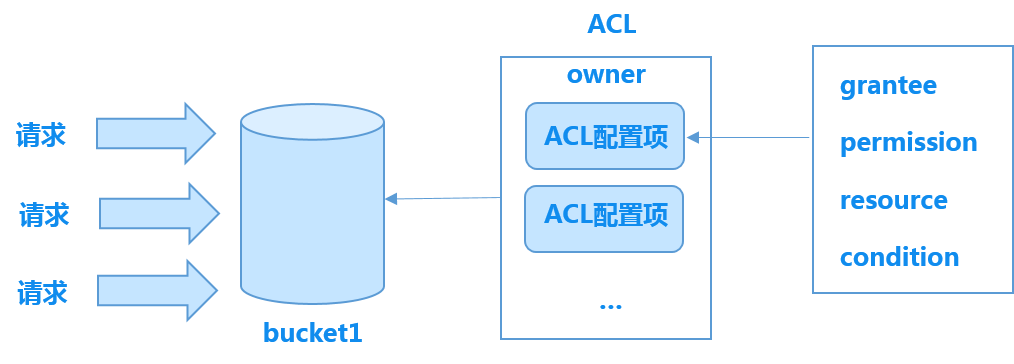
335
336Suppose the grantee defined in an ACL file is *, representing all users, with READ permission and the resource as bucket1.
337
338- If the request is PutObject, which involves uploading the file cat.jpg to bucket1, it will be rejected because PutObject is not included in the API permissions granted under READ, so the request cannot be authorized.
339- If the request is GetObject, which involves downloading the file cat.jpg from bucket1, it will be authorized because GetObject corresponds to the READ permission, meeting all the conditions in the ACL.
340
341> **Note:** CopyObject operation requires READ, GetObject or FULL_CONTROL permission for the source object and WRITE or FULL_CONTROL permission for the target object.
342
343**Example**
344
345- This example primarily illustrates the fundamental usage of grantees and permissions.
346
347 Assume that the bucket1 owner wants another Baidu AI Cloud user (userid=16147f559dd14bb294175a8bab74ff1f) to help him manage bucket1, namely, giving the user the FULL_CONTROL permission for bucket1. The corresponding ACL file format is as follows:
348
349 {
350 "accessControlList": [
351 {
352 "grantee": [
353 {
354 "id": "16147f559dd14bb294175a8bab74ff1f"
355 }
356 ],
357 "permission": [
358 "FULL_CONTROL"
359 ]
360 }
361 ]
362 }
363
364- This example primarily demonstrates how to configure multiple ACL items.
365
366 The owner of bucket1 wants everyone to have READ access to the contents of the bucket, but only one Baidu AI Cloud user (userid=b124deeaf6f641c9ac27700b41a350a8) to have management privileges. To achieve this, all users are granted READ permission, while the user with userid=b124deeaf6f641c9ac27700b41a350a8 is assigned FULL_CONTROL. The corresponding ACL file format is as follows:
367
368```javascript
369 {
370 "accessControlList": [
371 {
372 "grantee": [
373 {
374 "id": "b124deeaf6f641c9ac27700b41a350a8"
375 }
376 ],
377 "permission": [
378 "FULL_CONTROL"
379 ]
380 },
381 {
382 "grantee": [
383 {
384 "id": "*"
385 }
386 ],
387 "permission": [
388 "READ"
389 ]
390 }
391 ]
392 }-
This example primarily explains how to use the condition field.
The owner of bucket1 allows users with userid=10eb6f5ff6ff4605bf044313e8f3ffa5 to manage the bucket only from specific IP segments. This is implemented by defining conditions and granting FULL_CONTROL permissions to these users. The corresponding ACL file format is as follows:
1        {
2          "accessControlList": [
3              {
4                  "grantee": [
5                      {
6                          "id":"10eb6f5ff6ff4605bf044313e8f3ffa5"
7                      }
8                  ],
9                  "permission": [
10                      "FULL_CONTROL"
11                  ],
12                  "condition" : {
13                    "ipAddress": [
14                          "192.168.0.0/16",
15                          "192.169.0.*",
16                          "192.170.0.5"
17                      ]
18                  }
19              }
20          ]
21        }
The owner of bucket1 allows users with userid=10eb6f5ff6ff4605bf044313e8f3ffa5 to manage the bucket from outside specific IP segments. This is implemented by defining conditions that exclude certain IP segments and granting these users FULL_CONTROL permissions. The corresponding ACL file format is as follows:
1        {
2          "accessControlList": [
3              {
4                  "grantee": [
5                      {
6                          "id":"10eb6f5ff6ff4605bf044313e8f3ffa5"
7                      }
8                  ],
9                  "permission": [
10                      "FULL_CONTROL"
11                  ],
12                  "condition" : {
13                    "notIpAddress": [
14                          "192.168.0.0/16",
15                          "192.169.0.*",
16                          "192.170.0.5"
17                      ]
18                  }
19              }
20          ]
21 }-
This example primarily explains how to utilize the secureTransport and currentTime fields in conditions.
The owner of bucket1 allows users with userid=10eb6f5ff6ff4605bf044313e8f3ffa5 to manage the bucket only when accessing via HTTPS at a specific time. This is achieved by defining secureTransport and currentTime in the condition fields and granting these users FULL_CONTROL. The corresponding ACL file format is as follows:
1    {
2       "accessControlList": [
3            {
4                "grantee": [
5                    {
6                        "id": "10eb6f5ff6ff4605bf044313e8f3ffa5"
7                    }
8                ],
9                "permission": [
10                    "FULL_CONTROL"
11                ],
12                "resource": [
13                    "bucket1/*"
14                ],
15                "condition": {
16                    "currentTime": {
17                        "dateLessThan": "2020-07-01T12:00:00Z" ,
18                        "dateGreaterThan": "2018-03-01T15:00:00Z"
19                    },
20                    "secureTransport": true
21                }
22            }
23        ]
24 }-
This example primarily demonstrates the usage of the referer field.
The bucket1 owner allows users with a referer matching the configured allow list and userid=c558855ea8514c299508699b115473ef to view bucket and object information through the specific IP. The referer field is used to define the allow list that can be accessed, stringEquals is used for exact matching, and stringLike is used for fuzzy matching. In stringLike,
*represents 0 to any number, at most one*is allowed, and*can be anywhere in the string. The corresponding ACL file format is as follows:
1        {
2           "accessControlList": [
3                {
4                    "condition": {
5                        "referer": {
6                            "stringLike": [
7                                "http://www.abc.com/*"
8                            ],
9                            "stringEquals": [
10                                "http://www.abc.com"
11                            ]
12                        },
13                        "ipAddress": [
14                            "192.168.1.1"
15                        ]
16                    },
17                    "grantee": [
18                        {
19                            "id": "c558855ea8514c299508699b115473ef"
20                        }
21                    ],
22                    "permission": [
23                        "LIST"
24                    ],
25                    "resource": [
26                        "bucket1",
27                        "bucket1/*"
28                    ]
29                }
30            ]
31 }-
This example primarily demonstrates the usage of the resource field.
The resource field can be used to set access permissions for specific files and directories (prefix) within the bucket. For example, the owner of bucket1 allows another Baidu AI Cloud user (userid=10eb6f5ff6ff4605bf044313e8f3ffa5) to have FULL_CONTROL over objects with the prefix "cook," the prefix "edu/," and the object "travel/Chinese National Geography." There must be exactly one * at the end of the resource field. Since the resource assigned in the resource field pertains to objects, only object-level API operations such as PutObject, GetObject, and DeleteObject are allowed under FULL_CONTROL. The corresponding ACL file format is as follows:
1        {
2          "accessControlList": [
3              {
4                  "grantee": [
5                      {
6                          "id":"10eb6f5ff6ff4605bf044313e8f3ffa5"
7                      }
8                  ],
9                  "permission": [
10                      "FULL_CONTROL"
11                  ],
12                  "resource": [
13                      "bucket1/cook*",
14                      "bucket1/edu/*",
15 "bucket1/travel/Chinese National Geography"
16                  ]
17              }
18           ]
19 }-
This example primarily demonstrates the usage of the notResource field.
The notResource field can be used to set access permissions for all objects except those matching specific files and directories (prefix) within the bucket. For instance, the owner of bucket1 allows another Baidu AI Cloud user (userid=10eb6f5ff6ff4605bf044313e8f3ffa5) to have FULL_CONTROL over all objects except those with the prefix "cook," the prefix "edu/," and the object "travel/Chinese National Geography." There must be exactly one * at the end of the notResource field. Since the resource assigned in the notResource field pertains to objects, only object-level API operations such as PutObject, GetObject, and DeleteObject can be performed under FULL_CONTROL. The corresponding ACL file format is as follows:
1         {
2           "accessControlList": [
3               {
4                   "grantee": [
5                       {
6                           "id":"10eb6f5ff6ff4605bf044313e8f3ffa5"
7                       }
8                   ],
9                   "permission": [
10                       "FULL_CONTROL"
11                   ],
12                   "notResource": [
13                       "bucket1/cook*",
14                       "bucket1/edu/*",
15 "bucket1/travel/Chinese National Geography"
16                   ]
17               }
18            ]
19 }- This example mainly explains the basic use method of bucket-level permissions. The bucket1 owner hopes that just one Baidu AI Cloud user (userid= userid=b124deeaf6f641c9ac27700b41a350a8) can view the information of bucket or list objects in bucket, so this user is given the GetBucket permission. The corresponding ACL file format is as follows:
1{
2    "accessControlList": [
3        {
4            "grantee": [
5                {
6                    "id": "b124deeaf6f641c9ac27700b41a350a8"
7                }
8            ],
9            "permission": [
10                "GetBucket"
11            ]
12        }
13    ]
14}-
This example primarily explains the basic usage of object-level permissions.
The owner of bucket1 wants everyone to have read and write access to the objects in the bucket but grants management privileges only to one Baidu AI Cloud user (userid=b124deeaf6f641c9ac27700b41a350a8). Thus, all users are granted GetObject and PutObject permissions, while the user with userid=b124deeaf6f641c9ac27700b41a350a8 is assigned FULL_CONTROL. The corresponding ACL file format is as follows:
1    {
2        "accessControlList": [
3            {
4                "grantee": [
5                    {
6                        "id": "b124deeaf6f641c9ac27700b41a350a8"
7                    }
8                ],
9                "permission": [
10                    "FULL_CONTROL"
11                ]
12            },
13            {
14                "grantee": [
15                    {
16                        "id": "*"
17                    }
18                ],
19                "permission": [
20                    "GetObject","PutObject"
21                ]
22            }
23        ]
24 }-
This example primarily demonstrates the basic methods for preventing data tampering in the bucket.
The bucket1 owner doesn't want a Baidu AI Cloud user (userid=b124deeaf6f641c9ac27700b41a350a8) to tamper with bucket data, but allows him to add and read data, so the user with userid=b124deeaf6f641c9ac27700b41a350a8 is given Deny MODIFY, Allow PutObject and Allow READ permissions. The corresponding ACL file format is as follows:
1    {
2    	"accessControlList": [
3    		{
4    			"effect" : "Deny",
5    			"grantee": [
6    				{
7                        "id": "b124deeaf6f641c9ac27700b41a350a8"
8                    }
9                ],
10                "permission": [
11                    "MODIFY"
12                ]
13            },{
14    			"effect" : "Allow",
15    			"grantee": [
16    				{
17                        "id": "b124deeaf6f641c9ac27700b41a350a8"
18                    }
19                ],
20                "permission": [
21                    "PutObject","READ"
22                ]
23            }
24        ]
25    }
View access permissions
- To view the access permission of a bucekt, please see [GetBucketAcl API](BOS/API Reference/Bucket-Related Interface/Permission control/GetBucketAcl.md) for details.
- The owner attribute is automatically added to the returned ACL.
Object permission control
BOS supports ACLs for managing object permissions. An object ACL is essentially a permission attached to a resource (such as an object) and is used to grant specific permissions to designated grantees.
Now, BOS can set ACL by uploading ACL files or using CannedAcl, and both the two method are realized through [PutObjectAcl API](BOS/API Reference/Object-Related Interface/Permission control/PutObjectAcl.md).
- Uploading ACL files allows you to describe the ACL information of an object using a JSON file. Since directly editing ACL files can be complex, BOS also supports the CannedACL method.
- CannedACL simplifies permission control by encapsulating several common scenarios. It directly sets resource permissions in the "x-bce-acl" or "x-bce-grant-read/x-bce-grant-full-control" fields in the PutObjectAcl header.
Permission supported by object ACL
| Permission value supported by object ACL | Supported operation |
|---|---|
| READ | This attribute means that users are allowed to read the contents of the object and its related information. |
| FULL_CONTROL | This attribute means that users have the control permission for the object, which is equivalent to the permission of read and put/get/delete object acl. |
Types supported by CannedACL
| Acl | Added permissions |
|---|---|
| private | Bucket owner gets FULL_CONTROL, and others have no permission |
| public-read | Bucket owner gets FULL_CONTROL, and others get read permission |
Three headers supported by CannedACL
To make permission settings easier, you can include a CannedACL when creating or copying an object, or when setting an object's ACL. This allows you to define object access permissions through the "x-bce-acl" or "x-bce-grant-permission" fields in the header. Note that you cannot set both a CannedACL and upload ACL files simultaneously in the same request. The main methods for setting headers are detailed below, and these two types of headers cannot coexist in a single request.
| CannedACL Header | Valid value | Required or not |
|---|---|---|
| x-bce-acl | private/public-read | No |
| x-bce-grant-read | It supports multiple IDs, and is separated by commas. | No |
| x-bce-grant-full-control | It supports multiple IDs, and is separated by commas. | No |
Description:
- If the object belongs to the archive storage class, its ACL configuration cannot be set or deleted until both the upload and retrieval processes for the archive file are fully completed.
Modify Canned ACL API through Header
- [PutObject API](BOS/API Reference/Object-Related Interface/Basic Operations/PutObject.md)
- [PostObject API](BOS/API Reference/Object-Related Interface/Basic Operations/PostObject.md)
- [AppendObject API](BOS/API Reference/Object-Related Interface/Basic Operations/AppendObject.md)
- [CopyObject API](BOS/API Reference/Object-Related Interface/Basic Operations/CopyObject.md)
- [InitMultiUpload API](BOS/API Reference/Multipart Upload-Related Interface/InitiateMultipartUpload.md)
- [PutObjectAcl API](BOS/API Reference/Object-Related Interface/Permission control/PutObjectAcl.md)