Data Processing Introduction
Overview
BOS image processing is a service based on BOS’s core storage capabilities, offering flexible, diverse, and real-time processing features for images. Simply upload the original image to BOS, add processing parameters to your request, and instantly receive the processed image. Supported features include thumbnail generation, cropping, format conversion, rotation, and adding text/image watermarks. Images are processed and returned in real-time.
Images stored in BOS can be processed through the BOS console or API. Every bucket created in BOS includes built-in image processing capabilities by default, eliminating the need for additional activation.
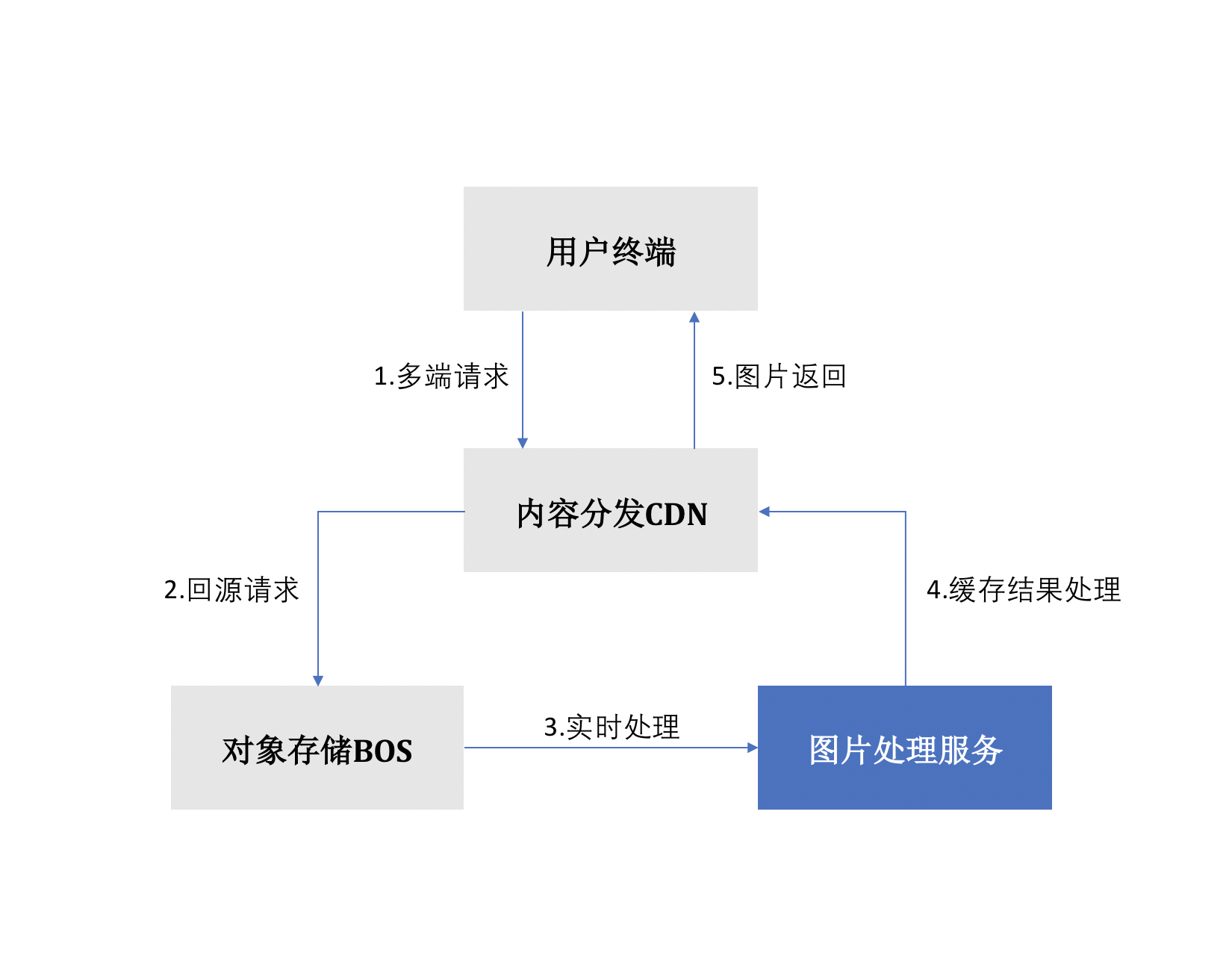
The workflow of image processing service is shown below:
-
User's first request processing flow:
- The client sends the first image processing request;
- For the first request, if the CDN is not matched, the request will be sent directly to the BOS origin server for processing
- Perform real-time image processing based on the parameters sent by the user
- The processed result image will be cached on CDN nodes;
- The generated image will be returned to the client.
-
Client non-first-time access image processing flow:
- The client sends the image processing request;
- If the CDN is matched, proceed directly to step 5; if the CDN is not matched, proceed to step 3;
- The request will be sent to BOS through back-to-origin operation, and the image will be processed in real-time based on the processing parameters sent by the user
- The processed result image will be cached on CDN nodes;
- The image generated by the process will be sent back to the client.
To enhance access speed, the image processing service integrates Baidu AI Cloud's CDN functionality, utilizing high-quality global CDN nodes to accelerate image content distribution and significantly reduce pressure on the origin server.
Charge type
Basic image processing, and HEIC image compression and WebP-M6 image compression in advanced image processing have been officially charged since 00:00, June 1, 2020. At present, you can sign in to the console - finance to view usage data. BOS fees are billed hourly. For specific prices, refer to Data Processing Fees.
| Charge item | Billing instructions |
|---|---|
| Basic image processing fee | The basic image processing fee refers to the fee incurred during basic image processing operations such as scaling, cropping, rotation, format conversion, progressive display, quality transformation and watermarking on images stored in BOS. BOS will charge based on the size of the image before processing. BOS provides each user with 10 TB of free monthly credit quota for basic image processing. When the amount of images you process in a month exceeds 10 TB, the excess usage will be charged. |
| HEIC image compression fee (for specifications below 800 × 600) | This fee is incurred from advanced image processing services. If you use BOS’s HEIC image compression service and the original image size to be processed is below 800 × 600, this fee will be generated. This charge item is billed based on the number of invocation. |
| HEIC image compression fee (for specifications above 800 × 600) | This fee is incurred from advanced image processing services. If you use BOS’s HEIC image compression service and the original image size to be processed is above 800 × 600, this fee will be generated. This charge item is billed based on the number of invocation. |
| WebP-M6 image compression fee (specification below 800 × 600) | This fee is incurred from advanced image processing services. If you use BOS’s WebP-M6 image compression service and the original image size to be processed is below 800 × 600, this fee will be generated. This charge item is billed based on the number of invocation. |
| WebP-M6 image compression fee (specification above 800 × 600) | This fee is incurred from advanced image processing services. If you use BOS’s WebP-M6 image compression service and the original image size to be processed is above 800 × 600, this fee will be generated. This charge item is billed based on the number of invocation. |
| Intelligent effect - intelligent defogging | This fee is incurred from intelligent image effect services. If you use intelligent defogging, it can remove fog from images where details are indistinguishable due to heavy fog, restoring clearer and more realistic images. This charge item is billed based on the number of invocation. |
| Intelligent scenario - style conversion | This fee is incurred from intelligent image scenario services. If you use style conversion, you can convert images into a total of 9 styles, including cartoons, pencil drawings, colored pencil drawings, Gothic oil paintings, colored candy oil paintings, The Scream oil paintings, The Great Wave off Kanagawa oil paintings, fantasy oil paintings and lavender oil paintings. It can be used to carry out interesting activities or integrated into Meitu APP for image style conversion. This charge item is billed based on the number of invocation. |
| Intelligent scenario - portrait animation | This fee is incurred from intelligent image scenario services. Portrait animation technology uses world-leading generative adversarial networks, combined with face detection, hair segmentation, portrait segmentation, etc., to create customized thousands-of-faces 2D anime images for users; moreover, through parameter settings, 2D anime portraits with masks can be generated. This charge item is billed based on the number of invocation. |
| Intelligent Scenario - Sky Segmentation | This fee is incurred from intelligent image scenario services. Sky segmentation can intelligently segment sky boundary position, and output grayscale and binary images of the sky and background. It can be used for secondary image processing, such as sky replacement, matting and other image editing scenarios. This charge item is billed based on the number of invocation. |
| Intelligent scenario - object erasure | This fee is incurred from intelligent image scenario services. Object erasure can remove unwanted occluders from pictures and fill them with background content to improve image quality. This charge item is billed based on the number of invocation. |
| Intelligent scenario - stretch repair | This fee is incurred from intelligent image scenario services. Stretch repair can automatically identify over-stretched images and restore the image content to its normal proportion. This charge item is billed based on the number of invocation. |
| Intelligent scenario - black and white coloring | This fee is incurred from intelligent image scenario services. Black and white coloring can intelligently identify the content of black and white images and fill them with colors, making black and white images vivid. This charge item is billed based on the number of invocation. |
| Intelligent scenario - lossless magnification | This fee is incurred from intelligent image scenario services. Lossless magnification can magnify the input image twice in both length and width directions while maintaining the image quality as much as possible. This charge item is billed based on the number of invocation. |
Image processing protocols
BOS image processing currently supports two versions of image processing protocols: V1.0 and V2.0. The V2.0 version supports more image processing features and uses different command invocation methods compared to V1.0. Therefore, it is recommended that you use the V2.0 version. V1.0, as an older version, will be discontinued in the future. However, both versions are currently available, and the system will automatically recognize and be compatible with both protocol versions.
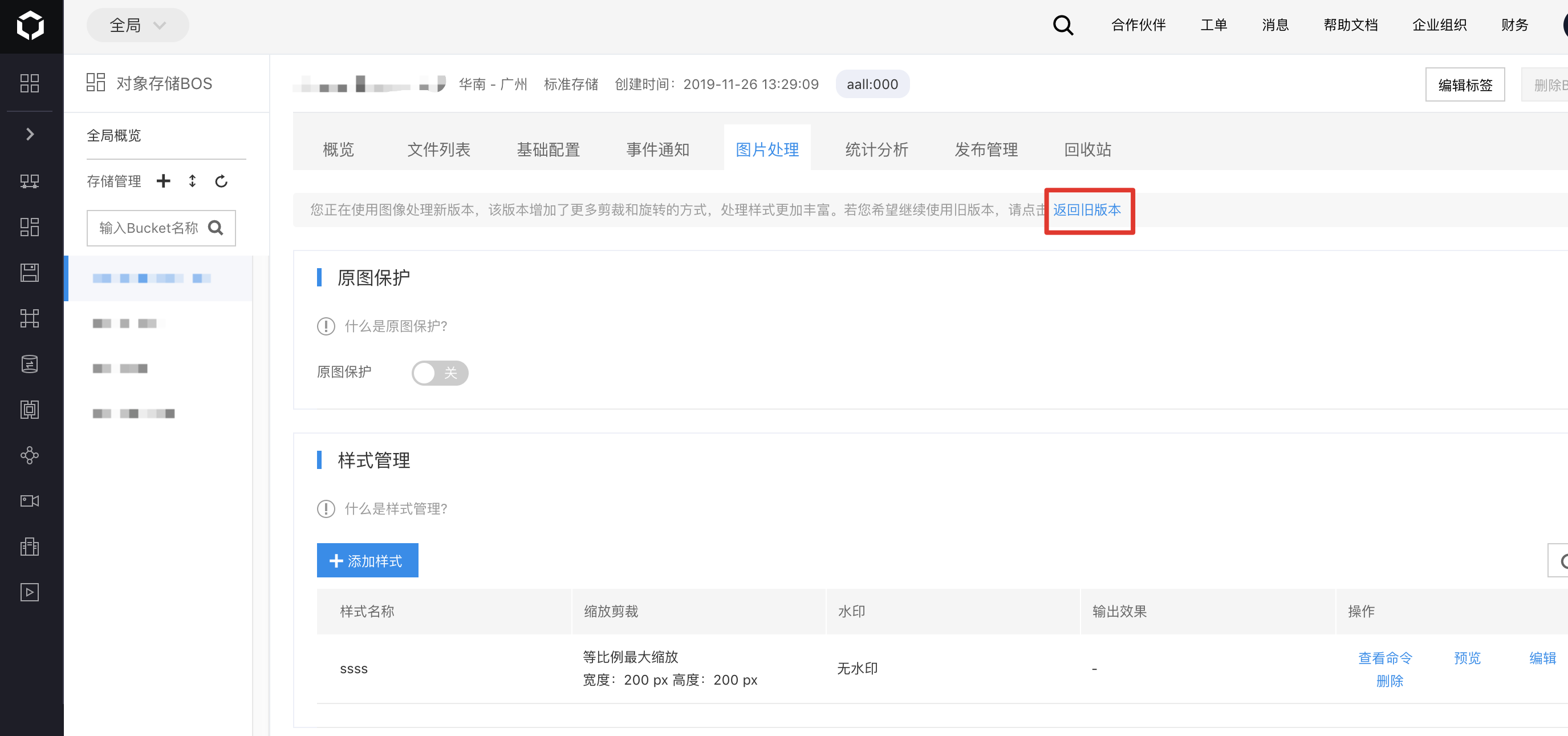
Once logged into the BOS console, you can toggle between the two versions in the Image Processing section of a bucket.