Video Review

BOS

  • Function Release Records
  • Product Announcement
  • S3
    • Overview
    • Compatible Interfaces
    • Compatible Signature Authentication
    • Service domain
    • Compatible Common Headers
    • Compatible Tools
  • Security and compliance
    • Overview
    • Monitoring and Audit
    • Data Disaster Recovery
    • Access control
    • Data protection
    • Data Retention Compliance
    • Data encryption
  • API Reference
    • Interface Specifications
    • Audio and Video Processing Interface
    • Access control
    • Introduction
    • Error code
    • Upload callback
    • Service-Related Interface
      • ListBuckets
      • Quota management
        • DeleteUserQuota
        • PutUserQuota
        • GetUserQuota
    • Image Moderation Service Interface
      • Politician Recognition (Politician)
      • Disgusting Image Recognition (Disgust)
      • API description
      • Watermark and QR Code Recognition (Watermark)
      • Face Detection (Face)
      • Image Quality Recognition (Quality)
      • General Text Recognition (OCR)
      • Pornography Recognition (Antiporn)
      • Public Figure Recognition (Public)
      • Terror Recognition (Terror)
    • Multipart Upload-Related Interface
      • AbortMultipartUpload
      • ListMultipartUploads
      • ListParts
      • User guide
      • UploadPart
      • InitiateMultipartUpload
      • UploadPartCopy
      • CompleteMultipartUpload
    • Bucket-Related Interface
      • Original image protection
        • PutBucketCopyrightProtection
        • GetCopyrightProtection
        • DeleteCopyrightProtection
      • Tag Management
        • PutBucketTagging
        • DeleteBucketTagging
        • GetBucketTagging
      • Quota management
        • PutBucketQuota
        • GetBucketQuota
        • DeleteBucketQuota
      • Data encryption
        • GetBucketEncryption
        • DeleteBucketEncryption
        • PutBucketEncryption
      • Event notification
        • PostResult
        • DeleteNotification
        • PostEvent
        • GetNotification
        • PutNotification
      • Recycle bin
        • DeleteBucketTrash
        • GetBucketTrash
        • PutBucketTrash
      • Data synchronization
        • GetBucketReplicationProgress
        • ListBucketReplication
        • GetBucketReplication
        • PutBucketReplication
        • DeleteBucketReplication
      • Cross-Origin Access
        • GetBucketCors
        • PutBucketCors
        • DeleteBucketCors
      • Mirror back-to-origin
        • PutBucketMirroring
        • DeleteBuketMirroring
        • GetBucketMirroring
      • Basic Operations
        • GetBucketLocation
        • HeadBucket
        • PutBucketStorageclass
        • PutBucket
        • GetBucketStorageClass
        • DeleteBucket
      • Lifecycle
        • DeleteBucketLifecycle
        • GetBucketLifecycle
        • PutBucketLifecycle
      • Permission control
        • PutBucketAcl
        • GetBucketAcl
      • Compliance retention
        • ExtendBucketObjectLock
        • DeleteBucketObjectLock
        • CompleteBucketObjectLock
        • InitBucketObjectLock
        • GetBucketObjectLock
      • Bucket inventory
        • GetBucketInventory
        • ListBucketInventory
        • DeleteBucketInventory
        • PutBucketInventory
      • Requester Pays
        • GetBucketRequestPayment
        • PutBucketRequestPayment
      • Static Website
        • PutBucketStaticWebsite
        • DeleteBucketStaticWebsite
        • GetBucketStaticWebsite
      • Versioning
        • PutBucketVersioning
        • GetBucketVersioning
      • Logging
        • DeleteBucketLogging
        • GetBucketLogging
        • PutBucketLogging
    • Object-Related Interface
      • Object Tag
        • PutObjectTagging
        • GetObjectTagging
        • DeleteObjectTagging
      • Basic Operations
        • CopyObject
        • ListObjects
        • FetchObject
        • GetObjectMeta
        • PostObject
        • listObjectVersions
        • DeleteObject
        • PutObject
        • AppendObject
        • DeleteMultipleObjects
        • RestoreObject
        • GetObject
        • OPTIONSObject
      • Soft links
        • GetSymlink
        • PutSymlink
      • Permission control
        • GetObjectAcl
        • PutObjectAcl
        • DeleteObjectAcl
      • Select scanning
        • SelectObject
  • Console Operation Guide
    • Hierarchical Namespace Bucket Operation Instructions
    • Configuring BOS Multi-User Access Control
    • Image Service
    • Operation preparation
    • Favorite Path
    • Quota management
    • Linkage with Baidu Netdisk sharing
    • Online data import
    • Statistics and monitoring
    • Intelligent Business Analysis
    • Event Notification and Data Processing
    • View and export usage data
    • Image Review Service
    • Automatic file decompression
    • Data Publishing
      • Data Publishing Introduction
      • Global Acceleration
      • Creating a Bucket Custom Domain Name
      • Viewing Bucket Official Domain Name
      • Configure Cache Management
      • Enabling CDN Official Acceleration Domain Name
      • Configuring CDN Upload Acceleration
    • Global Settings
      • VPC Access Control
    • Managing Bucket
      • Set static website hosting
      • Setting Up Log Query
      • Set referer allow list
      • Create bucket
      • Set cross-origin access
      • Set bucket trash
      • Set mirror back-to-origin
      • Set access logs
      • Set server-side encryption
      • Set storage inventory
      • Managing Bucket Tag
      • Querying Bucket
      • Data access trend analysis
      • Bucket quota management
      • Set compliance retention
      • Bucket overview
      • Set data synchronization
      • Setting Up Versioning
      • Requester Pays
      • Delete bucket
      • Managing Lifecycle
        • Overview
        • Configure intelligent tiering
        • Configuring Basic Lifecycle Management
        • Basic Lifecycle Management Usage Instructions
          • Lifecycle Rule Based on Last Accessed Time
          • Lifecycle Rule Based on Last Modified Time
      • Set bucket read-write permissions
        • Permission Introduction
        • Set bucket read-write permissions
    • Manage object
      • Setting Symlink
      • Select scanning
      • Setting Meta Information
      • Share files - get file URLs
      • Parts management
      • Folder sharing
      • Restore Archived Files
      • Delete file
      • Copy and move files
      • Delete folders in batches
      • Batch Managing Object
      • Folder statistics
      • Renamed files
      • Convert file storage class
      • Set file permissions
      • Download file
      • Querying Object
      • Upload files
      • Managing Folder
      • Object Tag
  • Managing Bucket
    • Set static website hosting
    • Set referer allow list
    • Create bucket
    • Set bucket trash
    • Set mirror back-to-origin
    • Set access logs
    • Set server-side encryption
    • Set storage inventory
    • Managing Bucket Tag
    • Bucket quota management
    • Set compliance retention
    • Bucket overview
    • Set data synchronization
    • Requester Pays
    • Delete bucket
    • _Archive
      • Set static website hosting
      • Set referer allow list
      • Create bucket
      • Set cross-origin access
      • Set bucket trash
      • Set mirror back-to-origin
      • Set access logs
      • Set server-side encryption
      • Set storage inventory
      • Managing Bucket Tag
      • Querying Bucket
      • Bucket quota management
      • Set compliance retention
      • Bucket overview
      • Set data synchronization
      • Requester Pays
      • Delete bucket
    • Set bucket read-write permissions
      • Permission Introduction
      • Set bucket read-write permissions
      • _Archive
        • Permission Introduction
        • Set bucket read-write permissions
  • Content Review
    • Video Review
    • Image audit
  • Service Level Agreement (SLA)
    • BOS Service Level Agreement SLA (V3_0)
    • Baidu AI Cloud Object Storage (BOS) Trusted Cloud Certification
  • Data processing
    • Image audit
    • Data Processing FAQs
    • Document preview
    • Video frame capture
    • Instant video transcoding
    • Data Processing Introduction
    • Image Processing Terminology Explanation
    • Multimedia cloud processing
    • Get video metadata
    • General Image Settings
      • Original image protection
    • Intelligent Recognition
      • Overview
    • Image Processing Guide V2_0
      • Removing Metadata
      • Image Scaling
      • Image Brightness
      • Getting Image Information
      • Image Blur
      • Usage rules
      • Image Resizing
      • Quality Transformation
      • Format conversion
      • Progressive Display
      • Image Sharpening
      • Grayscale Transformation
      • Image Contrast
      • Image Rotation
        • Normal Rotation
        • Adaptive Rotation
      • Intelligent Processing
        • Intelligent Processing Usage Rules
        • Intelligent Scenarios
          • Lossless magnification
          • Portrait Cartoonization
          • Sky Segmentation
          • Style conversion
          • Black and white coloring
          • Stretch Restoration
          • Object erasure
        • Intelligent Effects
          • Intelligent Contrast
          • Intelligent Sharpness
          • Intelligent defogging
          • Intelligent Color Grading
      • Image Cropping
        • Rounded-corner rectangle cropping
        • Incircle Crop
        • Normal Crop
        • Index Crop
      • Image Watermark
        • Add Image-Text Mixed Watermark
        • Add Text Watermark
        • Add image watermark
    • Image Processing Guide V1_0
      • Image Cropping
      • Getting Image Information
      • Image Thumbnailing
      • Usage rules
      • Quality Transformation
      • Format conversion
      • Watermark
      • Progressive Display
      • Image Rotation
  • Peripheral Tools
    • fsspec-bosfs
    • Peripheral Tools Overview
    • BOS-FTP Tool
    • Download Zone
    • BOS-AlluxioExtension Tool
    • BOS-PC Client
      • FAQs
      • User guide
      • Installation and Login
    • BOS-HDFS Tool
      • Overview
      • Configuration and Usage
      • Big Data Component Usage Guide
        • DataX Reading and Writing BOS
        • Hive Usage Guide
        • Presto Usage Guide
        • Spark Usage Guide
        • Flume Data Storage to BOS
        • Flink Usage Guide
        • Impala Usage Guide
    • BOS-Probe Error Detection Tool
      • Overview
      • Suggestions and Report Viewing
      • Checking Uploads and Downloads via BOSProbe
      • Installing BOSProbe
    • Docker
      • Overview
    • BOS-CMD Command-Line Tool
      • Configure BCECMD Command-Line Completion
      • Install BOSCMD
      • Overview
      • FAQs
      • Use BOS Service via CMD
      • BOS CMD Common Issues
      • BOSCMD Version Change Records
      • Configure BOSCMD
    • BOS-Import Data Cloud Migration Tool
      • Configuration file
      • Deployment methods
      • Overview
      • Version records
      • Exception handling
      • Log
      • Task Progress Recovery
    • BOS-FS Mount Tool
      • Operations and Practices
      • Overview
      • Version Change Records
      • FAQs
      • Install
      • Configuration
    • BOS-API Generation Tool
      • Overview
      • Service-Related Interface
        • List Buckets
        • Quota management
          • Delete User Credit Quota Settings
          • Get User Credit Quota Information
          • Set User Credit Quota
      • Image Moderation Service Interface
        • Image Review Interface
      • How to Call the API
        • Authentication
        • Construct a Request
        • Return a Response
      • Bucket Data Synchronization Related Interfaces
        • Retrieving the Process Status of Data Synchronization for a Specified ID in a Bucket
        • Setting Up Bucket Data Synchronization
        • Deleting the Synchronization Replication Configuration of a Specified ID in a Bucket
        • Listing All Replication Synchronization Rules of a Bucket
        • Retrieving Bucket Data Synchronization Information
      • Bucket-Related Interface
        • Original image protection
          • Disabling Bucket Original Image Protection Configuration
          • Get the original image protection configuration of bucket
          • Enable the original image protection function of bucket
        • Data encryption
          • Check If Encryption Is Enabled for a Bucket
          • Disable Server-Side Encryption (SSE) for a Bucket
          • Enable Encryption for a Bucket
        • Event notification
          • Setting Up Bucket Notification Rules
          • Retrieving Bucket Notification Rules
          • Pushing ImageOcr and ImageClassify Messages
          • Deleting Bucket Notification Rules
          • Pushing Event Messages
        • Recycle bin
          • Retrieving the Activation Status of the Bucket Recycle Bin
          • Disabling Bucket Recycle Bin Functionality
          • Enabling Bucket Recycle Bin Functionality
        • Cross-Origin Access
          • Get Cross-Origin Resource Sharing (CORS) Rules Set on a Specified Bucket
          • Disable Cross-Origin Resource Sharing (CORS) Rule on a Specified Bucket
          • Set a Cross-Origin Resource Sharing (CORS) Rule on a Specified Bucket
        • Basic Operations
          • List Buckets
          • Cross-Origin Query
          • Create a bucket
          • Get the Default Storage Class of a Bucket
          • List Objects in a Bucket
          • Set default bucket storage class
          • Get the Region of a Bucket
          • Check If a Bucket Exists and Whether the Requester Has Permission to Access the Bucket
          • Delete bucket
        • Lifecycle
          • Get Lifecycle Management Rules for a Bucket
          • Delete Lifecycle Management Rules for a Bucket
          • Set Lifecycle for a Bucket
        • Permission control
          • Set bucket access permissions
          • Get Access Permission for a Bucket
        • Compliance retention
          • Retrieving Bucket Compliance Retention Policies
          • Deleting Compliance Retention Policies
          • Locking Bucket Compliance Retention Policies
          • Delaying the Protection Period of Bucket Compliance Retention Policies
          • Initializing Compliance Retention Policies
        • Static Website
          • Set static website hosting
          • Delete Static Website Hosting Information for a Bucket
          • Get Static Website Hosting Information for a Bucket
        • Logging
          • Enable bucket access logs
          • Disable Access Log Configuration for a Bucket
          • Get Access Log Configuration for a Bucket
      • Object-Related Interface
        • Basic Operations
          • Get Meta Information of an Object
          • Restore Archived Files
          • Get an Object
          • Fetch an Object and Store It in a Bucket
          • Delete Multiple Objects
          • Delete Object
        • Soft links
          • Retrieve a symlink
          • Create a symlink
        • Permission control
          • Set access permission for an object
          • Delete Access Permission for an Object
          • Get Access Permission for an Object
        • Select scanning
          • Execute SQL Statement on an Object
    • MoonBox Physical Migration Device
      • MoonBox introduction
      • MoonBox Operation Process
    • BOS Connector for PyTorch
      • Overview
      • Functionality and Usage Instructions
      • Reading and Writing Checkpoints
      • Installing BOS Connector for Pytorch
      • Building a Dataset
      • Configuring BOS Connector for Pytorch
      • Performance test
    • BOS-CLI Command-Line Tool (Old Version)
      • Overview
      • Version Change Records
      • Configure BOSCLI
      • Install BOSCLI
      • Use BOS Service via CLI
    • BOS-Util Batch Operation Tool
      • Overview
      • Version Change Records
      • Install BOS-Util
      • Using BOS Service via BOS-Util
    • Third-party tools
      • rclone
      • S3 Browser
      • MinIO
      • Goofys
      • Other Tools
  • Typical Practices
    • Using BOS as Backend Storage Service for Jfrog Artifactory
    • How to Solve Browser Cross-Origin CORS Issues
    • Using HTTPDNS Service via Android SDK
    • Client-Side Encryption Practice
    • BOS Dedicated Line Back-to-Origin IDC Best Practices
    • Presto Practice Based on BOS
    • Accessing BOS via Dedicated Line-VPN in Hybrid Cloud
    • CDN Dynamic Acceleration Uploading Data to BOS
    • HTTPS Transmission Encryption Practice
    • Using CDN to Accelerate BOS
    • Hotlink Protection
    • AWS Lambda Synchronizing S3 Data to BOS
    • Impala Practice Based on BOS
    • Direct Upload of Web Data to BOS
      • Advanced Chapter I - STS Temporary Authentication
      • Basic Chapter - Directly Uploading Files to BOS in the Browser
      • Advanced Chapter II - Handling Older Versions of IE via the PostObject Interface
      • Principle Chapter III - STS Temporary Authentication
      • Principle Chapter I - Directly Uploading Files to BOS in the Browser
      • Principle Chapter II - Upload large file in parts
    • Data Migration
      • Migrating Data from Third-Party Clouds to BOS
      • Migrating Local Data to BOS
      • Scenario overview
    • Mobile Photo Editing App Practice
      • Overview and Scenario Introduction
      • Code example
      • Solution Practice - Building the Photo Editing App
      • Solution Practice - Using the Photo Editing App
    • Accessing BOS via Python API Request
      • Upload File to Bucket via PUT Request
      • Basics (Must-Read) - Generation of authentication string
      • Download Bucket File to Local via GET Request
  • FAQs
    • Certification and permission management
    • Image Service
    • Security Problems
    • Bucket Domain Name Request Style
    • General Problems
    • Object upload-download and management
    • Data Migration and Backup
    • Billing Problems
    • API & SDK & Tools
    • Common Questions Overview
    • Bucket access and management
    • Analysis and Statistic
    • Performance-related questions
  • Video Zone
    • Accessing BOS Resources via Domain Name
    • Object upload
    • Understanding BOS
    • BOS Tiered Storage
  • Quick Start
    • Create bucket
    • Get Object
    • Upload Object
    • Quick Start Guide
    • Getting Started with BOS
    • Delete Object
    • Delete bucket
  • Product pricing
    • Billing Cases
    • Insufficient Balance and Debt Reminder
    • View Consumption Details
    • Billing FAQs
    • Product price
      • Resource Package Price List
      • Pay-As-You-Go Charge Type
      • Pay-As-You-Go Price List
        • Traffic Price
        • Storage prices
        • Data Processing Price
        • Request Price
      • Resource Package Charge Type
        • Resource Package Deduction Rules
        • Resource Package Overview
      • Resource Package Price List - Deprecated
        • Internet downlink traffic package
        • Infrequent access storage package
        • Back-to-origin traffic package
        • Archive storage package
        • Cold storage package
        • Standard storage package
    • Charge Item Introduction
      • Traffic fees
      • Storage Cost
      • Request fees
      • Data processing fees
      • Charge Item Overview
  • SDK
    • SDK Overview
    • Harmony-SDK
      • Overview
      • Version Change Records
      • Initialization
      • Install the SDK Package
      • Exception handling
      • Log
      • Bucket management
        • Create Bucket
        • Bucket permission control
        • View the region to which a bucket belongs
        • Bucket Storage Class Setting and Query
        • View bucket list
        • Check if bucket exists
        • Delete bucket
      • Object management
        • Object permission control
        • Multipart upload of objects
        • Get Object
        • View the object in the bucket
        • Copy Object
        • Upload Object
        • Delete Object
    • Ruby-SDK
      • Overview
      • Version Change Records
      • Initialization
      • Install the SDK Package
      • SDK Logging
      • Exception handling
      • Bucket management
        • Create Bucket
        • List buckets
        • Overview
        • Bucket permission management
        • View the region to which a bucket belongs
        • Check if bucket exists
        • Delete bucket
      • File management
        • Object permission control
        • Change file storage class
        • Get file download URL
        • Delete file
        • Copy Object
        • Download file
        • Upload files
        • List files in the storage space
        • Get and update file meta information
        • Check if a file exists
    • Python-SDK
      • Overview
      • Version Change Records
      • Initialization
      • FAQs
      • Install the SDK Package
      • Exception handling
      • Log Control
      • Bucket management
        • Bucket cross-origin resource access
        • Create Bucket
        • Bucket Recycle Bin
        • List buckets
        • Overview
        • Bucket Inventory Management
        • Mirror back-to-origin
        • Bucket Lifecycle Management
        • Event notification
        • Set bucket storage class
        • Bucket permission management
        • View the region to which a bucket belongs
        • Close Recycle Bin
        • Logging
        • Data synchronization
        • Get Recycle Bin Activation Information
        • Check if bucket exists
        • User Credit Quota Management
        • Original image protection
        • Delete bucket
      • File management
        • Object permission control
        • Change file storage class
        • Get file download URL
        • Delete file
        • Copy Object
        • Select file
        • Soft links
        • Download file
        • Upload files
        • Restore archived storage class files
        • List files in the storage space
        • Get and update file meta information
        • Check if a file exists
    • JavaScript-SDK
      • Overview
      • Version Change Records
      • Initialization
      • Quota management
      • Bucket management
      • Install SDK
      • Bucket management
        • Data Synchronization Configuration
        • Create Bucket
        • Overview
        • Bucket Logging Management
        • Bucket Lifecycle Management
        • Set bucket storage class
        • Bucket permission management
        • View the region to which a bucket belongs
        • View bucket list
        • Check if bucket exists
        • Delete bucket
      • Object management
        • Multipart upload of objects
        • Get Object
        • View the object in the bucket
        • Copy Object
        • Upload Object
        • Get File URL
        • Delete Object
    • Android-SDK
      • Overview
      • Version Change Records
      • Initialization
      • Install the SDK Package
      • Exception handling
      • Bucket management
      • Log
      • Object management
      • Bucket management
        • Create Bucket
        • Bucket permission control
        • View bucket list
        • Check if bucket exists
        • Delete bucket
      • File management
        • Object permission control
        • Multipart upload of objects
        • Get Object
        • View the object in the bucket
        • Copy Object
        • Upload Object
        • Delete Object
    • Java-SDK
      • Overview
      • Version Change Records
      • Initialization
      • File management
      • FAQs
      • Install the SDK Package
      • SDK Logging
      • Exception handling
      • Data Processing and Usage
      • Bucket management
      • Bucket management
        • Bucket static website hosting
        • Recycle bin
        • Bucket data synchronization
        • Create Bucket
        • List buckets
        • Overview
        • Mirror back-to-origin
        • Set Bucket server-side encryption
        • Set bucket storage class
        • Bucket permission management
        • View the region to which a bucket belongs
        • Tag Management
        • Check if bucket exists
        • Original image protection
        • Delete bucket
      • File management
        • Copy files
        • Object permission control
        • Change file storage class
        • Get file download URL
        • Delete file
        • Get directory capacity overview
        • Select file
        • Download file
        • Upload files
        • Restore archived storage class files
        • List files in the storage space
        • Object Tag
        • Get and update file meta information
        • Check if a file exists
    • IOS-SDK
      • Overview
      • Version Change Records
      • Initialization
      • Install the SDK Package
      • Exception handling
      • Bucket management
      • Log
      • Object management
      • Bucket management
        • Create New Bucket
        • Determine whether the bucket exists and whether there is permission to access it
        • Bucket permission control
        • View bucket list
        • Delete bucket
      • File management
        • Multipart upload of objects
        • Get Object
        • View the object in the bucket
        • Copy Object
        • Upload Object
        • Delete Object
    • GO-SDK
      • Overview
      • Version Change Records
      • Initialization
      • File management
      • Install the SDK Package
      • SDK Logging
      • Data Processing and Usage
      • Bucket management
      • Request management
      • Error handling
    • C-Dotnet-SDK
      • Overview
      • Version Change Records
      • Initialization
      • Install the SDK Package
      • Exception handling
      • Bucket management
      • Object management
    • PHP-SDK
      • Overview
      • Version Change Records
      • Initialization
      • File management
      • Install the SDK Package
      • Exception handling
      • Bucket management
    • C-SDK
      • Overview
      • Version Change Records
      • Initialization
      • Exception handling
      • Install SDK Toolkit
      • Bucket management
        • Create Bucket
        • List Buckets
        • Overview
        • Check If Bucket Exists
        • Delete Bucket
      • File management
        • Copy files
        • Object permission control
        • Change file storage class
        • Delete file
        • Download file
        • Upload files
        • Archive storage
        • Get and Update Metadata Information
        • Get File Download Link
        • List files in the storage space
        • Check if a file exists
    • C++-SDK
      • Overview
      • Version Change Records
      • Initialization
      • Install the SDK Package
      • SDK Logging
      • Exception handling
      • Bucket management
        • Create Bucket
        • List buckets
        • Overview
        • Bucket permission management
        • View the region to which a bucket belongs
        • Check if bucket exists
        • Delete bucket
      • File management
        • Copy files
        • Object permission control
        • Change file storage class
        • Get file download URL
        • Delete file
        • Object Tag Management
        • Download file
        • Upload files
        • Archive storage
        • List files in the storage space
        • Get and update file meta information
        • Check if a file exists
      • Request management
        • Cancel request interruption
  • Product Description
    • Product functions
    • Application scenarios
    • Product advantages
    • Usage restrictions
    • Product introduction
    • Core concepts
    • Tiered Storage Introduction
      • Why Tiered Storage Exists
      • Introduction to storage classes
  • Data Cube
    • Batch processing
    • ZIP packaging and compression
    • Intelligent Data Processing
      • Video processing
        • Video frame capture
        • Instant video transcoding
        • Multimedia cloud processing
        • M3U8 signature
        • Get video metadata
      • Document processing
        • Document preview
      • Image processing
        • Image Processing Introduction
        • Image Processing FAQs
        • Image Processing Terminology Explanation
        • General Image Settings
          • Original image protection
        • Image Processing Guide V2_0
          • Removing Metadata
          • Image Scaling
          • Image Processing Persistence
          • Image Brightness
          • Image Blind Watermark
          • Return Original Image on Failure
          • Getting Image Information
          • Image Blur
          • Usage rules
          • Quality Transformation
          • Format conversion
          • Progressive Display
          • Image Sharpening
          • Grayscale Transformation
          • Image Compression
          • Image Anomaly Detection
          • Image Contrast
          • Image Rotation
            • Normal Rotation
            • Adaptive Rotation
          • Intelligent Processing
            • Intelligent Processing Usage Rules
            • Intelligent Scenarios
              • Lossless magnification
              • Portrait Cartoonization
              • Sky Segmentation
              • Style conversion
              • Black and white coloring
              • Stretch Restoration
              • Object erasure
            • Intelligent Effects
              • Intelligent Contrast
              • Intelligent Sharpness
              • Intelligent defogging
              • Intelligent Color Grading
          • Image Cropping
            • Rounded-corner rectangle cropping
            • Incircle Crop
            • Normal Crop
            • Index Crop
          • Image Watermark
            • Add Image-Text Mixed Watermark
            • Add Text Watermark
            • Add image watermark
        • Image Processing Guide V1_0
          • Image Cropping
          • Getting Image Information
          • Image Thumbnailing
          • Usage rules
          • Quality Transformation
          • Format conversion
          • Watermark
          • Progressive Display
          • Image Rotation
  • Related Agreements
    • Baidu AI Cloud Object Storage (BOS) and Baidu Netdisk Integration Usage Agreement
  • Developer Guide
    • Single-link rate limit
    • Image audit
    • Region and Endpoint
    • Event notification
    • Monitor Service Operations
    • Static website hosting
    • Basic concepts
    • Development Preparation
    • Data Publishing
      • Binding Custom Domain Name
      • CDN Acceleration Publishing
    • Data Disaster Recovery
      • Multi-AZ storage
      • Data synchronization
    • Data Security
      • Set anti-stealing-link
      • Set bucket trash
      • Set server-side encryption
      • Principle of least privilege
      • Permission control
        • Object permission control
        • Bucket permission control
        • IAM primary-IAM user access control
      • Versioning
        • Deletion Mark
        • Versioning Overview
    • Bucket Basic Operations
      • Create bucket
      • Data Publishing
      • Obtaining Bucket Region Information
      • Managing Lifecycle
      • Set access logs
      • Setting Bucket Tag
      • Setting Cross-Origin Resource Sharing (CORS)
      • View bucket list
      • Delete bucket
    • Data lifecycle management
      • Intelligent Business Analysis
    • Data Migration to Cloud
      • Migration from other clouds
      • Local data to cloud
      • Scenario overview
    • Data lake access
      • Hierarchical namespace
      • Metadata Conversion Service
    • Object Basic Operations
      • Managing Files
        • Copy data
        • Select scanning
        • Delete data
        • Obtaining Data Metadata
        • Viewing File List
        • Object Tag
      • Uploading Data
        • Simple upload
        • Append upload
        • Form upload
        • Upload callback
        • Chunking and Resumable Upload
      • Downloading Data
        • Simple Download
        • Resumable download
  • Data Lake Storage
    • Big Data Component Usage Guide
      • HBase Uses BOS as Underlying Storage
      • Kafka Data Storage to BOS
      • Hive Usage Guide
      • Presto Usage Guide
      • Spark Usage Guide
      • Flume Data Storage to BOS
      • Flink Usage Guide
      • Impala Usage Guide
      • Fluentd Collects Data Storage to BOS
      • Logstash Data Storage to BOS
      • Elasticsearch Snapshot Data Storage to BOS
      • Druid Uses BOS as Deep Storage
    • BOS HDFS tool
      • Overview
      • FAQs
      • Configuration and Usage
    • Data Migration and Transfer
      • Migrate Data to Hierarchical Namespace Bucket Using DistCp
      • DataX Read and Write BOS
    • Hierarchical namespace
      • Usage method
      • Service Introduction
      • Convert Normal Bucket to Hierarchical Namespace Bucket
      • Function Support Description
All documents
menu
No results found, please re-enter

BOS

  • Function Release Records
  • Product Announcement
  • S3
    • Overview
    • Compatible Interfaces
    • Compatible Signature Authentication
    • Service domain
    • Compatible Common Headers
    • Compatible Tools
  • Security and compliance
    • Overview
    • Monitoring and Audit
    • Data Disaster Recovery
    • Access control
    • Data protection
    • Data Retention Compliance
    • Data encryption
  • API Reference
    • Interface Specifications
    • Audio and Video Processing Interface
    • Access control
    • Introduction
    • Error code
    • Upload callback
    • Service-Related Interface
      • ListBuckets
      • Quota management
        • DeleteUserQuota
        • PutUserQuota
        • GetUserQuota
    • Image Moderation Service Interface
      • Politician Recognition (Politician)
      • Disgusting Image Recognition (Disgust)
      • API description
      • Watermark and QR Code Recognition (Watermark)
      • Face Detection (Face)
      • Image Quality Recognition (Quality)
      • General Text Recognition (OCR)
      • Pornography Recognition (Antiporn)
      • Public Figure Recognition (Public)
      • Terror Recognition (Terror)
    • Multipart Upload-Related Interface
      • AbortMultipartUpload
      • ListMultipartUploads
      • ListParts
      • User guide
      • UploadPart
      • InitiateMultipartUpload
      • UploadPartCopy
      • CompleteMultipartUpload
    • Bucket-Related Interface
      • Original image protection
        • PutBucketCopyrightProtection
        • GetCopyrightProtection
        • DeleteCopyrightProtection
      • Tag Management
        • PutBucketTagging
        • DeleteBucketTagging
        • GetBucketTagging
      • Quota management
        • PutBucketQuota
        • GetBucketQuota
        • DeleteBucketQuota
      • Data encryption
        • GetBucketEncryption
        • DeleteBucketEncryption
        • PutBucketEncryption
      • Event notification
        • PostResult
        • DeleteNotification
        • PostEvent
        • GetNotification
        • PutNotification
      • Recycle bin
        • DeleteBucketTrash
        • GetBucketTrash
        • PutBucketTrash
      • Data synchronization
        • GetBucketReplicationProgress
        • ListBucketReplication
        • GetBucketReplication
        • PutBucketReplication
        • DeleteBucketReplication
      • Cross-Origin Access
        • GetBucketCors
        • PutBucketCors
        • DeleteBucketCors
      • Mirror back-to-origin
        • PutBucketMirroring
        • DeleteBuketMirroring
        • GetBucketMirroring
      • Basic Operations
        • GetBucketLocation
        • HeadBucket
        • PutBucketStorageclass
        • PutBucket
        • GetBucketStorageClass
        • DeleteBucket
      • Lifecycle
        • DeleteBucketLifecycle
        • GetBucketLifecycle
        • PutBucketLifecycle
      • Permission control
        • PutBucketAcl
        • GetBucketAcl
      • Compliance retention
        • ExtendBucketObjectLock
        • DeleteBucketObjectLock
        • CompleteBucketObjectLock
        • InitBucketObjectLock
        • GetBucketObjectLock
      • Bucket inventory
        • GetBucketInventory
        • ListBucketInventory
        • DeleteBucketInventory
        • PutBucketInventory
      • Requester Pays
        • GetBucketRequestPayment
        • PutBucketRequestPayment
      • Static Website
        • PutBucketStaticWebsite
        • DeleteBucketStaticWebsite
        • GetBucketStaticWebsite
      • Versioning
        • PutBucketVersioning
        • GetBucketVersioning
      • Logging
        • DeleteBucketLogging
        • GetBucketLogging
        • PutBucketLogging
    • Object-Related Interface
      • Object Tag
        • PutObjectTagging
        • GetObjectTagging
        • DeleteObjectTagging
      • Basic Operations
        • CopyObject
        • ListObjects
        • FetchObject
        • GetObjectMeta
        • PostObject
        • listObjectVersions
        • DeleteObject
        • PutObject
        • AppendObject
        • DeleteMultipleObjects
        • RestoreObject
        • GetObject
        • OPTIONSObject
      • Soft links
        • GetSymlink
        • PutSymlink
      • Permission control
        • GetObjectAcl
        • PutObjectAcl
        • DeleteObjectAcl
      • Select scanning
        • SelectObject
  • Console Operation Guide
    • Hierarchical Namespace Bucket Operation Instructions
    • Configuring BOS Multi-User Access Control
    • Image Service
    • Operation preparation
    • Favorite Path
    • Quota management
    • Linkage with Baidu Netdisk sharing
    • Online data import
    • Statistics and monitoring
    • Intelligent Business Analysis
    • Event Notification and Data Processing
    • View and export usage data
    • Image Review Service
    • Automatic file decompression
    • Data Publishing
      • Data Publishing Introduction
      • Global Acceleration
      • Creating a Bucket Custom Domain Name
      • Viewing Bucket Official Domain Name
      • Configure Cache Management
      • Enabling CDN Official Acceleration Domain Name
      • Configuring CDN Upload Acceleration
    • Global Settings
      • VPC Access Control
    • Managing Bucket
      • Set static website hosting
      • Setting Up Log Query
      • Set referer allow list
      • Create bucket
      • Set cross-origin access
      • Set bucket trash
      • Set mirror back-to-origin
      • Set access logs
      • Set server-side encryption
      • Set storage inventory
      • Managing Bucket Tag
      • Querying Bucket
      • Data access trend analysis
      • Bucket quota management
      • Set compliance retention
      • Bucket overview
      • Set data synchronization
      • Setting Up Versioning
      • Requester Pays
      • Delete bucket
      • Managing Lifecycle
        • Overview
        • Configure intelligent tiering
        • Configuring Basic Lifecycle Management
        • Basic Lifecycle Management Usage Instructions
          • Lifecycle Rule Based on Last Accessed Time
          • Lifecycle Rule Based on Last Modified Time
      • Set bucket read-write permissions
        • Permission Introduction
        • Set bucket read-write permissions
    • Manage object
      • Setting Symlink
      • Select scanning
      • Setting Meta Information
      • Share files - get file URLs
      • Parts management
      • Folder sharing
      • Restore Archived Files
      • Delete file
      • Copy and move files
      • Delete folders in batches
      • Batch Managing Object
      • Folder statistics
      • Renamed files
      • Convert file storage class
      • Set file permissions
      • Download file
      • Querying Object
      • Upload files
      • Managing Folder
      • Object Tag
  • Managing Bucket
    • Set static website hosting
    • Set referer allow list
    • Create bucket
    • Set bucket trash
    • Set mirror back-to-origin
    • Set access logs
    • Set server-side encryption
    • Set storage inventory
    • Managing Bucket Tag
    • Bucket quota management
    • Set compliance retention
    • Bucket overview
    • Set data synchronization
    • Requester Pays
    • Delete bucket
    • _Archive
      • Set static website hosting
      • Set referer allow list
      • Create bucket
      • Set cross-origin access
      • Set bucket trash
      • Set mirror back-to-origin
      • Set access logs
      • Set server-side encryption
      • Set storage inventory
      • Managing Bucket Tag
      • Querying Bucket
      • Bucket quota management
      • Set compliance retention
      • Bucket overview
      • Set data synchronization
      • Requester Pays
      • Delete bucket
    • Set bucket read-write permissions
      • Permission Introduction
      • Set bucket read-write permissions
      • _Archive
        • Permission Introduction
        • Set bucket read-write permissions
  • Content Review
    • Video Review
    • Image audit
  • Service Level Agreement (SLA)
    • BOS Service Level Agreement SLA (V3_0)
    • Baidu AI Cloud Object Storage (BOS) Trusted Cloud Certification
  • Data processing
    • Image audit
    • Data Processing FAQs
    • Document preview
    • Video frame capture
    • Instant video transcoding
    • Data Processing Introduction
    • Image Processing Terminology Explanation
    • Multimedia cloud processing
    • Get video metadata
    • General Image Settings
      • Original image protection
    • Intelligent Recognition
      • Overview
    • Image Processing Guide V2_0
      • Removing Metadata
      • Image Scaling
      • Image Brightness
      • Getting Image Information
      • Image Blur
      • Usage rules
      • Image Resizing
      • Quality Transformation
      • Format conversion
      • Progressive Display
      • Image Sharpening
      • Grayscale Transformation
      • Image Contrast
      • Image Rotation
        • Normal Rotation
        • Adaptive Rotation
      • Intelligent Processing
        • Intelligent Processing Usage Rules
        • Intelligent Scenarios
          • Lossless magnification
          • Portrait Cartoonization
          • Sky Segmentation
          • Style conversion
          • Black and white coloring
          • Stretch Restoration
          • Object erasure
        • Intelligent Effects
          • Intelligent Contrast
          • Intelligent Sharpness
          • Intelligent defogging
          • Intelligent Color Grading
      • Image Cropping
        • Rounded-corner rectangle cropping
        • Incircle Crop
        • Normal Crop
        • Index Crop
      • Image Watermark
        • Add Image-Text Mixed Watermark
        • Add Text Watermark
        • Add image watermark
    • Image Processing Guide V1_0
      • Image Cropping
      • Getting Image Information
      • Image Thumbnailing
      • Usage rules
      • Quality Transformation
      • Format conversion
      • Watermark
      • Progressive Display
      • Image Rotation
  • Peripheral Tools
    • fsspec-bosfs
    • Peripheral Tools Overview
    • BOS-FTP Tool
    • Download Zone
    • BOS-AlluxioExtension Tool
    • BOS-PC Client
      • FAQs
      • User guide
      • Installation and Login
    • BOS-HDFS Tool
      • Overview
      • Configuration and Usage
      • Big Data Component Usage Guide
        • DataX Reading and Writing BOS
        • Hive Usage Guide
        • Presto Usage Guide
        • Spark Usage Guide
        • Flume Data Storage to BOS
        • Flink Usage Guide
        • Impala Usage Guide
    • BOS-Probe Error Detection Tool
      • Overview
      • Suggestions and Report Viewing
      • Checking Uploads and Downloads via BOSProbe
      • Installing BOSProbe
    • Docker
      • Overview
    • BOS-CMD Command-Line Tool
      • Configure BCECMD Command-Line Completion
      • Install BOSCMD
      • Overview
      • FAQs
      • Use BOS Service via CMD
      • BOS CMD Common Issues
      • BOSCMD Version Change Records
      • Configure BOSCMD
    • BOS-Import Data Cloud Migration Tool
      • Configuration file
      • Deployment methods
      • Overview
      • Version records
      • Exception handling
      • Log
      • Task Progress Recovery
    • BOS-FS Mount Tool
      • Operations and Practices
      • Overview
      • Version Change Records
      • FAQs
      • Install
      • Configuration
    • BOS-API Generation Tool
      • Overview
      • Service-Related Interface
        • List Buckets
        • Quota management
          • Delete User Credit Quota Settings
          • Get User Credit Quota Information
          • Set User Credit Quota
      • Image Moderation Service Interface
        • Image Review Interface
      • How to Call the API
        • Authentication
        • Construct a Request
        • Return a Response
      • Bucket Data Synchronization Related Interfaces
        • Retrieving the Process Status of Data Synchronization for a Specified ID in a Bucket
        • Setting Up Bucket Data Synchronization
        • Deleting the Synchronization Replication Configuration of a Specified ID in a Bucket
        • Listing All Replication Synchronization Rules of a Bucket
        • Retrieving Bucket Data Synchronization Information
      • Bucket-Related Interface
        • Original image protection
          • Disabling Bucket Original Image Protection Configuration
          • Get the original image protection configuration of bucket
          • Enable the original image protection function of bucket
        • Data encryption
          • Check If Encryption Is Enabled for a Bucket
          • Disable Server-Side Encryption (SSE) for a Bucket
          • Enable Encryption for a Bucket
        • Event notification
          • Setting Up Bucket Notification Rules
          • Retrieving Bucket Notification Rules
          • Pushing ImageOcr and ImageClassify Messages
          • Deleting Bucket Notification Rules
          • Pushing Event Messages
        • Recycle bin
          • Retrieving the Activation Status of the Bucket Recycle Bin
          • Disabling Bucket Recycle Bin Functionality
          • Enabling Bucket Recycle Bin Functionality
        • Cross-Origin Access
          • Get Cross-Origin Resource Sharing (CORS) Rules Set on a Specified Bucket
          • Disable Cross-Origin Resource Sharing (CORS) Rule on a Specified Bucket
          • Set a Cross-Origin Resource Sharing (CORS) Rule on a Specified Bucket
        • Basic Operations
          • List Buckets
          • Cross-Origin Query
          • Create a bucket
          • Get the Default Storage Class of a Bucket
          • List Objects in a Bucket
          • Set default bucket storage class
          • Get the Region of a Bucket
          • Check If a Bucket Exists and Whether the Requester Has Permission to Access the Bucket
          • Delete bucket
        • Lifecycle
          • Get Lifecycle Management Rules for a Bucket
          • Delete Lifecycle Management Rules for a Bucket
          • Set Lifecycle for a Bucket
        • Permission control
          • Set bucket access permissions
          • Get Access Permission for a Bucket
        • Compliance retention
          • Retrieving Bucket Compliance Retention Policies
          • Deleting Compliance Retention Policies
          • Locking Bucket Compliance Retention Policies
          • Delaying the Protection Period of Bucket Compliance Retention Policies
          • Initializing Compliance Retention Policies
        • Static Website
          • Set static website hosting
          • Delete Static Website Hosting Information for a Bucket
          • Get Static Website Hosting Information for a Bucket
        • Logging
          • Enable bucket access logs
          • Disable Access Log Configuration for a Bucket
          • Get Access Log Configuration for a Bucket
      • Object-Related Interface
        • Basic Operations
          • Get Meta Information of an Object
          • Restore Archived Files
          • Get an Object
          • Fetch an Object and Store It in a Bucket
          • Delete Multiple Objects
          • Delete Object
        • Soft links
          • Retrieve a symlink
          • Create a symlink
        • Permission control
          • Set access permission for an object
          • Delete Access Permission for an Object
          • Get Access Permission for an Object
        • Select scanning
          • Execute SQL Statement on an Object
    • MoonBox Physical Migration Device
      • MoonBox introduction
      • MoonBox Operation Process
    • BOS Connector for PyTorch
      • Overview
      • Functionality and Usage Instructions
      • Reading and Writing Checkpoints
      • Installing BOS Connector for Pytorch
      • Building a Dataset
      • Configuring BOS Connector for Pytorch
      • Performance test
    • BOS-CLI Command-Line Tool (Old Version)
      • Overview
      • Version Change Records
      • Configure BOSCLI
      • Install BOSCLI
      • Use BOS Service via CLI
    • BOS-Util Batch Operation Tool
      • Overview
      • Version Change Records
      • Install BOS-Util
      • Using BOS Service via BOS-Util
    • Third-party tools
      • rclone
      • S3 Browser
      • MinIO
      • Goofys
      • Other Tools
  • Typical Practices
    • Using BOS as Backend Storage Service for Jfrog Artifactory
    • How to Solve Browser Cross-Origin CORS Issues
    • Using HTTPDNS Service via Android SDK
    • Client-Side Encryption Practice
    • BOS Dedicated Line Back-to-Origin IDC Best Practices
    • Presto Practice Based on BOS
    • Accessing BOS via Dedicated Line-VPN in Hybrid Cloud
    • CDN Dynamic Acceleration Uploading Data to BOS
    • HTTPS Transmission Encryption Practice
    • Using CDN to Accelerate BOS
    • Hotlink Protection
    • AWS Lambda Synchronizing S3 Data to BOS
    • Impala Practice Based on BOS
    • Direct Upload of Web Data to BOS
      • Advanced Chapter I - STS Temporary Authentication
      • Basic Chapter - Directly Uploading Files to BOS in the Browser
      • Advanced Chapter II - Handling Older Versions of IE via the PostObject Interface
      • Principle Chapter III - STS Temporary Authentication
      • Principle Chapter I - Directly Uploading Files to BOS in the Browser
      • Principle Chapter II - Upload large file in parts
    • Data Migration
      • Migrating Data from Third-Party Clouds to BOS
      • Migrating Local Data to BOS
      • Scenario overview
    • Mobile Photo Editing App Practice
      • Overview and Scenario Introduction
      • Code example
      • Solution Practice - Building the Photo Editing App
      • Solution Practice - Using the Photo Editing App
    • Accessing BOS via Python API Request
      • Upload File to Bucket via PUT Request
      • Basics (Must-Read) - Generation of authentication string
      • Download Bucket File to Local via GET Request
  • FAQs
    • Certification and permission management
    • Image Service
    • Security Problems
    • Bucket Domain Name Request Style
    • General Problems
    • Object upload-download and management
    • Data Migration and Backup
    • Billing Problems
    • API & SDK & Tools
    • Common Questions Overview
    • Bucket access and management
    • Analysis and Statistic
    • Performance-related questions
  • Video Zone
    • Accessing BOS Resources via Domain Name
    • Object upload
    • Understanding BOS
    • BOS Tiered Storage
  • Quick Start
    • Create bucket
    • Get Object
    • Upload Object
    • Quick Start Guide
    • Getting Started with BOS
    • Delete Object
    • Delete bucket
  • Product pricing
    • Billing Cases
    • Insufficient Balance and Debt Reminder
    • View Consumption Details
    • Billing FAQs
    • Product price
      • Resource Package Price List
      • Pay-As-You-Go Charge Type
      • Pay-As-You-Go Price List
        • Traffic Price
        • Storage prices
        • Data Processing Price
        • Request Price
      • Resource Package Charge Type
        • Resource Package Deduction Rules
        • Resource Package Overview
      • Resource Package Price List - Deprecated
        • Internet downlink traffic package
        • Infrequent access storage package
        • Back-to-origin traffic package
        • Archive storage package
        • Cold storage package
        • Standard storage package
    • Charge Item Introduction
      • Traffic fees
      • Storage Cost
      • Request fees
      • Data processing fees
      • Charge Item Overview
  • SDK
    • SDK Overview
    • Harmony-SDK
      • Overview
      • Version Change Records
      • Initialization
      • Install the SDK Package
      • Exception handling
      • Log
      • Bucket management
        • Create Bucket
        • Bucket permission control
        • View the region to which a bucket belongs
        • Bucket Storage Class Setting and Query
        • View bucket list
        • Check if bucket exists
        • Delete bucket
      • Object management
        • Object permission control
        • Multipart upload of objects
        • Get Object
        • View the object in the bucket
        • Copy Object
        • Upload Object
        • Delete Object
    • Ruby-SDK
      • Overview
      • Version Change Records
      • Initialization
      • Install the SDK Package
      • SDK Logging
      • Exception handling
      • Bucket management
        • Create Bucket
        • List buckets
        • Overview
        • Bucket permission management
        • View the region to which a bucket belongs
        • Check if bucket exists
        • Delete bucket
      • File management
        • Object permission control
        • Change file storage class
        • Get file download URL
        • Delete file
        • Copy Object
        • Download file
        • Upload files
        • List files in the storage space
        • Get and update file meta information
        • Check if a file exists
    • Python-SDK
      • Overview
      • Version Change Records
      • Initialization
      • FAQs
      • Install the SDK Package
      • Exception handling
      • Log Control
      • Bucket management
        • Bucket cross-origin resource access
        • Create Bucket
        • Bucket Recycle Bin
        • List buckets
        • Overview
        • Bucket Inventory Management
        • Mirror back-to-origin
        • Bucket Lifecycle Management
        • Event notification
        • Set bucket storage class
        • Bucket permission management
        • View the region to which a bucket belongs
        • Close Recycle Bin
        • Logging
        • Data synchronization
        • Get Recycle Bin Activation Information
        • Check if bucket exists
        • User Credit Quota Management
        • Original image protection
        • Delete bucket
      • File management
        • Object permission control
        • Change file storage class
        • Get file download URL
        • Delete file
        • Copy Object
        • Select file
        • Soft links
        • Download file
        • Upload files
        • Restore archived storage class files
        • List files in the storage space
        • Get and update file meta information
        • Check if a file exists
    • JavaScript-SDK
      • Overview
      • Version Change Records
      • Initialization
      • Quota management
      • Bucket management
      • Install SDK
      • Bucket management
        • Data Synchronization Configuration
        • Create Bucket
        • Overview
        • Bucket Logging Management
        • Bucket Lifecycle Management
        • Set bucket storage class
        • Bucket permission management
        • View the region to which a bucket belongs
        • View bucket list
        • Check if bucket exists
        • Delete bucket
      • Object management
        • Multipart upload of objects
        • Get Object
        • View the object in the bucket
        • Copy Object
        • Upload Object
        • Get File URL
        • Delete Object
    • Android-SDK
      • Overview
      • Version Change Records
      • Initialization
      • Install the SDK Package
      • Exception handling
      • Bucket management
      • Log
      • Object management
      • Bucket management
        • Create Bucket
        • Bucket permission control
        • View bucket list
        • Check if bucket exists
        • Delete bucket
      • File management
        • Object permission control
        • Multipart upload of objects
        • Get Object
        • View the object in the bucket
        • Copy Object
        • Upload Object
        • Delete Object
    • Java-SDK
      • Overview
      • Version Change Records
      • Initialization
      • File management
      • FAQs
      • Install the SDK Package
      • SDK Logging
      • Exception handling
      • Data Processing and Usage
      • Bucket management
      • Bucket management
        • Bucket static website hosting
        • Recycle bin
        • Bucket data synchronization
        • Create Bucket
        • List buckets
        • Overview
        • Mirror back-to-origin
        • Set Bucket server-side encryption
        • Set bucket storage class
        • Bucket permission management
        • View the region to which a bucket belongs
        • Tag Management
        • Check if bucket exists
        • Original image protection
        • Delete bucket
      • File management
        • Copy files
        • Object permission control
        • Change file storage class
        • Get file download URL
        • Delete file
        • Get directory capacity overview
        • Select file
        • Download file
        • Upload files
        • Restore archived storage class files
        • List files in the storage space
        • Object Tag
        • Get and update file meta information
        • Check if a file exists
    • IOS-SDK
      • Overview
      • Version Change Records
      • Initialization
      • Install the SDK Package
      • Exception handling
      • Bucket management
      • Log
      • Object management
      • Bucket management
        • Create New Bucket
        • Determine whether the bucket exists and whether there is permission to access it
        • Bucket permission control
        • View bucket list
        • Delete bucket
      • File management
        • Multipart upload of objects
        • Get Object
        • View the object in the bucket
        • Copy Object
        • Upload Object
        • Delete Object
    • GO-SDK
      • Overview
      • Version Change Records
      • Initialization
      • File management
      • Install the SDK Package
      • SDK Logging
      • Data Processing and Usage
      • Bucket management
      • Request management
      • Error handling
    • C-Dotnet-SDK
      • Overview
      • Version Change Records
      • Initialization
      • Install the SDK Package
      • Exception handling
      • Bucket management
      • Object management
    • PHP-SDK
      • Overview
      • Version Change Records
      • Initialization
      • File management
      • Install the SDK Package
      • Exception handling
      • Bucket management
    • C-SDK
      • Overview
      • Version Change Records
      • Initialization
      • Exception handling
      • Install SDK Toolkit
      • Bucket management
        • Create Bucket
        • List Buckets
        • Overview
        • Check If Bucket Exists
        • Delete Bucket
      • File management
        • Copy files
        • Object permission control
        • Change file storage class
        • Delete file
        • Download file
        • Upload files
        • Archive storage
        • Get and Update Metadata Information
        • Get File Download Link
        • List files in the storage space
        • Check if a file exists
    • C++-SDK
      • Overview
      • Version Change Records
      • Initialization
      • Install the SDK Package
      • SDK Logging
      • Exception handling
      • Bucket management
        • Create Bucket
        • List buckets
        • Overview
        • Bucket permission management
        • View the region to which a bucket belongs
        • Check if bucket exists
        • Delete bucket
      • File management
        • Copy files
        • Object permission control
        • Change file storage class
        • Get file download URL
        • Delete file
        • Object Tag Management
        • Download file
        • Upload files
        • Archive storage
        • List files in the storage space
        • Get and update file meta information
        • Check if a file exists
      • Request management
        • Cancel request interruption
  • Product Description
    • Product functions
    • Application scenarios
    • Product advantages
    • Usage restrictions
    • Product introduction
    • Core concepts
    • Tiered Storage Introduction
      • Why Tiered Storage Exists
      • Introduction to storage classes
  • Data Cube
    • Batch processing
    • ZIP packaging and compression
    • Intelligent Data Processing
      • Video processing
        • Video frame capture
        • Instant video transcoding
        • Multimedia cloud processing
        • M3U8 signature
        • Get video metadata
      • Document processing
        • Document preview
      • Image processing
        • Image Processing Introduction
        • Image Processing FAQs
        • Image Processing Terminology Explanation
        • General Image Settings
          • Original image protection
        • Image Processing Guide V2_0
          • Removing Metadata
          • Image Scaling
          • Image Processing Persistence
          • Image Brightness
          • Image Blind Watermark
          • Return Original Image on Failure
          • Getting Image Information
          • Image Blur
          • Usage rules
          • Quality Transformation
          • Format conversion
          • Progressive Display
          • Image Sharpening
          • Grayscale Transformation
          • Image Compression
          • Image Anomaly Detection
          • Image Contrast
          • Image Rotation
            • Normal Rotation
            • Adaptive Rotation
          • Intelligent Processing
            • Intelligent Processing Usage Rules
            • Intelligent Scenarios
              • Lossless magnification
              • Portrait Cartoonization
              • Sky Segmentation
              • Style conversion
              • Black and white coloring
              • Stretch Restoration
              • Object erasure
            • Intelligent Effects
              • Intelligent Contrast
              • Intelligent Sharpness
              • Intelligent defogging
              • Intelligent Color Grading
          • Image Cropping
            • Rounded-corner rectangle cropping
            • Incircle Crop
            • Normal Crop
            • Index Crop
          • Image Watermark
            • Add Image-Text Mixed Watermark
            • Add Text Watermark
            • Add image watermark
        • Image Processing Guide V1_0
          • Image Cropping
          • Getting Image Information
          • Image Thumbnailing
          • Usage rules
          • Quality Transformation
          • Format conversion
          • Watermark
          • Progressive Display
          • Image Rotation
  • Related Agreements
    • Baidu AI Cloud Object Storage (BOS) and Baidu Netdisk Integration Usage Agreement
  • Developer Guide
    • Single-link rate limit
    • Image audit
    • Region and Endpoint
    • Event notification
    • Monitor Service Operations
    • Static website hosting
    • Basic concepts
    • Development Preparation
    • Data Publishing
      • Binding Custom Domain Name
      • CDN Acceleration Publishing
    • Data Disaster Recovery
      • Multi-AZ storage
      • Data synchronization
    • Data Security
      • Set anti-stealing-link
      • Set bucket trash
      • Set server-side encryption
      • Principle of least privilege
      • Permission control
        • Object permission control
        • Bucket permission control
        • IAM primary-IAM user access control
      • Versioning
        • Deletion Mark
        • Versioning Overview
    • Bucket Basic Operations
      • Create bucket
      • Data Publishing
      • Obtaining Bucket Region Information
      • Managing Lifecycle
      • Set access logs
      • Setting Bucket Tag
      • Setting Cross-Origin Resource Sharing (CORS)
      • View bucket list
      • Delete bucket
    • Data lifecycle management
      • Intelligent Business Analysis
    • Data Migration to Cloud
      • Migration from other clouds
      • Local data to cloud
      • Scenario overview
    • Data lake access
      • Hierarchical namespace
      • Metadata Conversion Service
    • Object Basic Operations
      • Managing Files
        • Copy data
        • Select scanning
        • Delete data
        • Obtaining Data Metadata
        • Viewing File List
        • Object Tag
      • Uploading Data
        • Simple upload
        • Append upload
        • Form upload
        • Upload callback
        • Chunking and Resumable Upload
      • Downloading Data
        • Simple Download
        • Resumable download
  • Data Lake Storage
    • Big Data Component Usage Guide
      • HBase Uses BOS as Underlying Storage
      • Kafka Data Storage to BOS
      • Hive Usage Guide
      • Presto Usage Guide
      • Spark Usage Guide
      • Flume Data Storage to BOS
      • Flink Usage Guide
      • Impala Usage Guide
      • Fluentd Collects Data Storage to BOS
      • Logstash Data Storage to BOS
      • Elasticsearch Snapshot Data Storage to BOS
      • Druid Uses BOS as Deep Storage
    • BOS HDFS tool
      • Overview
      • FAQs
      • Configuration and Usage
    • Data Migration and Transfer
      • Migrate Data to Hierarchical Namespace Bucket Using DistCp
      • DataX Read and Write BOS
    • Hierarchical namespace
      • Usage method
      • Service Introduction
      • Convert Normal Bucket to Hierarchical Namespace Bucket
      • Function Support Description
  • Document center
  • arrow
  • BOS
  • arrow
  • Content Review
  • arrow
  • Video Review
Table of contents on this page
  • Overview
  • Note
  • Set audit rules
  • Use the audit service
  • View audit data and results
  • Through the BOS console
  • Through the ICR content audit console
  • Edit and modify audit rules
  • Delete audit rules

Video Review

Updated at:2025-11-03

Overview

The BOS video audit service, provided by Baidu AI Cloud, offers intelligent video content moderation. Leveraging deep learning-based solutions, it accurately detects inappropriate content in videos, such as pornography, violence, terrorism, politically sensitive material, advertisements, and obscenity. For user convenience, BOS provides an API-based video audit console, allowing users to review flagged content from BOS audit results and manually recheck as needed.

Note

  • It does not support enabling and configuring the BOS video audit service through sub-users
  • It does not support auditing the stocking data in the bucket; currently, only the incremental data in the bucket after the creation of audit rules is supported for audit
  • When setting video audit rules, if the audit scope is selected as the prefix mode, only one * character is allowed in a single prefix
  • For archived objects that have not been restored, the content audit policy will not take effect; archived objects that have been restored can be audited normally
  • After editing and modifying the video audit rules, the modified content is expected to take effect after one hour
  • Since BOS content audit relies on the content audit function of the Content Audit Platform (ICR), the service terms fully comply with the ICR terms. At the same time, fees for calling the content audit interface will be incurred. Please refer to the ICR Pricing Document. ICR provides you with a free usage quota. You can claim the Free Image Audit Calls of ICR. The calls generated by video audit will be deducted from this free resource first, and the insufficient part will be charged on a pay-as-you-go basis

Set audit rules

  1. Log in to the BOS Management Console
  2. Click on "Content Audit" in the left navigation bar and review the service guide for content audit.
  3. Once you have enabled ICR and completed post-payment, click "Use Now" on the next page to configure the audit rules.
  4. Setting video audit rules includes the following configuration items:
ConfigMap Description
Select bucket Select the target bucket to be audited. Currently, buckets in the Beijing, Suzhou, and Guangzhou regions are supported
Audit scope You can select the entire bucket or match prefixes. For prefix matching, up to 100 prefix entries can be added.
Audit suffix Supports selecting video files in various suffix formats. If the "empty suffix" option is checked, it determines whether it's a video file based on the content-type starting with "http."
Audit content Support adding the option to audit the audio of the video
Audit types Support selecting multiple audit types as needed, including pornography, violence and terrorism, political sensitivity, advertisement detection, and obscene images
Audit frame capture rules The default number of captured frames is 5 frames per second, and users can customize the number of frames to an integer between 1 and 360
File freezing settings After enabling file freezing, the access permission (ACL) of files with abnormal machine audit results will be changed to private (private read)
Callback settings If callback settings are enabled, the callback configuration is expected to take effect after 30 minutes
  1. Click "OK" to submit and save the audit rules. The audit task will then take effect.
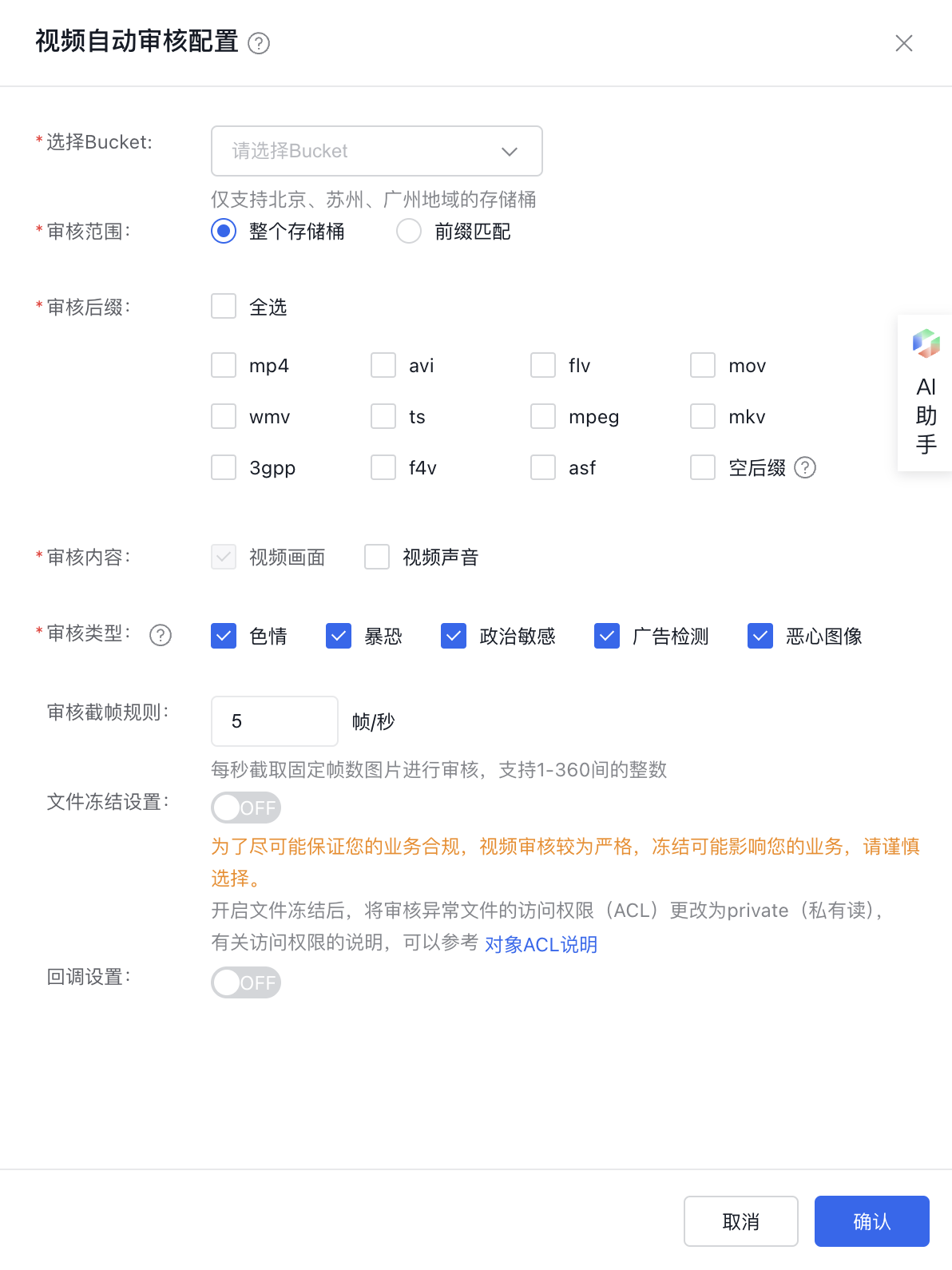
image.png

Use the audit service

View audit data and results

Through the BOS console

The BOS video audit service reviews all newly uploaded videos in the selected bucket and displays the audit information in "Audit Overview" and "Audit Details." It also provides the option to export audit results as a CSV file.

Audit Overview

  • Total Audited: The total number of video files audited
  • Total Non-Compliant: The number of non-compliant videos among the audited video files
  • Total Suspected: The number of videos flagged as potentially non-compliant among the audited video files.
  • Total Normal: The number of videos among the audited video files that are not in the non-compliant or suspected categories
  • Audit Failures: The number of video files among the audited ones with no clear audit results

Audit Details

  • Audit Results: Optional contents include all, normal, non-compliant, suspected, and no result obtained
  • Result Categories: Optional contents include all, pornography, violence and terrorism, political sensitivity, advertisement detection, and obscene images
  • Freezing Status: Optional contents include all, frozen, and restored
  • Audit Status: Optional contents include all, auditing, audit successful, and audit failed
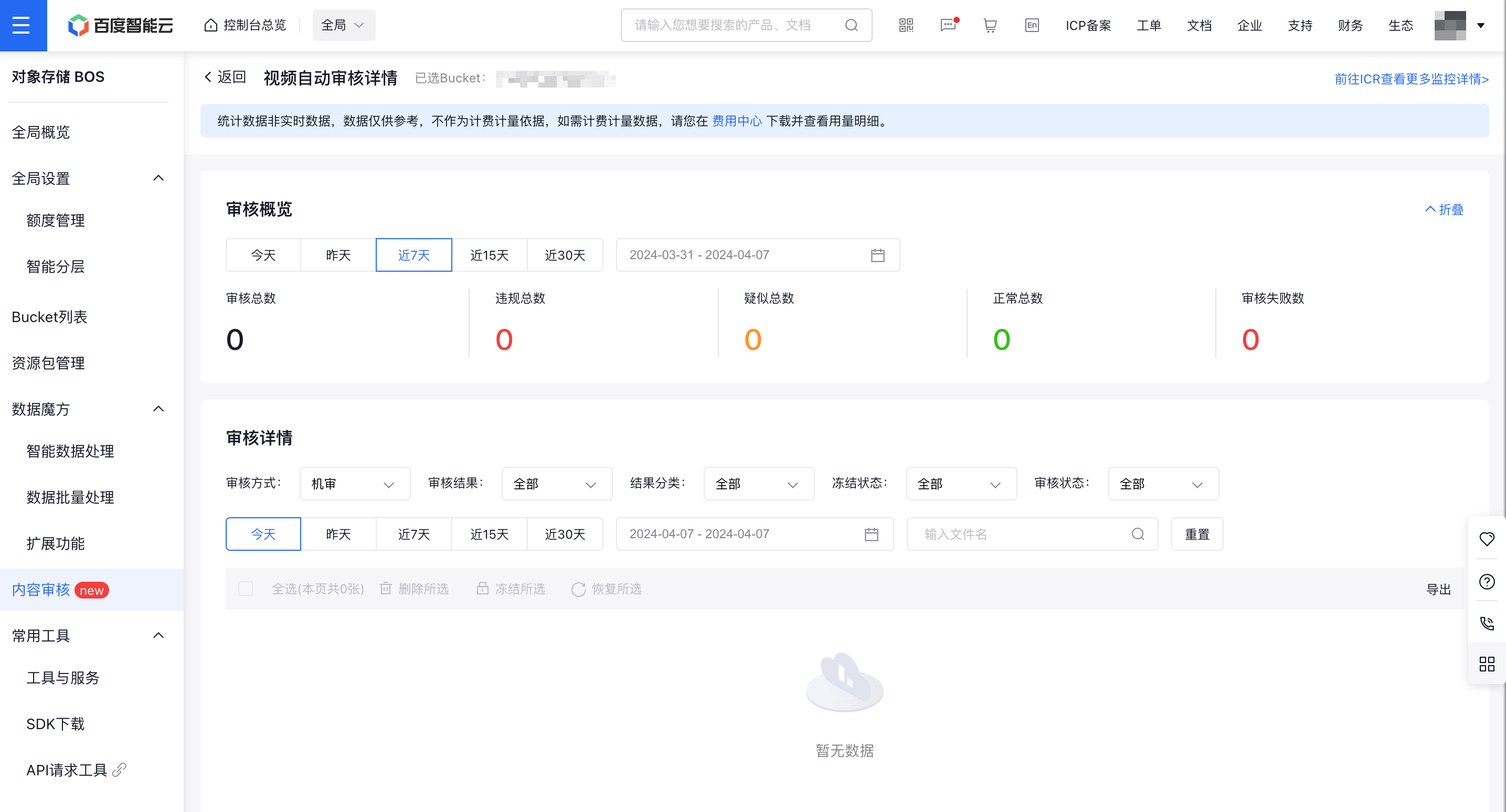
SCR-20240407-npuk.png

In the audit details section, click on specific video information to access the content's detailed page. This page provides details like audit status, audit result, exception message, URL, freezing status, and screenshots of non-compliant or suspicious content.

Through the ICR content audit console

You can also go to the ICR Content Audit Monitoring Report to view more specific information about video audit API calls. You can customize the time range and API type to query the details of video audit API calls.

Edit and modify audit rules

On the video audit rule list page in the console, you can edit and modify the corresponding audit rules.
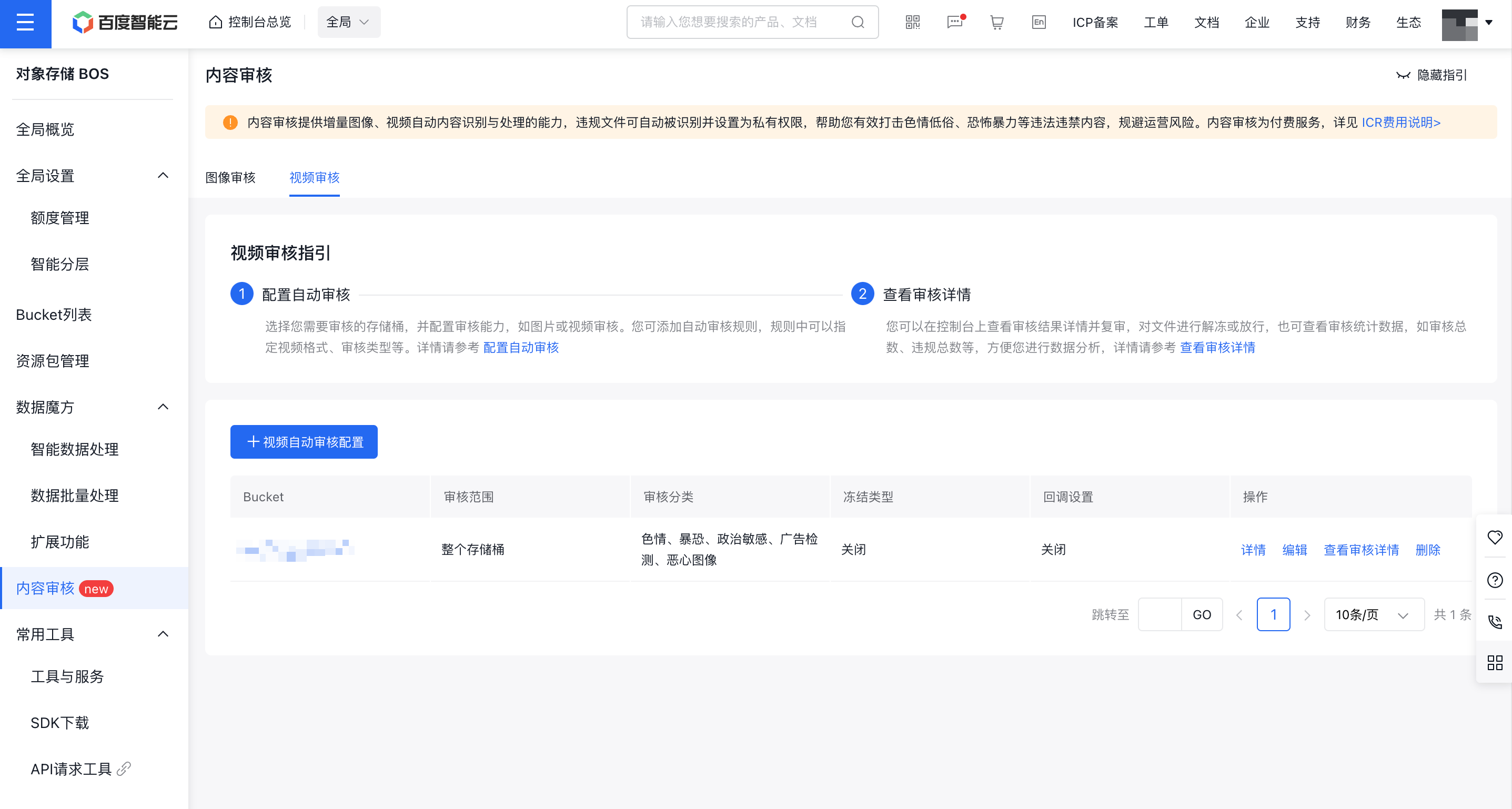
SCR-20240407-nqdj.png

Delete audit rules

On the video audit rule list page in the console, you can delete the corresponding audit rules. Once deleted, the incremental video file audit will be stopped.

Previous
Managing Bucket
Next
Image audit