Kafka Data Storage to BOS
Tool overview
Apache Kafka is an open-source distributed event streaming platform, which is widely used for high-performance data pipelines, stream analysis, data integration, and critical task application. It support exporting event stream data to object storage systems such as S3 through the connector method. This document will elaborate in detail on how to use S3 Sink Connector plugin to export data to a BOS bucket.
Configuration guide
-
Download the required versions of Kafka installation package and confluentinc-kafka-connect-s3 installation package, unzip them and start Kafka-related services (note that some versions of Kafka and connectors may be incompatible, requiring upgrades based on actual conditions. It is demonstrated with Kafka-3.6.2 and Kafka-connect-s3-10.5.0 versions).
Shell1# Download and install Kafka, create a plugins directory 2tar zxvf kafka_2.13-3.6.2.tgz 3cd kafka_2.13-3.6.2 4mkdir -p plugins 5# Start Zookeeper 6bin/zookeeper-server-start.sh config/zookeeper.properties 7# Start Kafka 8bin/kafka-server-start.sh config/server.properties 9# Download and install the S3 Sink Connector, then save it in the plugins directory after Kafka installation 10unzip confluentinc-kafka-connect-s3-10.5.0.zip 11cp -r confluentinc-kafka-connect-s3-10.5.0 kafka_2.13-3.6.2/plugins -
Modify the
connect-standalone.propertiesconfiguration file under Kafka’s config directory, add plugin paths and partial configurations.Shell1# Initial connection address of the Kafka cluster 2bootstrap.servers=localhost:9092 3# Converter type configuration 4key.converter=org.apache.kafka.connect.json.JsonConverter 5value.converter=org.apache.kafka.connect.json.JsonConverter 6key.converter.schemas.enable=false 7value.converter.schemas.enable=false 8offset.storage.file.filename=/tmp/connect.offsets 9# Interval at which Kafka Connect refreshes offsets to the storage file 10offset.flush.interval.ms=10000 11# Specific path of Kafka plugin 12plugin.path=/path/kafka_2.13-3.6.2/plugins -
Configure the S3 Sink Connector plugin, modify the
config/s3-sink.propertiesconfiguration file, and start the S3 Sink Connector. For details, refer to Configuration items, as shown below:Shell1name=s3-sink 2connector.class=io.confluent.connect.s3.S3SinkConnector 3# Maximum number of tasks a connector can create 4tasks.max=1 5# Specify the list of Kafka topics for reading data 6topics=my-topic 7# BOS Access Key ID 8aws.access.key.id=bos-ak 9# BOS Secret Access Key 10aws.secret.access.key=bos-sk 11# BOS Endpoint, e.g. https://s3.bj.bcebos.com 12store.url=bos-endpoint 13# BOS bucket name 14s3.bucket.name=bos-bkt 15storage.class=io.confluent.connect.s3.storage.S3Storage 16format.class=io.confluent.connect.s3.format.json.JsonFormat 17partitioner.class=io.confluent.connect.storage.partitioner.DefaultPartitioner 18# Maximum count of records cached before refreshing data to BOS 19flush.size=3 -
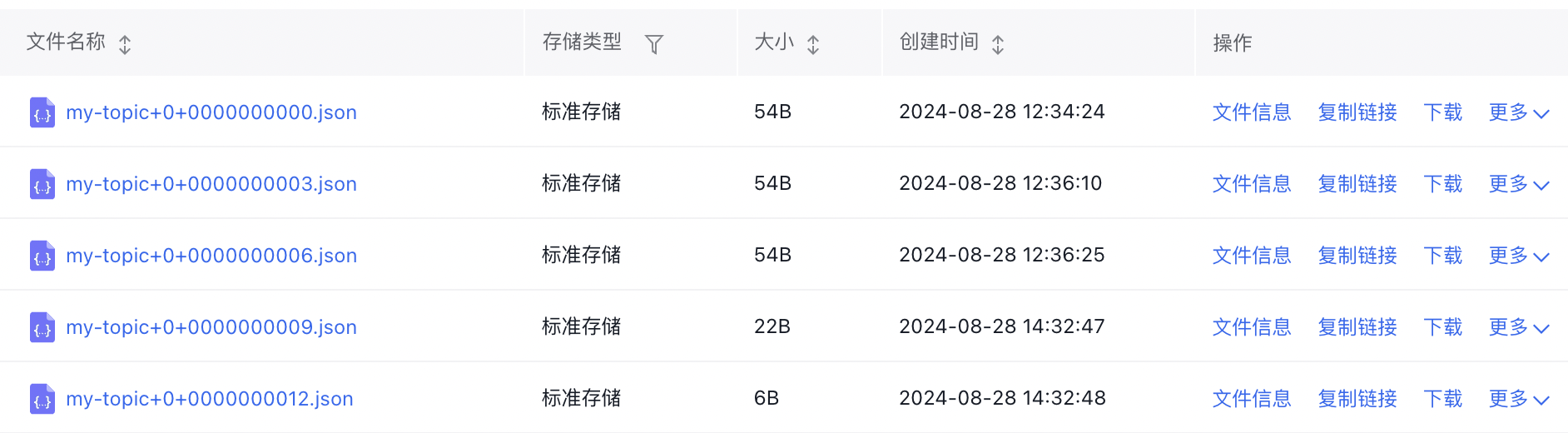
Start the S3 Sink Connector, create a Kafka topic, write data, and verify whether the data is exported normally to BOS by executing the following command:
Shell1# Start S3 Sink Connector 2bin/connect-standalone.sh config/connect-standalone.properties config/s3-sink.properties 3# Create a Kafka topic named my-topic 4bin/kafka-topics.sh --bootstrap-server localhost:9092 --create --topic my-topic 5# Write data to my-topic, execute the following command and then input the data 6bin/kafka-console-producer.sh --broker-list localhost:9092 --topic my-topic 7# After data is successfully exported to BOS, the Connector will output something similar to the following 8[2024-08-28 12:34:00,186] INFO [s3-sink|task-0] Creating S3 output stream. (io.confluent.connect.s3.storage.S3Storage:200) 9[2024-08-28 12:34:00,191] INFO [s3-sink|task-0] Create S3OutputStream for bucket 'bos-bkt' key 'topics/my-topic/partition=0/my-topic+0+0000000000.json' (io.confluent.connect.s3.storage.S3OutputStream:96) 10[2024-08-28 12:34:23,694] INFO [s3-sink|task-0] Starting commit and rotation for topic partition my-topic-0 with start offset {partition=0=0} (io.confluent.connect.s3.TopicPartitionWriter:326) 11[2024-08-28 12:34:24,148] INFO [s3-sink|task-0] Files committed to S3. Target commit offset for my-topic-0 is 3 (io.confluent.connect.s3.TopicPartitionWriter:634) - Then, we can view the exported topic data on the BOS console, formatted as
bos-bkt/topics/my-topic/partition=0/my-topic+0+0000000000.json: