

Set static website hosting
Overview
BOS allows users to host static websites on a bucket, enabling lightweight website operation and maintenance. After configuration, the hosted website can be accessed using the bucket's domain name.
A static website consists entirely of static resources like HTML and images (e.g., JPG), with no server-side scripts like PHP, JSP, or ASP.NET. Static hosting also does not support server-side scripting.
If you need to deploy and manage dynamic websites, please use Baidu AI Cloud Compute BCC or Container Service CCE.
Description:
For security reasons, starting September 15, 2022, webpage-type files (mimetype as text/html, e.g., HTM, HTML files) accessed via browsers using BOS official domain names or CDN official acceleration domain names across all Baidu AI Cloud Object Storage regions will be downloaded as attachments. The specific changes are as follows:
- When accessing using the BOS official domain name,
Content-Disposition:'attachment=filename;'will be automatically added to the response header. When accessing webpage-type files via a browser, content won't be displayed, instead of files download as attachments. For official domain name information, see View Bucket Official Domain Name.- When accessing BOS using the CDN official acceleration domain name,
Content-Disposition:'attachment=filename;'will be automatically added to the response header. When accessing webpage-type files via a browser, content won't be displayed, instead of files download as attachments.- When accessing BOS via a custom domain name, the response header won't include
Content-Disposition:'attachment=filename;'. You can directly preview webpage-type files via a browser. For details to add custom domain name, see Create Bucket Custom Domain Name.
Service mode
To host a static website, you first need to upload the key resources to the bucket: the "Index Page" and the "404 Page.\
Index Page
A standard website typically includes several index pages corresponding to the homepage and submodule homepages. When users access root directories www.example.com or paths ending with / (e.g., www.example.com/folderA/) without a specific page, BOS will return the index page.
Website administrators can upload static resources to the bucket's root or subdirectories to display index page content. BOS currently supports HTML files for this purpose.
404 Page
For better user experience during 404 errors in static website hosting, a customized error page can be used. On BOS, administrators can upload files in formats like HTML, JPG, PNG, BMP, or WEBP as 404 pages in the bucket's root directory. If a visitor encounters a missing resource, this 404 page will be displayed by default.
Note:
- Buckets used for hosting static websites need to be set with public read permissions to enable access by anonymous users. As a precaution, avoid uploading confidential data to such buckets.
- Avoid setting the meta tag "Content-Disposition:attachment" for the 404 page.
Once the resources for the index and 404 pages are uploaded to the bucket, administrators can configure them via the BOS management console.
Set static website hosting
- Sign in to the Baidu AI Cloud Object Storage (BOS) Management Console.
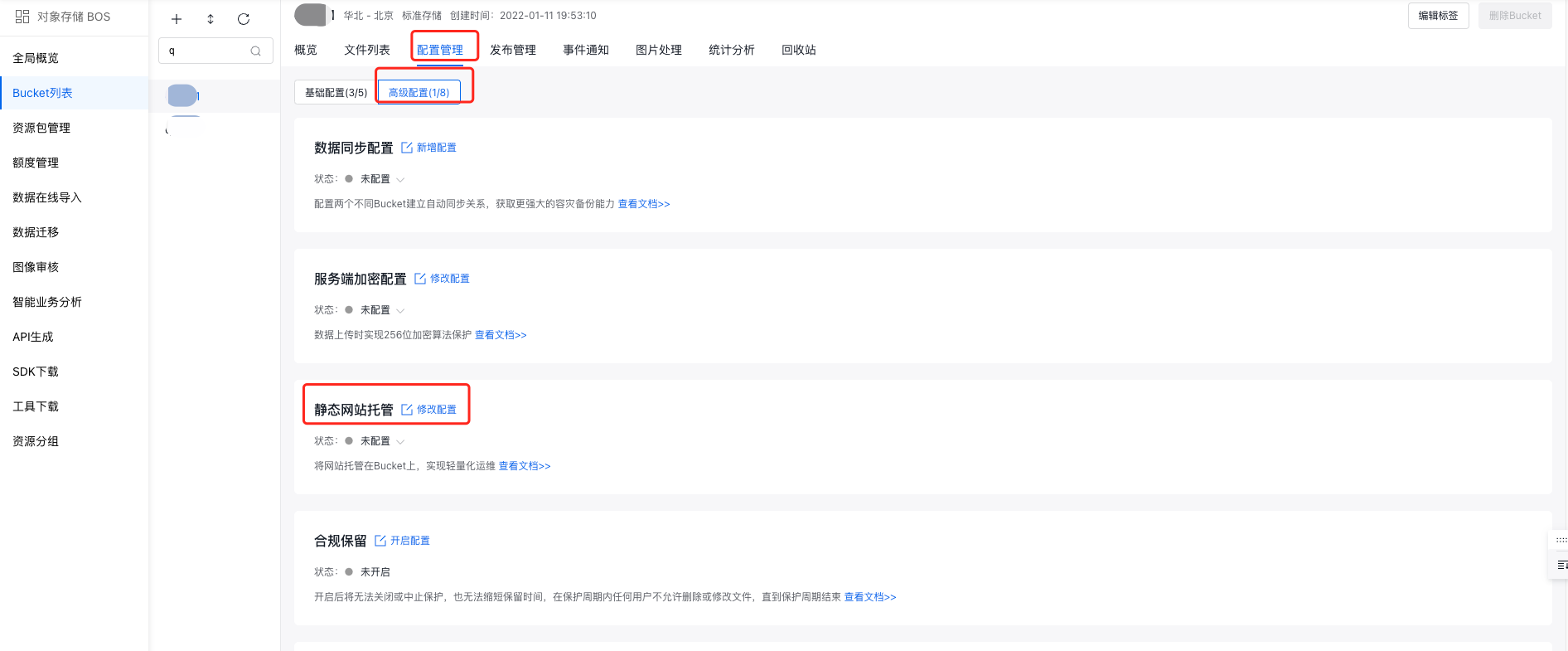
- From the bucket list on the left, select the bucket for which you want to set permissions, then click its name to enter the bucket management directory.
- Select the Configuration Management tab in the top navigation bar.
- On the Configuration Management page, select Advanced Configuration, and then click Modify Configuration in the Static Website Hosting region.
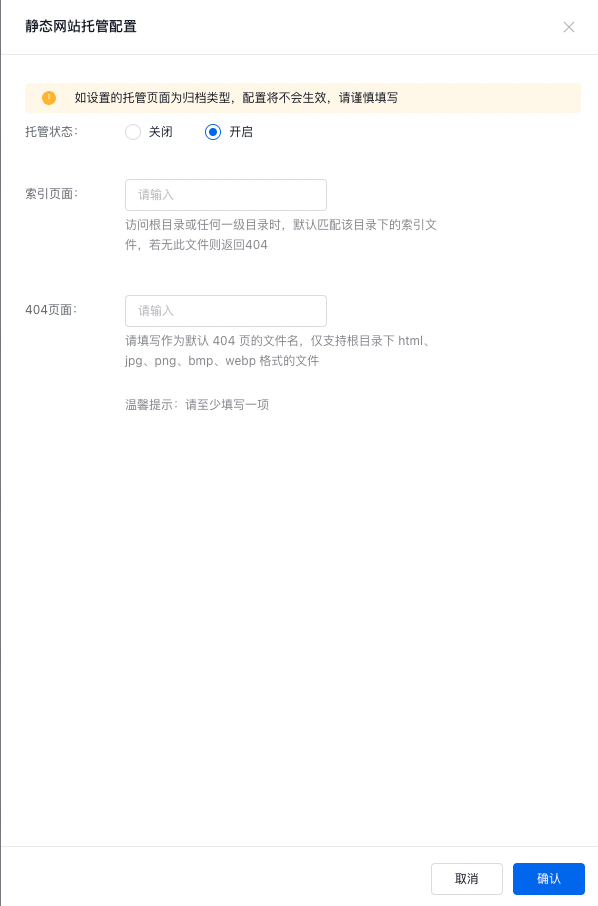
- In the operation bar of Static Website Hosting Configuration, change the Hosting Status{4-} to Enabled, and configure the Index Page and 404 Page.
Note:
- The index page name can be arbitrarily designated per website management practices (e.g., "index.html" or "admin.html"), but the resource name for index pages at all levels must be unified under the same name;
- Either an index page or 404 page must be specified; otherwise, the configuration will not take effect
- If the hosted page is set as archive storage, the configuration will not take effect
- When the resource matching the page filled by the administrator does not exist in the bucket, it is treated as 404; if the resource corresponding to the 404 page also does not exist, the original 404 error page is returned;
- When both static website hosting and mirror back-to-origin are enabled for a bucket, if the requested resource is unavailable, BOS will first attempt mirror back-to-origin. If no corresponding resource exists, it will switch to static hosting logic and return the 404 page.
Configuration example
A user creates a bucket named "website" in the bj region and places the following files in it:
- Place index.html in the root directory of the bucket
- Place 404.html in the root directory of the bucket
- Place index.html in the secondary directory website/car of the bucket
- Place apollo.jpg in the secondary directory website/car of the bucket
When users enable the static website hosting function for a bucket, visitor access behavior is defined as follows:
- When accessing www.website.bj.bcebos.com, the page displays index.html
- When accessing www.website.bj.bcebos.com/car/, the page displays index.html
- When accessing www.website.bj.bcebos.com/car/apollo.jpg, the page displays apollo.jpg
- When accessing www.website.bj.bcebos.com/car/dazhong.jpg, the page displays 404.html as the resource does not exist
Related APIs
Static website hosting also supports API-based configuration. Refer to the following API specifications:
- PutBucketStaticWebsite API: Use the PutBucketStaticWebsite API to set up static website hosting.
- GetBucketStaticWebsite API: Use the GetBucketStaticWebsite API to get static website hosting information of bucket.
- DeleteBucketStaticWebsite API: Use the DeleteBucketStaticWebsite API to delete the static website hosting information set for the bucket and disable static website hosting for this bucket.