

Billing FAQs
Updated at:2025-11-03
1. Account debt related
1.1 Will data be lost after debts?
- If your account balance falls below RMB 0 and cannot cover the BOS bill, it will be considered as debt. The system will send a debt notification when such a situation arises.
- Service will be suspended immediately due to overdue payments, and the system will issue a notification regarding the suspension. Data will be retained for 15 days during which storage fees will apply. If no payment is made within 15 days, the data will be deleted. The system will send a notification 1 day before, as well as when data deletion occurs.
1.2 What operations are needed to use BOS normally after debts? Can coupons be used?
- If your account has a debt, you can only resolve it by paying the outstanding balance. Once the debt is settled, you can use BOS normally.
- While your account has a debt, vouchers cannot be used. Please clear the outstanding balance first, after which coupons can be used for regular deductions.
1.3 What if BOS resources cannot be found after debts?
- When the BOS service is in debts and the debt period exceeds 24 h, the BOS service will automatically stop. However, the resources occupied by the user's storage space will continue to be charged on a pay-as-you-go basis, so the debt balance will accumulate. If you recharge within 24 h after debts, your service will not be affected by the suspension. If the user’s debt period exceeds 24 h, the BOS service will automatically stop. Users can recharge to make up for the debts within 15 days, and the service will automatically restart, allowing continued use. If debts exceed 15 days, the user will be deemed to have voluntarily abandoned the BOS storage service. The storage space will be reclaimed, and the data in the storage space will be cleared and cannot be recovered. For detailed description, please refer to [Insufficient Balance and Debt Reminder](BOS/Product pricing/Insufficient Balance and Debt Reminder.md).
1.4 What to do if BOS remains inaccessible after recharging for debts?
- After recharging to settle BOS debts, it typically takes 10-20 minutes for the payment to take effect and functionality to resume. Please wait patiently and, after 10 minutes, try refreshing your browser cache.
2. Product usage related
2.1 What is the traffic charging standard after enabling mirror back-to-origin?
- The mirror back-to-origin is a bucket-level setting. Currently, files fetched by mirror back-to-origin are stored in standard storage by default. The charge items include storage, request and traffic fees. For specific charge details, please check [Product Pricing](BOS/Product pricing/Product price/Pay-As-You-Go Charge Type.md).
2.2 Will there be traffic consumption for downloaded files obtained through the BOS GetObject method call?
- Files downloaded through the GetObject method call will incur request fees + traffic fees. For infrequent access storage and cold storage, data restoration fees will also be charged. For specific fee details, please check [Product Pricing](BOS/Product pricing/Product price/Pay-As-You-Go Charge Type.md).
2.3 Will repeatedly uploading unmodified files on BOS consume the count of requests?
- Each upload triggers a request to the corresponding upload API, and the number of requests is tracked and calculated.
2.4 What is the minimum charge time for BOS?
- BOS pushes bill usage data every minute. The Baidu AI Cloud will calculate minute-level fees in the system based on this usage data and charge item unit prices, and accumulate the fees of the past 60 min to form an hour-level bill. For specific charge rules, please check BOS Charge Rules.
2.5 I have enabled CDN acceleration, so why don’t I see the related fees?
- If you enable CDN acceleration in BOS, the associated fees will appear in the bill for "Content Delivery Network (CDN)" instead of the BOS bill. Please refer to the CDN bill for details.
2.6 How to check the fees for CDN uplink acceleration?
- The commonly referred CDN acceleration pertains to downlink acceleration and does not include uplink acceleration. If you wish to use CDN uplink acceleration, it must be enabled in the console. CDN uplink acceleration leverages the CDN dynamic acceleration feature, and the associated fees will appear in the bill for "Content Delivery Network (CDN)" instead of the BOS bill. Please check the CDN bill for details.
2.7 I mainly operate through the console and SDK, without directly using APIs, so why are there fees related to read/write API times?
- The BOS console, SDKs in various languages, and various encapsulation tools all use BOS APIs at the underlying level. Therefore, if you use the console or SDK, you are essentially using various APIs of BOS, which will incur fees related to API read/write times. For information about API-related charge items, please check BOS Request Fee Charge Item Description.
2.8 I mainly upload data through the internet. Will there be related fees?
- BOS only charges fees for the internet (i.e., public network/internet) downlink traffic. internet uplink, intranet uplink and intranet downlink are free of charge and incur no fees. For descriptions of BOS traffic-related charge items, please check BOS Traffic Fee Description.
3. Resource package related
3.1 Must I purchase a resource package to use BOS?
- BOS operates on a post-payment basis by default, and purchasing a resource package is optional. If files are uploaded to BOS without a resource package, storage fees will be charged on a pay-as-you-go basis. Ensure there is sufficient balance in your Baidu AI Cloud account to cover the charges.
3.2 Is the unit-price of BOS resource packages cheaper than post-payment?
- When purchasing a BOS resource package of 6 months, 1 year, 2 years, or 3 years, discounts are applied. A 6-month package offers an 8.3% discount off the postpaid price, while packages for 1, 2, and 3 years include a 7.5% discount off the postpaid price.
3.3 How to use BOS after purchasing a storage package?
- BOS supports the purchase of storage packages in subscription (pre-payment) form. After purchasing the storage package, your BOS consumption will first be deducted from the storage package (no special settings required), and the excess part will be charged on a pay-as-you-go basis. You can purchase storage packages directly in the "BOS->Storage Packages" tab of the management console. When purchasing, select the region, specification, purchase period and effective time as prompted. For detailed descriptions, please refer to the following document [BOS Storage Package Charge](BOS/Product pricing/Product price/Resource Package Charge Type/Resource Package Overview.md).
3.4 Can resource packages be renewed after expiration?
- Resource packages currently do not support renewals. However, you can purchase a new resource package and set its effective start date to coincide with the expiration date of your existing package, enabling seamless connection similar to a renewal.
4. Early-month reconciliation related
4.1 How to check last month’s BOS consumption bill?
- Baidu AI Cloud provides visual monthly BOS resource bills. You can sign in to the console and click "Finance" in the upper right corner to view them. For various ways to view BOS bills, please check BOS Bill View and Analysis, which has sorted out various bill view methods for you.
4.2 How to check detailed hourly bills?
- Baidu AI Cloud provides visual hour-level hour bills. You can sign in to the console and click "Finance" in the upper right corner to view them. For various ways to view BOS bills, please check BOS Bill View and Analysis, which has sorted out various bill view methods for you.
4.3 How to check fees incurred by a specific bucket?
- Baidu AI Cloud provides detailed bucket-level bills. You can sign in to the console and click "Finance" in the upper right corner to view them. For various ways to view BOS bills, please check BOS Bill View and Analysis, which has sorted out various bill view methods for you.
4.4 How to check the usage data of standard storage under the account?
- You can view usage data through various bills provided by Baidu AI Cloud or use the console usage export function provided by BOS. For details, please refer to BOS Usage View and Export.
4.5 My data volume has not changed, so why is the capacity consumption amount in February different from that in March? Is the monthly unit-price on the official website inaccurate?
- BOS operates on a pay-as-you-go basis with minute-level traffic settlement and hourly billing. The monthly unit price presented on the official website is a 30-day reference price rather than a calendar month price. For instance, the monthly rate for standard storage is listed as RMB 0.119/GB/month, which translates to RMB 0.00396667/GB/day, RMB 0.000165278/GB/hour, and RMB 0.0000027546/GB/minute. For a usage peak of 10,987,654,321 bytes in one minute, the corresponding bill is calculated as 10,987,654,321 ÷ 1024 ÷ 1024 ÷ 1024 × 0.0000027546 = RMB 0.00002818796. For a 30-day month, the total comes to RMB 1.22; for a 31-day month, RMB 1.26; and for a 28-day month, RMB 1.10. This represents a precise minute-level billing system where the monthly unit price is merely a 30-day reference value.
4.6 Why is this month’s fee much higher? How to solve this problem?
- You can view the usage data of all BOS charge items for a specific month in the resource month bill and check the bill amount generated by each charge item for easy reconciliation. You can also download monthly resource bills for consecutive months, compare bills across months, check changes in resource usage of each charge item, and analyze the reasons for increases or decreases in bill amounts. For ways to view monthly resource bills, please refer to BOS Bill View and Analysis.
Customer case of bill analysis through monthly resource bills:
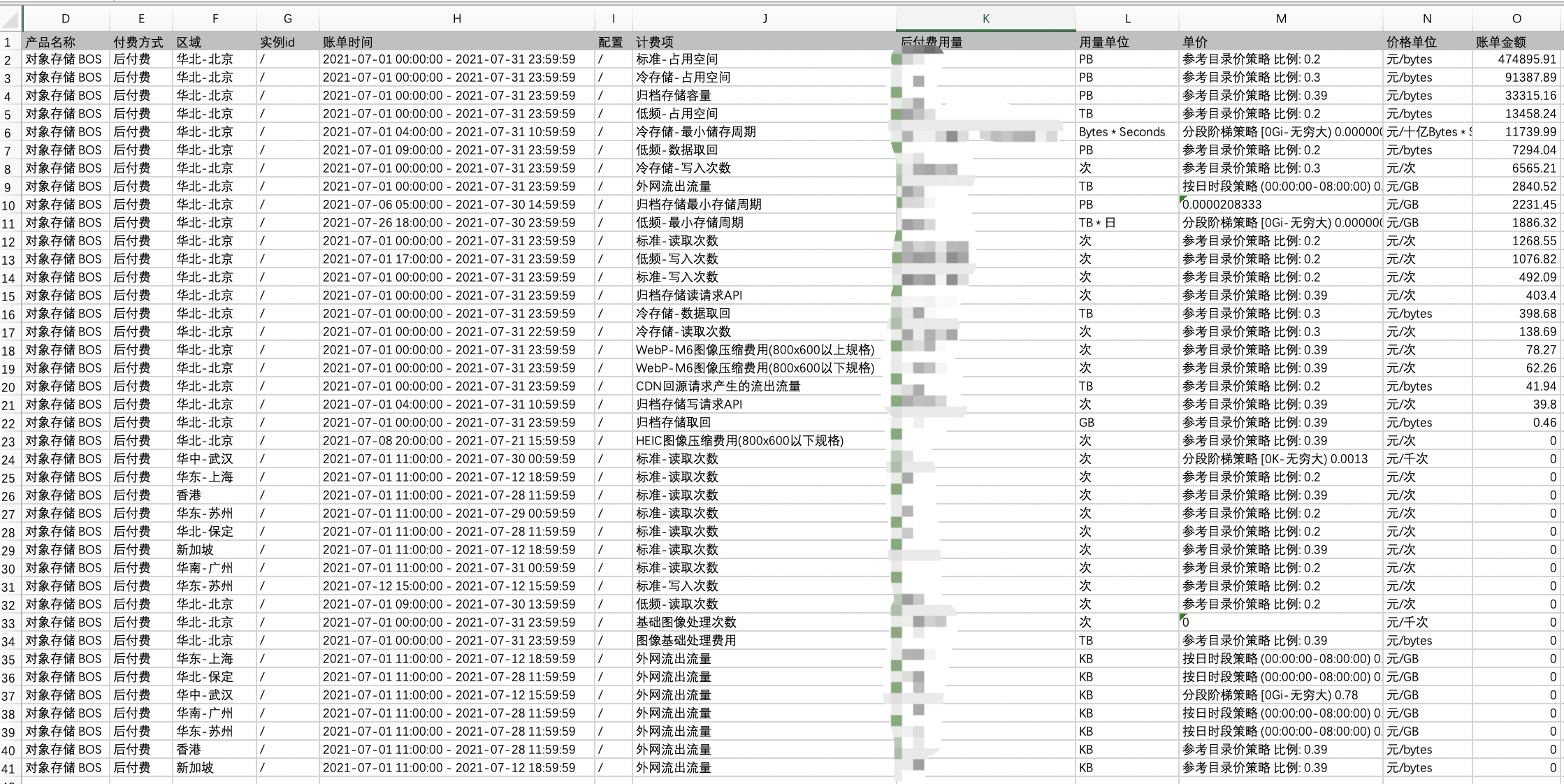
- The figure below shows a customer’s BOS resource month bill for July 2021. According to the customer feedback, the bill amount in July was nearly RMB 15,000 higher than the expected amount in June, and they wanted to investigate the reason for the increase in bill amount. From the customer’s July bill, it can be seen that:
- The customer used 4 storage types: standard storage, infrequent access storage, cold storage and archive storage. The total storage capacity fees for these four types accounted for about 88% of the total bill. Therefore, BOS storage fees account for a significant proportion of the total bill, which is normal for BOS usage. Although BOS has nearly 60 charge items, "Standard - Space Usage", "Infrequent Access - Space Usage", "Cold - Occupied Space" and "Archive - Space Usage" generally generate the highest fees. To learn about BOS charge items, please refer to Charge Item Details.
- The customer’s July bill included an item "Cold Storage - Minimum Storage Period" with a fee of about RMB 11,000. Meanwhile, there was a fee of about RMB 1,800 for "Infrequent Access - Minimum Storage Period" and about RMB 2,200 for "Archive Storage - Minimum Storage Period". The total minimum storage period fees for the three storage types in July were about RMB 15,000. The customer also downloaded the June resource month bill and found no such amount in June, thus identifying the reason for the unexpected increase in amount.
- After checking BOS official help documentation, the customer further learned that infrequent access storage, cold storage and archive storage have Minimum Storage Durations: 30 days for infrequent access storage, 60 days for cold storage, and 180 days for archive storage. If data is deleted before meeting this duration, the storage fees for the remaining not fully stored duration will be charged once at the time of deletion, which is reflected in the bill as "Minimum Storage Duration". Based on bill analysis, the customer reselected appropriate storage types according to their usage and data deletion plans to avoid such fees in the future.
4.7 My cold storage capacity is only 1.2 PB, so why is there a cold storage minimum storage period fee of 74.90 PB in the bill?
- BOS has charge items for minimum storage periods, namely infrequent access multi-AZ minimum storage period, infrequent access minimum storage period, cold storage minimum storage period and archive minimum storage period. For the minimum storage period charge items, since the data in the bill is displayed in monthly aggregated granularity, the usage data in the bill is the product of "capacity × remaining time", with units of bytes ✖ hours or bytes ✖ days (where bytes are automatically rounded up to GB/TB/PB). For example, the usage data of the following item is 74.90 PB ✖ hours, where 74.90 is the product of capacity and hours.

- If calculated based on the remaining 40 days (i.e., 960 hours), the capacity data is 74.9 ✖ 1,024/40/24 = 79.89 TB, which did not generate a bill of 74.90 PB. If you want to view detailed usage, you can check the hourly bill. For descriptions of minimum storage period charge items, please check Minimum Storage Period Charge Item Description.
More questions
For more common questions, please check Common Questions.