VPC Access Control
Updated at:2025-11-03
Overview
To enhance enterprise data security and prevent unauthorized access to critical data, VPC Access Control lets you authorize bucket access at the VPC level.
Note
- Only the root account has the privilege to configure this policy.
- Once a permission policy is configured, the access from all non-authorized buckets will be denied. Please configure the permission policy appropriately.
- This permission configuration applies solely to access originating from the VPC and not from external, non-VPC sources.
- Once the permission policy is configured, the VPC access control rules apply to both direct access to the BOS domain name and access through the service network interface card within the VPC.
Operation steps
- Sign in to the Baidu AI Cloud Object Storage (BOS) Management Console.
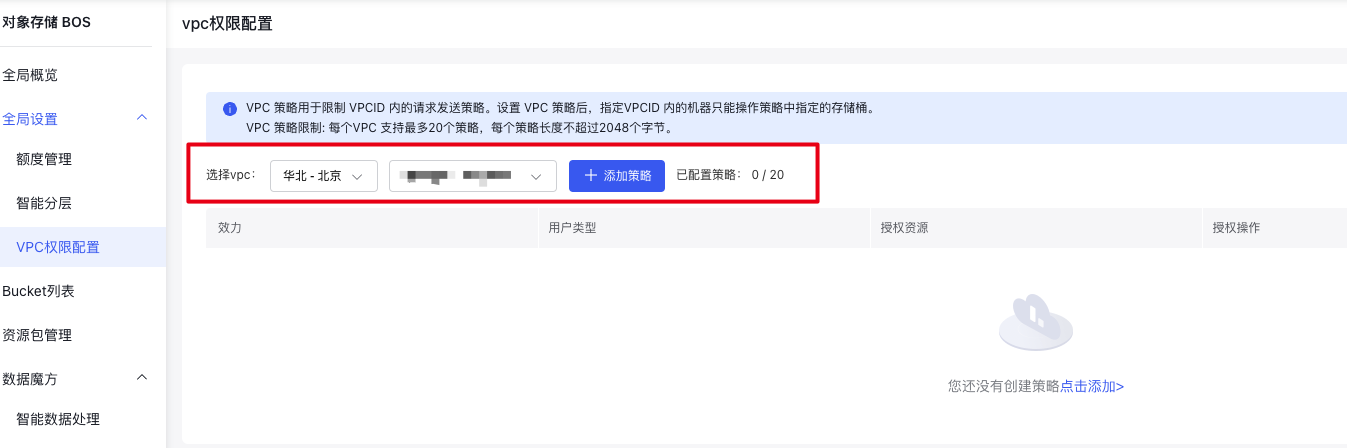
- Under Global Settings on the left, select VPC Permission Configuration to enter the VPC Access Control Configuration page.
- From the VPC dropdown menu above, select the VPC for which you want to configure access permission rules.
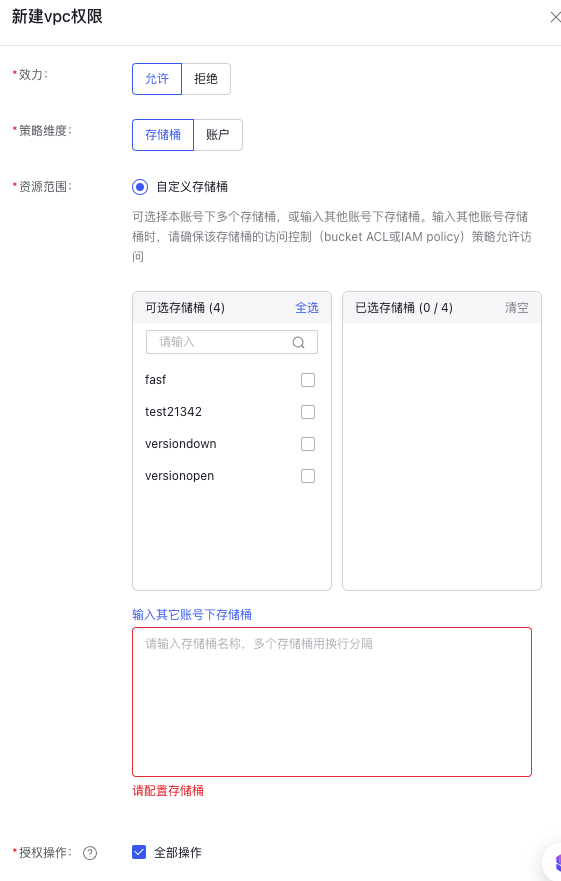
- Click Add Policy to enter the VPC Access Policy Editing page. Select the authorization effect type as needed, then choose the bucket for which the permission takes effect under the resource scope section. You can select custom buckets under your account or enter the name of a bucket under another account. By default, all operations are selected for authorization. After confirming the information, click OK to submit the policy.