Add Text Watermark

BOS

  • Function Release Records
  • Product Announcement
  • S3
    • Overview
    • Compatible Interfaces
    • Compatible Signature Authentication
    • Service domain
    • Compatible Common Headers
    • Compatible Tools
  • Security and compliance
    • Overview
    • Monitoring and Audit
    • Data Disaster Recovery
    • Access control
    • Data protection
    • Data Retention Compliance
    • Data encryption
  • API Reference
    • Interface Specifications
    • Audio and Video Processing Interface
    • Access control
    • Introduction
    • Error code
    • Upload callback
    • Service-Related Interface
      • ListBuckets
      • Quota management
        • DeleteUserQuota
        • PutUserQuota
        • GetUserQuota
    • Image Moderation Service Interface
      • Politician Recognition (Politician)
      • Disgusting Image Recognition (Disgust)
      • API description
      • Watermark and QR Code Recognition (Watermark)
      • Face Detection (Face)
      • Image Quality Recognition (Quality)
      • General Text Recognition (OCR)
      • Pornography Recognition (Antiporn)
      • Public Figure Recognition (Public)
      • Terror Recognition (Terror)
    • Multipart Upload-Related Interface
      • AbortMultipartUpload
      • ListMultipartUploads
      • ListParts
      • User guide
      • UploadPart
      • InitiateMultipartUpload
      • UploadPartCopy
      • CompleteMultipartUpload
    • Bucket-Related Interface
      • Original image protection
        • PutBucketCopyrightProtection
        • GetCopyrightProtection
        • DeleteCopyrightProtection
      • Tag Management
        • PutBucketTagging
        • DeleteBucketTagging
        • GetBucketTagging
      • Quota management
        • PutBucketQuota
        • GetBucketQuota
        • DeleteBucketQuota
      • Data encryption
        • GetBucketEncryption
        • DeleteBucketEncryption
        • PutBucketEncryption
      • Event notification
        • PostResult
        • DeleteNotification
        • PostEvent
        • GetNotification
        • PutNotification
      • Recycle bin
        • DeleteBucketTrash
        • GetBucketTrash
        • PutBucketTrash
      • Data synchronization
        • GetBucketReplicationProgress
        • ListBucketReplication
        • GetBucketReplication
        • PutBucketReplication
        • DeleteBucketReplication
      • Cross-Origin Access
        • GetBucketCors
        • PutBucketCors
        • DeleteBucketCors
      • Mirror back-to-origin
        • PutBucketMirroring
        • DeleteBuketMirroring
        • GetBucketMirroring
      • Basic Operations
        • GetBucketLocation
        • HeadBucket
        • PutBucketStorageclass
        • PutBucket
        • GetBucketStorageClass
        • DeleteBucket
      • Lifecycle
        • DeleteBucketLifecycle
        • GetBucketLifecycle
        • PutBucketLifecycle
      • Permission control
        • PutBucketAcl
        • GetBucketAcl
      • Compliance retention
        • ExtendBucketObjectLock
        • DeleteBucketObjectLock
        • CompleteBucketObjectLock
        • InitBucketObjectLock
        • GetBucketObjectLock
      • Bucket inventory
        • GetBucketInventory
        • ListBucketInventory
        • DeleteBucketInventory
        • PutBucketInventory
      • Requester Pays
        • GetBucketRequestPayment
        • PutBucketRequestPayment
      • Static Website
        • PutBucketStaticWebsite
        • DeleteBucketStaticWebsite
        • GetBucketStaticWebsite
      • Versioning
        • PutBucketVersioning
        • GetBucketVersioning
      • Logging
        • DeleteBucketLogging
        • GetBucketLogging
        • PutBucketLogging
    • Object-Related Interface
      • Object Tag
        • PutObjectTagging
        • GetObjectTagging
        • DeleteObjectTagging
      • Basic Operations
        • CopyObject
        • ListObjects
        • FetchObject
        • GetObjectMeta
        • PostObject
        • listObjectVersions
        • DeleteObject
        • PutObject
        • AppendObject
        • DeleteMultipleObjects
        • RestoreObject
        • GetObject
        • OPTIONSObject
      • Soft links
        • GetSymlink
        • PutSymlink
      • Permission control
        • GetObjectAcl
        • PutObjectAcl
        • DeleteObjectAcl
      • Select scanning
        • SelectObject
  • Console Operation Guide
    • Hierarchical Namespace Bucket Operation Instructions
    • Configuring BOS Multi-User Access Control
    • Image Service
    • Operation preparation
    • Favorite Path
    • Quota management
    • Linkage with Baidu Netdisk sharing
    • Online data import
    • Statistics and monitoring
    • Intelligent Business Analysis
    • Event Notification and Data Processing
    • View and export usage data
    • Image Review Service
    • Automatic file decompression
    • Data Publishing
      • Data Publishing Introduction
      • Global Acceleration
      • Creating a Bucket Custom Domain Name
      • Viewing Bucket Official Domain Name
      • Configure Cache Management
      • Enabling CDN Official Acceleration Domain Name
      • Configuring CDN Upload Acceleration
    • Global Settings
      • VPC Access Control
    • Managing Bucket
      • Set static website hosting
      • Setting Up Log Query
      • Set referer allow list
      • Create bucket
      • Set cross-origin access
      • Set bucket trash
      • Set mirror back-to-origin
      • Set access logs
      • Set server-side encryption
      • Set storage inventory
      • Managing Bucket Tag
      • Querying Bucket
      • Data access trend analysis
      • Bucket quota management
      • Set compliance retention
      • Bucket overview
      • Set data synchronization
      • Setting Up Versioning
      • Requester Pays
      • Delete bucket
      • Managing Lifecycle
        • Overview
        • Configure intelligent tiering
        • Configuring Basic Lifecycle Management
        • Basic Lifecycle Management Usage Instructions
          • Lifecycle Rule Based on Last Accessed Time
          • Lifecycle Rule Based on Last Modified Time
      • Set bucket read-write permissions
        • Permission Introduction
        • Set bucket read-write permissions
    • Manage object
      • Setting Symlink
      • Select scanning
      • Setting Meta Information
      • Share files - get file URLs
      • Parts management
      • Folder sharing
      • Restore Archived Files
      • Delete file
      • Copy and move files
      • Delete folders in batches
      • Batch Managing Object
      • Folder statistics
      • Renamed files
      • Convert file storage class
      • Set file permissions
      • Download file
      • Querying Object
      • Upload files
      • Managing Folder
      • Object Tag
  • Managing Bucket
    • Set static website hosting
    • Set referer allow list
    • Create bucket
    • Set bucket trash
    • Set mirror back-to-origin
    • Set access logs
    • Set server-side encryption
    • Set storage inventory
    • Managing Bucket Tag
    • Bucket quota management
    • Set compliance retention
    • Bucket overview
    • Set data synchronization
    • Requester Pays
    • Delete bucket
    • _Archive
      • Set static website hosting
      • Set referer allow list
      • Create bucket
      • Set cross-origin access
      • Set bucket trash
      • Set mirror back-to-origin
      • Set access logs
      • Set server-side encryption
      • Set storage inventory
      • Managing Bucket Tag
      • Querying Bucket
      • Bucket quota management
      • Set compliance retention
      • Bucket overview
      • Set data synchronization
      • Requester Pays
      • Delete bucket
    • Set bucket read-write permissions
      • Permission Introduction
      • Set bucket read-write permissions
      • _Archive
        • Permission Introduction
        • Set bucket read-write permissions
  • Content Review
    • Video Review
    • Image audit
  • Service Level Agreement (SLA)
    • BOS Service Level Agreement SLA (V3_0)
    • Baidu AI Cloud Object Storage (BOS) Trusted Cloud Certification
  • Data processing
    • Image audit
    • Data Processing FAQs
    • Document preview
    • Video frame capture
    • Instant video transcoding
    • Data Processing Introduction
    • Image Processing Terminology Explanation
    • Multimedia cloud processing
    • Get video metadata
    • General Image Settings
      • Original image protection
    • Intelligent Recognition
      • Overview
    • Image Processing Guide V2_0
      • Removing Metadata
      • Image Scaling
      • Image Brightness
      • Getting Image Information
      • Image Blur
      • Usage rules
      • Image Resizing
      • Quality Transformation
      • Format conversion
      • Progressive Display
      • Image Sharpening
      • Grayscale Transformation
      • Image Contrast
      • Image Rotation
        • Normal Rotation
        • Adaptive Rotation
      • Intelligent Processing
        • Intelligent Processing Usage Rules
        • Intelligent Scenarios
          • Lossless magnification
          • Portrait Cartoonization
          • Sky Segmentation
          • Style conversion
          • Black and white coloring
          • Stretch Restoration
          • Object erasure
        • Intelligent Effects
          • Intelligent Contrast
          • Intelligent Sharpness
          • Intelligent defogging
          • Intelligent Color Grading
      • Image Cropping
        • Rounded-corner rectangle cropping
        • Incircle Crop
        • Normal Crop
        • Index Crop
      • Image Watermark
        • Add Image-Text Mixed Watermark
        • Add Text Watermark
        • Add image watermark
    • Image Processing Guide V1_0
      • Image Cropping
      • Getting Image Information
      • Image Thumbnailing
      • Usage rules
      • Quality Transformation
      • Format conversion
      • Watermark
      • Progressive Display
      • Image Rotation
  • Peripheral Tools
    • fsspec-bosfs
    • Peripheral Tools Overview
    • BOS-FTP Tool
    • Download Zone
    • BOS-AlluxioExtension Tool
    • BOS-PC Client
      • FAQs
      • User guide
      • Installation and Login
    • BOS-HDFS Tool
      • Overview
      • Configuration and Usage
      • Big Data Component Usage Guide
        • DataX Reading and Writing BOS
        • Hive Usage Guide
        • Presto Usage Guide
        • Spark Usage Guide
        • Flume Data Storage to BOS
        • Flink Usage Guide
        • Impala Usage Guide
    • BOS-Probe Error Detection Tool
      • Overview
      • Suggestions and Report Viewing
      • Checking Uploads and Downloads via BOSProbe
      • Installing BOSProbe
    • Docker
      • Overview
    • BOS-CMD Command-Line Tool
      • Configure BCECMD Command-Line Completion
      • Install BOSCMD
      • Overview
      • FAQs
      • Use BOS Service via CMD
      • BOS CMD Common Issues
      • BOSCMD Version Change Records
      • Configure BOSCMD
    • BOS-Import Data Cloud Migration Tool
      • Configuration file
      • Deployment methods
      • Overview
      • Version records
      • Exception handling
      • Log
      • Task Progress Recovery
    • BOS-FS Mount Tool
      • Operations and Practices
      • Overview
      • Version Change Records
      • FAQs
      • Install
      • Configuration
    • BOS-API Generation Tool
      • Overview
      • Service-Related Interface
        • List Buckets
        • Quota management
          • Delete User Credit Quota Settings
          • Get User Credit Quota Information
          • Set User Credit Quota
      • Image Moderation Service Interface
        • Image Review Interface
      • How to Call the API
        • Authentication
        • Construct a Request
        • Return a Response
      • Bucket Data Synchronization Related Interfaces
        • Retrieving the Process Status of Data Synchronization for a Specified ID in a Bucket
        • Setting Up Bucket Data Synchronization
        • Deleting the Synchronization Replication Configuration of a Specified ID in a Bucket
        • Listing All Replication Synchronization Rules of a Bucket
        • Retrieving Bucket Data Synchronization Information
      • Bucket-Related Interface
        • Original image protection
          • Disabling Bucket Original Image Protection Configuration
          • Get the original image protection configuration of bucket
          • Enable the original image protection function of bucket
        • Data encryption
          • Check If Encryption Is Enabled for a Bucket
          • Disable Server-Side Encryption (SSE) for a Bucket
          • Enable Encryption for a Bucket
        • Event notification
          • Setting Up Bucket Notification Rules
          • Retrieving Bucket Notification Rules
          • Pushing ImageOcr and ImageClassify Messages
          • Deleting Bucket Notification Rules
          • Pushing Event Messages
        • Recycle bin
          • Retrieving the Activation Status of the Bucket Recycle Bin
          • Disabling Bucket Recycle Bin Functionality
          • Enabling Bucket Recycle Bin Functionality
        • Cross-Origin Access
          • Get Cross-Origin Resource Sharing (CORS) Rules Set on a Specified Bucket
          • Disable Cross-Origin Resource Sharing (CORS) Rule on a Specified Bucket
          • Set a Cross-Origin Resource Sharing (CORS) Rule on a Specified Bucket
        • Basic Operations
          • List Buckets
          • Cross-Origin Query
          • Create a bucket
          • Get the Default Storage Class of a Bucket
          • List Objects in a Bucket
          • Set default bucket storage class
          • Get the Region of a Bucket
          • Check If a Bucket Exists and Whether the Requester Has Permission to Access the Bucket
          • Delete bucket
        • Lifecycle
          • Get Lifecycle Management Rules for a Bucket
          • Delete Lifecycle Management Rules for a Bucket
          • Set Lifecycle for a Bucket
        • Permission control
          • Set bucket access permissions
          • Get Access Permission for a Bucket
        • Compliance retention
          • Retrieving Bucket Compliance Retention Policies
          • Deleting Compliance Retention Policies
          • Locking Bucket Compliance Retention Policies
          • Delaying the Protection Period of Bucket Compliance Retention Policies
          • Initializing Compliance Retention Policies
        • Static Website
          • Set static website hosting
          • Delete Static Website Hosting Information for a Bucket
          • Get Static Website Hosting Information for a Bucket
        • Logging
          • Enable bucket access logs
          • Disable Access Log Configuration for a Bucket
          • Get Access Log Configuration for a Bucket
      • Object-Related Interface
        • Basic Operations
          • Get Meta Information of an Object
          • Restore Archived Files
          • Get an Object
          • Fetch an Object and Store It in a Bucket
          • Delete Multiple Objects
          • Delete Object
        • Soft links
          • Retrieve a symlink
          • Create a symlink
        • Permission control
          • Set access permission for an object
          • Delete Access Permission for an Object
          • Get Access Permission for an Object
        • Select scanning
          • Execute SQL Statement on an Object
    • MoonBox Physical Migration Device
      • MoonBox introduction
      • MoonBox Operation Process
    • BOS Connector for PyTorch
      • Overview
      • Functionality and Usage Instructions
      • Reading and Writing Checkpoints
      • Installing BOS Connector for Pytorch
      • Building a Dataset
      • Configuring BOS Connector for Pytorch
      • Performance test
    • BOS-CLI Command-Line Tool (Old Version)
      • Overview
      • Version Change Records
      • Configure BOSCLI
      • Install BOSCLI
      • Use BOS Service via CLI
    • BOS-Util Batch Operation Tool
      • Overview
      • Version Change Records
      • Install BOS-Util
      • Using BOS Service via BOS-Util
    • Third-party tools
      • rclone
      • S3 Browser
      • MinIO
      • Goofys
      • Other Tools
  • Typical Practices
    • Using BOS as Backend Storage Service for Jfrog Artifactory
    • How to Solve Browser Cross-Origin CORS Issues
    • Using HTTPDNS Service via Android SDK
    • Client-Side Encryption Practice
    • BOS Dedicated Line Back-to-Origin IDC Best Practices
    • Presto Practice Based on BOS
    • Accessing BOS via Dedicated Line-VPN in Hybrid Cloud
    • CDN Dynamic Acceleration Uploading Data to BOS
    • HTTPS Transmission Encryption Practice
    • Using CDN to Accelerate BOS
    • Hotlink Protection
    • AWS Lambda Synchronizing S3 Data to BOS
    • Impala Practice Based on BOS
    • Direct Upload of Web Data to BOS
      • Advanced Chapter I - STS Temporary Authentication
      • Basic Chapter - Directly Uploading Files to BOS in the Browser
      • Advanced Chapter II - Handling Older Versions of IE via the PostObject Interface
      • Principle Chapter III - STS Temporary Authentication
      • Principle Chapter I - Directly Uploading Files to BOS in the Browser
      • Principle Chapter II - Upload large file in parts
    • Data Migration
      • Migrating Data from Third-Party Clouds to BOS
      • Migrating Local Data to BOS
      • Scenario overview
    • Mobile Photo Editing App Practice
      • Overview and Scenario Introduction
      • Code example
      • Solution Practice - Building the Photo Editing App
      • Solution Practice - Using the Photo Editing App
    • Accessing BOS via Python API Request
      • Upload File to Bucket via PUT Request
      • Basics (Must-Read) - Generation of authentication string
      • Download Bucket File to Local via GET Request
  • FAQs
    • Certification and permission management
    • Image Service
    • Security Problems
    • Bucket Domain Name Request Style
    • General Problems
    • Object upload-download and management
    • Data Migration and Backup
    • Billing Problems
    • API & SDK & Tools
    • Common Questions Overview
    • Bucket access and management
    • Analysis and Statistic
    • Performance-related questions
  • Video Zone
    • Accessing BOS Resources via Domain Name
    • Object upload
    • Understanding BOS
    • BOS Tiered Storage
  • Quick Start
    • Create bucket
    • Get Object
    • Upload Object
    • Quick Start Guide
    • Getting Started with BOS
    • Delete Object
    • Delete bucket
  • Product pricing
    • Billing Cases
    • Insufficient Balance and Debt Reminder
    • View Consumption Details
    • Billing FAQs
    • Product price
      • Resource Package Price List
      • Pay-As-You-Go Charge Type
      • Pay-As-You-Go Price List
        • Traffic Price
        • Storage prices
        • Data Processing Price
        • Request Price
      • Resource Package Charge Type
        • Resource Package Deduction Rules
        • Resource Package Overview
      • Resource Package Price List - Deprecated
        • Internet downlink traffic package
        • Infrequent access storage package
        • Back-to-origin traffic package
        • Archive storage package
        • Cold storage package
        • Standard storage package
    • Charge Item Introduction
      • Traffic fees
      • Storage Cost
      • Request fees
      • Data processing fees
      • Charge Item Overview
  • SDK
    • SDK Overview
    • Harmony-SDK
      • Overview
      • Version Change Records
      • Initialization
      • Install the SDK Package
      • Exception handling
      • Log
      • Bucket management
        • Create Bucket
        • Bucket permission control
        • View the region to which a bucket belongs
        • Bucket Storage Class Setting and Query
        • View bucket list
        • Check if bucket exists
        • Delete bucket
      • Object management
        • Object permission control
        • Multipart upload of objects
        • Get Object
        • View the object in the bucket
        • Copy Object
        • Upload Object
        • Delete Object
    • Ruby-SDK
      • Overview
      • Version Change Records
      • Initialization
      • Install the SDK Package
      • SDK Logging
      • Exception handling
      • Bucket management
        • Create Bucket
        • List buckets
        • Overview
        • Bucket permission management
        • View the region to which a bucket belongs
        • Check if bucket exists
        • Delete bucket
      • File management
        • Object permission control
        • Change file storage class
        • Get file download URL
        • Delete file
        • Copy Object
        • Download file
        • Upload files
        • List files in the storage space
        • Get and update file meta information
        • Check if a file exists
    • Python-SDK
      • Overview
      • Version Change Records
      • Initialization
      • FAQs
      • Install the SDK Package
      • Exception handling
      • Log Control
      • Bucket management
        • Bucket cross-origin resource access
        • Create Bucket
        • Bucket Recycle Bin
        • List buckets
        • Overview
        • Bucket Inventory Management
        • Mirror back-to-origin
        • Bucket Lifecycle Management
        • Event notification
        • Set bucket storage class
        • Bucket permission management
        • View the region to which a bucket belongs
        • Close Recycle Bin
        • Logging
        • Data synchronization
        • Get Recycle Bin Activation Information
        • Check if bucket exists
        • User Credit Quota Management
        • Original image protection
        • Delete bucket
      • File management
        • Object permission control
        • Change file storage class
        • Get file download URL
        • Delete file
        • Copy Object
        • Select file
        • Soft links
        • Download file
        • Upload files
        • Restore archived storage class files
        • List files in the storage space
        • Get and update file meta information
        • Check if a file exists
    • JavaScript-SDK
      • Overview
      • Version Change Records
      • Initialization
      • Quota management
      • Bucket management
      • Install SDK
      • Bucket management
        • Data Synchronization Configuration
        • Create Bucket
        • Overview
        • Bucket Logging Management
        • Bucket Lifecycle Management
        • Set bucket storage class
        • Bucket permission management
        • View the region to which a bucket belongs
        • View bucket list
        • Check if bucket exists
        • Delete bucket
      • Object management
        • Multipart upload of objects
        • Get Object
        • View the object in the bucket
        • Copy Object
        • Upload Object
        • Get File URL
        • Delete Object
    • Android-SDK
      • Overview
      • Version Change Records
      • Initialization
      • Install the SDK Package
      • Exception handling
      • Bucket management
      • Log
      • Object management
      • Bucket management
        • Create Bucket
        • Bucket permission control
        • View bucket list
        • Check if bucket exists
        • Delete bucket
      • File management
        • Object permission control
        • Multipart upload of objects
        • Get Object
        • View the object in the bucket
        • Copy Object
        • Upload Object
        • Delete Object
    • Java-SDK
      • Overview
      • Version Change Records
      • Initialization
      • File management
      • FAQs
      • Install the SDK Package
      • SDK Logging
      • Exception handling
      • Data Processing and Usage
      • Bucket management
      • Bucket management
        • Bucket static website hosting
        • Recycle bin
        • Bucket data synchronization
        • Create Bucket
        • List buckets
        • Overview
        • Mirror back-to-origin
        • Set Bucket server-side encryption
        • Set bucket storage class
        • Bucket permission management
        • View the region to which a bucket belongs
        • Tag Management
        • Check if bucket exists
        • Original image protection
        • Delete bucket
      • File management
        • Copy files
        • Object permission control
        • Change file storage class
        • Get file download URL
        • Delete file
        • Get directory capacity overview
        • Select file
        • Download file
        • Upload files
        • Restore archived storage class files
        • List files in the storage space
        • Object Tag
        • Get and update file meta information
        • Check if a file exists
    • IOS-SDK
      • Overview
      • Version Change Records
      • Initialization
      • Install the SDK Package
      • Exception handling
      • Bucket management
      • Log
      • Object management
      • Bucket management
        • Create New Bucket
        • Determine whether the bucket exists and whether there is permission to access it
        • Bucket permission control
        • View bucket list
        • Delete bucket
      • File management
        • Multipart upload of objects
        • Get Object
        • View the object in the bucket
        • Copy Object
        • Upload Object
        • Delete Object
    • GO-SDK
      • Overview
      • Version Change Records
      • Initialization
      • File management
      • Install the SDK Package
      • SDK Logging
      • Data Processing and Usage
      • Bucket management
      • Request management
      • Error handling
    • C-Dotnet-SDK
      • Overview
      • Version Change Records
      • Initialization
      • Install the SDK Package
      • Exception handling
      • Bucket management
      • Object management
    • PHP-SDK
      • Overview
      • Version Change Records
      • Initialization
      • File management
      • Install the SDK Package
      • Exception handling
      • Bucket management
    • C-SDK
      • Overview
      • Version Change Records
      • Initialization
      • Exception handling
      • Install SDK Toolkit
      • Bucket management
        • Create Bucket
        • List Buckets
        • Overview
        • Check If Bucket Exists
        • Delete Bucket
      • File management
        • Copy files
        • Object permission control
        • Change file storage class
        • Delete file
        • Download file
        • Upload files
        • Archive storage
        • Get and Update Metadata Information
        • Get File Download Link
        • List files in the storage space
        • Check if a file exists
    • C++-SDK
      • Overview
      • Version Change Records
      • Initialization
      • Install the SDK Package
      • SDK Logging
      • Exception handling
      • Bucket management
        • Create Bucket
        • List buckets
        • Overview
        • Bucket permission management
        • View the region to which a bucket belongs
        • Check if bucket exists
        • Delete bucket
      • File management
        • Copy files
        • Object permission control
        • Change file storage class
        • Get file download URL
        • Delete file
        • Object Tag Management
        • Download file
        • Upload files
        • Archive storage
        • List files in the storage space
        • Get and update file meta information
        • Check if a file exists
      • Request management
        • Cancel request interruption
  • Product Description
    • Product functions
    • Application scenarios
    • Product advantages
    • Usage restrictions
    • Product introduction
    • Core concepts
    • Tiered Storage Introduction
      • Why Tiered Storage Exists
      • Introduction to storage classes
  • Data Cube
    • Batch processing
    • ZIP packaging and compression
    • Intelligent Data Processing
      • Video processing
        • Video frame capture
        • Instant video transcoding
        • Multimedia cloud processing
        • M3U8 signature
        • Get video metadata
      • Document processing
        • Document preview
      • Image processing
        • Image Processing Introduction
        • Image Processing FAQs
        • Image Processing Terminology Explanation
        • General Image Settings
          • Original image protection
        • Image Processing Guide V2_0
          • Removing Metadata
          • Image Scaling
          • Image Processing Persistence
          • Image Brightness
          • Image Blind Watermark
          • Return Original Image on Failure
          • Getting Image Information
          • Image Blur
          • Usage rules
          • Quality Transformation
          • Format conversion
          • Progressive Display
          • Image Sharpening
          • Grayscale Transformation
          • Image Compression
          • Image Anomaly Detection
          • Image Contrast
          • Image Rotation
            • Normal Rotation
            • Adaptive Rotation
          • Intelligent Processing
            • Intelligent Processing Usage Rules
            • Intelligent Scenarios
              • Lossless magnification
              • Portrait Cartoonization
              • Sky Segmentation
              • Style conversion
              • Black and white coloring
              • Stretch Restoration
              • Object erasure
            • Intelligent Effects
              • Intelligent Contrast
              • Intelligent Sharpness
              • Intelligent defogging
              • Intelligent Color Grading
          • Image Cropping
            • Rounded-corner rectangle cropping
            • Incircle Crop
            • Normal Crop
            • Index Crop
          • Image Watermark
            • Add Image-Text Mixed Watermark
            • Add Text Watermark
            • Add image watermark
        • Image Processing Guide V1_0
          • Image Cropping
          • Getting Image Information
          • Image Thumbnailing
          • Usage rules
          • Quality Transformation
          • Format conversion
          • Watermark
          • Progressive Display
          • Image Rotation
  • Related Agreements
    • Baidu AI Cloud Object Storage (BOS) and Baidu Netdisk Integration Usage Agreement
  • Developer Guide
    • Single-link rate limit
    • Image audit
    • Region and Endpoint
    • Event notification
    • Monitor Service Operations
    • Static website hosting
    • Basic concepts
    • Development Preparation
    • Data Publishing
      • Binding Custom Domain Name
      • CDN Acceleration Publishing
    • Data Disaster Recovery
      • Multi-AZ storage
      • Data synchronization
    • Data Security
      • Set anti-stealing-link
      • Set bucket trash
      • Set server-side encryption
      • Principle of least privilege
      • Permission control
        • Object permission control
        • Bucket permission control
        • IAM primary-IAM user access control
      • Versioning
        • Deletion Mark
        • Versioning Overview
    • Bucket Basic Operations
      • Create bucket
      • Data Publishing
      • Obtaining Bucket Region Information
      • Managing Lifecycle
      • Set access logs
      • Setting Bucket Tag
      • Setting Cross-Origin Resource Sharing (CORS)
      • View bucket list
      • Delete bucket
    • Data lifecycle management
      • Intelligent Business Analysis
    • Data Migration to Cloud
      • Migration from other clouds
      • Local data to cloud
      • Scenario overview
    • Data lake access
      • Hierarchical namespace
      • Metadata Conversion Service
    • Object Basic Operations
      • Managing Files
        • Copy data
        • Select scanning
        • Delete data
        • Obtaining Data Metadata
        • Viewing File List
        • Object Tag
      • Uploading Data
        • Simple upload
        • Append upload
        • Form upload
        • Upload callback
        • Chunking and Resumable Upload
      • Downloading Data
        • Simple Download
        • Resumable download
  • Data Lake Storage
    • Big Data Component Usage Guide
      • HBase Uses BOS as Underlying Storage
      • Kafka Data Storage to BOS
      • Hive Usage Guide
      • Presto Usage Guide
      • Spark Usage Guide
      • Flume Data Storage to BOS
      • Flink Usage Guide
      • Impala Usage Guide
      • Fluentd Collects Data Storage to BOS
      • Logstash Data Storage to BOS
      • Elasticsearch Snapshot Data Storage to BOS
      • Druid Uses BOS as Deep Storage
    • BOS HDFS tool
      • Overview
      • FAQs
      • Configuration and Usage
    • Data Migration and Transfer
      • Migrate Data to Hierarchical Namespace Bucket Using DistCp
      • DataX Read and Write BOS
    • Hierarchical namespace
      • Usage method
      • Service Introduction
      • Convert Normal Bucket to Hierarchical Namespace Bucket
      • Function Support Description
All documents
menu
No results found, please re-enter

BOS

  • Function Release Records
  • Product Announcement
  • S3
    • Overview
    • Compatible Interfaces
    • Compatible Signature Authentication
    • Service domain
    • Compatible Common Headers
    • Compatible Tools
  • Security and compliance
    • Overview
    • Monitoring and Audit
    • Data Disaster Recovery
    • Access control
    • Data protection
    • Data Retention Compliance
    • Data encryption
  • API Reference
    • Interface Specifications
    • Audio and Video Processing Interface
    • Access control
    • Introduction
    • Error code
    • Upload callback
    • Service-Related Interface
      • ListBuckets
      • Quota management
        • DeleteUserQuota
        • PutUserQuota
        • GetUserQuota
    • Image Moderation Service Interface
      • Politician Recognition (Politician)
      • Disgusting Image Recognition (Disgust)
      • API description
      • Watermark and QR Code Recognition (Watermark)
      • Face Detection (Face)
      • Image Quality Recognition (Quality)
      • General Text Recognition (OCR)
      • Pornography Recognition (Antiporn)
      • Public Figure Recognition (Public)
      • Terror Recognition (Terror)
    • Multipart Upload-Related Interface
      • AbortMultipartUpload
      • ListMultipartUploads
      • ListParts
      • User guide
      • UploadPart
      • InitiateMultipartUpload
      • UploadPartCopy
      • CompleteMultipartUpload
    • Bucket-Related Interface
      • Original image protection
        • PutBucketCopyrightProtection
        • GetCopyrightProtection
        • DeleteCopyrightProtection
      • Tag Management
        • PutBucketTagging
        • DeleteBucketTagging
        • GetBucketTagging
      • Quota management
        • PutBucketQuota
        • GetBucketQuota
        • DeleteBucketQuota
      • Data encryption
        • GetBucketEncryption
        • DeleteBucketEncryption
        • PutBucketEncryption
      • Event notification
        • PostResult
        • DeleteNotification
        • PostEvent
        • GetNotification
        • PutNotification
      • Recycle bin
        • DeleteBucketTrash
        • GetBucketTrash
        • PutBucketTrash
      • Data synchronization
        • GetBucketReplicationProgress
        • ListBucketReplication
        • GetBucketReplication
        • PutBucketReplication
        • DeleteBucketReplication
      • Cross-Origin Access
        • GetBucketCors
        • PutBucketCors
        • DeleteBucketCors
      • Mirror back-to-origin
        • PutBucketMirroring
        • DeleteBuketMirroring
        • GetBucketMirroring
      • Basic Operations
        • GetBucketLocation
        • HeadBucket
        • PutBucketStorageclass
        • PutBucket
        • GetBucketStorageClass
        • DeleteBucket
      • Lifecycle
        • DeleteBucketLifecycle
        • GetBucketLifecycle
        • PutBucketLifecycle
      • Permission control
        • PutBucketAcl
        • GetBucketAcl
      • Compliance retention
        • ExtendBucketObjectLock
        • DeleteBucketObjectLock
        • CompleteBucketObjectLock
        • InitBucketObjectLock
        • GetBucketObjectLock
      • Bucket inventory
        • GetBucketInventory
        • ListBucketInventory
        • DeleteBucketInventory
        • PutBucketInventory
      • Requester Pays
        • GetBucketRequestPayment
        • PutBucketRequestPayment
      • Static Website
        • PutBucketStaticWebsite
        • DeleteBucketStaticWebsite
        • GetBucketStaticWebsite
      • Versioning
        • PutBucketVersioning
        • GetBucketVersioning
      • Logging
        • DeleteBucketLogging
        • GetBucketLogging
        • PutBucketLogging
    • Object-Related Interface
      • Object Tag
        • PutObjectTagging
        • GetObjectTagging
        • DeleteObjectTagging
      • Basic Operations
        • CopyObject
        • ListObjects
        • FetchObject
        • GetObjectMeta
        • PostObject
        • listObjectVersions
        • DeleteObject
        • PutObject
        • AppendObject
        • DeleteMultipleObjects
        • RestoreObject
        • GetObject
        • OPTIONSObject
      • Soft links
        • GetSymlink
        • PutSymlink
      • Permission control
        • GetObjectAcl
        • PutObjectAcl
        • DeleteObjectAcl
      • Select scanning
        • SelectObject
  • Console Operation Guide
    • Hierarchical Namespace Bucket Operation Instructions
    • Configuring BOS Multi-User Access Control
    • Image Service
    • Operation preparation
    • Favorite Path
    • Quota management
    • Linkage with Baidu Netdisk sharing
    • Online data import
    • Statistics and monitoring
    • Intelligent Business Analysis
    • Event Notification and Data Processing
    • View and export usage data
    • Image Review Service
    • Automatic file decompression
    • Data Publishing
      • Data Publishing Introduction
      • Global Acceleration
      • Creating a Bucket Custom Domain Name
      • Viewing Bucket Official Domain Name
      • Configure Cache Management
      • Enabling CDN Official Acceleration Domain Name
      • Configuring CDN Upload Acceleration
    • Global Settings
      • VPC Access Control
    • Managing Bucket
      • Set static website hosting
      • Setting Up Log Query
      • Set referer allow list
      • Create bucket
      • Set cross-origin access
      • Set bucket trash
      • Set mirror back-to-origin
      • Set access logs
      • Set server-side encryption
      • Set storage inventory
      • Managing Bucket Tag
      • Querying Bucket
      • Data access trend analysis
      • Bucket quota management
      • Set compliance retention
      • Bucket overview
      • Set data synchronization
      • Setting Up Versioning
      • Requester Pays
      • Delete bucket
      • Managing Lifecycle
        • Overview
        • Configure intelligent tiering
        • Configuring Basic Lifecycle Management
        • Basic Lifecycle Management Usage Instructions
          • Lifecycle Rule Based on Last Accessed Time
          • Lifecycle Rule Based on Last Modified Time
      • Set bucket read-write permissions
        • Permission Introduction
        • Set bucket read-write permissions
    • Manage object
      • Setting Symlink
      • Select scanning
      • Setting Meta Information
      • Share files - get file URLs
      • Parts management
      • Folder sharing
      • Restore Archived Files
      • Delete file
      • Copy and move files
      • Delete folders in batches
      • Batch Managing Object
      • Folder statistics
      • Renamed files
      • Convert file storage class
      • Set file permissions
      • Download file
      • Querying Object
      • Upload files
      • Managing Folder
      • Object Tag
  • Managing Bucket
    • Set static website hosting
    • Set referer allow list
    • Create bucket
    • Set bucket trash
    • Set mirror back-to-origin
    • Set access logs
    • Set server-side encryption
    • Set storage inventory
    • Managing Bucket Tag
    • Bucket quota management
    • Set compliance retention
    • Bucket overview
    • Set data synchronization
    • Requester Pays
    • Delete bucket
    • _Archive
      • Set static website hosting
      • Set referer allow list
      • Create bucket
      • Set cross-origin access
      • Set bucket trash
      • Set mirror back-to-origin
      • Set access logs
      • Set server-side encryption
      • Set storage inventory
      • Managing Bucket Tag
      • Querying Bucket
      • Bucket quota management
      • Set compliance retention
      • Bucket overview
      • Set data synchronization
      • Requester Pays
      • Delete bucket
    • Set bucket read-write permissions
      • Permission Introduction
      • Set bucket read-write permissions
      • _Archive
        • Permission Introduction
        • Set bucket read-write permissions
  • Content Review
    • Video Review
    • Image audit
  • Service Level Agreement (SLA)
    • BOS Service Level Agreement SLA (V3_0)
    • Baidu AI Cloud Object Storage (BOS) Trusted Cloud Certification
  • Data processing
    • Image audit
    • Data Processing FAQs
    • Document preview
    • Video frame capture
    • Instant video transcoding
    • Data Processing Introduction
    • Image Processing Terminology Explanation
    • Multimedia cloud processing
    • Get video metadata
    • General Image Settings
      • Original image protection
    • Intelligent Recognition
      • Overview
    • Image Processing Guide V2_0
      • Removing Metadata
      • Image Scaling
      • Image Brightness
      • Getting Image Information
      • Image Blur
      • Usage rules
      • Image Resizing
      • Quality Transformation
      • Format conversion
      • Progressive Display
      • Image Sharpening
      • Grayscale Transformation
      • Image Contrast
      • Image Rotation
        • Normal Rotation
        • Adaptive Rotation
      • Intelligent Processing
        • Intelligent Processing Usage Rules
        • Intelligent Scenarios
          • Lossless magnification
          • Portrait Cartoonization
          • Sky Segmentation
          • Style conversion
          • Black and white coloring
          • Stretch Restoration
          • Object erasure
        • Intelligent Effects
          • Intelligent Contrast
          • Intelligent Sharpness
          • Intelligent defogging
          • Intelligent Color Grading
      • Image Cropping
        • Rounded-corner rectangle cropping
        • Incircle Crop
        • Normal Crop
        • Index Crop
      • Image Watermark
        • Add Image-Text Mixed Watermark
        • Add Text Watermark
        • Add image watermark
    • Image Processing Guide V1_0
      • Image Cropping
      • Getting Image Information
      • Image Thumbnailing
      • Usage rules
      • Quality Transformation
      • Format conversion
      • Watermark
      • Progressive Display
      • Image Rotation
  • Peripheral Tools
    • fsspec-bosfs
    • Peripheral Tools Overview
    • BOS-FTP Tool
    • Download Zone
    • BOS-AlluxioExtension Tool
    • BOS-PC Client
      • FAQs
      • User guide
      • Installation and Login
    • BOS-HDFS Tool
      • Overview
      • Configuration and Usage
      • Big Data Component Usage Guide
        • DataX Reading and Writing BOS
        • Hive Usage Guide
        • Presto Usage Guide
        • Spark Usage Guide
        • Flume Data Storage to BOS
        • Flink Usage Guide
        • Impala Usage Guide
    • BOS-Probe Error Detection Tool
      • Overview
      • Suggestions and Report Viewing
      • Checking Uploads and Downloads via BOSProbe
      • Installing BOSProbe
    • Docker
      • Overview
    • BOS-CMD Command-Line Tool
      • Configure BCECMD Command-Line Completion
      • Install BOSCMD
      • Overview
      • FAQs
      • Use BOS Service via CMD
      • BOS CMD Common Issues
      • BOSCMD Version Change Records
      • Configure BOSCMD
    • BOS-Import Data Cloud Migration Tool
      • Configuration file
      • Deployment methods
      • Overview
      • Version records
      • Exception handling
      • Log
      • Task Progress Recovery
    • BOS-FS Mount Tool
      • Operations and Practices
      • Overview
      • Version Change Records
      • FAQs
      • Install
      • Configuration
    • BOS-API Generation Tool
      • Overview
      • Service-Related Interface
        • List Buckets
        • Quota management
          • Delete User Credit Quota Settings
          • Get User Credit Quota Information
          • Set User Credit Quota
      • Image Moderation Service Interface
        • Image Review Interface
      • How to Call the API
        • Authentication
        • Construct a Request
        • Return a Response
      • Bucket Data Synchronization Related Interfaces
        • Retrieving the Process Status of Data Synchronization for a Specified ID in a Bucket
        • Setting Up Bucket Data Synchronization
        • Deleting the Synchronization Replication Configuration of a Specified ID in a Bucket
        • Listing All Replication Synchronization Rules of a Bucket
        • Retrieving Bucket Data Synchronization Information
      • Bucket-Related Interface
        • Original image protection
          • Disabling Bucket Original Image Protection Configuration
          • Get the original image protection configuration of bucket
          • Enable the original image protection function of bucket
        • Data encryption
          • Check If Encryption Is Enabled for a Bucket
          • Disable Server-Side Encryption (SSE) for a Bucket
          • Enable Encryption for a Bucket
        • Event notification
          • Setting Up Bucket Notification Rules
          • Retrieving Bucket Notification Rules
          • Pushing ImageOcr and ImageClassify Messages
          • Deleting Bucket Notification Rules
          • Pushing Event Messages
        • Recycle bin
          • Retrieving the Activation Status of the Bucket Recycle Bin
          • Disabling Bucket Recycle Bin Functionality
          • Enabling Bucket Recycle Bin Functionality
        • Cross-Origin Access
          • Get Cross-Origin Resource Sharing (CORS) Rules Set on a Specified Bucket
          • Disable Cross-Origin Resource Sharing (CORS) Rule on a Specified Bucket
          • Set a Cross-Origin Resource Sharing (CORS) Rule on a Specified Bucket
        • Basic Operations
          • List Buckets
          • Cross-Origin Query
          • Create a bucket
          • Get the Default Storage Class of a Bucket
          • List Objects in a Bucket
          • Set default bucket storage class
          • Get the Region of a Bucket
          • Check If a Bucket Exists and Whether the Requester Has Permission to Access the Bucket
          • Delete bucket
        • Lifecycle
          • Get Lifecycle Management Rules for a Bucket
          • Delete Lifecycle Management Rules for a Bucket
          • Set Lifecycle for a Bucket
        • Permission control
          • Set bucket access permissions
          • Get Access Permission for a Bucket
        • Compliance retention
          • Retrieving Bucket Compliance Retention Policies
          • Deleting Compliance Retention Policies
          • Locking Bucket Compliance Retention Policies
          • Delaying the Protection Period of Bucket Compliance Retention Policies
          • Initializing Compliance Retention Policies
        • Static Website
          • Set static website hosting
          • Delete Static Website Hosting Information for a Bucket
          • Get Static Website Hosting Information for a Bucket
        • Logging
          • Enable bucket access logs
          • Disable Access Log Configuration for a Bucket
          • Get Access Log Configuration for a Bucket
      • Object-Related Interface
        • Basic Operations
          • Get Meta Information of an Object
          • Restore Archived Files
          • Get an Object
          • Fetch an Object and Store It in a Bucket
          • Delete Multiple Objects
          • Delete Object
        • Soft links
          • Retrieve a symlink
          • Create a symlink
        • Permission control
          • Set access permission for an object
          • Delete Access Permission for an Object
          • Get Access Permission for an Object
        • Select scanning
          • Execute SQL Statement on an Object
    • MoonBox Physical Migration Device
      • MoonBox introduction
      • MoonBox Operation Process
    • BOS Connector for PyTorch
      • Overview
      • Functionality and Usage Instructions
      • Reading and Writing Checkpoints
      • Installing BOS Connector for Pytorch
      • Building a Dataset
      • Configuring BOS Connector for Pytorch
      • Performance test
    • BOS-CLI Command-Line Tool (Old Version)
      • Overview
      • Version Change Records
      • Configure BOSCLI
      • Install BOSCLI
      • Use BOS Service via CLI
    • BOS-Util Batch Operation Tool
      • Overview
      • Version Change Records
      • Install BOS-Util
      • Using BOS Service via BOS-Util
    • Third-party tools
      • rclone
      • S3 Browser
      • MinIO
      • Goofys
      • Other Tools
  • Typical Practices
    • Using BOS as Backend Storage Service for Jfrog Artifactory
    • How to Solve Browser Cross-Origin CORS Issues
    • Using HTTPDNS Service via Android SDK
    • Client-Side Encryption Practice
    • BOS Dedicated Line Back-to-Origin IDC Best Practices
    • Presto Practice Based on BOS
    • Accessing BOS via Dedicated Line-VPN in Hybrid Cloud
    • CDN Dynamic Acceleration Uploading Data to BOS
    • HTTPS Transmission Encryption Practice
    • Using CDN to Accelerate BOS
    • Hotlink Protection
    • AWS Lambda Synchronizing S3 Data to BOS
    • Impala Practice Based on BOS
    • Direct Upload of Web Data to BOS
      • Advanced Chapter I - STS Temporary Authentication
      • Basic Chapter - Directly Uploading Files to BOS in the Browser
      • Advanced Chapter II - Handling Older Versions of IE via the PostObject Interface
      • Principle Chapter III - STS Temporary Authentication
      • Principle Chapter I - Directly Uploading Files to BOS in the Browser
      • Principle Chapter II - Upload large file in parts
    • Data Migration
      • Migrating Data from Third-Party Clouds to BOS
      • Migrating Local Data to BOS
      • Scenario overview
    • Mobile Photo Editing App Practice
      • Overview and Scenario Introduction
      • Code example
      • Solution Practice - Building the Photo Editing App
      • Solution Practice - Using the Photo Editing App
    • Accessing BOS via Python API Request
      • Upload File to Bucket via PUT Request
      • Basics (Must-Read) - Generation of authentication string
      • Download Bucket File to Local via GET Request
  • FAQs
    • Certification and permission management
    • Image Service
    • Security Problems
    • Bucket Domain Name Request Style
    • General Problems
    • Object upload-download and management
    • Data Migration and Backup
    • Billing Problems
    • API & SDK & Tools
    • Common Questions Overview
    • Bucket access and management
    • Analysis and Statistic
    • Performance-related questions
  • Video Zone
    • Accessing BOS Resources via Domain Name
    • Object upload
    • Understanding BOS
    • BOS Tiered Storage
  • Quick Start
    • Create bucket
    • Get Object
    • Upload Object
    • Quick Start Guide
    • Getting Started with BOS
    • Delete Object
    • Delete bucket
  • Product pricing
    • Billing Cases
    • Insufficient Balance and Debt Reminder
    • View Consumption Details
    • Billing FAQs
    • Product price
      • Resource Package Price List
      • Pay-As-You-Go Charge Type
      • Pay-As-You-Go Price List
        • Traffic Price
        • Storage prices
        • Data Processing Price
        • Request Price
      • Resource Package Charge Type
        • Resource Package Deduction Rules
        • Resource Package Overview
      • Resource Package Price List - Deprecated
        • Internet downlink traffic package
        • Infrequent access storage package
        • Back-to-origin traffic package
        • Archive storage package
        • Cold storage package
        • Standard storage package
    • Charge Item Introduction
      • Traffic fees
      • Storage Cost
      • Request fees
      • Data processing fees
      • Charge Item Overview
  • SDK
    • SDK Overview
    • Harmony-SDK
      • Overview
      • Version Change Records
      • Initialization
      • Install the SDK Package
      • Exception handling
      • Log
      • Bucket management
        • Create Bucket
        • Bucket permission control
        • View the region to which a bucket belongs
        • Bucket Storage Class Setting and Query
        • View bucket list
        • Check if bucket exists
        • Delete bucket
      • Object management
        • Object permission control
        • Multipart upload of objects
        • Get Object
        • View the object in the bucket
        • Copy Object
        • Upload Object
        • Delete Object
    • Ruby-SDK
      • Overview
      • Version Change Records
      • Initialization
      • Install the SDK Package
      • SDK Logging
      • Exception handling
      • Bucket management
        • Create Bucket
        • List buckets
        • Overview
        • Bucket permission management
        • View the region to which a bucket belongs
        • Check if bucket exists
        • Delete bucket
      • File management
        • Object permission control
        • Change file storage class
        • Get file download URL
        • Delete file
        • Copy Object
        • Download file
        • Upload files
        • List files in the storage space
        • Get and update file meta information
        • Check if a file exists
    • Python-SDK
      • Overview
      • Version Change Records
      • Initialization
      • FAQs
      • Install the SDK Package
      • Exception handling
      • Log Control
      • Bucket management
        • Bucket cross-origin resource access
        • Create Bucket
        • Bucket Recycle Bin
        • List buckets
        • Overview
        • Bucket Inventory Management
        • Mirror back-to-origin
        • Bucket Lifecycle Management
        • Event notification
        • Set bucket storage class
        • Bucket permission management
        • View the region to which a bucket belongs
        • Close Recycle Bin
        • Logging
        • Data synchronization
        • Get Recycle Bin Activation Information
        • Check if bucket exists
        • User Credit Quota Management
        • Original image protection
        • Delete bucket
      • File management
        • Object permission control
        • Change file storage class
        • Get file download URL
        • Delete file
        • Copy Object
        • Select file
        • Soft links
        • Download file
        • Upload files
        • Restore archived storage class files
        • List files in the storage space
        • Get and update file meta information
        • Check if a file exists
    • JavaScript-SDK
      • Overview
      • Version Change Records
      • Initialization
      • Quota management
      • Bucket management
      • Install SDK
      • Bucket management
        • Data Synchronization Configuration
        • Create Bucket
        • Overview
        • Bucket Logging Management
        • Bucket Lifecycle Management
        • Set bucket storage class
        • Bucket permission management
        • View the region to which a bucket belongs
        • View bucket list
        • Check if bucket exists
        • Delete bucket
      • Object management
        • Multipart upload of objects
        • Get Object
        • View the object in the bucket
        • Copy Object
        • Upload Object
        • Get File URL
        • Delete Object
    • Android-SDK
      • Overview
      • Version Change Records
      • Initialization
      • Install the SDK Package
      • Exception handling
      • Bucket management
      • Log
      • Object management
      • Bucket management
        • Create Bucket
        • Bucket permission control
        • View bucket list
        • Check if bucket exists
        • Delete bucket
      • File management
        • Object permission control
        • Multipart upload of objects
        • Get Object
        • View the object in the bucket
        • Copy Object
        • Upload Object
        • Delete Object
    • Java-SDK
      • Overview
      • Version Change Records
      • Initialization
      • File management
      • FAQs
      • Install the SDK Package
      • SDK Logging
      • Exception handling
      • Data Processing and Usage
      • Bucket management
      • Bucket management
        • Bucket static website hosting
        • Recycle bin
        • Bucket data synchronization
        • Create Bucket
        • List buckets
        • Overview
        • Mirror back-to-origin
        • Set Bucket server-side encryption
        • Set bucket storage class
        • Bucket permission management
        • View the region to which a bucket belongs
        • Tag Management
        • Check if bucket exists
        • Original image protection
        • Delete bucket
      • File management
        • Copy files
        • Object permission control
        • Change file storage class
        • Get file download URL
        • Delete file
        • Get directory capacity overview
        • Select file
        • Download file
        • Upload files
        • Restore archived storage class files
        • List files in the storage space
        • Object Tag
        • Get and update file meta information
        • Check if a file exists
    • IOS-SDK
      • Overview
      • Version Change Records
      • Initialization
      • Install the SDK Package
      • Exception handling
      • Bucket management
      • Log
      • Object management
      • Bucket management
        • Create New Bucket
        • Determine whether the bucket exists and whether there is permission to access it
        • Bucket permission control
        • View bucket list
        • Delete bucket
      • File management
        • Multipart upload of objects
        • Get Object
        • View the object in the bucket
        • Copy Object
        • Upload Object
        • Delete Object
    • GO-SDK
      • Overview
      • Version Change Records
      • Initialization
      • File management
      • Install the SDK Package
      • SDK Logging
      • Data Processing and Usage
      • Bucket management
      • Request management
      • Error handling
    • C-Dotnet-SDK
      • Overview
      • Version Change Records
      • Initialization
      • Install the SDK Package
      • Exception handling
      • Bucket management
      • Object management
    • PHP-SDK
      • Overview
      • Version Change Records
      • Initialization
      • File management
      • Install the SDK Package
      • Exception handling
      • Bucket management
    • C-SDK
      • Overview
      • Version Change Records
      • Initialization
      • Exception handling
      • Install SDK Toolkit
      • Bucket management
        • Create Bucket
        • List Buckets
        • Overview
        • Check If Bucket Exists
        • Delete Bucket
      • File management
        • Copy files
        • Object permission control
        • Change file storage class
        • Delete file
        • Download file
        • Upload files
        • Archive storage
        • Get and Update Metadata Information
        • Get File Download Link
        • List files in the storage space
        • Check if a file exists
    • C++-SDK
      • Overview
      • Version Change Records
      • Initialization
      • Install the SDK Package
      • SDK Logging
      • Exception handling
      • Bucket management
        • Create Bucket
        • List buckets
        • Overview
        • Bucket permission management
        • View the region to which a bucket belongs
        • Check if bucket exists
        • Delete bucket
      • File management
        • Copy files
        • Object permission control
        • Change file storage class
        • Get file download URL
        • Delete file
        • Object Tag Management
        • Download file
        • Upload files
        • Archive storage
        • List files in the storage space
        • Get and update file meta information
        • Check if a file exists
      • Request management
        • Cancel request interruption
  • Product Description
    • Product functions
    • Application scenarios
    • Product advantages
    • Usage restrictions
    • Product introduction
    • Core concepts
    • Tiered Storage Introduction
      • Why Tiered Storage Exists
      • Introduction to storage classes
  • Data Cube
    • Batch processing
    • ZIP packaging and compression
    • Intelligent Data Processing
      • Video processing
        • Video frame capture
        • Instant video transcoding
        • Multimedia cloud processing
        • M3U8 signature
        • Get video metadata
      • Document processing
        • Document preview
      • Image processing
        • Image Processing Introduction
        • Image Processing FAQs
        • Image Processing Terminology Explanation
        • General Image Settings
          • Original image protection
        • Image Processing Guide V2_0
          • Removing Metadata
          • Image Scaling
          • Image Processing Persistence
          • Image Brightness
          • Image Blind Watermark
          • Return Original Image on Failure
          • Getting Image Information
          • Image Blur
          • Usage rules
          • Quality Transformation
          • Format conversion
          • Progressive Display
          • Image Sharpening
          • Grayscale Transformation
          • Image Compression
          • Image Anomaly Detection
          • Image Contrast
          • Image Rotation
            • Normal Rotation
            • Adaptive Rotation
          • Intelligent Processing
            • Intelligent Processing Usage Rules
            • Intelligent Scenarios
              • Lossless magnification
              • Portrait Cartoonization
              • Sky Segmentation
              • Style conversion
              • Black and white coloring
              • Stretch Restoration
              • Object erasure
            • Intelligent Effects
              • Intelligent Contrast
              • Intelligent Sharpness
              • Intelligent defogging
              • Intelligent Color Grading
          • Image Cropping
            • Rounded-corner rectangle cropping
            • Incircle Crop
            • Normal Crop
            • Index Crop
          • Image Watermark
            • Add Image-Text Mixed Watermark
            • Add Text Watermark
            • Add image watermark
        • Image Processing Guide V1_0
          • Image Cropping
          • Getting Image Information
          • Image Thumbnailing
          • Usage rules
          • Quality Transformation
          • Format conversion
          • Watermark
          • Progressive Display
          • Image Rotation
  • Related Agreements
    • Baidu AI Cloud Object Storage (BOS) and Baidu Netdisk Integration Usage Agreement
  • Developer Guide
    • Single-link rate limit
    • Image audit
    • Region and Endpoint
    • Event notification
    • Monitor Service Operations
    • Static website hosting
    • Basic concepts
    • Development Preparation
    • Data Publishing
      • Binding Custom Domain Name
      • CDN Acceleration Publishing
    • Data Disaster Recovery
      • Multi-AZ storage
      • Data synchronization
    • Data Security
      • Set anti-stealing-link
      • Set bucket trash
      • Set server-side encryption
      • Principle of least privilege
      • Permission control
        • Object permission control
        • Bucket permission control
        • IAM primary-IAM user access control
      • Versioning
        • Deletion Mark
        • Versioning Overview
    • Bucket Basic Operations
      • Create bucket
      • Data Publishing
      • Obtaining Bucket Region Information
      • Managing Lifecycle
      • Set access logs
      • Setting Bucket Tag
      • Setting Cross-Origin Resource Sharing (CORS)
      • View bucket list
      • Delete bucket
    • Data lifecycle management
      • Intelligent Business Analysis
    • Data Migration to Cloud
      • Migration from other clouds
      • Local data to cloud
      • Scenario overview
    • Data lake access
      • Hierarchical namespace
      • Metadata Conversion Service
    • Object Basic Operations
      • Managing Files
        • Copy data
        • Select scanning
        • Delete data
        • Obtaining Data Metadata
        • Viewing File List
        • Object Tag
      • Uploading Data
        • Simple upload
        • Append upload
        • Form upload
        • Upload callback
        • Chunking and Resumable Upload
      • Downloading Data
        • Simple Download
        • Resumable download
  • Data Lake Storage
    • Big Data Component Usage Guide
      • HBase Uses BOS as Underlying Storage
      • Kafka Data Storage to BOS
      • Hive Usage Guide
      • Presto Usage Guide
      • Spark Usage Guide
      • Flume Data Storage to BOS
      • Flink Usage Guide
      • Impala Usage Guide
      • Fluentd Collects Data Storage to BOS
      • Logstash Data Storage to BOS
      • Elasticsearch Snapshot Data Storage to BOS
      • Druid Uses BOS as Deep Storage
    • BOS HDFS tool
      • Overview
      • FAQs
      • Configuration and Usage
    • Data Migration and Transfer
      • Migrate Data to Hierarchical Namespace Bucket Using DistCp
      • DataX Read and Write BOS
    • Hierarchical namespace
      • Usage method
      • Service Introduction
      • Convert Normal Bucket to Hierarchical Namespace Bucket
      • Function Support Description
  • Document center
  • arrow
  • BOS
  • arrow
  • Data processing
  • arrow
  • Image Processing Guide V2_0
  • arrow
  • Image Watermark
  • arrow
  • Add Text Watermark
Table of contents on this page
  • Overview
  • Text watermark parameters
  • Watermark encoding
  • Anchor point position
  • Supported font types
  • Example

Add Text Watermark

Updated at:2025-11-03

Overview

Embed a text watermark into an image.

Text watermark parameters

Command name: watermark.

Parameters Value Description
text - The watermark text content must be encoded using URL-safe Base64, ensuring the encoded result does not exceed 200 characters. A text watermark is mandatory.
size 1-1024 Set the font size of the watermark. This is optional, with a default value of 30.
color 8-bit hexadecimal color code Specify the font color in the format of RRGGBBAA. The last 2 digits (Alpha channel) can be omitted; if omitted, the default is 00, indicating opacity. Optional; the default color is black 000000.
type Supported fonts are listed in the table below Specify the font type, which must also be URL-safe Base64 encoded. This is optional, and if the provided font is not within the supported list, the default font (Song) will be applied.
style normal、italic、bold Define the font style, which can be normal, italic, or bold. This is optional, with the default style being normal. Text effects are rendered only when the font supports these styles.
g 1-9 Determine the anchor point position for the watermark. This is optional, and the default value is 9. For detailed descriptions, refer to the section below.
x -4096-4096 Define the horizontal offset of the watermark relative to the anchor point. This setting is optional, with a default value of 10.
y -4096-4096 Define the vertical distance of the watermark from its anchor point. This is optional, with a default value of 10.
a -360-360 Set the watermark's rotation angle. Positive values mean a clockwise rotation, while negative values indicate a counterclockwise rotation. This is optional, with a default value of 0.
skw 1-1024 Set the stroke width for the text. This is optional, with a default value of 0.
skc 8-bit hexadecimal color code Specify the text stroke color, in RRGGBBAA format. The last 2 digits (Alpha channel) can be omitted; if omitted, the default is 00, indicating opacity. Optional; the default color is black 000000.
blr 1-50 Set the Gaussian blur radius for the stroke. This is optional, with a default value of 0.
bls 1-50 Set the standard deviation of the Gaussian blur for the stroke. This is optional, with a default value of 0.
layout tile Choose the watermark layout. Options include Tile (tiling). This is optional, with a default value of none. Refer to the examples for specific effects.

Watermark encoding

When adding a watermark, details like the text content and font must be encoded using URL-safe Base64. The encoding steps are as follows:

  • Convert the content into Base64 format and then modify some characters in the result.
  • Replace all plus signs (+) in the result with hyphens (-).
  • Replace all forward slashes (/) in the result with underscores (_).
  • Remove all trailing equal signs (=) from the result.

Anchor point position

Divide the original image into 9 regions as shown in the figure below, and number them according to the positions shown in the diagram. The anchor points of each region are shown in the figure:
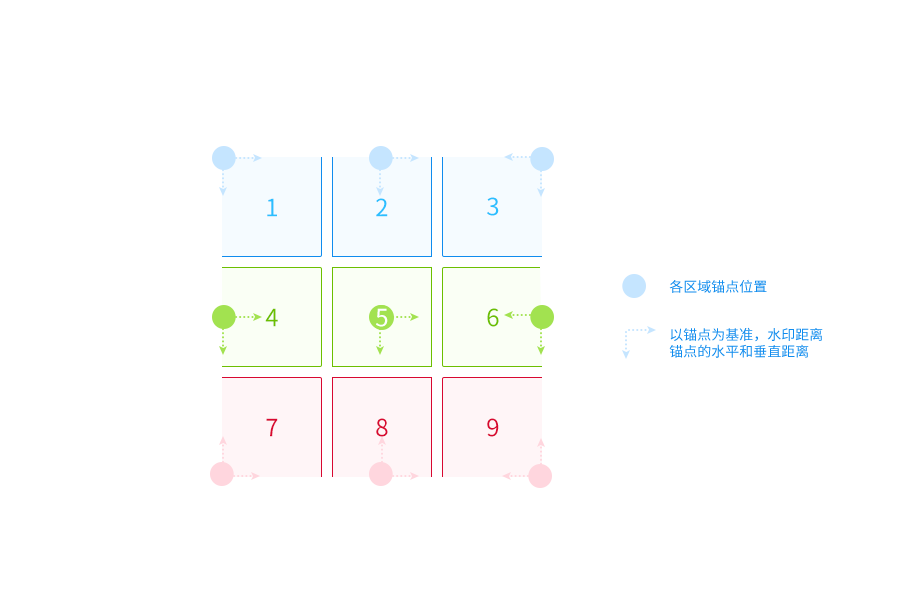
gravity.png

Supported font types

Font Name base64 encoding
FZLanTingHei Founder Lan Ting Hei Simplified Chinese RlpMYW5UaW5nSGVp
FZLanTingHeiSBGB Founder Lan Ting Hei Bold Simplified Chinese RlpMYW5UaW5nSGVpU0JHQg==
FZLanTingHeiSDB1GB Founder Lan Ting Hei Medium Bold Simplified Chinese RlpMYW5UaW5nSGVpU0RCMUdC
FZLanTingHeiSDBGB Founder Lanting Medium Hei Simplified Chinese RlpMYW5UaW5nSGVpU0RCR0I=
FZLanTingHeiSEBGB Founder Lan Ting Hei Heavy Simplified Chinese RlpMYW5UaW5nSGVpU0VCR0I=
FZLanTingHeiSELGB Founder Lan Ting Hei Light Simplified Chinese RlpMYW5UaW5nSGVpU0VMR0I=
FZLanTingHeiSHGB Founder Lan Ting Hei Extra Bold Simplified Chinese RlpMYW5UaW5nSGVpU0hHQg==
FZLanTingHeiSLGB Founder Lan Ting Hei Thin Simplified Chinese RlpMYW5UaW5nSGVpU0xHQg==
FZLanTingHeiSMGB Founder Lan Ting Hei Semi Bold Simplified Chinese RlpMYW5UaW5nSGVpU01HQg==
FZLanTingHeiSRGB Founder Lan Ting Hei Simplified Chinese RlpMYW5UaW5nSGVpU1JHQg==
FZLanTingHeiSULGB Founder Lan Ting Hei Ultra Light Simplified Chinese RlpMYW5UaW5nSGVpU1VMR0I=
FZKaTongM19S Founder Cartoon Simplified Chinese RlpLYVRvbmdNMTlT
FZFangSong Founder Imitation Song Simplified Chinese RlpGYW5nU29uZw==
FZShuSong Founder Book Song Simplified Chinese RlpTaHVTb25n
FZKai Founder Kai Script Simplified Chinese RlpLYWk=
FZHei Founder Black Simplified Chinese RlpIZWk=
FZDuHeiS Founder Du Hei Simplified Chinese RlpEdUhlaVM=

Example

  • Add a text watermark with blue text:
    https://doc.bce.baidu.com/bce-documentation/BOS/image.jpg?x-bce-process=image/watermark,text_aGVsbG8=,type_RlpMYW5UaW5nSGVp,g_9,color_0000ff

  • Add a text watermark with white text and blue stroke
    https://doc.bce.baidu.com/bce-documentation/BOS/image.jpg?x-bce-process=image/watermark,text_aGVsbG8=,type_RlpMYW5UaW5nSGVp,size_36,g_9,color_ffffff,skw_1,skc_0000ff

  • Add a text watermark using the tiling layout:
    https://doc.bce.baidu.com/bce-documentation/BOS/image.jpg?x-bce-process=image/watermark,text_aGVsbG8=,size_30,g_3,x_20,y_20,a_45,layout_tile

Previous
Add Image-Text Mixed Watermark
Next
Add image watermark