

Advanced Chapter II - Handling Older Versions of IE via the PostObject Interface
Advanced Chapter II: Handling older versions of IE via the PostObject API
Due to the limited HTML5 support in older IE versions (IE8, IE9), BOS developed the PostObject API to enable direct file uploads in these browsers. Files can be uploaded to the BOS server using the multipart/form-data format via this API. In the PostObject signature mode, the application server generates a signature for the policy and sends it back to the client.

The bce-bos-uploader already supports this API, but additional configuration work is required before use:
Configure the application server side
- Upload crossdomain.xml
For HTML5-based cross-domain solutions, Cross-Origin Resource Sharing (CORS) must be configured. If cross-domain data interaction requires Flash, set up crossdomain.xml. Simply save the following content as crossdomain.xml and upload it to the bucket's root directory.
1<?xml version="1.0" encoding="UTF-8" ?>
2<!DOCTYPE cross-domain-policy SYSTEM "http://www.macromedia.com/xml/dtds/cross-domain-policy.dtd">
3<cross-domain-policy>
4  <site-control permitted-cross-domain-policies="all"/>
5  <allow-access-from domain="*" secure="false" />
6  <allow-http-request-headers-from domain="*" headers="*" secure="false"/>
7</cross-domain-policy>
If the bucket is private, you need to configure it with custom permissions to ensure crossdomain.xml has public-read access. In the Console, select the bucket, go to the Basic Settings tab, choose Modify Configuration under Bucket Permission Settings, adjust the permission setting to Custom Permissions, and grant the necessary access.
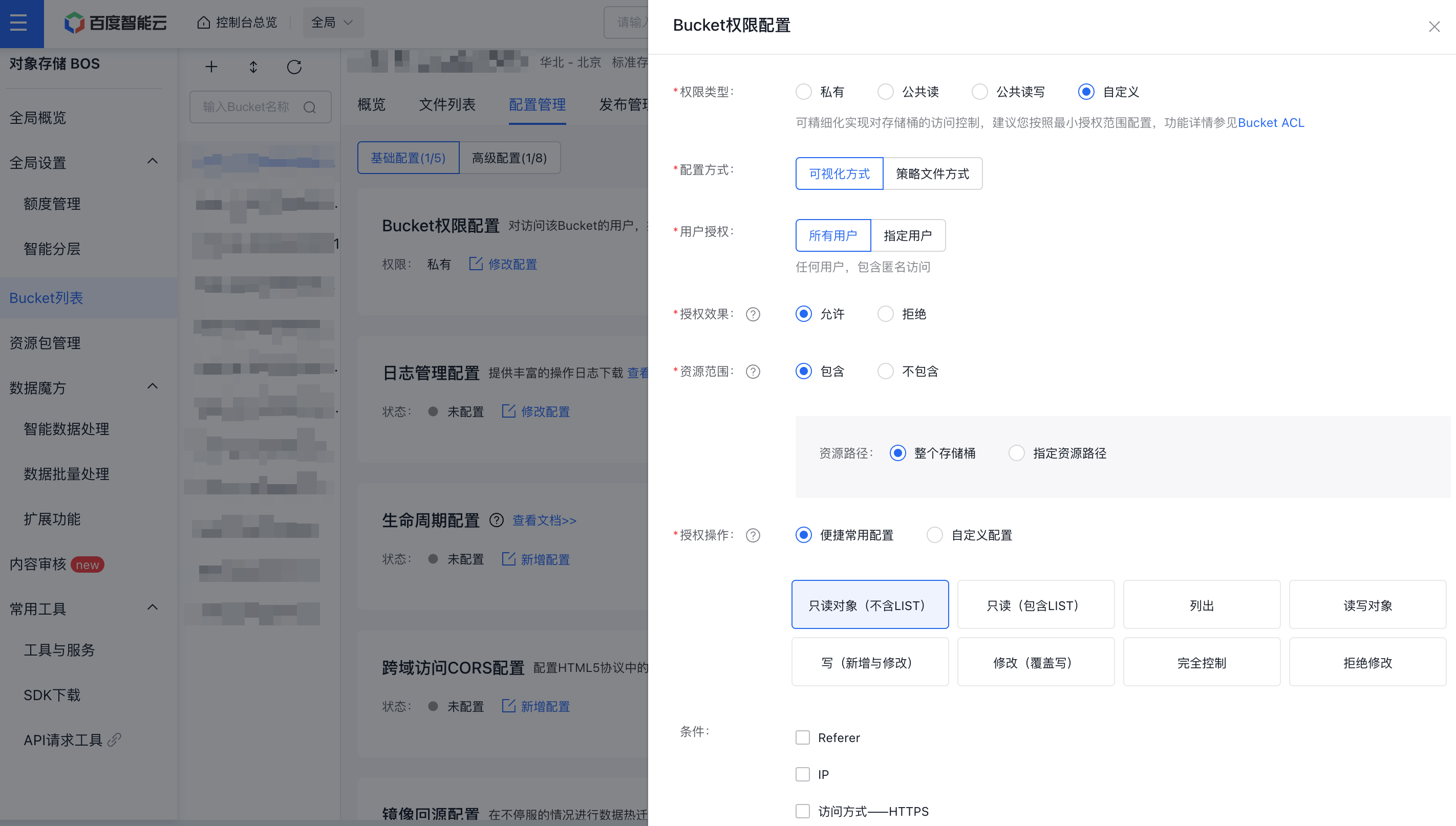
- The server will return the uptoken_url parameter.
When using PostObject for older IE versions, configure the uptoken_url parameter in the bce-bos-uploader.
Configure the browser-side bce-bos-uploader parameters
- Initialize the uptoken_url parameter in the bce-bos-uploader using HTML format.
1<html>
2  <head>
3    <meta charset="UTF-8" />
4    <title>bce-bos-uploader simple demo</title>
5    <!--[if lt IE 8]><script src="./bower_components/json3/lib/json3.min.js"></script><![endif]-->
6    <!--[if lt IE 9]><script src="./bower_components/js-polyfills/es5.js"></script><![endif]-->
7    <!--[if lt IE 10]><script src="./bower_components/moxie/bin/js/moxie.js"></script><![endif]-->
8    <script src="./bower_components/jquery/dist/jquery.min.js"></script>
9    <script src="./bower_components/bce-bos-uploader/bce-bos-uploader.bundle.js"></script>
10  </head>
11 <body>1 </body>
2</html>-
Set the uptoken_url parameter in the bce-bos-uploader using the JavaScript format.
Plain Text1<input type="file" id="file">