

Set mirror back-to-origin
Overview
Users can enable the bucket trash feature to ensure deleted data remains in the bucket trash for later recovery. For more details, refer to the Bucket Trash Function documentation. Files placed in the bucket trash will incur charges until they are permanently deleted by the user.
Application scenarios
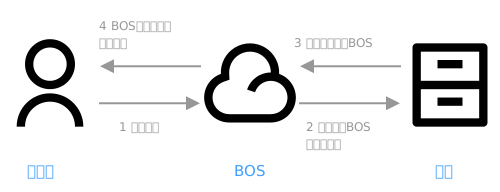
Mirror back-to-origin is mainly used for scenarios allowing seamless data migration to BOS. For instance, the origin server contains a batch of cold data while continuously generating new hot data.
- You can first migrate data to BOS using the BOS CMD tool or other migration tools (submit a ticket for large data volumes), while configuring mirror back-to-origin rules for the corresponding bucket;
- Directly switch the business domain name to the BOS bucket domain name. Even if newly generated hot data has not yet been migrated to BOS, users can still access it as BOS retrieves the data from the origin server while storing it in BOS after the first access.
- If the origin server stops generating new hot data, you can perform a scan of the origin server to import remaining data to BOS. Upon completing this process, the mirror back-to-origin configuration can be disabled.
Usage restrictions
- Number of rules: A maximum of 20 mirror back-to-origin rules can be configured. Multiple rules cannot have prefix and suffix of the inclusion relationship. If you configure all files back to the source, only one rule can be configured;
- Back-to-Origin Address: You can configure a third-party back-to-origin address or use your private bucket. Third-party back-to-origin addresses support HTTP/HTTPS protocols and can use domain names or IPs with optional ports. If no protocol is specified, HTTP will be used by default. Private buckets only support the HTTP protocol.
- Supported regions: Available in all regions.
Back-to-origin rules
Trigger conditions
- BOS will only perform mirror back-to-origin and request the file from the origin server when the HTTP status code returned is 404;
Access origin server
- By default, BOS does not carry the QueryString and Header from the original request during mirror back-to-origin, but you can actively configure QueryString and header passing rules;
- BOS does not support configuring certain standard HTTP headers, such as Content-Length, Authorization, Range, Date, Content-Md5, Host, and headers prefixed with x-bce-;
Back-to-origin file naming rules
- Files retrieved through mirror back-to-origin will be stored in BOS under their original filenames from the origin server. For example, if BOS requests the URL http://huiyuan.com/myobject from the origin server, the retrieved file will be stored in BOS with the name "myobject." If the back-to-origin address of a bucket is configured as http://huiyuan.com and a user requests myobject.docx, which is absent in the bucket, BOS will fetch it from http://huiyuan.com/myobject.docx and save it in BOS with the name myobject.docx.
Back-to-origin request failure return rules
- If the origin server returns a 404 status code, BOS will also return a 404 status code to the user.
Metadata of back-to-origin files
BOS will store the following HTTP headers returned by the origin server as metadata of BOS files:
1  Content-Type
2  Content-Encoding
3  Content-Disposition
4  Cache-Control
5  Expires
6  Content-Language
7  Access-Control-Allow-Origin
Set mirror back-to-origin
- Sign in to the Baidu AI Cloud Object Storage (BOS) Management Console.
- In the left bucket list, select the bucket for mirror-back-to-origin settings, then click bucket name to enter the bucket management directory.
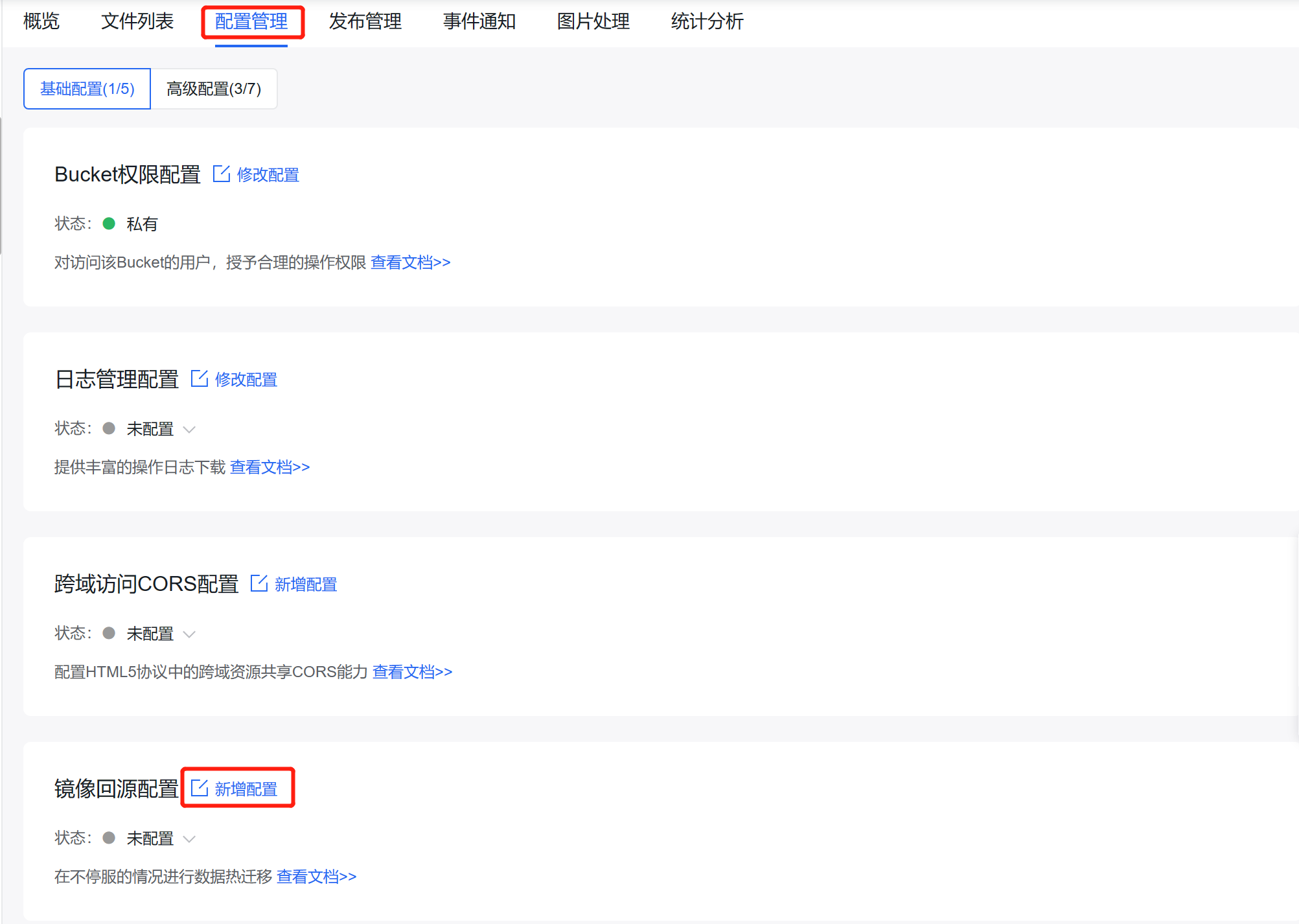
- Select the Configuration Management tab in the top navigation bar.
- On the Configuration Management page, select Basic Configuration, and then click Add Configuration in the Mirror Back-to-origin Configuration area to configure mirror back-to-origin for the bucket (see configuration item description for details).
- Click Confirm to complete the mirror back-to-origin configuration;
- After the configuration is completed, you can see the generated back-to-origin rule records in Mirror Back-to-Origin Configuration. You can view the configuration details. If you want to modify the configuration, you can click Edit to make changes; if you want to delete the configuration, you can click Delete. Back-to-origin will stop after deletion, so please operate with caution.
Description of configuration items
1. Basic configuration
1.1 Back-to-origin method
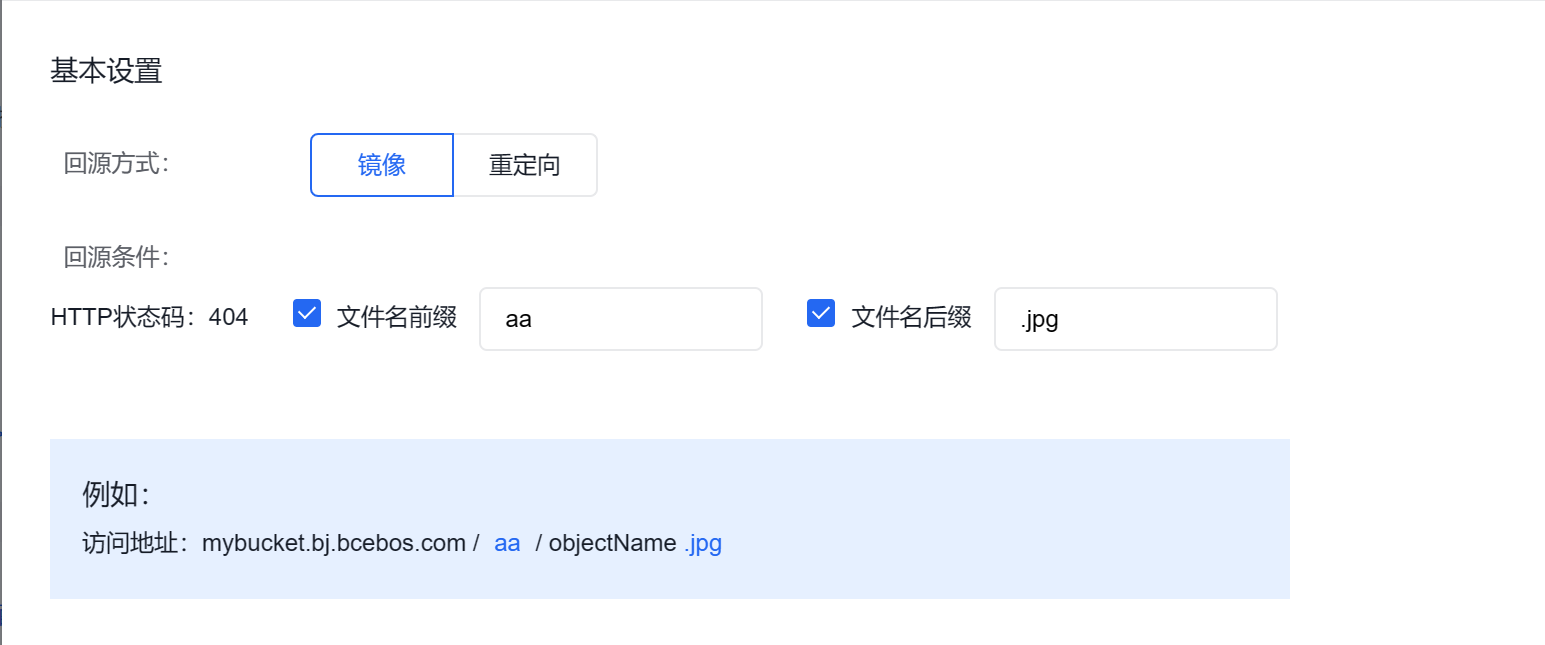
- Mirror: In mirror back-to-origin mode, when the corresponding file is not found in BOS for your request, the corresponding file will be automatically fetched from the origin server, and saved to BOS, and the content will be directly returned to you;
- Redirection: In redirection mode, requests meeting the response conditions will return a redirection address via HTTP redirection, and the browser or client will fetch the content from the origin server. Meanwhile, BOS will asynchronously fetch the corresponding file from the origin server and save it to BOS;
1.2 Back-to-origin conditions
- HTTP Status Code 404: By default, back-to-origin is triggered when the HTTP status code is 404;
-
Filename Prefix:
- The mirror back-to-origin rule is triggered when the requested filename prefix matches a predefined pattern. For example, if the prefix is set to "aa," accessing http://mybucket.com/aa/mypic.jpg and receiving a 404 status code will activate the back-to-origin rule.
- The prefix cannot end with "/";
-
Filename suffix:
- The mirror back-to-origin rule takes effect when the requested filename suffix matches a predefined pattern. For instance, if the suffix is set to ".jpg," accessing http://mybucket.com/mypic.png and receiving a 404 status code will trigger the back-to-origin rule.
2. Configuration of primary origin server
2.1 Type of primary origin server
- BOS private bucket: If you need to back-to-origin to a private bucket, check this option and select the target bucket from the dropdown. When the origin server is another bucket under your account, back-to-origin operations may generate Internet downlink traffic for the back-to-origin bucket;
- Replace or crop prefix: You can flexibly configure the URL for BOS to access your configured origin server. Both cropping and replacement operate on the file path portion of your original access URL. If your access URL is mybucket.bj.bcebos.com/abc/def/myobject.docx, after cropping is configured, /abc/def is cropped, and the back-to-origin address is your configured back-to-origin domain name /myobject.docx. Replacement allows access URL rewriting. If replacement is configured, you must enter the path information that needs to be replaced. For example, if replacement with 123 is configured, the back-to-origin address is your configured back-to-origin domain name /123/myobject.docx. To ensure the correctness of the back-to-origin address, carefully configure and verify whether the back-to-origin address in the console meets expectations.
2.2 Back-to-origin address
- Access protocol: It is HTTP by default. If you back-to-origin to a third-party origin server, you can drop down and select HTTPS;
- Back-to-origin domain name: Enter the domain name or IP address & port number for back-to-origin access. If you choose to back-to-origin to a private bucket, you may select it directly;
- Fixed filename: Only supported for redirection. You can check the Fixed Filename option and enter a filename. Files matching the rule will trigger the back-to-origin rule and uniformly return the fixed filename to the client;
- Prefix: Enter the prefix of the back-to-origin address. When the back-to-origin rule is triggered, redirect to the file with the specified prefix. For example, if the prefix is specified as "test", accessing http://mybucket.com/objectname.doc will trigger the back-to-origin rule, redirecting to Back-to-origin Address /test/objectname.doc
- Suffix: Enter the suffix of the back-to-origin address. When the back-to-origin rule is triggered, redirect to the file with the specified suffix. For example, if the suffix is specified as ".doc", accessing http://mybucket.com/objectname.doc will trigger the back-to-origin rule, redirecting to
/objectname.doc; 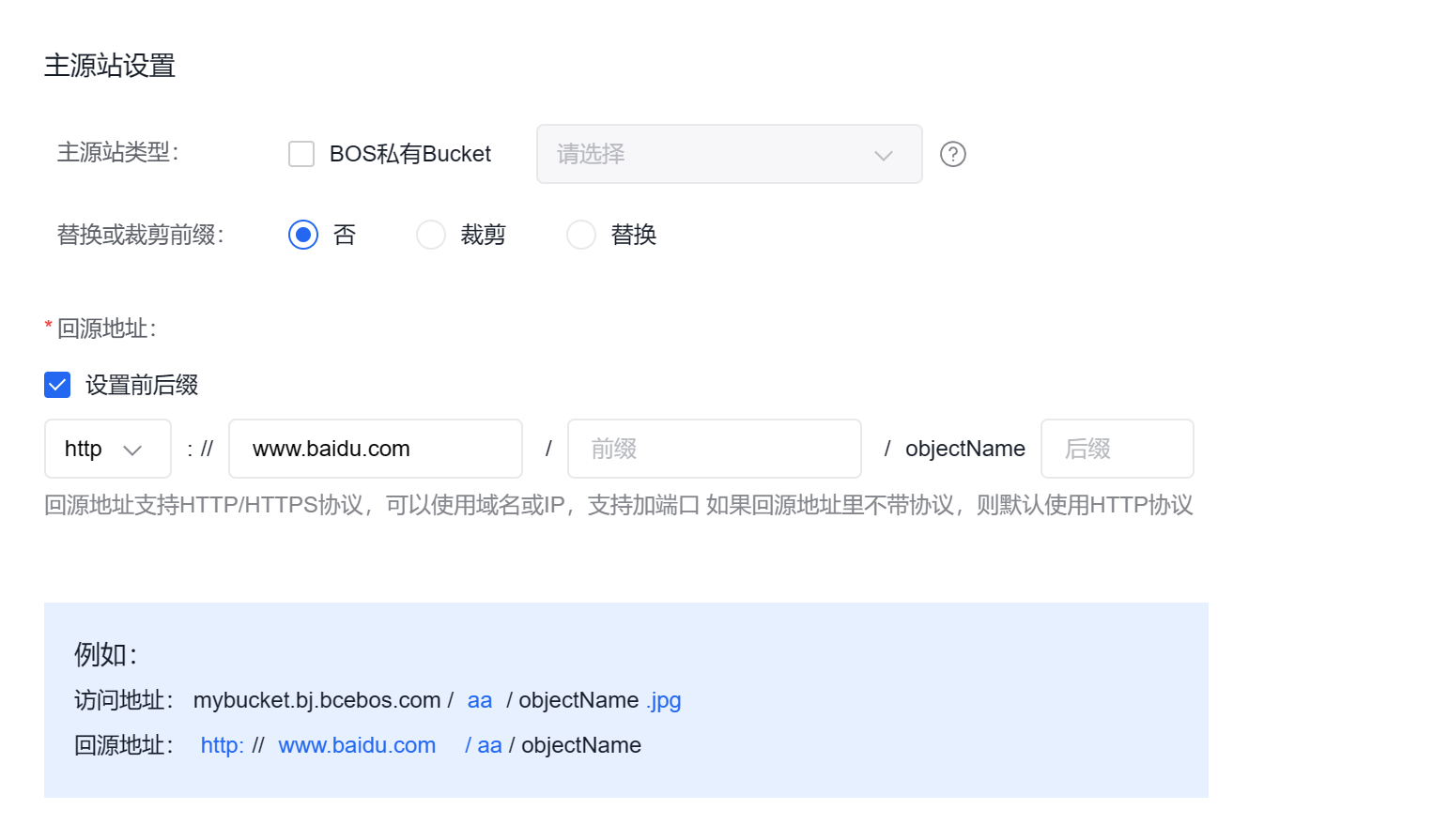
3. Configuration of backup origin server
-
Configuration of backup origin server:
- BOS allows configuring primary and backup origin servers to improve the reliability and success rate of mirror back-to-origin. When the primary origin server fails, BOS will initiate a back-to-origin request to the backup origin server.
- Configuration is only supported for mirror back-to-origin;
-
Back-to-origin address:
- The backup origin server follows the same back-to-origin rules as the primary origin server, supporting domain names or IP addresses & port numbers
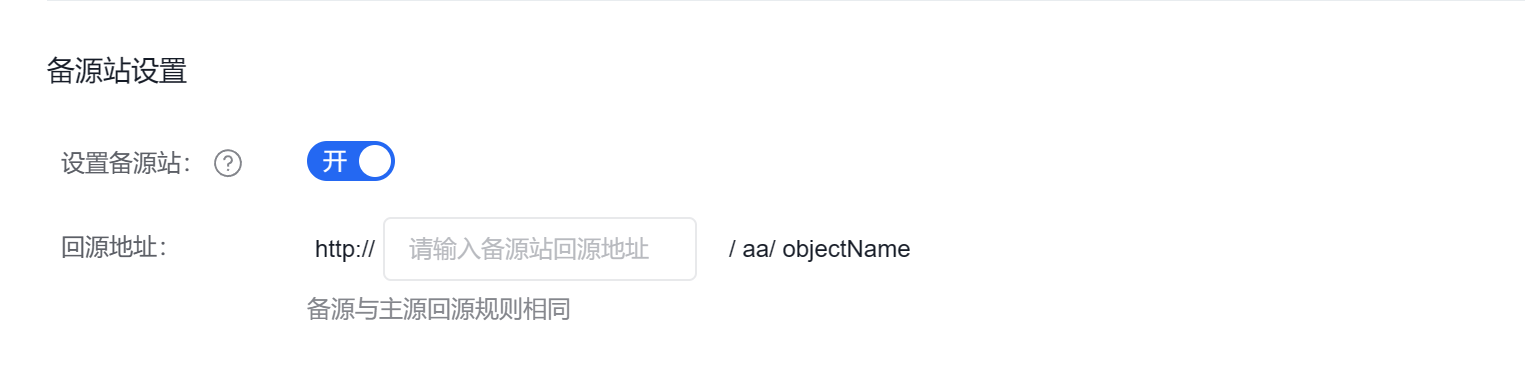
- The backup origin server follows the same back-to-origin rules as the primary origin server, supporting domain names or IP addresses & port numbers
4. Other settings
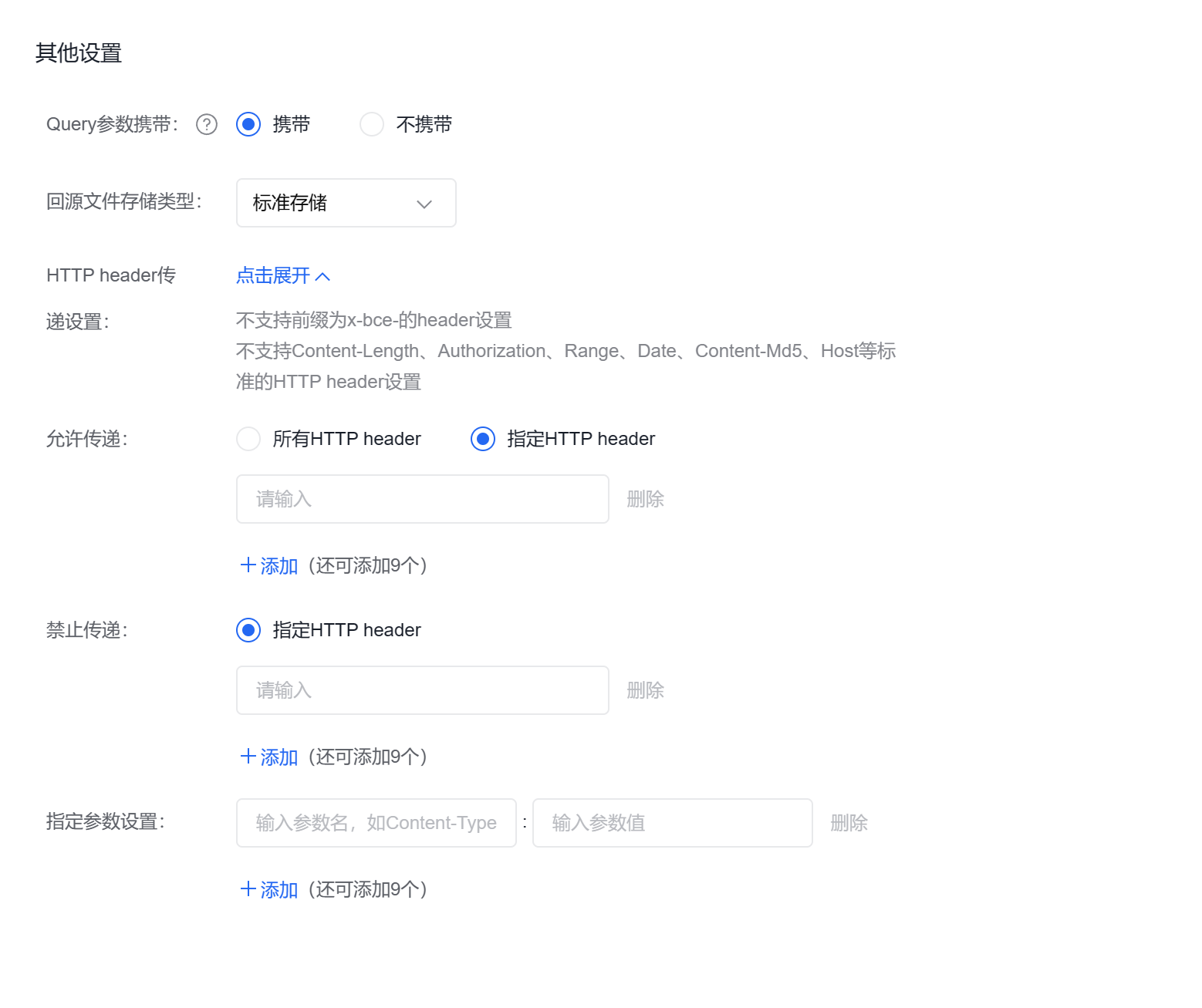
You can configure whether BOS passes QueryString information and HTTP header to the origin server, as well as the storage class for back-to-origin files.
4.1 Query carrying
- Request carries Query string: If enabled, the QueryString from the BOS request will be passed to the origin server;
4.2 Storage class of back-to-origin files
- Storage class of back-to-origin files: Files pulled from the origin server will be stored in BOS according to the specified storage class. If you configure the bucket of the back-to-origin rule as single-AZ type, you can choose the storage class of back-to-origin files as standard storage, infrequent access storage, cold storage and archive storage. If you configure the bucket of the back-to-origin rule as multi-AZ type, you can choose the storage class of back-to-origin files as standard storage-multi-AZ and infrequent access storage-multi-AZ;
4.3 HTTP header
-
Allow passing: By default, BOS does not carry headers from the original request during mirror back-to-origin, but you can actively configure header passing rules. You may choose to allow:
- Pass all HTTP header parameters
- Pass specified HTTP header parameters, with a maximum of 10 per rule
- Prohibit passing: You can prohibit passing the specified HTTP header parameters, with a maximum of 10 per rule;
- Configure specified parameters: You can configure specified HTTP header parameters and values, with a maximum of 10 per rule;
Configuration example
Address example
1For accessing a file named myobject.docx in the mybucket, the default access address is: mybucket.bj.bcebos.com/myobject.docx
2 If the access address is: mybucket.bj.bcebos.com/myobject.docx (initial address)
3 The back-to-origin address is: http://back-to-origin domain name/myobject.docx (initial address)
Case 1: If you enter "abc" as the filename prefix in the back-to-origin conditions, the access address and back-to-origin address will be:
If the access address is: mybucket.bj.bcebos.com/abc/myobject.docx
The back-to-origin address is: http://back-to-origin domain name/abc/myobject.docx
Case 2: If you enter "abc/aa" as the filename prefix in the back-to-origin conditions, the access address and back-to-origin address will be:
If the access address is: mybucket.bj.bcebos.com/abc/aa/myobject.docx
The back-to-origin address is: http://back-to-origin domain name/abc/aa/myobject.docx
Case 3: If, based on Case 1, you further configure replacing the filename prefix with tihuan/edf, and configure the back-to-origin protocol as HTTP, back-to-origin domain name as www.myweb.com, and file suffix as .doc, the access address and back-to-origin address will be:
If the access address is: mybucket.bj.bcebos.com/abc/myobject.docx
The back-to-origin address is: http://www.myweb.com/tihuan/edf/myobject.doc
Case 4: If, based on Case 2, you further configure the cropping of filename prefixes, and configure the back-to-origin protocol as HTTP, back-to-origin domain name as www.myweb.com, and prefix as qianzhui/, the access address and back-to-origin address will be:
If the access address is: mybucket.bj.bcebos.com/abc/aa/myobject.docx
The back-to-origin address is: http://www.myweb.com/qianhui/myobject.docx
Process example 1:
You have a bucket named bucketA, and the following scenario needs to be implemented:
-
When a requester accesses non-existent files in bucketA, the files can be sourced back from the myobject directory at https://myweb.com. To meet the above scenario requirements, configure the following mirror back-to-origin rules according to the operation guide:
Parameter Configuration Back-to-origin method - Select the mirror;
Back-to-origin conditions - If no filename prefix or suffix is configured, it represents all files;
Configuration of primary origin server - Check the Replace Prefix/Suffix option and enter the prefix myobject;
- Configuration of primary origin server: configure it as HTTP, with the back-to-origin domain name configured as myweb.com;
After the above rules are configured, the access process is as follows:
- When a requester first accesses bucketA to retrieve any file;
- If the file does not exist in bucketA, BOS will request the file from the myobject directory at https://myweb.com;
- The third-party origin server https://myweb.com supplies files to BOS; if a requested file is unavailable, a 404 status code will ultimately be returned.
Process example 2:
You have a bucket named bucketA, and the following scenario needs to be implemented:
- If a requester tries to access a non-existent file in the examplefolder directory, the file can be traced back and retrieved from the myobject directory at https://myweb.com.
To meet the above scenario requirements, configure the following mirror back-to-origin rules according to the operation guide:
| Parameter | Configuration |
|---|---|
| Back-to-origin method |
|
| Back-to-origin conditions |
|
| Replacement |
|
| Primary back-to-origin address |
|
| Backup origin server address |
|
After the above rules are configured, the access process is as follows:
- When a requester first accesses bucketA to retrieve files from the examplefolder directory;
- If the file does not exist in examplefolder directory of bucketA, BOS will request the file from the myobject directory at https://myweb.com;
- The third-party origin server at https://myweb.com will deliver the file to BOS. If the file is unavailable on the third-party origin server, the backup origin server at backup.com will be accessed. If the file is also unavailable there, a 404 error will ultimately be returned.
Process example 3:
You have two buckets named bucketA and bucketB. bucketA allows public read access, whereas bucketB is private. The following scenario needs to be implemented:
- If a file is missing from the folderA directory under bucketA's root directory, the target file is retrieved from the folderB directory of bucketB.
- The query string included in the request URL is permitted to be passed to the origin server.
- The HTTP headers (header1 and header2) carried in the request URL are allowed to be passed to the origin server. To meet the above scenario requirements, configure the following mirror back-to-origin rules according to the operation guide:
| Parameter | Configuration |
|---|---|
| Back-to-origin method |
|
| Back-to-origin conditions |
|
| Type of primary origin server |
|
| Prefix replacement or cropping |
|
| Primary back-to-origin address |
|
| Query carrying |
|
| HTTP header |
|
After the above rules are configured, the access process is as follows:
- When a requester first accesses bucketA to retrieve the example.docx files;
- If folderA/example.docx file does not exist in bucketA, BOS will request the file from bucketB's folderB directory;
- BucketB will collect access statistics based on the passed parameters and return example.docx to BOS (if the example.docx file is also absent in BucketB, 404 will be returned);
- BOS will name the retrieved file folderA/example.docx and store the named file in bucketA;
- If the request carries HTTP headers such as header1 and header2, they will also be passed to bucketB.