Automatic file decompression
Introduction
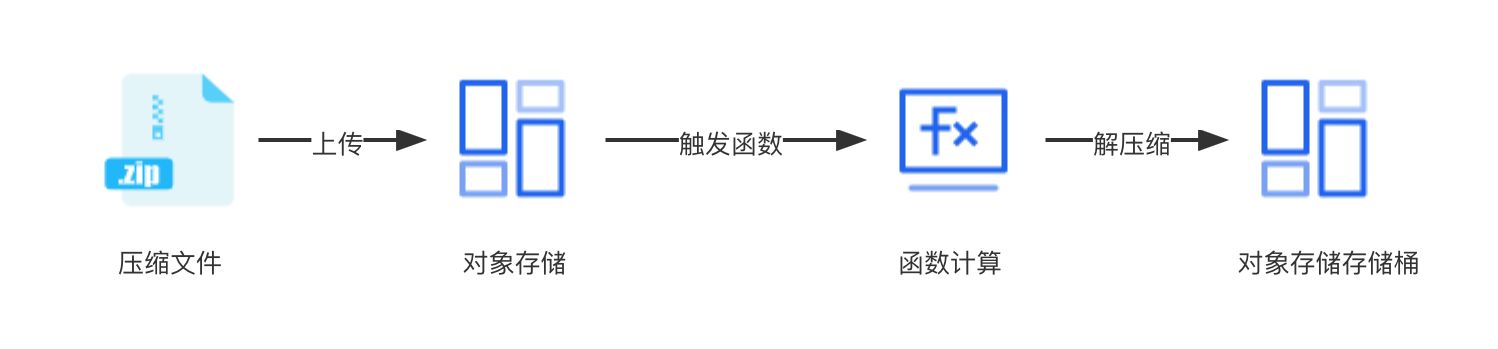
The file decompression feature is a data processing solution provided by Baidu AI Cloud Object Storage (BOS) based on Baidu AI Cloud Function Compute (CFC). After users add file decompression rules to the bucket, when a compressed file is uploaded to object storage, it will automatically trigger the cloud function pre-configured by object storage for you to automatically decompress the file to the specified bucket and path. The flowchart for file decompression is as shown below.
You can also use CFC to set up BOS file operations in event notification rules to automatically trigger more custom function processing. For details, refer to Function Compute Configuration Guide.
Note
- File decompression only supports decompressing files in ZIP format.
- If you add a file decompression rule for a bucket in the object storage console, the corresponding file decompression function you created will be visible in the Cloud Function Compute (CFC) Console. Please do not delete or modify this file decompression function arbitrarily, as this may render your rule ineffective.
- Regions where function compute is already available all support compressed package decompression, including Beijing, Guangzhou, and Suzhou. For more supported regions, you can submit a ticket.
- Directories or filenames in the compressed package must use UTF-8 encoding strictly. Otherwise, issues such as garbled filenames/directory names after decompression or interrupted decompression may occur. If an error occurs, you can navigate to the cloud function console to view logs.
- Files stored in the archive class cannot be decompressed.
- To use this feature, you must have activated object storage and CFC services. If you have not yet activated Cloud Function Compute (CFC), go to the Function Compute Console to activate it and complete service authorization as prompted.
- The maximum processing time for decompressing a single compressed package is 1,800 seconds. An excessively large source compressed package may cause decompression failure. It is recommended to upload compressed packages smaller than 60 GB, with no more than 10,000 files to be decompressed in each compressed package. Limits for the object storage decompression feature are based on cloud function services. For other limits, refer to Function Compute Limits.
- The object storage decompression feature depends on cloud function services, which provide users with free quotas and pricing. When using file decompression: Larger compressed packages consume more resource usage; more decompression times consume more invocation times.
- Both the original compressed package and the decompressed files will incur storage fees. After decompression, if the compressed package is no longer needed, you must delete it manually.
Operation steps
Create
- Sign in to the Object Storage Console.
- In the left navigation bar, go to the Bucket List, locate the bucket where you want to add an automatic file decompression rule, and click its name to access the management page.
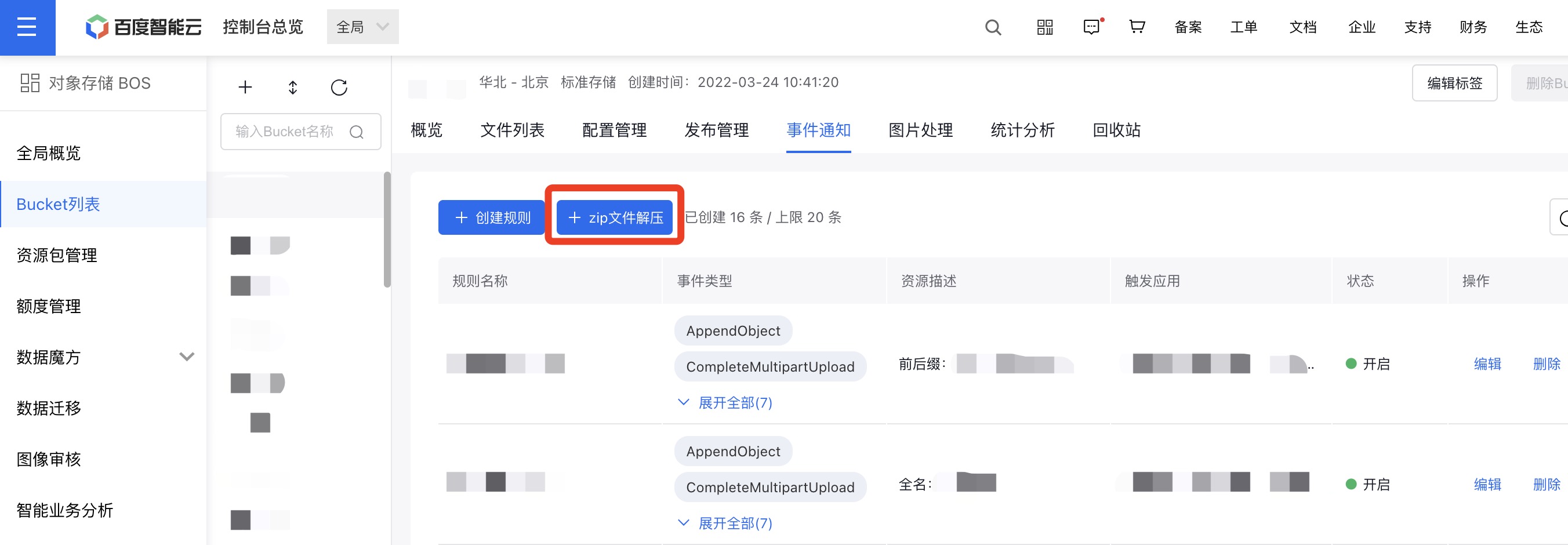
- Click on Event Notification, then select ZIP File Decompression.
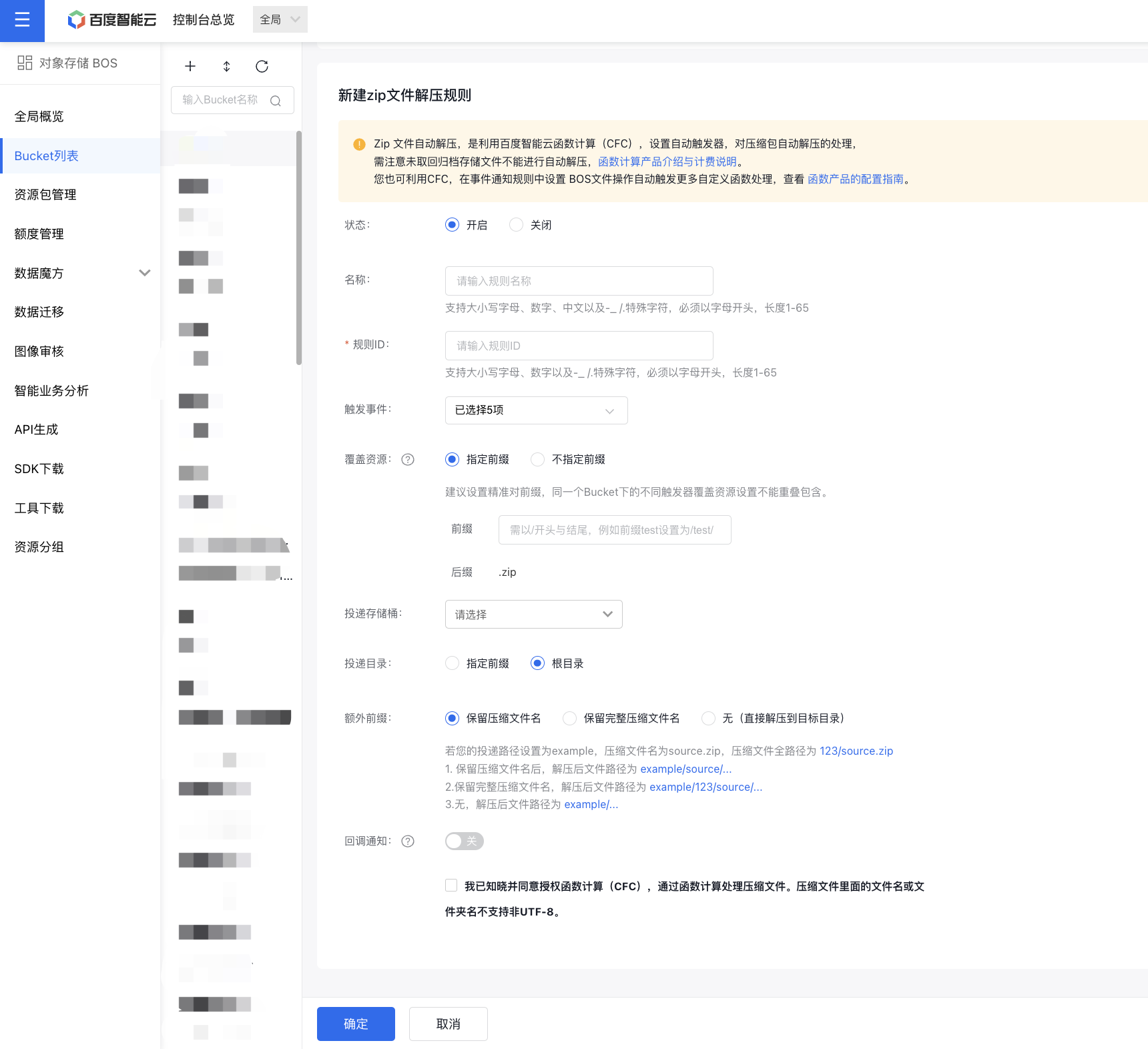
- Enter the ZIP file decompression rule configuration page and configure the following rule information:
| Parameters | Parameter description |
|---|---|
| Status | The feature is enabled by default. When active, the rule will automatically decompress compressed packages that meet the specified conditions. To pause the decompression process, you can disable it. |
| Rule name / Rule ID / Product ID | The identifiers for the decompression rule cannot be modified after creation. They support uppercase and lowercase letters, numbers, Chinese characters, and special characters such as -_/; must start with a letter and have a length of 1-65. |
| Trigger events | · Events refer to operations that trigger the cloud function. Currently, 5 events are supported: PutObject, PostObject, CopyObject, FetchObject, CompleteMultipartUpload (multipart upload completed) · For example, uploads can be done via the PutObject API or PostObject API. If you select PutObject as the event, only compressed packages uploaded via the PutObject API will trigger decompression. · If your files are uploaded to the bucket via multiple channels (e.g., simple upload, multipart upload), it is recommended to select All events. |
| Covered resources | · Indicates the path to which the compressed package is uploaded to trigger the cloud function. If you select a “specified prefix”, the cloud function is only triggered when the compressed package is uploaded to the path under the specified prefix. If you select “no specified prefix”, the cloud function is triggered when the compressed package is uploaded to any location in the bucket. · To prevent unnecessary cyclic decompression, it is recommended to configure covered resources to the directory level for accuracy. |
| Decompression format | The currently supported compression format is ZIP. |
| Delivery bucket | Files extracted after decompression are stored in the bucket located in the same region as the bucket where the compressed file is uploaded. |
| Delivery directory | · Decompressed files that match the rule are stored in this target directory. · It is recommended that the delivery directory you set does not overlap with the prefix set for covered resources. If the configured target file prefix has an inclusive relationship with the trigger condition, cyclic triggering may occur, leading to unnecessary costs. Please avoid this scenario. Example: If the delivery directory is set to pre/fix/ and the trigger condition is pre/, uploading a compressed package pre/fix/1.zip will trigger cyclic decompression. |
| Additional prefix | · The bucket where decompressed files are stored. Only buckets in the same region as the bucket where the compressed file is uploaded are supported. * Retain ZIP filename: You can decompress the compressed package to a prefix named after the compressed package. * Retain the full ZIP filename: You can decompress the compressed package to a prefix named after a full compressed package path. * Set to None: Files in the compressed package will be decompressed directly to the delivery path. · Example: If your delivery path is set to example/, the original ZIP filename is source.zip, the full path of the original ZIP file is 123/source.zip, and the filename inside the compressed package is test.txt: * After retaining the ZIP filename: The decompressed file path is example/source/test.txt * After retaining the full ZIP filename path: The decompressed file path is example/123/source/test.txt * None: The decompressed file path is example/test.txt |
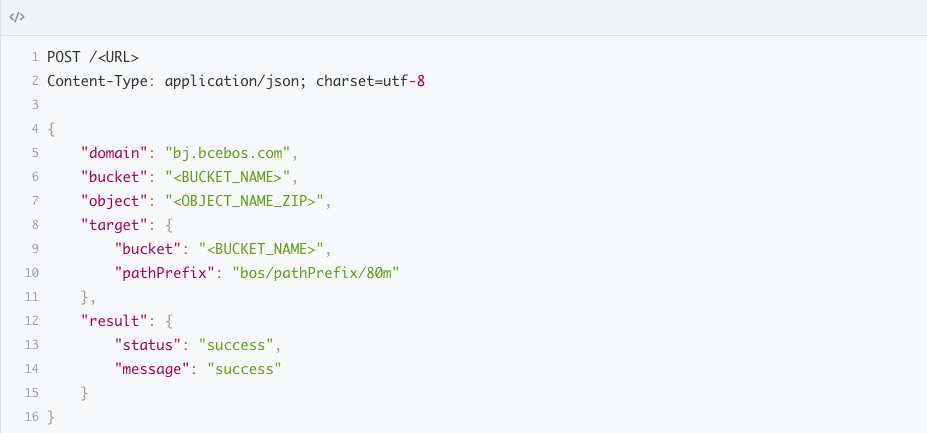
| Callback notification | Enable callback notification and configure the callback URL for receiving decompression results. After decompression is completed, BOS will push the decompression results in JSON format to this URL. For callback result details, refer to [Callback Result Example](#Callback result example). |
| CFC authorization | I acknowledge and agree to authorize Cloud Function Compute (CFC) to process compressed files via CFC. Decompression requires authorizing the cloud function to read the compressed package from your bucket and upload the decompressed files to your specified location. Therefore, this authorization is required, and you may incur certain CFC usage fees (refer to CFC Billing Instructions). I also acknowledge that filenames or folder names in the compressed file do not support non-UTF-8 characters. |
- Once you confirm the configuration, click OK. You can then view the newly added rule in the event notification rule list.
File decompression rule management
For the newly created decompression rule, you can perform the following operations:
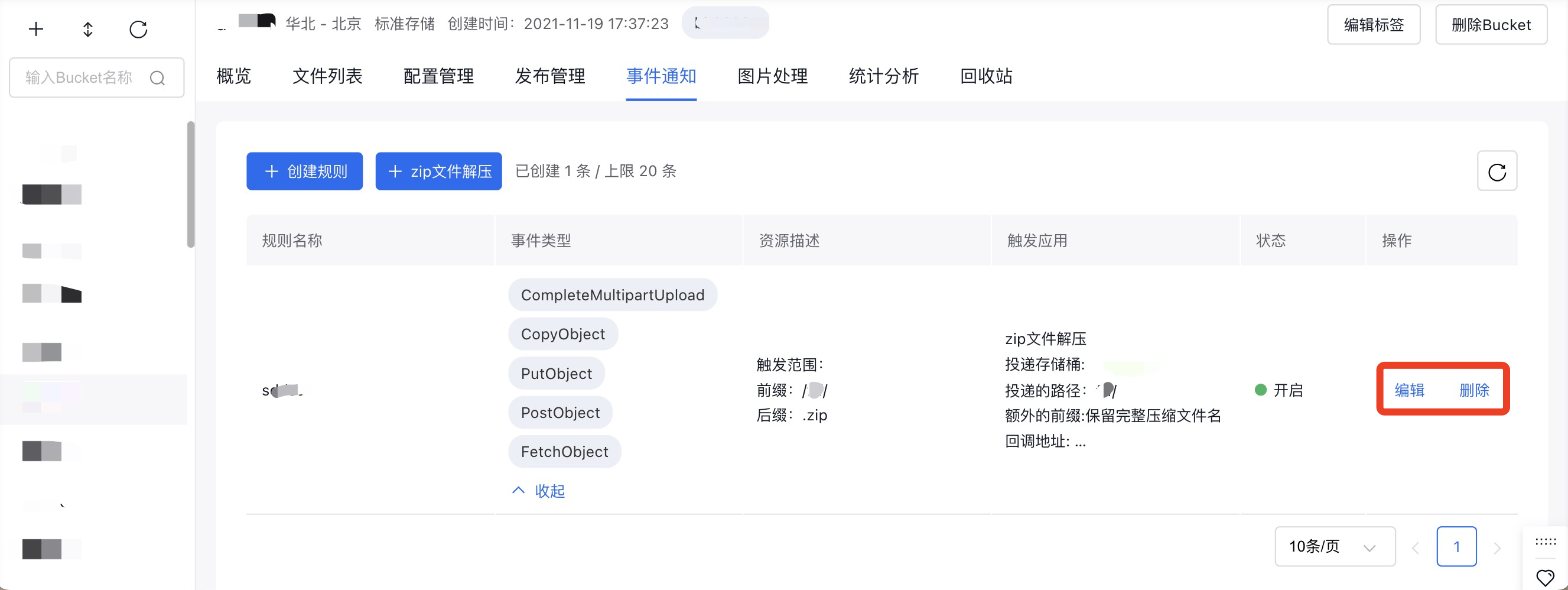
- Click Edit to update the file decompression rules.
- Click Delete to remove decompression rules that are no longer in use.
Callback result example