

Set server-side encryption
Overview
To further enhance data security, BOS supports SSE (Server-Side Encryption) to encrypt data on the server side. When you configure SSE settings, BOS applies encryption during the upload process using the specified encryption parameters. Additionally, BOS offers a server-side encryption (SSE) toggle in bucket settings to improve usability. Once enabled, newly uploaded data will be encrypted by default, without affecting data uploaded prior to enabling these settings.
Encryption method
Currently, BOS supports two encryption methods: BOS managed keys and KMS service managed keys
- BOS-managed keys: Choosing this option enables unified encryption for all data uploaded to a bucket using BOS-managed keys. When retrieving data, the system automatically decrypts it, requiring no user intervention for a seamless experience.
- KMS service managed keys: You need to activate Baidu AI Cloud Key Management Service and create self-managed KMS keys. KMS will generate the corresponding Data Keys based on your created KMS master key. Data is automatically encrypted during upload using these Data Keys.
Set server-side encryption
- Sign in to the Baidu AI Cloud Object Storage (BOS) Management Console.
- In the bucket list on the left, click the name of the desired bucket.
- In the left navigation bar, select Basic Configuration > Server-Side Encryption Configuration.
- On the Server-Side Encryption Configuration page, click Modify Configuration to enable encryption settings and select the encryption method and algorithm.
-
Encryption method: You can choose BOS managed keys or KMS managed keys to perform server-side encryption on the uploaded data.
- If you choose BOS managed keys, no additional configuration is necessary. Simply click OK to activate.
- If you select KMS managed keys for encryption, you need to activate Baidu AI Cloud Key Management Service and create self-managed KMS keys. When selecting KMS service managed key method, choose the created key from the dropdown list in Baidu AI Cloud KMS Key Management Service. Thereafter, data uploaded to this bucket will be encrypted with the custom key selected by users. Similarly, when a user reads data, the BOS service requests data decryption from the KMS service before returning plaintext data to the user.
-
Encryption Algorithm: You can configure an encryption algorithm.
- AES256
- SM4 (national cryptographic standard)
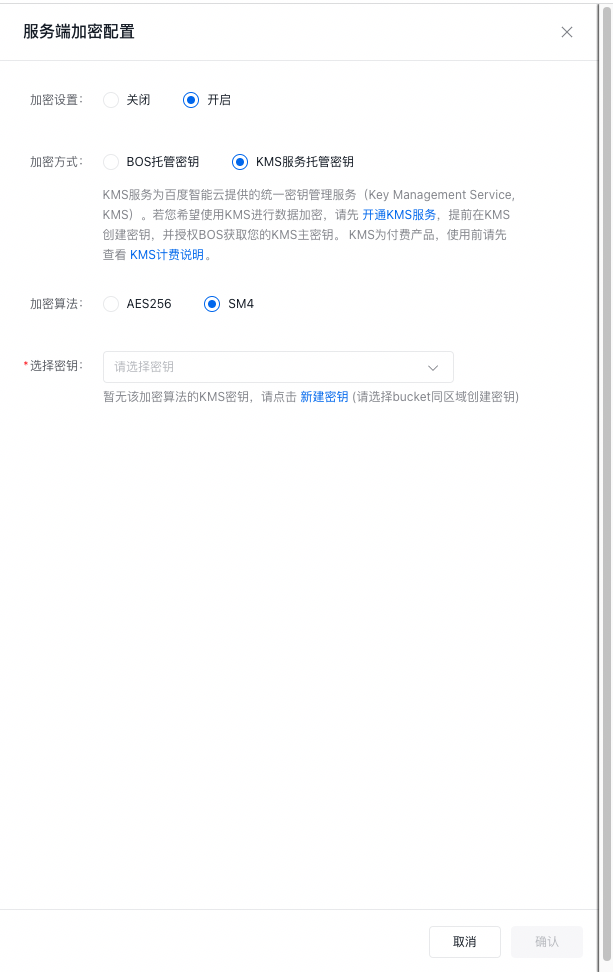
- Click OK to complete the server-side encryption configuration.
- You can click Modify Configuration to change the encryption method or disable bucket server-side encryption (SSE).
Related APIs
- PutBucketEncryption API: Use the PutBucketEncryption API to enable the encryption switch for the specified bucket.
- GetBucketEncryption API: Use the GetBucketEncryption API to check whether server-side encryption for the bucket is enabled.
- DeleteBucketEncryption API: Use the DeleteBucketEncryption API to disable the server-side encryption function.