

CDN Acceleration Publishing
Updated at:2025-11-03
Basic introduction
BOS currently supports using CDN to accelerate specific buckets. After selecting the bucket to be accelerated, the DNS resolution of the corresponding BOS bucket’s domain name is adjusted to the CNAME domain name provided by CDN, enabling connection to CDN nodes and activating CDN acceleration.
CDN configuration rules
- If the expiration time is not configured in CDN and the source station does not explicitly provide an HTTP cache control header, CDN will not cache data. In this scenario, CDN acceleration cannot be automatically applied after data in the Bucket is updated. You need to manually refresh the cache in CDN. For specific operations, please refer to [Cache Refresh](CDN/Operation guide/Refresh and Preload/Cache Purge.md).
- You can configure the expiration time in CDN to automatically update the cache. For specific operations, please refer to [Configure Cache Expiration Time](CDN/Operation guide/Configure Domain Name/Cache configuration/Configure Cache Expiration Time.md).
Operation types
- Click on the bucket name to enter the bucket management page, then select the Distribution Management tab.
-
Click Enable Acceleration on the right side of the official acceleration domain name to activate the official CDN acceleration domain name for the bucket directly.
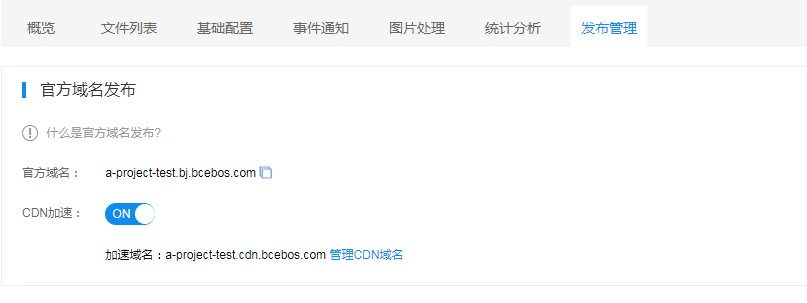
After activation, refresh the page. The button on the right side of the official domain name will change to Manage CDN Acceleration. Click it to enter the CDN domain name management page and manage domain name details.
- If you wish to add a custom acceleration domain name, click Add Custom Acceleration Domain Name. The newly added domain name will appear in the custom domain name list. To manage an accelerated domain name, click CDN Acceleration Management in the corresponding operation column.
Note
- By default, CDN acceleration is disabled when a new bucket is created.
- BOS provides an official CDN acceleration domain name in the format bucketname.cdn.bcebos.com. This is the default CDN acceleration domain name enabled for the BOS bucket. It requires no CNAME resolution configuration and cannot be modified.
- Before adding a custom domain name, you need to go to the DNS resolution management console of your domain registrar and set the CNAME resolution of the custom domain name to the CNAME address provided by CDN. Only after successful resolution can you access the bucket via CDN acceleration. For specific operations, please refer to [Bind CNAME](CDN/Operation guide/Domain Name Access.md#Bind CNAME).
- If the custom domain name you want to add is already in use, please submit a ticket for assistance.