Watermark
Overview
This document explains how to apply watermarks. An image watermark involves overlaying another image or text on top of the original image to protect digital information. Currently, the BOS Image Processing V1.0 protocol supports two types of watermarks: image watermarks and text watermarks. BOS divides your original image into nine regions, as shown in the diagram below. Each region is numbered based on its position and contains an anchor point.
To determine the final position of the watermark on the original image, you need to confirm the following two factors:
- The anchor point position;
- Define the horizontal and vertical distances based on the position of the anchor point.
The anchor point positions are shown in the figure:
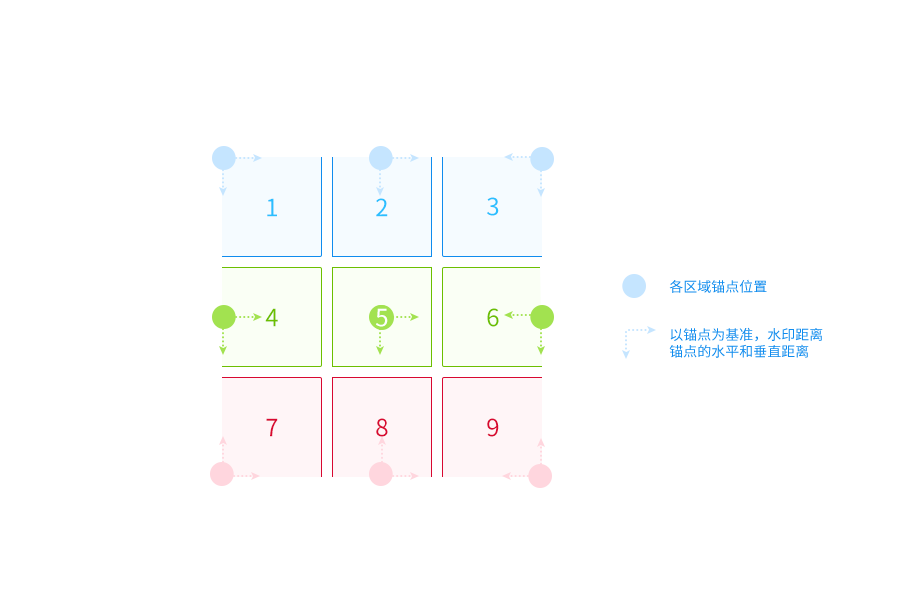
Image watermark parameters
| Parameter name | Abbreviated command | Types | Value range | Command description | Default value | Required or not |
|---|---|---|---|---|---|---|
| watermark | wm | unsigned | 0,1,2 | Specify the watermark type. wm_0 indicates disabling the watermark function; wm_1 indicates an image watermark; wm_2 indicates a text watermark. |
- | Yes |
| key | k | string | - | Specify the Object name (i.e., ObjectKey) where the watermark image is stored in BOS. If the Object is stored in a folder, the folder path must be included. This value is required to be Base64-encoded. |
- | Yes |
| gravity | g | unsigned int | 1~9 | Specify the anchor point position of the watermark. For the meaning of image anchor points, please refer to the [Image Watermark Command](#Image Watermark Command). |
9 | No |
| gravityX | x | int | -4096~4096 | Set the horizontal distance of the watermark relative to the anchor point. | 10 | No |
| gravityY | y | int | -4096~4096 | Set the vertical distance of the watermark relative to the anchor point. | 10 | No |
| angle | a | int | -360~360 | Specify the rotation angle of the watermark image. A positive value indicates clockwise rotation, e.g., a_60;a negative value indicates counterclockwise rotation, e.g., a_-30. |
0 | No |
| opacity | o | unsigned int | 1~100 | Specify the opacity of the watermark image. A value of 100 means that the opacity is consistent with the original image. |
100 | No |
Description
- The watermark image must be stored in the same BOS bucket as the original image.
Text watermark parameters
| Parameter name | Abbreviated command | Types | Value range | Command description | Default value | Required or not |
|---|---|---|---|---|---|---|
| watermark | wm | unsigned | 0,1,2 | Specify the watermark type. wm_0 indicates disabling the watermark function; wm_1 indicates an image watermark; wm_2 indicates a text watermark. |
- | Yes |
| text | t | string | - | The content of the watermark text needs to be Base64-encoded, and the encoded content must not exceed 80 characters. |
- | Yes |
| gravity | g | unsigned int |
1~9 | Specify the anchor point position of the watermark. For the meaning of image anchor points, please refer to the [Image Watermark Command](#Image Watermark Command). |
9 | No |
| gravityX | x | int | -4096~4096 | Specify the horizontal distance of the watermark relative to the anchor point. |
10 | No |
| gravityY | y | int | -4096~4096 | Specify the vertical distance of the watermark relative to the anchor point. |
10 | No |
| angle | a | int | -360~360 | Specify the rotation angle of the watermark image. A positive value indicates clockwise rotation, e.g., a_60;a negative value indicates counterclockwise rotation, e.g., a_-30. |
0 | No |
| fontSize | sz | unsigned int |
1~1024 | Specify the font size of the watermark, in px. |
30 | No |
| fontColor | fc | string | - | Specify the font color as an 8-digit hexadecimal string, where every 2 digits represent an item in RGBA. The first 6 digits represent the RGB color, e.g., ffffff; the last 2 digits represent the Alpha channel, which can be omitted. If omitted, it means opaque. Example: 000000ff represents black opaque font. |
000000 | No |
| fontFamily | ff | string | - | Specify the font type; the value is required to be Base64-encoded. For supported font types, please refer to the list below. |
Song | No |
| fontStyle | fs | string | normal, italic, bold |
Specify the font style to be used. | normal | No |
Supported font types:
| Parameter value | Font type |
|---|---|
| MicrosoftYaHei | Microsoft YaHei |
| FangSong | FangSong |
| SimHei | HeiTi |
| KaiTi | KaiTi |
| SimSun | Song |
| FZBeiWeiKaiShuJianTi | Founder Beiwei Kaishu Simplified Chinese |
| FZBoYaSongJianTi | Founder Boya Song Simplified Chinese |
| FZCuHeiSongJianTi | Founder Bold Hei Song Simplified Chinese |
| FZLanTingZhongHeiJianTi | Founder Lanting Medium Hei Simplified Chinese |
| FZZhengHei | Founder Zheng Hei |
| AvantGarde | AvantGarde |
| Bookman | Bookman |
| Courier | Courier |
| Helvetica | Helvetica |
| HelveticaNarrow | HelveticaNarrow |
| NewCenturySchlbk | NewCenturySchlbk |
| Palatino | Palatino |
| Times | Times |
| Symbol | Symbol |
Description:
- Text effects will only render properly if the selected font family supports the specified font style effect.
- If the specified font style is not in the list of currently supported font families, the display will default to the Song typeface.
Mixed text-image watermark
This process involves adding both an image watermark and a text watermark to the original image simultaneously. Since image and text watermarks are implemented through two separate commands, mixed text-image watermarks need to be applied using a pipeline.
Example
Image watermark examples
The original image is image.jpg, and the watermark image is https://bce.bdstatic.com/p3m/bce-doc-en/images/BOS/BOS/Data processing/Image Processing Guide V1_0/bce-documentation/BOS/bce-1762161336961.jpg (Base64-encoded as "YmNlLWRvY3VtZW50YXRpb24vQk9TL2JjZS5qcGc=").
- Apply an image watermark to the bottom-right corner, specifying a vertical distance of 10 and setting the opacity to 60.

- Place a watermark in the bottom-left corner, using default values for the horizontal and vertical distances. Set the opacity to 50 and apply a 90° clockwise rotation.

Text watermark examples
- The simplest text watermark reads "hello world".
https://doc.bce.baidu.com/bce-documentation/BOS/image.jpg@wm_2,t_aGVsbG8gd29ybGQ=

- The text content is "hello world," displayed in the Microsoft YaHei font with default color and size, bold styling, and positioned at the right-middle. It has a horizontal and vertical distance of 20 from the anchor point and features a 30° clockwise rotation.

Mixed text-image watermark
- The simplest mixed text-image watermark includes an image (https://bce.bdstatic.com/p3m/bce-doc-en/images/BOS/BOS/Data processing/Image Processing Guide V1_0/bce-documentation/BOS/bce-1762161336961.jpg) and the text "hello world," with all other parameters set to default.

- For mixed text-image watermarking: The watermark image located at https://bce.bdstatic.com/p3m/bce-doc-en/images/BOS/BOS/Data processing/Image Processing Guide V1_0/bce-documentation/BOS/bce-1762161336961.jpg is placed in the bottom-left corner, 15 units horizontally and 20 units vertically from the anchor point, with 50% opacity. The text "hello world" is positioned directly above, 100 units vertically, in lavender font color.