

SelectObject
Updated at:2025-11-03
API description
This API is designed to execute SQL statements on specified objects in the Bucket and return the selected content. The requester must have read permission for the selected object. Before using SelectObject, ensure the corresponding bucket and object exist. For details, refer to the SelectObject Developer Documentation.
Request
-
Request syntax
Plain Text1POST /<ObjectKey>?select&type=json/csv/parquet HTTP/1.1 2Host: <BucketName>.bj.bcebos.com 3Date: <Date> 4Authorization: <Authorization_String> 5Content-Type: application/json; charset=utf-8 6Content-Length: <Content_Length> 7{ 8 "selectRequest": { 9 "expression": "Base64Encode(Select * from BosObject)", 10 "expressionType": "SQL", 11 "inputSerialization": { 12 "compressionType": "GZIP/NONE", 13 // JSON or CSV or Parquet 14 }, 15 "outputSerialization": { 16 // JSON or CSV or Parquet 17 }, 18 "requestProgress": { 19 "enabled": false/true 20 } 21 } 22} -
Request parameters
| Term | Types | Description | Required or not |
|---|---|---|---|
| type | string | The target object type for select, currently supporting json/csv/parquet | Yes |
JSON文件
| Name | Required or not | Types | Description |
|---|---|---|---|
| selectRequest | Yes | - | The root node of the JSON body |
| + expression | Yes | string | Base64-encoded SQL statement |
| + expressionType | Yes | string | The syntax type of the query statement, only supporting "SQL" |
| + inputSerialization | Yes | - | The input stream node, the child nodes of which describe the format information of the queried object |
| ++compressionType | No | string | Specify whether the queried object is compressed, with options "NONE" or "GZIP" |
| ++ json | Yes | - | JSON node, the child nodes of which describe relevant information about the JSON file |
| +++ type | Yes | string | JSON type, the format of the queried JSON object, with options "DOCUMENT" or "LINES" |
| + outputSerialization | Yes | - | Output stream node, the child nodes of which describe the format information about the query result returned |
| ++ json | Yes | - | JSON node, the child nodes of which describe relevant information about the JSON data returned |
| +++ recordDelimiter | No | string | Specify the line break, encoded in Base64. Default value is \n (optional) |
| + requestProgress | No | - | The progress information node for the select operation. The child nodes of the node describe the execution progress of the select operation, and periodically return the information to the user every 3 seconds |
| . ++ enabled | No | boolean | Describe whether the periodic return of progress information is required, with options false/true. If data filtering is time-consuming and may cause a 504 timeout, setting this to true can maintain the HTTP connection. |
CSV文件
| Name | Required or not | Types | Description |
|---|---|---|---|
| selectRequest | Yes | - | The root node of the JSON body |
| + expression | Yes | string | Base64-encoded SQL statement |
| + expressionType | Yes | string | The syntax type of the query statement, only supporting "SQL" |
| + inputSerialization | Yes | - | The input stream node, the child nodes of which describe the format information of the queried object |
| ++compressionType | No | string | Specify whether the queried object is compressed, with options "NONE" or "GZIP" |
| ++ csv | Yes | - | CSV node, the child nodes of which describe relevant information about the CSV file |
| +++ fileHeaderInfo | No | string | Option NONE/IGNORE/USE, specifying the header information in the first line of the CSV file. The default value NONE indicates no header information, IGNORE indicates header information exists but is ignored. Both NONE and IGNORE mean only column number can be used to extract a specific column; USE indicates the usage of header information, where only header names can be used to extract a specific column |
| . +++ recordDelimiter | No | string | Specify the line break of the CSV file, encoded in Base64. The default value is \n (optional), with a maximum of 2 characters, such as \r\n |
| . +++ fieldDelimiter | No | string | Specify the delimiter of the CSV file, encoded in Base64. The default value is , (optional), with a maximum of 1 character, such as |
| . +++ quoteCharacter | No | string | Specify the quote character of the CSV file, encoded in Base64. The line breaks and column delimiters within quotes in the CSV file will be considered ordinary characters. The default value is double quotes " (optional), with a maximum of 1 character, such as single quotes ' |
| . +++ commentCharacter | No | string | Specify the comment character of the CSV file, encoded in Base64. Lines starting with this character can be ignored; the default value is # (optional), with a maximum of 2 characters, such as //. |
| + outputSerialization | Yes | - | Output stream node, the child nodes of which describe the format information about the query result returned |
| ++ outputHeader | No | boolean | Output CSV header information at the beginning of the result, it is defaulted to false; it requires the fileHeaderInfo field value to be USE. When this value is true, corresponding CSV header names will be added in the first line of each Records message in the response results; options are false/true |
| . ++ csv | Yes | - | CSV node, the child nodes of which describe relevant information about the CSV data returned |
| +++ quoteFields | No | string | Options are ALWAYS/ASNEEDED, specifying whether each field in the returned CSV data should be enclosed with ""; ASNEEDED indicates that the original data is returned in the file, and ALWAYS indicates that the field is always enclosed with ""; it defaults to ASNEEDED |
| . +++ recordDelimiter | No | string | It specifies the line break for the returned CSV data, and is encoded in Base64. The default value is \n (optional), with a maximum of 2 characters, such as \r\n |
| . +++ fieldDelimiter | No | string | It specifies the column delimiter for the returned CSV data, and is encoded in Base64. The default value is , (optional), with a maximum of 1 characters, such as ; |
| +++ quoteCharacter | No | string | Specify the quote character of the CSV data returned, encoded in Base64. The line breaks and column delimiters within quotes in the CSV file will be considered ordinary characters. The default value is double quotes " (optional), with a maximum of 1 character, such as single quotes '. |
| + requestProgress | No | - | The progress information node for the select operation. The child nodes of the node describe the execution progress of the select operation, and periodically return the information to the user every 3 seconds |
| . ++ enabled | No | boolean | Describe whether the periodic return of progress information is required, with options false/true. If data filtering is time-consuming and may cause a 504 timeout, setting this to true can maintain the HTTP connection. |
Parquet File
| Name | Required or not | Types | Description |
|---|---|---|---|
| selectRequest | Yes | - | The root node of the JSON body |
| + expression | Yes | string | Base64-encoded SQL statement |
| + expressionType | Yes | string | The syntax type of the query statement, only supporting "SQL" |
| + inputSerialization | Yes | - | The input stream node, the child nodes of which describe the format information of the queried object |
| ++compressionType | No | string | Specify whether the queried object is compressed, with options or "NONE" |
| ++ parquet | Yes | - | It is the parquet node, the child nodes of which describe relevant information about the parquet file, and it is empty. |
| + outputSerialization | Yes | - | Output stream node, the child nodes of which describe the format information about the query result returned |
| ++ json | Yes | - | JSON node, the child nodes of which describe relevant information about the JSON data returned |
| +++ recordDelimiter | No | string | Specify the line break, encoded in Base64. Default value is \n (optional) |
| + requestProgress | No | - | The progress information node for the select operation. The child nodes of the node describe the execution progress of the select operation, and periodically return the information to the user every 3 seconds |
| . ++ enabled | No | boolean | Describe whether the periodic return of progress information is required, with options false/true. If data filtering is time-consuming and may cause a 504 timeout, setting this to true can maintain the HTTP connection. |
Response
| Name | Types | Description |
|---|---|---|
| Transfer-Encoding | String | The value chunked indicates that the returned content is transmitted in chunks through HTTP/1.1 chunked encoding. |
-
Response parameters
None
-
Response body
The SelectObject API response is returned in chunks, including three types: Records message, Continuation message, and End message:
message Format Description Records message prelude(8 byte) + n * (header_key_len(1 byte) + header_key + header_val_len(2 byte) + header_val) + payload + crc32(4 byte) It contains the data returned by the Select request, and can be a single line or multiple Records. Continuation message It is the same as above and in fixed format, and only have the payload content different with the message above. The current select progress (scanned bytes/returned bytes) is returned to the client every 3 seconds, and the HTTP connection is maintained. End message It is the same as above and in fixed format, and the payload content is null. It indicates the end of this select request. The headers field includes information such as error-code, error-message, message-type, and bytes-scanned. Details of Message Format:
Plain Text1 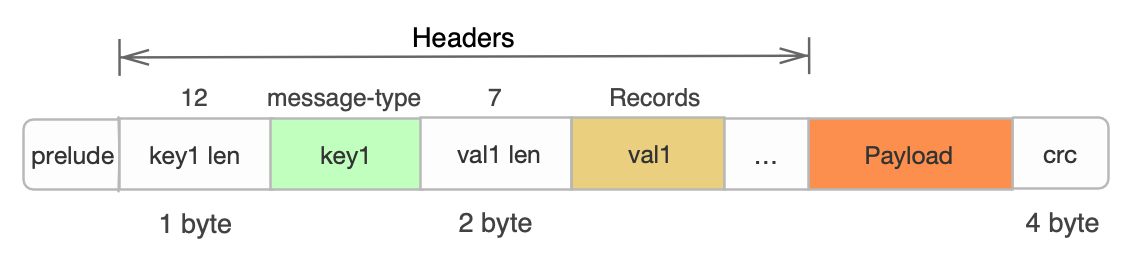- The prelude part consists of 8 bytes in total: the first 4 bytes indicate the total length of the message, and the last 4 bytes indicate the total length of the header.
The total length of chunk (value stored in the first 4 bytes of prelude) - total length of header - 8 bytes of prelude - 4 byte of crc32 = total length of payload data; crc32 indicates the erasure code of the entire message. - Headers include custom <key,value>: "message-type": {"Records", "Cont", "End"}; "error-code": specific error code; "error-message": "detailed error message".
- Payload indicates returned raw data in any format. Continuation message Payload includes BytesScanned and BytesReturned fields indicating the select progress.
- The prelude part consists of 8 bytes in total: the first 4 bytes indicate the total length of the message, and the last 4 bytes indicate the total length of the header.
Example
-
Example of CSV file request
Plain Text1POST /object?select&type=csv HTTP/1.1 2Host: bucket.bj.bcebos.com 3Date: Thu, 15 May 2017 00:17:23 GMT 4Authorization: <Authorization_String> 5Content-Type: application/json; charset=utf-8 6Content-Length: 512 7{ 8 "selectRequest": { 9 "expression": "c2VsZWN0IGNvdW50KCopIGZyb20gbxkl2JqZWN0IHdoZXJlIF80ID4gNDU=", 10 "expressionType": "SQL", 11 "inputSerialization": { 12 "compressionType": "NONE", 13 "csv": { 14 "fileHeaderInfo": "NONE", 15 "recordDelimiter": "Cg==", 16 "fieldDelimiter": "LA==", 17 "quoteCharacter": "Ig==", 18 "commentCharacter": "Iw==" 19 } 20 }, 21 "outputSerialization": { 22 "outputHeader": FALSE, 23 "csv": { 24 "quoteFields": "ALWAYS", 25 "recordDelimiter": "Cg==", 26 "fieldDelimiter": "LA==", 27 "quoteCharacter": "Ig==" 28 } 29 }, 30 "requestProgress": { 31 "enabled": false 32 } 33 } 34} -
Example of CSV file response
Plain Text1HTTP/1.1 200 OK 2x-bce-request-id: 4db2b34d-654d-4d8a-b49b-3049ca786409 3Date: Wed, 06 Apr 2016 06:34:40 GMT 4ETag: "1b2cf535f27731c974343645a3985328" 5Transfer-Encoding: chunked 6Connection: close 7Server: BceBos 8----- Body ------ 9<Records message> 10…… 11<Continuation Message> 12…… 13<Records message> 14<Continuation Message> 15<End message> -
Example of JSON file request
Plain Text1POST /object?select&type=json HTTP/1.1 2Host: bucket.bj.bcebos.com 3Date: Thu, 15 May 2017 00:17:23 GMT 4Authorization: <Authorization_String> 5Content-Type: application/json; charset=utf-8 6Content-Length: 512 7{ 8 "selectRequest": { 9 "expression": "c2VsZWN0IGNvdW50KCopIGZyb20gbxkl2JqZWN0IHdoZXJlIF80ID4gNDU=", 10 "expressionType": "SQL", 11 "inputSerialization": { 12 "compressionType": "NONE", 13 "json": { 14 "type": "DOCUMENT" 15 } 16 }, 17 "outputSerialization": { 18 "json": { 19 "recordDelimiter": "Cg==" 20 } 21 }, 22 "requestProgress": { 23 "enabled": false 24 } 25 } 26} -
Example of JSON file response
Plain Text1HTTP/1.1 200 OK 2x-bce-request-id: 4db2b34d-654d-4d8a-b49b-3049ca786409 3Date: Wed, 06 Apr 2016 06:34:40 GMT 4ETag: "1b2cf535f27731c974343645a3985328" 5Transfer-Encoding: chunked 6Connection: close 7Server: BceBos 8----- Body ------ 9<Records message> 10…… 11<Continuation Message> 12…… 13<Records message> 14<Continuation Message> 15<End message> -
Example of Parquet file request
Plain Text1POST /object?select&type=parquet HTTP/1.1 2Host: bucket.bj.bcebos.com 3Date: Thu, 15 May 2017 00:17:23 GMT 4Authorization: <Authorization_String> 5Content-Type: application/json; charset=utf-8 6Content-Length: 512 7{ 8 "selectRequest": { 9 "expression": "c2VsZWN0IGNvdW50KCopIGZyb20gbxkl2JqZWN0IHdoZXJlIF80ID4gNDU=", 10 "expressionType": "SQL", 11 "inputSerialization": { 12 "compressionType": "NONE", 13 "parquet": {} 14 }, 15 "outputSerialization": { 16 "json": { 17 "recordDelimiter": "Cg==" 18 } 19 }, 20 "requestProgress": { 21 "enabled": false 22 } 23 } 24} -
Example of Parquet file response
Plain Text1HTTP/1.1 200 OK 2x-bce-request-id: 4db2b34d-654d-4d8a-b49b-3049ca786409 3Date: Wed, 06 Apr 2016 06:34:40 GMT 4ETag: "1b2cf535f27731c974343645a3985328" 5Transfer-Encoding: chunked 6Connection: close 7Server: BceBos 8----- Body ------ 9<Records message> 10…… 11<Continuation Message> 12…… 13<Records message> 14<Continuation Message> 15<End message>