

Accessing BOS via Dedicated Line-VPN in Hybrid Cloud
Overview
This tutorial offers solutions for accessing BOS via an intranet connection through dedicated lines or VPN in a hybrid cloud setup.
Application scenarios
A hybrid cloud combines public and private cloud infrastructures, forming a significant model and development direction in cloud computing. For security, enterprises often store data in private clouds while accessing computational resources from public clouds. Baidu AI Cloud’s hybrid cloud solution connects the customer’s IDC and Baidu AI Cloud VPC using dedicated lines or VPN, enabling seamless integration of on-cloud and off-cloud services. This approach lets businesses leverage the scalability and flexibility of cloud resources while adhering to local compliance requirements with on-premises IDCs.
Dedicated lines or VPN provide a secure, high-speed transmission channel for customer IDCs accessing BOS. However, in a hybrid cloud scenario, when an IDC accesses BOS (e.g., for backing up local data to the cloud), the data must traverse the public network. This happens because the IDC resolves the BOS domain name to its public IP address, preventing direct access to BOS services via the dedicated line or VPN network.

Practice solution
Solution 1: Using VPC service network interface card (SNIC)
SNIC is a highly available and scalable VPC proxy for accessing BOS. It can map external public services such as BOS to the inside of the VPC, and can also mount service domain names generated by service publishing points. Users can conveniently and securely access these services through the intranet within the VPC or at the opposite end of the hybrid cloud.
Before Configuration, you should know::
- Each VPC supports up to 20 SNICs.
- A single SNIC is associated with only one subnet, and its IP address must fall within the subnet's CIDR block.
- Each subnet supports only one SNIC for a specific service.
- Local domain services can be connected to the backend of the SNIC.
Step 1: Create an SNIC
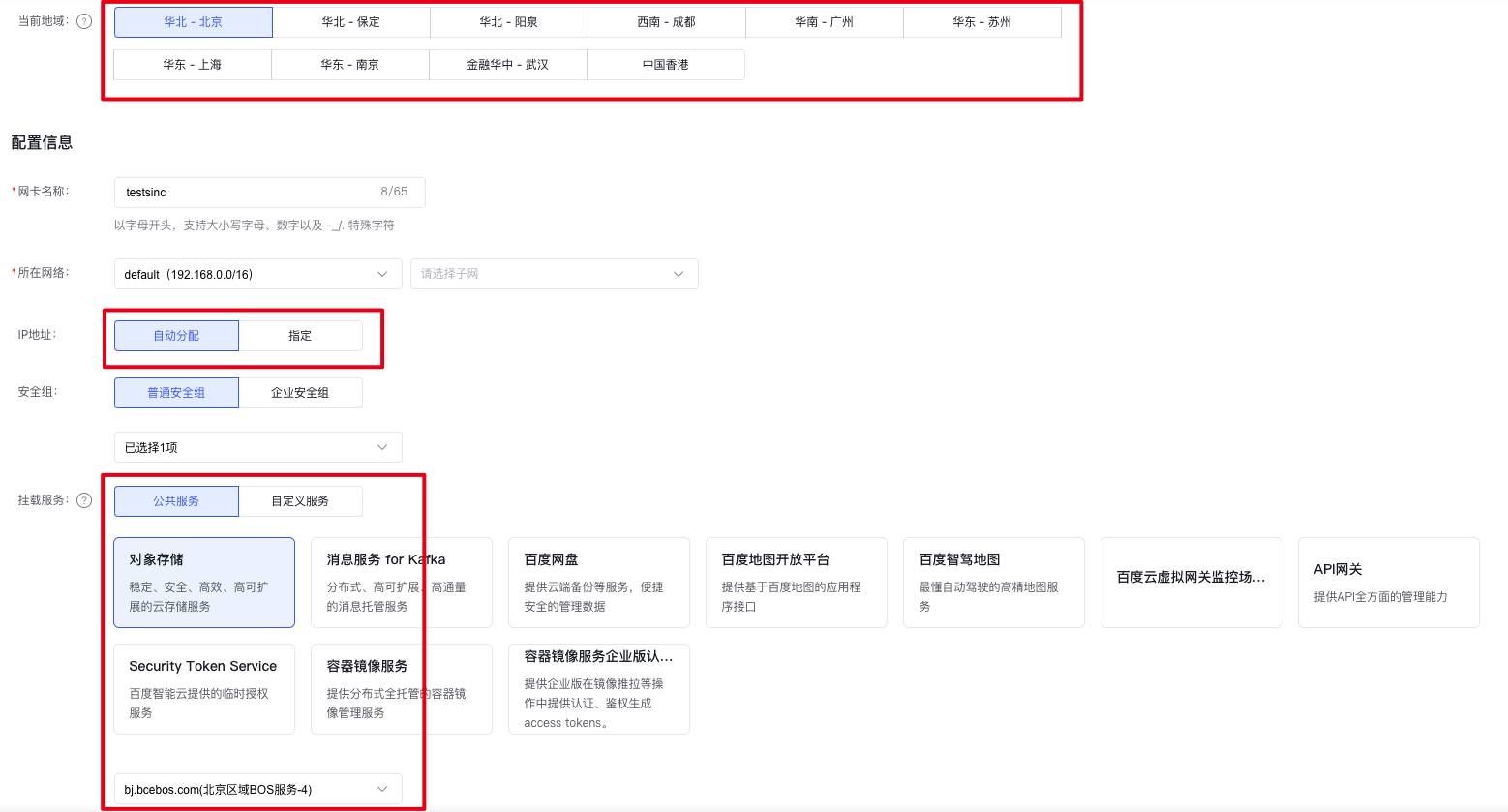
Log in to the SNIC Console, click Create Service Network Card, and configure the SNIC.
Configuration items:
- Ensure that the selected region matches the bucket you need to access; cross-region access will still utilize the public network.
- The IP address of the SNIC can be manually assigned from the subnet range it belongs to.
- Choose object storage for the connected service, and select the appropriate BOS service endpoint.
Step 2: Confirm the SNIC Configuration
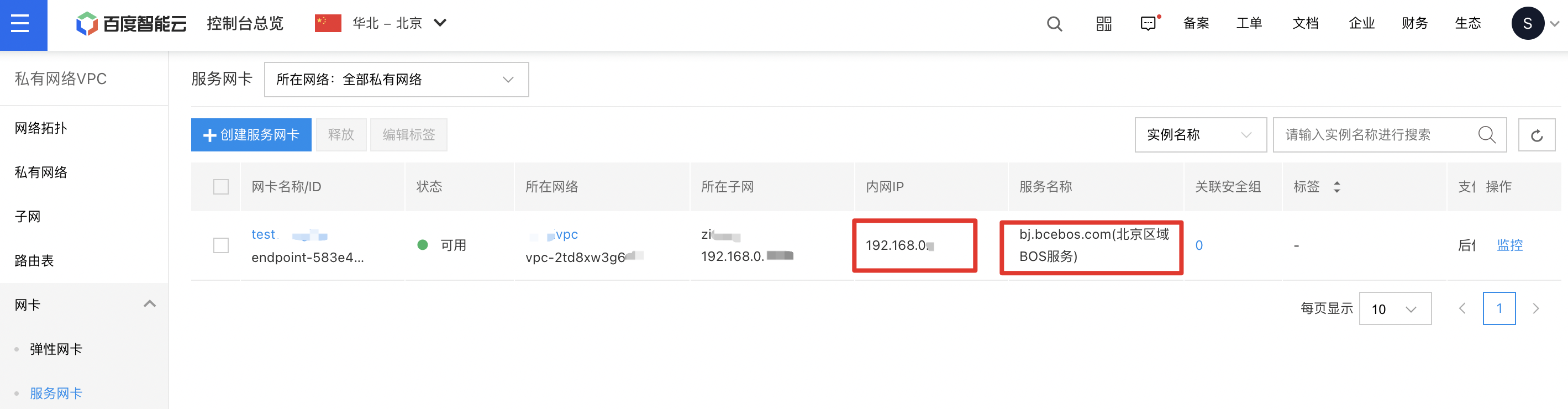
After creating the SNIC, review its configuration in the SNIC list and verify that the service name linked to the SNIC matches the BOS service endpoint you intend to access.
Step 3: Access BOS Service through the SNIC
Once the configurations of the SNIC and the dedicated line/VPN are verified as correct, you can replace the BOS service's domain name with the intranet IP of the SNIC in the IDC. This enables direct access to the BOS service via the dedicated line/VPN intranet.
Solution 2: Using BCC as an access proxy
Overview
The core of the solution for accessing BOS via dedicated lines/VPN in a hybrid cloud is to use BCC as an access proxy:
- First, apply for a BCC and install Nginx as a reverse proxy to BOS;
-
Update the local DNS records on the customer's IDC machine to direct BOS access requests to the Nginx proxy.
Plain Text1<div align="center">
1> **Note:** This solution ensures that BOS access within the same region is routed through the dedicated line/VPN and intranet. For instance, if the customer’s IDC connects to Baidu AI Cloud’s Beijing VPC, this solution allows access to a BOS bucket in Beijing via the dedicated line/VPN. However, if the BOS bucket is located in Guangzhou, data will still traverse the public network. Configure Nginx reverse proxy
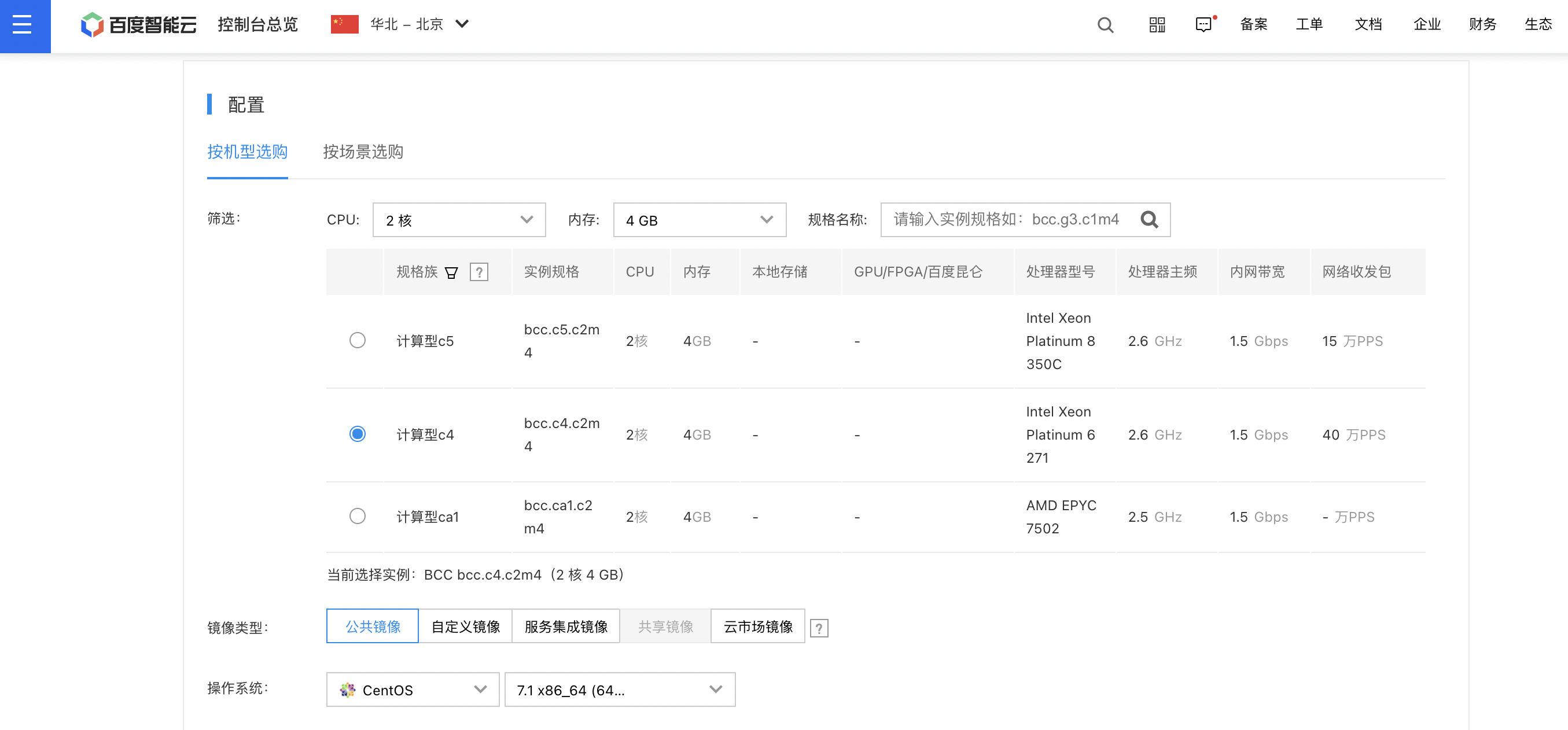
- First, apply for a BCC. Recommended configuration: 2-core CPU, 4GB memory, CentOS 7.1, no public IP address required.
-
Install Nginx. Since an additional stream module is needed to provide TCP protocol proxy, the stream module also needs to be installed.
a)
yum install nginx nginx-mod-streamb) Configure Nginx:
Plain Text1cd /nginx/ 2vim nginx.confModify nginx.conf to the following configuration. Note that the following configuration is applicable to the Beijing region. If you want to access BOS in the Guangzhou region, replace “bj” in the configuration file with “gz”:
Plain Text1#user work; 2worker_processes auto; 3 4events { 5 worker_connections 1024; 6} 7 8stream { 9 error_log logs/access.log info; 10 11 # The backend address of BOS in Beijing 12 upstream httpbosbj { 13 server bj.bcebos.com:80; 14 } 15 16 upstream httpsbosbj { 17 server bj.bcebos.com:443; 18 } 19 20 server { 21 listen 80; 22 23 proxy_pass httpbosbj; 24 # Proxy settings 25 proxy_connect_timeout 5s; 26 proxy_timeout 90s; 27 proxy_buffer_size 4k; 28 } 29 30 server { 31 listen 443; 32 33 proxy_pass httpsbosbj; 34 # Proxy settings 35 proxy_connect_timeout 5s; 36 proxy_timeout 90s; 37 proxy_buffer_size 4k; 38 } 39}c) Verify the configuration file and start Nginx (requires root privileges):
Plain Text1nginx -t 2mkdir –p /usr/share/nginx/logsConfirm that Nginx starts successfully:
Plain Text1
Configure customer IDC nodes
Configure the local DNS records to route BOS access requests from the customer’s IDC machine to the Nginx relay machine. For CentOS, add entries to /etc/hosts:
nginxIp bj.bcebos.com
Here, nginxIp represents the intranet IP address of the previously configured Nginx reverse proxy, e.g., 192.168.1.5. The process of modifying local DNS records in other environments like Windows follows a similar approach.
Testing
After completing the configuration, BOS can be accessed from the IDC machine using dedicated lines/VPN. Tools like BOS SDK, CLI, and BOS Desktop can facilitate file uploads and management tasks.
In addition, you can log in to the Nginx proxy node to check logs and confirm whether the Nginx reverse proxy is working properly:
less /usr/local/nginx/logs/access.log

Notes:
- The methods in this tutorial cater to most BOS access needs. With a 2-core, 4GB setup, a single proxy node can handle 1,000 concurrent connections (a limit set by BOS to mitigate DDoS risks) and achieve an access speed of 1 Gbps.
- However, this solution has some limitations: (1) The Nginx proxy constitutes a single point of failure, requiring maintenance of the BCC instance for uninterrupted operation; (2) For higher upload speeds and increased concurrent connections, you can upgrade the Nginx node’s configuration or deploy additional Nginx nodes.