

Delete Object
Updated at:2025-11-03
Overview
If you no longer need to store objects in your bucket, delete them promptly to avoid unnecessary charges.
Note
After an object is deleted, it cannot be recovered. Please proceed with caution.
Delete objects by the management console
- Sign in to the Baidu AI Cloud Object Storage (BOS) Management Console.
- Select the bucket to be operated and click the File List tab.
-
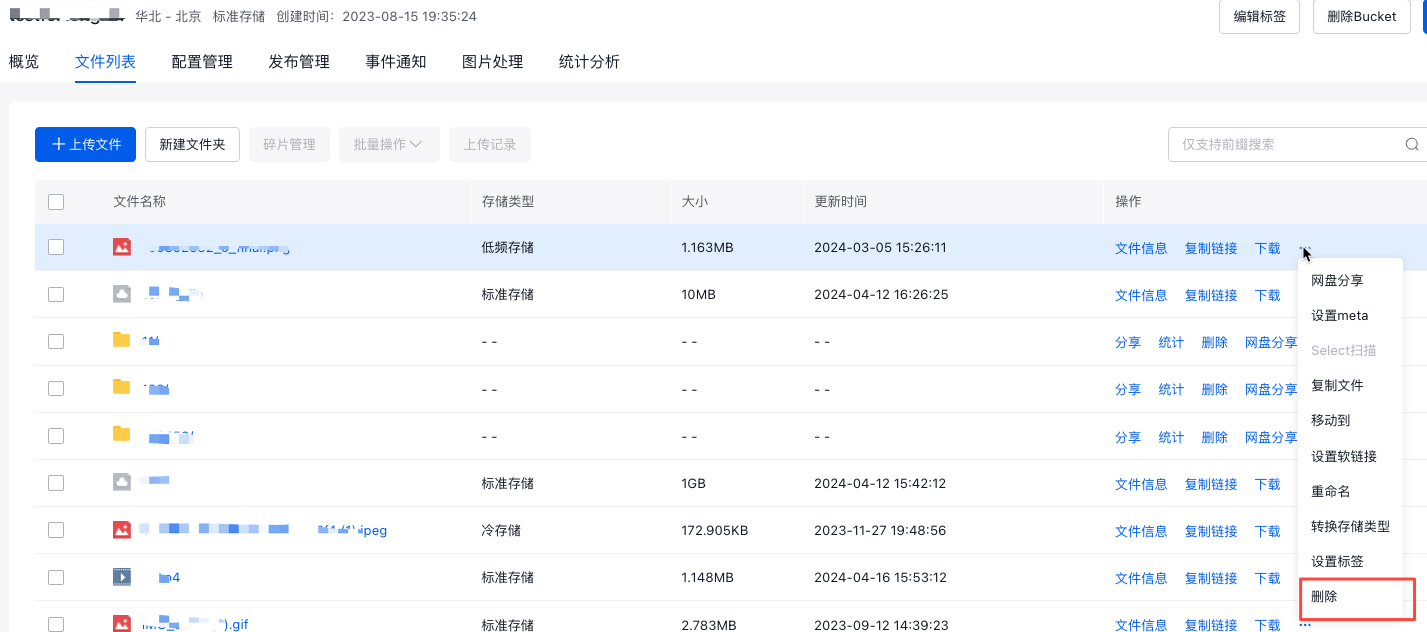
On the File List page, click More -> Delete on the right side of the object to be deleted to delete the specified object.
Delete an object by the API
API: [DeleteObject](BOS/API Reference/Object-Related Interface/Basic Operations/DeleteObject.md)。
Delete an object by SDK
- JAVA SDK: [Delete File](BOS/SDK/Java-SDK/File management/Delete file.md)
- Python SDK: [Delete File](BOS/SDK/Python-SDK/Bucket management/Delete bucket.md)
- PHP SDK: [Delete File](BOS/SDK/PHP-SDK/File management.md#Delete file)
- C# SDK: [Delete Object](BOS/SDK/C-Dotnet-SDK/Object management.md#Delete Object)
- JavaScript SDK: Delete Object
- Android SDK: [Delete Object](BOS/SDK/Android-SDK/File management/Delete Object.md)
- iOS SDK: [Delete Object](BOS/SDK/IOS-SDK/File management/Delete Object.md)
- Ruby SDK: [Delete File](BOS/SDK/Ruby-SDK/File management/Delete file.md)
- Go SDK: [Delete File](BOS/SDK/GO-SDK/File management.md#Delete file)
- C++ SDK: [Delete File](BOS/SDK/C++-SDK/File management/Delete file.md)
Delete objects by tools
You can use the official tool BOS Browser provided by BOS to delete objects. For details, please refer to File Deletion.