

Introduction to storage classes
Comparison of storage classes
| Comparison indicators | Standard storage-multi-AZ | Standard storage | Infrequent access storage-multi-AZ | Infrequent access storage | Cold storage | Archive storage |
|---|---|---|---|---|---|---|
| Availability | 99.995% | 99.99% | 99.995% | 99.95% | 99.95% | 99%(after data restoration) |
| Minimum storage duration | None | None | 30 days | 30 days | 60 days | 180 days |
| Data restoration fees | None | None | Pay-as-you-go (GB) | Pay-as-you-go (GB) | Pay-as-you-go (GB) | Pay-as-you-go (GB) + restoration API call fee (per call) |
| Minimum unit of measurement | Based on actual size | Based on actual size | Based on actual size | Based on actual size | Based on actual size | 64 KB |
| Data restoration performance | No restoration required | No restoration required | Automatic restoration trigger, millisecond latency | Automatic restoration trigger, millisecond latency | Automatic restoration trigger, millisecond latency | Need to manually restore first before access |
| Applicable scenarios | Mobile applications, website videos, data analysis and other scenarios requiring extremely high reliability | Mobile applications, website videos, data analysis, etc. | Network disk storage, monitoring data, media asset backup and other scenarios requiring extremely high reliability | Network disk storage, monitoring data, media asset backup, etc. | Medical images, business backups, log data, backup storage for live broadcast transcription, etc. | For business scenarios requiring long-term data preservation, such as genetic data or compliance archive files. |
| Scenario characteristics | Best suited for use cases with frequent data reads. | Best suited for use cases with frequent data reads. | Designed for scenarios where the average monthly access frequency is less than once. | Designed for scenarios where the average monthly access frequency is less than once. | For scenarios where the average annual access frequency is less than once. | For scenarios where the average access frequency is less than once every three years. |
Description:
- The data reliability of standard storage, standard storage-multi-AZ, infrequent access storage, infrequent access storage-multi-AZ, and cold storage is 99.9999999999% (12 nines), and the data reliability of archive storage is 99.999999999% (11 nines)
Regional availability of each storage class
The regional availability of various BOS storage classes differs. Please consult the table below for appropriate selection.
| Region | Standard storage-multi-AZ | Standard storage | Infrequent access storage-multi-AZ | Infrequent access storage | Cold storage | Archive storage |
|---|---|---|---|---|---|---|
| North China-Beijing | ✓ | ✓ | ✓ | ✓ | ✓ | ✓ |
| North China-Baoding | Not available | ✓ | Not available | ✓ | ✓ | ✓ |
| East China-Shanghai | Not available | ✓ | Not available | Not available | Not available | Not available |
| East China-Suzhou | ✓ | ✓ | ✓ | ✓ | ✓ | ✓ |
| South China-Guangzhou | ✓ | ✓ | ✓ | ✓ | ✓ | ✓ |
| Southwest-Chengdu | Not available | ✓ | Not available | ✓ | ✓ | Not available |
| Central China-Wuhan | Not available | ✓ | Not available | ✓ | ✓ | ✓ |
| Hong Kong | Not available | ✓ | Not available | ✓ | Not available | Not available |
Note
-
Please select the appropriate storage class based on the expected access frequency of the files:
- Archive Storage is suitable for scenarios where the average access frequency is less than once every three years. Such as genetic data, compliance archive files, archived medical data, etc.;
- For cold data with relatively frequent access, please choose other storage classes, such as infrequent access storage-multi-AZ and infrequent access storage (suitable for average monthly access frequency less than 1 time), cold storage (suitable for average annual access frequency less than 1 time);
-
Please note the minimum storage period fee:
- The minimum storage period for archive storage files is 180 days.If an archive storage file is stored for less than 180 days (e.g., deleted before 180 days of storage), BOS will charge an “Archive Storage Minimum Storage Period” fee, which is a one-time charge for the remaining unfulfilled storage period;
- Infrequent access storage-multi-AZ, infrequent access storage, and cold storage files also have minimum storage duration restrictions.The minimum storage duration for infrequent access storage-multi-AZ and infrequent access storage files is 30 days, and for cold storage files, it is 60 days. If the corresponding storage period is not met, a “minimum storage period” fee will also be incurred, which will be charged one-time based on the remaining unfulfilled period;
-
Please note the data restoration fee:
- BOS has many billing items, and the selection of storage class is very important. For different storage classes, Standard Storage is for frequently accessed hot data, with the highest capacity cost but no data restoration fee; Archive Storage is for almost never accessed archive backup data (such as archive data accessed once every three years), with the lowest storage capacity cost but the most expensive occasional data restoration fee. Therefore, please select the appropriate file storage class according to the data access frequency. For more information on data restoration fees, please refer to the BOS Billing Document; for more explanations on BOS billing items, please refer to BOS Billing Items;
- When reading files of infrequent access storage-multi-AZ, infrequent access storage, cold storage, and archive storage classes, you need to restore the files first (Standard Storage files do not require restoration);
- When you access files of infrequent access storage-multi-AZ, infrequent access storage, and cold storage classes, BOS will automatically trigger the restoration operation according to the file storage class, no manual restoration is needed;
- When you access files of archive storage class, you need to manually call the RestoreObject API to restore the files, or click “Restore File” on the “File Information” page in the console;
- Data restoration is a paid service, which is equivalent to BOS thawing the frozen files for you, and the files can be accessed and read normally only after thawing. For data restoration fees, please refer to the BOS Billing Document. For Archive Storage files, restoration will incur not only data restoration fees (calculated by GB) but also fees for the number of data restoration API calls (calculated by the number of restoration API calls);
-
Archive storage supports hierarchical restoration:
- Archive storage files are long-term unused archive backup files with extremely low access frequency. For Archive Storage files, you can trigger an appropriate restoration method according to the current requirements for restoration efficiency of the files: (1) If there are no special requirements, Archive Storage files will use standard restoration when restored, which generally takes about 5 hours to complete; (2) If you encounter an emergency and want to restore the files as soon as possible, you can trigger express restoration, which generally takes 30 minutes to complete; (3) If there is no high requirement for restoration time, for example, you need to restore the Archive Storage files one week in advance to cope with a security review scheduled one week later, you can use deferred restoration, which generally takes about 12 hours to complete the restoration operation. For the operation method of restoring archive storage files, please refer to the RestoreObject API.
- Different levels of restoration for archive storage have different restoration fees: Express restoration fee - Standard restoration fee - Deferred restoration fee. For more information on archive storage restoration fees, please refer to Data Restoration Fees and Archive Storage Restoration Request Fees.
Settle via lifecycle
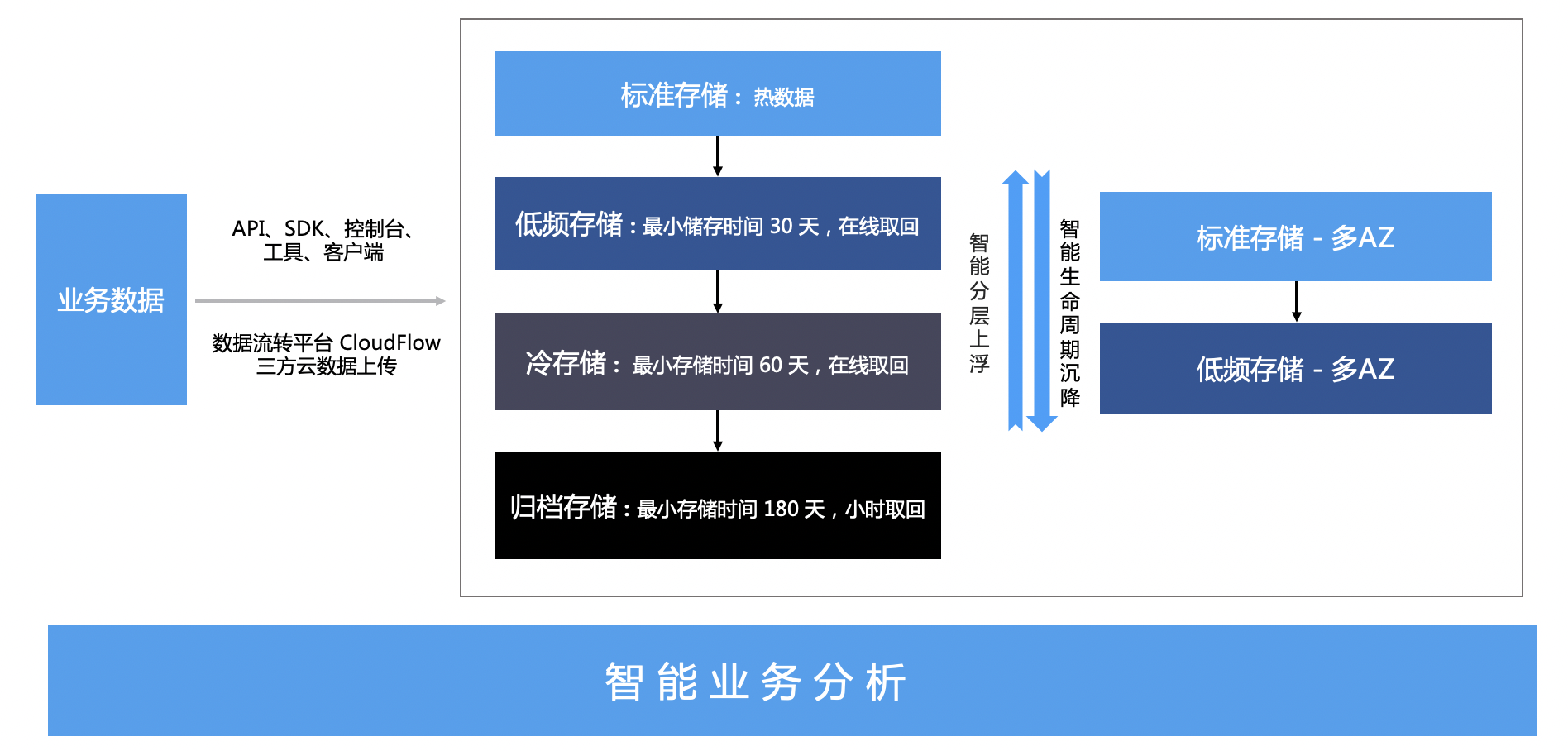
The storage class is not fixed. After uploading files, you can set settlement rules to realize the settlement of storage classes, such as settling the files under a certain prefix of a bucket to infrequent access storage 30 days after upload. After you set the settlement rules, the settlement will be triggered automatically, and there is no need to manually modify the storage class. For the use of lifecycle, please refer to Console Settings for Lifecycle Rules or API-PutBucketLifecycle
Charge type
For the storage price, traffic fee, request fee, and data processing fee of each storage class, please refer to Billing Items Overview for detailed information on billing items. For the prices of billing items, please refer to Pay-as-you-go. You can also purchase [Resource Packages](BOS/Product pricing/Product price/Resource Package Charge Type/Resource Package Overview.md) in advance, and the corresponding fees will be automatically deducted from the resource packages after purchase.