

Billing Problems
1. Will data be lost after debts?
Debt handling:
- If your account balance falls below RMB 0 and cannot cover the BOS bill, it will be considered as debt. The system will send a debt notification when such a situation arises.
- Service will be suspended immediately due to overdue payments, and the system will issue a notification regarding the suspension. Data will be retained for 15 days during which storage fees will apply. If no payment is made within 15 days, the data will be deleted. The system will send a notification 1 day before, as well as when data deletion occurs.
2. What is the traffic charging standard after enabling mirror back-to-origin?
The mirror back-to-origin is a bucket-level setting. Currently, files fetched by mirror back-to-origin are stored in standard storage by default. The charge items include storage, request and traffic fees. For specific charge details, please check [Product Pricing](BOS/Product pricing/Charge Item Introduction/Charge Item Overview.md).
3. Will there be traffic consumption for downloaded files obtained through the BOS GetObject method call?
Files downloaded through the GetObject method call will incur request fees + traffic fees. For infrequent access storage and cold storage, data restoration fees will also be charged. For specific fee details, please check [Product Pricing](BOS/Product pricing/Charge Item Introduction/Charge Item Overview.md).
4. Will repeatedly uploading unmodified files on BOS consume the count of requests?
Each upload triggers a request to the corresponding upload API, and the number of requests is tracked and calculated.
5. What to do if BOS remains inaccessible after recharging for debts?
After recharging for BOS debts, it typically takes 10 to 20 minutes for the payment to take effect. Please wait patiently and refresh the browser cache after 10 minutes if necessary.
6. Why can't coupons offset BOS fees?
Since coupons have region types, BOS currently only supports global region-type coupons. Other region-type coupons cannot offset BOS fees. Coupon type viewing method: Console - Finance - Coupons

7. How to use BOS after purchasing a storage package?
BOS supports the purchase of storage packages in subscription (pre-payment) form. After purchasing the storage package, your BOS consumption will first be deducted from the storage package (no special settings required). Usage within the storage package limit is free, and the excess part will be charged on a pay-as-you-go basis. You can purchase storage packages directly in the "BOS->Storage Packages" tab of the management console. When purchasing, select the region, specification, purchase period and effective time as prompted. For detailed descriptions, please refer to the following document [BOS Storage Package Charge](BOS/Product pricing/Product price/Resource Package Charge Type/Resource Package Overview.md).
8. What if BOS resources cannot be found after debts?
When the BOS service is in debt status, service will be suspended immediately. BOS will reject your read/write requests, but the data will be retained for 15 days, during which the storage space occupied by your data will continue to incur fees, thus accumulating the debt amount. If you recharge promptly after debt, your service will resume normal operation and data will become available. If debts exceed 15 days, you will be deemed to have voluntarily abandoned the BOS storage service. The storage space will be reclaimed, and the data in the storage space will be cleared and cannot be recovered. For detailed description, please refer to [Insufficient Balance and Debt Reminder](BOS/Product pricing/Insufficient Balance and Debt Reminder.md).
9. Can BOS standard storage package be purchased annually?
BOS standard storage packages can be purchased on an annual basis.
10. Why am I still being charged after purchasing a resource package for BOS?
BOS charges consist of four parts: storage fees, traffic fees, processing fees, and request fees. Your storage package only offsets storage fees. For detailed billing information, Review the Document.
11. Can deleted BOS data be recovered after expiration?
Service will be suspended immediately upon incurring BOS debts, and the system will send a debt service suspension notification. Data will be retained for 15 days during which storage fees will continue to apply. If no payment is made within 15 days, the data will be permanently deleted. The system will send a notification one day before and during the data clearing process. Deleted data cannot be recovered.
12. What to do if a BOS resource package is purchased in the wrong region?
Purchased resource packages must be in the same region as the bucket; otherwise, fees cannot be offset. You may submit a Financial Ticket to unsubscribe the resource package and repurchase.
13. How to view bucket cost breakdown?
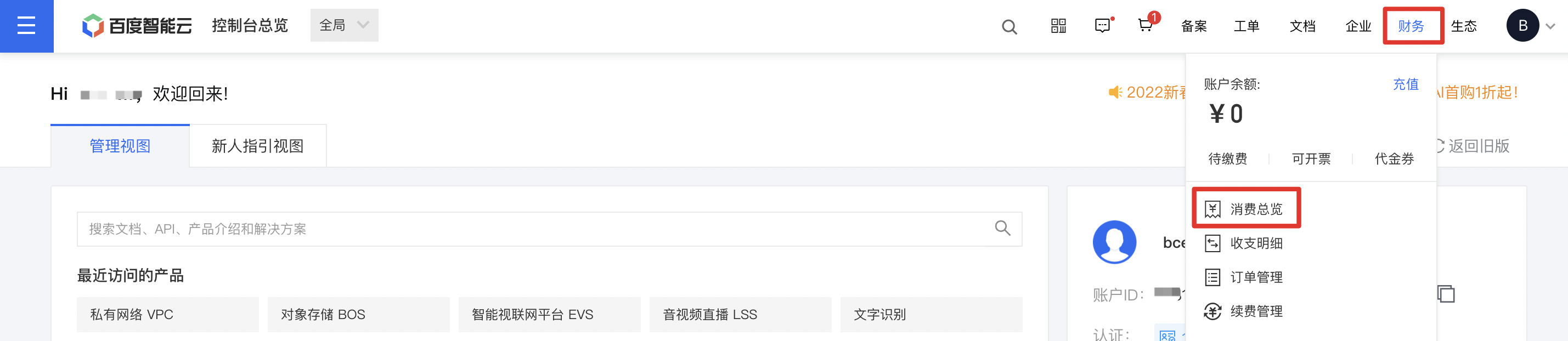
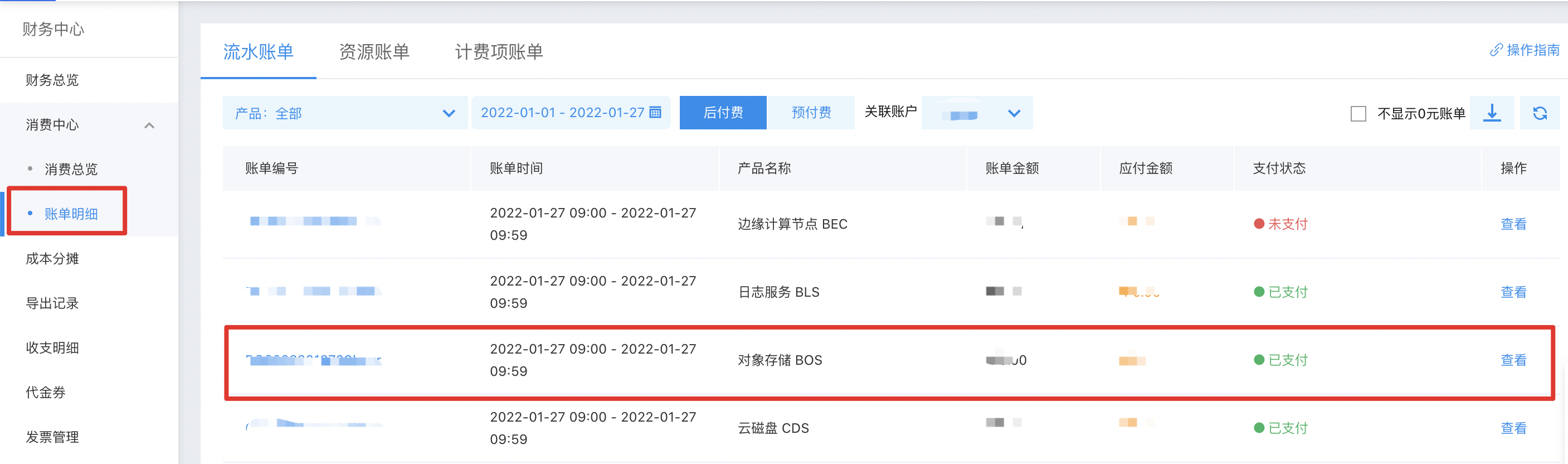
Bucket cost breakdown can be viewed under Consumption Overview - Bill Details:
- Sign in to the Manage Console, and click Finance - Consumption Overview to access the Financial Center.
- Click Consumption Center - Bill Details in the left navigation bar. On the Hour Bill page, locate the BOS product and click View on the right to view product fees.
14. What are the fees for data replication via copyobject?
CopyObject performs replication within the same region, incurring API call fees and storage costs for the target object.
15. What happens after purchasing and exhausting a Baidu AI Cloud Object Storage resource package?
Currently, the Baidu AI Cloud Object Storage (BOS) service is a postpaid product. When purchased resource packages are exhausted, account balances will be deducted. Accounts in debt will be suspended, and resources will be automatically released after 15 days of debt. For details, refer to: Insufficient Balance and Debt Reminder.
16. Does Baidu AI Cloud Object Storage offer yearly payment options for Internet downlink traffic packages?
Currently, BOS Internet traffic packages cannot be purchased on an annual basis. It is recommended to purchase multiple specific-time traffic packages or renew an existing resource package, which will automatically set the active time for the renewal.
17. What charge items are involved in archive storage?
1. Charge items directly related to archive storage class:
Note: Prices are subject to the Baidu AI Cloud Object Storage (BOS) Official Website Details Page
| Charge item | Official website price | Description | Example | Charge type |
|---|---|---|---|---|
| Minimum storage period of archive storage | RMB 0.015/GB/month × remaining storage period (months) × archive storage class file capacity | Files of archive storage class have a minimum storage duration of 180 days. If a file is deleted/overwritten before being stored for 180 days, a minimum storage period fee will be incurred, and BOS will charge the remaining capacity fees for the unfulfilled period in one lump sum. | If you have a 1 GB of archive storage class files and delete them 3 days after upload, the minimum storage period fee would be: archive storage usage (GB) × monthly unit-price for archive storage × remaining minimum storage period (months) = 1×0.015×(180-3)/30 | Pay-as-you-go |
| Archive storage class file restoration cache | RMB 0.003967/GB/day | To access an archive storage class file, you need to restore it first. BOS will create a temporary replica for reading. During the restoration process, you must set the cache duration for the replica, and corresponding cache fees will apply. | If you have a 1 GB of archive storage class files with a post-restoration replica cache period of 10 days, the file will incur one-time cache fees for 10 days. The restoration cache fees would be: archive storage usage (GB) × cache period (days) × 0.003967 = 1×10×0.003967 | Pay-as-you-go |
| Archive storage usage | 1. If <64 KB: RMB 0.015/GB/month × 64/1024/1024 GB × storage duration (months) 2. If ≥64 KB: RMB 0.015/GB/month × archive storage class file capacity (GB) × storage duration (months) |
For archive storage class files smaller than 64 KB, they are billed as 64 KB. Files 64 KB or larger are billed based on their actual size. | If your archive storage class file capacity is 1 GB stored for 12 months, the storage fees would be: archive storage class file capacity (GB) × 0.015 × storage duration (months) = 1×0.015×12 | Pay-as-you-go or resource package charges (for resource package prices, see the Official Website) |
| Archive storage read requests API | RMB 0.5/10,000 times | All operations on BOS are essentially calls to BOS APIs. When you read data in BOS, you will call BOS read-related APIs such as GET, which will incur read request fees. Operations on the BOS console are also implemented through BOS API calls, so using the BOS console will also generate the read request count. The system settles read request fees per hour. | If you read archive storage class files for 10,000 times, the read request fees would be: request count (10,000 times) × 0.5 = 1×0.5 | Pay-as-you-go |
| Archive storage write requests API | RMB 0.5/10,000 times | All operations on BOS are essentially calls to BOS APIs. When you write data to BOS (upload, overwrite), you will call BOS write-related APIs such as PUT, which will incur write request fees. Operations on the BOS console are also implemented through BOS API calls, so using the BOS console will also generate the write request count. The system settles write request fees per hour. | If you write for 10,000 times when uploading archive storage class files, the write request fees would be: request count (10,000 times) × 0.5 = 1×0.5 | Pay-as-you-go |
| Expedited restoration for archive storage | RMB 0.35/GB | The restoration of archive storage class files must be manually triggered via API, SDK, BOS official tools, or the console. Files can only be accessed or downloaded after successful restoration. There are three restoration modes available: expedited (restoration within 30 minutes), standard, and deferred, each incurring different fees. | If you have 1 GB of archive storage class files to restore and choose expedited restoration, the restoration fees would be: archive storage usage (GB) × 0.35 = 1×0.35 | Pay-as-you-go |
| Expedited restore requests for archive storage | RMB 30/10,000 times | When you restore files in the archive storage class, the restoration API will be invoked, and charges will apply based on the selected restoration mode. | If you make 10,000 restoration requests when restoring archive storage class files, the fees for calling restoration requests would be: restoration API call count (10,000 times) × 30 = 1×30 | Pay-as-you-go |
| Standard restore for archive storage | RMB 0.12/GB | Restoring files in the archive storage class must be initiated manually by you using the API, SDK, BOS official tools, or the console. You can only access or download the files after the restoration is complete. There are three restoration modes available: expedited, standard, and deferred. Each mode has its own fee structure. (Standard restoration: completed within 5 hours). | If you have a 1 GB of archive storage class files and select standard restoration, the restoration fees would be: archive storage usage (GB) × 0.12 = 1×0.12 | Pay-as-you-go |
| Standard restore requests for archive storage | RMB 3/10,000 times | When you restore files in the archive storage class, the restoration API will be invoked, and charges will apply based on the selected restoration mode. | If you make 10,000 restoration requests when restoring archive storage class files, the fees for calling restoration requests would be: restoration API call count (10,000 times) × 3 = 1×3 | Pay-as-you-go |
| Deferred restoration for archive storage | RMB 0.06/GB | Restoring files in the archive storage class must be initiated manually by you using the API, SDK, BOS official tools, or the console. You can only access or download the files after the restoration is complete. There are three restoration modes available: expedited, standard, and deferred. Each mode has its own fee structure. (Deferred restoration: completed within 12 hours). | If you have 1 GB of archive storage class files to restore and choose deferred restoration, the restoration fees would be: archive storage usage (GB) × 0.06 = 1×0.06 | Pay-as-you-go |
| Deferred restore requests for archive storage | RMB 0.3/10,000 times | When you restore files in the archive storage class, the restoration API will be invoked, and charges will apply based on the selected restoration mode. | If you make 10,000 restoration requests when restoring archive storage class files, the fees for calling restoration requests would be: restoration API call count (10,000 times) × 0.3 = 1×0.3 | Pay-as-you-go |
2. Charge items unrelated to storage class but related to usage function:
Description:
- According to the different usage of customers, the charges involved are different
- For specific charge items of content review, refer to the ICR Pricing Document
| Charge Items | Description | Features |
|---|---|---|
| Internet Egress Traffic, CDN Back-to-Origin Traffic, Cross-Region Replication Traffic, CDN Uplink Acceleration | If both of the following conditions are met, corresponding fees will be incurred: 1. Use the function 2. When archive storage class files are in the restored state (with directly readable cached files) |
Regardless of storage class, using corresponding functions will generate corresponding usage and fees. For details, see Baidu AI Cloud Object Storage (BOS) Pricing |
| Select scanning, video processing, image processing, document preview, content review | If both of the following conditions are met, corresponding fees will be incurred: 1. Use corresponding functions 2. When archive storage class files are in the restored state (with directly readable cached files) |
|
| Inventory fees | Using corresponding functions will incur corresponding fees |
18. BOS charge item name optimization notes
- To improve the readability and consistency of BOS charge item names in Chinese and eliminate ambiguity caused by inaccurate names, modifications and optimizations were made to some BOS Charge Item Names in Chinese on May 26, 2023. Specific changes are as follows:
| Category | (Original) charge item name in Chinese | (Current) charge item name in Chinese |
|---|---|---|
| Traffic | Read traffic | Internet egress traffic |
| Egress traffic generated by CDN back-to-origin requests | CDN back-to-origin outbound traffic | |
| Cross-region egress traffic | Cross-region replication traffic | |
| Read/write times | Standard - Read count | Standard storage - Read API call count |
| Standard - Write count | Standard storage - Write API call count | |
| Infrequent access - Read count | Infrequent access storage - Read API call count | |
| Infrequent access - Write count | Infrequent access storage - Write API call count | |
| Cold storage - Read count | Cold storage - Read API call count | |
| Cold storage - Write count | Cold storage - Write API call count | |
| Archive storage read requests API | Archive storage - Read API call count | |
| Archive storage write requests API | Archive storage - Write API call count | |
| Standard multi-AZ - Read count | Standard storage multi-AZ - Read API call count | |
| Standard multi-AZ - Write count | Standard storage multi-AZ - Write API call count | |
| Infrequent access multi-AZ - Read count | Infrequent access storage multi-AZ - Read API call count | |
| Infrequent access multi-AZ - Write count | Infrequent access storage multi-AZ - Write API call count | |
| Expedited restore requests for archive storage | Archive storage - Expedited restoration API call count | |
| Standard restore requests for archive storage | Archive storage - Standard restoration API call count | |
| Deferred restore requests for archive storage | Archive storage - Deferred restoration API call count | |
| Capacity | Standard - Space usage | Standard storage - Capacity fees |
| Infrequent access - Space usage | Infrequent access storage - Capacity fees | |
| Cold storage - Space usage | Cold storage - Capacity fees | |
| Archive storage usage | Archive storage - Capacity fees | |
| Standard multi-AZ - Space usage | Standard storage multi-AZ - Capacity fees | |
| Infrequent access multi-AZ - Space usage | Infrequent access storage multi-AZ - Capacity fees | |
| Standard storage (dedicated) - Space usage | Standard storage (dedicated) - Capacity fees | |
| Infrequent access storage (dedicated) - Space usage | Infrequent access storage (dedicated) - Capacity fees | |
| Cold storage (dedicated) - Space usage | Cold storage (dedicated) - Capacity fees | |
| Archive storage (dedicated) - Space usage | Archive storage (dedicated) - Capacity fees | |
| Infrequent access - Minimum storage period | Infrequent access storage - Minimum storage period | |
| Minimum storage period of archive storage | Archive storage - Minimum storage period | |
| Infrequent access multi-AZ - Minimum storage period | Infrequent access storage multi-AZ - Minimum storage period | |
| Data restoration | Infrequent access - Data restoration | Infrequent access storage - data restoration |
| Expedited restoration for archive storage | Archive storage - Expedited data restoration | |
| Standard restore for archive storage | Archive storage - standard data restoration | |
| Deferred restoration for archive storage | Archive storage - deferred data restoration | |
| Archive storage class file restoration cache | Archive storage - data restoration cache | |
| Infrequent access -multi-AZ - data restoration | Infrequent access storage -multi-AZ - data restoration |