

Creating a Bucket Custom Domain Name
Overview
BOS allows you to bind a custom domain name to a bucket. Once the domain name is bound, you can use it to publish data stored in the bucket, making the data accessible using the custom domain name.
Note
Creating a custom domain name for a bucket can meet the following scenarios:
- When accessing website-related files (e.g., those with a mimetype of text/html, such as HTM and HTML files) in a bucket via a browser, it’s recommended to open them in preview mode rather than downloading them.
- If you configure a bucket as a static website, you should directly view the static website’s pages in a browser rather than downloading them.
Prerequisites
- Domain name filing has been completed. If the domain name is not filed yet, please complete filing according to the Registration procedure.
- Domain name ownership verification has been completed. If it is not verified yet, please complete verification according to the [Verification of Domain Name Ownership](#Verify domain name ownership) procedure.
- A bucket has been created. For creation steps of bucket, refer to [Create Bucket](BOS/Console Operation Guide/Managing Bucket/Create bucket.md).
- To utilize domain name acceleration, you must first activate the CDN/DRCDN services.
Verify domain name ownership
- On the Release Management - Custom Domain Release page in the BOS console, click "Add Custom Domain Name." After entering the domain name, BOS will generate a random token for the domain, displaying details such as the record type, host record, and record value. Use this information to complete TXT resolution and validate domain ownership. If entering a second-level domain, the table will show two record options, either of which can be used for resolution and verification.
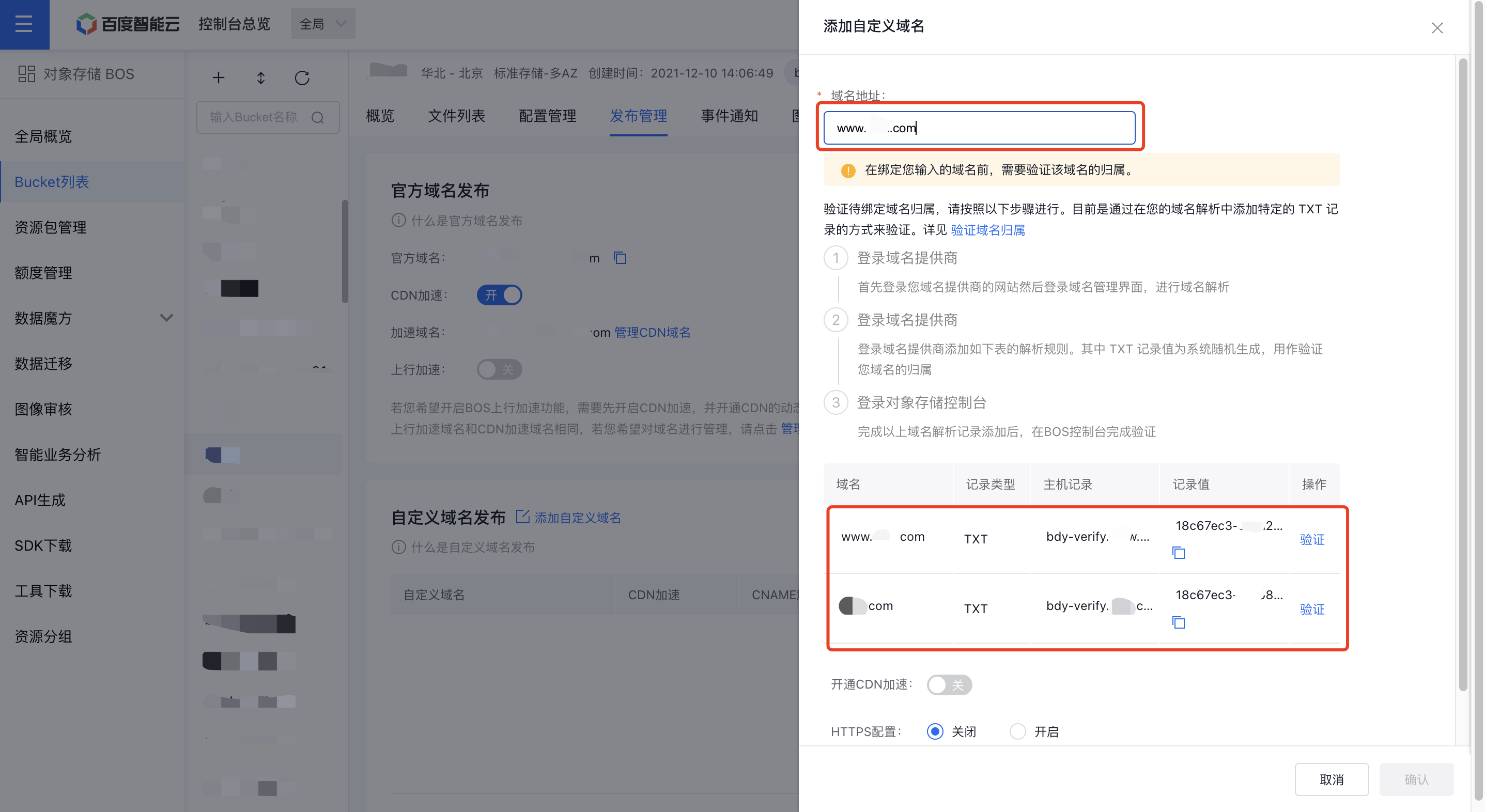
- Sign in to your domain name provider's website, access the Domain Name Management interface, add the Domain Name, and enter the Record Type, Host Record, and Record Value from the BOS console table to perform TXT domain name resolution. If your domain name resolution provider is Baidu AI Cloud, refer to DNS Resolution Verification Steps.
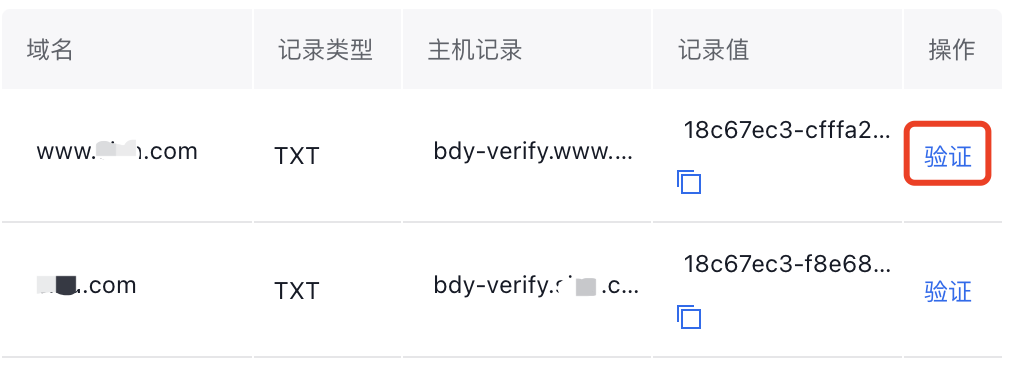
- Once TXT resolution takes effect, click the verification button in the BOS console corresponding to the domain name to complete domain ownership validation.
Note
- Custom domain names should not include protocols, ports, or paths, and must consist solely of the domain name itself.
- Each bucket can have a maximum of 200 custom domain names bound to it.
- A specific domain name can be linked to only one bucket.
Create custom domain name
- Sign in to the BOS Management Console and navigate to the Global Overview page.
- In the bucket list of left navigation bar of the BOS console, select the target bucket name, then click to open the bucket’s File List page.
- Click the Release Management tab in the top navigation bar to enter the Release Management page.
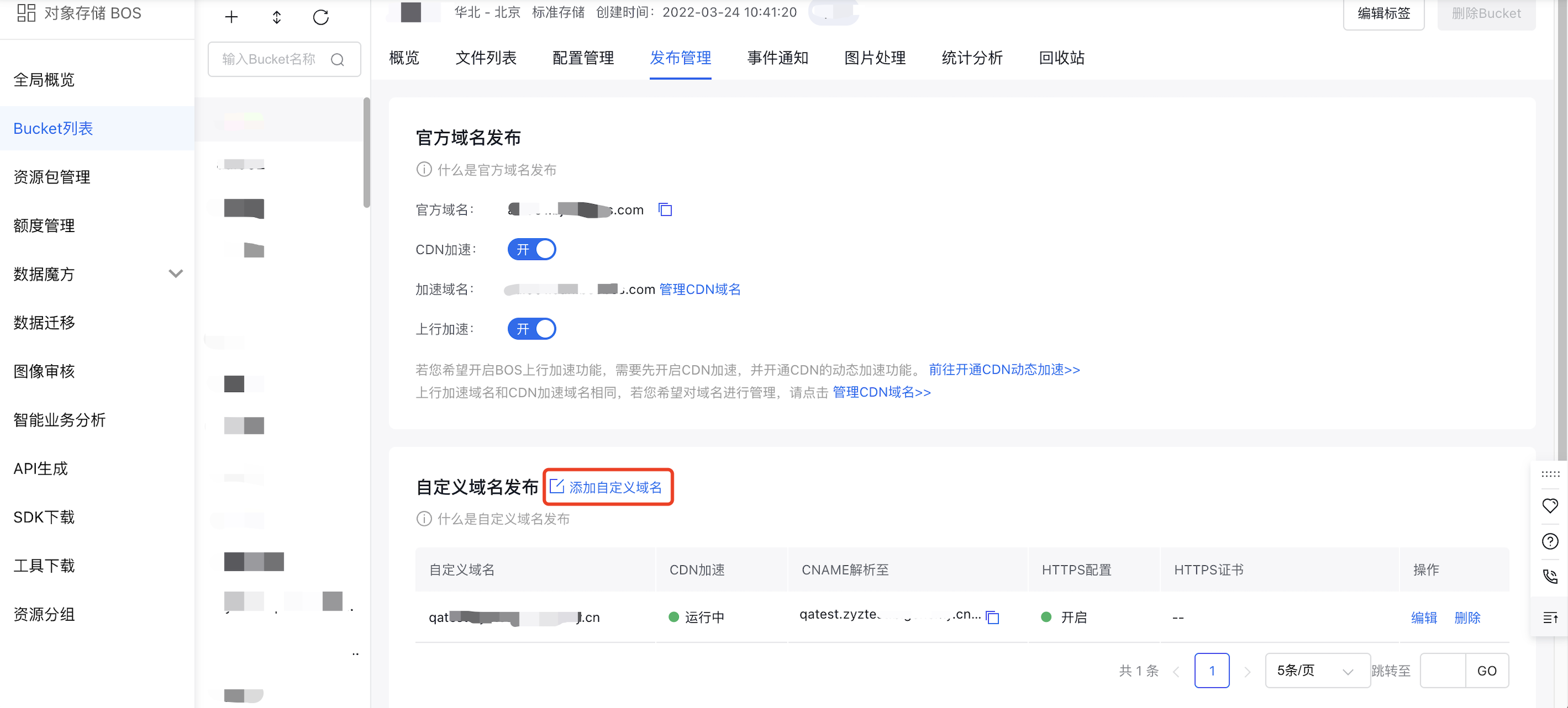
- Click Add Custom Domain Name on the "Custom Domain Name Release" page.
- In the pop-up window for adding a custom domain name, enter the Domain Name Address that has been filed and domain name ownership verification has been completed, choose whether to Enable CDN, and whether to enable HTTPS Configuration.
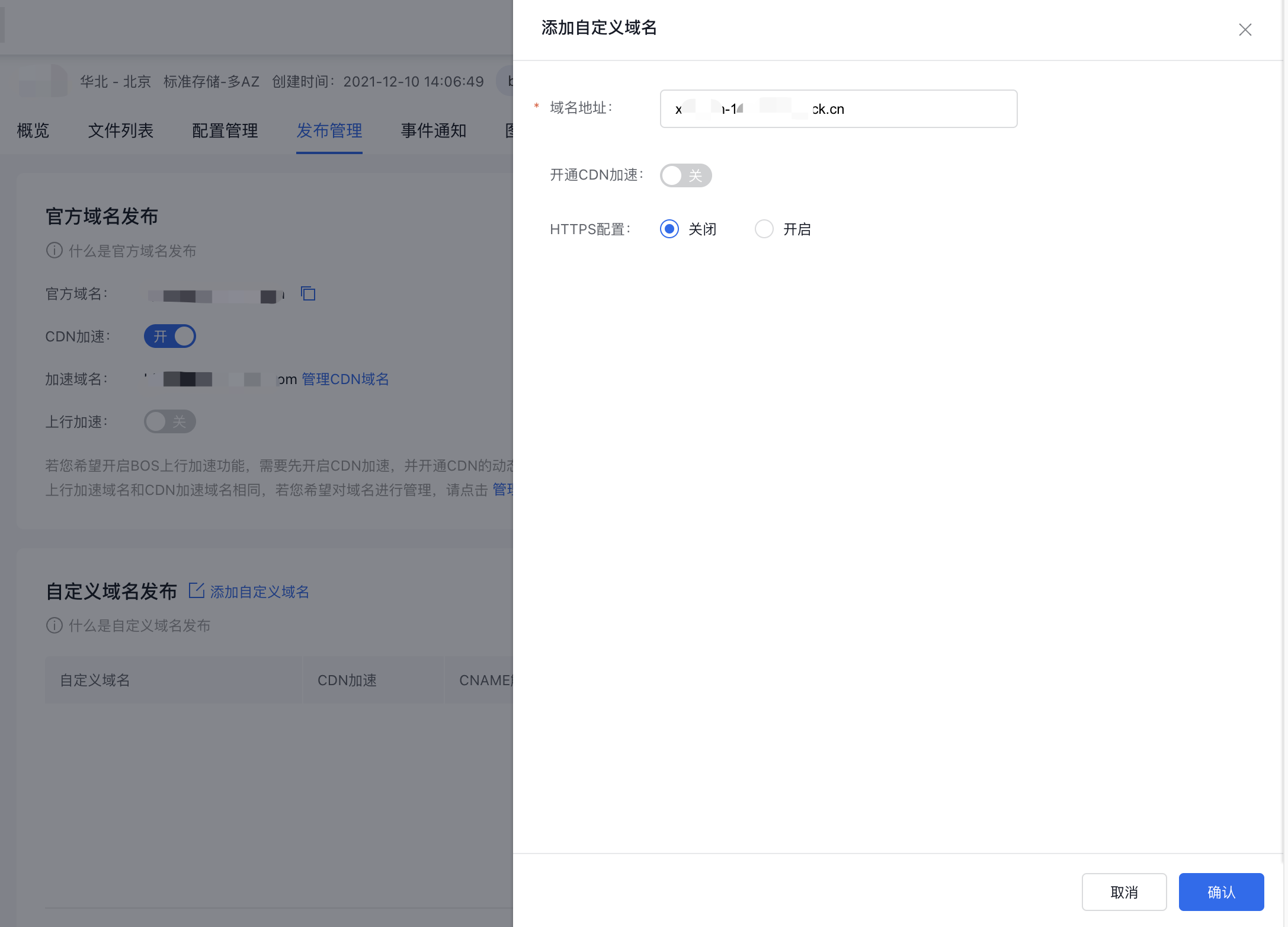
- Click OK to complete the addition and binding of bucket custom domain names. After successful addition, the domain name will be displayed in the custom domain name list below.
Note:
- For the custom domain name to work, you must complete the CNAME resolution in the DNS management console of your domain registrar. The domain name can only be used to access the bucket after the resolution takes effect.
- To enable CDN acceleration for the custom domain name, click Enable CDN Acceleration in the operation column corresponding to the domain name.
- To unbind the custom domain name, click Delete in the operation column corresponding to the domain name.
CNAME domain name resolution
After completing the binding, sign in to your domain name provider's backend, add CNAME domain name resolution in domain management, and set the required domain name to BOS domain name by CNAME. The method to obtain BOS domain name:
- Via the console: Similarly, under the Release Management tab, remove the bucket name and . from the [Official Domain Name], and retain the second-level domain name only.
-
Rule concatenation
<region>.bcebos.comPlain Text1Note: (`<region>` refers to the region where the bucket is located. Please refer to the [Region Selection Instructions](Reference/Region Selection Instructions/Region.md) to complete the binding configurations of all domain names. For example:Your bucket is in the Beijing region, set the CNAME to
bj.bcebos.com. Your bucket is located in Guangzhou region. Please set the CNAME togz.bcebos.com. Your bucket is located in Suzhou region. Please set the CNAME tosu.bcebos.com.
Note: If the domain name had other resolution records before, you must delete those old records after setting the CNAME to
<region>.bcebos.com.
Activate domain name acceleration
You can enable domain name acceleration when adding a new custom domain name or editing an existing one. The system supports two acceleration types: Content Delivery Network (CDN) and Dynamic Route Content Delivery Network (DRCDN).
The enabling acceleration with CDN/DRCDN services is applicable only to domestic domain name accesses by default. If you want to enable acceleration of global domain names, you can enable Overseas CDN simultaneously when enabling acceleration service. Enabling overseas acceleration is applicable to both uplink and downlink access worldwide, significantly improving access efficiency.
Note: The overseas acceleration feature is currently available only via an allow list. To enable it, please submit a ticket.
- If either the CDN or DRCDN service is enabled for a custom domain, after the domain is deactivated, the service type cannot be changed when reactivating acceleration. To modify the service type, please navigate to the CDN/DRCDN console and complete the necessary adjustments.
- As a sub-feature of domain acceleration, overseas acceleration will also be automatically disabled when domain acceleration is turned off.
- The CDN/DRCDN/overseas acceleration functions generate traffic charges applicable to the CDN service. You can review detailed charges in the CDN-related billing statements.
Bind HTTPS certificate
After configuring the CNAME resolution, to access your custom domain via HTTPS, you can bind an existing HTTPS certificate to it.
Baidu AI Cloud’s SSL Certificate Service provides a one-stop solution for complete certificate application and management. Users can purchase, manage, and use HTTPS certificates on Baidu AI Cloud. For details, please refer to [Certificate Management](Reference/Certificate management/Introduction.md)
If you have valid certificates in Baidu AI Cloud’s SSL certificate service, you can bind them to your BOS custom domain in the following way: In the BOS custom domain console, when creating or modifying a custom domain name, click the HTTPS Certificate option. A dropdown menu will display all certificates managed in Baidu AI Cloud’s SSL certificate service; choose the appropriate certificate as needed.
If the certificate bound to a domain expires or becomes invalid: Select the custom domain, click HTTPS Certificate, and replace the expired certificate with a valid one from the dropdown menu.
Note:
- If the selected certificate's domain range does not align with the custom domain name you want to bind, a prompt will appear on the interface. You’ll need to replace it with a valid certificate.
- It is recommended to regularly check the validity of certificates bound in Baidu AI Cloud’s SSL certificate service to prevent HTTPS access issues caused by certificate expiration.
- Currently, BOS supports configuring HTTPS certificates only for custom domain names associated with buckets in four regions: North China - Beijing (bj), North China - Baoding (db), East China - Suzhou (su), and South China - Guangzhou (gz).
- After selecting and binding a custom certificate, it typically takes 5-10 minutes to establish the binding. Please wait patiently before attempting HTTPS access.
Access address
Once binding is completed, you can directly access the bucket through the bound custom domain name.
Example: Suppose the bucket name is video, and the custom domain name to be bound is video.51mingxi.com. First, log in to your domain service provider’s backend and set the CNAME of video.51mingxi.com to <region>.bcebos.com. After configuration, you can access the bucket directly using the URL: http://video.51mingxi.com/.