To enhance the security of data stored in BOS, we offer diverse multilevel permission management options. The BOS permission system is divided into three levels:
Bucket Standard Permissions: Common industry permission settings include private, public-read, and public-read-write.
Coarse-Grained Custom Permissions: More fine-grained permissions than standard ones allow setting READ, LIST, WRITE, FULL_CONTROL and MODIFY permissions for specific users, and specifying accessible resources, IP addresses, and referer allow lists.
Fine-grained custom permissions: API-level fine-grained custom permissions provided by BOS. Configurable API categories include 18 types, such as GetBucket, GetObject, PutObject and DeleteObject. You can customize the corresponding permission for each category.
From the bucket list on the left, select the bucket whose permissions you want to configure, then click the bucket name.
In the left navigation bar, select Configuration Management > Permission Configuration.
On the Permission Configuration page, click Modify Configuration to configure the bucket's permissions.
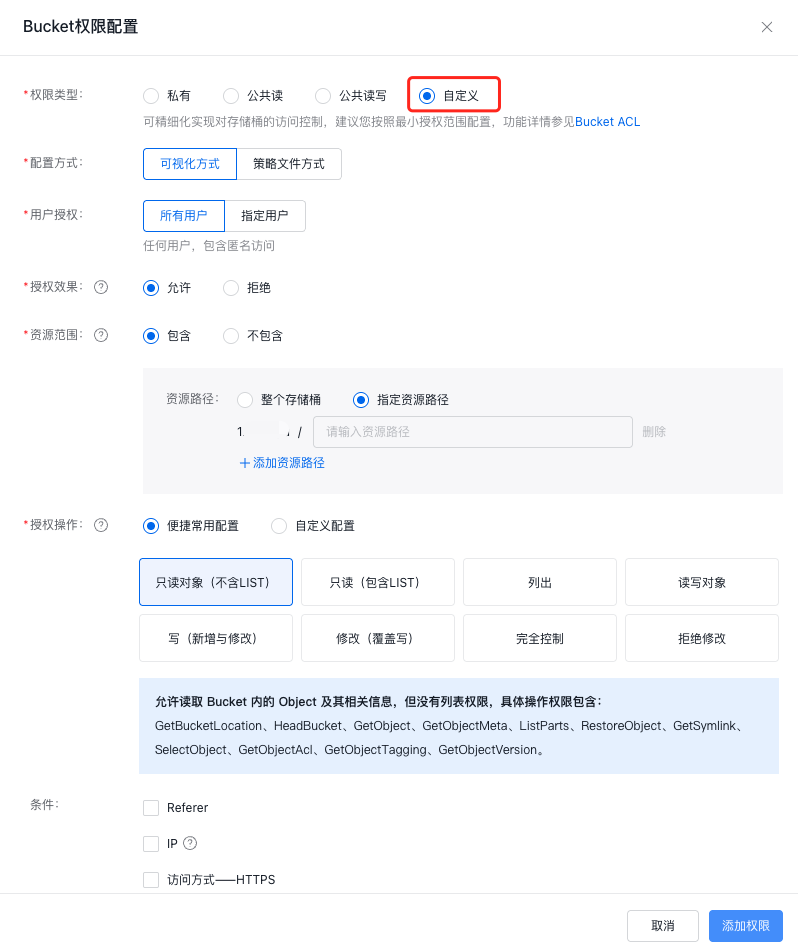
A bucket can be set to private, public-read, or public-read-write. For more requirements, you can select custom permissions and click Custom, allowing configuration via visual editing or full ACL policy text modification.
Refer to the following table for custom permission configuration parameters:
Configuration name
Configuration description
User authorization
All users: Refer to that this configuration applies to all users
Custom: Refer to that this configuration applies to specified users. After selecting Custom, you need to enter the user ID you wish to specify. The user ID can be viewed in the user center. Additionally, BOS supports setting multiple user IDs simultaneously, with each ID entered on a separate line (no punctuation is required at the end of each line). To apply to all users, enter "*" (one "*" at most is supported). You may also enter AuthenticatedUsers to grant permission to all registered Baidu AI Cloud users
All the above user IDs refer to the root account IDs. If you need to control the permissions of the user IDs of IAM users, you need to perform corresponding configurations through IAM identity and access management: IAM Identity and Access Management
Authorization Effect
It is used to set the operation effects for authorized users. If “Allow” is selected, the configured permissions will grant users the effect of “Allow”; if “Deny” is selected, the configured permissions will grant users the effect of “Deny”
Authorization Configuration
Coarse-grained custom permissions: Include READ, LIST, WRITE, MODIFY, FULL_CONTROL permissions
Fine-grained custom permissions: Users can click "Advanced Settings" to expand the fine-grained permission list and select one or more as needed to form a new custom permission
Fine-grained and coarse-grained permissions (READ, LIST, WRITE, FULL_CONTROL and MODIFY) do not interfere with each other and may be granted simultaneously
Coarse-grained permissions have higher priority than fine-grained permissions. If both coarse-grained permissions and fine-grained permissions are assigned, coarse-grained permissions will override fine-grained permissions, and take the priority. You may combine coarse-grained and fine-grained permissions as needed
Resources
Specify the resource scope to which this permission applies.
Here, "Include" refers to the effective resource scope. Resources must start with the bucket name. If a resource contains only one slash, it cannot end with a slash and must terminate with a wildcard "*". Multiple resources can be set, with one per line and each ending with a wildcard. Example: `myBucket, myBucket/*, myBucket/myfolder/object*`. If the resource field is left blank, it is equivalent to "Bucket Name".
Here, "Exclude" refers to setting permissions for objects outside the specified range, and the filling method of configuration is the same as that of “Include”. Selecting "Exclude" while leaving the field blank is equivalent to no configuration. The default configuration applies here, encompassing both the bucket itself and all objects within it.
Access control
The following are the supported conditions, meaning that when the configured conditions are met, this access control policy will take effect
Referer: Set the referer allow list. Each referer is separated by a line break, and each referer supports a maximum of one wildcard `*`. You may also select whether to allow null referer. When "Allow null referer" is selected, HTTP requests containing referers from the allow list or null referers are permitted; when "Do not allow null referer" is selected, only HTTP requests with referers from the allow list are permitted, while null referers are denied.
IP address: Specify the list of IP addresses and identify the IPs using the CIDR method. Multiple IP addresses can be set, with one per line. Each line supports one wildcard `*` at most and must end with `.*`. Examples: `192.168.1.*` or `192.168.0.1/24` `192.168.0.100``192.168.*`
It supports two conditional configurations: IP equals and IP not equals. IP not equals is typically used to deny access from non-specified source IPs
HTTPS protocol: The allow list only supports HTTP and HTTPS protocols. If you need to use the HTTPS protocol, you need to check this option
Access time: BOS supports setting access times for custom permissions. You can set the minimum and maximum times in the access time
VPC: BOS supports VPC-level access control for custom permissions. You can allow or deny specific VPCs accessing your bucket by selecting the account VPC ID in the console or setting another account VPC ID via “Input Other VPCID”
Signature version: You can specify the S3-compatible V2 signature version for BOS to allow or deny resource access
Description:
To perform access control based on IP addresses, use either the official bucket domain name or a custom domain name with CDN acceleration disabled. Accessing BOS via an official CDN domain name or a custom domain name with CDN acceleration enabled will invalidate the IP settings.
VPC-level access control currently only supports the North China - Beijing, North China - Baoding, and East China - Suzhou regions. If you need support for other regions, please contact us through your business manager or by submitting a ticket.
Data safety prompt:
With Public Read-Write Permission, anyone can directly read and write data in your bucket without authentication, which poses extremely high security risks. It is recommended to strictly follow the [Principle of Least Privilege](BOS/Developer Guide/Data Security/Principle of least privilege.md) to avoid data security risks.
LIST permission supports viewing the list of objects in the bucket and obtaining all unfinished multipart upload tasks. It is not recommended to grant LIST permission to all users; please strictly follow the principle of least privilege.
Click OK to complete the configuration.
After configuration, you may view generated permission records in Permission Configuration and modify existing permissions via the Edit and Delete buttons.