Online data import
This feature was deprecated on June 30, 2022. We recommend using the CloudFlow, which offers superior performance and more advanced features, to complete data import.
Overview
When users prepare to use Baidu AI Cloud Object Storage (BOS), they usually need to migrate data from other cloud storage services to Baidu AI Cloud Object Storage (BOS). If the volume of data to be migrated is large, the traditional manual migration method of “downloading first and then uploading” is often time-consuming and labor-intensive, making it difficult to meet users’ business needs for rapid migration.
BOS provides users with an online data import feature. All users need to do is configure import rules, and the system will automatically fetch data from the source directory and store it in the specified path on BOS, significantly improving the efficiency of business data migration.
Note
- Feature deprecation
- The size of the source object must be within the range of 0-10 GB.
- Data migrated to BOS is automatically stored in the target bucket by default.
- Ensure that the source directory is in a readable state so BOS can access the objects.
- If a migrated file shares the same name as an existing file in the target bucket, the existing file will be overwritten by the new one in the bucket.
- Using the transfer service may incur read fees for third-party source paths, while BOS will incur request fees when writing to the target bucket.
- Online import tasks consume a certain amount of bandwidth resources. Therefore, users should schedule task execution times wisely to avoid impacting other business operations when bandwidth is fully utilized.
Online data import
- Sign in to the BOS Management Console and navigate to the Global Overview page.
- Click "Online Data Import" in the left navigation bar to access the page.
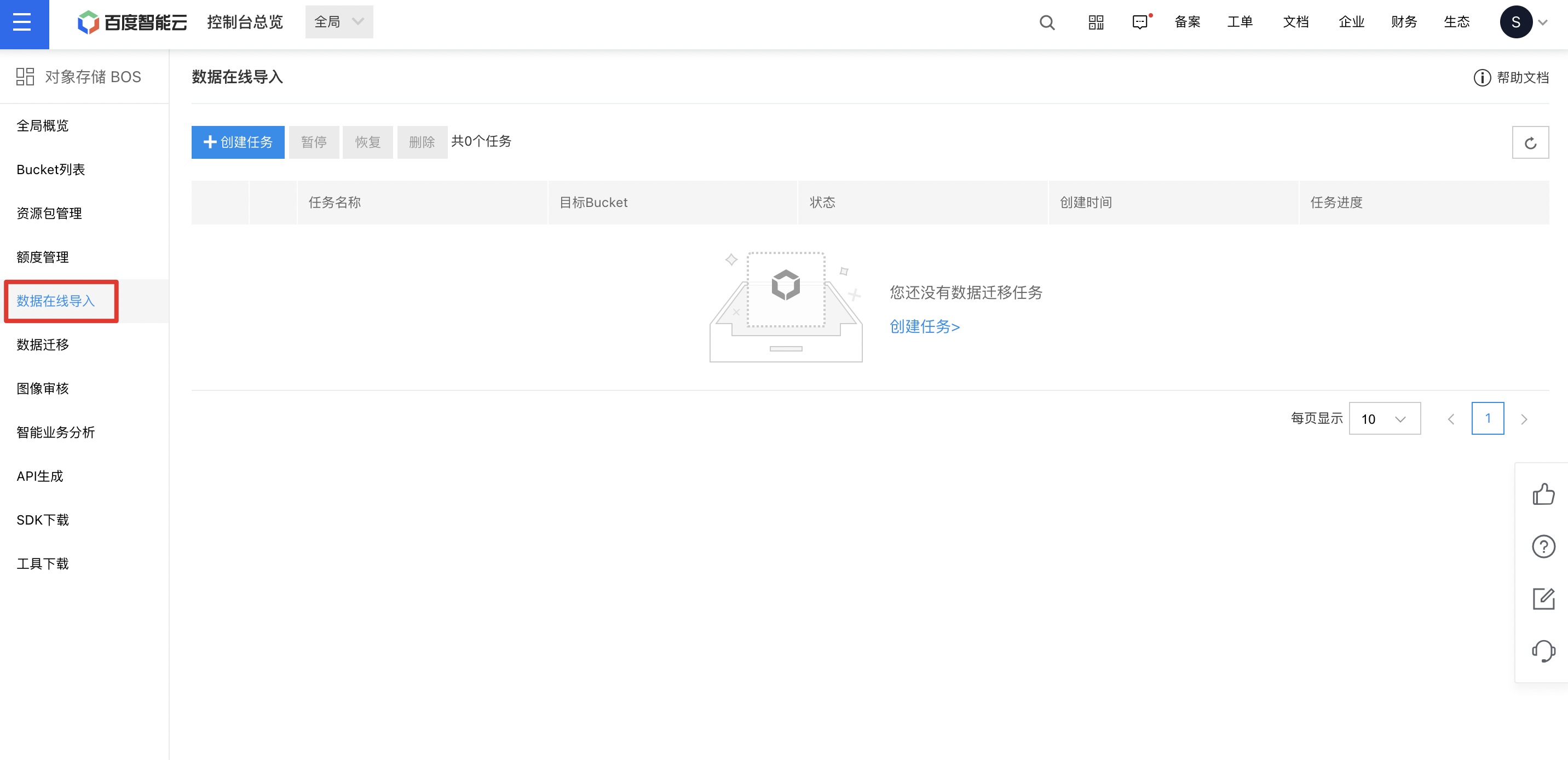
Note: To ensure task transfer performance, the system currently supports a maximum of 2 tasks in the “Running” state.
- Enter the task creation page and fill in the following configuration information:
| Parameters | Description |
|---|---|
| Task name | Supports uppercase and lowercase letters, numbers, Chinese characters, and the special characters -_/; it must start with a letter and have a length of 1-65 characters. |
| Transfer target | Select an existing bucket as the destination bucket for the online data import. |
| Transfer source | Click the Select File button to upload the locally prepared URL list file to BOS. For format requirements of this URL list file, refer to [URL List File Format Requirements](#URL list file format requirements). |
| Configure execution time | Select either Limit Running Time Period or set to run At All Times according to your needs. |
- Click Submit to complete the creation of the online data import task. You can view the task in the Running state in the task list.
URL list file format requirements
A URL list file contains the following three parts of information:
- The location of the object in the source directory, defined in URL format;
- The storage path and object name of the object after being transferred to the specified BOS bucket;
- The object’s storage class after uploading to BOS can be one of four types: STANDARD (standard storage), STANDARD-IA (infrequent access storage), COLD (cold storage), or ARCHIVE (archive storage). If no specification is made, the default is standard storage.
BOS enables users to define the aforementioned three parts of information within a single .txt file. Each line represents an object. The first column specifies the object’s storage path in BOS after transfer; the second column indicates the object’s address in the source directory; the third column shows the object’s storage class in BOS, as illustrated in the figure below:
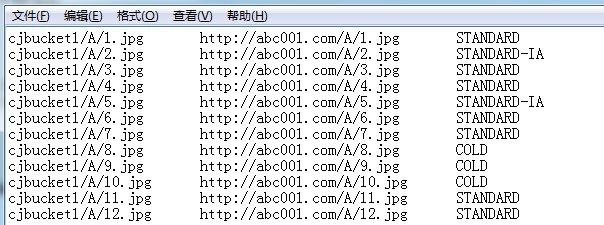
Taking the object represented by the first line as an example: Its storage path in the source directory is http://abc001.com/A/1.jpg; After online import, it is saved under the path cjbucket1/A/1.jpg in the specified BOS bucket; Its storage class in BOS is STANDARD (i.e., standard storage).
Note: The three columns must be separated using tabs.
Transfer list
View tasks:
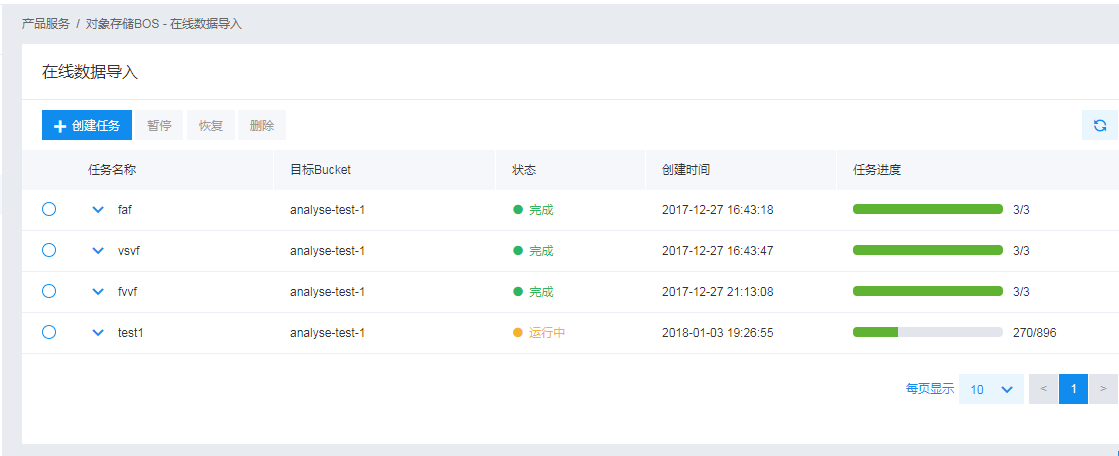
- All created tasks appear in a centralized transfer list. The list displays the task name, target bucket, current status, creation time, and progress of each task.
- For each task, users can access more detailed information via the drop-down menu in the task bar.
Manage tasks:
- For ongoing tasks, users can pause them. For stopped tasks, users can delete or resume them. For completed tasks, users have the option to delete them.
Task logs:
For completed tasks, BOS automatically generates a task log detailing the transfer status of each object during execution, aiding users in identifying failed objects.
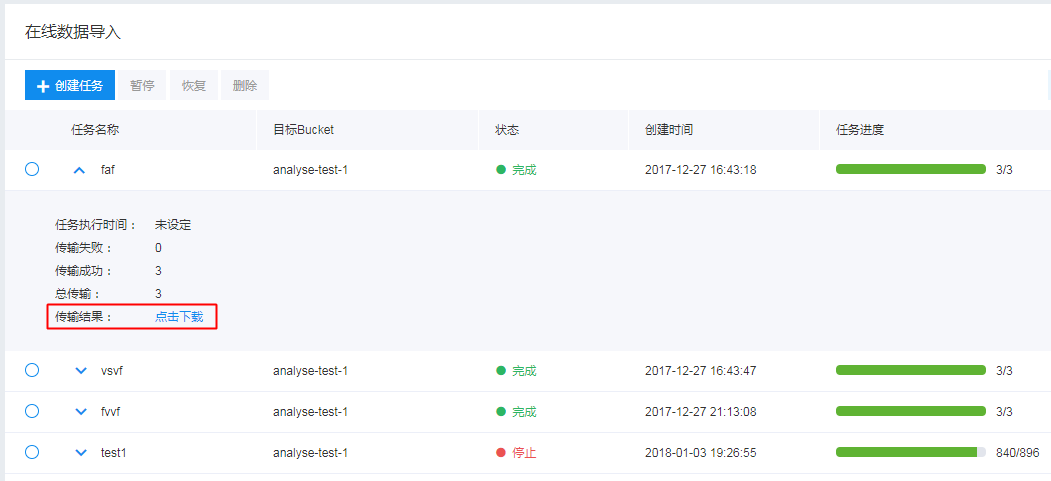
Simply click the Click to Download button in the figure below. This task log is also automatically uploaded to the root directory of the task’s target bucket by default.