

Binding Custom Domain Name
Basic introduction
Users have the option to bind a custom domain name to a bucket, enabling direct publishing of the bucket online and access through the custom domain name.
Binding rules
- The bound domain name should only include the domain itself; it must not contain protocols, ports, or paths.
- Each bucket can accommodate up to 20 unique domain names.
- A specific domain name can be linked to only one bucket.
Operation types
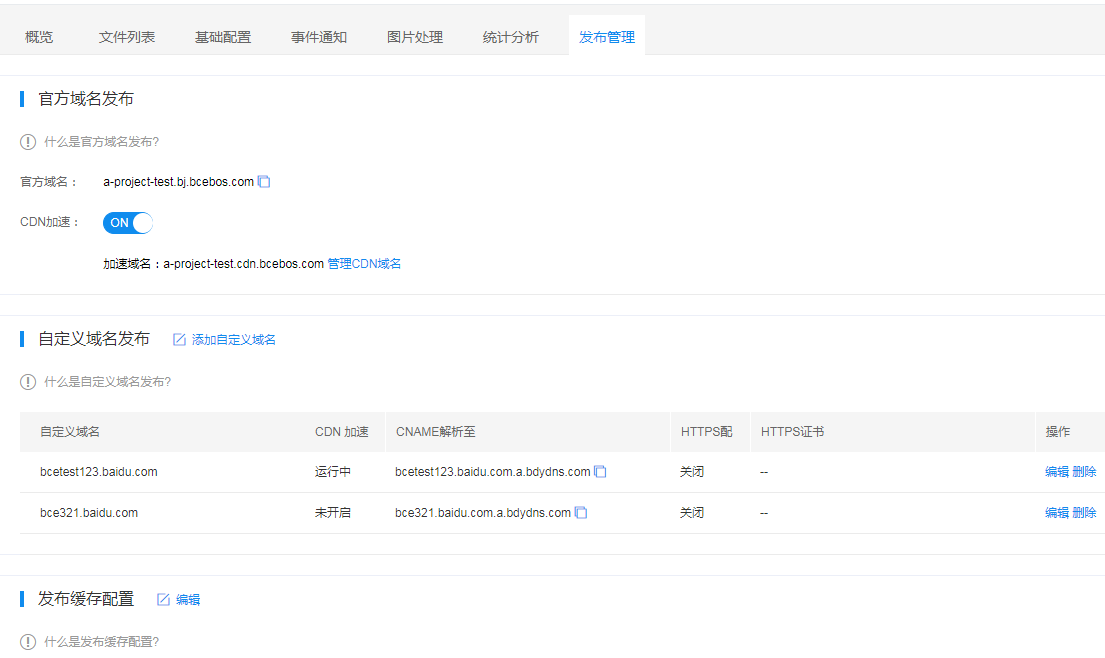
- Click on the bucket name to enter the bucket management page, then select the Distribution Management tab.
-
Click Add Custom Domain Name to complete the binding of the domain to the bucket. After successful addition, the domain name will appear in the custom domain name list below.
CNAME domain resolution
After completing the binding, please sign in to the backend of your domain name service provider. In the domain management section, add a CNAME record to resolve your custom domain name to the BOS domain <region>.bcebos.com (where <region> refers to the region where the bucket is located; please refer to [Instructions for Region Selection](Reference/Region Selection Instructions/Region.md)). This completes all domain binding configurations.
For example:
- For example, if your bucket is in the Beijing region, set the CNAME to
bj.bcebos.com. - For example, if your bucket is in the Guangzhou region, set the CNAME to
gz.bcebos.com. - For example, if your bucket is in the Suzhou region, set the CNAME to
su.bcebos.com.
Binding an HTTPS certificate
Once you've set up CNAME resolution, you can bind your existing HTTPS certificate to the custom domain name to enable HTTPS access.
Baidu AI Cloud’s SSL Certificate Service provides a one-stop solution for complete certificate application and management. Users can purchase, manage, and use HTTPS certificates on Baidu AI Cloud. For details, please refer to [Certificate Management](Reference/Certificate management/Introduction.md)
If you have valid certificates in Baidu AI Cloud’s SSL certificate service, you can link them to your BOS custom domain name as follows: In the BOS custom domain console, either when creating a new custom domain name or modifying an existing one, click on the HTTPS Certificate option. A dropdown menu will show all the certificates you manage in Baidu AI Cloud’s SSL certificate service. Select the appropriate certificate as required.
If the certificate linked to the domain name expires or becomes invalid, select the custom domain name, click HTTPS Certificate, and choose a valid certificate from the dropdown menu to replace the expired one.
Access address
After completing the binding process, you can access the bucket directly using the custom domain name.
Example: Suppose the bucket name is video, and the custom domain name to be bound is video.51mingxi.com. First, sign in to your domain service provider’s backend and set the CNAME of video.51mingxi.com to <region>.bcebos.com. After configuration, you can access the bucket directly using the URL: http://video.51mingxi.com/.
Note
- To ensure the custom domain name functions properly, you must complete CNAME resolution in the DNS management console provided by your domain registrar. Only after the resolution takes effect can the domain name be used to access the bucket. If you want to enable CDN acceleration for the custom domain name, click Enable CDN Acceleration in the action column corresponding to the domain name. To unbind the custom domain name, click Delete in the corresponding action column.
- If the domain name had other resolution records before, you must delete those old records after setting the CNAME to
<region>.bcebos.com. - If the selected certificate's domain range does not align with the custom domain name you want to bind, a prompt will appear on the interface. You’ll need to replace it with a valid certificate.
- It's advisable to check the validity period of the linked certificate in Baidu AI Cloud’s SSL certificate service to prevent HTTPS access failures when the certificate expires.
- Currently, BOS supports HTTPS certificate configuration for custom domain names of buckets based only in three regions: Beijing (bj), Suzhou (su), and Guangzhou (gz).
- After selecting and binding a custom certificate, the binding process typically takes 5 to 10 minutes to finalize. Please wait patiently before attempting to access via HTTPS.