

Installation and Login
Introduction of BOS Browser
BOS Browser is an official graphical desktop client released by BOS, supporting Windows and Mac OS, providing explorer-like functions such as file/folder upload, download, deletion, and renaming. This document describes how to rapidly install and sign in to BOS Browser. For detailed functions and usage, refer to BOS Browser User Guide.
Note:
- All resource changes made in the BOS Browser, including uploading new files, renaming files, deleting files, and creating folders, are synchronized with the console. BOS Browser offers real-time local synchronization as well, ensuring content in local folders is automatically synced with their corresponding cloud folders. When files are added to a local folder, the associated cloud folder updates automatically to include the new files.
- After April 7, 2023, the BOS Browser will be upgraded to a new version with more extensive functions, and the compatibility between old and new versions are maintained.The legacy BOS Browser will cease iteration. Welcome to use the new version.
Download new BOS Browser
| Supported platforms | OS | Version (Recommended) | Download address |
|---|---|---|---|
| Windows |
|
1.4.6 | 1.4.6-windows.exe |
| macOS | macOS (for Intel chips) | 1.4.6 | 1.4.6-mac.dmg |
| macOS (for Apple Silicon chips) | 1.4.6 | 1.4.6-arm64.dmg |
Download the historical version of new BOS Browser
| Supported platforms | OS | Version | Download address |
|---|---|---|---|
| Windows |
|
1.4.5 | 1.4.5-windows.exe |
| 1.4.4 | 1.4.4-windows.exe | ||
| 1.4.3 | 1.4.3-windows.exe | ||
| 1.4.2 | 1.4.2-windows.exe | ||
| 1.3.0 | 1.3.0-windows.exe | ||
| 1.2.0 | 1.2.0-windows.exe | ||
| macOS | macOS (for Intel chips) | 1.4.5 | 1.4.5-mac.dmg |
| 1.4.4 | 1.4.4-mac.dmg | ||
| 1.4.3 | 1.4.3-mac.dmg | ||
| 1.4.2 | 1.4.2-mac.dmg | ||
| 1.3.0 | 1.3.0-mac.dmg | ||
| 1.2.0 | 1.2.0-mac.dmg | ||
| macOS (for Apple Silicon chips) | 1.4.5 | 1.4.5-arm64.dmg | |
| 1.4.4 | 1.4.4-arm64.dmg | ||
| 1.4.3 | 1.4.3-arm64.dmg | ||
| 1.4.2 | 1.4.2-arm64.dmg | ||
| 1.3.0 | 1.3.0-arm64.dmg | ||
| 1.2.0 | 1.2.0-arm64.dmg |
Download legacy BOS Browser
Note: After April 7, 2023, the BOS Browser will be upgraded to a new version with more extensive functions, and the compatibility between old and new versions are maintained.The legacy BOS Browser will cease iteration. Welcome to use the new version.
| Supported platforms | OS | Version | Download address |
|---|---|---|---|
| Windows |
|
0.4.11 | bce-client-0.4.11-nsis.exe |
| macOS | macOS 10.x+ | 0.4.11 | bce-client-0.4.11.dmg |
How to sign in
Note: The following steps use the new BOS Browser as an example.
The BOS Browser client supports two login modes:
1. AK/SK mode. This mode is suitable for scenarios where users can access AK/SK. It enables optional configuration for specific buckets or file access paths and supports extensive functions.
2. Copy the folder sharing link and extraction codes. This mode works for cases where only the folder sharing URL and extraction codes are provided and mainly facilitates batch downloading of files or folders.
AK/SK login
- AK (Access Key ID)/SK (Secret Access Key) is equivalent to the user name and password assigned by Baidu AI Cloud to users, and is used to authenticate and authorize users' call behaviors. After registering a Baidu AI Cloud account and successfully sign in to the console, you can apply for and manage your own AK/SK through the console. For detailed acquisition methods, refer to Obtain AK/SK.
Note: To enhance your convenience, session persistence function is provided. Once it is selected, your signed-in AK/SK information will be retained. You do not need to repeatedly enter the key information.For your data security, please do not tick this function on temporary computers.
- Access path format: bos:/bucketname/path/

Login via folder sharing link
- After obtaining the folder sharing link and extraction code, use them to complete the login process.
- Once logged in, you can only access the file list in the folder and perform batch downloads of files or folders.
Note: Before login, please verify the validity of the link and extraction code. If they expire, regenerate the link and extraction code before logging in.

Sign Out
- To switch login keys or modes, sign out first before changing the login mode or updating login information.
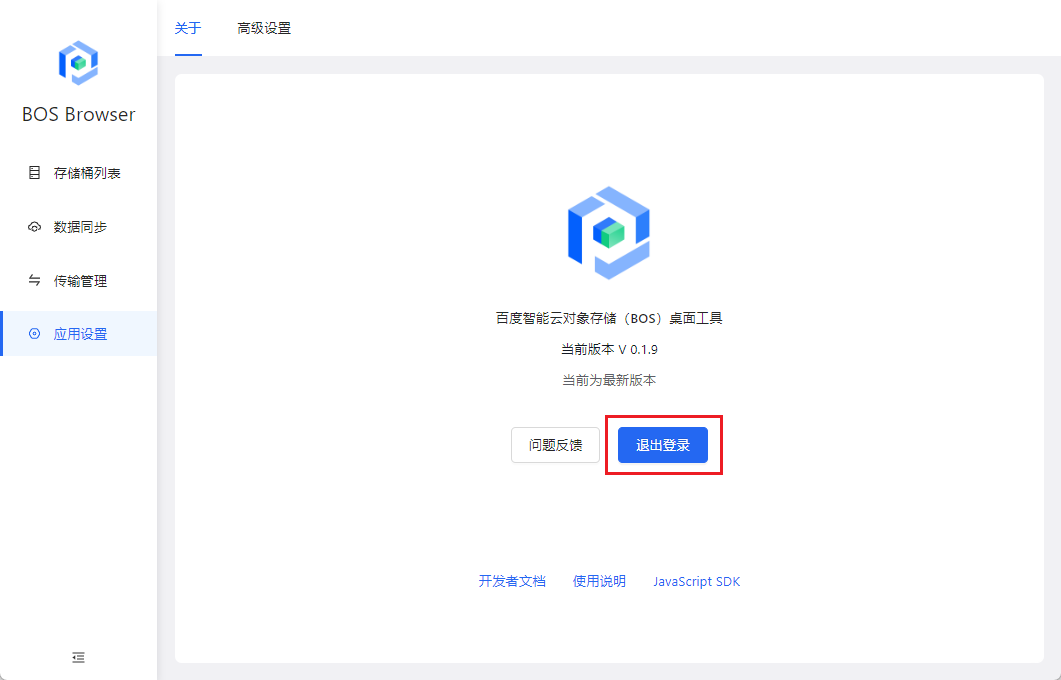
- Sign out of the current account by clicking "Sign Out" in App Settings - About.
FAQs
MacOSapplication opening error:bos-browser is damaged
Fix: Execute sudo spctl --master-disable in the terminal, and then enter the administrator password. If damage warnings persist, execute sudo xattr -r -d com.apple.quarantine /Applications/bos-browser.app in the terminal to remove the protection flag of the application. Ensure that /Applications/bos-browser.app is changed to the current BOS Browser installation path.
-
Access denied during signing in as IAM user
Fix: In the multi-user management interface, create an authorization policy for IAM users and assign them the "ListBuckets" permission. Example policy content:
1{
2  "id": "policy_af6c3c62c1da432497b1fdc0d82bca12",
3  "version": "v1",
4  "accessControlList": [
5    {
6      "service": "bce:bos",
7      "region": "*",
8      "resource": [
9        "bucket-name",
10        "bucket-name/*"
11      ],
12      "effect": "Allow",
13      "permission": [
14        "*"
15      ]
16    },
17    {
18      "service": "bce:bos",
19      "region": "*",
20      "resource": [
21        "*"
22      ],
23      "effect": "Allow",
24      "permission": [
25        "ListBuckets"
26      ]
27    }
28  ]
29}
Comment
If you have any comments or suggestions about the BOS Browser, feel free to contact us through the provided methods.