

Global Acceleration
Overview
File access quality in Baidu AI Cloud Object Storage (BOS) can vary greatly between regions due to dependency chains. For applications requiring cross-region access — such as overseas access to a domestic bucket — the global acceleration feature in BOS can enhance performance. BOS utilizes CDN services with globally dispersed edge nodes, ensuring clients connect to the nearest node and benefit from optimized routes and high-quality inter-node connections to improve the global access experience.
Note
- CDN/DRCDN domain acceleration applies to domestic regions by default. To enable global acceleration, you must activate the overseas acceleration option.
- To activate overseas acceleration function, ensure that the overseas CDN service has been activated. To activate, please submit a ticket.
- As part of the domain name acceleration feature, overseas acceleration will automatically deactivate if you disable domain name acceleration. Please proceed with caution.
Global acceleration is enabled for official domain name
- Sign in to BOS Management Console.
- In the left navigation bar of the BOS console, select Bucket List, then click to choose the target bucket and enter the Bucket Details page.
- Click the Publish Management tab in the configuration navigation bar on the left side of the page to enter the Publish Management page.
- Click Enable Domain Name Acceleration under the "Official Domain Name Release" module, then select the domestic acceleration service type in the pop-up window. For details, refer to the Content Delivery Network (CDN) and Dynamic Route CDN (DRCDN) product documents.
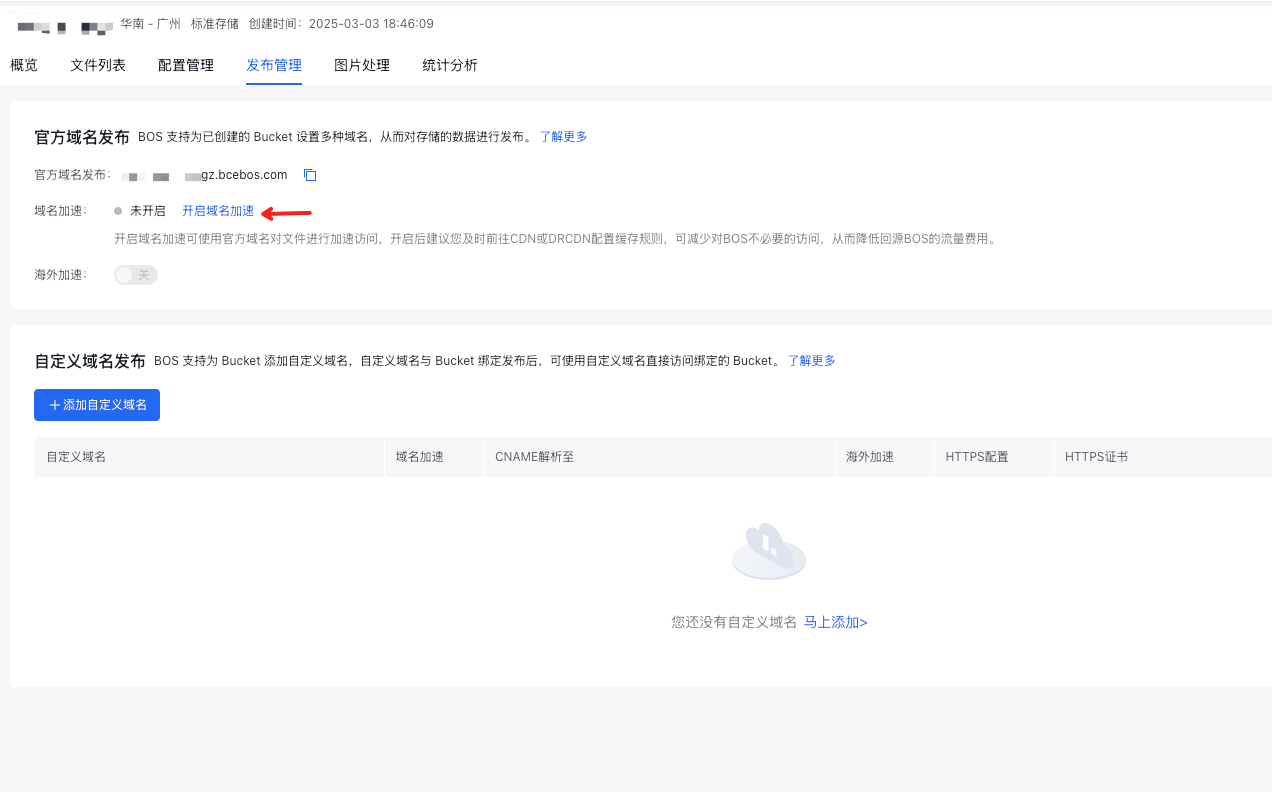
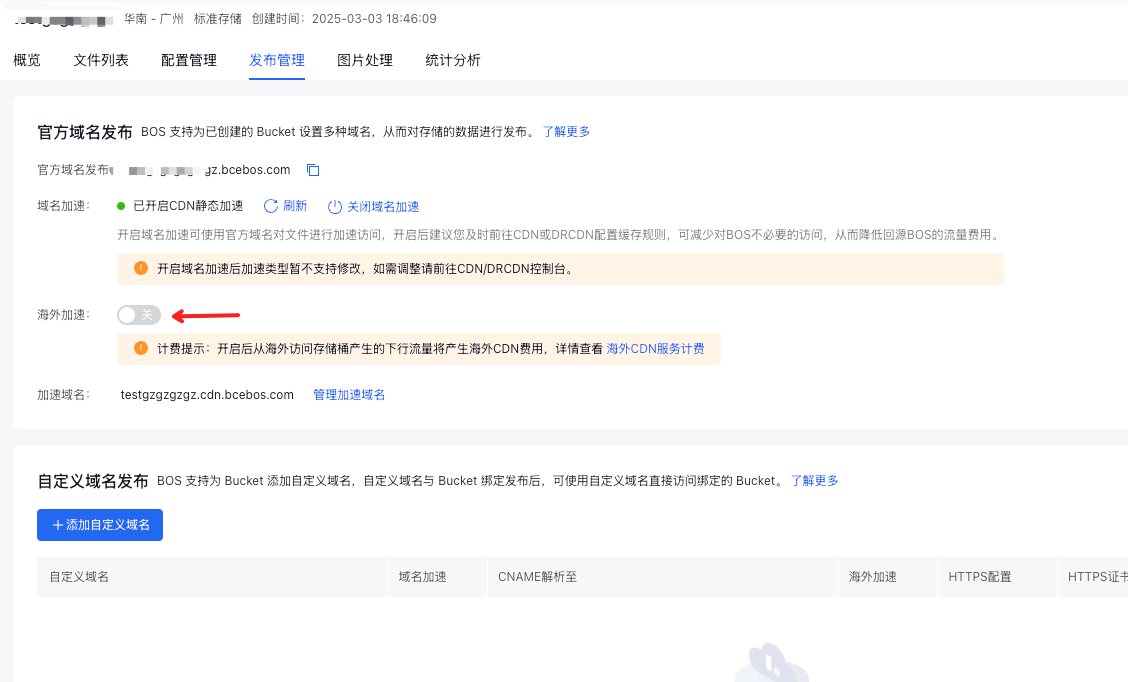
- After enabling domestic domain name acceleration, please ensure that the Overseas CDN service has been activated. Click the Overseas Acceleration switch below to enable the global acceleration function.
Global acceleration is enabled for custom domain name
- Sign in to BOS Management Console.
- In the left navigation bar of the BOS console, select Bucket List, then click to choose the target bucket and enter the Bucket Details page.
- Click the Publish Management tab in the configuration navigation bar on the left side of the page to enter the Publish Management page.
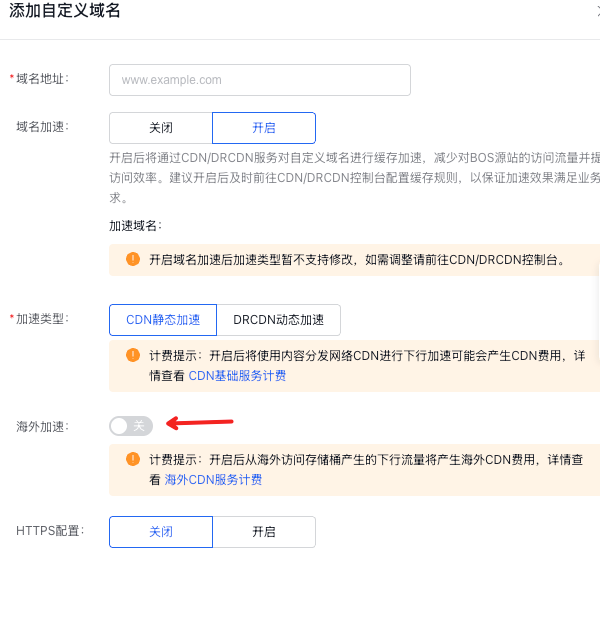
- You can enable global acceleration when adding a custom domain name or editing a custom domain name already added. Now enable the Domain Name Acceleration option and select the domestic acceleration service type based on requirements. For details, refer to the Content Delivery Network (CDN) and Dynamic Route CDN (DRCDN) product documents. Then click the Overseas Acceleration switch and save the settings to enable global acceleration for the custom domain name.
More operations
You can enable or disable the overseas acceleration feature independently; however, turning off domain name acceleration will also deactivate overseas acceleration.
Charge
Enabling global acceleration function will incur traffic fees charged by the CDN service. For billing details, refer to the billing instructions of corresponding service based on the activated service type: Content Delivery Network (CDN) Billing, Dynamic Route CND (DRCDN) Billing, and Overseas Acceleration Billing.
Note
- The uplink acceleration function for overseas acceleration is currently in public beta. Uplink traffic is free in the beta phase, while downlink traffic billing details can be found in Overseas Acceleration Billing.
- The domain name acceleration feature activated through the BOS console defaults to a pay-by-traffic model.
- Once global acceleration is enabled, domestic access acceleration incurs CDN/DRCDN traffic fees, while overseas access acceleration incurs overseas CDN traffic fees. These fees are not charged simultaneously.
FAQs
If domestic domain name acceleration is already enabled, will enabling overseas acceleration affect the existing domestic acceleration? No. Enabling overseas acceleration only expands edge node coverage to achieve global acceleration capability and does not affect domestic acceleration service.
After enabling global acceleration, will overseas access incur domestic CDN/DRCDN traffic fees? No. Domestic access only incurs domestic CDN/DRCDN fees, while overseas access only incurs overseas CDN fees. There will be no duplicate charges.