

Set compliance retention
Overview
Bucket compliance retention is a data protection feature designed to prevent accidental deletion of important information stored in the bucket. It is ideal for industries like finance, insurance, healthcare, and securities. Compliance retention involves time-based configuration. Once this feature is enabled, users must define the data retention period.
Note
Bucket compliance retention supports retention periods ranging from 1 day to 70 years. Once enabled, compliance retention cannot be disabled or modified to shorten the retention period. During this period, objects in the bucket cannot be deleted. Please enable this feature cautiously.
Retention period description
The compliance retention period is calculated based on the upload time of each object in the bucket, not from the moment the compliance retention policy is applied.
For example, if a user creates a bucket named BCEName on January 1, 2016, and uploads three files—file1.pdf, file2.pdf, and file3.pdf—at different times, and then applies a bucket compliance retention policy with a 5-year retention period on January 1, 2019, the upload times and expiration dates for these files will be as follows:
| Name of uploaded files | Creation time | Compliance retention expiration time |
|---|---|---|
| file1.pdf | January 1, 2017 | December 31, 2021 |
| file2.pdf | January 1, 2018 | December 31, 2022 |
| file3.pdf | June 1, 2018 | May 31, 2023 |
Set compliance retention
- Sign in to the Baidu AI Cloud Object Storage (BOS) Management Console.
- From the bucket list on the left, select the bucket for which you want to set permissions, then click its name to enter the bucket management directory.
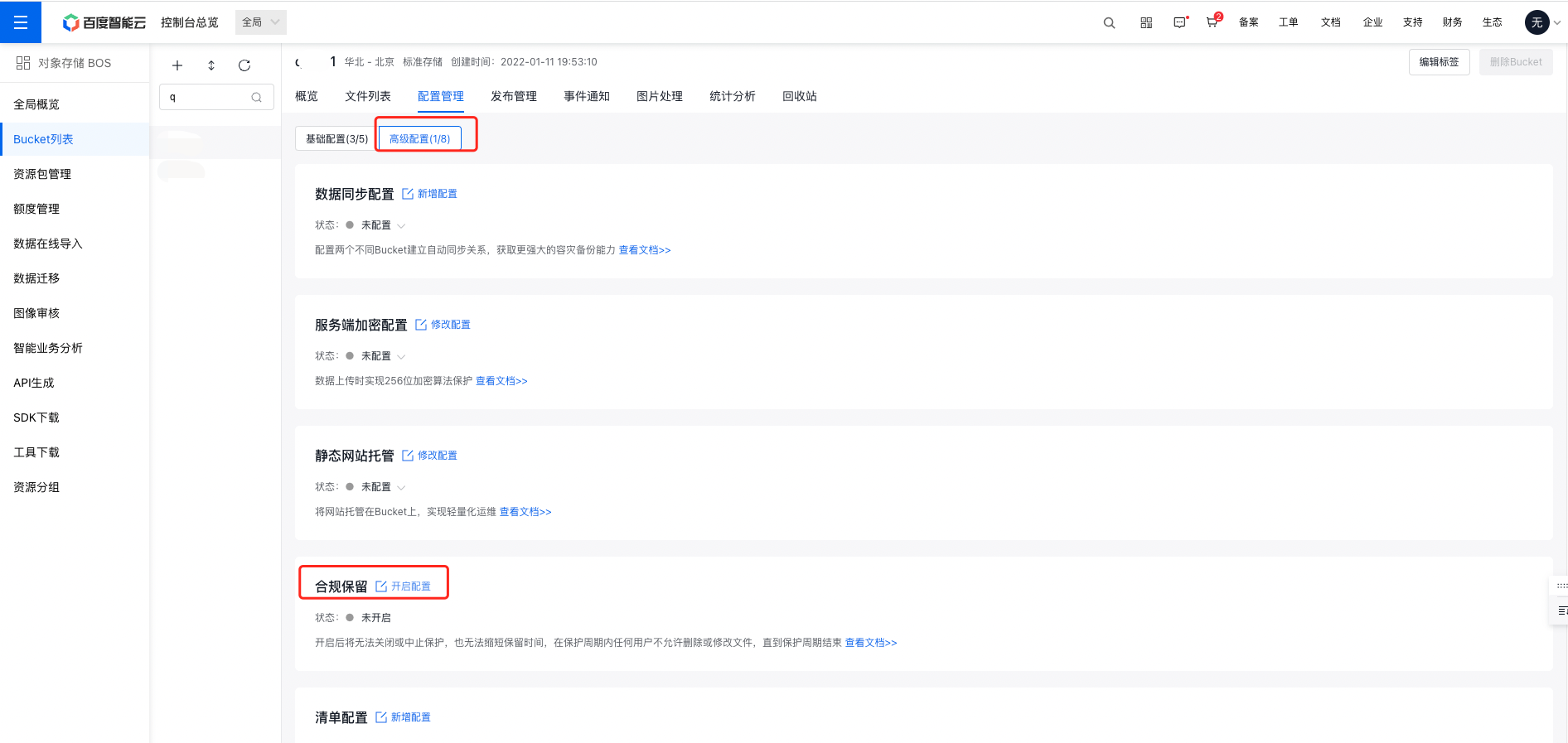
- Select the Configuration Management tab in the top navigation bar.
- On the Configuration Management page, select Advanced Configuration, and click Enable Configuration in the Compliance Retention area to set compliance retention for the bucket.
- Set compliance retention rules in the operation bar of Enable Compliance Retention Configuration. After setting the retention period, the policy must be locked to take effect. The policy supports two forms: Lock Immediately and Lock Later. If Lock Later is selected, the policy will be retained for 24 hours. If not locked within 24 h, the policy will expire and should be deleted before reconfiguration.
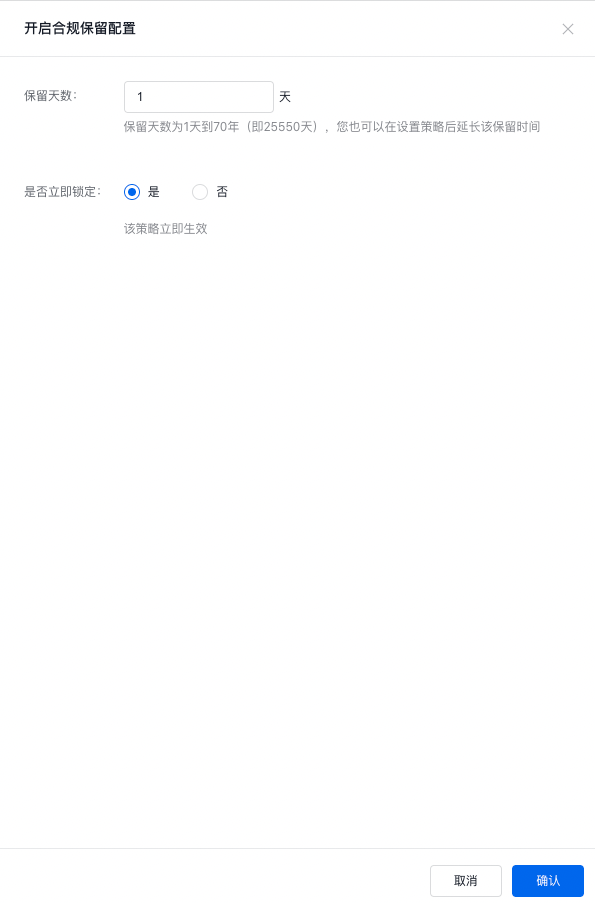
After the policy is locked, files in the bucket will enter the compliance retention period. During the retention period, you can also click Modify Configuration to extend the compliance retention period.
Notes If a compliance retention period is set for an empty bucket, the bucket can still be deleted. The compliance retention policy will also be deleted upon removal.
- Click OK to complete the configuration. After configuration is completed and locked, the compliance retention policy takes effect immediately.
Related APIs
- InitBucketObjectLock API: Use the InitBucketObjectLock API to create a time-based compliance retention policy for the specified bucket.
- GetBucketObjectLock API: Use the GetBucketObjectLock API to obtain the configuration information of the compliance retention policy.
- DeleteBucketObjectLock API: Use the DeleteBucketObjectLock API to delete the compliance retention policy.
- CompleteBucketObjectLock API: Use the CompleteBucketObjectLock API to lock the compliance retention policy immediately.
- ExtendBucketObjectLock API: Use ExtendBucketObjectLock API to extend the protection period of the compliance retention policy.