

Setting Up Log Query
Overview
Accessing Baidu AI Cloud Object Storage (BOS) generates a significant volume of access logs. The log query function integrates BOS with the Baidu AI Cloud Log Service (BLS), enabling you to query BOS access logs via the BOS console. This facilitates BOS operation audit, access statistics, abnormal event tracing, and issue localization, to improve efficiency and supporting data-driven decision-making. This function requires enabling Baidu AI Cloud Log Service (BLS).
Note:
- This function leverages Baidu AI Cloud Log Service (BLS) for real-time object storage log queries. You must first enable the Baidu AI Cloud Log Service (BLS)
- This function incurs additional fees billed separately by the Baidu AI Cloud Log Service (BLS). Refer to Baidu AI Cloud Log Service (BLS) Billing Instructions. After enabling the service, you must create indexes to search and analyze real-time logs.
Enable log query
- Sign in to the Baidu AI Cloud Object Storage (BOS) Management Console.
- In the left-hand bucket list, select the bucket for log query settings and click its name to access the bucket management directory.
-
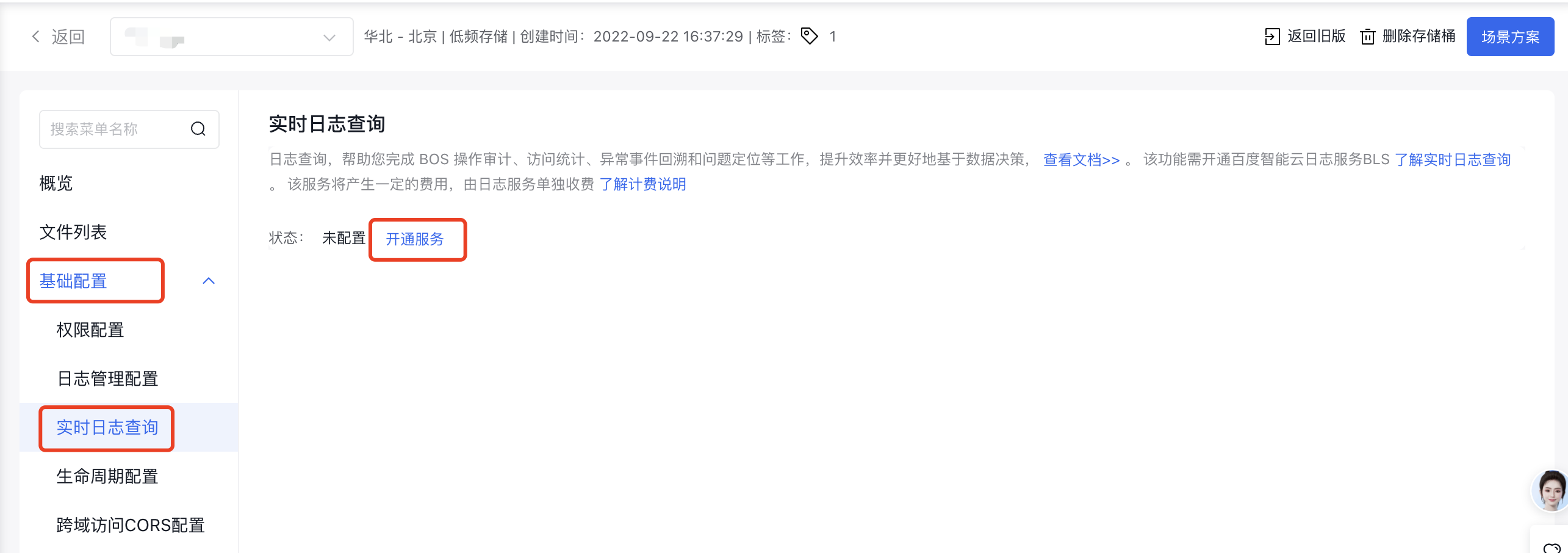
On the Basic Configuration Management page, select Real-time Log Query and click Activate Service to activate it:
- If you haven't enabled the Baidu AI Cloud Log Service (BLS), click "Activate BLS Now" to proceed.
- If you have already activated the Baidu AI Cloud Log Service (BLS), click "Activate Service" to enable the BOS log query function.
Query real-time logs
Method 1: through BOS console
- Sign in to the Baidu AI Cloud Object Storage (BOS) Management Console.
- From the left-hand bucket list, choose a bucket with BOS log query enabled, then click the bucket's name to go to its management directory.
- On the Basic Configuration Management page, select "Real-time Log Query" and click "Query Logs Now" to be redirected to the BLS page for log querying.
Note
In the Beijing region, you need to complete index configuration in the Index Management section of the BLS console first to enable the analysis and retrieval of incremental logs after activation.
Method 2: Via the BLS console
- Sign in to the Baidu AI Cloud Log Service (BLS) Console.
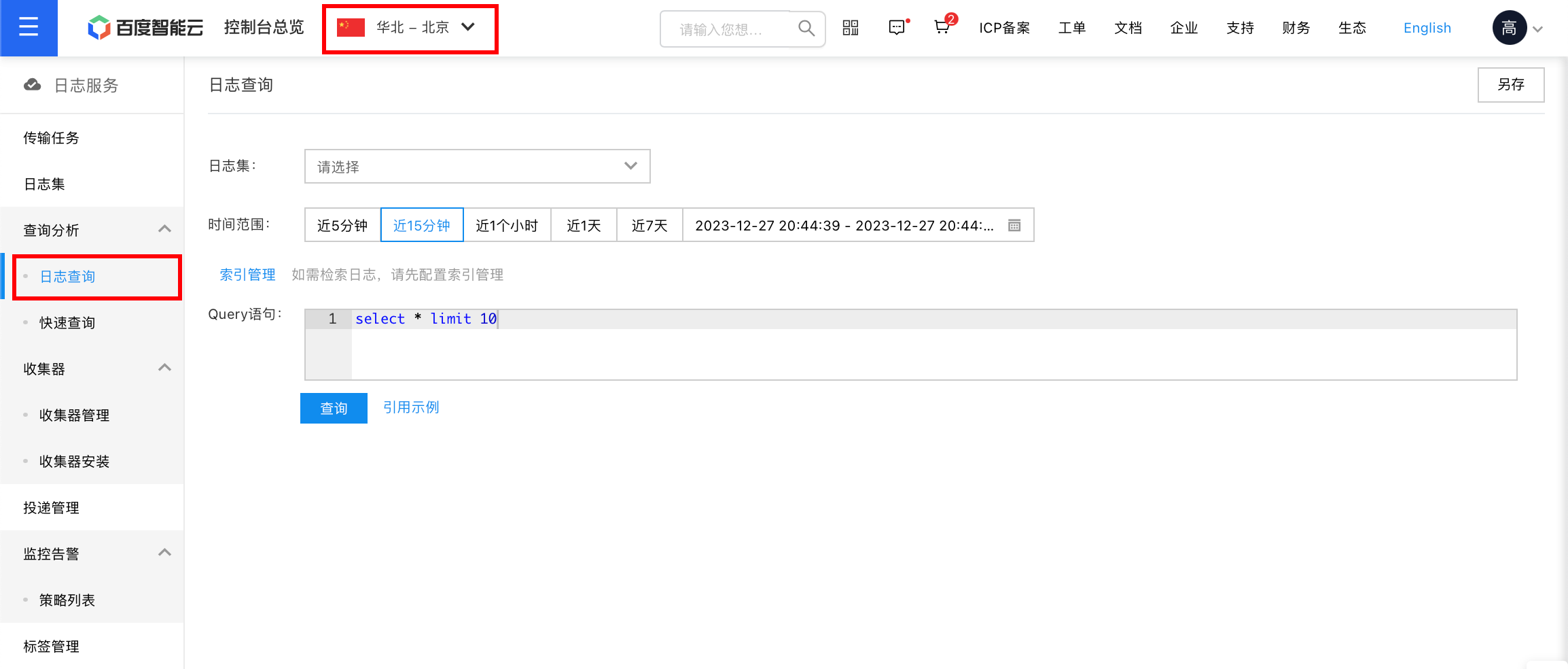
- At the top, choose the region where the bucket with the enabled BOS log query function is located.
- In the left-hand navigation bar, select "Query Analysis -> Log Query."
- Choose the LogStore and click "Query."
Disable log query
If you've decided that the log data no longer needs to be retained, follow the steps below to disable the real-time log query.
- Sign in to the Baidu AI Cloud Object Storage (BOS) Management Console.
- In the left-hand bucket list, select the bucket where the log query functionality will be disabled, then click its name to enter the bucket management directory.
- On the Basic Configuration Management page, select "Real-time Log Query," then click "Disable Service" on the page.
- Carefully read the prompt in the confirmation pop-up window and click "OK."