

ACL
Updated at:2025-10-16
Introduction
Access Control List (ACL) is a firewall component within VPC that manages security group policies at the subnet level, allowing flexible traffic configuration for one or more subnets to meet diverse network security needs.
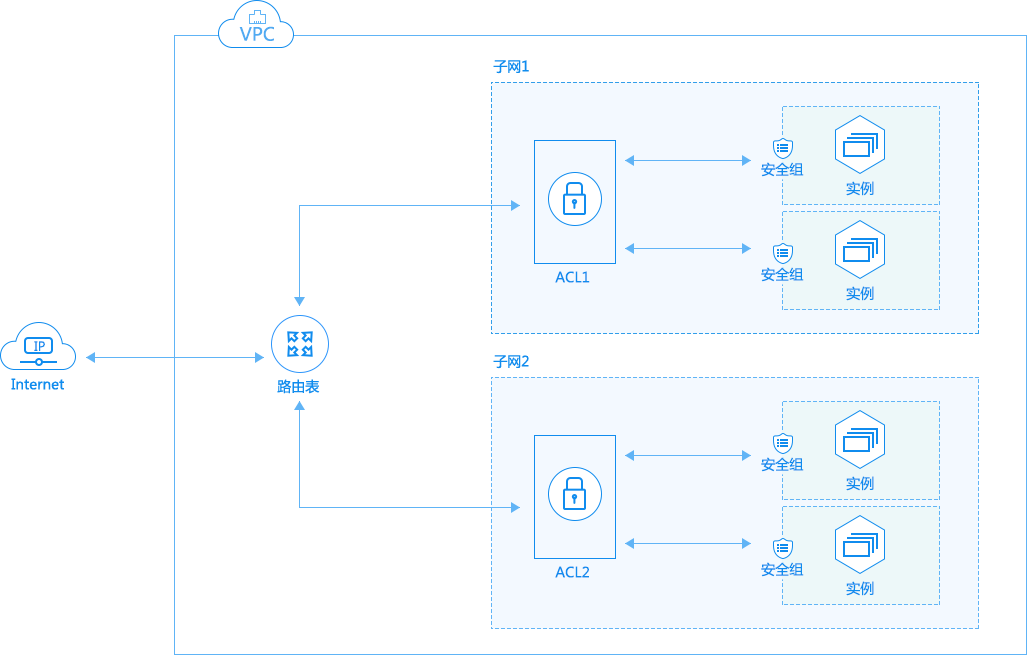
ACL rules
Before creating ACL rules, please note the following details:
| Entry | ACL rules |
|---|---|
| ACL scope | ACLs belong to the VPC and apply to subnets within it. By default, all intra-subnet traffic is permitted |
| Control instance type | ACL access control policies apply to all instances under the subnet, including BCC, DCC, BBC, BLB, RDS, SCS, etc. |
| Default ACL rules | The system automatically creates a default ACL for each subnet, which includes a default rule that permits all traffic. Default rules cannot be modified. |
| Ingress or egress | Ingress and egress directions refer to the direction viewed from the perspective of an instance under the subnet |
| Maximum limit of rules | For rules under the same ACL, each direction supports up to 150 rules |
| Rule trigger | Once the traffic matches a rule in the ACL, the access control policy (allow/deny) is triggered without further matching against other rules |
| ACL status | ACL is stateless and performs access control on data flow traffic in the specified direction without automatically controlling the return traffic for the flow. |
For a comparison between ACL and security group rules, refer to the table below:
| ACL | Security group |
|---|---|
| Subnet-level traffic control | Instance-level traffic control |
| Support the allow/deny policies | Regular security groups only support allow policies, while enterprise security groups support both allow/deny policies |
| Deployment: Return data flows are not automatically applied | Stateful: Return data flow is automatically applied. |
| Rules are matched by priority. Once matched, remaining rules are not evaluated | Match all rules |
| Subnets are associated with default ACLs by default, allowing all traffic | When creating an instance in a VPC, it must be associated with a security group. If unspecified, it will be linked to the default security group |
| After associating an ACL with a subnet, the policies automatically take effect on all instances under that subnet | Security groups only take effect when specified during instance launch or later associated with the instance |
Create ACL rules
- Log in to the Baidu AI Cloud console, click on Virtual Private Cloud in the navigation bar, and then click on the VPC Name to access the Instance Details page.
- Click on ACL to configure traffic rules for each subnet.
- Choose a subnet to apply ACL policies, select Ingress/Egress policies, and click Add Rule.
- In the popup, enter required information such as priority, protocol, and IP, select Allow/Deny Policy, and click OK to complete
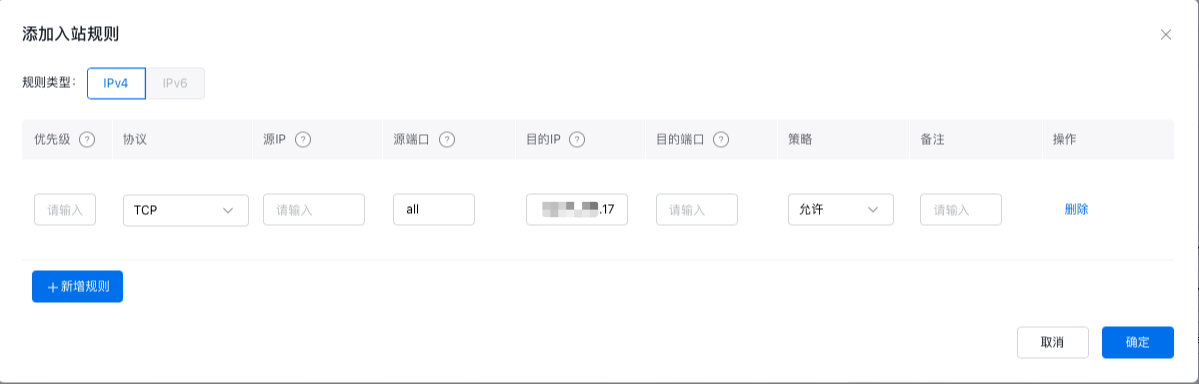
| Parameters | Description |
|---|---|
| Priority | The smaller the value, the higher the priority. Rules are matched in descending order of priority. For example, a rule with priority 50 takes precedence over a rule with priority 100. The priority input range is 1-32768. As a best practice, it is recommended to leave a large interval between the priority values of adjacent rules for easier future adjustments, such as 100, 200 and 300. Under the same ingress/egress direction, different rules cannot have the same priority. |
| Protocol | All protocols, TCP, UDP, ICMP |
| Source IP | Support single IP, network segment, all, or existing subnet IPs, the current subnet segments by default |
| Source port | Valid range: 1-65535, default: all |
| Destination IP | Support single IP and network segment |
| Destination port | Valid range: 1-65535. Supports setting consecutive ports, e.g., 200-600 |
| Policy | Allow (default), Deny |
Edit ACL Rules
- Log in to the Baidu AI Cloud console, click on Virtual Private Cloud in the navigation bar, and then click on the VPC Name to access the Instance Details page.
- Click on ACL to access the Subnet list where ACL policies need to be removed, locate the Ingress/Egress ACL rule list, and click the Edit button to modify ACL rules.
Delete ACL rules
- Log in to the Baidu AI Cloud console, click on Virtual Private Cloud in the navigation bar, and then click on the VPC Name to access the Instance Details page.
- Click on ACL to access the Subnet list where ACL policies need to be removed, locate the Ingress/Egress ACL rule list, and click the Delete button.
- Confirm the deletion, click OK, and the ACL rule will be removed.