

Using IPv6
This document introduces the method of "configuring Ipv6 on BCC " (including instructional video) of Baidu AI Cloud. Users can refer to key steps in the video to use Baidu AI Cloud products or self-solve issues. Click here to watch Configure Ipv6 on BCC
Description:
If the interface elements or operation methods shown in the video guidance are updated, please rely on the AI Cloud console interface for the most accurate information. The video aims to demonstrate the functional operation process, and minor interface changes will not affect the overall functionality or presentation.
The Virtual Private Cloud (VPC) supports dual-stack IPv4 and IPv6 protocols, allowing cloud resources to communicate using both IPv4 and IPv6.
Configure IPv6 VPC
Add IPv6 network segment when creating VPC
- Sign in to the Baidu AI Cloud console.
- Go to Product Service - Virtual Private Cloud (VPC), then select Virtual Private Cloud from the left navigation menu to view the VPC LIST page.
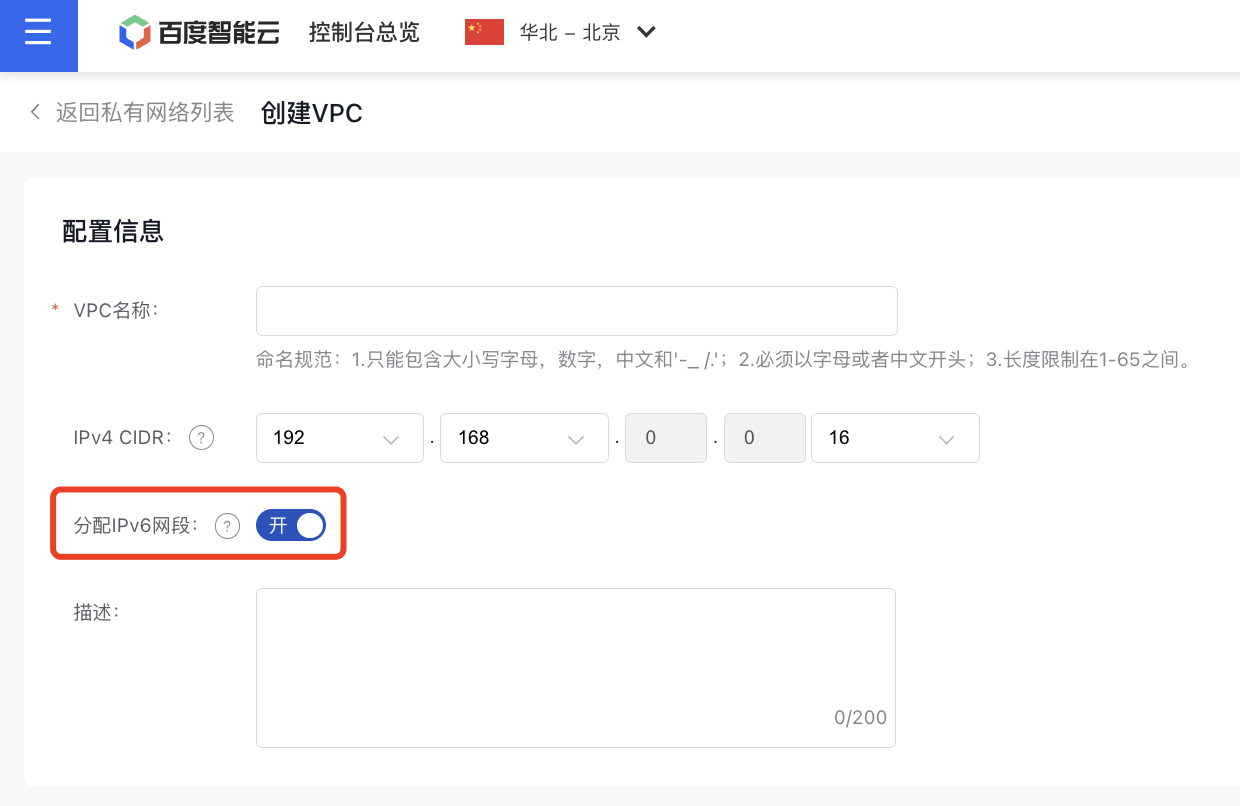
- Click Create VPC, toggle on the IPv6 segment allocation option in the dialog box, and the system will automatically assign a /56 IPv6 CIDR block to the VPC.
Description:
- By default, no IPv6 network segment is assigned when creating a VPC.
- IPv6 address segments are automatically allocated by the system and cannot be customized or modified by users.
- If there are IPv6 subnets within a VPC, the corresponding IPv6 network segment cannot be deleted.
Add IPv6 network segment to VPC
- Sign in to the Baidu AI Cloud console.
- Go to Product Service - Virtual Private Cloud (VPC), then select Virtual Private Cloud from the left navigation menu to view the VPC LIST page.
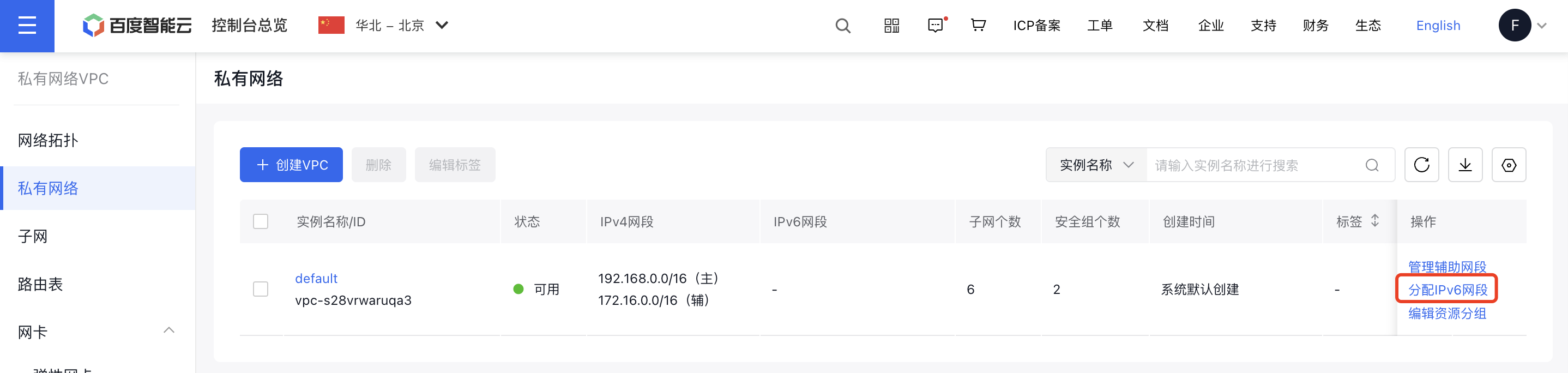
- Click Allocate IPv6 Network Segment in the VPC list, and the system will automatically assign an IPv6 network segment with a /56 mask to the VPC.
Configure IPv6 subnet
- In the Virtual Private Cloud console, assign an IPv6 network segment to a VPC instance.
- You can allocate a new IPv6 CIDR block with a 64-bit mask to a newly created subnet or add an IPv6 segment to an existing subnet.
IPv6 gateway
The IPv6 gateway serves as the primary exit point for a virtual private cloud (VPC) to connect to the public network using IPv6. Users can purchase IPv6 public network bandwidth as needed and flexibly manage IPv6 Internet egress and ingress bandwidth by applying egress-only policies and IP rate limiting.
Before creation, users need to understand:
- Only one IPv6 gateway can be created within a single VPC.
- The IPv6 gateway's IP rate-limiting policy supports a maximum of 50 records.
- The VPC where the IPv6 gateway is created must have an assigned IPv6 CIDR.
- The upper limit of gateway bandwidth equals to the outbound bandwidth limit, with a minimum of 1M and a maximum of 5G
- The minimum ingress bandwidth is 10 Mbps. If the purchased network bandwidth is less than 10 Mbps, the ingress bandwidth will be set to 10 Mbps. If the purchased network bandwidth exceeds 10 Mbps, the ingress bandwidth will match the outbound bandwidth.
For example:
If the purchased network bandwidth is 10 Mbps, the egress bandwidth will be 10 Mbps, and the ingress bandwidth will also be 10 Mbps.
If the purchased network bandwidth is 100 Mbps, the egress bandwidth and ingress bandwidth will both be 100 Mbps.
Create IPv6 gateway
- Log in to the Virtual Private Cloud (VPC) console.
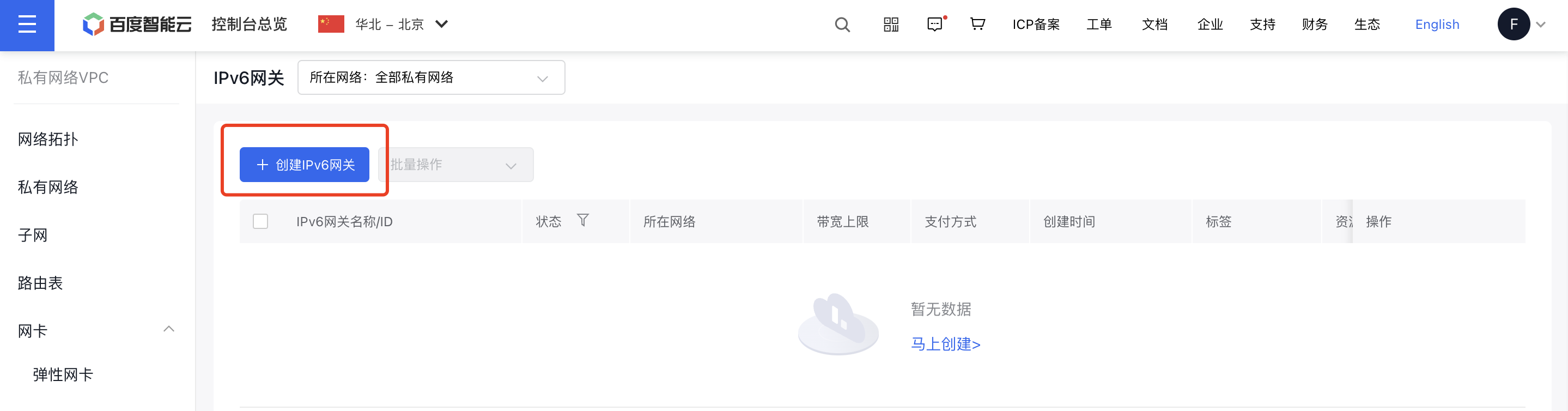
- From the left navigation bar, choose Network Connection - IPv6 Gateway, and click Create IPv6 Gateway.
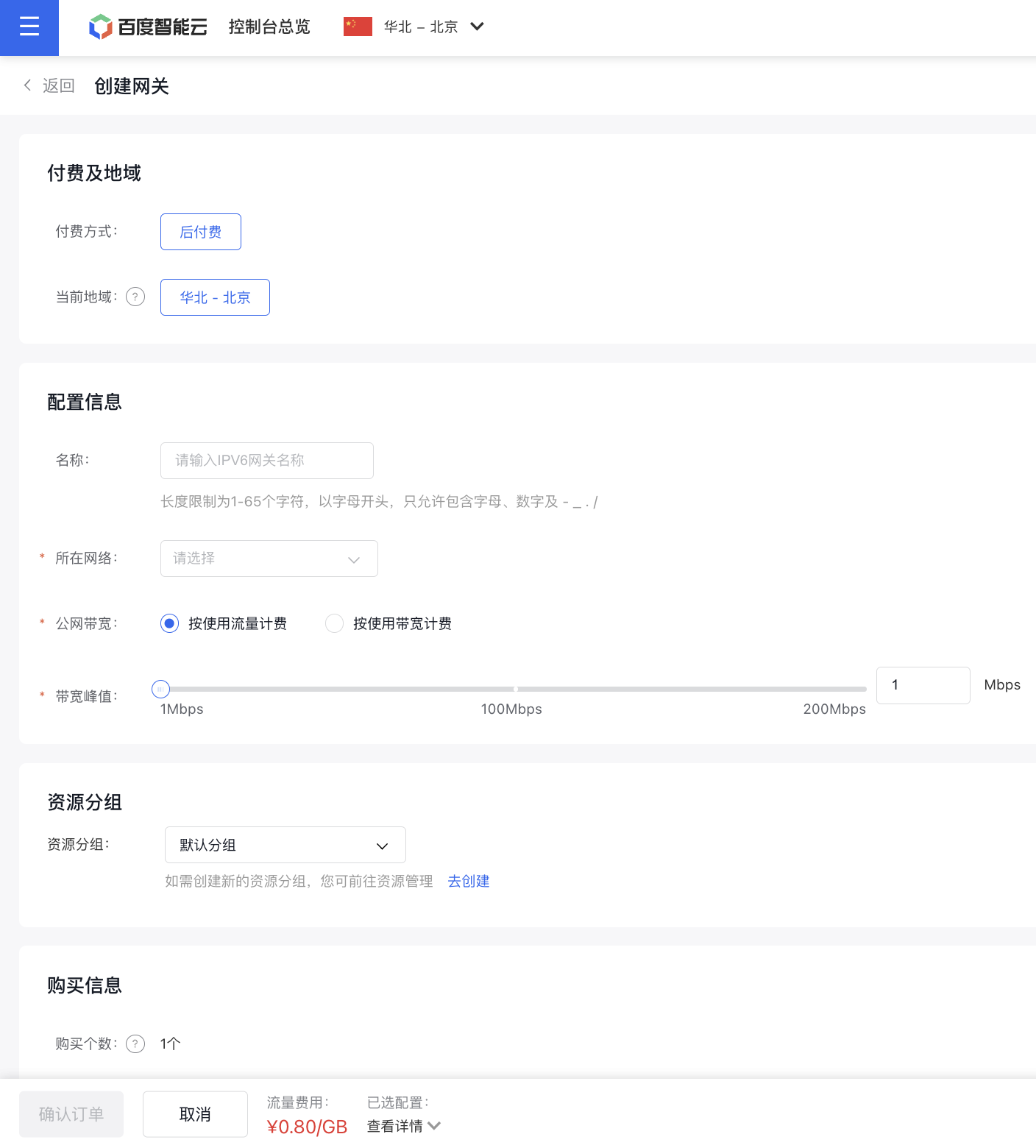
- On the Create Gateway page, select the desired public network bandwidth and other required details.
- The creation process completes once the payment is successfully processed step by step.
Modify public network bandwidth upper limit
- Log in to Baidu AI Cloud, navigate to Virtual Private Cloud.
- From the left navigation menu, choose Network Connection - IPv6 Gateway, then select Public Network Bandwidth Scaling Up under the operations section.
- Choose the desired bandwidth size (resizing is supported), and complete the payment.
Add egress-only policy
- Log in to Baidu AI Cloud, navigate to Virtual Private Cloud.
- In the left navigation menu, go to Network Connection - IPv6 Gateway, click the Gateway Name to access the gateway details page.
- In the egress-only policy section, click Add Policy.
- Enter the specified CIDR in the add policy dialog box to finalize the addition.
Notes When adding multiple egress-only policies, CIDR blocks must not overlap.
Add IP rate limiting policy
- Log in to Baidu AI Cloud, navigate to Virtual Private Cloud.
- In the left navigation menu, go to Network Connection - IPv6 Gateway, click the Gateway Name to access the gateway details page.
- Within the IP rate-limiting section, click Add Rate Limiting Policy.
- In the add rate-limiting policy dialog box, provide the specified IP, egress bandwidth, and ingress bandwidth to complete the setup.
Notes The bandwidth limit for IP rate limiting cannot exceed the total egress bandwidth of the public IPv6 network.
Configure IPv6 security group
- Log in to the Virtual Private Cloud (VPC) console.
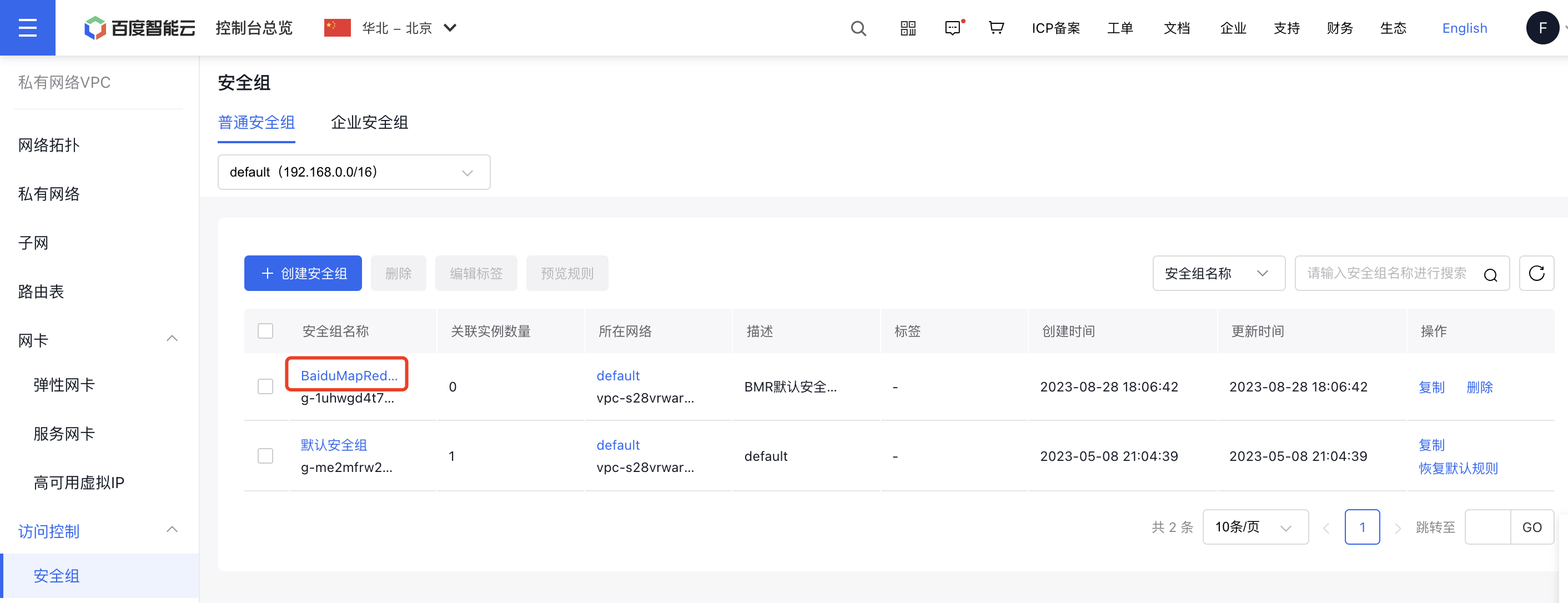
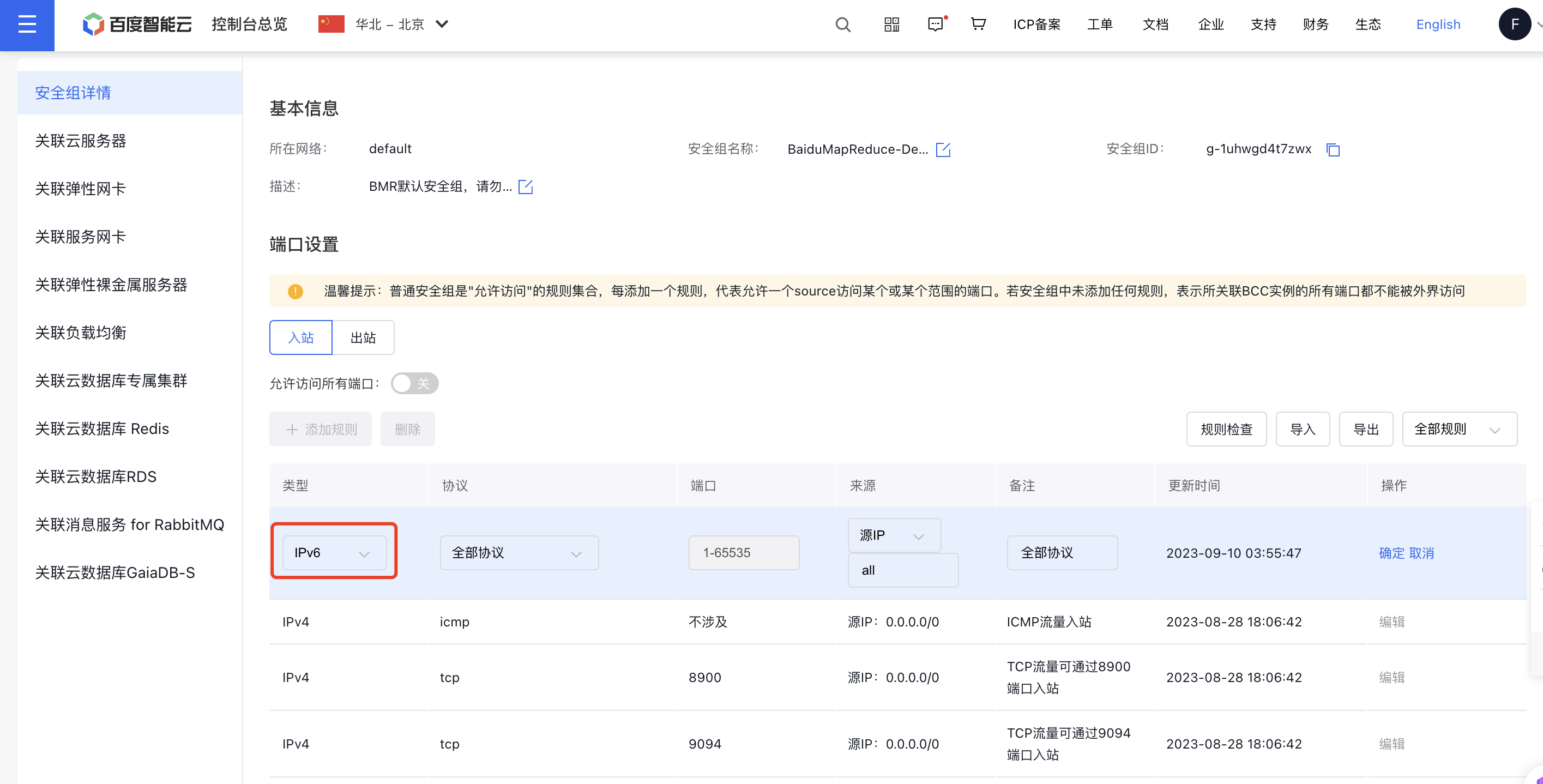
- In the left navigation menu, choose Security Group, find the target security group, click the Security Group Name to open its details page, and then click Add Rule.
- Choose the IPv6 rule type when configuring IPv6 access policies.
Configure IPv6 ACL
- Log in to the Virtual Private Cloud (VPC) console.
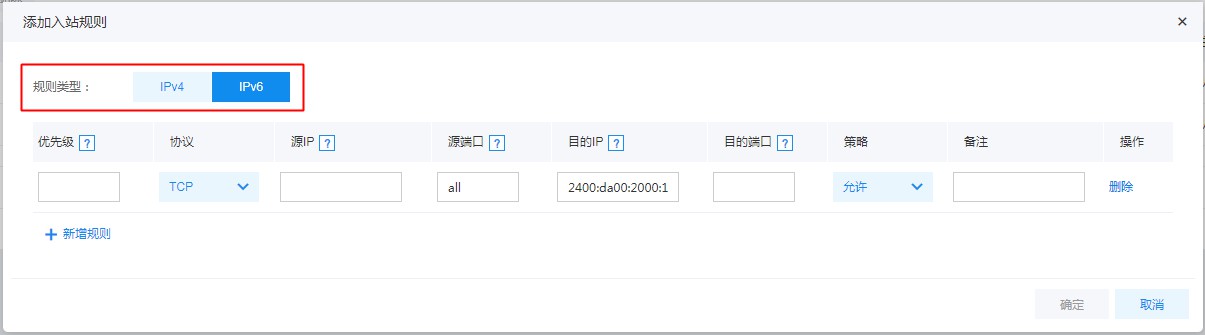
- From the left navigation bar, go to Access Control - ACL, and click Add Rule.
- Select the IPv6 rule type in Add Rules pop-up box to configure IPv6 access policies.
Configure IPv6 route
- Log in to the Virtual Private Cloud (VPC) console.
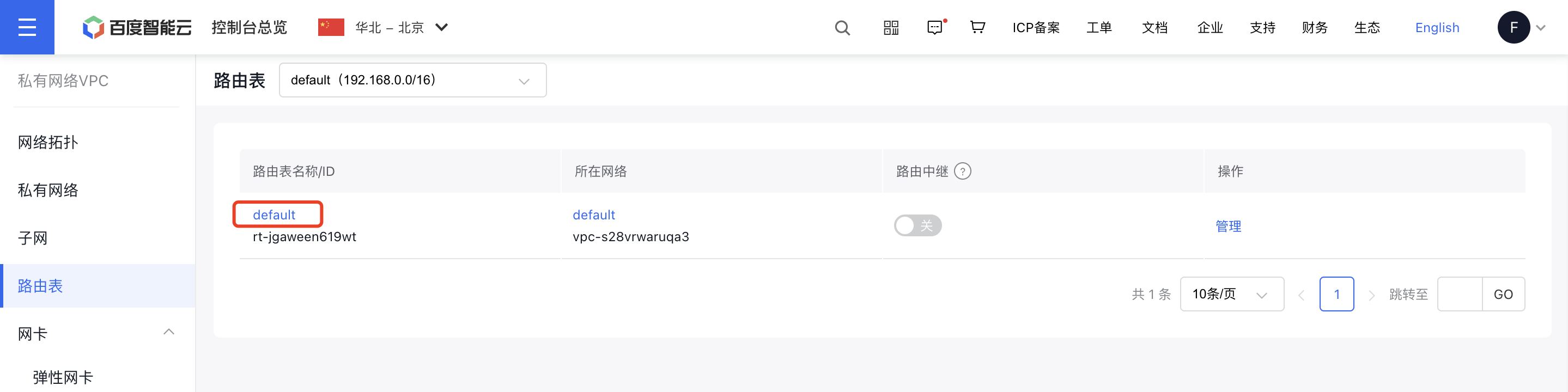
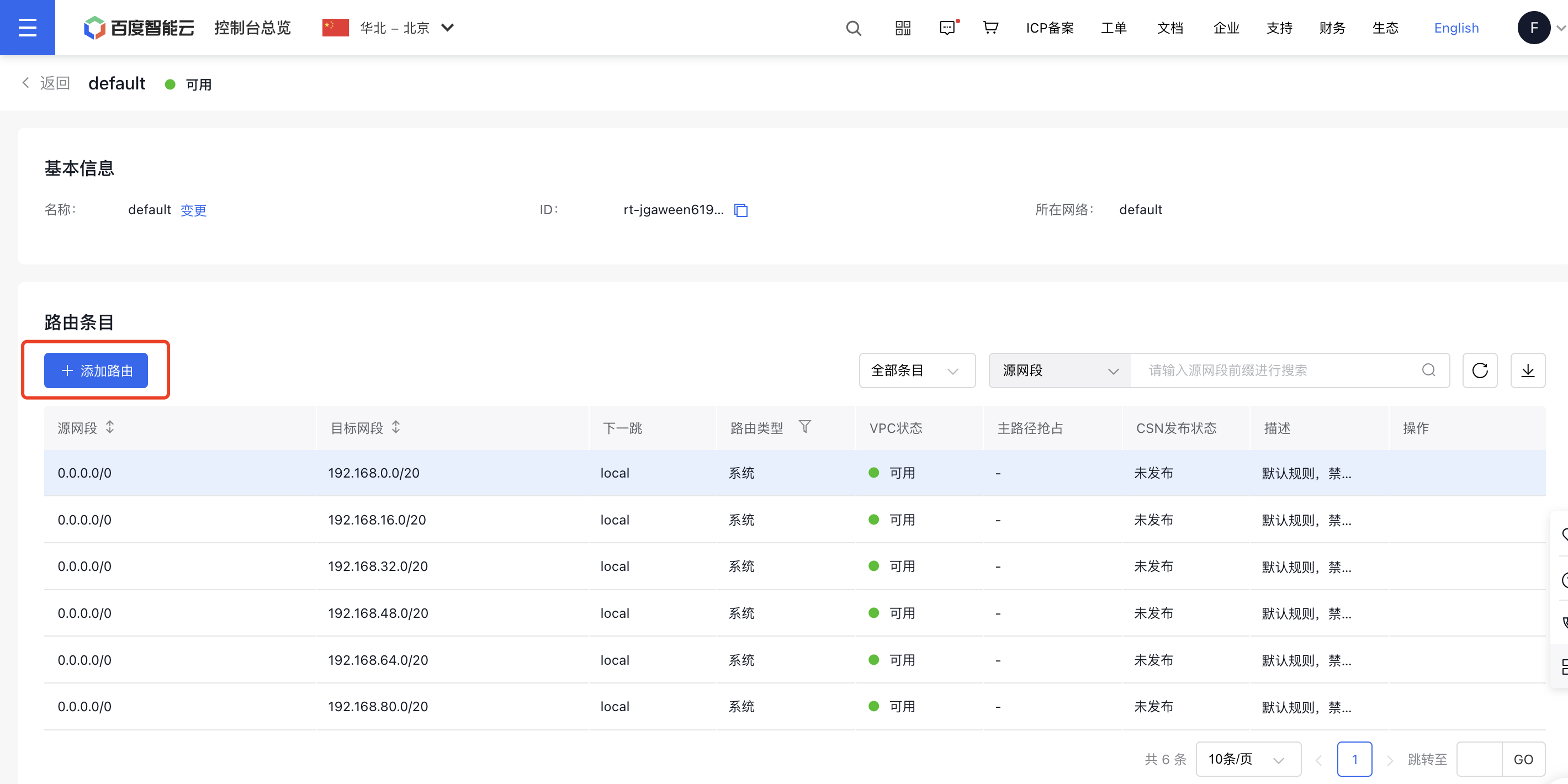
- In the left navigation bar, navigate to Route Table, select the Route Table name to access the details page, and then click Add Route.
-
In the Add Route dialog box, select the IPv6 segment type to configure IPv6 routing rules.
If there are no restrictions on the destination segment, input "::" in the Destination Segment field, select IPv6 Public Gateway as the route type, and set the next hop instance to the created IPv6 gateway.
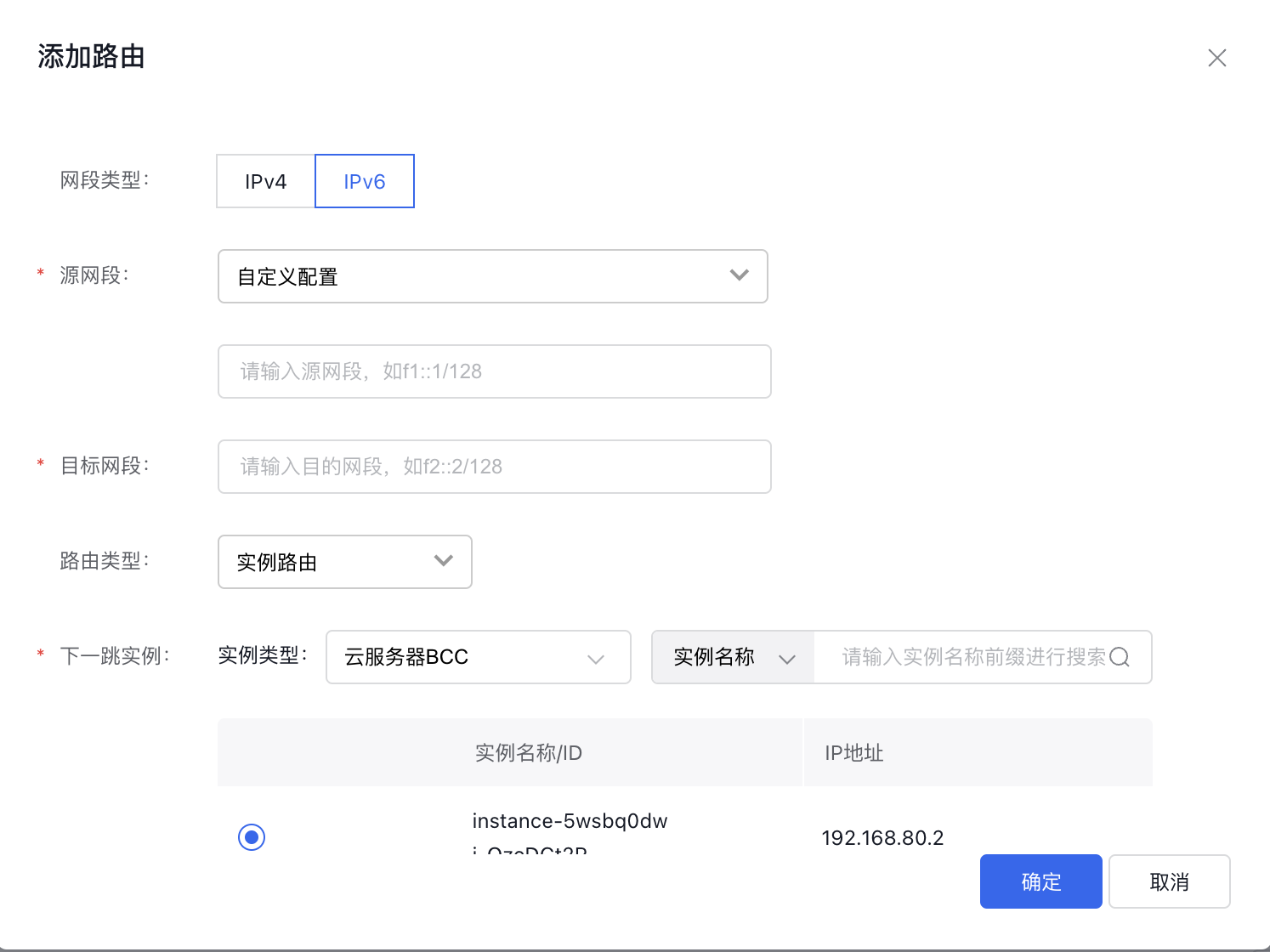
Notes Current IPv6 route types only support instance routes, IPv6 gateway, peering connections, and elastic network interface.