Route table
The route table serves as the traffic controller in a VPC, allowing both global and subnet-level traffic control through a single global route table. Users can customize route rules to determine the destination of network traffic. There are two types of route tables: default route tables and custom route tables.
- System route table: A default system route table is automatically generated when a VPC is created. Users can add, delete, and modify route policies in system route tables. Note: System route tables cannot be deleted.
- Custom route table: Users can create custom route tables within VPCs. By binding a custom route table to a TGW and setting the TGW CIDR as the destination, cloud products within CSNs can communicate, enabling more flexible network management. Users can create and associate custom route tables for CSNs with shared routing policies. Custom route tables can be deleted. Note: All binding relationships must be removed before deletion.
Currently, Baidu AI Cloud supports nine types of routes: local routes, instance routes, elastic network interface routes, NAT gateway routes, VPN gateway routes, peering connections routes, dedicated gateway routes, TGW routes, and high-availability virtual IP address
Local route
When you create a virtual private cloud, the system automatically generates a local route table to which subnets are automatically linked. Local route tables cannot be deleted by users.
Instance route
Users can route traffic through instance-based routing by setting the next hop to a BCC instance, directing the traffic to it for advanced forwarding and precise control.
Elastic network interface
Users can route traffic using elastic network interfaces by setting the next hop to an elastic network interface, forwarding traffic meant for a specific network segment to the chosen interface.
High-availability virtual IP address
Users can route traffic via a high-availability virtual IP address by setting the next hop to this address, ensuring traffic targeting particular network segments is forwarded accordingly.
NAT Gateway
When using a NAT to connect instances in a virtual private cloud to the Internet, configure this type of route to forward Internet-bound traffic to a NAT. For more information, refer to NAT gateway.
VPN Gateway
When using a VPN gateway to connect instances in a Virtual Private Cloud (VPC) to an IDC or other VPCs, configure this route type to forward traffic destined for target CIDRs to a VPN gateway. For more information, refer to VPN gateway.
Peering Connections
When using peering connections to achieve cross-VPC network interconnection, configure this type of route to forward traffic destined for the target subnet to a VPC. For more information, refer to Peering connection.
Dedicated gateway
When connecting to an IDC via a physical dedicated Line, configure this type of route to forward traffic destined for the target subnet to a dedicated gateway. For more information, refer to Dedicated Gateway
TGW route
Users can route traffic through TGW route by setting the next hop to a TGW instance, directing traffic to it for further forwarding and precise control. For more information, refer to TGW Route.
Description:
- Route tables operate as global resources.
- Every subnet generates a default local route. When subnets are created, local routes are established, and subnets within the same VPC are interconnected by default.
- To enable subnet communication with external networks, corresponding route entries must be configured in the route table.
Route rule priority
When there are multiple route rules in a route table, priority is determined first by rule type precedence and then by the longest match principle.
Priority of route types
Route type priorities are as follows: instance route = elastic network interface = high-availability virtual IP address = NAT gateway = VPN gateway = peering connections = dedicated gateway < local route.
Note:
For routes with equal priority, if the destination is 0.0.0.0/0, its priority is automatically downgraded to the lowest within the same priority level.
Longest prefix match principle
First, match the source address, followed by the destination address.
- Source address is the primary matching criterion: If a user's network IP falls within a source range in the route table, that route entry is prioritized for matching. If no conditions are met, the match defaults to the source network segment (ALL).
- Exact destination address match: Once the source address is matched, an exact destination address match is performed using the longest match principle.
For example, in an existing route table, if the test network source IP is 192.168.0.1 and the destination host IP is 100.0.0.1.
a, Source (ALL) | Destination (100.0.0/24) | Next hop BCC1b, Source subnet (192.168.0.0/16) | Destination (100.0.0.0/16) | Next hop BCC2c, Source subnet (192.168.0.0/16) | Destination (100.0.0.0/30) | Next hop BCC3
First match b or c routes, then select c routes based on longest destination address matching principle. The final policy is c>b>a.
Description:
Route entries do not detect destination unreachability. When two routes match, even if the higher-priority route's destination address is unreachable, traffic will not automatically switch to the lower-priority route.
Usage restrictions
- Each virtual private cloud has only one system route table which cannot be altered.
- The default route table for any VPC cannot be deleted.
- Each VPC is limited to 10 custom route tables, but this quota can be adjusted upon request.
Create custom route table
- Log in to the Baidu AI Cloud console.
- After successfully logging in, go to Product Services - Virtual Private Cloud - Route Table and click "Create Route Table.\
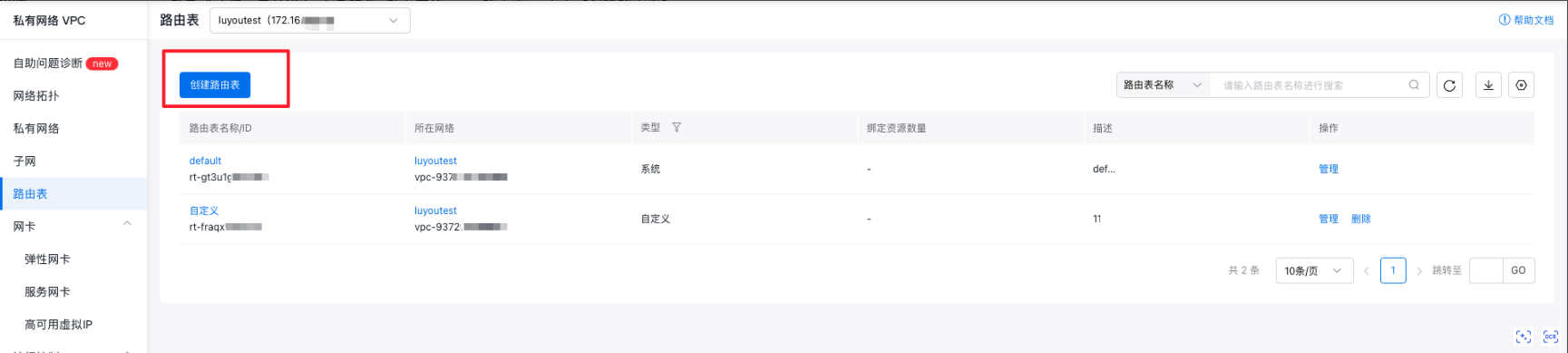
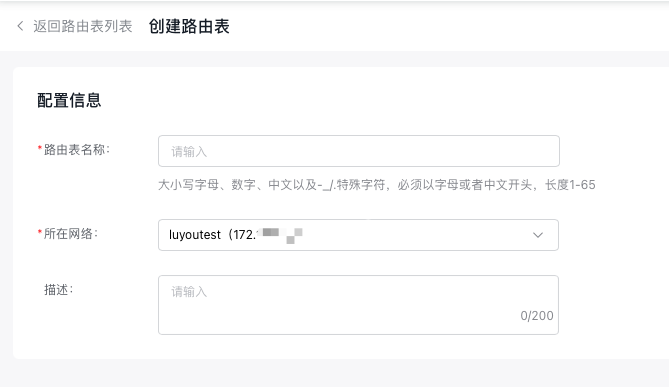
- Enter the route table configuration details and click OK to complete the setup. Successfully created route tables will be displayed in the list.
Add route
- Sign in to the Baidu AI Cloud console.
- After logging in successfully, go to Product Services - Virtual Private Cloud, and choose the instance's region from the top-left corner.
- Choose a VPC instance and access its details page.
- Click Add Route and fill in the following details:
| ConfigMap | Description |
|---|---|
| Source network segment | all or already created subnets, defaulted as all |
| Destination segment | |
| Route type | Includes local routes (created by default and cannot be deleted), instance routes, elastic network interface routes, NAT gateway routes, VPN gateway routes, peering connections routes, dedicated gateway routes, TGW routes, and high-availability virtual IP address |
| Next-hop instance | Based on route type, select Next Hop: BCC instance, NAT-bound Public IP, or EIPGROUP package |
| Description | Edit route entry description information |
- Click OK to finalize adding custom routing entries.
Note:
System routes cannot be created or modified. However, custom routes can be created and updated.
Bind route table to TGW
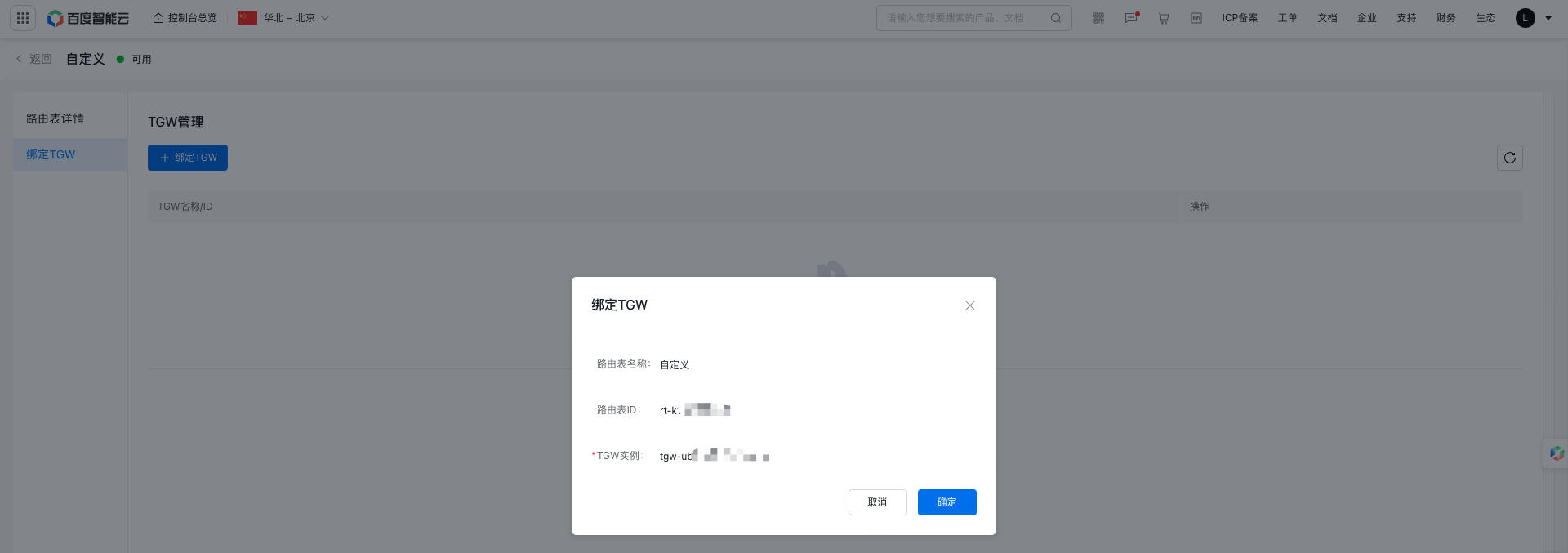
- Click on Route Table to open the Custom Route Table Details page, then select Bind TGW from the left-hand menu.
- Choose TGW and click OK to complete the binding process.
Delete custom route table
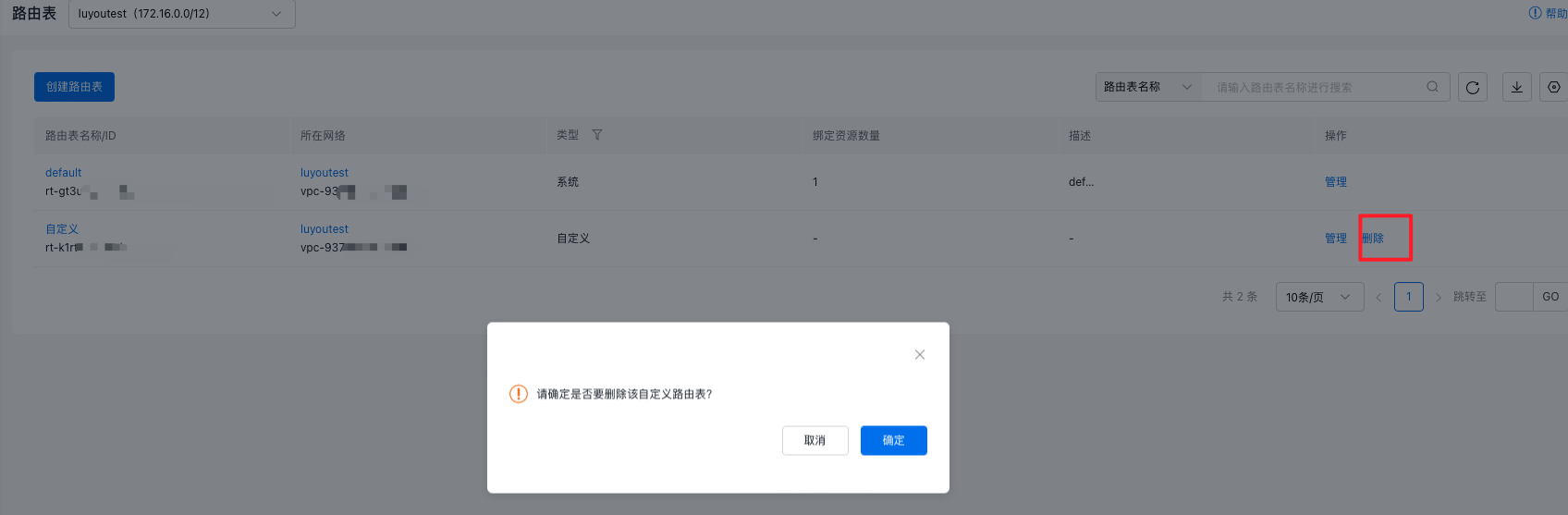
Users can delete custom route tables but cannot remove system route tables. Ensure all associations are unbound before deleting a custom route table.
- Log in to the Baidu AI Cloud console.
- After successfully logging in, go to Product Service - Virtual Private Cloud (VPC).
- Click on Route Table in the navigation bar on the left.
- On the Route Table page, find the custom route table you wish to delete and click Delete in the Operations column.