VPC Custom Route Table to Achieve Secure Traffic Mutual Access

VPC VPC

  • API Reference
    • ACL-Related Interfaces
      • Add ACL rule
      • Delete ACL rules
      • Query ACL rules
      • Query ACL
      • Update ACL rules
    • API function release records
    • API Overview
    • Appendix
    • Common Headers and Error Responses
    • Dedicated Gateway-Related Interfaces
      • Bind physical dedicated line
      • Create dedicated gateway
      • Create health check for dedicated gateway
      • Query dedicated gateway details
      • Query dedicated gateway list
      • Release dedicated gateway
      • Unbind physical dedicated line
      • Update dedicated gateway
    • Elastic Network Interface-Related Interfaces
      • Add intranet IP to elastic network interface in batches
      • Add Secondary IP Address of Elastic Network Interface
      • Create elastic network interface
      • Delete elastic network interface
      • Delete Intranet IP from elastic network interface in batches
      • Delete Secondary IP Address of Elastic Network Interface
      • Elastic network interface binds to EIP
      • Elastic Network Interface Mounts Cloud Product Instance
      • Elastic network interface unbinds from EIP
      • Elastic Network Interface Unmounts Cloud Product Instance
      • Query elastic network interface list
      • Query elastic network interface status
      • Query the specified elastic network interface
      • Update elastic network interface with enterprise security group
      • Update elastic network interface with regular security group
      • Update elastic network interface
    • Gateway Bandwidth Limiting Rule Related Interfaces
      • Create gateway bandwidth limiting rules
      • Delete Gateway Bandwidth Limiting Rule
      • Modify Gateway Bandwidth Limiting Rule
      • View Gateway Bandwidth Limiting Rule
    • General Description
    • High-Availability Virtual IP Address(HAVIP) Related Interfaces
      • Bind EIP to high-availability virtual IP address
      • Bind instance to high-availability virtual IP address
      • Create high-availability virtual IP address
      • Delete high-availability virtual IP address
      • Query high-availability virtual IP address list
      • Query the specified high-availability virtual IP address
      • Unbind EIP from high-availability virtual IP address
      • Unbind instance from high-availability virtual IP address
      • Update high-availability virtual IP address
    • Interface Overview
    • IPv6 Gateway-Related Interfaces
      • Add IPv6 egress-only policy
      • Bandwidth resizing for IPv6 gateway
      • Create IPv6 gateway bandwidth limiting policy
      • Create IPv6 gateway
      • Delete IPv6 gateway bandwidth limiting policy
      • Delete IPv6 Gateway
      • Delete the IPv6 egress-only policy
      • Query IPv6 gateway bandwidth limiting policy list
      • Query IPv6 gateway
      • Query the IPv6 egress-only policy list
      • Update IPv6 gateway bandwidth limiting policy
      • Update the IPv6 gateway release protection switch
    • NAT Gateway-Related Interfaces
      • Bind DNAT EIP to the NAT gateway
      • Bind SNAT EIP to the NAT gateway
      • Create DNAT rules in batches
      • Create DNAT rules
      • Create NAT gateway
      • Create SNAT rules in batches
      • Create SNAT rules
      • Delete DNAT rules
      • Delete SNAT rules
      • NAT Gateway Binds EIP
      • NAT gateway renewal
      • NAT Gateway Resize
      • NAT Gateway Unbinds EIP
      • Query DNAT rules
      • Query NAT gateway details
      • Query NAT gateway list
      • Query SNAT rules
      • Release NAT gateway
      • Unbind DNAT EIP from the NAT gateway
      • Unbind SNAT EIP from the NAT gateway
      • Update DNAT rules
      • Update NAT Delete Protection Switch
      • Update NAT gateway name
      • Update SNAT rules
    • Network Detection Related Interfaces
      • Create Network Probe
      • Delete network probe
      • Query network probe details
      • Query network probe list.
      • Update probe
    • Parameter Template-Related Interfaces
      • Add IP addresses to the IP address family
      • Add IP addresses to the IP address group
      • Create IP address family
      • Create IP address set
      • Delete IP address family
      • Delete IP address from IP address group
      • Delete IP address set
      • Query IP address family list
      • Query IP address group list
      • Query specified IP address family
      • Query specified IP address group
      • Remove IP address group from IP address family
      • Update IP address family
      • Update IP address set
    • Peering Connections-Related Interfaces
      • Application to process the peering connection
      • Bandwidth resizing for peering connections
      • Create peering connections
      • Disable DNS synchronization for the peering connections.
      • Enable DNS synchronization for the peering connections
      • List of peering connections to be queried.
      • Peering connection renewal
      • Release peering connections
      • Update the local API name and remarks for peering connections
      • Update the peering connection release protection switch
      • View details of peering connection
    • Route Table Related Interfaces
      • Create route rules
      • Delete route rules
      • Primary-standby switch
      • Query route table
      • Query routing rules
      • Update route rules
    • Security Group Related Interfaces
      • Enterprise security group
        • Authorize enterprise security group rules
        • Create enterprise security group
        • Delete enterprise security group rules
        • Delete enterprise security group
        • Query enterprise security group list
        • Update enterprise security group rules
      • Regular security group
        • Authorize regular security group rules
        • Create regular security group
        • Delete regular security group rules
        • Delete regular security group
        • Query regular security group list
        • Revoke regular security group rules
        • Update regular security group rules
        • View security group details
    • Service domain
    • Service Network Interface Card (SNIC)-Related Interfaces
      • Create service network interface card
      • Delete service network interface card
      • Query mountable public services
      • Query service network interface card details
      • Query service network interface card list
      • Update regular security group for service network interface card
      • Update service network interface card with enterprise security group
      • Update the service network interface card
    • Subnet-Related Interfaces
      • Create reserved network segment
      • Create subnet
      • Delete reserved network segment
      • Delete subnet
      • Query specified subnet
      • Query subnet list
      • Query the reserved network segment list
      • Update subnet
    • VPC-Related Interfaces
      • Create VPC
      • Delete VPC
      • Open VPC relay
      • Query IP Usage by Products in VPC
      • Query specified VPC
      • Query VPC intranet IP
      • Query VPC list
      • Shut down VPC relay
      • Update VPC
    • VPN-Related Interfaces
      • Bind EIP
      • Create SSL VPN server
      • Create SSL VPN users in batches
      • Create VPN tunnel
      • Create VPN
      • Delete SSL VPN server
      • Delete SSL VPN user
      • Delete VPN tunnel
      • Query SSL-VPN server
      • Query SSL-VPN user
      • Query VPN details
      • Query VPN List
      • Query VPN tunnels
      • Release VPN
      • Unbind EIP
      • Update SSL VPN server
      • Update SSL VPN user
      • Update VPN release protection switch
      • Update VPN tunnel
      • Update VPN
      • VPN gateway renewal
    • High-Availability Virtual IP Address (HAVIP) Related Interfaces
      • Bind EIP to high-availability virtual IP address
      • Bind instance to high-availability virtual IP address
      • Create high-availability virtual IP address
      • Delete high-availability virtual IP address
      • Query high-availability virtual IP address list
      • Query the specified high-availability virtual IP address
      • Unbind EIP from high-availability virtual IP address
      • Unbind instance from high-availability virtual IP address
      • Update high-availability virtual IP address
  • FAQs
    • Common Questions Overview
    • NAT FAQs
    • Route Table FAQs
    • Service Network Interface Card(SNIC) Common Questions
    • VPC FAQs
    • VPN FAQs
    • Service Network Interface Card (SNIC) Common Questions
  • Function Release Records
  • Operation guide
    • Access control
      • ACL
      • Parameter Template
      • Security group
    • Identity and access management
    • Monitor and Operations
      • NAT Gateway Instance Diagnosis
    • Network Connection
      • Dedicated gateway
      • IPv6 gateway
      • Layer 2 Gateway
      • NAT Gateway
        • Private Network NAT(Network Address Translation) Gateway
        • Public Network NAT(Network Address Translation) Gateway
        • Private Network NAT (Network Address Translation) Gateway
        • Public Network NAT (Network Address Translation) Gateway
      • Peering Connections
      • VPN Gateway
        • GRE VPN Gateway
        • IPsec VPN Gateway
        • SSL VPN Gateway
    • Network Diagnostics
      • Flow log
      • Gateway bandwidth limiting
      • Network probe
      • Path analysis
      • Port verification
      • Traffic monitor
    • Network interface card
      • Elastic network interface
      • High-availability virtual IP address (HAVIP)
      • Service network interface card
    • Network topology
    • Route table
    • Subnet
    • Tag Management
    • Using IPv6
    • VPC
  • Product Description
    • Application scenarios
    • Product advantages
    • Product features
    • Product Introduction
    • Related concepts
    • Usage restrictions
  • Product pricing
  • SDK
    • Go-SDK
      • ACL
      • Dedicated gateway
      • Elastic network interface
      • Exception handling
      • High-availability virtual IP address (HAVIP)
      • Initialization
      • Install the SDK Package
      • IPv6Gateway
      • NAT
      • Network probe
      • Overview
      • Peering Connections
      • Route
      • Security group
        • Enterprise security group
        • Regular security group
      • Service network interface card
      • Subnet
      • VPC
      • VPN
    • Java-SDK
      • ACL
      • Dedicated gateway
      • Elastic network interface
      • Enterprise security group
      • High-availability virtual IP address (HAVIP)
      • Install the SDK Package
      • IPv6 gateway
      • NAT
      • Network probe
      • Overview
      • Parameter Template
      • Peering Connections
      • Regular security group
      • Route
      • Service network interface card
      • Subnet
      • Version history
      • vpc
      • VPN
    • PHP-SDK
      • ACL
      • Install the SDK Package
      • NAT
      • Overview
      • Peering Connections
      • Route
      • Security group
      • Subnet
      • Version history
      • vpc
    • Python-SDK
      • ACL
      • Dedicated gateway
      • Elastic network interface
      • Enterprise security group
      • High-availability virtual IP address (HAVIP)
      • Install the SDK Package
      • IPv6Gateway
      • NAT
      • Network probe
      • Overview
      • Peering Connections
      • Route
      • Security group
      • Service network interface card
      • Subnet
      • Version history
      • VPC
      • VPN
  • Service Level Agreement (SLA)
    • IPv6 Gateway Service Level Agreement SLA
    • NAT(Network Address Translation) Gateway Service Level Agreement SLA
    • Peering Connections Service Level Agreement SLA
    • Service Network Interface Card(SNIC) Service Level Agreement SLA
    • VPN Gateway Service Level Agreement SLA
    • NAT (Network Address Translation) Gateway Service Level Agreement SLA
    • Service Network Interface Card (SNIC) Service Level Agreement SLA
  • Typical Practices
    • Configure Custom Service and Use Service Network Interface Card(SNIC) to Provide Service for Other VPCs
    • HAVIP Combined with Keepalived to Achieve Master-Backup Multi-Machine High Availability
    • Layer 2 Gateway Combined with Dedicated Line Access ET to Build Large Layer 2 Network Between IDC and Cloud VPC
    • Network Layer Security Description
    • Peering Connections Typical Practice
    • Security Group Configuration Practice (Advanced Level)
    • Security Group Configuration Practice (Beginner Level)
    • Typical Practice of Managing Elastic Network Interface Using Terraform
    • Typical Practice of Managing IPsec VPN Gateway Using Terraform
    • Using Keepalived in VPC to Achieve High-Availability Architecture
    • VPC Custom Route Table to Achieve Secure Traffic Mutual Access
    • Windows Using HAVIP to Configure Master-Backup Multi-Machine
    • Configure Custom Service and Use Service Network Interface Card (SNIC) to Provide Service for Other VPCs
  • VPC CLI
    • Configure BCE-CLI
    • Install BCE-CLI
    • Route Table Related Operations
    • Subnet Related Operations
    • Using VPC Service via CLI
    • Version Change Records
    • VPC Related Operations
All documents
menu
No results found, please re-enter

VPC VPC

  • API Reference
    • ACL-Related Interfaces
      • Add ACL rule
      • Delete ACL rules
      • Query ACL rules
      • Query ACL
      • Update ACL rules
    • API function release records
    • API Overview
    • Appendix
    • Common Headers and Error Responses
    • Dedicated Gateway-Related Interfaces
      • Bind physical dedicated line
      • Create dedicated gateway
      • Create health check for dedicated gateway
      • Query dedicated gateway details
      • Query dedicated gateway list
      • Release dedicated gateway
      • Unbind physical dedicated line
      • Update dedicated gateway
    • Elastic Network Interface-Related Interfaces
      • Add intranet IP to elastic network interface in batches
      • Add Secondary IP Address of Elastic Network Interface
      • Create elastic network interface
      • Delete elastic network interface
      • Delete Intranet IP from elastic network interface in batches
      • Delete Secondary IP Address of Elastic Network Interface
      • Elastic network interface binds to EIP
      • Elastic Network Interface Mounts Cloud Product Instance
      • Elastic network interface unbinds from EIP
      • Elastic Network Interface Unmounts Cloud Product Instance
      • Query elastic network interface list
      • Query elastic network interface status
      • Query the specified elastic network interface
      • Update elastic network interface with enterprise security group
      • Update elastic network interface with regular security group
      • Update elastic network interface
    • Gateway Bandwidth Limiting Rule Related Interfaces
      • Create gateway bandwidth limiting rules
      • Delete Gateway Bandwidth Limiting Rule
      • Modify Gateway Bandwidth Limiting Rule
      • View Gateway Bandwidth Limiting Rule
    • General Description
    • High-Availability Virtual IP Address(HAVIP) Related Interfaces
      • Bind EIP to high-availability virtual IP address
      • Bind instance to high-availability virtual IP address
      • Create high-availability virtual IP address
      • Delete high-availability virtual IP address
      • Query high-availability virtual IP address list
      • Query the specified high-availability virtual IP address
      • Unbind EIP from high-availability virtual IP address
      • Unbind instance from high-availability virtual IP address
      • Update high-availability virtual IP address
    • Interface Overview
    • IPv6 Gateway-Related Interfaces
      • Add IPv6 egress-only policy
      • Bandwidth resizing for IPv6 gateway
      • Create IPv6 gateway bandwidth limiting policy
      • Create IPv6 gateway
      • Delete IPv6 gateway bandwidth limiting policy
      • Delete IPv6 Gateway
      • Delete the IPv6 egress-only policy
      • Query IPv6 gateway bandwidth limiting policy list
      • Query IPv6 gateway
      • Query the IPv6 egress-only policy list
      • Update IPv6 gateway bandwidth limiting policy
      • Update the IPv6 gateway release protection switch
    • NAT Gateway-Related Interfaces
      • Bind DNAT EIP to the NAT gateway
      • Bind SNAT EIP to the NAT gateway
      • Create DNAT rules in batches
      • Create DNAT rules
      • Create NAT gateway
      • Create SNAT rules in batches
      • Create SNAT rules
      • Delete DNAT rules
      • Delete SNAT rules
      • NAT Gateway Binds EIP
      • NAT gateway renewal
      • NAT Gateway Resize
      • NAT Gateway Unbinds EIP
      • Query DNAT rules
      • Query NAT gateway details
      • Query NAT gateway list
      • Query SNAT rules
      • Release NAT gateway
      • Unbind DNAT EIP from the NAT gateway
      • Unbind SNAT EIP from the NAT gateway
      • Update DNAT rules
      • Update NAT Delete Protection Switch
      • Update NAT gateway name
      • Update SNAT rules
    • Network Detection Related Interfaces
      • Create Network Probe
      • Delete network probe
      • Query network probe details
      • Query network probe list.
      • Update probe
    • Parameter Template-Related Interfaces
      • Add IP addresses to the IP address family
      • Add IP addresses to the IP address group
      • Create IP address family
      • Create IP address set
      • Delete IP address family
      • Delete IP address from IP address group
      • Delete IP address set
      • Query IP address family list
      • Query IP address group list
      • Query specified IP address family
      • Query specified IP address group
      • Remove IP address group from IP address family
      • Update IP address family
      • Update IP address set
    • Peering Connections-Related Interfaces
      • Application to process the peering connection
      • Bandwidth resizing for peering connections
      • Create peering connections
      • Disable DNS synchronization for the peering connections.
      • Enable DNS synchronization for the peering connections
      • List of peering connections to be queried.
      • Peering connection renewal
      • Release peering connections
      • Update the local API name and remarks for peering connections
      • Update the peering connection release protection switch
      • View details of peering connection
    • Route Table Related Interfaces
      • Create route rules
      • Delete route rules
      • Primary-standby switch
      • Query route table
      • Query routing rules
      • Update route rules
    • Security Group Related Interfaces
      • Enterprise security group
        • Authorize enterprise security group rules
        • Create enterprise security group
        • Delete enterprise security group rules
        • Delete enterprise security group
        • Query enterprise security group list
        • Update enterprise security group rules
      • Regular security group
        • Authorize regular security group rules
        • Create regular security group
        • Delete regular security group rules
        • Delete regular security group
        • Query regular security group list
        • Revoke regular security group rules
        • Update regular security group rules
        • View security group details
    • Service domain
    • Service Network Interface Card (SNIC)-Related Interfaces
      • Create service network interface card
      • Delete service network interface card
      • Query mountable public services
      • Query service network interface card details
      • Query service network interface card list
      • Update regular security group for service network interface card
      • Update service network interface card with enterprise security group
      • Update the service network interface card
    • Subnet-Related Interfaces
      • Create reserved network segment
      • Create subnet
      • Delete reserved network segment
      • Delete subnet
      • Query specified subnet
      • Query subnet list
      • Query the reserved network segment list
      • Update subnet
    • VPC-Related Interfaces
      • Create VPC
      • Delete VPC
      • Open VPC relay
      • Query IP Usage by Products in VPC
      • Query specified VPC
      • Query VPC intranet IP
      • Query VPC list
      • Shut down VPC relay
      • Update VPC
    • VPN-Related Interfaces
      • Bind EIP
      • Create SSL VPN server
      • Create SSL VPN users in batches
      • Create VPN tunnel
      • Create VPN
      • Delete SSL VPN server
      • Delete SSL VPN user
      • Delete VPN tunnel
      • Query SSL-VPN server
      • Query SSL-VPN user
      • Query VPN details
      • Query VPN List
      • Query VPN tunnels
      • Release VPN
      • Unbind EIP
      • Update SSL VPN server
      • Update SSL VPN user
      • Update VPN release protection switch
      • Update VPN tunnel
      • Update VPN
      • VPN gateway renewal
    • High-Availability Virtual IP Address (HAVIP) Related Interfaces
      • Bind EIP to high-availability virtual IP address
      • Bind instance to high-availability virtual IP address
      • Create high-availability virtual IP address
      • Delete high-availability virtual IP address
      • Query high-availability virtual IP address list
      • Query the specified high-availability virtual IP address
      • Unbind EIP from high-availability virtual IP address
      • Unbind instance from high-availability virtual IP address
      • Update high-availability virtual IP address
  • FAQs
    • Common Questions Overview
    • NAT FAQs
    • Route Table FAQs
    • Service Network Interface Card(SNIC) Common Questions
    • VPC FAQs
    • VPN FAQs
    • Service Network Interface Card (SNIC) Common Questions
  • Function Release Records
  • Operation guide
    • Access control
      • ACL
      • Parameter Template
      • Security group
    • Identity and access management
    • Monitor and Operations
      • NAT Gateway Instance Diagnosis
    • Network Connection
      • Dedicated gateway
      • IPv6 gateway
      • Layer 2 Gateway
      • NAT Gateway
        • Private Network NAT(Network Address Translation) Gateway
        • Public Network NAT(Network Address Translation) Gateway
        • Private Network NAT (Network Address Translation) Gateway
        • Public Network NAT (Network Address Translation) Gateway
      • Peering Connections
      • VPN Gateway
        • GRE VPN Gateway
        • IPsec VPN Gateway
        • SSL VPN Gateway
    • Network Diagnostics
      • Flow log
      • Gateway bandwidth limiting
      • Network probe
      • Path analysis
      • Port verification
      • Traffic monitor
    • Network interface card
      • Elastic network interface
      • High-availability virtual IP address (HAVIP)
      • Service network interface card
    • Network topology
    • Route table
    • Subnet
    • Tag Management
    • Using IPv6
    • VPC
  • Product Description
    • Application scenarios
    • Product advantages
    • Product features
    • Product Introduction
    • Related concepts
    • Usage restrictions
  • Product pricing
  • SDK
    • Go-SDK
      • ACL
      • Dedicated gateway
      • Elastic network interface
      • Exception handling
      • High-availability virtual IP address (HAVIP)
      • Initialization
      • Install the SDK Package
      • IPv6Gateway
      • NAT
      • Network probe
      • Overview
      • Peering Connections
      • Route
      • Security group
        • Enterprise security group
        • Regular security group
      • Service network interface card
      • Subnet
      • VPC
      • VPN
    • Java-SDK
      • ACL
      • Dedicated gateway
      • Elastic network interface
      • Enterprise security group
      • High-availability virtual IP address (HAVIP)
      • Install the SDK Package
      • IPv6 gateway
      • NAT
      • Network probe
      • Overview
      • Parameter Template
      • Peering Connections
      • Regular security group
      • Route
      • Service network interface card
      • Subnet
      • Version history
      • vpc
      • VPN
    • PHP-SDK
      • ACL
      • Install the SDK Package
      • NAT
      • Overview
      • Peering Connections
      • Route
      • Security group
      • Subnet
      • Version history
      • vpc
    • Python-SDK
      • ACL
      • Dedicated gateway
      • Elastic network interface
      • Enterprise security group
      • High-availability virtual IP address (HAVIP)
      • Install the SDK Package
      • IPv6Gateway
      • NAT
      • Network probe
      • Overview
      • Peering Connections
      • Route
      • Security group
      • Service network interface card
      • Subnet
      • Version history
      • VPC
      • VPN
  • Service Level Agreement (SLA)
    • IPv6 Gateway Service Level Agreement SLA
    • NAT(Network Address Translation) Gateway Service Level Agreement SLA
    • Peering Connections Service Level Agreement SLA
    • Service Network Interface Card(SNIC) Service Level Agreement SLA
    • VPN Gateway Service Level Agreement SLA
    • NAT (Network Address Translation) Gateway Service Level Agreement SLA
    • Service Network Interface Card (SNIC) Service Level Agreement SLA
  • Typical Practices
    • Configure Custom Service and Use Service Network Interface Card(SNIC) to Provide Service for Other VPCs
    • HAVIP Combined with Keepalived to Achieve Master-Backup Multi-Machine High Availability
    • Layer 2 Gateway Combined with Dedicated Line Access ET to Build Large Layer 2 Network Between IDC and Cloud VPC
    • Network Layer Security Description
    • Peering Connections Typical Practice
    • Security Group Configuration Practice (Advanced Level)
    • Security Group Configuration Practice (Beginner Level)
    • Typical Practice of Managing Elastic Network Interface Using Terraform
    • Typical Practice of Managing IPsec VPN Gateway Using Terraform
    • Using Keepalived in VPC to Achieve High-Availability Architecture
    • VPC Custom Route Table to Achieve Secure Traffic Mutual Access
    • Windows Using HAVIP to Configure Master-Backup Multi-Machine
    • Configure Custom Service and Use Service Network Interface Card (SNIC) to Provide Service for Other VPCs
  • VPC CLI
    • Configure BCE-CLI
    • Install BCE-CLI
    • Route Table Related Operations
    • Subnet Related Operations
    • Using VPC Service via CLI
    • Version Change Records
    • VPC Related Operations
  • Document center
  • arrow
  • VPCVPC
  • arrow
  • Typical Practices
  • arrow
  • VPC Custom Route Table to Achieve Secure Traffic Mutual Access
Table of contents on this page
  • Overview
  • Requirement scenarios
  • Solution overview
  • Access traffic between two VPCs via security VPC
  • Configuration steps
  • Environment preparation
  • Configuration process
  • Connectivity test
  • Related products

VPC Custom Route Table to Achieve Secure Traffic Mutual Access

Updated at:2025-10-16

Overview

The Virtual Private Cloud (VPC) allows the creation of multiple custom route tables, which can be linked to the Transit Gateway (TGW) of the Cloud Smart Network. This enables traffic from TGW to VPC to adhere to custom route tables, addressing user needs in diverse scenarios, including implementing security measures between multiple VPCs.

Requirement scenarios

Security VPC: Access traffic among multiple VPCs must be secured via a security VPC.

Description:

  • A security VPC is a specialized Virtual Private Cloud (VPC) setup designed to deploy third-party firewalls for safeguarding traffic pathways for interactions across multiple VPCs and between VPCs and the public network.
  • The configuration of third-party firewalls is not covered here. Users can set them up independently according to their specific requirements.

Solution overview

Access traffic between two VPCs via security VPC

When request traffic is transmitted from the source VPC, it first passes through the third-party firewall instance in the security VPC before reaching the destination VPC. Similarly, return traffic from the destination VPC flows through the third-party firewall instance in the security VPC before rerouting to the source VPC.
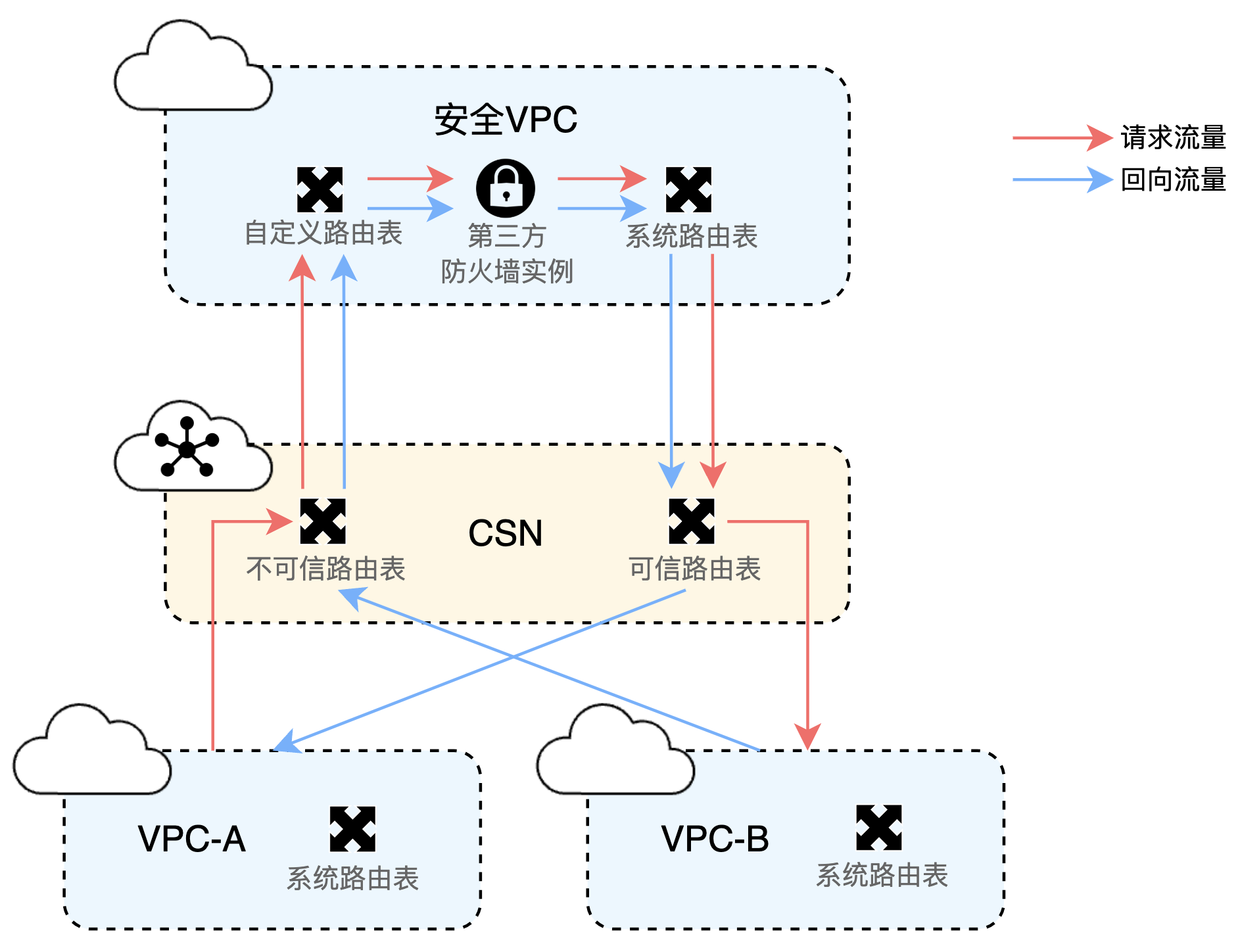
1 modified.png

Configure route tables as follows (see configuration steps for details):

  • Service VPC route settings: For VPC-A and VPC-B, the default system route table already fulfills basic communication requirements. When they access the Cloud Smart Network (CSN), the system automatically synchronizes the route information of the three major private network segments pointing to these two VPCs to the Transit Gateway (TGW). This eliminates the need for complicated operations, providing a simple foundation for connectivity.
  • Route table classification and association: In CSN, the default route table is defined as an untrusted route table, while a manually created custom route table is defined as a trusted route table. VPC-A and VPC-B are associated with the untrusted route table, whereas the security VPC is associated with the trusted route table.
  • Refined traffic direction for security VPC: The custom route table of the security VPC is bound to the Transit Gateway (TGW) to redirect incoming traffic of the security VPC to the firewall. Meanwhile, the system route table of the security VPC directs traffic to the TGW.
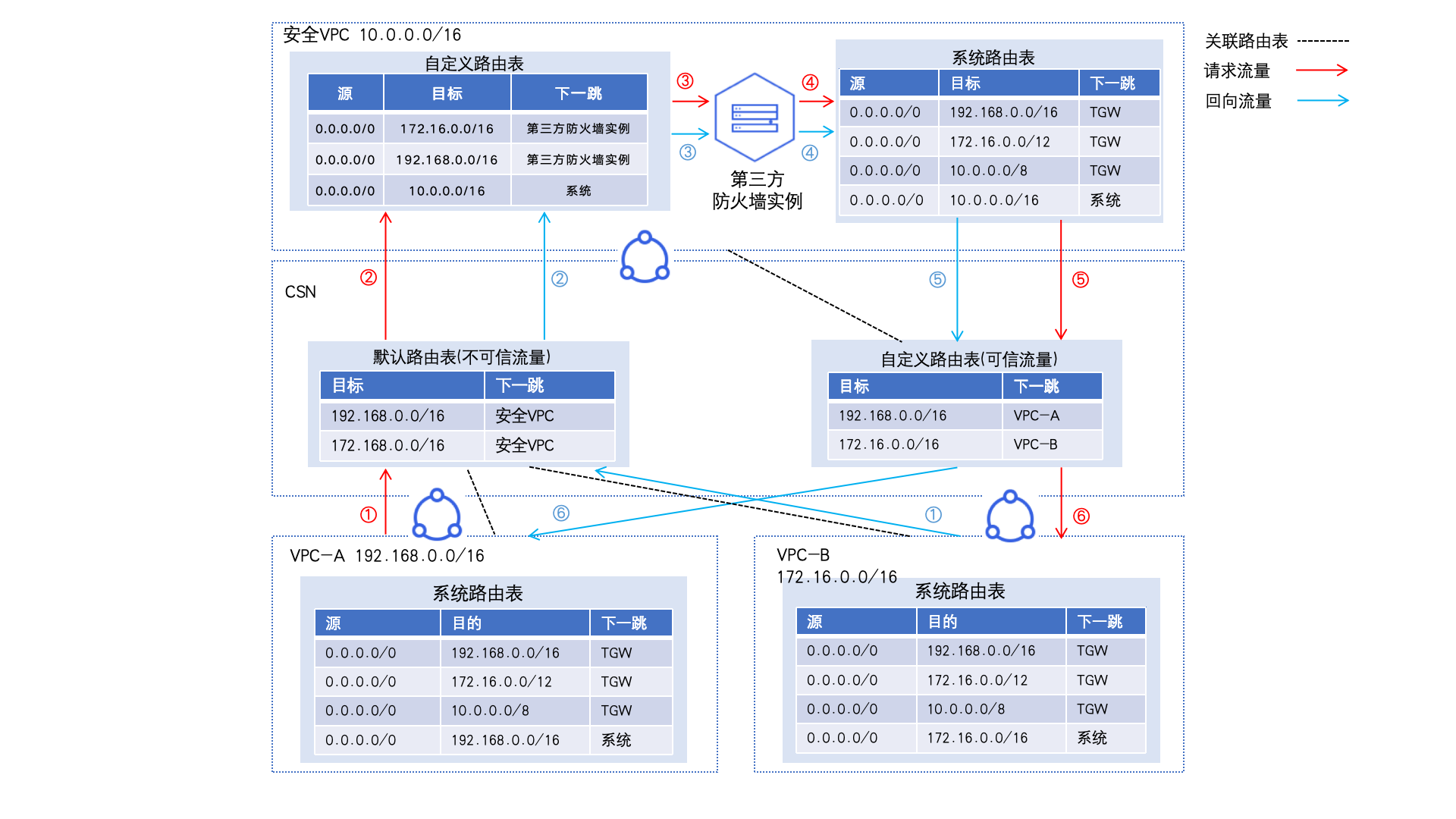
2.3 modified.png

Configuration steps

Environment preparation

Create three VPCs: VPC-A, VPC-B, and the security VPC. In the current VPC route table setup, subnet direct routes take precedence over custom routes. It's recommended to use different network segments for each VPC to avoid traffic interference from direct routes. For instance, the network segment for VPC-A can be 192.168.0.0/16, for VPC-B 172.16.0.0/16, and for the security VPC 10.0.0.0/16.

For specific operations, refer to Create VPC

Create a virtual machine in the security VPC to simulate a third-party firewall, and create one virtual machine each in VPC-A and VPC-B to test connectivity for access traffic between the two VPCs.

For specific operations, refer to Baidu Cloud Compute Instance

Appropriately configure security groups for the three virtual machines to allow mutual communication between them.

For specific operations, refer to Security Group.

Configuration process

Flowchart-202412191611.png

Step I: Create a CSN instance and load VPC

  • Sign in to Baidu AI Cloud Console and create a CSN instance.

For specific operations, refer to Create CSN Instance
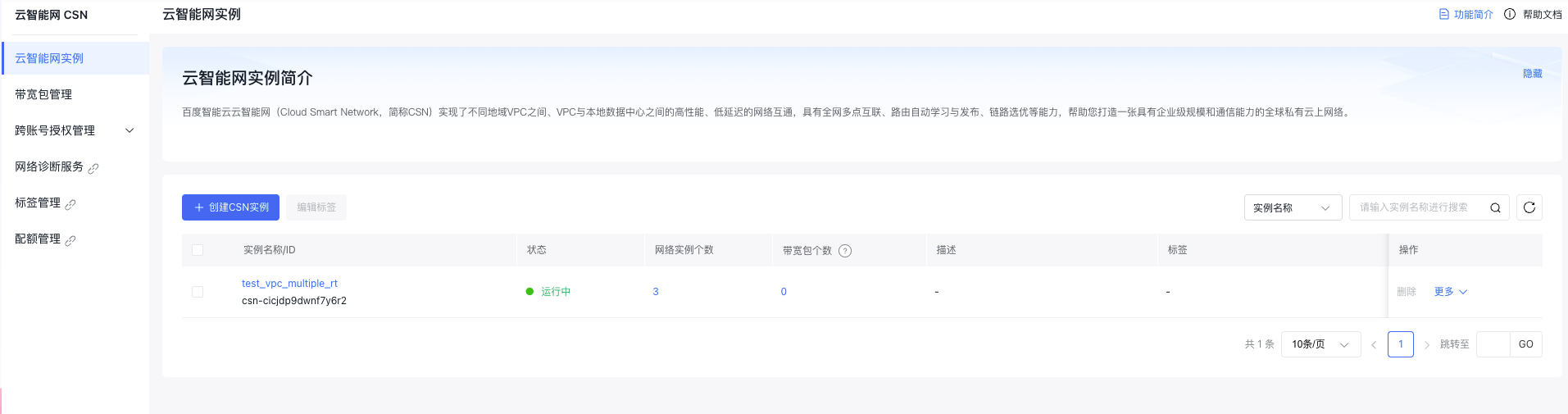
3.png

  • Click on the created instance name to access the Basic Instance Information page. Then, click the Network Instance Management button in the left sidebar to navigate to the Network Instance Management page and sequentially add VPC-A, VPC-B, and the security VPC to CSN.

For specific operations, refer to Add Network Instance.

  • Note: When adding, select VPC for route-learning granularity; disable both "Associate to Default Route Table" and "Learn to Default Route Table" (to be configured separately in subsequent steps); enable "Automatically Configure Routes Pointing to TGW for the Instance".
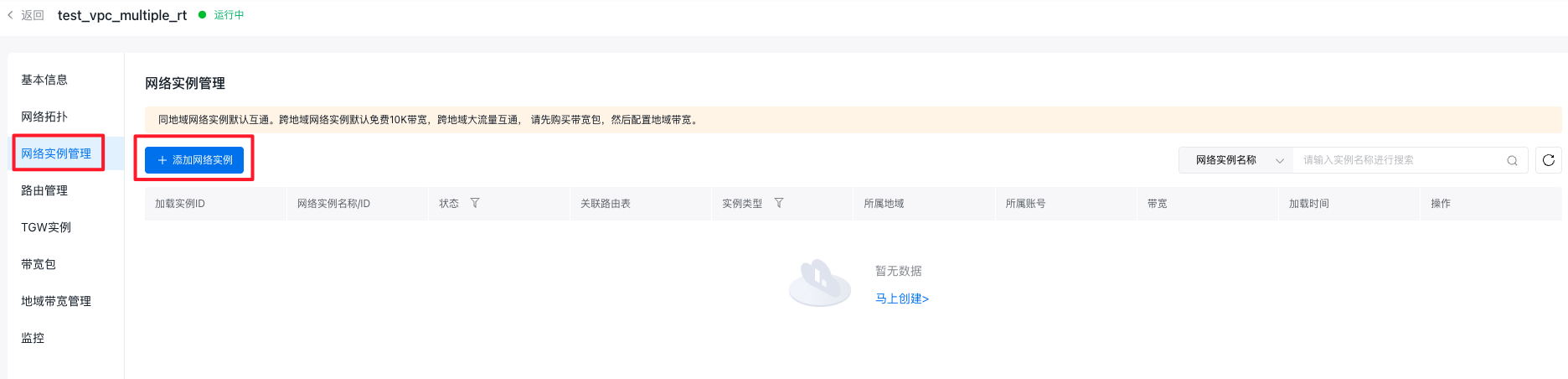
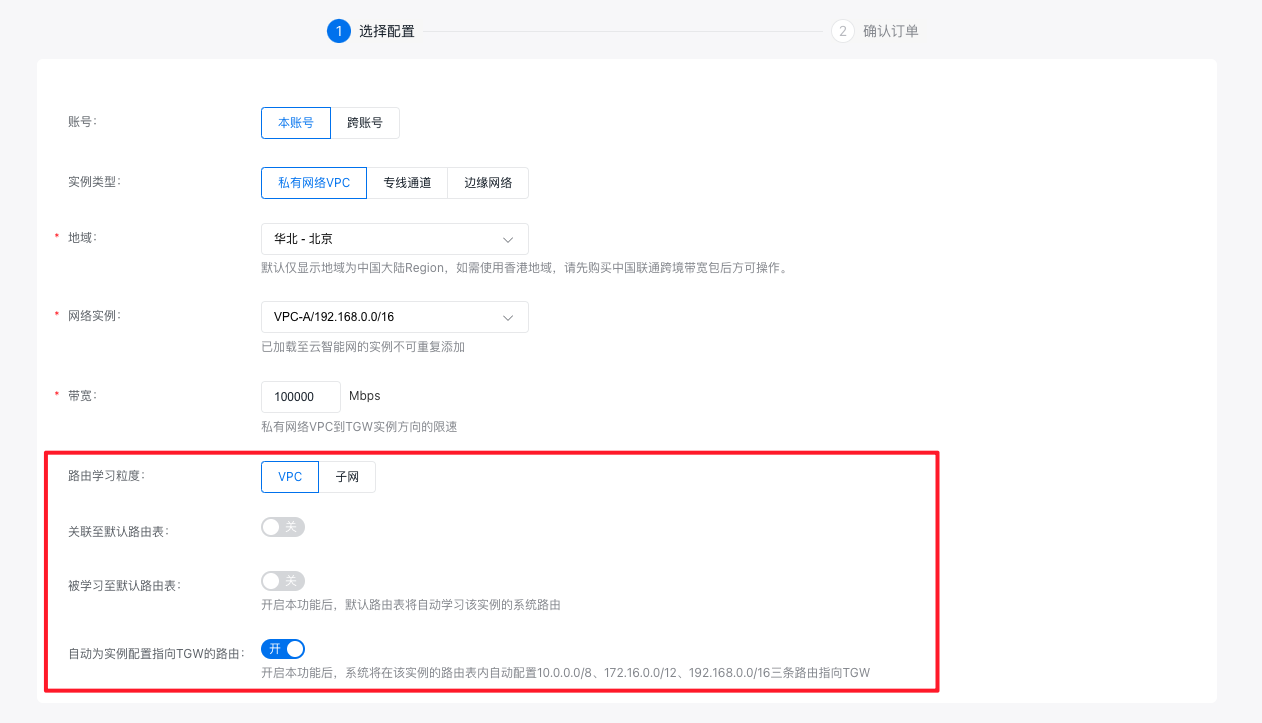
4.png 5.png

  • Once the three VPCs are loaded, the Network Instance Management page will appear as shown in the accompanying figure.
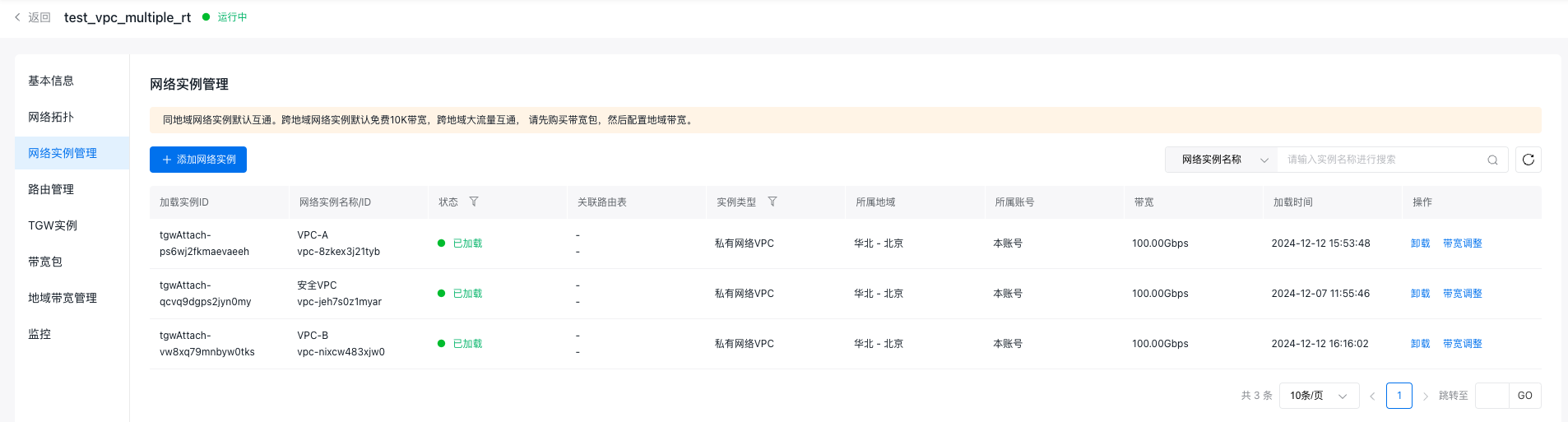
6.png

Step II: Configure CSN instance route tables

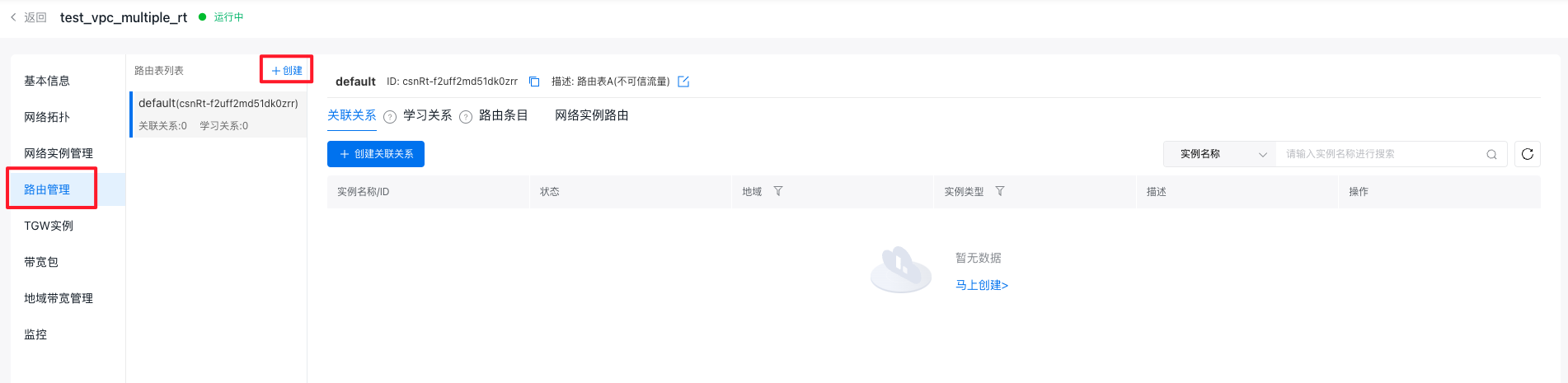
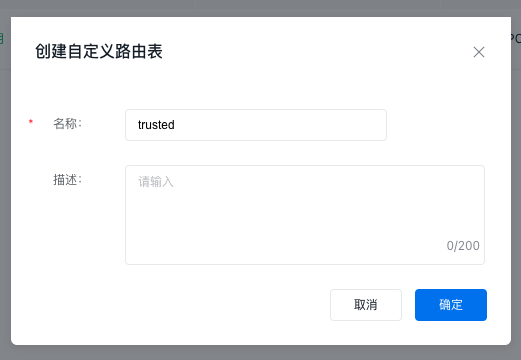
  • Click on the Route Management button in the left sidebar to open the Route Management page. At this stage, the route table list will display a default route table, classified as an untrusted route table. After being added to the CSN multiple-route-table allow list, click the + Create button in the route table list to create a custom route table, classify it as the trusted route table, and name it "trusted.\
7.png 8.png

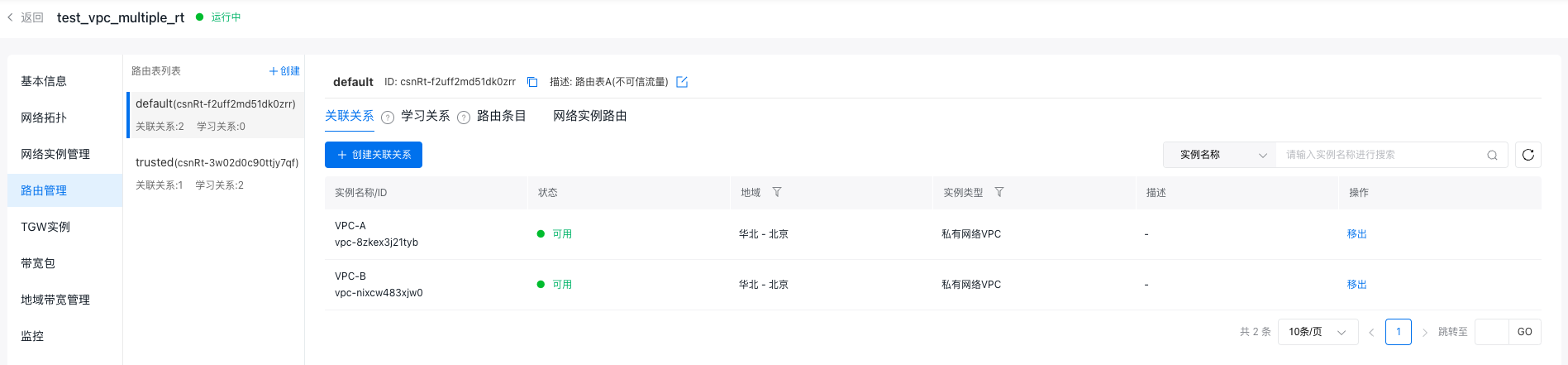
  • In the untrusted route table (default), add affiliations with VPC-A and VPC-B so traffic entering TGW from these VPCs is matched to the untrusted route table.

For specific operations, refer to Method for Creating Affiliation.
9.png

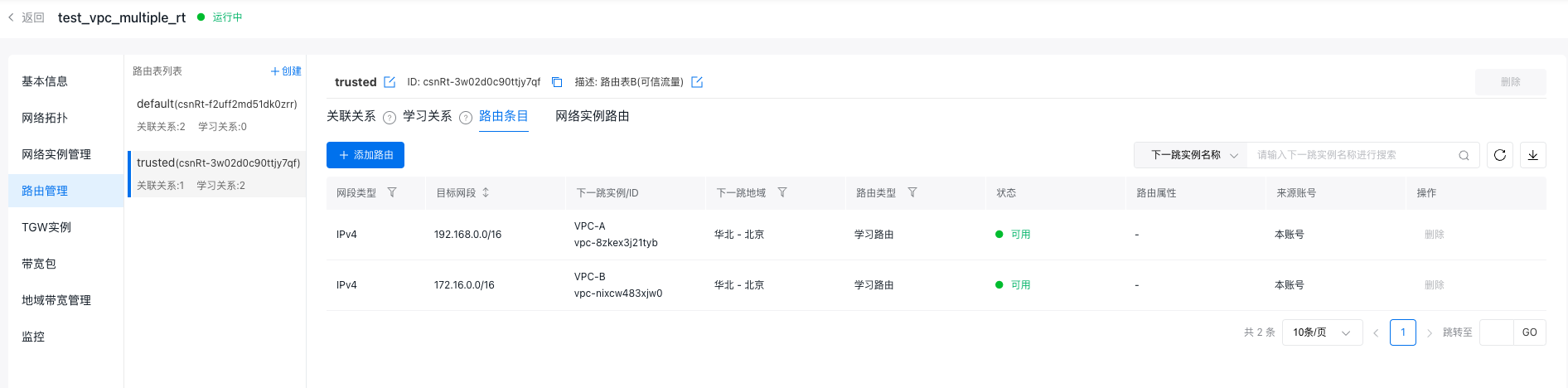
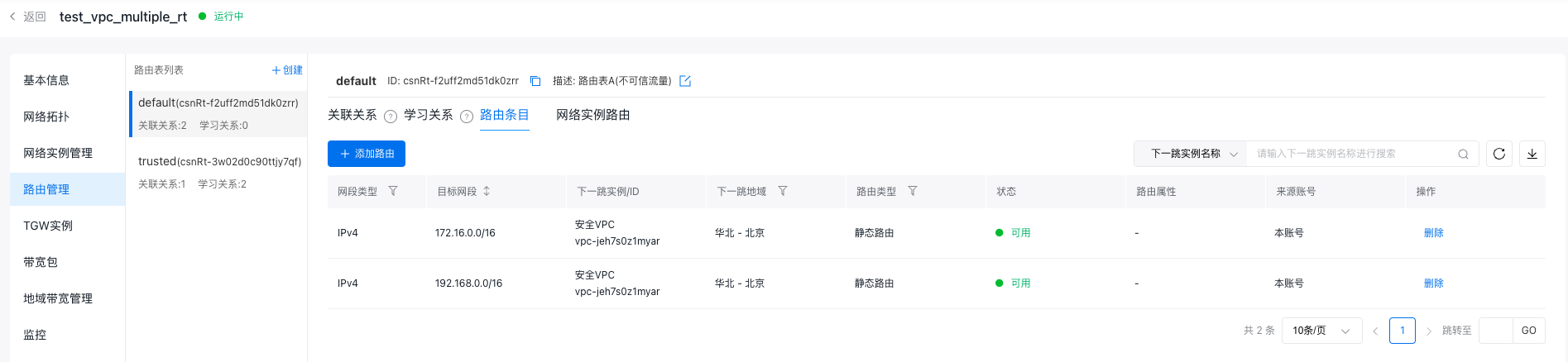
  • In the untrusted route table (default), add two static routes: Set the destination network segments as the network segments of VPC-A and VPC-B, respectively, and the next-hop instance as the security VPC. This ensures that access traffic between VPC-A and VPC-B is forwarded to the security VPC.

Refer to Method for Adding Routes.
10.png

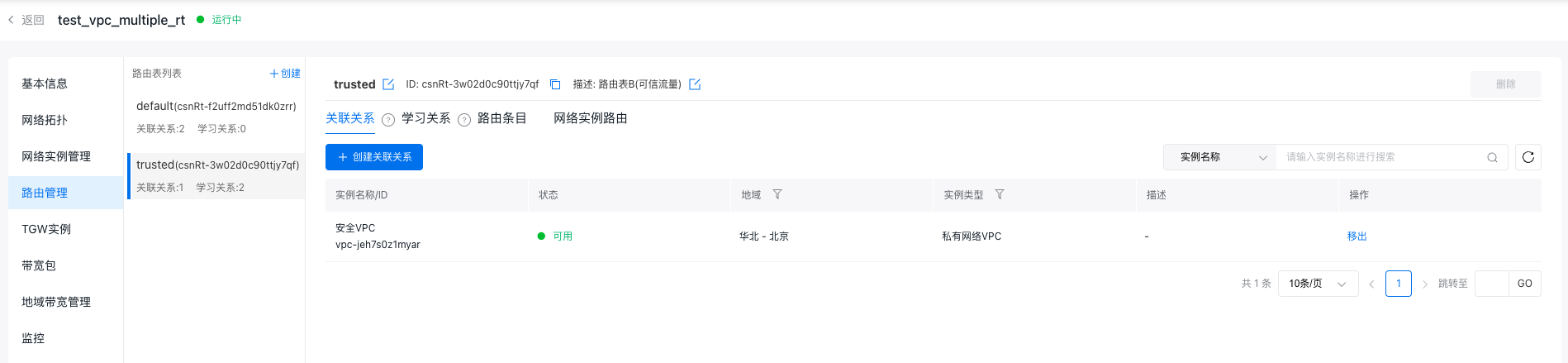
  • In the trusted route table (trusted), create an affiliation with the security VPC, ensuring traffic entering TGW from the security VPC is matched to the trusted route table.
11.png

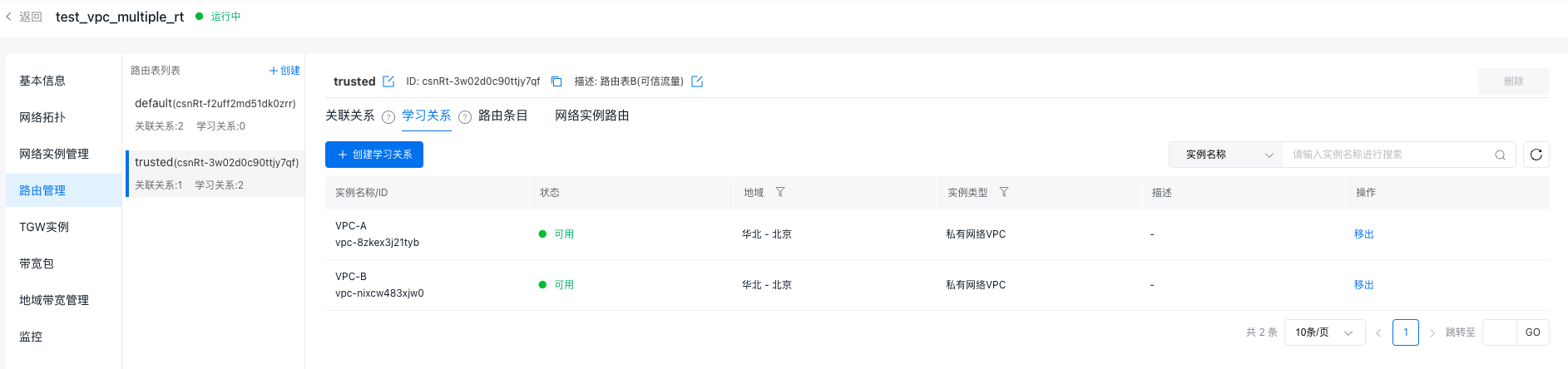
  • In the trusted route table (trusted), establish learning relationships with VPC-A and VPC-B to forward traffic passing through the security VPC to either VPC-A or VPC-B.

Refer to Method for Creating Learning Relationships.
12.png 13.png

  • After configuration, the route table information of the CSN instance is as follows:

Route table name

Route table description

Associate VPC

Route

Destination segment

Next hop

default

Untrusted traffic

VPC-A and VPC-B

192.168.0.0/16

Security VPC

172.16.0.0/16

Security VPC

trusted

Trusted traffic

Security VPC

192.168.0.0/16

VPC-A

172.16.0.0/16

VPC-B

Step III: Configure security VPC route table

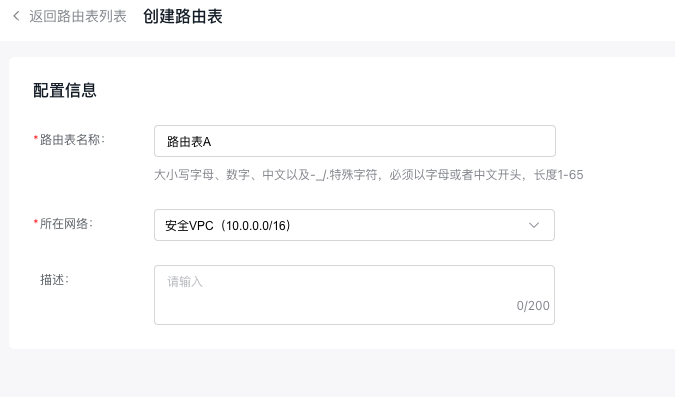
  • Sign in to the Virtual Private Cloud Console, click the Route Table button in the left sidebar to enter the Route Table page; click the Create Route Table button to name the route table Route Table A and select the security VPC for the network.

14.png 15.png

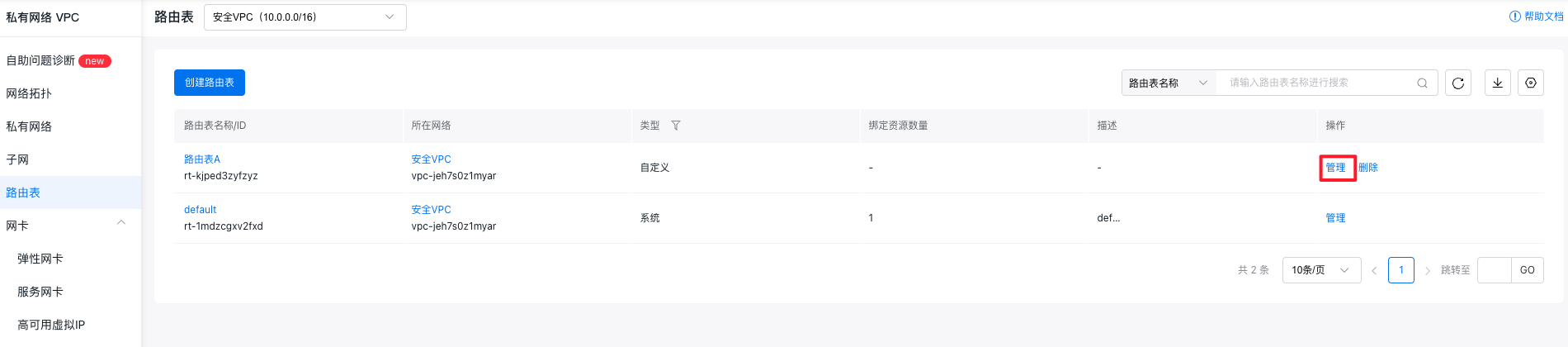
  • Once created, click the Manage button next to Route Table A to access its details page.
16.png

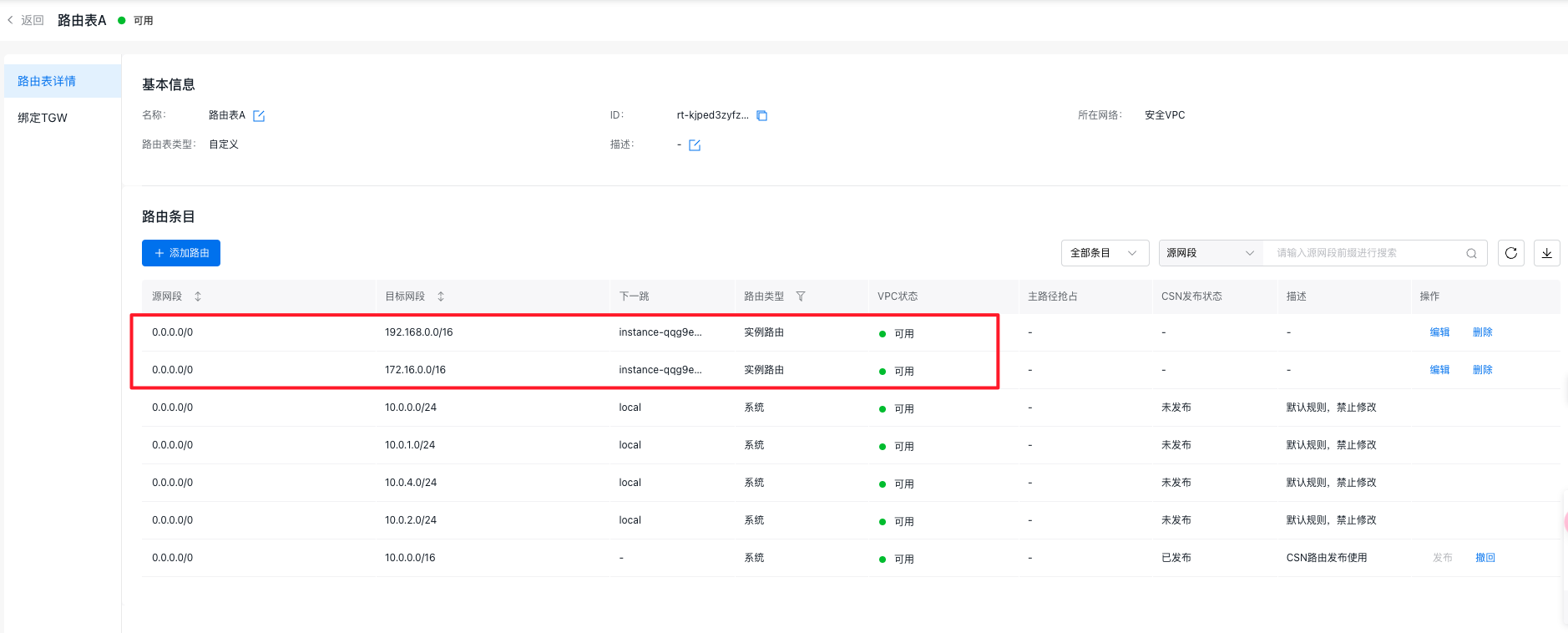
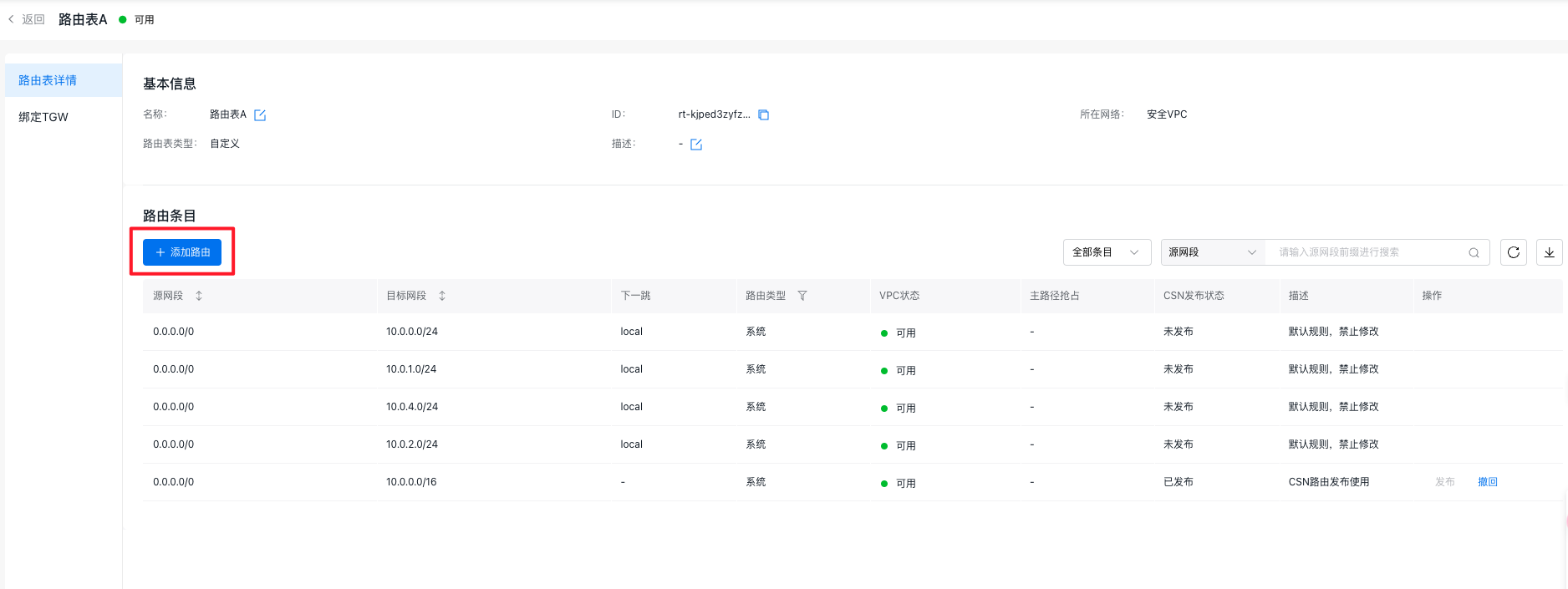
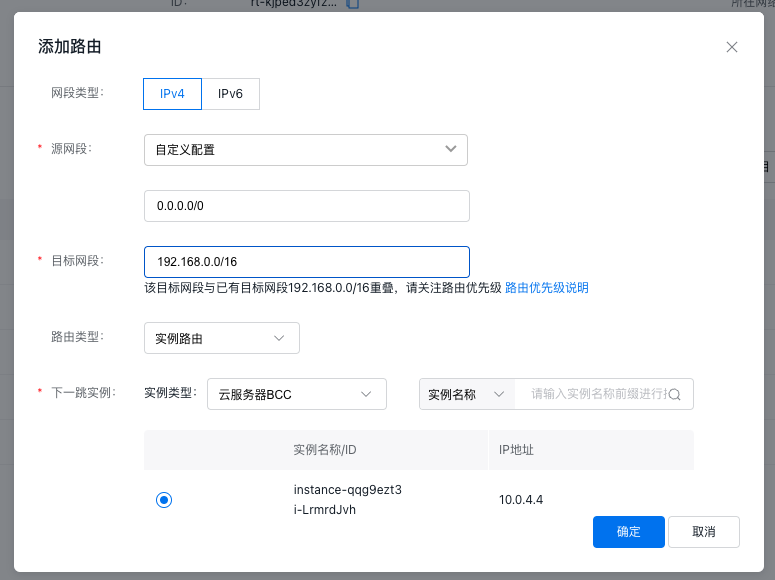
Click the + Add Route button, choose Custom Configuration for the source network segment, and enter 0.0.0.0/0. For the destination network segment, input the network segment of VPC-A. Select Instance Route as the route type and choose the user’s third-party firewall instance as the next-hop instance. Repeat this process to add a route for VPC-B's network segment and any other necessary routes with similar configurations.
17.png 18.png 19.png

Step IV: Bind the TGW to the custom route table of the security VPC

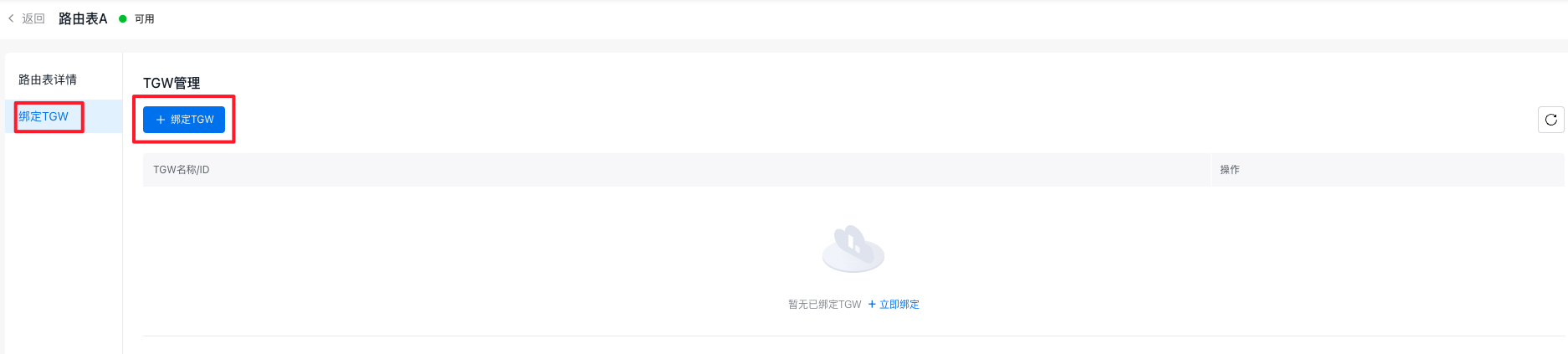
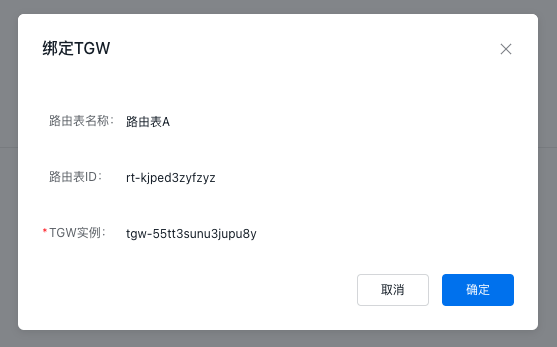
  • On the Route Table A Details page, click the Bind TGW button in the left sidebar. Then, click the + Bind TGW button to attach the created TGW instance, ensuring that traffic from TGW to the security VPC is matched with the custom route table.
20.png 21.png 22.png

  • After configuration, the information of the VPC route table is as follows:

VPC name

Route table name

Bind resources

Route

Source network segment

Destination segment

Next hop

VPC-A

default

All resources in the VPC

0.0.0.0/0

192.168.0.0/16

System

0.0.0.0/0

192.168.0.0/16

TGW instance

0.0.0.0/0

172.16.0.0/12

TGW instance

0.0.0.0/0

10.0.0.0/8

TGW instance

VPC-B

default

All resources in the VPC

0.0.0.0/0

172.16.0.0/16

System

0.0.0.0/0

192.168.0.0/16

TGW instance

0.0.0.0/0

172.16.0.0/12

TGW instance

0.0.0.0/0

10.0.0.0/8

TGW instance

Security VPC

default

All resources in the VPC except TGW

0.0.0.0/0

10.0.0.0/16

System

0.0.0.0/0

192.168.0.0/16

TGW instance

0.0.0.0/0

172.16.0.0/12

TGW instance

0.0.0.0/0

10.0.0.0/8

TGW instance

Route table A

TGW instance (traffic from TGW to VPC matches this route table)

0.0.0.0/0

10.0.0.0/16

System

0.0.0.0/0

192.168.0.0/16

Third-party firewall instance

0.0.0.0/0

172.16.0.0/16

Third-party firewall instance

Connectivity test

  1. Log in to the third-party firewall instance in the security VPC and execute the necessary commands to enable traffic forwarding.
Plain Text
1# Temporarily enable forwarding (invalid after restart)
2echo 1 > /proc/sys/net/ipv4/ip_forward
3# Permanently enable forwarding
4echo 'net.ipv4.ip_forward=1' >> /etc/sysctl.conf
5sudo sysctl -p
  1. Log in to the virtual machine in VPC-A and run the ping command to test its connectivity with the virtual machine in VPC-B. At the same time, on the third-party firewall instance in the security VPC, execute the tcpdump command to verify whether access traffic between VPC-A and VPC-B is passing through the firewall.
Plain Text
1# Test connectivity between VPC-A and VPC-B
2 ping <virtual machine IP address>
3# Test whether traffic passes through the third-party firewall
4 tcpdump host <source virtual machine IP address> and <destination virtual machine IP address>

Related products

Baidu Cloud Compute (BCC), Virtual Private Cloud (VPC), Cloud Smart Network (CSN)

Previous
Using Keepalived in VPC to Achieve High-Availability Architecture
Next
Windows Using HAVIP to Configure Master-Backup Multi-Machine