Typical Practice of Managing Elastic Network Interface Using Terraform

VPC VPC

  • API Reference
    • ACL-Related Interfaces
      • Add ACL rule
      • Delete ACL rules
      • Query ACL rules
      • Query ACL
      • Update ACL rules
    • API function release records
    • API Overview
    • Appendix
    • Common Headers and Error Responses
    • Dedicated Gateway-Related Interfaces
      • Bind physical dedicated line
      • Create dedicated gateway
      • Create health check for dedicated gateway
      • Query dedicated gateway details
      • Query dedicated gateway list
      • Release dedicated gateway
      • Unbind physical dedicated line
      • Update dedicated gateway
    • Elastic Network Interface-Related Interfaces
      • Add intranet IP to elastic network interface in batches
      • Add Secondary IP Address of Elastic Network Interface
      • Create elastic network interface
      • Delete elastic network interface
      • Delete Intranet IP from elastic network interface in batches
      • Delete Secondary IP Address of Elastic Network Interface
      • Elastic network interface binds to EIP
      • Elastic Network Interface Mounts Cloud Product Instance
      • Elastic network interface unbinds from EIP
      • Elastic Network Interface Unmounts Cloud Product Instance
      • Query elastic network interface list
      • Query elastic network interface status
      • Query the specified elastic network interface
      • Update elastic network interface with enterprise security group
      • Update elastic network interface with regular security group
      • Update elastic network interface
    • Gateway Bandwidth Limiting Rule Related Interfaces
      • Create gateway bandwidth limiting rules
      • Delete Gateway Bandwidth Limiting Rule
      • Modify Gateway Bandwidth Limiting Rule
      • View Gateway Bandwidth Limiting Rule
    • General Description
    • High-Availability Virtual IP Address(HAVIP) Related Interfaces
      • Bind EIP to high-availability virtual IP address
      • Bind instance to high-availability virtual IP address
      • Create high-availability virtual IP address
      • Delete high-availability virtual IP address
      • Query high-availability virtual IP address list
      • Query the specified high-availability virtual IP address
      • Unbind EIP from high-availability virtual IP address
      • Unbind instance from high-availability virtual IP address
      • Update high-availability virtual IP address
    • Interface Overview
    • IPv6 Gateway-Related Interfaces
      • Add IPv6 egress-only policy
      • Bandwidth resizing for IPv6 gateway
      • Create IPv6 gateway bandwidth limiting policy
      • Create IPv6 gateway
      • Delete IPv6 gateway bandwidth limiting policy
      • Delete IPv6 Gateway
      • Delete the IPv6 egress-only policy
      • Query IPv6 gateway bandwidth limiting policy list
      • Query IPv6 gateway
      • Query the IPv6 egress-only policy list
      • Update IPv6 gateway bandwidth limiting policy
      • Update the IPv6 gateway release protection switch
    • NAT Gateway-Related Interfaces
      • Bind DNAT EIP to the NAT gateway
      • Bind SNAT EIP to the NAT gateway
      • Create DNAT rules in batches
      • Create DNAT rules
      • Create NAT gateway
      • Create SNAT rules in batches
      • Create SNAT rules
      • Delete DNAT rules
      • Delete SNAT rules
      • NAT Gateway Binds EIP
      • NAT gateway renewal
      • NAT Gateway Resize
      • NAT Gateway Unbinds EIP
      • Query DNAT rules
      • Query NAT gateway details
      • Query NAT gateway list
      • Query SNAT rules
      • Release NAT gateway
      • Unbind DNAT EIP from the NAT gateway
      • Unbind SNAT EIP from the NAT gateway
      • Update DNAT rules
      • Update NAT Delete Protection Switch
      • Update NAT gateway name
      • Update SNAT rules
    • Network Detection Related Interfaces
      • Create Network Probe
      • Delete network probe
      • Query network probe details
      • Query network probe list.
      • Update probe
    • Parameter Template-Related Interfaces
      • Add IP addresses to the IP address family
      • Add IP addresses to the IP address group
      • Create IP address family
      • Create IP address set
      • Delete IP address family
      • Delete IP address from IP address group
      • Delete IP address set
      • Query IP address family list
      • Query IP address group list
      • Query specified IP address family
      • Query specified IP address group
      • Remove IP address group from IP address family
      • Update IP address family
      • Update IP address set
    • Peering Connections-Related Interfaces
      • Application to process the peering connection
      • Bandwidth resizing for peering connections
      • Create peering connections
      • Disable DNS synchronization for the peering connections.
      • Enable DNS synchronization for the peering connections
      • List of peering connections to be queried.
      • Peering connection renewal
      • Release peering connections
      • Update the local API name and remarks for peering connections
      • Update the peering connection release protection switch
      • View details of peering connection
    • Route Table Related Interfaces
      • Create route rules
      • Delete route rules
      • Primary-standby switch
      • Query route table
      • Query routing rules
      • Update route rules
    • Security Group Related Interfaces
      • Enterprise security group
        • Authorize enterprise security group rules
        • Create enterprise security group
        • Delete enterprise security group rules
        • Delete enterprise security group
        • Query enterprise security group list
        • Update enterprise security group rules
      • Regular security group
        • Authorize regular security group rules
        • Create regular security group
        • Delete regular security group rules
        • Delete regular security group
        • Query regular security group list
        • Revoke regular security group rules
        • Update regular security group rules
        • View security group details
    • Service domain
    • Service Network Interface Card (SNIC)-Related Interfaces
      • Create service network interface card
      • Delete service network interface card
      • Query mountable public services
      • Query service network interface card details
      • Query service network interface card list
      • Update regular security group for service network interface card
      • Update service network interface card with enterprise security group
      • Update the service network interface card
    • Subnet-Related Interfaces
      • Create reserved network segment
      • Create subnet
      • Delete reserved network segment
      • Delete subnet
      • Query specified subnet
      • Query subnet list
      • Query the reserved network segment list
      • Update subnet
    • VPC-Related Interfaces
      • Create VPC
      • Delete VPC
      • Open VPC relay
      • Query IP Usage by Products in VPC
      • Query specified VPC
      • Query VPC intranet IP
      • Query VPC list
      • Shut down VPC relay
      • Update VPC
    • VPN-Related Interfaces
      • Bind EIP
      • Create SSL VPN server
      • Create SSL VPN users in batches
      • Create VPN tunnel
      • Create VPN
      • Delete SSL VPN server
      • Delete SSL VPN user
      • Delete VPN tunnel
      • Query SSL-VPN server
      • Query SSL-VPN user
      • Query VPN details
      • Query VPN List
      • Query VPN tunnels
      • Release VPN
      • Unbind EIP
      • Update SSL VPN server
      • Update SSL VPN user
      • Update VPN release protection switch
      • Update VPN tunnel
      • Update VPN
      • VPN gateway renewal
    • High-Availability Virtual IP Address (HAVIP) Related Interfaces
      • Bind EIP to high-availability virtual IP address
      • Bind instance to high-availability virtual IP address
      • Create high-availability virtual IP address
      • Delete high-availability virtual IP address
      • Query high-availability virtual IP address list
      • Query the specified high-availability virtual IP address
      • Unbind EIP from high-availability virtual IP address
      • Unbind instance from high-availability virtual IP address
      • Update high-availability virtual IP address
  • FAQs
    • Common Questions Overview
    • NAT FAQs
    • Route Table FAQs
    • Service Network Interface Card(SNIC) Common Questions
    • VPC FAQs
    • VPN FAQs
    • Service Network Interface Card (SNIC) Common Questions
  • Function Release Records
  • Operation guide
    • Access control
      • ACL
      • Parameter Template
      • Security group
    • Identity and access management
    • Monitor and Operations
      • NAT Gateway Instance Diagnosis
    • Network Connection
      • Dedicated gateway
      • IPv6 gateway
      • Layer 2 Gateway
      • NAT Gateway
        • Private Network NAT(Network Address Translation) Gateway
        • Public Network NAT(Network Address Translation) Gateway
        • Private Network NAT (Network Address Translation) Gateway
        • Public Network NAT (Network Address Translation) Gateway
      • Peering Connections
      • VPN Gateway
        • GRE VPN Gateway
        • IPsec VPN Gateway
        • SSL VPN Gateway
    • Network Diagnostics
      • Flow log
      • Gateway bandwidth limiting
      • Network probe
      • Path analysis
      • Port verification
      • Traffic monitor
    • Network interface card
      • Elastic network interface
      • High-availability virtual IP address (HAVIP)
      • Service network interface card
    • Network topology
    • Route table
    • Subnet
    • Tag Management
    • Using IPv6
    • VPC
  • Product Description
    • Application scenarios
    • Product advantages
    • Product features
    • Product Introduction
    • Related concepts
    • Usage restrictions
  • Product pricing
  • SDK
    • Go-SDK
      • ACL
      • Dedicated gateway
      • Elastic network interface
      • Exception handling
      • High-availability virtual IP address (HAVIP)
      • Initialization
      • Install the SDK Package
      • IPv6Gateway
      • NAT
      • Network probe
      • Overview
      • Peering Connections
      • Route
      • Security group
        • Enterprise security group
        • Regular security group
      • Service network interface card
      • Subnet
      • VPC
      • VPN
    • Java-SDK
      • ACL
      • Dedicated gateway
      • Elastic network interface
      • Enterprise security group
      • High-availability virtual IP address (HAVIP)
      • Install the SDK Package
      • IPv6 gateway
      • NAT
      • Network probe
      • Overview
      • Parameter Template
      • Peering Connections
      • Regular security group
      • Route
      • Service network interface card
      • Subnet
      • Version history
      • vpc
      • VPN
    • PHP-SDK
      • ACL
      • Install the SDK Package
      • NAT
      • Overview
      • Peering Connections
      • Route
      • Security group
      • Subnet
      • Version history
      • vpc
    • Python-SDK
      • ACL
      • Dedicated gateway
      • Elastic network interface
      • Enterprise security group
      • High-availability virtual IP address (HAVIP)
      • Install the SDK Package
      • IPv6Gateway
      • NAT
      • Network probe
      • Overview
      • Peering Connections
      • Route
      • Security group
      • Service network interface card
      • Subnet
      • Version history
      • VPC
      • VPN
  • Service Level Agreement (SLA)
    • IPv6 Gateway Service Level Agreement SLA
    • NAT(Network Address Translation) Gateway Service Level Agreement SLA
    • Peering Connections Service Level Agreement SLA
    • Service Network Interface Card(SNIC) Service Level Agreement SLA
    • VPN Gateway Service Level Agreement SLA
    • NAT (Network Address Translation) Gateway Service Level Agreement SLA
    • Service Network Interface Card (SNIC) Service Level Agreement SLA
  • Typical Practices
    • Configure Custom Service and Use Service Network Interface Card(SNIC) to Provide Service for Other VPCs
    • HAVIP Combined with Keepalived to Achieve Master-Backup Multi-Machine High Availability
    • Layer 2 Gateway Combined with Dedicated Line Access ET to Build Large Layer 2 Network Between IDC and Cloud VPC
    • Network Layer Security Description
    • Peering Connections Typical Practice
    • Security Group Configuration Practice (Advanced Level)
    • Security Group Configuration Practice (Beginner Level)
    • Typical Practice of Managing Elastic Network Interface Using Terraform
    • Typical Practice of Managing IPsec VPN Gateway Using Terraform
    • Using Keepalived in VPC to Achieve High-Availability Architecture
    • VPC Custom Route Table to Achieve Secure Traffic Mutual Access
    • Windows Using HAVIP to Configure Master-Backup Multi-Machine
    • Configure Custom Service and Use Service Network Interface Card (SNIC) to Provide Service for Other VPCs
  • VPC CLI
    • Configure BCE-CLI
    • Install BCE-CLI
    • Route Table Related Operations
    • Subnet Related Operations
    • Using VPC Service via CLI
    • Version Change Records
    • VPC Related Operations
All documents
menu
No results found, please re-enter

VPC VPC

  • API Reference
    • ACL-Related Interfaces
      • Add ACL rule
      • Delete ACL rules
      • Query ACL rules
      • Query ACL
      • Update ACL rules
    • API function release records
    • API Overview
    • Appendix
    • Common Headers and Error Responses
    • Dedicated Gateway-Related Interfaces
      • Bind physical dedicated line
      • Create dedicated gateway
      • Create health check for dedicated gateway
      • Query dedicated gateway details
      • Query dedicated gateway list
      • Release dedicated gateway
      • Unbind physical dedicated line
      • Update dedicated gateway
    • Elastic Network Interface-Related Interfaces
      • Add intranet IP to elastic network interface in batches
      • Add Secondary IP Address of Elastic Network Interface
      • Create elastic network interface
      • Delete elastic network interface
      • Delete Intranet IP from elastic network interface in batches
      • Delete Secondary IP Address of Elastic Network Interface
      • Elastic network interface binds to EIP
      • Elastic Network Interface Mounts Cloud Product Instance
      • Elastic network interface unbinds from EIP
      • Elastic Network Interface Unmounts Cloud Product Instance
      • Query elastic network interface list
      • Query elastic network interface status
      • Query the specified elastic network interface
      • Update elastic network interface with enterprise security group
      • Update elastic network interface with regular security group
      • Update elastic network interface
    • Gateway Bandwidth Limiting Rule Related Interfaces
      • Create gateway bandwidth limiting rules
      • Delete Gateway Bandwidth Limiting Rule
      • Modify Gateway Bandwidth Limiting Rule
      • View Gateway Bandwidth Limiting Rule
    • General Description
    • High-Availability Virtual IP Address(HAVIP) Related Interfaces
      • Bind EIP to high-availability virtual IP address
      • Bind instance to high-availability virtual IP address
      • Create high-availability virtual IP address
      • Delete high-availability virtual IP address
      • Query high-availability virtual IP address list
      • Query the specified high-availability virtual IP address
      • Unbind EIP from high-availability virtual IP address
      • Unbind instance from high-availability virtual IP address
      • Update high-availability virtual IP address
    • Interface Overview
    • IPv6 Gateway-Related Interfaces
      • Add IPv6 egress-only policy
      • Bandwidth resizing for IPv6 gateway
      • Create IPv6 gateway bandwidth limiting policy
      • Create IPv6 gateway
      • Delete IPv6 gateway bandwidth limiting policy
      • Delete IPv6 Gateway
      • Delete the IPv6 egress-only policy
      • Query IPv6 gateway bandwidth limiting policy list
      • Query IPv6 gateway
      • Query the IPv6 egress-only policy list
      • Update IPv6 gateway bandwidth limiting policy
      • Update the IPv6 gateway release protection switch
    • NAT Gateway-Related Interfaces
      • Bind DNAT EIP to the NAT gateway
      • Bind SNAT EIP to the NAT gateway
      • Create DNAT rules in batches
      • Create DNAT rules
      • Create NAT gateway
      • Create SNAT rules in batches
      • Create SNAT rules
      • Delete DNAT rules
      • Delete SNAT rules
      • NAT Gateway Binds EIP
      • NAT gateway renewal
      • NAT Gateway Resize
      • NAT Gateway Unbinds EIP
      • Query DNAT rules
      • Query NAT gateway details
      • Query NAT gateway list
      • Query SNAT rules
      • Release NAT gateway
      • Unbind DNAT EIP from the NAT gateway
      • Unbind SNAT EIP from the NAT gateway
      • Update DNAT rules
      • Update NAT Delete Protection Switch
      • Update NAT gateway name
      • Update SNAT rules
    • Network Detection Related Interfaces
      • Create Network Probe
      • Delete network probe
      • Query network probe details
      • Query network probe list.
      • Update probe
    • Parameter Template-Related Interfaces
      • Add IP addresses to the IP address family
      • Add IP addresses to the IP address group
      • Create IP address family
      • Create IP address set
      • Delete IP address family
      • Delete IP address from IP address group
      • Delete IP address set
      • Query IP address family list
      • Query IP address group list
      • Query specified IP address family
      • Query specified IP address group
      • Remove IP address group from IP address family
      • Update IP address family
      • Update IP address set
    • Peering Connections-Related Interfaces
      • Application to process the peering connection
      • Bandwidth resizing for peering connections
      • Create peering connections
      • Disable DNS synchronization for the peering connections.
      • Enable DNS synchronization for the peering connections
      • List of peering connections to be queried.
      • Peering connection renewal
      • Release peering connections
      • Update the local API name and remarks for peering connections
      • Update the peering connection release protection switch
      • View details of peering connection
    • Route Table Related Interfaces
      • Create route rules
      • Delete route rules
      • Primary-standby switch
      • Query route table
      • Query routing rules
      • Update route rules
    • Security Group Related Interfaces
      • Enterprise security group
        • Authorize enterprise security group rules
        • Create enterprise security group
        • Delete enterprise security group rules
        • Delete enterprise security group
        • Query enterprise security group list
        • Update enterprise security group rules
      • Regular security group
        • Authorize regular security group rules
        • Create regular security group
        • Delete regular security group rules
        • Delete regular security group
        • Query regular security group list
        • Revoke regular security group rules
        • Update regular security group rules
        • View security group details
    • Service domain
    • Service Network Interface Card (SNIC)-Related Interfaces
      • Create service network interface card
      • Delete service network interface card
      • Query mountable public services
      • Query service network interface card details
      • Query service network interface card list
      • Update regular security group for service network interface card
      • Update service network interface card with enterprise security group
      • Update the service network interface card
    • Subnet-Related Interfaces
      • Create reserved network segment
      • Create subnet
      • Delete reserved network segment
      • Delete subnet
      • Query specified subnet
      • Query subnet list
      • Query the reserved network segment list
      • Update subnet
    • VPC-Related Interfaces
      • Create VPC
      • Delete VPC
      • Open VPC relay
      • Query IP Usage by Products in VPC
      • Query specified VPC
      • Query VPC intranet IP
      • Query VPC list
      • Shut down VPC relay
      • Update VPC
    • VPN-Related Interfaces
      • Bind EIP
      • Create SSL VPN server
      • Create SSL VPN users in batches
      • Create VPN tunnel
      • Create VPN
      • Delete SSL VPN server
      • Delete SSL VPN user
      • Delete VPN tunnel
      • Query SSL-VPN server
      • Query SSL-VPN user
      • Query VPN details
      • Query VPN List
      • Query VPN tunnels
      • Release VPN
      • Unbind EIP
      • Update SSL VPN server
      • Update SSL VPN user
      • Update VPN release protection switch
      • Update VPN tunnel
      • Update VPN
      • VPN gateway renewal
    • High-Availability Virtual IP Address (HAVIP) Related Interfaces
      • Bind EIP to high-availability virtual IP address
      • Bind instance to high-availability virtual IP address
      • Create high-availability virtual IP address
      • Delete high-availability virtual IP address
      • Query high-availability virtual IP address list
      • Query the specified high-availability virtual IP address
      • Unbind EIP from high-availability virtual IP address
      • Unbind instance from high-availability virtual IP address
      • Update high-availability virtual IP address
  • FAQs
    • Common Questions Overview
    • NAT FAQs
    • Route Table FAQs
    • Service Network Interface Card(SNIC) Common Questions
    • VPC FAQs
    • VPN FAQs
    • Service Network Interface Card (SNIC) Common Questions
  • Function Release Records
  • Operation guide
    • Access control
      • ACL
      • Parameter Template
      • Security group
    • Identity and access management
    • Monitor and Operations
      • NAT Gateway Instance Diagnosis
    • Network Connection
      • Dedicated gateway
      • IPv6 gateway
      • Layer 2 Gateway
      • NAT Gateway
        • Private Network NAT(Network Address Translation) Gateway
        • Public Network NAT(Network Address Translation) Gateway
        • Private Network NAT (Network Address Translation) Gateway
        • Public Network NAT (Network Address Translation) Gateway
      • Peering Connections
      • VPN Gateway
        • GRE VPN Gateway
        • IPsec VPN Gateway
        • SSL VPN Gateway
    • Network Diagnostics
      • Flow log
      • Gateway bandwidth limiting
      • Network probe
      • Path analysis
      • Port verification
      • Traffic monitor
    • Network interface card
      • Elastic network interface
      • High-availability virtual IP address (HAVIP)
      • Service network interface card
    • Network topology
    • Route table
    • Subnet
    • Tag Management
    • Using IPv6
    • VPC
  • Product Description
    • Application scenarios
    • Product advantages
    • Product features
    • Product Introduction
    • Related concepts
    • Usage restrictions
  • Product pricing
  • SDK
    • Go-SDK
      • ACL
      • Dedicated gateway
      • Elastic network interface
      • Exception handling
      • High-availability virtual IP address (HAVIP)
      • Initialization
      • Install the SDK Package
      • IPv6Gateway
      • NAT
      • Network probe
      • Overview
      • Peering Connections
      • Route
      • Security group
        • Enterprise security group
        • Regular security group
      • Service network interface card
      • Subnet
      • VPC
      • VPN
    • Java-SDK
      • ACL
      • Dedicated gateway
      • Elastic network interface
      • Enterprise security group
      • High-availability virtual IP address (HAVIP)
      • Install the SDK Package
      • IPv6 gateway
      • NAT
      • Network probe
      • Overview
      • Parameter Template
      • Peering Connections
      • Regular security group
      • Route
      • Service network interface card
      • Subnet
      • Version history
      • vpc
      • VPN
    • PHP-SDK
      • ACL
      • Install the SDK Package
      • NAT
      • Overview
      • Peering Connections
      • Route
      • Security group
      • Subnet
      • Version history
      • vpc
    • Python-SDK
      • ACL
      • Dedicated gateway
      • Elastic network interface
      • Enterprise security group
      • High-availability virtual IP address (HAVIP)
      • Install the SDK Package
      • IPv6Gateway
      • NAT
      • Network probe
      • Overview
      • Peering Connections
      • Route
      • Security group
      • Service network interface card
      • Subnet
      • Version history
      • VPC
      • VPN
  • Service Level Agreement (SLA)
    • IPv6 Gateway Service Level Agreement SLA
    • NAT(Network Address Translation) Gateway Service Level Agreement SLA
    • Peering Connections Service Level Agreement SLA
    • Service Network Interface Card(SNIC) Service Level Agreement SLA
    • VPN Gateway Service Level Agreement SLA
    • NAT (Network Address Translation) Gateway Service Level Agreement SLA
    • Service Network Interface Card (SNIC) Service Level Agreement SLA
  • Typical Practices
    • Configure Custom Service and Use Service Network Interface Card(SNIC) to Provide Service for Other VPCs
    • HAVIP Combined with Keepalived to Achieve Master-Backup Multi-Machine High Availability
    • Layer 2 Gateway Combined with Dedicated Line Access ET to Build Large Layer 2 Network Between IDC and Cloud VPC
    • Network Layer Security Description
    • Peering Connections Typical Practice
    • Security Group Configuration Practice (Advanced Level)
    • Security Group Configuration Practice (Beginner Level)
    • Typical Practice of Managing Elastic Network Interface Using Terraform
    • Typical Practice of Managing IPsec VPN Gateway Using Terraform
    • Using Keepalived in VPC to Achieve High-Availability Architecture
    • VPC Custom Route Table to Achieve Secure Traffic Mutual Access
    • Windows Using HAVIP to Configure Master-Backup Multi-Machine
    • Configure Custom Service and Use Service Network Interface Card (SNIC) to Provide Service for Other VPCs
  • VPC CLI
    • Configure BCE-CLI
    • Install BCE-CLI
    • Route Table Related Operations
    • Subnet Related Operations
    • Using VPC Service via CLI
    • Version Change Records
    • VPC Related Operations
  • Document center
  • arrow
  • VPCVPC
  • arrow
  • Typical Practices
  • arrow
  • Typical Practice of Managing Elastic Network Interface Using Terraform
Table of contents on this page
  • Overview
  • Requirement scenarios
  • Before configuration, you should know:
  • Configuration steps
  • 1. Prepare environment
  • 2. Initialize Terraform
  • 3. Create elastic network interface
  • 4. elastic network interface configuration Update
  • 5. Bind elastic network interface to instance
  • 6. Application configuration
  • Testing and verification
  • Resource deletion
  • Related products

Typical Practice of Managing Elastic Network Interface Using Terraform

Updated at:2025-10-16

Overview

Baidu AI Cloud's elastic network interface can be freely migrated among multiple cloud hosts. By binding elastic network interfaces to cloud hosts, a highly available network solution can be implemented. Additionally, multiple intranet IP addresses can be bound to a single elastic network interface, with each intranet IP address capable of being bound to an EIP. After configuring IP addresses, users can apply application policies to route different traffic flows via different source IP addresses from the network interface card, enabling the deployment of a single host with multiple IP addresses.

Using infrastructure automation orchestration tools such as Terraform, enterprises can significantly reduce costs in building infrastructure while enhancing cloud infrastructure developers' capabilities in Infrastructure as Code (IAC). Terraform allows users to quickly create, deploy, and manage elastic network interfaces through code.

Requirement scenarios

  • Deploy high-availability clusters: Elastic network interfaces are critical components in system architecture, designed to meet the high-availability requirements for single instances and multiple network interface cards within a system.
  • Rapid failover: Traffic from a failed instance can be quickly switched to a standby instance by unmounting the elastic network interface from the faulty cloud host and attaching it to another cloud host, enabling disaster recovery for services.
  • Refined network management: Instances can mount multiple elastic network interfaces, which can exist in different subnets and be configured with security groups and ACL security access rules individually. This setup allows for traffic security access controls on each elastic network interface and ensures data isolation between different businesses.

Before configuration, you should know:

  • Each VPC can support up to 500 elastic network interfaces.
  • BCC instances and elastic network interfaces must reside in the same availability zone and VPC. However, they can belong to different subnets and be associated with separate security groups.
  • The bandwidth capacity of a BCC instance is determined by its specifications, and mounting multiple elastic network interfaces on a single instance does not enhance its bandwidth performance.
  • The primary network interface card of a BCC instance is not an elastic network interface and does not appear in the list of elastic network interfaces. It can be configured on the BCC Details page.
  • The number of IPs per network interface card must be between 1 and 40.
  • The number of elastic network interfaces that can be mounted by a cloud host is determined by the smaller value between the host's core count and 8.
  • Count of configurable IPs of network interface cards bound to the cloud host:
Memory Count of IPs
1G 2
(1-8]G 8
(8-32]G 16
(32-64]G 30
Greater than 64G 40

Configuration steps

1. Prepare environment

  • Terraform: A tool for safely and efficiently building, changing and versioning infrastructure. It is driven by configuration files where you define various components, and Terraform completes the creation, modification and management of all components based on these files. Currently, Baidu AI Cloud has integrated with Terraform. You can use Terraform to create and manage various Baidu AI Cloud resources such as ENI, VPC, and BCC. For details, please refer to Terraform BaiduCloud Provider.

2. Initialize Terraform

  1. Sign in to the Terraform official website and download the installation package suitable for your operating system.
  2. Set up the Terraform Baidu Provider information. Refer to the sample code below to create a configuration file, and save it as version.tf in the current directory.
Plain Text
1    terraform {
2      required_providers {
3        baiducloud = {
4          source = "baidubce/baiducloud"
5 version = "1.16.2" #Version note: Elastic network interface is supported starting from version 1.16.2
6        }
7      }
8    }
  1. Run the command terraform init. Terraform will initialize the workspace based on the version.tf file in the current directory.
  2. Edit the Terraform configuration file by creating a new main.tf file. Specify metadata such as VPC, elastic network interface, and security group in the file. Refer to the configuration and steps provided below:

    For more elastic network interface parameter information, please refer to the official Baidu Provider Documentation

3. Create elastic network interface

Add the following code to the main.tf file. Execution of “terraform apply” will then create the elastic network interface

Plain Text
1resource "baiducloud_eni" "eni" {
2# Elastic network interface name
3  name      = "terraform-eni"
4# ID of the subnet to which the elastic network interface belongs
5  subnet_id = baiducloud_subnet.subnet.id
6# Elastic network interface description
7  description        = "terraform test"
8# Security group for elastic network interface
9  security_group_ids = [
10    baiducloud_security_group.sg.id
11  ]
12# Elastic network interface private IP configuration
13  private_ip {
14# Whether it is primary IP address
15    primary            = true
16# Intranet IP
17    private_ip_address = "172.16.0.10"
18# Public IP (Optional)
19    public_ip_address  = baiducloud_eip.eip2.eip
20  }
21  private_ip {
22    primary            = false
23    private_ip_address = "172.16.0.11"
24    public_ip_address  = baiducloud_eip.eip1.eip
25  }
26  private_ip {
27    primary            = false
28    private_ip_address = "172.16.0.13"
29  }
30}

Note: Users can use Terraform to create resources like EIP, VPC, and subnet required for elastic network interfaces, then reference these resources in the necessary fields during elastic network interface creation. Alternatively, users can directly input the IDs of the dependent resources.

The configuration information of EIP, VPC, subnet, and security group relied upon by the elastic network interface in this example is follows:

Plain Text
1# Create VPC
2resource "baiducloud_vpc" "vpc" {
3  name = "terraform_vpc"
4  cidr = "172.16.0.0/20"
5}
6# Create subnet
7resource "baiducloud_subnet" "subnet" {
8  name        = "terraform_subnet"
9  zone_name   = "cn-bj-d"
10  cidr        = "172.16.0.0/24"
11  vpc_id      = baiducloud_vpc.vpc.id
12  description = "terraform test subnet"
13}
14# Create security group
15resource "baiducloud_security_group" "sg" {
16  name        = "terraform-sg"
17  description = "security group created by terraform"
18  vpc_id      = baiducloud_vpc.vpc.id
19}
20# Create two EIPs
21resource "baiducloud_eip" "eip1" {
22  bandwidth_in_mbps = 1
23  billing_method    = "ByBandwidth"
24  payment_timing    = "Postpaid"
25}
26resource "baiducloud_eip" "eip2" {
27  bandwidth_in_mbps = 1
28  billing_method    = "ByBandwidth"
29  payment_timing    = "Postpaid"
30}

4. elastic network interface configuration Update

The following fields support updates: simply modify the field values and apply the change plan to complete the update

  • name
  • description
  • security_group_ids

    Note:

    • Ensure there is at least one security group ID
  • private_ip

    Note:

    • A private_ip is a code block. Declaring it in the elastic network interface's configuration completes the creation of the intranet IP
    • Primary IP address cannot be deleted
    • Only secondary IP address can be deleted
    • Newly added intranet IPs are all secondary IP addresses
    • To delete an intranet IP, simply remove the corresponding intranet IP code block in the elastic network interface's configuration
    • To bind an EIP, simply configure it in the intranet IP code block

5. Bind elastic network interface to instance

  • Note:
  1. A cloud host can have multiple elastic network interfaces attached, but only one primary network interface card.
  2. An elastic network interface can be attached to only one cloud host.
  3. Elastic network interfaces can only be attached to cloud hosts that are in running or stopped states.
  4. The elastic network interface and its attached cloud host must belong to the same virtual private cloud, and their respective subnets must be in the same availability zone.
  • Example code is as follows:

    Note: If the instance is not fully initialized, binding an elastic network interface may fail

Plain Text
1# Create a 1c4g instance
2resource "baiducloud_instance" "server1" {
3  availability_zone = "cn-bj-d"
4  instance_spec     = "bcc.gr1.c1m4"
5  image_id          = data.baiducloud_images.images.images.0.id
6  billing           = {
7    payment_timing = "Postpaid"
8  }
9  admin_pass      = "Eni12345"
10  subnet_id       = baiducloud_subnet.subnet.id
11  security_groups = [
12    baiducloud_security_group.sg.id
13  ]
14  #  action = "stop"
15}
16# Wait 60 seconds for the instance to fully start
17resource "time_sleep" "wait_60_seconds" {
18  depends_on      = [baiducloud_instance.server1, baiducloud_eni.eni]
19  create_duration = "60s"
20}
21# Instance Binds elastic network interface
22resource "baiducloud_eni_attachment" "default" {
23  depends_on  = [time_sleep.wait_30_seconds]
24  eni_id      = baiducloud_eni.eni.id
25  instance_id = baiducloud_instance.server1.id
26}

Note:

  • After mounting the cloud host, secondary IP addresses must be manually configured. Refer to the BCC documentation - Configure Elastic Network Interface.
  • The primary IP address of an elastic network interface cannot be released, but secondary IP addresses can be released.

6. Application configuration

  • Execute the following code to view the resource change plan
Shell
1$ terraform plan
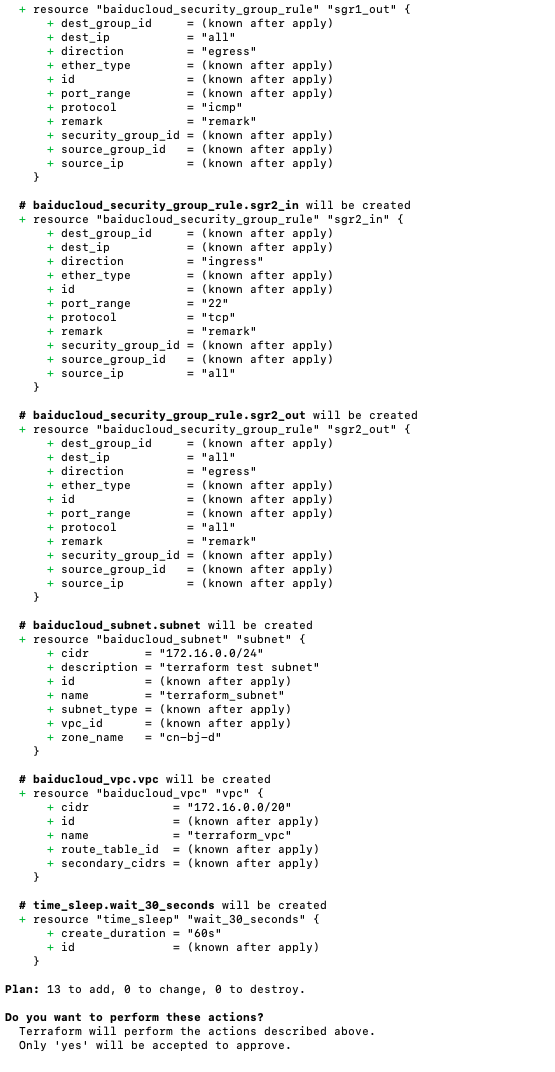
  • Execute the following code to apply the resource change plan and complete resource creation or update (as shown in the figure)
Shell
1$ terraform apply

image.png

  • After all change plans are completed, the results will be displayed

image.png

Testing and verification

    1. Verify if all the corresponding resources have been successfully created in the product API of the Baidu AI Cloud Console.
    1. After completing the above configuration steps, test whether the instance can be accessed using two different Public IPs.

      Note: The example code does not include security group rules. If you need to test connectivity for a specific port, create security group rules as required

If the instance can be accessed through different Public IPs, it indicates that the elastic network interface has been successfully configured and bound.

Resource deletion

  • To unbind an elastic network interface from the instance, simply delete the baiducloud_eni_attachment resource, as shown in the following code:
Shell
1 # Specify the resource to delete using the -target parameter
2 terraform destroy -target baiducloud_eni_attachment.default
  • Execute the following command to destroy all resources defined in the current main.tf
Shell
1 terraform destroy

Related products

Elastic network interface (ENI), Virtual Private Cloud (VPC), Baidu Cloud Compute (BCC), EIP

Previous
Security Group Configuration Practice (Beginner Level)
Next
Typical Practice of Managing IPsec VPN Gateway Using Terraform