

IPv6 gateway
The IPv6 gateway acts as the primary egress for a virtual private cloud to connect to the public network using IPv6. Users can purchase IPv6 public bandwidth on demand and dynamically configure IPv6 Internet egress and ingress bandwidth by setting egress-only policies and applying IP rate limits.
Before creation, users need to understand:
- Only one IPv6 gateway can be created within a single VPC.
- The IPv6 gateway's IP rate-limiting policy supports a maximum of 50 records.
- The VPC where the IPv6 gateway is created must have an assigned IPv6 CIDR.
- The gateway bandwidth limit applies to outgoing traffic, with a guaranteed 10 Mbps for incoming traffic; any excess follows a 1:1 ratio.
- Instances within the same VPC (e.g., Baidu Cloud Compute servers, load balancers) cannot simultaneously use both elastic public IPv6 and IPv6 gateway. If the elastic public IPv6 gateway is bound, an IPv6 gateway cannot be created in this VPC.
Create IPv6 gateway
- From the left navigation bar, choose Network Connection - IPv6 Gateway, and click Create IPv6 Gateway.
- In the left navigation bar, select IPv6 Gateway and click Create Gateway.
- On the Create Gateway page, select the charge type, required public network bandwidth, and other details.
- The creation process completes once the payment is successfully processed step by step.
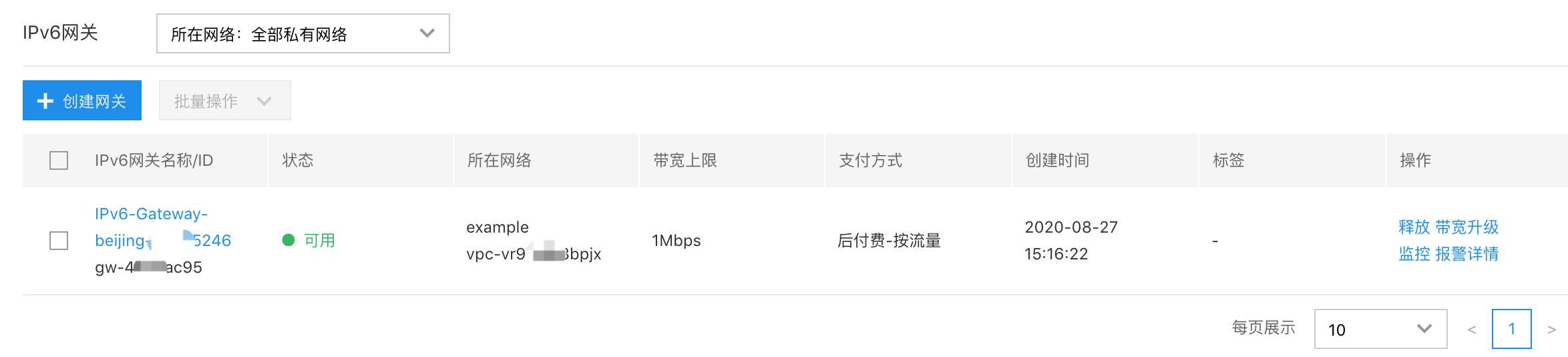
Modify public network bandwidth upper limit
- Log in to Baidu AI Cloud, navigate to Virtual Private Cloud.
- From the left navigation menu, choose Network Connection - IPv6 Gateway, then select Public Network Bandwidth Scaling Up under the operations section.
- Choose the desired bandwidth size (resizing is supported), and complete the payment.
Add egress-only policy
- Log in to Baidu AI Cloud, navigate to Virtual Private Cloud.
- In the left navigation menu, go to Network Connection - IPv6 Gateway, click the Gateway Name to access the gateway details page.
- In the egress-only policy section, click Add Policy.
- Enter the specified CIDR in the add policy dialog box to finalize the addition.
Notes When adding multiple egress-only policies, CIDR blocks must not overlap.
Add IP rate limiting policy
- Log in to Baidu AI Cloud, navigate to Virtual Private Cloud.
- In the left navigation menu, go to Network Connection - IPv6 Gateway, click the Gateway Name to access the gateway details page.
- Within the IP rate-limiting section, click Add Rate Limiting Policy.
- In the add rate-limiting policy dialog box, provide the specified IP, egress bandwidth, and ingress bandwidth to complete the setup.
Notes The bandwidth limit for IP rate limiting cannot exceed the total egress bandwidth of the public IPv6 network.
Configure IPv6 gateway route
Once the IPv6 gateway is successfully created, users need to set up the route table to enable communication between the VPC's internet traffic and the public network. The steps for configuring the route table in Baidu AI Cloud are as follows:
- In the navigation bar, select Route Table, click the Route Table name to access the details page, and then click Add Route.
- Enter the route table associated with the on-premises network that will be accessed.
- Source network segment
- Enter the destination network segment
- Select IPv6 gateway for the route type.
- Select the created IPv6 gateway for the next-hop instance.
- Click OK to finalize the route table configuration.