HAVIP Combined with Keepalived to Achieve Master-Backup Multi-Machine High Availability

VPC VPC

  • API Reference
    • ACL-Related Interfaces
      • Add ACL rule
      • Delete ACL rules
      • Query ACL rules
      • Query ACL
      • Update ACL rules
    • API function release records
    • API Overview
    • Appendix
    • Common Headers and Error Responses
    • Dedicated Gateway-Related Interfaces
      • Bind physical dedicated line
      • Create dedicated gateway
      • Create health check for dedicated gateway
      • Query dedicated gateway details
      • Query dedicated gateway list
      • Release dedicated gateway
      • Unbind physical dedicated line
      • Update dedicated gateway
    • Elastic Network Interface-Related Interfaces
      • Add intranet IP to elastic network interface in batches
      • Add Secondary IP Address of Elastic Network Interface
      • Create elastic network interface
      • Delete elastic network interface
      • Delete Intranet IP from elastic network interface in batches
      • Delete Secondary IP Address of Elastic Network Interface
      • Elastic network interface binds to EIP
      • Elastic Network Interface Mounts Cloud Product Instance
      • Elastic network interface unbinds from EIP
      • Elastic Network Interface Unmounts Cloud Product Instance
      • Query elastic network interface list
      • Query elastic network interface status
      • Query the specified elastic network interface
      • Update elastic network interface with enterprise security group
      • Update elastic network interface with regular security group
      • Update elastic network interface
    • Gateway Bandwidth Limiting Rule Related Interfaces
      • Create gateway bandwidth limiting rules
      • Delete Gateway Bandwidth Limiting Rule
      • Modify Gateway Bandwidth Limiting Rule
      • View Gateway Bandwidth Limiting Rule
    • General Description
    • High-Availability Virtual IP Address(HAVIP) Related Interfaces
      • Bind EIP to high-availability virtual IP address
      • Bind instance to high-availability virtual IP address
      • Create high-availability virtual IP address
      • Delete high-availability virtual IP address
      • Query high-availability virtual IP address list
      • Query the specified high-availability virtual IP address
      • Unbind EIP from high-availability virtual IP address
      • Unbind instance from high-availability virtual IP address
      • Update high-availability virtual IP address
    • Interface Overview
    • IPv6 Gateway-Related Interfaces
      • Add IPv6 egress-only policy
      • Bandwidth resizing for IPv6 gateway
      • Create IPv6 gateway bandwidth limiting policy
      • Create IPv6 gateway
      • Delete IPv6 gateway bandwidth limiting policy
      • Delete IPv6 Gateway
      • Delete the IPv6 egress-only policy
      • Query IPv6 gateway bandwidth limiting policy list
      • Query IPv6 gateway
      • Query the IPv6 egress-only policy list
      • Update IPv6 gateway bandwidth limiting policy
      • Update the IPv6 gateway release protection switch
    • NAT Gateway-Related Interfaces
      • Bind DNAT EIP to the NAT gateway
      • Bind SNAT EIP to the NAT gateway
      • Create DNAT rules in batches
      • Create DNAT rules
      • Create NAT gateway
      • Create SNAT rules in batches
      • Create SNAT rules
      • Delete DNAT rules
      • Delete SNAT rules
      • NAT Gateway Binds EIP
      • NAT gateway renewal
      • NAT Gateway Resize
      • NAT Gateway Unbinds EIP
      • Query DNAT rules
      • Query NAT gateway details
      • Query NAT gateway list
      • Query SNAT rules
      • Release NAT gateway
      • Unbind DNAT EIP from the NAT gateway
      • Unbind SNAT EIP from the NAT gateway
      • Update DNAT rules
      • Update NAT Delete Protection Switch
      • Update NAT gateway name
      • Update SNAT rules
    • Network Detection Related Interfaces
      • Create Network Probe
      • Delete network probe
      • Query network probe details
      • Query network probe list.
      • Update probe
    • Parameter Template-Related Interfaces
      • Add IP addresses to the IP address family
      • Add IP addresses to the IP address group
      • Create IP address family
      • Create IP address set
      • Delete IP address family
      • Delete IP address from IP address group
      • Delete IP address set
      • Query IP address family list
      • Query IP address group list
      • Query specified IP address family
      • Query specified IP address group
      • Remove IP address group from IP address family
      • Update IP address family
      • Update IP address set
    • Peering Connections-Related Interfaces
      • Application to process the peering connection
      • Bandwidth resizing for peering connections
      • Create peering connections
      • Disable DNS synchronization for the peering connections.
      • Enable DNS synchronization for the peering connections
      • List of peering connections to be queried.
      • Peering connection renewal
      • Release peering connections
      • Update the local API name and remarks for peering connections
      • Update the peering connection release protection switch
      • View details of peering connection
    • Route Table Related Interfaces
      • Create route rules
      • Delete route rules
      • Primary-standby switch
      • Query route table
      • Query routing rules
      • Update route rules
    • Security Group Related Interfaces
      • Enterprise security group
        • Authorize enterprise security group rules
        • Create enterprise security group
        • Delete enterprise security group rules
        • Delete enterprise security group
        • Query enterprise security group list
        • Update enterprise security group rules
      • Regular security group
        • Authorize regular security group rules
        • Create regular security group
        • Delete regular security group rules
        • Delete regular security group
        • Query regular security group list
        • Revoke regular security group rules
        • Update regular security group rules
        • View security group details
    • Service domain
    • Service Network Interface Card (SNIC)-Related Interfaces
      • Create service network interface card
      • Delete service network interface card
      • Query mountable public services
      • Query service network interface card details
      • Query service network interface card list
      • Update regular security group for service network interface card
      • Update service network interface card with enterprise security group
      • Update the service network interface card
    • Subnet-Related Interfaces
      • Create reserved network segment
      • Create subnet
      • Delete reserved network segment
      • Delete subnet
      • Query specified subnet
      • Query subnet list
      • Query the reserved network segment list
      • Update subnet
    • VPC-Related Interfaces
      • Create VPC
      • Delete VPC
      • Open VPC relay
      • Query IP Usage by Products in VPC
      • Query specified VPC
      • Query VPC intranet IP
      • Query VPC list
      • Shut down VPC relay
      • Update VPC
    • VPN-Related Interfaces
      • Bind EIP
      • Create SSL VPN server
      • Create SSL VPN users in batches
      • Create VPN tunnel
      • Create VPN
      • Delete SSL VPN server
      • Delete SSL VPN user
      • Delete VPN tunnel
      • Query SSL-VPN server
      • Query SSL-VPN user
      • Query VPN details
      • Query VPN List
      • Query VPN tunnels
      • Release VPN
      • Unbind EIP
      • Update SSL VPN server
      • Update SSL VPN user
      • Update VPN release protection switch
      • Update VPN tunnel
      • Update VPN
      • VPN gateway renewal
    • High-Availability Virtual IP Address (HAVIP) Related Interfaces
      • Bind EIP to high-availability virtual IP address
      • Bind instance to high-availability virtual IP address
      • Create high-availability virtual IP address
      • Delete high-availability virtual IP address
      • Query high-availability virtual IP address list
      • Query the specified high-availability virtual IP address
      • Unbind EIP from high-availability virtual IP address
      • Unbind instance from high-availability virtual IP address
      • Update high-availability virtual IP address
  • FAQs
    • Common Questions Overview
    • NAT FAQs
    • Route Table FAQs
    • Service Network Interface Card(SNIC) Common Questions
    • VPC FAQs
    • VPN FAQs
    • Service Network Interface Card (SNIC) Common Questions
  • Function Release Records
  • Operation guide
    • Access control
      • ACL
      • Parameter Template
      • Security group
    • Identity and access management
    • Monitor and Operations
      • NAT Gateway Instance Diagnosis
    • Network Connection
      • Dedicated gateway
      • IPv6 gateway
      • Layer 2 Gateway
      • NAT Gateway
        • Private Network NAT(Network Address Translation) Gateway
        • Public Network NAT(Network Address Translation) Gateway
        • Private Network NAT (Network Address Translation) Gateway
        • Public Network NAT (Network Address Translation) Gateway
      • Peering Connections
      • VPN Gateway
        • GRE VPN Gateway
        • IPsec VPN Gateway
        • SSL VPN Gateway
    • Network Diagnostics
      • Flow log
      • Gateway bandwidth limiting
      • Network probe
      • Path analysis
      • Port verification
      • Traffic monitor
    • Network interface card
      • Elastic network interface
      • High-availability virtual IP address (HAVIP)
      • Service network interface card
    • Network topology
    • Route table
    • Subnet
    • Tag Management
    • Using IPv6
    • VPC
  • Product Description
    • Application scenarios
    • Product advantages
    • Product features
    • Product Introduction
    • Related concepts
    • Usage restrictions
  • Product pricing
  • SDK
    • Go-SDK
      • ACL
      • Dedicated gateway
      • Elastic network interface
      • Exception handling
      • High-availability virtual IP address (HAVIP)
      • Initialization
      • Install the SDK Package
      • IPv6Gateway
      • NAT
      • Network probe
      • Overview
      • Peering Connections
      • Route
      • Security group
        • Enterprise security group
        • Regular security group
      • Service network interface card
      • Subnet
      • VPC
      • VPN
    • Java-SDK
      • ACL
      • Dedicated gateway
      • Elastic network interface
      • Enterprise security group
      • High-availability virtual IP address (HAVIP)
      • Install the SDK Package
      • IPv6 gateway
      • NAT
      • Network probe
      • Overview
      • Parameter Template
      • Peering Connections
      • Regular security group
      • Route
      • Service network interface card
      • Subnet
      • Version history
      • vpc
      • VPN
    • PHP-SDK
      • ACL
      • Install the SDK Package
      • NAT
      • Overview
      • Peering Connections
      • Route
      • Security group
      • Subnet
      • Version history
      • vpc
    • Python-SDK
      • ACL
      • Dedicated gateway
      • Elastic network interface
      • Enterprise security group
      • High-availability virtual IP address (HAVIP)
      • Install the SDK Package
      • IPv6Gateway
      • NAT
      • Network probe
      • Overview
      • Peering Connections
      • Route
      • Security group
      • Service network interface card
      • Subnet
      • Version history
      • VPC
      • VPN
  • Service Level Agreement (SLA)
    • IPv6 Gateway Service Level Agreement SLA
    • NAT(Network Address Translation) Gateway Service Level Agreement SLA
    • Peering Connections Service Level Agreement SLA
    • Service Network Interface Card(SNIC) Service Level Agreement SLA
    • VPN Gateway Service Level Agreement SLA
    • NAT (Network Address Translation) Gateway Service Level Agreement SLA
    • Service Network Interface Card (SNIC) Service Level Agreement SLA
  • Typical Practices
    • Configure Custom Service and Use Service Network Interface Card(SNIC) to Provide Service for Other VPCs
    • HAVIP Combined with Keepalived to Achieve Master-Backup Multi-Machine High Availability
    • Layer 2 Gateway Combined with Dedicated Line Access ET to Build Large Layer 2 Network Between IDC and Cloud VPC
    • Network Layer Security Description
    • Peering Connections Typical Practice
    • Security Group Configuration Practice (Advanced Level)
    • Security Group Configuration Practice (Beginner Level)
    • Typical Practice of Managing Elastic Network Interface Using Terraform
    • Typical Practice of Managing IPsec VPN Gateway Using Terraform
    • Using Keepalived in VPC to Achieve High-Availability Architecture
    • VPC Custom Route Table to Achieve Secure Traffic Mutual Access
    • Windows Using HAVIP to Configure Master-Backup Multi-Machine
    • Configure Custom Service and Use Service Network Interface Card (SNIC) to Provide Service for Other VPCs
  • VPC CLI
    • Configure BCE-CLI
    • Install BCE-CLI
    • Route Table Related Operations
    • Subnet Related Operations
    • Using VPC Service via CLI
    • Version Change Records
    • VPC Related Operations
All documents
menu
No results found, please re-enter

VPC VPC

  • API Reference
    • ACL-Related Interfaces
      • Add ACL rule
      • Delete ACL rules
      • Query ACL rules
      • Query ACL
      • Update ACL rules
    • API function release records
    • API Overview
    • Appendix
    • Common Headers and Error Responses
    • Dedicated Gateway-Related Interfaces
      • Bind physical dedicated line
      • Create dedicated gateway
      • Create health check for dedicated gateway
      • Query dedicated gateway details
      • Query dedicated gateway list
      • Release dedicated gateway
      • Unbind physical dedicated line
      • Update dedicated gateway
    • Elastic Network Interface-Related Interfaces
      • Add intranet IP to elastic network interface in batches
      • Add Secondary IP Address of Elastic Network Interface
      • Create elastic network interface
      • Delete elastic network interface
      • Delete Intranet IP from elastic network interface in batches
      • Delete Secondary IP Address of Elastic Network Interface
      • Elastic network interface binds to EIP
      • Elastic Network Interface Mounts Cloud Product Instance
      • Elastic network interface unbinds from EIP
      • Elastic Network Interface Unmounts Cloud Product Instance
      • Query elastic network interface list
      • Query elastic network interface status
      • Query the specified elastic network interface
      • Update elastic network interface with enterprise security group
      • Update elastic network interface with regular security group
      • Update elastic network interface
    • Gateway Bandwidth Limiting Rule Related Interfaces
      • Create gateway bandwidth limiting rules
      • Delete Gateway Bandwidth Limiting Rule
      • Modify Gateway Bandwidth Limiting Rule
      • View Gateway Bandwidth Limiting Rule
    • General Description
    • High-Availability Virtual IP Address(HAVIP) Related Interfaces
      • Bind EIP to high-availability virtual IP address
      • Bind instance to high-availability virtual IP address
      • Create high-availability virtual IP address
      • Delete high-availability virtual IP address
      • Query high-availability virtual IP address list
      • Query the specified high-availability virtual IP address
      • Unbind EIP from high-availability virtual IP address
      • Unbind instance from high-availability virtual IP address
      • Update high-availability virtual IP address
    • Interface Overview
    • IPv6 Gateway-Related Interfaces
      • Add IPv6 egress-only policy
      • Bandwidth resizing for IPv6 gateway
      • Create IPv6 gateway bandwidth limiting policy
      • Create IPv6 gateway
      • Delete IPv6 gateway bandwidth limiting policy
      • Delete IPv6 Gateway
      • Delete the IPv6 egress-only policy
      • Query IPv6 gateway bandwidth limiting policy list
      • Query IPv6 gateway
      • Query the IPv6 egress-only policy list
      • Update IPv6 gateway bandwidth limiting policy
      • Update the IPv6 gateway release protection switch
    • NAT Gateway-Related Interfaces
      • Bind DNAT EIP to the NAT gateway
      • Bind SNAT EIP to the NAT gateway
      • Create DNAT rules in batches
      • Create DNAT rules
      • Create NAT gateway
      • Create SNAT rules in batches
      • Create SNAT rules
      • Delete DNAT rules
      • Delete SNAT rules
      • NAT Gateway Binds EIP
      • NAT gateway renewal
      • NAT Gateway Resize
      • NAT Gateway Unbinds EIP
      • Query DNAT rules
      • Query NAT gateway details
      • Query NAT gateway list
      • Query SNAT rules
      • Release NAT gateway
      • Unbind DNAT EIP from the NAT gateway
      • Unbind SNAT EIP from the NAT gateway
      • Update DNAT rules
      • Update NAT Delete Protection Switch
      • Update NAT gateway name
      • Update SNAT rules
    • Network Detection Related Interfaces
      • Create Network Probe
      • Delete network probe
      • Query network probe details
      • Query network probe list.
      • Update probe
    • Parameter Template-Related Interfaces
      • Add IP addresses to the IP address family
      • Add IP addresses to the IP address group
      • Create IP address family
      • Create IP address set
      • Delete IP address family
      • Delete IP address from IP address group
      • Delete IP address set
      • Query IP address family list
      • Query IP address group list
      • Query specified IP address family
      • Query specified IP address group
      • Remove IP address group from IP address family
      • Update IP address family
      • Update IP address set
    • Peering Connections-Related Interfaces
      • Application to process the peering connection
      • Bandwidth resizing for peering connections
      • Create peering connections
      • Disable DNS synchronization for the peering connections.
      • Enable DNS synchronization for the peering connections
      • List of peering connections to be queried.
      • Peering connection renewal
      • Release peering connections
      • Update the local API name and remarks for peering connections
      • Update the peering connection release protection switch
      • View details of peering connection
    • Route Table Related Interfaces
      • Create route rules
      • Delete route rules
      • Primary-standby switch
      • Query route table
      • Query routing rules
      • Update route rules
    • Security Group Related Interfaces
      • Enterprise security group
        • Authorize enterprise security group rules
        • Create enterprise security group
        • Delete enterprise security group rules
        • Delete enterprise security group
        • Query enterprise security group list
        • Update enterprise security group rules
      • Regular security group
        • Authorize regular security group rules
        • Create regular security group
        • Delete regular security group rules
        • Delete regular security group
        • Query regular security group list
        • Revoke regular security group rules
        • Update regular security group rules
        • View security group details
    • Service domain
    • Service Network Interface Card (SNIC)-Related Interfaces
      • Create service network interface card
      • Delete service network interface card
      • Query mountable public services
      • Query service network interface card details
      • Query service network interface card list
      • Update regular security group for service network interface card
      • Update service network interface card with enterprise security group
      • Update the service network interface card
    • Subnet-Related Interfaces
      • Create reserved network segment
      • Create subnet
      • Delete reserved network segment
      • Delete subnet
      • Query specified subnet
      • Query subnet list
      • Query the reserved network segment list
      • Update subnet
    • VPC-Related Interfaces
      • Create VPC
      • Delete VPC
      • Open VPC relay
      • Query IP Usage by Products in VPC
      • Query specified VPC
      • Query VPC intranet IP
      • Query VPC list
      • Shut down VPC relay
      • Update VPC
    • VPN-Related Interfaces
      • Bind EIP
      • Create SSL VPN server
      • Create SSL VPN users in batches
      • Create VPN tunnel
      • Create VPN
      • Delete SSL VPN server
      • Delete SSL VPN user
      • Delete VPN tunnel
      • Query SSL-VPN server
      • Query SSL-VPN user
      • Query VPN details
      • Query VPN List
      • Query VPN tunnels
      • Release VPN
      • Unbind EIP
      • Update SSL VPN server
      • Update SSL VPN user
      • Update VPN release protection switch
      • Update VPN tunnel
      • Update VPN
      • VPN gateway renewal
    • High-Availability Virtual IP Address (HAVIP) Related Interfaces
      • Bind EIP to high-availability virtual IP address
      • Bind instance to high-availability virtual IP address
      • Create high-availability virtual IP address
      • Delete high-availability virtual IP address
      • Query high-availability virtual IP address list
      • Query the specified high-availability virtual IP address
      • Unbind EIP from high-availability virtual IP address
      • Unbind instance from high-availability virtual IP address
      • Update high-availability virtual IP address
  • FAQs
    • Common Questions Overview
    • NAT FAQs
    • Route Table FAQs
    • Service Network Interface Card(SNIC) Common Questions
    • VPC FAQs
    • VPN FAQs
    • Service Network Interface Card (SNIC) Common Questions
  • Function Release Records
  • Operation guide
    • Access control
      • ACL
      • Parameter Template
      • Security group
    • Identity and access management
    • Monitor and Operations
      • NAT Gateway Instance Diagnosis
    • Network Connection
      • Dedicated gateway
      • IPv6 gateway
      • Layer 2 Gateway
      • NAT Gateway
        • Private Network NAT(Network Address Translation) Gateway
        • Public Network NAT(Network Address Translation) Gateway
        • Private Network NAT (Network Address Translation) Gateway
        • Public Network NAT (Network Address Translation) Gateway
      • Peering Connections
      • VPN Gateway
        • GRE VPN Gateway
        • IPsec VPN Gateway
        • SSL VPN Gateway
    • Network Diagnostics
      • Flow log
      • Gateway bandwidth limiting
      • Network probe
      • Path analysis
      • Port verification
      • Traffic monitor
    • Network interface card
      • Elastic network interface
      • High-availability virtual IP address (HAVIP)
      • Service network interface card
    • Network topology
    • Route table
    • Subnet
    • Tag Management
    • Using IPv6
    • VPC
  • Product Description
    • Application scenarios
    • Product advantages
    • Product features
    • Product Introduction
    • Related concepts
    • Usage restrictions
  • Product pricing
  • SDK
    • Go-SDK
      • ACL
      • Dedicated gateway
      • Elastic network interface
      • Exception handling
      • High-availability virtual IP address (HAVIP)
      • Initialization
      • Install the SDK Package
      • IPv6Gateway
      • NAT
      • Network probe
      • Overview
      • Peering Connections
      • Route
      • Security group
        • Enterprise security group
        • Regular security group
      • Service network interface card
      • Subnet
      • VPC
      • VPN
    • Java-SDK
      • ACL
      • Dedicated gateway
      • Elastic network interface
      • Enterprise security group
      • High-availability virtual IP address (HAVIP)
      • Install the SDK Package
      • IPv6 gateway
      • NAT
      • Network probe
      • Overview
      • Parameter Template
      • Peering Connections
      • Regular security group
      • Route
      • Service network interface card
      • Subnet
      • Version history
      • vpc
      • VPN
    • PHP-SDK
      • ACL
      • Install the SDK Package
      • NAT
      • Overview
      • Peering Connections
      • Route
      • Security group
      • Subnet
      • Version history
      • vpc
    • Python-SDK
      • ACL
      • Dedicated gateway
      • Elastic network interface
      • Enterprise security group
      • High-availability virtual IP address (HAVIP)
      • Install the SDK Package
      • IPv6Gateway
      • NAT
      • Network probe
      • Overview
      • Peering Connections
      • Route
      • Security group
      • Service network interface card
      • Subnet
      • Version history
      • VPC
      • VPN
  • Service Level Agreement (SLA)
    • IPv6 Gateway Service Level Agreement SLA
    • NAT(Network Address Translation) Gateway Service Level Agreement SLA
    • Peering Connections Service Level Agreement SLA
    • Service Network Interface Card(SNIC) Service Level Agreement SLA
    • VPN Gateway Service Level Agreement SLA
    • NAT (Network Address Translation) Gateway Service Level Agreement SLA
    • Service Network Interface Card (SNIC) Service Level Agreement SLA
  • Typical Practices
    • Configure Custom Service and Use Service Network Interface Card(SNIC) to Provide Service for Other VPCs
    • HAVIP Combined with Keepalived to Achieve Master-Backup Multi-Machine High Availability
    • Layer 2 Gateway Combined with Dedicated Line Access ET to Build Large Layer 2 Network Between IDC and Cloud VPC
    • Network Layer Security Description
    • Peering Connections Typical Practice
    • Security Group Configuration Practice (Advanced Level)
    • Security Group Configuration Practice (Beginner Level)
    • Typical Practice of Managing Elastic Network Interface Using Terraform
    • Typical Practice of Managing IPsec VPN Gateway Using Terraform
    • Using Keepalived in VPC to Achieve High-Availability Architecture
    • VPC Custom Route Table to Achieve Secure Traffic Mutual Access
    • Windows Using HAVIP to Configure Master-Backup Multi-Machine
    • Configure Custom Service and Use Service Network Interface Card (SNIC) to Provide Service for Other VPCs
  • VPC CLI
    • Configure BCE-CLI
    • Install BCE-CLI
    • Route Table Related Operations
    • Subnet Related Operations
    • Using VPC Service via CLI
    • Version Change Records
    • VPC Related Operations
  • Document center
  • arrow
  • VPCVPC
  • arrow
  • Typical Practices
  • arrow
  • HAVIP Combined with Keepalived to Achieve Master-Backup Multi-Machine High Availability
Table of contents on this page
  • Overview
  • Solution overview
  • Configuration steps
  • Step 1: Create HAVIP
  • Step 2: Install Keepalived on the active and standby servers
  • Step 3: Configure Keepalived to bind the HAVIP to the active and backup servers
  • Step 4: Bind the HAVIP to an EIP (optional)
  • Step 5: Testing and Verification
  • Related products

HAVIP Combined with Keepalived to Achieve Master-Backup Multi-Machine High Availability

Updated at:2025-10-16

Overview

Using a high-availability virtual IP address with Keepalived enables a primary-backup cluster setup. By default, the primary cluster handles client traffic. If the primary cluster fails, the standby cluster seamlessly takes over, ensuring high service availability.

Solution overview

This document presents the following scenario: creating four BCC instances with private IPs 192.168.0.2, 192.168.1.2, 192.168.2.2, and 192.168.0.5, along with one HAVIP (192.168.2.3). Using Keepalived, 192.168.0.2 acts as the active server, while 192.168.1.2 and 192.168.2.2 serve as backup servers. A simulated client (192.168.0.5) accesses the HAVIP (192.168.2.3).
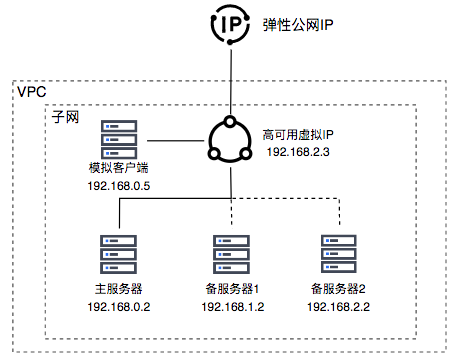
image.png

Configuration steps

Step 1: Create HAVIP

  1. Navigate to Products & Services - Virtual Private Cloud (VPC) and select Network Interface Card - High-Availability Virtual IP Address from the left navigation bar.
  2. Click Create Virtual IP to open the virtual IP creation dialog, and fill in the required configuration information.
ConfigMap Description
Virtual IP name User-defined HAVIP name
Network Select the virtual private cloud where the HAVIP is to be created
Subnet belonged HAVIP has subnet attributes. Please select the subnet under the current VPC from the dropdown
IP address By default, automatic IP address assignment is selected. Specifying a custom IP is supported, provided that the IP is unoccupied
Description Edit HAVIP description
  1. Click OK to create the high-availability virtual IP address.

image.png

Step 2: Install Keepalived on the active and standby servers

  1. Sign in to the BCC console, navigate to the instance page, click Create Instance, and complete the BCC creation by filling in the configuration details. For detailed steps, refer to Instance Creation Guide.
  2. Sign in to the Baidu Cloud Compute instance. For specific operations, refer to Login Method Overview.
  3. Install Keepalived on the active and standby servers by using the yum method to set it up.

    yum install keepalived -y

Step 3: Configure Keepalived to bind the HAVIP to the active and backup servers

  1. Sign in to the High-availability Virtual IP Address console, click the instance name to enter the details page, select Bind Server from the left navigation bar to access the backend server list, and click Add Real Server to select the Baidu Cloud Compute instance to be bound.
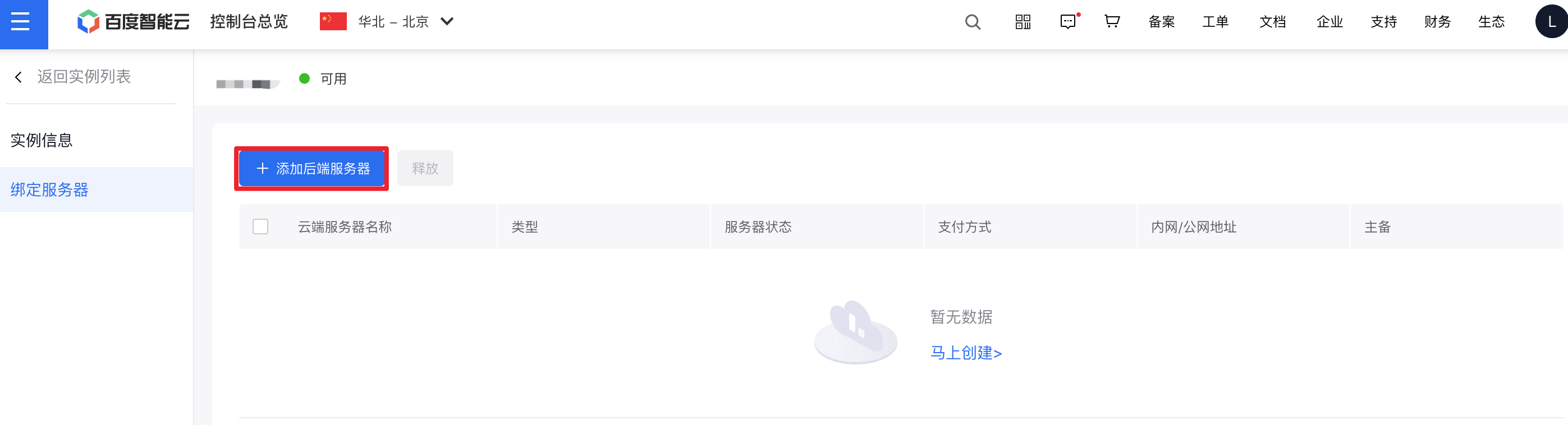
image.png

  1. Log into the active server, execute vim /etc/keepalived/keepalived.conf, and update the necessary configuration.

    Plain Text
    1 global_defs {
    2     notification_email {
    3       acassen@firewall.loc
    4       failover@firewall.loc
    5       sysadmin@firewall.loc
    6     }
    7     notification_email_from Alexandre.Cassen@firewall.loc
    8     smtp_server 192.168.200.1   
    9     smtp_connect_timeout 30
    10     router_id LVS_DEVEL
    11     vrrp_skip_check_adv_addr
    12     vrrp_garp_interval 0
    13     vrrp_gna_interval 0
    14  }
    15  vrrp_script checkService
    16  {

    script "/etc/keepalived/check_status.sh” # Check whether the business process is running normally. The "check_status.sh" file is a user-defined business process detection script. Execute it according to business needs, and replace "check_status.sh" with the actual script name during execution. interval 1 } vrrp_instance VI_1 { state MASTER # Set the initial status to "MASTER” interface eth0 # Set the network interface card bound to the VIP, e.g., eth0 virtual_router_id 51 # Configure the cluster's virtual_router_id value nopreempt # Set non-preemptive mode, priority 100 # Higher values indicate higher priority (range: 1-254) advert_int 1 # #Advertisement interval, default is 1. authentication { auth_type PASS auth_pass 1111 } unicast_src_ip 192.168.0.2 # Set the local intranet IP address unicast_peer { 192.168.1.2
    192.168.2.2 # Intranet IP address of other peer devices bound to the high-availability virtual IP address } virtual_ipaddress { 192.168.2.3 # Configure high-availability virtual IP address } notify_master "/etc/keepalived/notify_action.sh MASTER" notify_backup "/etc/keepalived/notify_action.sh BACKUP" notify_fault "/etc/keepalived/notify_action.sh FAULT" notify_stop "/etc/keepalived/notify_action.sh STOP" garp_master_refresh 5 # Set the interval for the master node to send ARP messages garp_master_delay 1 # Sets the delay for updating ARP cache after switching to master status track_interface { eth0 # Use the network interface card bound to VIP, e.g., eth0 } track_script { checkService } }

  2. Log into standby server 1, execute vim /etc/keepalived/keepalived.conf, and update the necessary configuration.

    Plain Text
    1 global_defs {
    2     notification_email {
    3       acassen@firewall.loc
    4       failover@firewall.loc
    5       sysadmin@firewall.loc
    6     }
    7     notification_email_from Alexandre.Cassen@firewall.loc
    8     smtp_server 192.168.200.1   
    9     smtp_connect_timeout 30
    10     router_id LVS_DEVEL
    11     vrrp_skip_check_adv_addr
    12     vrrp_garp_interval 0
    13     vrrp_gna_interval 0
    14  }
    15  vrrp_script checkService
    16  {

    script "/etc/keepalived/check_status.sh” # Check whether the business process is running normally. The "check_status.sh" file is a user-defined business process detection script. Execute it according to business needs, and replace "check_status.sh" with the actual script name during execution. interval 1 } vrrp_instance VI_1 { state BACKUP # Set the initial status to "BACKUP” interface eth0 # Set the network interface card bound to the VIP, e.g., eth0 virtual_router_id 51 # Configure the cluster's virtual_router_id value nopreempt # Set non-preemptive mode, priority 100 # Higher values indicate higher priority (range: 1-254) advert_int 1 # #Advertisement interval, default is 1. authentication { auth_type PASS auth_pass 1111 } unicast_src_ip 192.168.1.2 # Set the local intranet IP address unicast_peer { 192.168.0.2 192.168.2.2 # Intranet IP address of other peer devices bound to the high-availability virtual IP address } virtual_ipaddress { 192.168.2.3 # Configure high-availability virtual IP address } notify_master "/etc/keepalived/notify_action.sh MASTER" notify_backup "/etc/keepalived/notify_action.sh BACKUP" notify_fault "/etc/keepalived/notify_action.sh FAULT" notify_stop "/etc/keepalived/notify_action.sh STOP" garp_master_refresh 5 # Set the interval for the master node to send ARP messages garp_master_delay 1 # Sets the delay for updating ARP cache after switching to master status track_interface { eth0 # Use the network interface card bound to VIP, e.g., eth0 } track_script { checkService } }

  3. Log into standby server 2, execute vim /etc/keepalived/keepalived.conf, and update the necessary configuration.

    Plain Text
    1 global_defs {
    2     notification_email {
    3       acassen@firewall.loc
    4       failover@firewall.loc
    5       sysadmin@firewall.loc
    6     }
    7     notification_email_from Alexandre.Cassen@firewall.loc
    8     smtp_server 192.168.200.1   
    9     smtp_connect_timeout 30
    10     router_id LVS_DEVEL
    11     vrrp_skip_check_adv_addr
    12     vrrp_garp_interval 0
    13     vrrp_gna_interval 0
    14  }
    15  vrrp_script checkService
    16  {

    script "/etc/keepalived/check_status.sh” # Check whether the business process is running normally. The "check_status.sh" file is a user-defined business process detection script. Execute it according to business needs, and replace "check_status.sh" with the actual script name during execution. interval 1 } vrrp_instance VI_1 { state BACKUP # Set the initial status to "BACKUP” interface eth0 # Set the network interface card bound to the VIP, e.g., eth0 virtual_router_id 51 # Configure the cluster's virtual_router_id value nopreempt # Set non-preemptive mode, priority 100 # Higher values indicate higher priority (range: 1-254) advert_int 1 # #Advertisement interval, default is 1. authentication { auth_type PASS auth_pass 1111 } unicast_src_ip 192.168.2.2 # Set the local intranet IP address unicast_peer { 192.168.0.2 192.168.1.2 # Intranet IP address of other peer devices bound to the high-availability virtual IP address } virtual_ipaddress { 192.168.2.3 # Configure high-availability virtual IP address } notify_master "/etc/keepalived/notify_action.sh MASTER" notify_backup "/etc/keepalived/notify_action.sh BACKUP" notify_fault "/etc/keepalived/notify_action.sh FAULT" notify_stop "/etc/keepalived/notify_action.sh STOP" garp_master_refresh 5 # Set the interval for the master node to send ARP messages garp_master_delay 1 # Sets the delay for updating ARP cache after switching to master status track_interface { eth0 # Use the network interface card bound to VIP, e.g., eth0 } track_script { checkService } }

  4. Test the business script check_status.sh. Customize the script content and path as required, then synchronize updates to keepalived.conf. In this example, the existence of the /tmp/down file determines the service status. If the file does not exist, the service is considered normal (returning 0); if it exists, the service is considered abnormal (returning 1), triggering Keepalived to switch to Master. The script and permissions (755 or higher) are as follows:

image (1).png

/etc/keepalived/check_status.sh

Plain Text
1#!/bin/sh
2if [ ! -f /tmp/down ]
3then
4    exit 0
5fi
6exit 1
  1. Restart the Keepalived process to apply the updated configurations.

    Plain Text
    1systemctl start keepalived
    2systemctl restart keepalived
    3systemctl status keepalived
  2. Sign in to the high-availability virtual IP console to view the active server (192.168.0.2), standby server 1 (192.168.1.2), and standby server 2 (192.168.2.2) bound to the high-availability virtual IP address, as shown in the figure below.
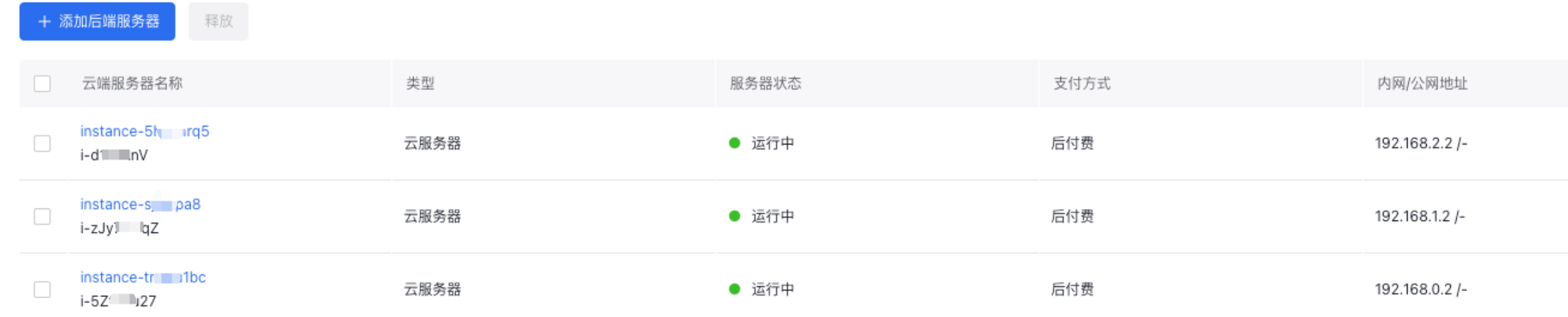
image.png

Step 4: Bind the HAVIP to an EIP (optional)

  1. Sign in to the high-availability virtual IP address console, click Bind in the operations for the HAVIP created in Step 1.

image.png

  1. In the EIP binding dialog, select the EIP to bind, then click OK. If no Public IP is available, click "Create Public IP" in the upper-right corner to apply for one.

Step 5: Testing and Verification

  1. After starting according to the Keepalived Configuration file, the server (192.168.0.2) becomes the master (state=MASTER, priority 100, with a 1-second Period for checking virtual machine status)
  2. Simulate client (192.168.0.5) continuously pinging HAVIP: ping 192.168.2.3 -i 0.001
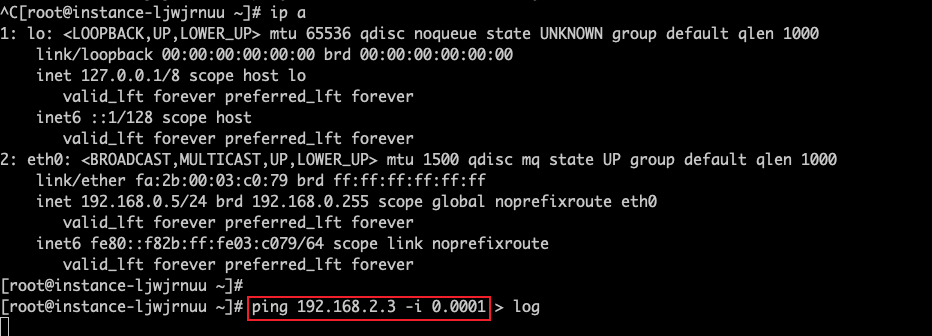
image (2).png

  1. On the master server (192.168.0.2), create a "down" file under /tmp directory. The Keepalived periodic task checks /tmp/down to simulate service failure and trigger HAVIP switchover
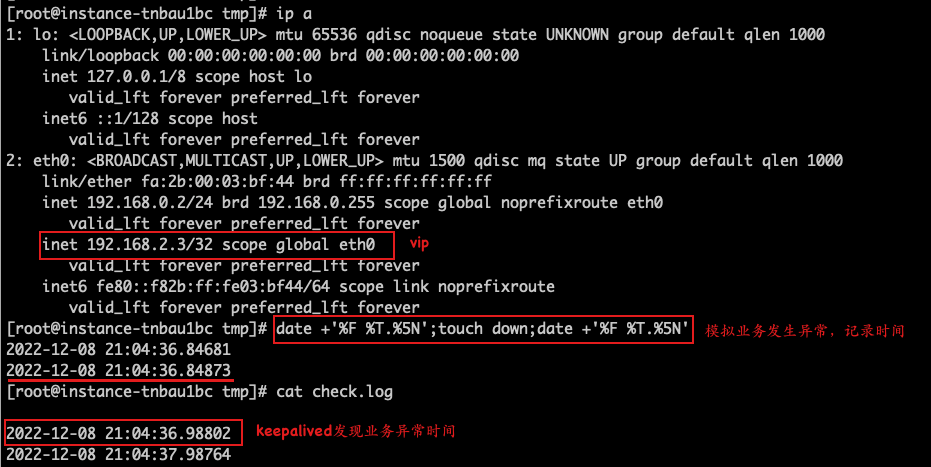
image (3).png

  1. Capture gratuitous ARP packets and ICMP packets for the HAVIP on Backup Server 1 (192.168.1.2) and Backup Server 2 (192.168.2.2).
  • When the server (192.168.2.2) switches to Master, observe the time when gratuitous ARP packets are sent.
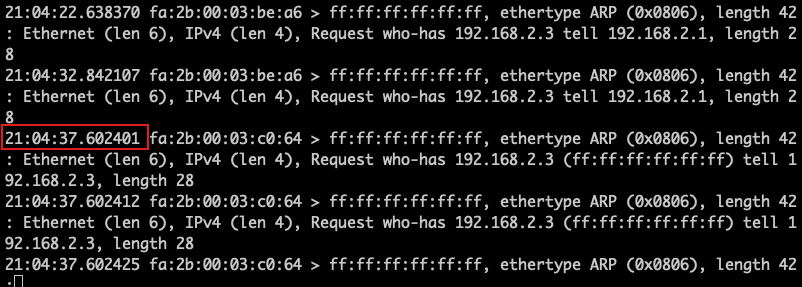
image (4).png

  • Record the time when the server (192.168.2.2) completes traffic switching and starts receiving ICMP packets.
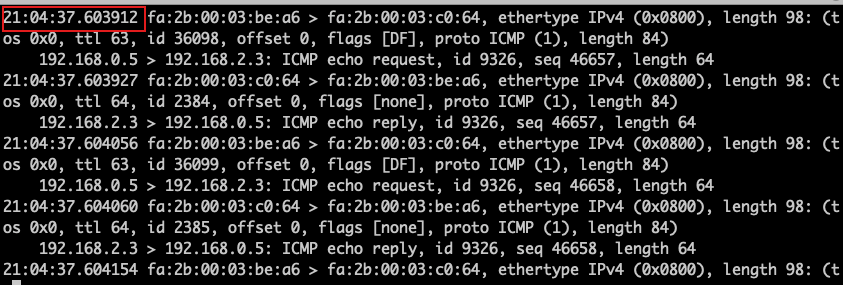
image (5).png

  1. Once the primary/standby switchover is complete, the bound host in the console will show as switched to the Baidu Cloud Compute instance (192.168.2.2).

Related products

Baidu Cloud Compute (BCC), Elastic Public IP, Virtual Private Cloud (VPC)

Previous
Configure Custom Service and Use Service Network Interface Card(SNIC) to Provide Service for Other VPCs
Next
Layer 2 Gateway Combined with Dedicated Line Access ET to Build Large Layer 2 Network Between IDC and Cloud VPC