Parameter Template

VPC VPC

  • API Reference
    • ACL-Related Interfaces
      • Add ACL rule
      • Delete ACL rules
      • Query ACL rules
      • Query ACL
      • Update ACL rules
    • API function release records
    • API Overview
    • Appendix
    • Common Headers and Error Responses
    • Dedicated Gateway-Related Interfaces
      • Bind physical dedicated line
      • Create dedicated gateway
      • Create health check for dedicated gateway
      • Query dedicated gateway details
      • Query dedicated gateway list
      • Release dedicated gateway
      • Unbind physical dedicated line
      • Update dedicated gateway
    • Elastic Network Interface-Related Interfaces
      • Add intranet IP to elastic network interface in batches
      • Add Secondary IP Address of Elastic Network Interface
      • Create elastic network interface
      • Delete elastic network interface
      • Delete Intranet IP from elastic network interface in batches
      • Delete Secondary IP Address of Elastic Network Interface
      • Elastic network interface binds to EIP
      • Elastic Network Interface Mounts Cloud Product Instance
      • Elastic network interface unbinds from EIP
      • Elastic Network Interface Unmounts Cloud Product Instance
      • Query elastic network interface list
      • Query elastic network interface status
      • Query the specified elastic network interface
      • Update elastic network interface with enterprise security group
      • Update elastic network interface with regular security group
      • Update elastic network interface
    • Gateway Bandwidth Limiting Rule Related Interfaces
      • Create gateway bandwidth limiting rules
      • Delete Gateway Bandwidth Limiting Rule
      • Modify Gateway Bandwidth Limiting Rule
      • View Gateway Bandwidth Limiting Rule
    • General Description
    • High-Availability Virtual IP Address(HAVIP) Related Interfaces
      • Bind EIP to high-availability virtual IP address
      • Bind instance to high-availability virtual IP address
      • Create high-availability virtual IP address
      • Delete high-availability virtual IP address
      • Query high-availability virtual IP address list
      • Query the specified high-availability virtual IP address
      • Unbind EIP from high-availability virtual IP address
      • Unbind instance from high-availability virtual IP address
      • Update high-availability virtual IP address
    • Interface Overview
    • IPv6 Gateway-Related Interfaces
      • Add IPv6 egress-only policy
      • Bandwidth resizing for IPv6 gateway
      • Create IPv6 gateway bandwidth limiting policy
      • Create IPv6 gateway
      • Delete IPv6 gateway bandwidth limiting policy
      • Delete IPv6 Gateway
      • Delete the IPv6 egress-only policy
      • Query IPv6 gateway bandwidth limiting policy list
      • Query IPv6 gateway
      • Query the IPv6 egress-only policy list
      • Update IPv6 gateway bandwidth limiting policy
      • Update the IPv6 gateway release protection switch
    • NAT Gateway-Related Interfaces
      • Bind DNAT EIP to the NAT gateway
      • Bind SNAT EIP to the NAT gateway
      • Create DNAT rules in batches
      • Create DNAT rules
      • Create NAT gateway
      • Create SNAT rules in batches
      • Create SNAT rules
      • Delete DNAT rules
      • Delete SNAT rules
      • NAT Gateway Binds EIP
      • NAT gateway renewal
      • NAT Gateway Resize
      • NAT Gateway Unbinds EIP
      • Query DNAT rules
      • Query NAT gateway details
      • Query NAT gateway list
      • Query SNAT rules
      • Release NAT gateway
      • Unbind DNAT EIP from the NAT gateway
      • Unbind SNAT EIP from the NAT gateway
      • Update DNAT rules
      • Update NAT Delete Protection Switch
      • Update NAT gateway name
      • Update SNAT rules
    • Network Detection Related Interfaces
      • Create Network Probe
      • Delete network probe
      • Query network probe details
      • Query network probe list.
      • Update probe
    • Parameter Template-Related Interfaces
      • Add IP addresses to the IP address family
      • Add IP addresses to the IP address group
      • Create IP address family
      • Create IP address set
      • Delete IP address family
      • Delete IP address from IP address group
      • Delete IP address set
      • Query IP address family list
      • Query IP address group list
      • Query specified IP address family
      • Query specified IP address group
      • Remove IP address group from IP address family
      • Update IP address family
      • Update IP address set
    • Peering Connections-Related Interfaces
      • Application to process the peering connection
      • Bandwidth resizing for peering connections
      • Create peering connections
      • Disable DNS synchronization for the peering connections.
      • Enable DNS synchronization for the peering connections
      • List of peering connections to be queried.
      • Peering connection renewal
      • Release peering connections
      • Update the local API name and remarks for peering connections
      • Update the peering connection release protection switch
      • View details of peering connection
    • Route Table Related Interfaces
      • Create route rules
      • Delete route rules
      • Primary-standby switch
      • Query route table
      • Query routing rules
      • Update route rules
    • Security Group Related Interfaces
      • Enterprise security group
        • Authorize enterprise security group rules
        • Create enterprise security group
        • Delete enterprise security group rules
        • Delete enterprise security group
        • Query enterprise security group list
        • Update enterprise security group rules
      • Regular security group
        • Authorize regular security group rules
        • Create regular security group
        • Delete regular security group rules
        • Delete regular security group
        • Query regular security group list
        • Revoke regular security group rules
        • Update regular security group rules
        • View security group details
    • Service domain
    • Service Network Interface Card (SNIC)-Related Interfaces
      • Create service network interface card
      • Delete service network interface card
      • Query mountable public services
      • Query service network interface card details
      • Query service network interface card list
      • Update regular security group for service network interface card
      • Update service network interface card with enterprise security group
      • Update the service network interface card
    • Subnet-Related Interfaces
      • Create reserved network segment
      • Create subnet
      • Delete reserved network segment
      • Delete subnet
      • Query specified subnet
      • Query subnet list
      • Query the reserved network segment list
      • Update subnet
    • VPC-Related Interfaces
      • Create VPC
      • Delete VPC
      • Open VPC relay
      • Query IP Usage by Products in VPC
      • Query specified VPC
      • Query VPC intranet IP
      • Query VPC list
      • Shut down VPC relay
      • Update VPC
    • VPN-Related Interfaces
      • Bind EIP
      • Create SSL VPN server
      • Create SSL VPN users in batches
      • Create VPN tunnel
      • Create VPN
      • Delete SSL VPN server
      • Delete SSL VPN user
      • Delete VPN tunnel
      • Query SSL-VPN server
      • Query SSL-VPN user
      • Query VPN details
      • Query VPN List
      • Query VPN tunnels
      • Release VPN
      • Unbind EIP
      • Update SSL VPN server
      • Update SSL VPN user
      • Update VPN release protection switch
      • Update VPN tunnel
      • Update VPN
      • VPN gateway renewal
    • High-Availability Virtual IP Address (HAVIP) Related Interfaces
      • Bind EIP to high-availability virtual IP address
      • Bind instance to high-availability virtual IP address
      • Create high-availability virtual IP address
      • Delete high-availability virtual IP address
      • Query high-availability virtual IP address list
      • Query the specified high-availability virtual IP address
      • Unbind EIP from high-availability virtual IP address
      • Unbind instance from high-availability virtual IP address
      • Update high-availability virtual IP address
  • FAQs
    • Common Questions Overview
    • NAT FAQs
    • Route Table FAQs
    • Service Network Interface Card(SNIC) Common Questions
    • VPC FAQs
    • VPN FAQs
    • Service Network Interface Card (SNIC) Common Questions
  • Function Release Records
  • Operation guide
    • Access control
      • ACL
      • Parameter Template
      • Security group
    • Identity and access management
    • Monitor and Operations
      • NAT Gateway Instance Diagnosis
    • Network Connection
      • Dedicated gateway
      • IPv6 gateway
      • Layer 2 Gateway
      • NAT Gateway
        • Private Network NAT(Network Address Translation) Gateway
        • Public Network NAT(Network Address Translation) Gateway
        • Private Network NAT (Network Address Translation) Gateway
        • Public Network NAT (Network Address Translation) Gateway
      • Peering Connections
      • VPN Gateway
        • GRE VPN Gateway
        • IPsec VPN Gateway
        • SSL VPN Gateway
    • Network Diagnostics
      • Flow log
      • Gateway bandwidth limiting
      • Network probe
      • Path analysis
      • Port verification
      • Traffic monitor
    • Network interface card
      • Elastic network interface
      • High-availability virtual IP address (HAVIP)
      • Service network interface card
    • Network topology
    • Route table
    • Subnet
    • Tag Management
    • Using IPv6
    • VPC
  • Product Description
    • Application scenarios
    • Product advantages
    • Product features
    • Product Introduction
    • Related concepts
    • Usage restrictions
  • Product pricing
  • SDK
    • Go-SDK
      • ACL
      • Dedicated gateway
      • Elastic network interface
      • Exception handling
      • High-availability virtual IP address (HAVIP)
      • Initialization
      • Install the SDK Package
      • IPv6Gateway
      • NAT
      • Network probe
      • Overview
      • Peering Connections
      • Route
      • Security group
        • Enterprise security group
        • Regular security group
      • Service network interface card
      • Subnet
      • VPC
      • VPN
    • Java-SDK
      • ACL
      • Dedicated gateway
      • Elastic network interface
      • Enterprise security group
      • High-availability virtual IP address (HAVIP)
      • Install the SDK Package
      • IPv6 gateway
      • NAT
      • Network probe
      • Overview
      • Parameter Template
      • Peering Connections
      • Regular security group
      • Route
      • Service network interface card
      • Subnet
      • Version history
      • vpc
      • VPN
    • PHP-SDK
      • ACL
      • Install the SDK Package
      • NAT
      • Overview
      • Peering Connections
      • Route
      • Security group
      • Subnet
      • Version history
      • vpc
    • Python-SDK
      • ACL
      • Dedicated gateway
      • Elastic network interface
      • Enterprise security group
      • High-availability virtual IP address (HAVIP)
      • Install the SDK Package
      • IPv6Gateway
      • NAT
      • Network probe
      • Overview
      • Peering Connections
      • Route
      • Security group
      • Service network interface card
      • Subnet
      • Version history
      • VPC
      • VPN
  • Service Level Agreement (SLA)
    • IPv6 Gateway Service Level Agreement SLA
    • NAT(Network Address Translation) Gateway Service Level Agreement SLA
    • Peering Connections Service Level Agreement SLA
    • Service Network Interface Card(SNIC) Service Level Agreement SLA
    • VPN Gateway Service Level Agreement SLA
    • NAT (Network Address Translation) Gateway Service Level Agreement SLA
    • Service Network Interface Card (SNIC) Service Level Agreement SLA
  • Typical Practices
    • Configure Custom Service and Use Service Network Interface Card(SNIC) to Provide Service for Other VPCs
    • HAVIP Combined with Keepalived to Achieve Master-Backup Multi-Machine High Availability
    • Layer 2 Gateway Combined with Dedicated Line Access ET to Build Large Layer 2 Network Between IDC and Cloud VPC
    • Network Layer Security Description
    • Peering Connections Typical Practice
    • Security Group Configuration Practice (Advanced Level)
    • Security Group Configuration Practice (Beginner Level)
    • Typical Practice of Managing Elastic Network Interface Using Terraform
    • Typical Practice of Managing IPsec VPN Gateway Using Terraform
    • Using Keepalived in VPC to Achieve High-Availability Architecture
    • VPC Custom Route Table to Achieve Secure Traffic Mutual Access
    • Windows Using HAVIP to Configure Master-Backup Multi-Machine
    • Configure Custom Service and Use Service Network Interface Card (SNIC) to Provide Service for Other VPCs
  • VPC CLI
    • Configure BCE-CLI
    • Install BCE-CLI
    • Route Table Related Operations
    • Subnet Related Operations
    • Using VPC Service via CLI
    • Version Change Records
    • VPC Related Operations
All documents
menu
No results found, please re-enter

VPC VPC

  • API Reference
    • ACL-Related Interfaces
      • Add ACL rule
      • Delete ACL rules
      • Query ACL rules
      • Query ACL
      • Update ACL rules
    • API function release records
    • API Overview
    • Appendix
    • Common Headers and Error Responses
    • Dedicated Gateway-Related Interfaces
      • Bind physical dedicated line
      • Create dedicated gateway
      • Create health check for dedicated gateway
      • Query dedicated gateway details
      • Query dedicated gateway list
      • Release dedicated gateway
      • Unbind physical dedicated line
      • Update dedicated gateway
    • Elastic Network Interface-Related Interfaces
      • Add intranet IP to elastic network interface in batches
      • Add Secondary IP Address of Elastic Network Interface
      • Create elastic network interface
      • Delete elastic network interface
      • Delete Intranet IP from elastic network interface in batches
      • Delete Secondary IP Address of Elastic Network Interface
      • Elastic network interface binds to EIP
      • Elastic Network Interface Mounts Cloud Product Instance
      • Elastic network interface unbinds from EIP
      • Elastic Network Interface Unmounts Cloud Product Instance
      • Query elastic network interface list
      • Query elastic network interface status
      • Query the specified elastic network interface
      • Update elastic network interface with enterprise security group
      • Update elastic network interface with regular security group
      • Update elastic network interface
    • Gateway Bandwidth Limiting Rule Related Interfaces
      • Create gateway bandwidth limiting rules
      • Delete Gateway Bandwidth Limiting Rule
      • Modify Gateway Bandwidth Limiting Rule
      • View Gateway Bandwidth Limiting Rule
    • General Description
    • High-Availability Virtual IP Address(HAVIP) Related Interfaces
      • Bind EIP to high-availability virtual IP address
      • Bind instance to high-availability virtual IP address
      • Create high-availability virtual IP address
      • Delete high-availability virtual IP address
      • Query high-availability virtual IP address list
      • Query the specified high-availability virtual IP address
      • Unbind EIP from high-availability virtual IP address
      • Unbind instance from high-availability virtual IP address
      • Update high-availability virtual IP address
    • Interface Overview
    • IPv6 Gateway-Related Interfaces
      • Add IPv6 egress-only policy
      • Bandwidth resizing for IPv6 gateway
      • Create IPv6 gateway bandwidth limiting policy
      • Create IPv6 gateway
      • Delete IPv6 gateway bandwidth limiting policy
      • Delete IPv6 Gateway
      • Delete the IPv6 egress-only policy
      • Query IPv6 gateway bandwidth limiting policy list
      • Query IPv6 gateway
      • Query the IPv6 egress-only policy list
      • Update IPv6 gateway bandwidth limiting policy
      • Update the IPv6 gateway release protection switch
    • NAT Gateway-Related Interfaces
      • Bind DNAT EIP to the NAT gateway
      • Bind SNAT EIP to the NAT gateway
      • Create DNAT rules in batches
      • Create DNAT rules
      • Create NAT gateway
      • Create SNAT rules in batches
      • Create SNAT rules
      • Delete DNAT rules
      • Delete SNAT rules
      • NAT Gateway Binds EIP
      • NAT gateway renewal
      • NAT Gateway Resize
      • NAT Gateway Unbinds EIP
      • Query DNAT rules
      • Query NAT gateway details
      • Query NAT gateway list
      • Query SNAT rules
      • Release NAT gateway
      • Unbind DNAT EIP from the NAT gateway
      • Unbind SNAT EIP from the NAT gateway
      • Update DNAT rules
      • Update NAT Delete Protection Switch
      • Update NAT gateway name
      • Update SNAT rules
    • Network Detection Related Interfaces
      • Create Network Probe
      • Delete network probe
      • Query network probe details
      • Query network probe list.
      • Update probe
    • Parameter Template-Related Interfaces
      • Add IP addresses to the IP address family
      • Add IP addresses to the IP address group
      • Create IP address family
      • Create IP address set
      • Delete IP address family
      • Delete IP address from IP address group
      • Delete IP address set
      • Query IP address family list
      • Query IP address group list
      • Query specified IP address family
      • Query specified IP address group
      • Remove IP address group from IP address family
      • Update IP address family
      • Update IP address set
    • Peering Connections-Related Interfaces
      • Application to process the peering connection
      • Bandwidth resizing for peering connections
      • Create peering connections
      • Disable DNS synchronization for the peering connections.
      • Enable DNS synchronization for the peering connections
      • List of peering connections to be queried.
      • Peering connection renewal
      • Release peering connections
      • Update the local API name and remarks for peering connections
      • Update the peering connection release protection switch
      • View details of peering connection
    • Route Table Related Interfaces
      • Create route rules
      • Delete route rules
      • Primary-standby switch
      • Query route table
      • Query routing rules
      • Update route rules
    • Security Group Related Interfaces
      • Enterprise security group
        • Authorize enterprise security group rules
        • Create enterprise security group
        • Delete enterprise security group rules
        • Delete enterprise security group
        • Query enterprise security group list
        • Update enterprise security group rules
      • Regular security group
        • Authorize regular security group rules
        • Create regular security group
        • Delete regular security group rules
        • Delete regular security group
        • Query regular security group list
        • Revoke regular security group rules
        • Update regular security group rules
        • View security group details
    • Service domain
    • Service Network Interface Card (SNIC)-Related Interfaces
      • Create service network interface card
      • Delete service network interface card
      • Query mountable public services
      • Query service network interface card details
      • Query service network interface card list
      • Update regular security group for service network interface card
      • Update service network interface card with enterprise security group
      • Update the service network interface card
    • Subnet-Related Interfaces
      • Create reserved network segment
      • Create subnet
      • Delete reserved network segment
      • Delete subnet
      • Query specified subnet
      • Query subnet list
      • Query the reserved network segment list
      • Update subnet
    • VPC-Related Interfaces
      • Create VPC
      • Delete VPC
      • Open VPC relay
      • Query IP Usage by Products in VPC
      • Query specified VPC
      • Query VPC intranet IP
      • Query VPC list
      • Shut down VPC relay
      • Update VPC
    • VPN-Related Interfaces
      • Bind EIP
      • Create SSL VPN server
      • Create SSL VPN users in batches
      • Create VPN tunnel
      • Create VPN
      • Delete SSL VPN server
      • Delete SSL VPN user
      • Delete VPN tunnel
      • Query SSL-VPN server
      • Query SSL-VPN user
      • Query VPN details
      • Query VPN List
      • Query VPN tunnels
      • Release VPN
      • Unbind EIP
      • Update SSL VPN server
      • Update SSL VPN user
      • Update VPN release protection switch
      • Update VPN tunnel
      • Update VPN
      • VPN gateway renewal
    • High-Availability Virtual IP Address (HAVIP) Related Interfaces
      • Bind EIP to high-availability virtual IP address
      • Bind instance to high-availability virtual IP address
      • Create high-availability virtual IP address
      • Delete high-availability virtual IP address
      • Query high-availability virtual IP address list
      • Query the specified high-availability virtual IP address
      • Unbind EIP from high-availability virtual IP address
      • Unbind instance from high-availability virtual IP address
      • Update high-availability virtual IP address
  • FAQs
    • Common Questions Overview
    • NAT FAQs
    • Route Table FAQs
    • Service Network Interface Card(SNIC) Common Questions
    • VPC FAQs
    • VPN FAQs
    • Service Network Interface Card (SNIC) Common Questions
  • Function Release Records
  • Operation guide
    • Access control
      • ACL
      • Parameter Template
      • Security group
    • Identity and access management
    • Monitor and Operations
      • NAT Gateway Instance Diagnosis
    • Network Connection
      • Dedicated gateway
      • IPv6 gateway
      • Layer 2 Gateway
      • NAT Gateway
        • Private Network NAT(Network Address Translation) Gateway
        • Public Network NAT(Network Address Translation) Gateway
        • Private Network NAT (Network Address Translation) Gateway
        • Public Network NAT (Network Address Translation) Gateway
      • Peering Connections
      • VPN Gateway
        • GRE VPN Gateway
        • IPsec VPN Gateway
        • SSL VPN Gateway
    • Network Diagnostics
      • Flow log
      • Gateway bandwidth limiting
      • Network probe
      • Path analysis
      • Port verification
      • Traffic monitor
    • Network interface card
      • Elastic network interface
      • High-availability virtual IP address (HAVIP)
      • Service network interface card
    • Network topology
    • Route table
    • Subnet
    • Tag Management
    • Using IPv6
    • VPC
  • Product Description
    • Application scenarios
    • Product advantages
    • Product features
    • Product Introduction
    • Related concepts
    • Usage restrictions
  • Product pricing
  • SDK
    • Go-SDK
      • ACL
      • Dedicated gateway
      • Elastic network interface
      • Exception handling
      • High-availability virtual IP address (HAVIP)
      • Initialization
      • Install the SDK Package
      • IPv6Gateway
      • NAT
      • Network probe
      • Overview
      • Peering Connections
      • Route
      • Security group
        • Enterprise security group
        • Regular security group
      • Service network interface card
      • Subnet
      • VPC
      • VPN
    • Java-SDK
      • ACL
      • Dedicated gateway
      • Elastic network interface
      • Enterprise security group
      • High-availability virtual IP address (HAVIP)
      • Install the SDK Package
      • IPv6 gateway
      • NAT
      • Network probe
      • Overview
      • Parameter Template
      • Peering Connections
      • Regular security group
      • Route
      • Service network interface card
      • Subnet
      • Version history
      • vpc
      • VPN
    • PHP-SDK
      • ACL
      • Install the SDK Package
      • NAT
      • Overview
      • Peering Connections
      • Route
      • Security group
      • Subnet
      • Version history
      • vpc
    • Python-SDK
      • ACL
      • Dedicated gateway
      • Elastic network interface
      • Enterprise security group
      • High-availability virtual IP address (HAVIP)
      • Install the SDK Package
      • IPv6Gateway
      • NAT
      • Network probe
      • Overview
      • Peering Connections
      • Route
      • Security group
      • Service network interface card
      • Subnet
      • Version history
      • VPC
      • VPN
  • Service Level Agreement (SLA)
    • IPv6 Gateway Service Level Agreement SLA
    • NAT(Network Address Translation) Gateway Service Level Agreement SLA
    • Peering Connections Service Level Agreement SLA
    • Service Network Interface Card(SNIC) Service Level Agreement SLA
    • VPN Gateway Service Level Agreement SLA
    • NAT (Network Address Translation) Gateway Service Level Agreement SLA
    • Service Network Interface Card (SNIC) Service Level Agreement SLA
  • Typical Practices
    • Configure Custom Service and Use Service Network Interface Card(SNIC) to Provide Service for Other VPCs
    • HAVIP Combined with Keepalived to Achieve Master-Backup Multi-Machine High Availability
    • Layer 2 Gateway Combined with Dedicated Line Access ET to Build Large Layer 2 Network Between IDC and Cloud VPC
    • Network Layer Security Description
    • Peering Connections Typical Practice
    • Security Group Configuration Practice (Advanced Level)
    • Security Group Configuration Practice (Beginner Level)
    • Typical Practice of Managing Elastic Network Interface Using Terraform
    • Typical Practice of Managing IPsec VPN Gateway Using Terraform
    • Using Keepalived in VPC to Achieve High-Availability Architecture
    • VPC Custom Route Table to Achieve Secure Traffic Mutual Access
    • Windows Using HAVIP to Configure Master-Backup Multi-Machine
    • Configure Custom Service and Use Service Network Interface Card (SNIC) to Provide Service for Other VPCs
  • VPC CLI
    • Configure BCE-CLI
    • Install BCE-CLI
    • Route Table Related Operations
    • Subnet Related Operations
    • Using VPC Service via CLI
    • Version Change Records
    • VPC Related Operations
  • Document center
  • arrow
  • VPCVPC
  • arrow
  • Operation guide
  • arrow
  • Access control
  • arrow
  • Parameter Template
Table of contents on this page
  • Parameter template overview
  • Application scenarios:
  • Before configuration, you should know:
  • IP address group
  • Create IP address group
  • Modify IP address group
  • Delete IP address set
  • View associated instances
  • IP address family
  • Create IP address family
  • Modify IP address family
  • Delete IP address family
  • View associated instances
  • Enterprise security group association parameter template

Parameter Template

Updated at:2025-10-16

Parameter template overview

A parameter template is a collection of IP addresses. Multiple IPs with the same requirements can be saved as IP address group templates, which can further be aggregated into IP address family templates. These templates can be directly referenced as source or destination IPs when configuring security group rules, improving the efficiency of enterprise security group management.

Application scenarios:

When users edit parameter templates, all security group rules linked to them take effect immediately, enhancing the operational efficiency of security group rule management.

Before configuration, you should know:

  • A single region can accommodate up to 500 IP address groups.
  • A single region can support up to 50 IP address families.
  • The maximum number of IP addresses in an IP address group is 20.
  • The maximum number of IP address groups in an IP address family is 5.
  • If an IP address group or family is already associated, it can be edited but not deleted.
  • To associate IP address groups or families, you need to access the Security Group page.
  • Parameter templates can only be used by enterprise security groups and currently do not support instances such as regular security groups.

IP address group

Create IP address group

  1. Go to Product Services - Virtual Private Cloud (VPC), and select Parameter Template from the left navigation menu.
  2. Choose IP Address Group to open the IP Address Group List page.
  3. Click on Create IP Address Group to access the creation interface.
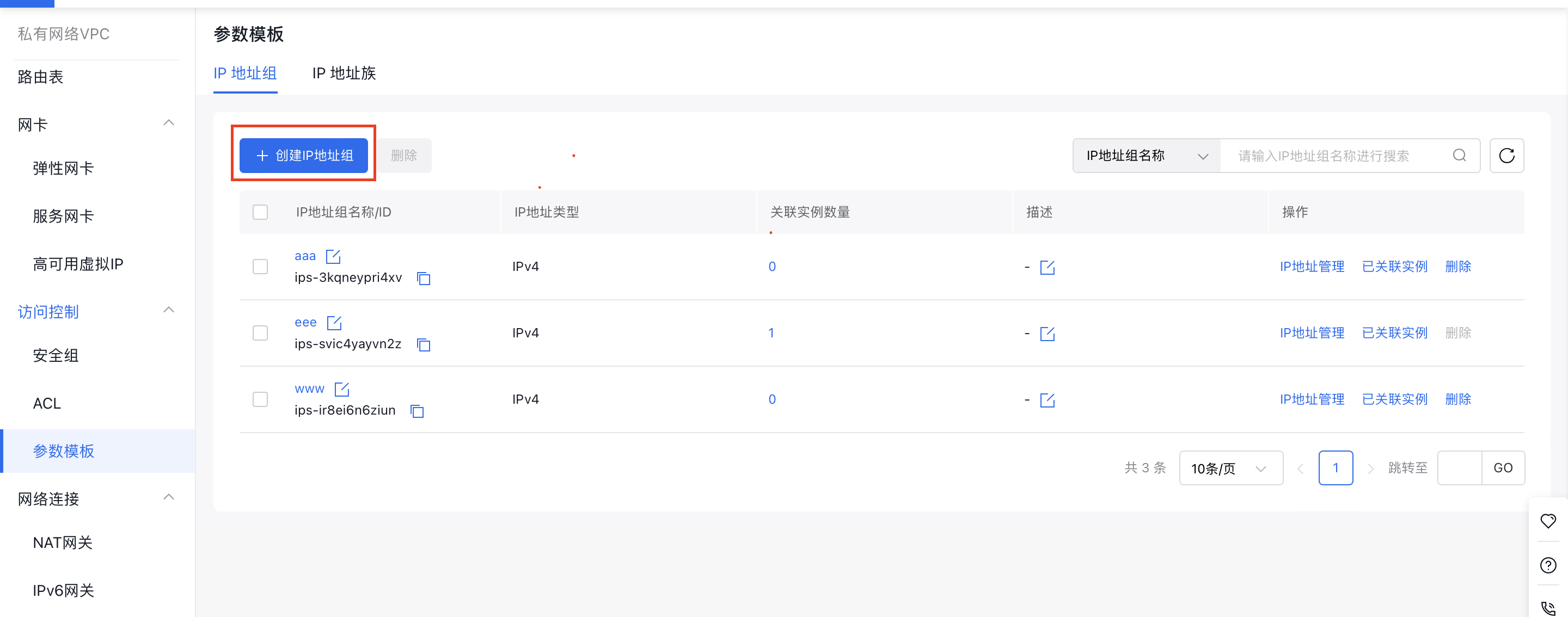
Screenshot 2023-10-12 11.48.17.png

  1. Fill in the following configuration information:
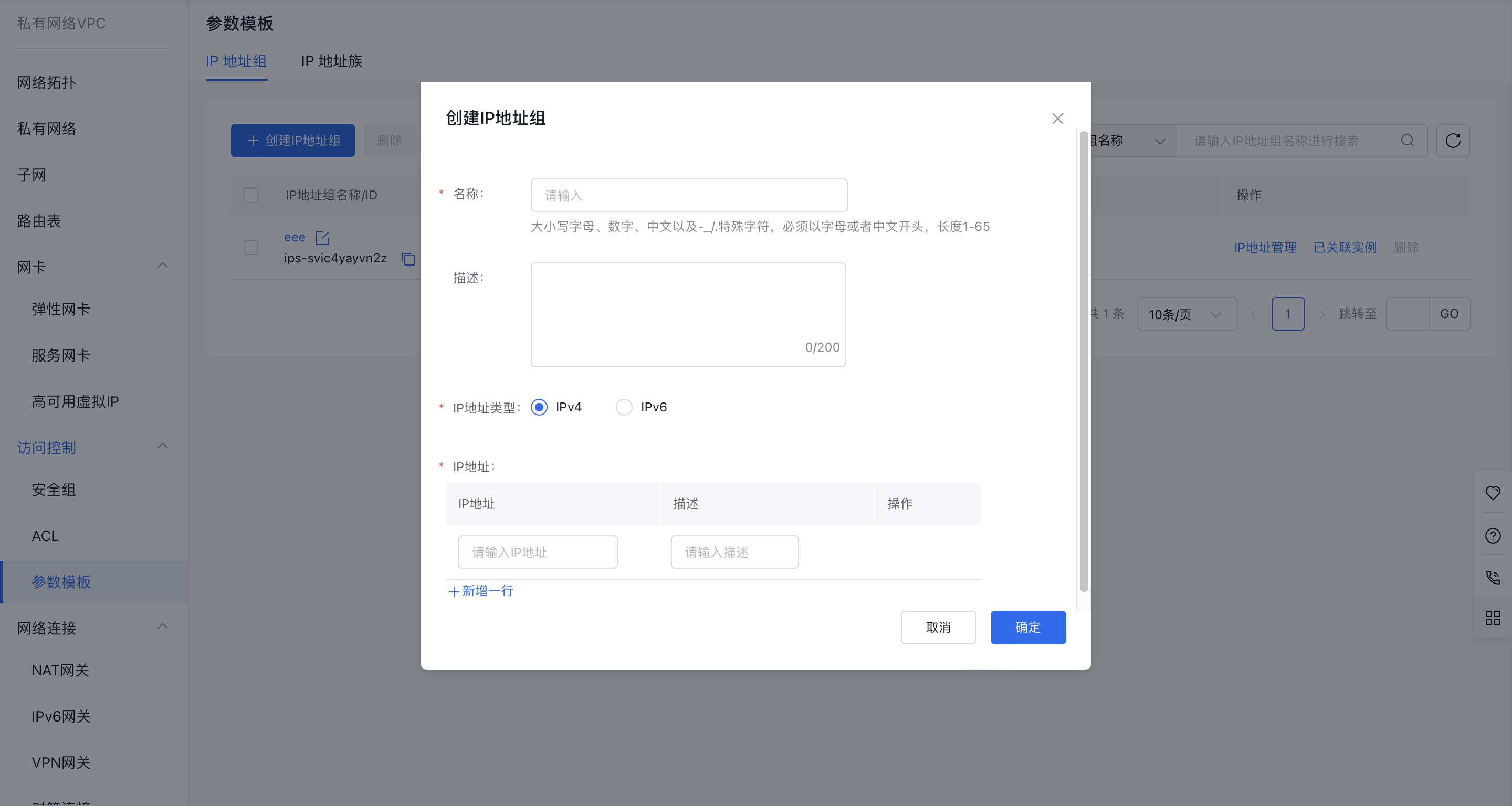
Screenshot 2023-10-12 11.30.31.png

ConfigMap Description
Name User-defined IP address group name
Description Edit IP address group description information
IP address group type IPv4 or IPv6 types can be selected, with IPv4 being the default
IP address Users must input IP addresses that match the type of the selected IP address group
  1. Click OK to finalize the creation of the IP address group.

Modify IP address group

For existing parameter templates, users can modify details and add, edit, or delete IP addresses or IP address groups within them.

  1. Go to Product Services - Virtual Private Cloud (VPC), and select Parameter Template from the left navigation menu.
  2. Choose IP Address Group to open the IP Address Group List page.
  3. Click on IP Address Group Management in the operations column, or click the IP Address Group Name to access the IP Address Management page.
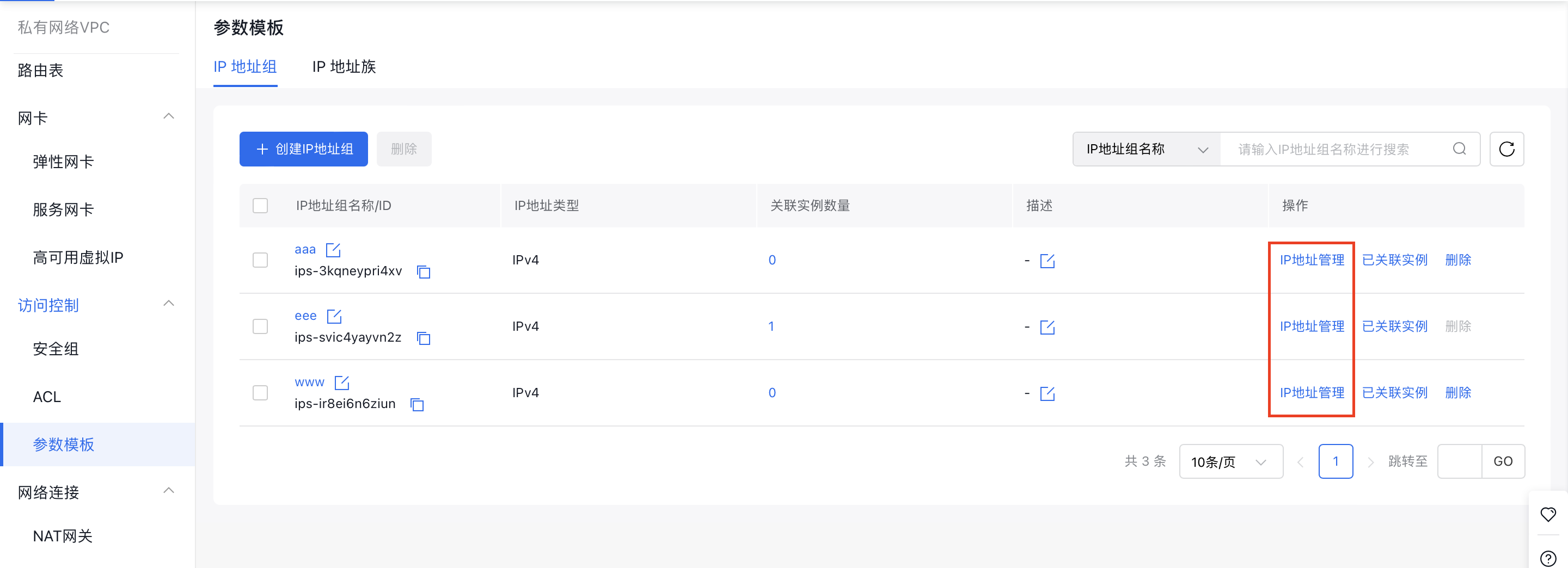
Screenshot 2023-10-12 11.49.54.png

  1. Select an IP address and click Delete to remove it.
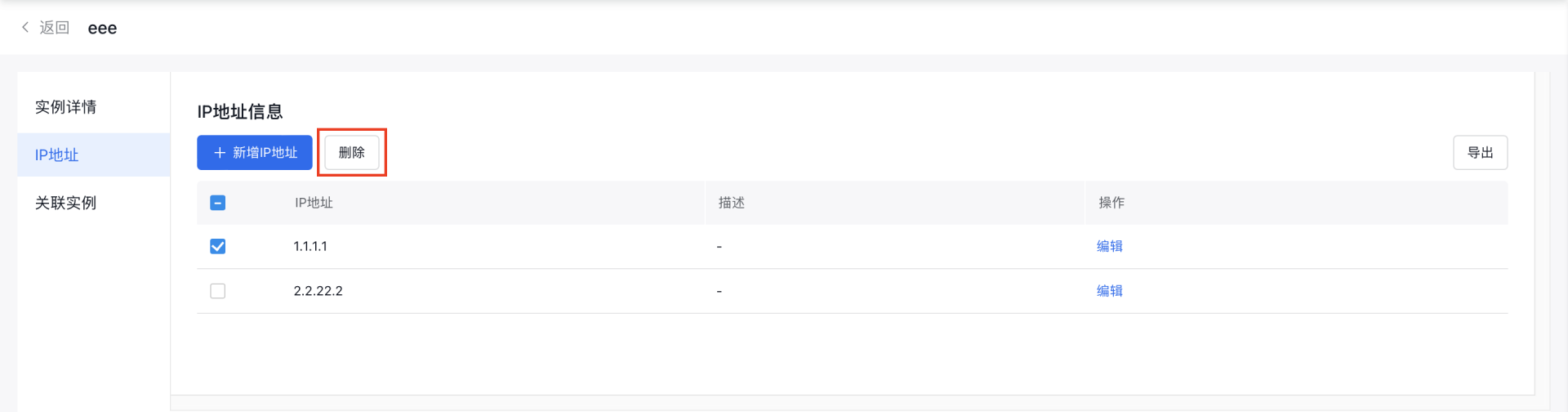
Screenshot 2023-10-12 11.52.07.png

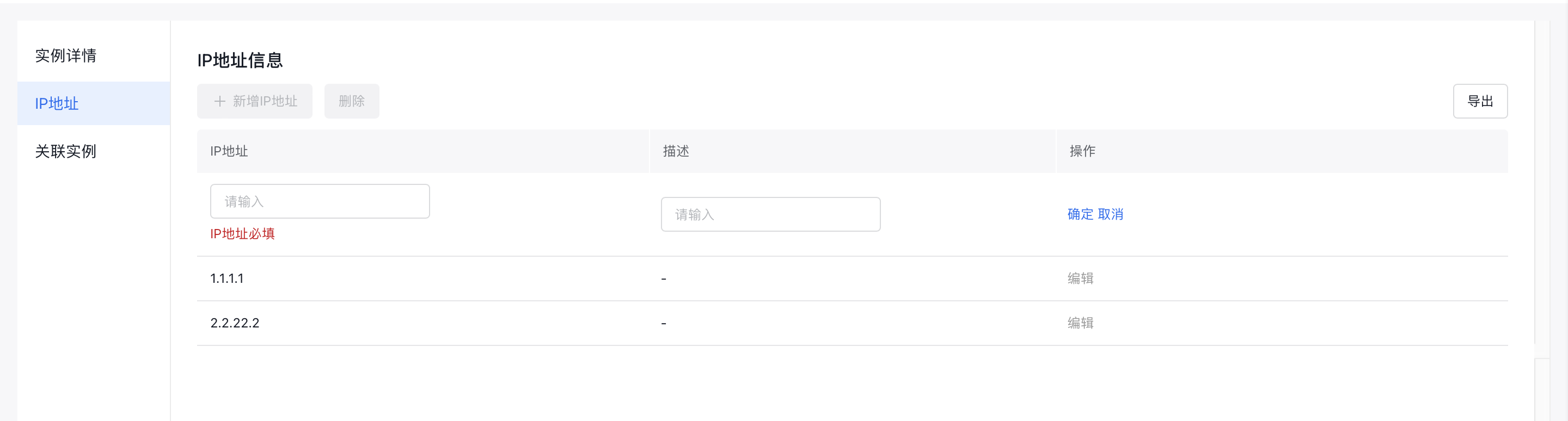
  1. Click Add IP Address to include addresses in the IP address group. Changes take effect after clicking OK in the Operations column.
Screenshot 2023-10-12 11.42.41.png

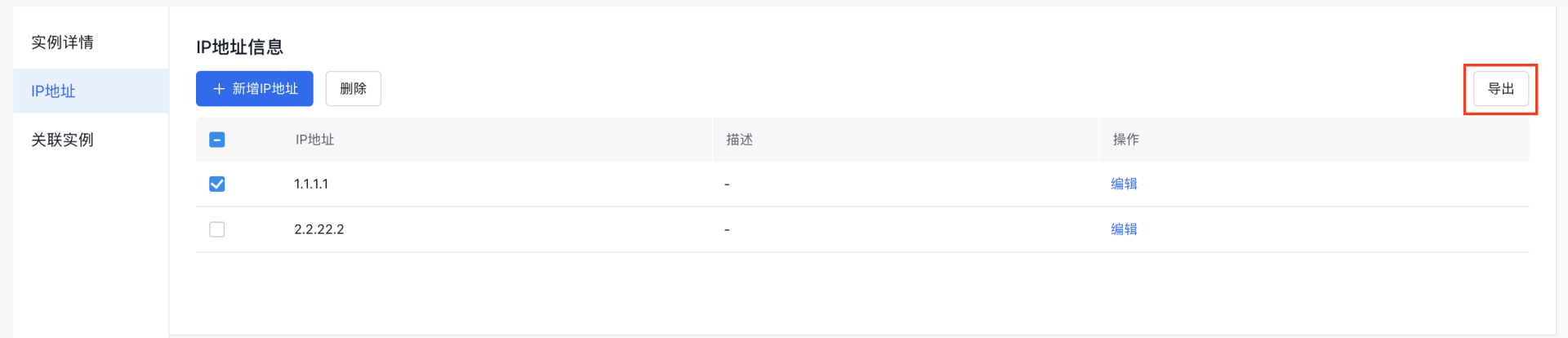
  1. Click Export to download the IP address list of this IP address group.
Screenshot 2023-10-12 11.54.25.png

Description:

  1. If a newly added or modified parameter template is already associated, the linked security group rules will be updated accordingly. Proceed with caution.
  2. The maximum number of IP addresses in an IP address group is 20. Adding more than this limit is not allowed.

Delete IP address set

When a parameter template is no longer needed, it can be deleted.

  1. Go to Product Services - Virtual Private Cloud (VPC), and select Parameter Template from the left navigation menu.
  2. Choose IP Address Group to open the IP Address Group List page.
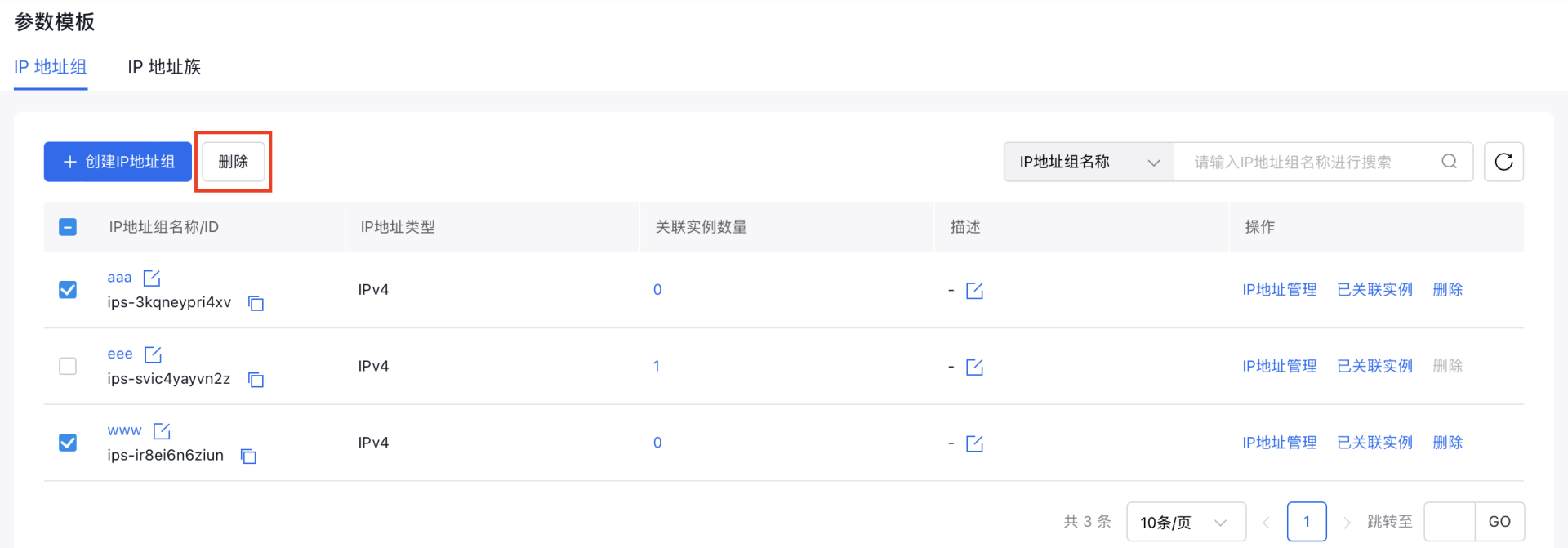
  3. Users can select multiple IP address groups and click Delete to remove them at once.
Screenshot 2023-10-12 11.57.15.png

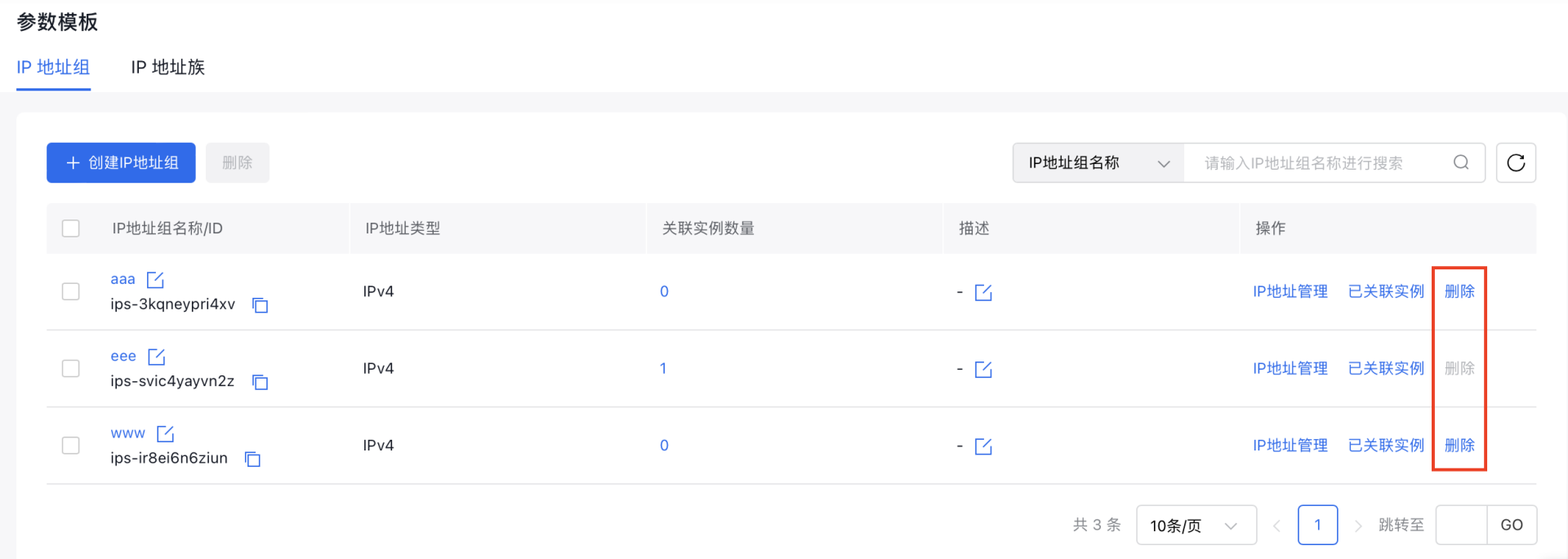
  1. Users can also click Delete in the operations column of an IP address group to remove a single group.
Screenshot 2023-10-12 11.56.22.png

Description:

  1. Deleted IP address groups cannot be restored. Proceed with caution.
  2. Users can delete custom IP address groups that aren't linked directly. For linked IP address groups, they must first be disconnected before deletion.

View associated instances

  1. Go to Product Services - Virtual Private Cloud (VPC), and select Parameter Template from the left navigation menu.
  2. Choose IP Address Group to open the IP Address Group List page.
  3. Click the name of the desired configuration template, select Associated Instances, and go to the Associated Instance page.
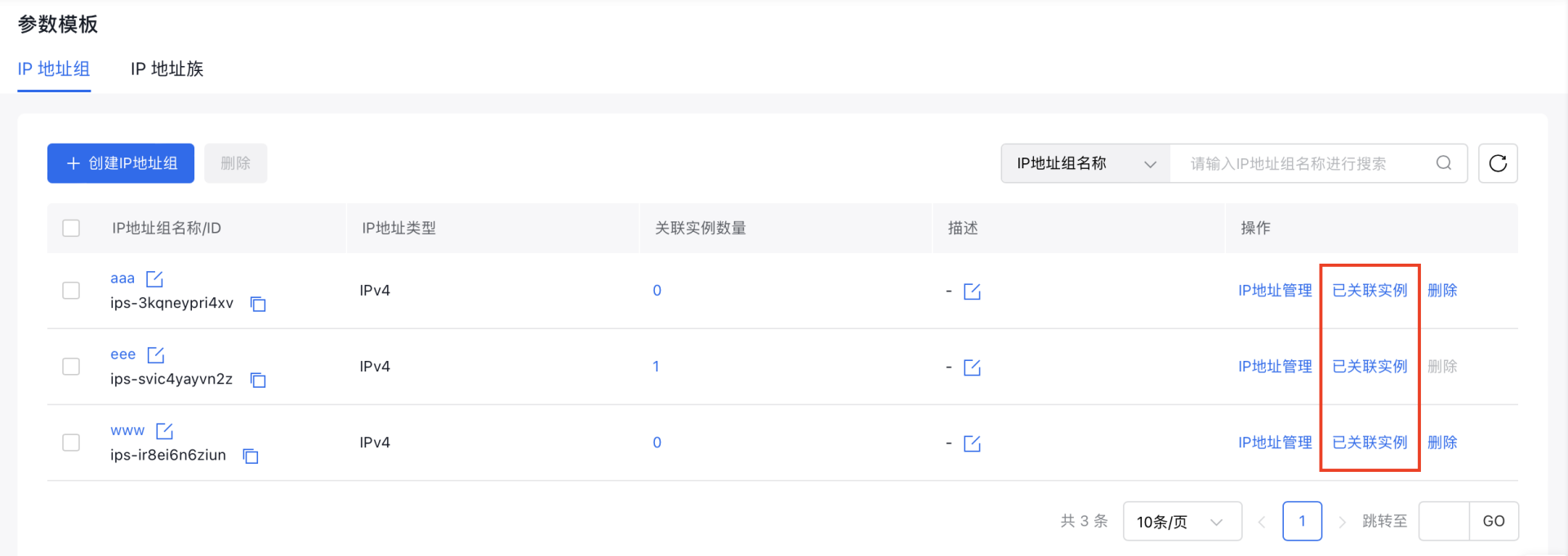
Screenshot 2023-10-12 11.58.43.png

  1. Users can search by entering the Instance Name or ID to view the linked instances.
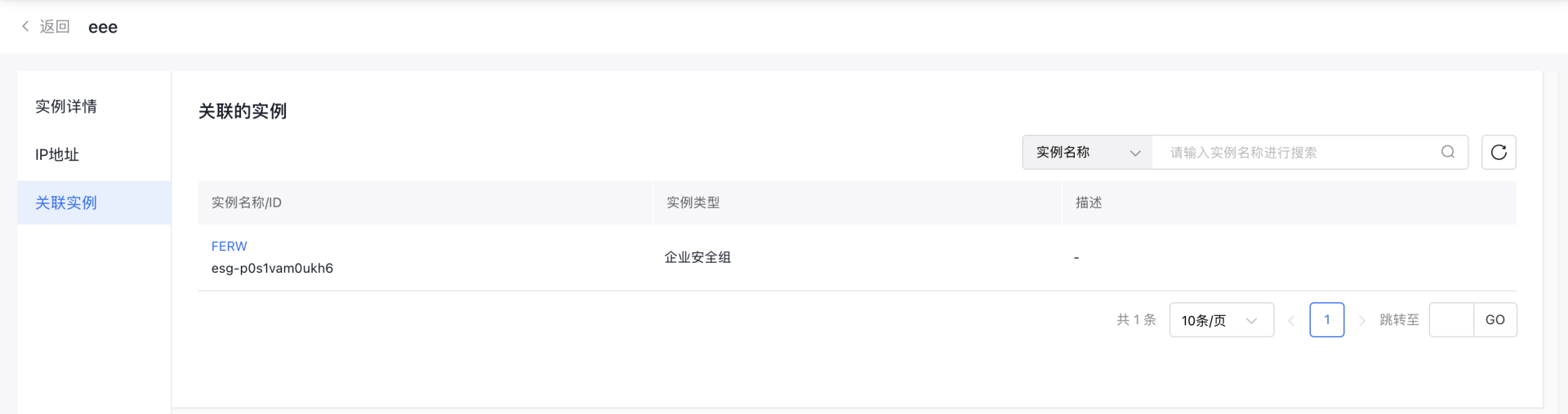
Screenshot 2023-10-12 12.00.26.png

Description:

Instances tied to the parameter template are read-only. To link or unlink, click the instance name in the associated instance list to navigate to the respective instance details page.

IP address family

Create IP address family

  1. Go to Product Services - Virtual Private Cloud (VPC), and select Parameter Template from the left navigation menu.
  2. Select IP Address Family to enter the IP Address Family List page
  3. Click Create IP Address Family to open the page for creating an IP Address Family.
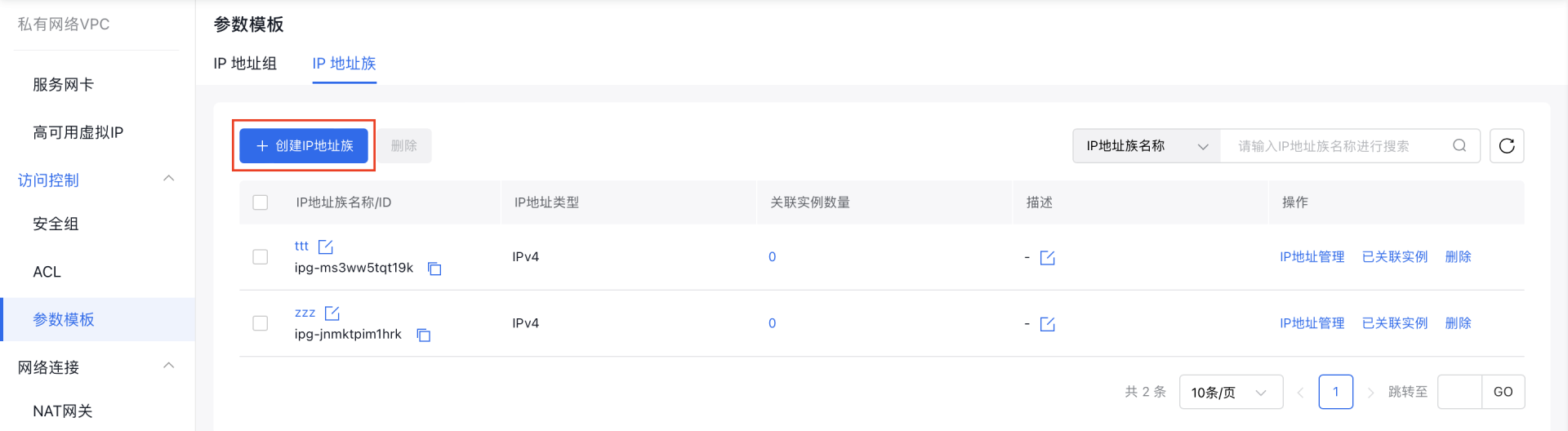
Screenshot 2023-10-12 12.02.41.png

  1. Fill in the following configuration information:
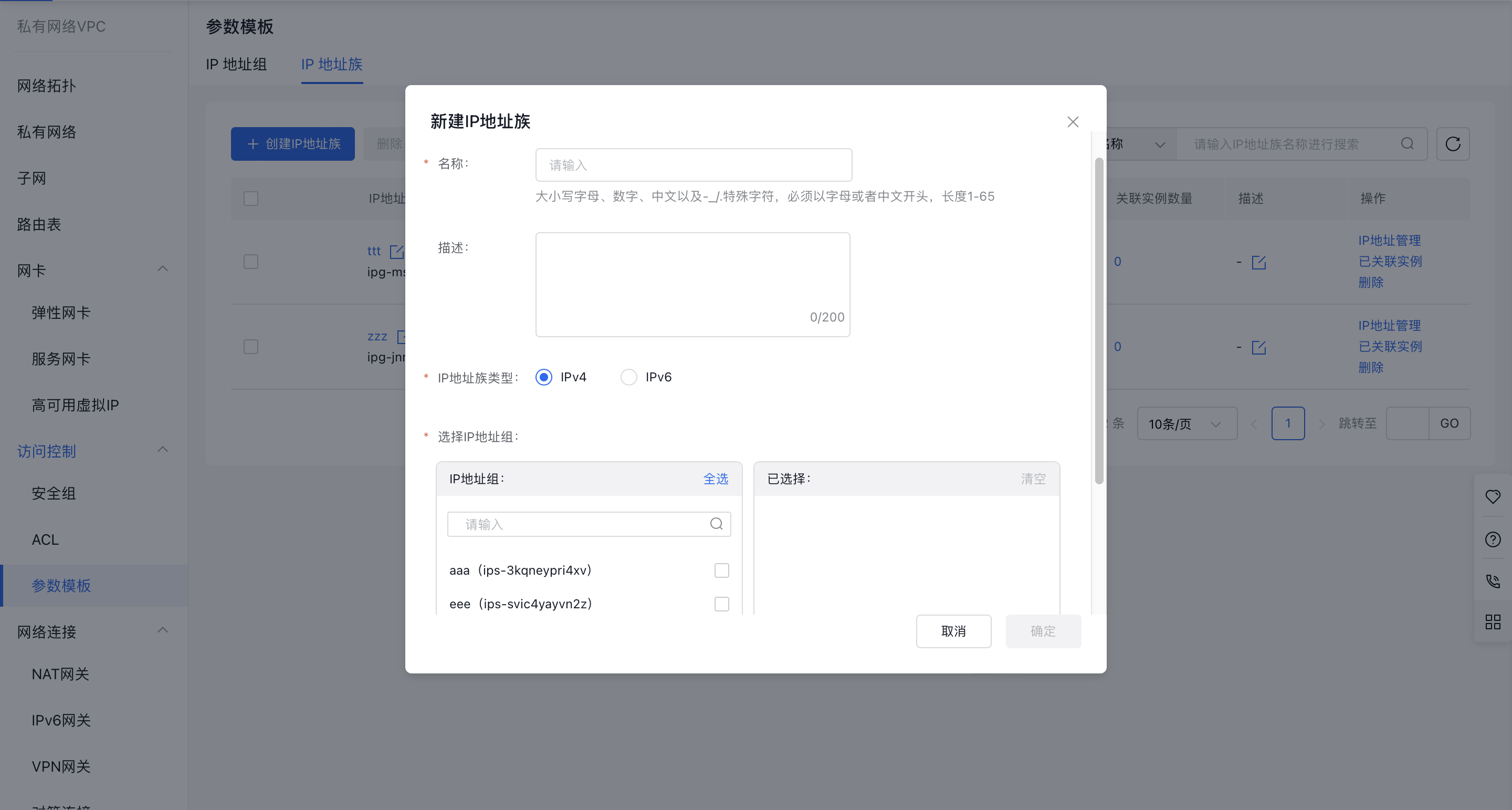
Screenshot 2023-10-12 12.13.24.png

ConfigMap Description
Name User-defined IP address family name
Description Edit IP address family description information
IP address family type IPv4 or IPv6 types can be selected, with IPv4 being the default
Select IP address group Users can search and select IP address groups in the left panel, ensuring the type matches the selected IP address family
  1. Click OK to finalize the creation of the IP address family.

Modify IP address family

  1. Go to Product Services - Virtual Private Cloud (VPC), and select Parameter Template from the left navigation menu.
  2. Select an IP Address Family to view the IP Address Family List page.
  3. Click IP Address Family Management in the operations column or click the IP Address Family Name to access the IP Address Family Management page.
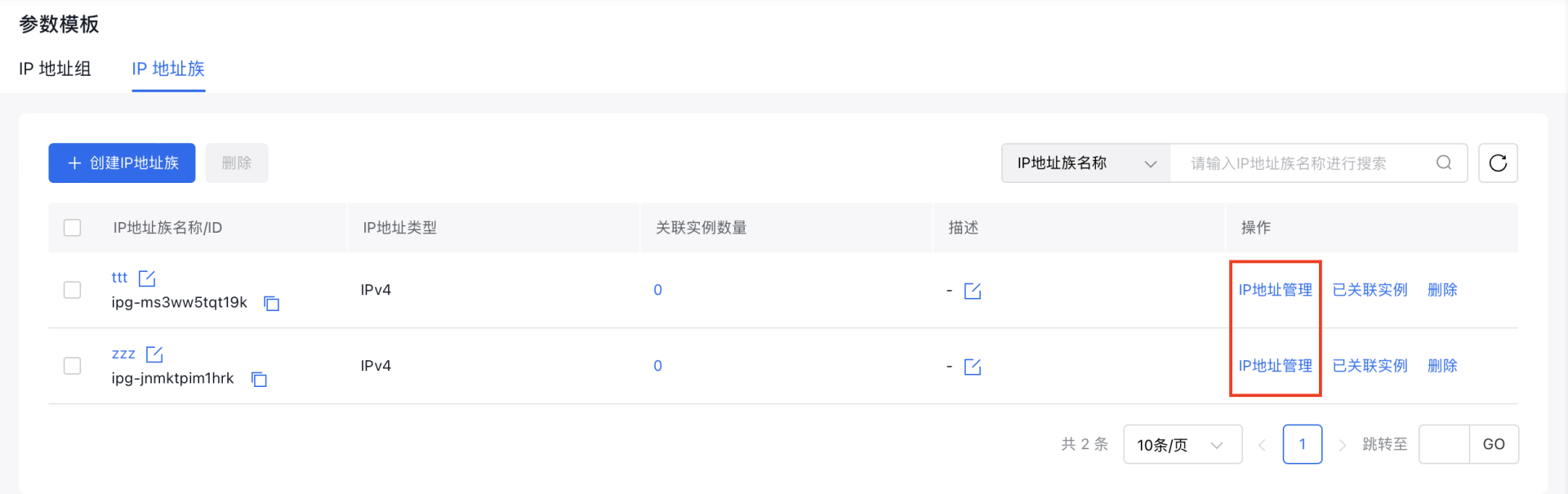
Screenshot 2023-10-12 12.17.52.png

  1. Click Edit in the corresponding operation column of the IP address family to modify the group, and the changes are applied after clicking OK.
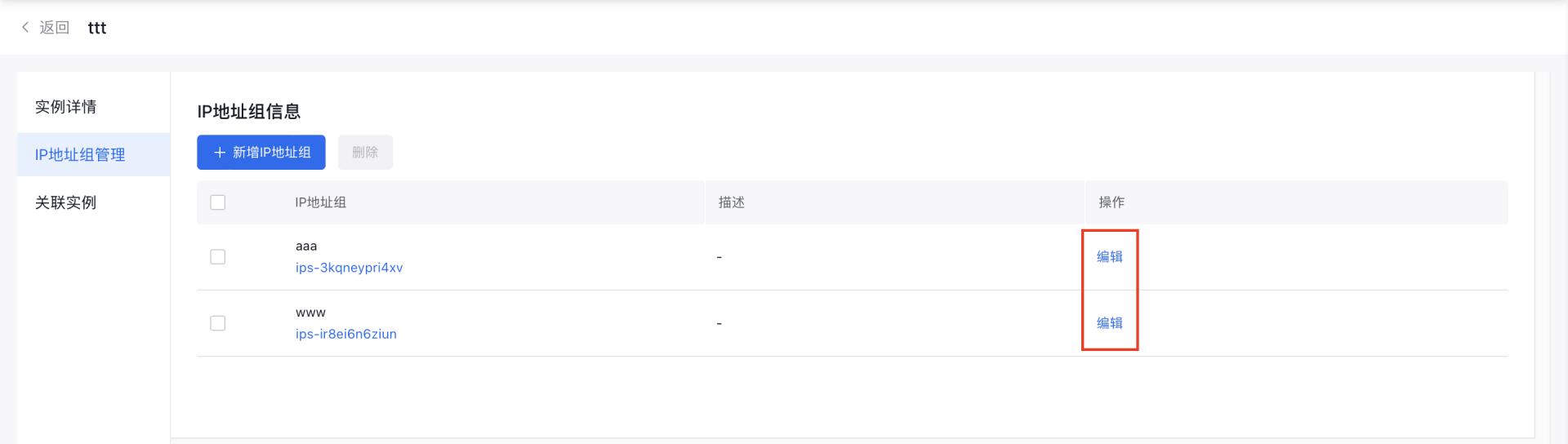
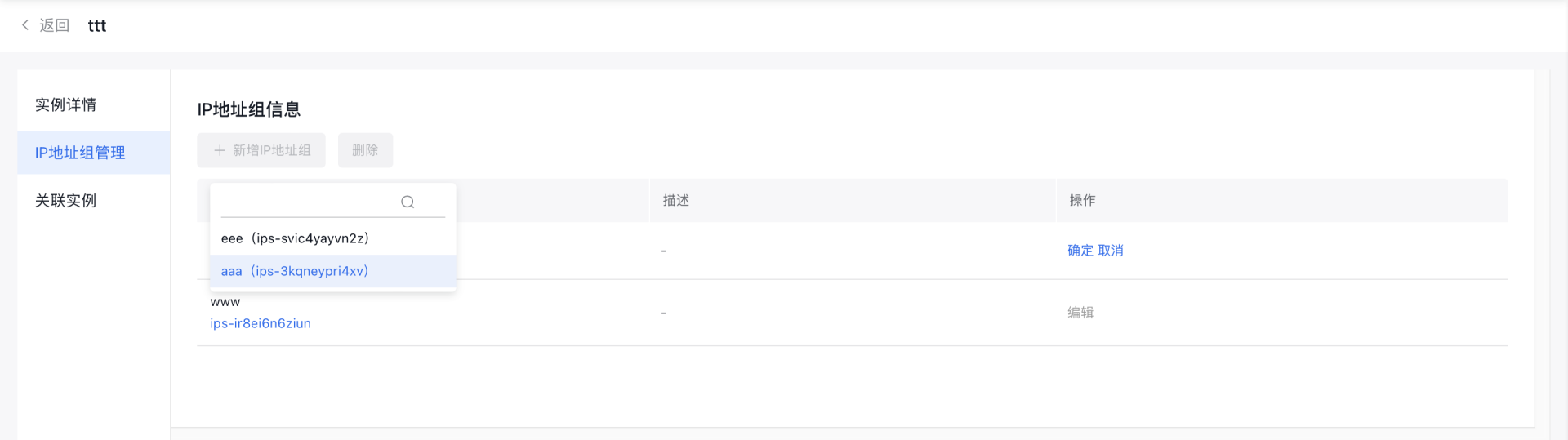
Screenshot 2023-10-12 12.20.20.png

Screenshot 2023-10-12 12.21.05.png

  1. Select the IP Address Group and click Delete to remove it.
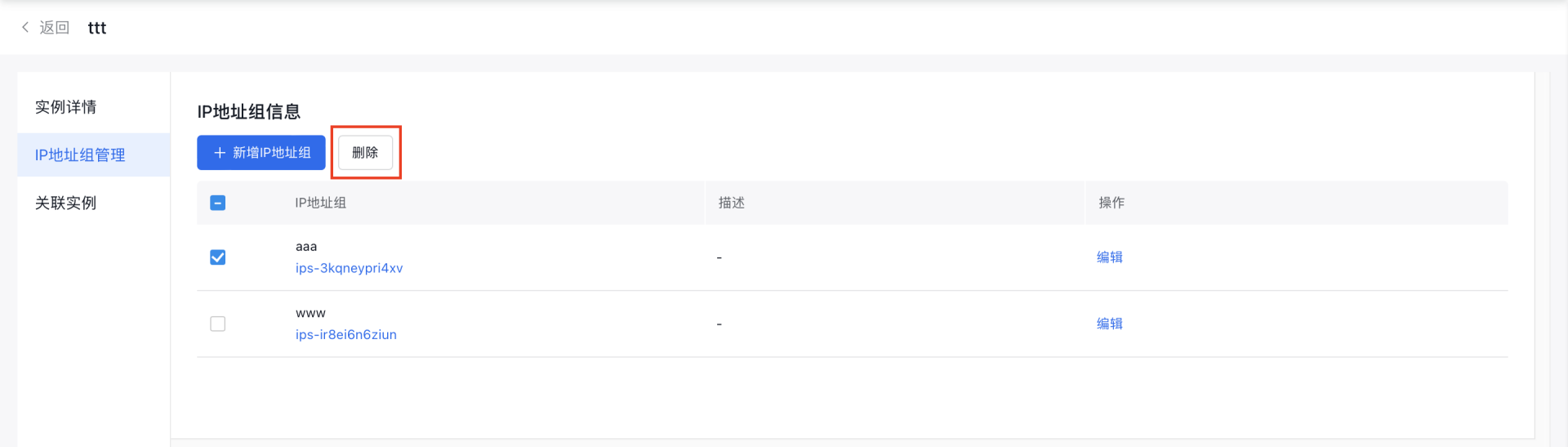
Screenshot 2023-10-12 12.21.42.png

  1. Click Create IP Address Group, select and add IP address groups, and confirm the changes by clicking OK.
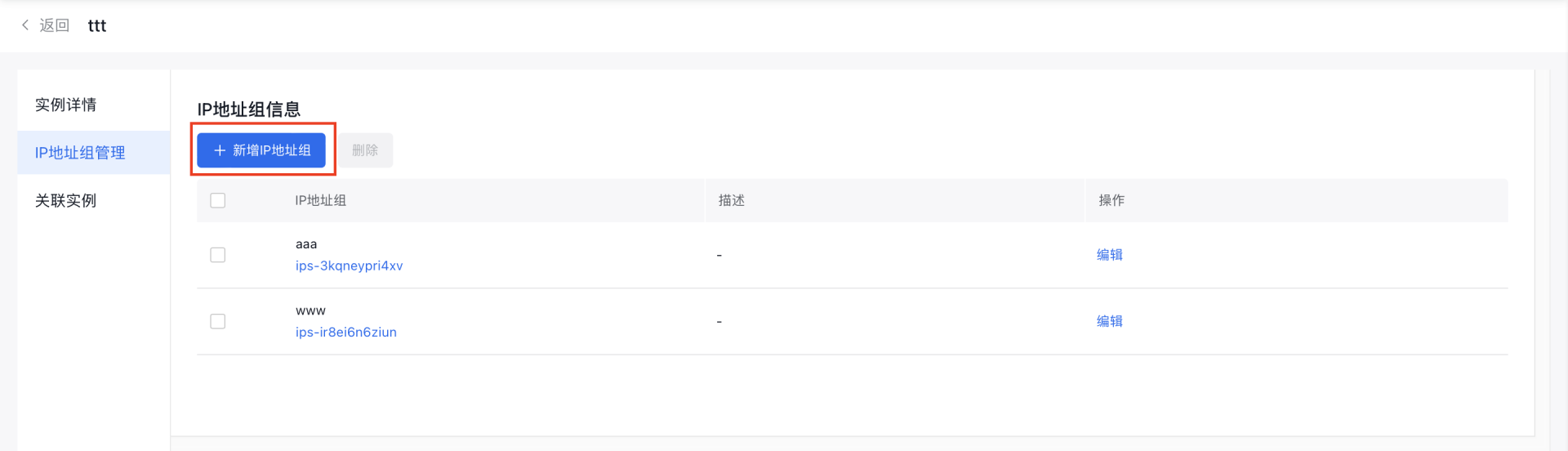
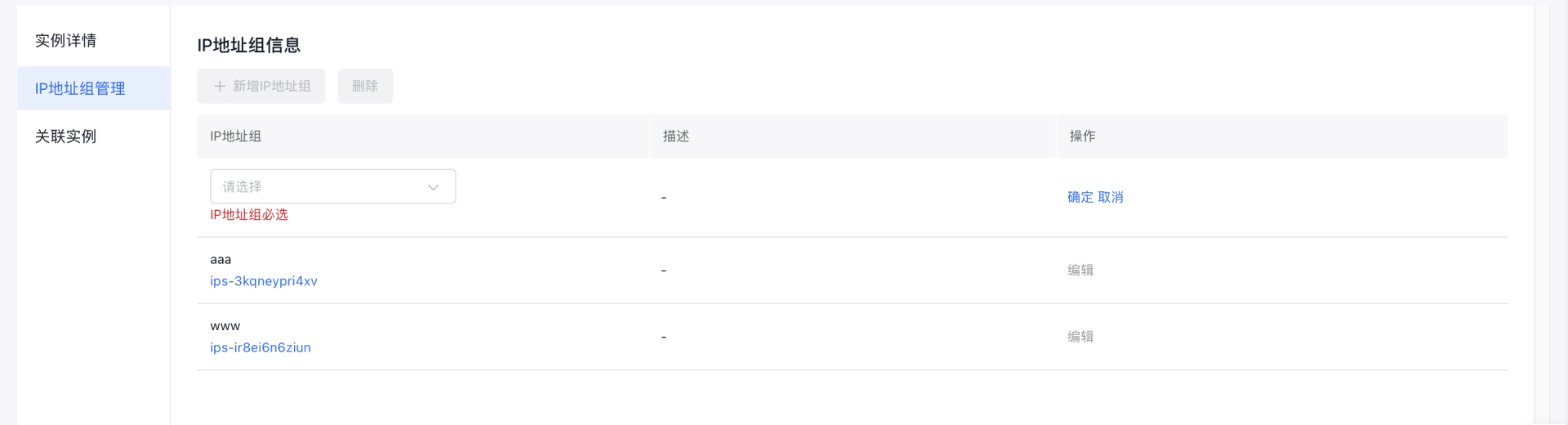
Screenshot 2023-10-12 12.22.43.png

Screenshot 2023-10-12 12.24.31.png

Description:

  1. If the newly added or modified IP address family is already linked, the associated security group rules will be updated accordingly. Please handle with care.
  2. A maximum of 5 IP address groups can be included in an IP address family. Additional groups cannot be added if this limit is exceeded.

Delete IP address family

  1. Go to Product Services - Virtual Private Cloud (VPC), and select Parameter Template from the left navigation menu.
  2. Select an IP Address Family to view the IP Address Family List page.
  3. Users can select multiple IP address families and delete them by clicking Delete.
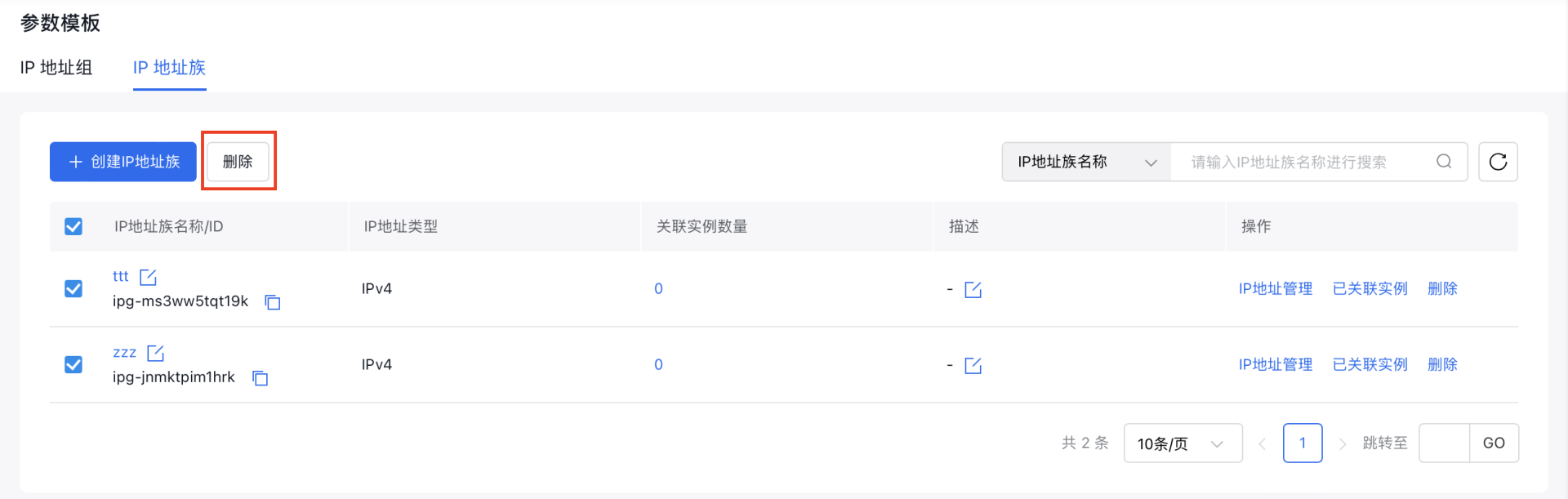
Screenshot 2023-10-12 15.12.03.png

  1. To delete a single IP address family, users can click Delete in the operation column of the relevant family.
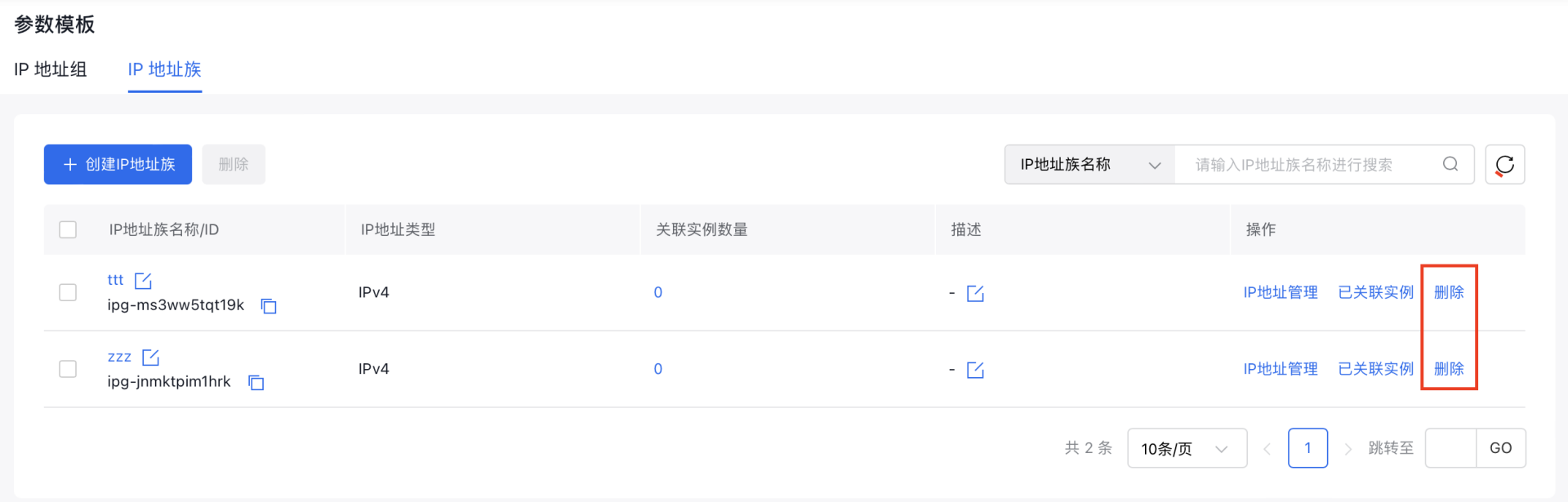
Screenshot 2023-10-12 15.13.01.png

Description:

  1. Deleted IP address families cannot be restored. Proceed with caution.
  2. Users can delete unconnected custom IP address families directly. For connected families, unlink them first before deleting.

View associated instances

  1. Go to Product Services - Virtual Private Cloud (VPC), and select Parameter Template from the left navigation menu.
  2. Select an IP Address Family to view the IP Address Family List page.
  3. Click the name of the desired configuration template, select Associated Instances, and go to the Associated Instance page.
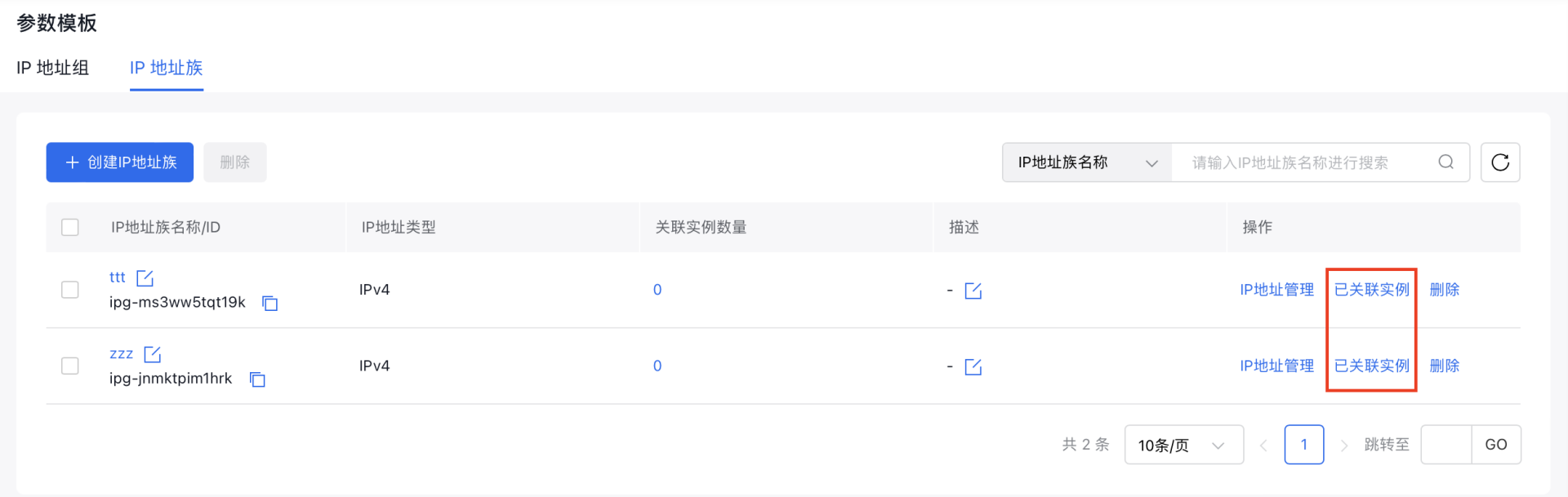
Screenshot 2023-10-12 15.14.10.png

  1. Users can search by entering the Instance Name or ID to view the linked instances.

Screenshot 2023-10-12 12.00.26.png

Description:

Instances tied to the parameter template are read-only. To link or unlink, click the instance name in the associated instance list to navigate to the respective instance details page.

Enterprise security group association parameter template

  1. Go to Product Services - Virtual Private Cloud (VPC), select Security Group from the left navigation panel, and then choose Enterprise Security Group from the top tab bar.
  2. Click on a security group name to access the Security Group Details page.
  3. Click Add Rule in the rule list, set the source and destination columns to Parameter Template, and select an IP address group or IP address family from the dropdown menu.
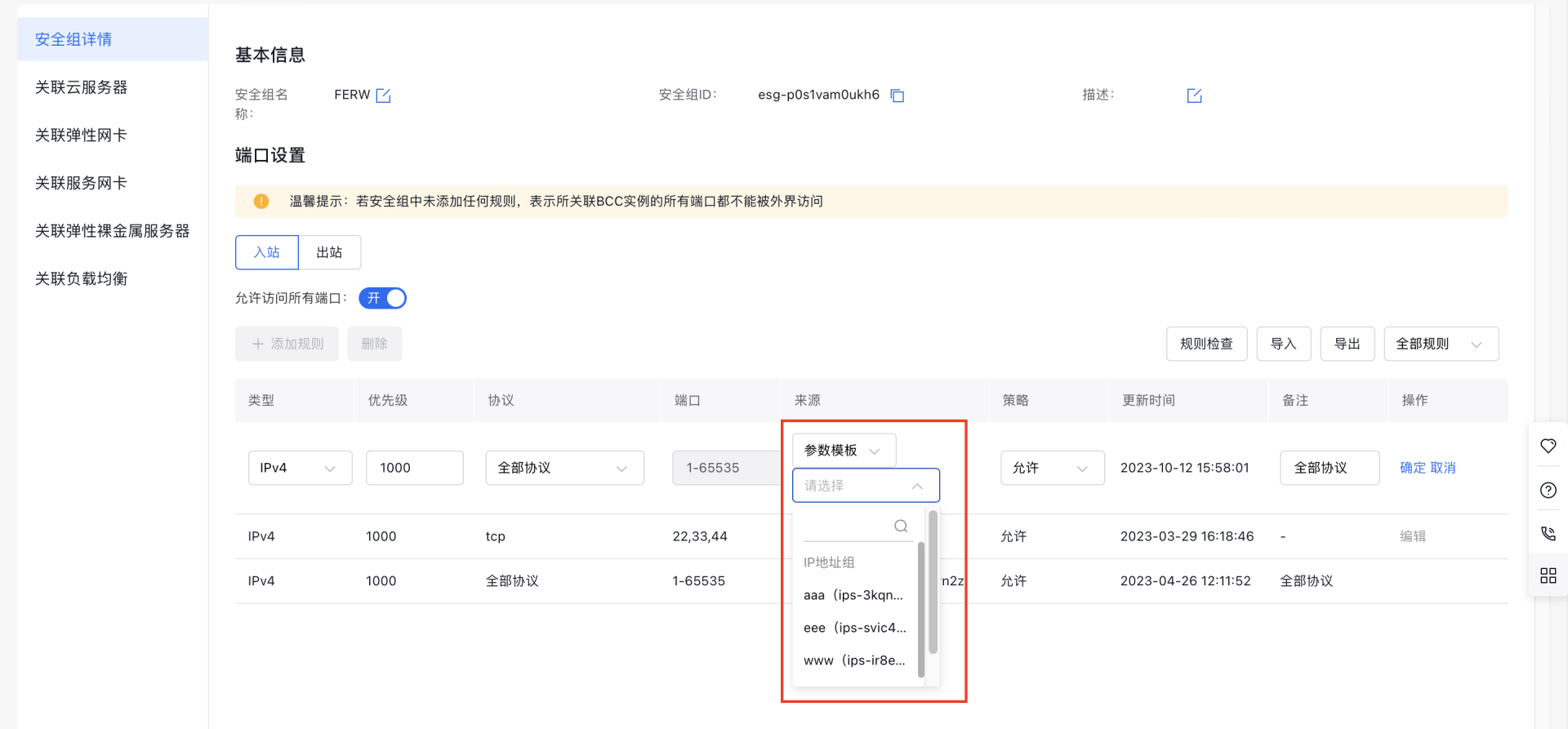
Screenshot 2023-10-12 15.58.33.png

  1. After the addition is complete, the new rules can be viewed in the security group rules list.

Previous
ACL
Next
Security group