

Identity and access management
Introduction
Identity and Access Management facilitates efficient management of resource access permissions within cloud accounts. It is tailored for various enterprise roles by assigning different product permissions to employees. It is advised to adopt Identity and Access Management when multi-user collaboration is necessary for resource operations in your organization.
It is applicable to the following usage scenarios:
- Medium and large enterprise customers: Authorization management for multiple employees in the enterprise;
- Technology-oriented vendor or SAAS platform provider: Resource and permission management for proxy clients;
- Small and medium-sized developers or small enterprises: Add project members or collaborators for resource management.
Create User
-
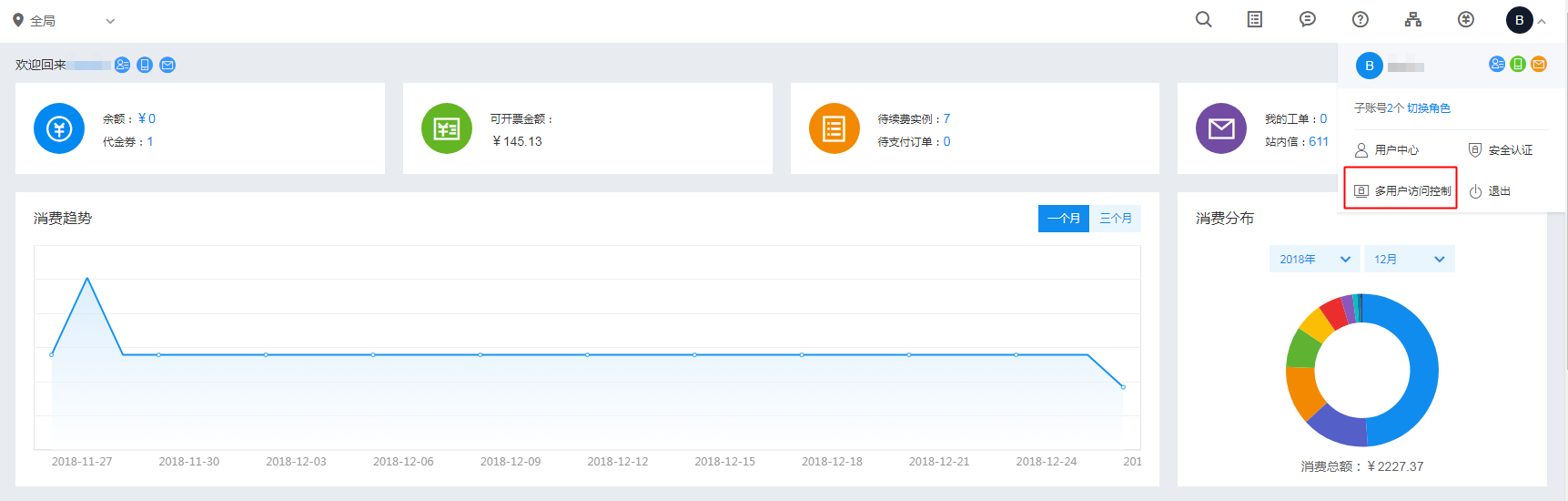
After logging into the root account, select Identity and Access Management from the console to access the user management page.
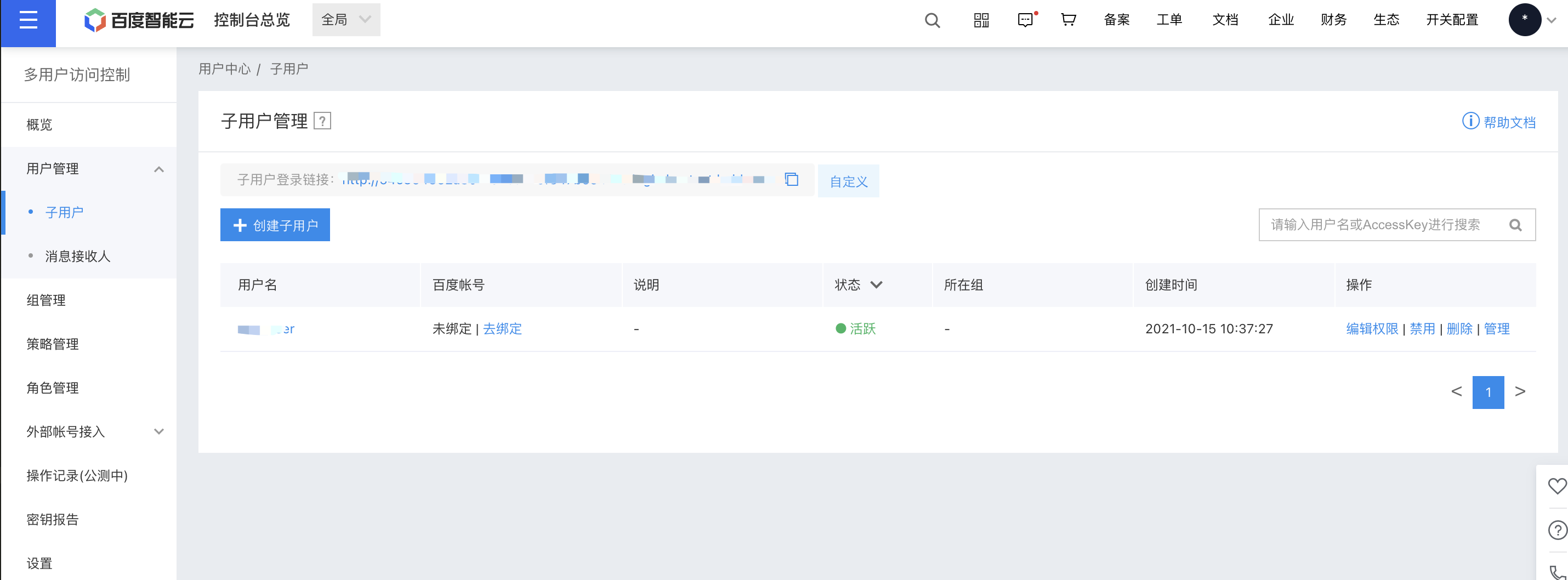
- Click on User Management in the left navigation bar, then click New User on the IAM User Management List page.
- In the pop-up New User dialog box, fill in the User Name and confirm, and return to the IAM User Management List area to view the newly created IAM user.
Configuration Policy
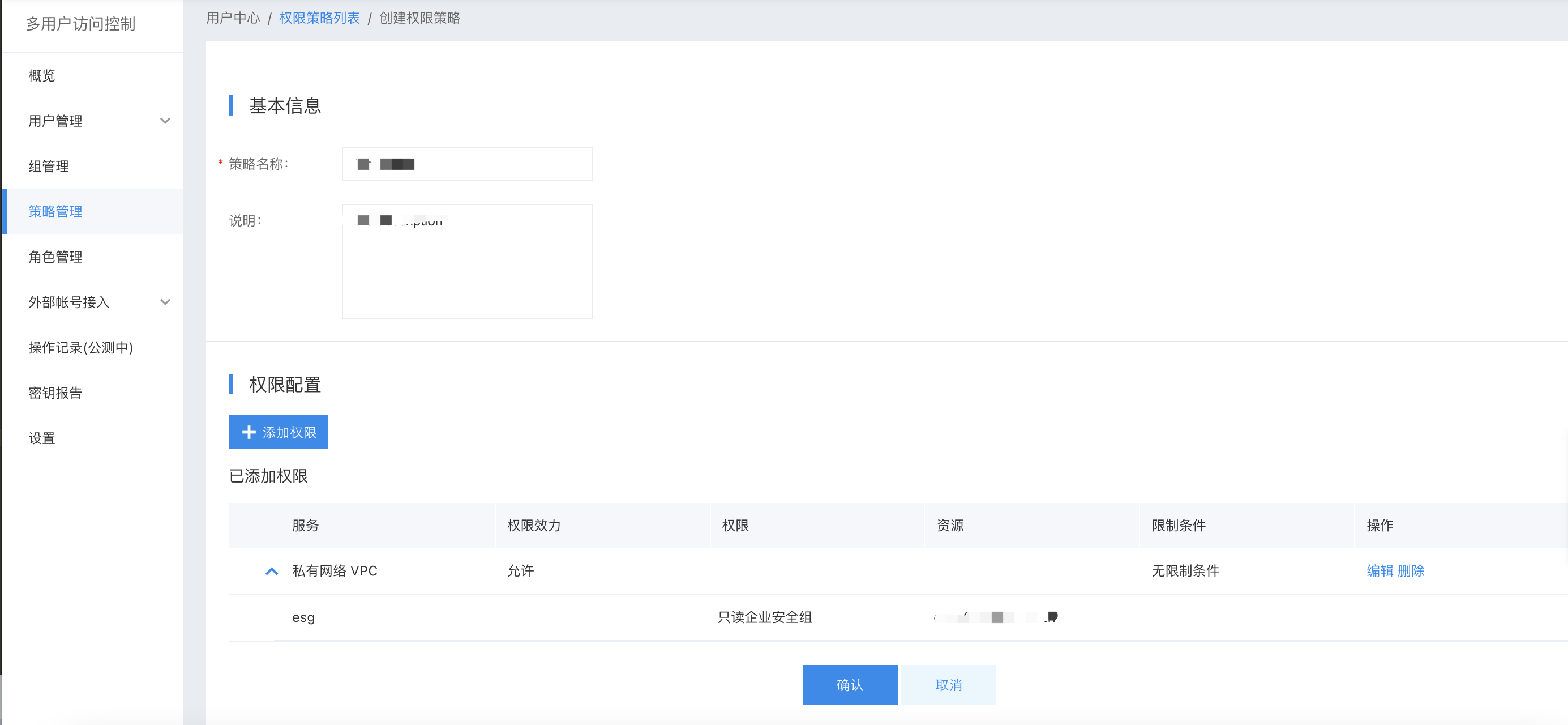
Virtual Private Cloud (VPC) supports both system and custom policies, allowing for product-level permission control as well as instance-level permission control within the VPC.
- System policy: A pre-defined set of permissions provided by the Baidu AI Cloud system for resource management. These can be directly assigned to IAM users, but users cannot modify them.
- Custom policy: User-created more detailed permission set for resource management, allowing permission configuration for single instance to flexibly meet differentiated permission management of accounts for different users. When editing policies, after modifying the first name, select Virtual Private Cloud (VPC) under Service Type to display all sub-products. Users can set permissions based on different roles.
Description:
- A VPC is composed of multiple sub-products, and the permissions for each sub-product are classified into three types: read-only, operations and maintenance, and management (certain sub-products may not include management permissions).
- Custom policies apply to specific individual instances and only take effect for those instances. As a result, they do not include permissions for instance creation.
Permission scope
The correspondence between the names of system policy and third-level permissions for each product is as follows:
| Product Name | Read-only permission | Operation and maintenance permission | Management permission |
|---|---|---|---|
| VPC | VpcReadOnlyAccessPolicy | VpcOperateAccessPolicy | VpcFullControlPolicy |
| Subnet | SubnetReadOnlyAccessPolicy | SubnetOperateAccessPolicy | SubnetFullControlPolicy |
| Route table | RouteReadOnlyAccessPolicy | RouteOperateAccessPolicy | None |
| Regular security group | SecurityGroupReadOnlyAccessPolicy | SecurityGroupOperateAccessPolicy | SecurityGroupFullControlPolicy |
| Enterprise security group | ESGReadAccessPolicy | ESGOperateAccessPolicy | ESGFullControlAccessPolicy |
| ACL | AclReadPolicy | AclOperatePolicy | None |
| Elastic network interface | ENICReadOnlyAccessPolicy | ENICOperateAccessPolicy | ENICFullControlPolicy |
| Service network interface card | SNICReadOnlyAccessPolicy | SNICOperateAccessPolicy | SNICFullControlPolicy |
| High-availability virtual IP address (HAVIP) | HAVIPReadAccessPolicy | HAVIPOperateAccessPolicy | HAVIPFullControlAccessPolicy |
| NAT gateway | NATReadPolicy | NATOperateAccessPolicy | NATFullControlPolicy |
| IPv6 gateway | IPV6ReadPolicy | IPV6OperateAccessPolicy | IPV6FullControlAccessPolicy |
| VPN gateway | VPNReadPolicy | VPNOperatePolicy | VPNFullControlPolicy |
| Peering connections | PEERCONNReadPolicy | PEERCONNOperatePolicy | PEERCONNFullControlPolicy |
| Dedicated gateway | DedicatedConnReadPolicy | DedicatedConnOperatePolicy | DedicatedConnFullControlPolicy |
The permission scope of policies for each product is detailed as follows:
| Products | Read-only permission | Operation and maintenance permission | Management permission |
|---|---|---|---|
| VPC | Query VPC list, query specified VPC | Query VPC list, query specified VPC, modify VPC name/description | Query VPC List, query specified VPC, modify VPC name/description, create/delete VPC |
| Subnet | Query subnet list, query specified subnet | Query subnet list, query specified subnet, modify subnet name/description | Query subnet list, query specified subnet, modify subnet name/description, create/delete subnet |
| Route table | Query route table | Query route table, create/delete route rules | |
| Regular security group | Query regular security group list and details | Query regular security group list/details, add/delete regular security group rules, bind/unbind instances | Query regular security group lists/details, add/delete regular security group rules, bind/unbind instances, create/delete regular security groups |
| Enterprise security group | Query enterprise security group list/details | Query enterprise security group list/details, add/delete enterprise security group rules, bind/unbind instances | Query enterprise security group lists/details, add/delete enterprise security group rules, bind/unbind instances, create/delete enterprise security groups |
| ACL | Query ACL list, query specified ACL | Query ACL list, query specified ACL, add/delete ACL rules | |
| Elastic network interface | View instance list and view instance details | View instance list/details, modify instance name/description, mount/unmount hosts, add/release secondary IP addresses, associate security groups | View instance list/details, modify instance name/description, mount/unmount hosts, add/release secondary IP addresses, associate security groups, create/release elastic network interface |
| Service network interface card | View instance list and view instance details | View Instance list, check instance details, modify network interface card name/description, monitor, configure alarms | View Instance list, check instance details, modify network interface card name/description, monitor, configure alarms, create/release instance |
| High-availability virtual IP address (HAVIP) | View instance list and view instance details | View instance list, view instance details, bind/unbind EIP, add/release real server | View instance list, view instance details, bind/unbind EIP, add/release real server, create/release instance |
| NAT gateway | Query instance list and view instance details | Query Instance list, view Instance details, bind/unbind public IP, monitor, configure alarms | Query instance list, view instance details, bind/unbind public IP, Monitor, configure alarms, create/release instances, gateway upgrade, renew, shift charge |
| IPv6 gateway | Query instance list and view instance details | Query instance list, view instance details, configure egress-only policies, configure IP rate limiting policies, monitor, configure alarms | Query instance list, view instance details, configure egress-only policies, configure IP rate limiting policies, view monitor, configure alarms, create/release instances, bandwidth scaling up, renew, shift charge |
| VPN gateway | Query instance list and view instance details | Query Instance list, view Instance details, bind/unbind public IP, configure VPN tunnel, monitor, configure alarms | Query instance list, view instance details, bind/unbind public IP, configure VPN tunnel, view monitor, configure alarms, create/release instances, renew |
| Peering connections | Query peer instance list, view instance details, view cross-account connection requests | Query peer instance list, view instance details, review cross-account connection requests, modify instance name/description/local interface name, view monitor, configure alarms | Query peer instance list, view instance details, review cross-account connection requests, modify instance name/description/local interface name, view monitor, configure alarms, create/release peering connections, bandwidth scaling up, manage cross-account connection requests |
| Dedicated gateway | View instance list and view instance details | View instance list/details, modify name/description/egress bandwidth/cloud network, bind/unbind physical dedicated line, view monitor, configure alarms | View instance list/details, modify name/description/egress bandwidth/cloud network, bind/unbind physical dedicated line, view monitor, configure alarms, create/release dedicated gateway |
User Authorization
Under User Management -> IAM User List, select Edit Permission in the Operations column for the corresponding IAM user, then authorize with either System Policy or Custom Policy.
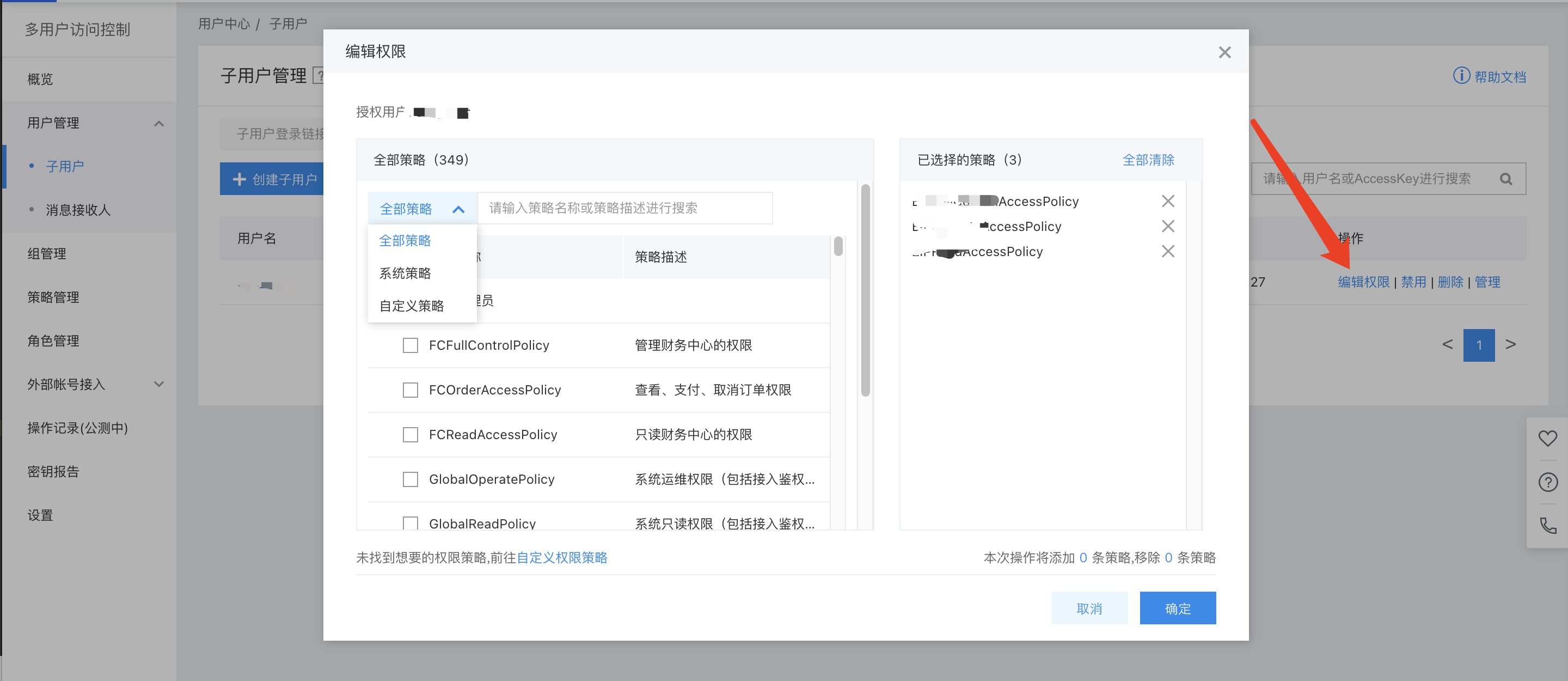
Note: To change an IAM user's permissions without modifying existing policy rules, you must delete the current policy and assign a new one since existing policy permissions cannot be unchecked or edited directly.
Sign in as IAM User
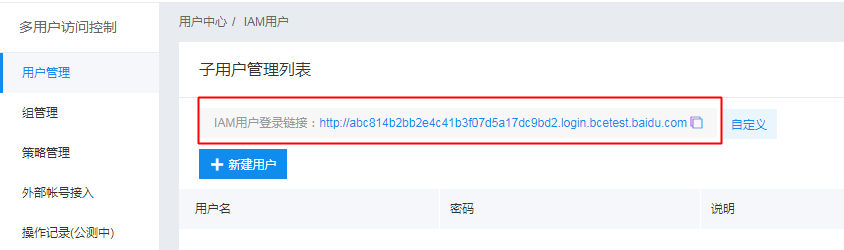
After the root account authorizes the IAM user, it can share the login link with the IAM user. The IAM user can then access the root account's management console via this link and operate or view the root account's resources based on the granted policies.
For other detailed operations, refer to: Multi-User Access Control.